 |
|
|
|
|
|
| |
| |
|
|
|
|
| |
| |
|
|
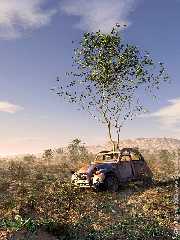
Absolutely stunning.
I'd suggest put some focal blur on it and add a little roughness to the tree
bark, other than that it looks like a photo!
Nice one :)
--
Tek
http://www.evilsuperbrain.com
Post a reply to this message
|
|
| |
| |
|
|
|
|
| |
| |
|
|
A spectacular success. High praise.
DZ
Gilles Tran wrote:
> Here's a little pic I made.
> - Terragen sky. Actually, it's a terragen-made panorama linked to the sun
> position...
Post a reply to this message
|
|
| |
| |
|
|
|
|
| |
| |
|
|
Very Beautifull!
Sebastian H.
Post a reply to this message
|
|
| |
| |
|
|
|
|
| |
| |
|
|
People like you make me sick!
excellent job.
Is
Gilles Tran wrote:
> Here's a little pic I made.
> - Terragen sky. Actually, it's a terragen-made panorama linked to the sun
> position.
> - isosurface terrain (ridged multifractal)
> - xfrog plants : for those who don't know it, xfrog can be described as
> Poser for plants, with animation and modelling abilities.
> (http://www.xfrog.com, fully-functional 30-day trial version available).
> Some of the plants (the tree, the dandelion) are derived from the models
> bundled with the software and I made others (imaginary ones...). Norbert
> Kern's IRTC winner "warm up" used a lot of xfrog trees. Here there are
> around 17000 plants.
> - 2cv car by De Espona, with some parts remodelled in Rhino. Rust texture
> borrowed from HE Day.
> - low quality radiosity (runs quite fast in fact, 8 hours at 1200*1600 on my
> P733).
> The image was rendered with assumed_gamma = 1. The gamma and contrast were
> adjusted by post-processing. It could use more contrast actually. I couldn't
> get rid of that painterly look but it's not so bad after all.
>
> G.
> --
>
> **********************
> http://www.oyonale.com
> **********************
> - Graphic experiments
> - POV-Ray and Poser computer images
> - Posters
>
>
>
>
Post a reply to this message
|
|
| |
| |
|
|
|
|
| |
| |
|
|
The only thing I think it needs is focal_blur. Other than that, superb job
(as usual), Gilles.
Post a reply to this message
|
|
| |
| |
|
|
|
|
| |
| |
|
|
To me it looks more like a painting (as Mr Tran himself said).
"Tek" <tek### [at] evilsuperbrain com> wrote in message
news:3ce2a35b$1@news.povray.org...
> Absolutely stunning.
>
> I'd suggest put some focal blur on it and add a little roughness to the
tree
> bark, other than that it looks like a photo!
>
> Nice one :)
>
> --
> Tek
> http://www.evilsuperbrain.com
>
>
>
>
> com> wrote in message
news:3ce2a35b$1@news.povray.org...
> Absolutely stunning.
>
> I'd suggest put some focal blur on it and add a little roughness to the
tree
> bark, other than that it looks like a photo!
>
> Nice one :)
>
> --
> Tek
> http://www.evilsuperbrain.com
>
>
>
>
>
Post a reply to this message
|
|
| |
| |
|
|
|
|
| |
| |
|
|
Oh, forgot to say; it's amazing :-)
"Alastair Murray" <ala### [at] hotmailcom> wrote in message
news:3ce2c405@news.povray.org...
> To me it looks more like a painting (as Mr Tran himself said).
>
>
> "Tek" <tek### [at] evilsuperbraincom> wrote in message
> news:3ce2a35b$1@news.povray.org...
> > Absolutely stunning.
> >
> > I'd suggest put some focal blur on it and add a little roughness to the
> tree
> > bark, other than that it looks like a photo!
> >
> > Nice one :)
> >
> > --
> > Tek
> > http://www.evilsuperbrain.com
> >
> >
> >
> >
> >
>
>
Post a reply to this message
|
|
| |
| |
|
|
|
|
| |
| |
|
|
On Wed, 15 May 2002 15:16:40 -0500, "Tony[B]" <ben### [at] catholicorg>
wrote:
>The only thing I think it needs is focal_blur. Other than that, superb job
>(as usual), Gilles.
>
Well, I was skeptical at first, but I simulated focal blur in
Photoshop LE, and I have to agree with you. If a SMALLl amount of blur
is applied to the objects farther away than the tree, it looks good.
Later,
Glen
7no### [at] ezwvcom (Remove the numeral "7")
Post a reply to this message
|
|
| |
| |
|
|
From: Christoph Hormann
Subject: Re: Not for sale anymore (120 kbu)
Date: 15 May 2002 16:30:05
Message: <3CE2C54A.95E9A567@gmx.de>
|
|
|
| |
| |
|
|
Gilles Tran wrote:
>
> Here's a little pic I made.
> [...]
Neat.
The small bush in the foreground looks a bit like a small scale version of
the tree.
Are all plants made with xfrog?
> - low quality radiosity (runs quite fast in fact, 8 hours at 1200*1600 on my
> P733).
i suppose this is a scaled version then? If not i wonder what aa settings
you used, the more distant trees look nicely smoothed.
Higher quality radiosity settings would probably improve the sense of
depth between the plants.
Christoph
--
POV-Ray tutorials, IsoWood include,
TransSkin and more: http://www.tu-bs.de/~y0013390/
Last updated 05 May. 2002 _____./\/^>_*_<^\/\.______
Post a reply to this message
|
|
| |
| |
|
|
|
|
| |
| |
|
|
On Wed, 15 May 2002 19:34:32 +0200, "Gilles Tran" <tra### [at] inapginrafr>
wrote:
>The image was rendered with assumed_gamma = 1. The gamma and contrast were
>adjusted by post-processing. It could use more contrast actually. I couldn't
>get rid of that painterly look but it's not so bad after all.
Since you opened the topic of needing contrast, and trying to lose the
"painterly effect", I toyed with your image in Photoshop LE, for a
little while, trying to make it more photographic looking.
In my opinion, the rusty vehicle texture needs more color saturation.
This was one of the best tweaks I found for this image. Perhaps there
is too much radiosity, or too high of an ambient level specified in
the rust texture? I also selectively darkened the shadow tones on the
right side of the vehicle, without also darkening the highlights or
midtones.
The foreground has a subtle haze clouding it. I manipulated the darker
tones of the foreground to he slightly darker. This got rid of a lot
of the hazey look. I left the haze in the background, because it seems
appropriate there.
If there really is some sort of haze/fog/media/atmosphere type of
effect coded into the scene, it need to only be applied to the
background area beyond the tree. If there are no atmospheric effects
used in the scene file, then perhaps the ambient level/ radiosity
level needs to be reduced in the foreground? Perhaps your textures and
colors need to be tweaked for a bit more color saturation in the
foreground?
All those haze comments are assuming that the scene was meant to have
a warm, late-afternoon sunlight effect, with somewhat warmer and
bolder colors and contrast.
I increased the color saturation of the blue and cyan tones in the
sky. Either try more saturated colors in your sky description, or
perhaps use a less hazey sky?
I also darkened the shadow areas of the tree leaves, increased the
color saturation of the green leaves, and brightened the highlights of
the green leaves.
This was just done in a few minutes in Photoshop LE, and is not
intended to be my best effort, but a simple exploration of what might
be tweaked.
I hope you appreciate the comments, and I hope you post more of your
excellent images to the newsgroup in the near future. I've been
missing your contributions here.
Later,
Glen Berry
Later,
Glen
7no### [at] ezwvcom (Remove the numeral "7")
Post a reply to this message
Attachments:
Download 'Not_4_Sale.jpg' (121 KB)
Preview of image 'Not_4_Sale.jpg'
|
|
| |
| |
|
|
|
|
| |






