|
|
|
|
|
|
| |
| |
|
|
|
|
| |
| |
|
|
Sometimes I wonder why I'm always copying other people's work...
Maybe because I don't need inspiration for that, and inspiration is exactly what
I don't have these days...

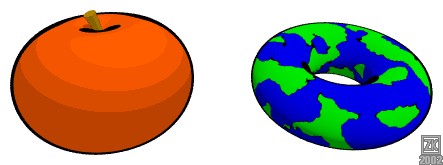
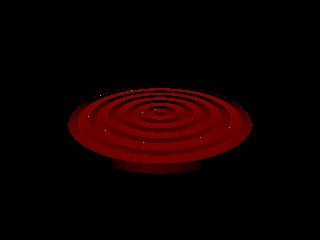
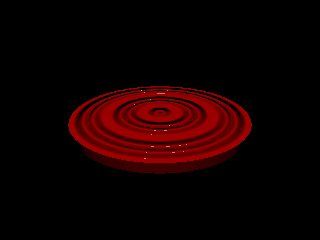
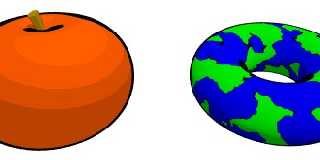
Anyway, this is my version of the cell-shader.  It works with
perspective-cameras.

Comments welcome, as always :)

cu!
--
camera{location-z*3}#macro G(b,e)b+(e-b)*(C/50)#end#macro L(b,e,k,l)#local C=0
;#while(C<50)sphere{G(b,e),.1pigment{rgb G(k,l)}finish{ambient 1}}#local C=C+1
;#end#end L(y-x,y,x,x+y)L(y,-x-y,x+y,y)L(-x-y,-y,y,y+z)L(-y,y,y+z,x+y)L(0,x+y,
<.5,1,.5>,x)L(0,x-y,<.5,1,.5>,x)               // ZK http://www.povplace.be.tf
Post a reply to this message
Attachments:
Download 'cellshadertest.jpg' (19 KB)
Preview of image 'cellshadertest.jpg'
|
|
| |
| |
|
|
|
|
| |
| |
|
|
gah, why can't I get mine to work with a perspective camera :(

I like

--
Kevin
http://www.geocities.com/qsquared_1999/
#macro _(r)#if(r<12)#local
i=asc(substr("oqshilacefg",r,1))-97;disc{<mod(i,7)-3,div(i,7)-1,6>,z,.4pigme
nt{rgb 10}}_(r+1)#end#end _(1)//KL
Post a reply to this message
|
|
| |
| |
|
|
|
|
| |
| |
|
|
> gah, why can't I get mine to work with a perspective camera :(
dunno, give me your code, and I'll take a look at it.  Maybe I can give you some
hints...
Your version *is* a shader, right?

> I like
tnx!

cu!
--
camera{location-z*3}#macro G(b,e)b+(e-b)*(C/50)#end#macro L(b,e,k,l)#local C=0
;#while(C<50)sphere{G(b,e),.1pigment{rgb G(k,l)}finish{ambient 1}}#local C=C+1
;#end#end L(y-x,y,x,x+y)L(y,-x-y,x+y,y)L(-x-y,-y,y,y+z)L(-y,y,y+z,x+y)L(0,x+y,
<.5,1,.5>,x)L(0,x-y,<.5,1,.5>,x)               // ZK http://www.povplace.be.tf
Post a reply to this message
|
|
| |
| |
|
|
|
|
| |
| |
|
|
So, how do these work? Are they functions that take the cross product of the
normal with the vector from the camera? No, that doesn't seem possible...

- Slime
[ http://www.slimeland.com/ ]
[ http://www.slimeland.com/images/ ]
Post a reply to this message
|
|
| |
| |
|
|
|
|
| |
| |
|
|
well - nice ..
can someone point me to a description of the term cell-shader?
thx
Wolfgang
"Zeger Knaepen" <zeg### [at] student kuleuvenacbe> wrote in message
news:3cc7709d@news.povray.org...
> Sometimes I wonder why I'm always copying other people's work...
> Maybe because I don't need inspiration for that, and inspiration is
exactly what
> I don't have these days...
>
> Anyway, this is my version of the cell-shader. It works with
> perspective-cameras.
>
> Comments welcome, as always :)
>
> cu!
> --
> camera{location-z*3}#macro G(b,e)b+(e-b)*(C/50)#end#macro L(b,e,k,l)#local
C=0
> ;#while(C<50)sphere{G(b,e),.1pigment{rgb G(k,l)}finish{ambient 1}}#local
C=C+1
> ;#end#end
L(y-x,y,x,x+y)L(y,-x-y,x+y,y)L(-x-y,-y,y,y+z)L(-y,y,y+z,x+y)L(0,x+y,
> <.5,1,.5>,x)L(0,x-y,<.5,1,.5>,x) // ZK
http://www.povplace.be.tf
>
>
> kuleuvenacbe> wrote in message
news:3cc7709d@news.povray.org...
> Sometimes I wonder why I'm always copying other people's work...
> Maybe because I don't need inspiration for that, and inspiration is
exactly what
> I don't have these days...
>
> Anyway, this is my version of the cell-shader. It works with
> perspective-cameras.
>
> Comments welcome, as always :)
>
> cu!
> --
> camera{location-z*3}#macro G(b,e)b+(e-b)*(C/50)#end#macro L(b,e,k,l)#local
C=0
> ;#while(C<50)sphere{G(b,e),.1pigment{rgb G(k,l)}finish{ambient 1}}#local
C=C+1
> ;#end#end
L(y-x,y,x,x+y)L(y,-x-y,x+y,y)L(-x-y,-y,y,y+z)L(-y,y,y+z,x+y)L(0,x+y,
> <.5,1,.5>,x)L(0,x-y,<.5,1,.5>,x) // ZK
http://www.povplace.be.tf
>
>
>
Post a reply to this message
|
|
| |
| |
|
|
|
|
| |
| |
|
|
> Comments welcome, as always :)

nice, hows about the source :)


--
Rick

Kitty5 WebDesign - http://Kitty5.com
POV-Ray News & Resources - http://Povray.co.uk
TEL : +44 (01270) 501101 - FAX : +44 (01270) 251105 - ICQ : 15776037

PGP Public Key
http://pgpkeys.mit.edu:11371/pks/lookup?op=get&search=0x231E1CEA
Post a reply to this message
|
|
| |
| |
|
|
|
|
| |
| |
|
|
> nice, hows about the source :)

Ditto, but I guess it only runs in PovMan. When Pov3.5 is released, I hope
the next MegaPOV will have those extra features from PovMan, Clothray, MLpov
and whatever is out there.

So, you ran with the glory and left Kevin in the dark corner... Well, what
can I say... Rendertime?

Regards,
Hugo
Post a reply to this message
|
|
| |
| |
|
|
|
|
| |
| |
|
|
> > nice, hows about the source :)
I'll give it when it's cleaned up :)

> Ditto, but I guess it only runs in PovMan. When Pov3.5 is released, I hope
> the next MegaPOV will have those extra features from PovMan, Clothray, MLpov
> and whatever is out there.
Yep, it's a shader, so it only runs in POVMan...

> So, you ran with the glory and left Kevin in the dark corner... Well, what
> can I say... Rendertime?
Rendertime: 19 seconds on a P3-450MHZ 320MB RAM running W98SE, lowest render
priority, highest GUI-priority.

And I hope I didn't really offend anyone with this copying... :-/

cu!
--
camera{location-z*3}#macro G(b,e)b+(e-b)*(C/50)#end#macro L(b,e,k,l)#local C=0
;#while(C<50)sphere{G(b,e),.1pigment{rgb G(k,l)}finish{ambient 1}}#local C=C+1
;#end#end L(y-x,y,x,x+y)L(y,-x-y,x+y,y)L(-x-y,-y,y,y+z)L(-y,y,y+z,x+y)L(0,x+y,
<.5,1,.5>,x)L(0,x-y,<.5,1,.5>,x)               // ZK http://www.povplace.be.tf
Post a reply to this message
|
|
| |
| |
|
|
|
|
| |
| |
|
|
> well - nice ..
doesn't sound very enthousiastic, but tnx! :)

> can someone point me to a description of the term cell-shader?
Hmmm, I just tried to copy the effect Kevin seemed to be trying to get.  As I
understand it, a cell-shader is supposed to make 3D-objects look like drawings.

cu!
--
camera{location-z*3}#macro G(b,e)b+(e-b)*(C/50)#end#macro L(b,e,k,l)#local C=0
;#while(C<50)sphere{G(b,e),.1pigment{rgb G(k,l)}finish{ambient 1}}#local C=C+1
;#end#end L(y-x,y,x,x+y)L(y,-x-y,x+y,y)L(-x-y,-y,y,y+z)L(-y,y,y+z,x+y)L(0,x+y,
<.5,1,.5>,x)L(0,x-y,<.5,1,.5>,x)               // ZK http://www.povplace.be.tf
Post a reply to this message
|
|
| |
| |
|
|
|
|
| |
| |
|
|
> So, how do these work? Are they functions that take the cross product of the
> normal with the vector from the camera? No, that doesn't seem possible...
Not impossible, not with shaders.

That's exactly how it works.

cu!
--
camera{location-z*3}#macro G(b,e)b+(e-b)*(C/50)#end#macro L(b,e,k,l)#local C=0
;#while(C<50)sphere{G(b,e),.1pigment{rgb G(k,l)}finish{ambient 1}}#local C=C+1
;#end#end L(y-x,y,x,x+y)L(y,-x-y,x+y,y)L(-x-y,-y,y,y+z)L(-y,y,y+z,x+y)L(0,x+y,
<.5,1,.5>,x)L(0,x-y,<.5,1,.5>,x)               // ZK http://www.povplace.be.tf
Post a reply to this message
|
|
| |
| |
|
|
|
|
| |
| |
|
|
> > So, how do these work? Are they functions that take the cross product of
the
> > normal with the vector from the camera? No, that doesn't seem
possible...
> Not impossible, not with shaders.
>
> That's exactly how it works.

So, actual POV-Ray function{}s?

- Slime
[ http://www.slimeland.com/ ]
[ http://www.slimeland.com/images/ ]
Post a reply to this message
|
|
| |
| |
|
|
|
|
| |
| |
|
|
On Thu, 25 Apr 2002 08:46:18 -0400, "Slime" <noo### [at] hotmailcom> wrote:
> > Not impossible, not with shaders.
> > That's exactly how it works.
>
> So, actual POV-Ray function{}s?

it's unofficial compile
http://www.google.com/search?q=POV+shader

ABX
Post a reply to this message
|
|
| |
| |
|
|
|
|
| |
| |
|
|
> So, actual POV-Ray function{}s?
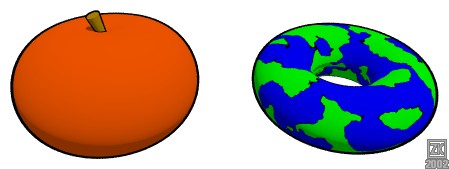
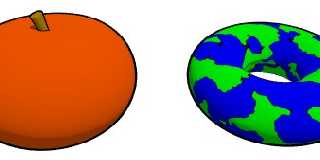
nope, POVMan shader-functions.  But I think I can make a similar image without a
shader...  Let's try it :)

cu!
--
camera{location-z*3}#macro G(b,e)b+(e-b)*(C/50)#end#macro L(b,e,k,l)#local C=0
;#while(C<50)sphere{G(b,e),.1pigment{rgb G(k,l)}finish{ambient 1}}#local C=C+1
;#end#end L(y-x,y,x,x+y)L(y,-x-y,x+y,y)L(-x-y,-y,y,y+z)L(-y,y,y+z,x+y)L(0,x+y,
<.5,1,.5>,x)L(0,x-y,<.5,1,.5>,x)               // ZK http://www.povplace.be.tf
Post a reply to this message
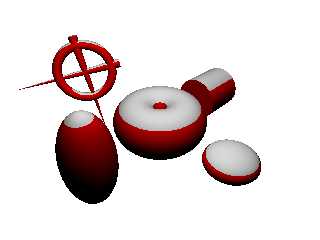
Attachments:
Download 'cellshadertest2.jpg' (19 KB)
Preview of image 'cellshadertest2.jpg'
|
|
| |
| |
|
|
|
|
| |
| |
|
|
On Thu, 25 Apr 2002 15:09:22 +0200, "Zeger Knaepen"
<zeg### [at] studentkuleuvenacbe> wrote:

> nope, POVMan shader-functions.  But I think I can make a similar image without a
> shader...  Let's try it :)

where is contour in inner hole in torus ?

ABX
Post a reply to this message
|
|
| |
| |
|
|
|
|
| |
| |
|
|
> > nope, POVMan shader-functions.  But I think I can make a similar image
without a
> > shader...  Let's try it :)
> where is contour in inner hole in torus ?
dunno :)

This technique isn't very useful anyway.  It works with "shell-objects", so it's
way too much work for real scenes.

cu!
--
camera{location-z*3}#macro G(b,e)b+(e-b)*(C/50)#end#macro L(b,e,k,l)#local C=0
;#while(C<50)sphere{G(b,e),.1pigment{rgb G(k,l)}finish{ambient 1}}#local C=C+1
;#end#end L(y-x,y,x,x+y)L(y,-x-y,x+y,y)L(-x-y,-y,y,y+z)L(-y,y,y+z,x+y)L(0,x+y,
<.5,1,.5>,x)L(0,x-y,<.5,1,.5>,x)               // ZK http://www.povplace.be.tf
Post a reply to this message
|
|
| |
| |
|
|
|
|
| |
| |
|
|
Thanks

and


NICE !!!
 (really - doesn't look like computer generated at all ... and that is the
whole point I guess)

--
This posting is provided "AS IS" with no warranties, and confers no rights.


Wolfgang

"Zeger Knaepen" <zeg### [at] studentkuleuvenacbe> wrote in message
news:3cc7f5f9@news.povray.org...
> > well - nice ..
> doesn't sound very enthousiastic, but tnx! :)
>
> > can someone point me to a description of the term cell-shader?
> Hmmm, I just tried to copy the effect Kevin seemed to be trying to get.
As I
> understand it, a cell-shader is supposed to make 3D-objects look like
drawings.
>
> cu!
> --
> camera{location-z*3}#macro G(b,e)b+(e-b)*(C/50)#end#macro L(b,e,k,l)#local
C=0
> ;#while(C<50)sphere{G(b,e),.1pigment{rgb G(k,l)}finish{ambient 1}}#local
C=C+1
> ;#end#end
L(y-x,y,x,x+y)L(y,-x-y,x+y,y)L(-x-y,-y,y,y+z)L(-y,y,y+z,x+y)L(0,x+y,
> <.5,1,.5>,x)L(0,x-y,<.5,1,.5>,x)               // ZK
http://www.povplace.be.tf
>
>
Post a reply to this message
|
|
| |
| |
|
|
|
|
| |
| |
|
|
I_think_that_the_effect_should_be_called_"cel_shading",
as_it_emulates_traditional_cel_animation_(ie_cartoons).
Cel_is_of_course_short_for_celluloid,_the_medium_on
which_"normal"_animation_is_drawn.

(Underscores_courtesy_of_my_clumsy_friend_who_spilt
beer_on_the_keyboard_at_the_weekend,_rendering_the
space_bar_useless...)

"Wolfgang Manousek" <wol### [at] hotmailcom> wrote in message
news:3cc7aa18@news.povray.org...
> well - nice ..
>
> can someone point me to a description of the term cell-shader?
>
> thx
> Wolfgang
> "Zeger Knaepen" <zeg### [at] studentkuleuvenacbe> wrote in
message
> news:3cc7709d@news.povray.org...
> > Sometimes I wonder why I'm always copying other people's work...
> > Maybe because I don't need inspiration for that, and inspiration is
> exactly what
> > I don't have these days...
> >
> > Anyway, this is my version of the cell-shader.  It works with
> > perspective-cameras.
> >
> > Comments welcome, as always :)
> >
> > cu!
> > --
> > camera{location-z*3}#macro G(b,e)b+(e-b)*(C/50)#end#macro
L(b,e,k,l)#local
> C=0
> > ;#while(C<50)sphere{G(b,e),.1pigment{rgb G(k,l)}finish{ambient
1}}#local
> C=C+1
> > ;#end#end
> L(y-x,y,x,x+y)L(y,-x-y,x+y,y)L(-x-y,-y,y,y+z)L(-y,y,y+z,x+y)L(0,x+y,
> > <.5,1,.5>,x)L(0,x-y,<.5,1,.5>,x)               // ZK
> http://www.povplace.be.tf
> >
> >
> >
>
>
Post a reply to this message
|
|
| |
| |
|
|
|
|
| |
| |
|
|
"Andrew" <ast### [at] hotmailcom> schreef in bericht
news:3cc8497b@news.povray.org...
> I_think_that_the_effect_should_be_called_"cel_shading",
> as_it_emulates_traditional_cel_animation_(ie_cartoons).
> Cel_is_of_course_short_for_celluloid,_the_medium_on
> which_"normal"_animation_is_drawn.
Hmmm, I think you're right.  But I just copied Kevin's subject :)

> (Underscores_courtesy_of_my_clumsy_friend_who_spilt
> beer_on_the_keyboard_at_the_weekend,_rendering_the
> space_bar_useless...)
LOL!! :)
you could have used alt+32 instead of typing underscores :)

cu!
--
camera{location-z*3}#macro G(b,e)b+(e-b)*(C/50)#end#macro L(b,e,k,l)#local C=0
;#while(C<50)sphere{G(b,e),.1pigment{rgb G(k,l)}finish{ambient 1}}#local C=C+1
;#end#end L(y-x,y,x,x+y)L(y,-x-y,x+y,y)L(-x-y,-y,y,y+z)L(-y,y,y+z,x+y)L(0,x+y,
<.5,1,.5>,x)L(0,x-y,<.5,1,.5>,x)               // ZK http://www.povplace.be.tf
Post a reply to this message
|
|
| |
| |
|
|
|
|
| |
| |
|
|
Wolfgang Manousek wrote:
> can someone point me to a description of the term cell-shader?

It should be spelled "cel-shader." It refers to a "cel" that is
used in cartoon animation.

From http://www.legacy-animation.com:

"A cel, derived from the word "celluloid", is the transparent
material on which a cartoon character is painted."
Post a reply to this message
|
|
| |
| |
|
|
|
|
| |
| |
|
|
Ahh, but that's the beauty of mine is it works in 3.5 and is all done with
procedurals (hence the orthographic camera)

--
Kevin
http://www.geocities.com/qsquared_1999/
#macro _(r)#if(r<12)#local
i=asc(substr("oqshilacefg",r,1))-97;disc{<mod(i,7)-3,div(i,7)-1,6>,z,.4pigme
nt{rgb 10}}_(r+1)#end#end _(1)//KL
Post a reply to this message
|
|
| |
| |
|
|
|
|
| |
| |
|
|
> Ahh, but that's the beauty of mine is it works in 3.5 and is all done with
> procedurals (hence the orthographic camera)
slope_maps to detect the edges?

cu!
--
camera{location-z*3}#macro G(b,e)b+(e-b)*(C/50)#end#macro L(b,e,k,l)#local C=0
;#while(C<50)sphere{G(b,e),.1pigment{rgb G(k,l)}finish{ambient 1}}#local C=C+1
;#end#end L(y-x,y,x,x+y)L(y,-x-y,x+y,y)L(-x-y,-y,y,y+z)L(-y,y,y+z,x+y)L(0,x+y,
<.5,1,.5>,x)L(0,x-y,<.5,1,.5>,x)               // ZK http://www.povplace.be.tf
Post a reply to this message
|
|
| |
| |
|
|
|
|
| |
| |
|
|
Slime wrote:
> So, how do these work? Are they functions that take the
> cross product of the normal with the vector from the camera?

The dot product would be cheaper and more appropriate.

--
Anton Sherwood, http://www.ogre.nu/
Post a reply to this message
|
|
| |
| |
|
|
|
|
| |
| |
|
|
whats the difference between slope_map and slope pattern?

--
Kevin
http://www.geocities.com/qsquared_1999/
#macro _(r)#if(r<12)#local
i=asc(substr("oqshilacefg",r,1))-97;disc{<mod(i,7)-3,div(i,7)-1,6>,z,.4pigme
nt{rgb 10}}_(r+1)#end#end _(1)//KL
Post a reply to this message
|
|
| |
| |
|
|
|
|
| |
| |
|
|
> whats the difference between slope_map and slope pattern?

slope_map is for normals, it maps the apparent slope of the surface normals.

slope pattern is a pattern that is dependent on the slope of the surface of
the object applied to.


-tgq
Post a reply to this message
|
|
| |
| |
|
|
|
|
| |
| |
|
|
> slope_map is for normals, it maps the apparent slope of the surface
normals.
>
> slope pattern is a pattern that is dependent on the slope of the surface
of
> the object applied to.

Sounds similar to me. I've fiddled with this myself recently, but not enough
to understand. You mean, a slope pattern may use a slope_map, like pigment
bumps take a pigment_map..? Documentation is a little complex I think.

Regards,
Hugo
Post a reply to this message
|
|
| |
| |
|
|
From: TinCanMan
Subject: slope pattern vs slope_map (from Cell Shader: my try)
Date: 27 Apr 2002 13:23:11
Message: <3ccade7f@news.povray.org>
|
|
|
| |
| |
|
|
> Sounds similar to me. I've fiddled with this myself recently, but not
enough
> to understand. You mean, a slope pattern may use a slope_map, like pigment
> bumps take a pigment_map..? Documentation is a little complex I think.

I'll try this again.

You understand what surface normals are.  They are a perturbance of the
surface to give it a bumy appearance without actually changing the surface.
When using gradient pattern pattern as a normal pattern, by default you get
a sawtooth appearance:

 /| /| /| /|
/ |/ |/ |/ |

if you set the waveform to sine_wave, scallop_wave, cubic_wave , etc.  the
normal gains the associated appearance.  Slope_map furthers this to allow
you to specify your own surface normal waveform.
from 6.7.2.1:

    slope_map {
      [0   <0, 1>]   // start at bottom and slope up
      [0.5 <1, 1>]   // halfway through reach top still climbing
      [0.5 <1,-1>]   // abruptly slope down
      [1   <0,-1>]   // finish on down slope at bottom
    }
would give the same appearance as the triangle_wave waveform

    slope_map {
      [0    <0.5, 1>]   // start in middle and slope up
      [0.25 <1.0, 0>]   // flat slope at top of wave
      [0.5  <0.5,-1>]   // slope down at mid point
      [0.75 <0.0, 0>]   // flat slope at bottom
      [1    <0.0, 0>]   // finish flate slope at bottom
    }
this would give a a more complex normal.

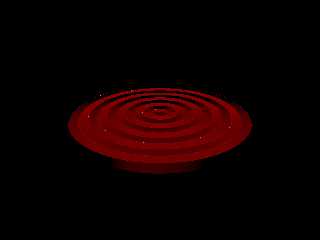
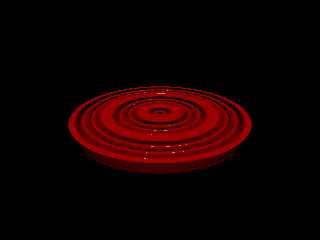
see 'slopemap1.png' and 'slopemap2.png', the previos normals and slope_maps
are applied to a cylinder using the wood pattern. the bump_size has been
exagerated.

The slope pattern is not related to normals at all, it is a pattern not a
map.  It is applied the same as any other pattern, i.e, it can be used for
pigments, textures, normals, etc.  The slope pattern calculates the slope of
the object's surface at each point and applies the texture according to the
slope value. If you had a red sphere and wanted it white everywhere the
slope was less than 45degrees, you calculate the position by hand and use a
gradient pattern, but if you wanted to do it to, say, a blob shape, it would
be very difficult to do this way.  If we use the slope pattern it is very
easy:
    pigment{
      slope y
      color_map{
        [0.0 red 1]
        [0.75 red 1]
        [0.75 rgb 1]
        [1.0 rgb 1]
      }
    }

if we apply this to any shape the object will be white anywhere its slope
(relative to the direction vector 'y') is less than 45degrees see
'slope1.png'

the direction vector (y in this case) represents the direction the slope is
based on

slope values
0.0 = negative horizontal slope
0.25 = -45 degrees
0.5 = vertical
0.75 = 45 degrees
1.0 = positive horizontal
...etc.

this pattern can be very useful in several applications.  One place I use it
constantly is to apply dust to objects:

#declare TDusty=
texture{
  pigment{
    slope y
    color_map{
      [0.5 rgbt 1]
      [1.0 rgbt<0.65,0.65,0.60,0.75>]
    }
    poly_wave 1.1
  }
  finish{
    ambient 0
    diffuse 0.85
    brilliance .33
  }
}

see 'Slope2.png'

I hope this explains a little better.

-tgq
Post a reply to this message
Attachments:
Download 'slope2.png' (14 KB)
Download 'Slope1.png' (14 KB)
Download 'Slopemap1.png' (8 KB)
Download 'slopemap2.png' (11 KB)
Preview of image 'slope2.png'
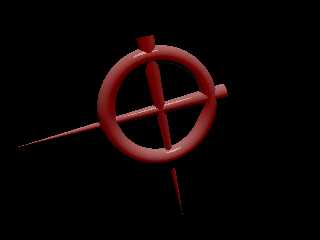
Preview of image 'Slope1.png'
Preview of image 'Slopemap1.png'
Preview of image 'slopemap2.png'
|
|
| |
| |
|
|
|
|
| |
| |
|
|
> whats the difference between slope_map and slope pattern?
A lot... :)
I meant the slope pattern of course... :)

cu!
--
ZK AKA SaD
http://www.povplace.be.tf
"The United States Government just asked us to save the world. Anyone wanna
say no?"
Post a reply to this message
|
|
| |
| |
|
|
From: Hugo
Subject: Re: slope pattern vs slope_map (from Cell Shader: my try)
Date: 27 Apr 2002 15:26:19
Message: <3ccafb5b$1@news.povray.org>
|
|
|
| |
| |
|
|
Hi Tincanman,

Thank you, wow that was a real explanation! I got it now. Yes, actually I
got the part about slope patterns just a few days ago, and this is a great
feature. I just didn't know about slope_maps. Now I understand, thank you!

Regards,
Hugo
Post a reply to this message
|
|
| |
| |
|
|
|
|
| |
| |
|
|
Thanks !

for the keyboard - remove the keys and just plain water to clean the
mechanisms (perhaps some light soap added) will get you going again,
keyboards are normally very sturdy and can take some water, more complex
liquids (especially with sugar (Coke etc.)) are more problematic

Wolfgang

"Andrew" <ast### [at] hotmailcom> wrote in message
news:3cc8497b@news.povray.org...
> I_think_that_the_effect_should_be_called_"cel_shading",
> as_it_emulates_traditional_cel_animation_(ie_cartoons).
> Cel_is_of_course_short_for_celluloid,_the_medium_on
> which_"normal"_animation_is_drawn.
>
> (Underscores_courtesy_of_my_clumsy_friend_who_spilt
> beer_on_the_keyboard_at_the_weekend,_rendering_the
> space_bar_useless...)
>
> "Wolfgang Manousek" <wol### [at] hotmailcom> wrote in message
> news:3cc7aa18@news.povray.org...
> > well - nice ..
> >
> > can someone point me to a description of the term cell-shader?
> >
> > thx
> > Wolfgang
> > "Zeger Knaepen" <zeg### [at] studentkuleuvenacbe> wrote in
> message
> > news:3cc7709d@news.povray.org...
> > > Sometimes I wonder why I'm always copying other people's work...
> > > Maybe because I don't need inspiration for that, and inspiration is
> > exactly what
> > > I don't have these days...
> > >
> > > Anyway, this is my version of the cell-shader.  It works with
> > > perspective-cameras.
> > >
> > > Comments welcome, as always :)
> > >
> > > cu!
> > > --
> > > camera{location-z*3}#macro G(b,e)b+(e-b)*(C/50)#end#macro
> L(b,e,k,l)#local
> > C=0
> > > ;#while(C<50)sphere{G(b,e),.1pigment{rgb G(k,l)}finish{ambient
> 1}}#local
> > C=C+1
> > > ;#end#end
> > L(y-x,y,x,x+y)L(y,-x-y,x+y,y)L(-x-y,-y,y,y+z)L(-y,y,y+z,x+y)L(0,x+y,
> > > <.5,1,.5>,x)L(0,x-y,<.5,1,.5>,x)               // ZK
> > http://www.povplace.be.tf
> > >
> > >
> > >
> >
> >
>
>
Post a reply to this message
|
|
| |
| |
|
|
|
|
| |
| |
|
|
Nice. Did you 'invented' this shader by yourself? ARM book contains
examples of such shaders. Unfortunately most advanced of them can't be
applied to POVMan, as POVMan doesn't support surface derivatives, which
are necessary for calculation of cel lines with uniform width. As it
could be seen on this picture and other 'pure-povray' approaches, line
widths depend from object geometry. Perhaps better results could be
achieved with specific patch by J. Grimbert, but this requires as well
surface derivative calculation...
Post a reply to this message
|
|
| |
| |
|
|
|
|
| |
| |
|
|
Vahur Krouverk wrote:
>
> Nice. Did you 'invented' this shader by yourself? ARM book contains
> examples of such shaders. Unfortunately most advanced of them can't be
> applied to POVMan, as POVMan doesn't support surface derivatives, which
> are necessary for calculation of cel lines with uniform width. As it
> could be seen on this picture and other 'pure-povray' approaches, line
> widths depend from object geometry. Perhaps better results could be
> achieved with specific patch by J. Grimbert, but this requires as well
> surface derivative calculation...

Until YOU are going to provide EACH pov object with a function which
provide the derivative at any point of the object, including at the
surface, but also inside and outside, the only approach would be
to make a kind of guess by casting more rays.
Thus it would require more rewrite of the pov-engine, and a serious
slowdown. (I remind you that some object provide a normal only
for a previously computed intersection... so you cannot 'sample' around
the intersection to get a feeling about the variation of the normal...)

So, the only safe approach would probably be a new function per object,
It should be easy for sphere, but already with a box the problems
start coming out... What is the derivative on a edge ? on a vertex ?

With CSG, it's even more difficult!
Blob is not funny either!
and Isosurface is probably better handled only by the user:
 user provide both the isosurface formulae and its derivatives!

quartic, quadric and all poly objects are on the contrary rather
simple to get the derivative automatically and easily.
And the same probably goes for superellipsoid (?).

--
Non Sine Numine
http://grimbert.cjb.net/
Puis, s'il advient d'un peu triompher, par hasard,
Ne pas être obligé d'en rien rendre à César,
Vis-à-vis de soi-même en garder le mérite,
Bref, dédaignant d'être le lierre parasite,
Lors même qu'on n'est pas le chêne ou le tilleul,
Ne pas monter bien haut, peut-être, mais tout seul !
Post a reply to this message
|
|
| |
| |
|
|
|
|
| |
| |
|
|
Jérôme Grimbert wrote:
>
> Until YOU are going to provide EACH pov object with a function which
> provide the derivative at any point of the object, including at the
> surface, but also inside and outside, the only approach would be
> to make a kind of guess by casting more rays.
> Thus it would require more rewrite of the pov-engine, and a serious
> slowdown. (I remind you that some object provide a normal only
> for a previously computed intersection... so you cannot 'sample' around
> the intersection to get a feeling about the variation of the normal...)
>
[Snip]
Yes, I know all these problems.
Additional problem, which comes with use of RenderMan shaders, is the
fact, that in RenderMan all surfaces are parametric (with respect to uv)
and surface derivatives are usually taken with respect of u and v (this
is done 'analytically' in BMRT (don't know about PRMan), other
derivatives are made by 'supersampling': running shader in u+du or v+dv
points and calculating required expression). This means, that using
RenderMan shaders with surface derivatives could be done to small subset
of POV-Ray objects (sphere, plane, box, mesh, ??).
I intend to create method for POV-Ray objects, which returns surface
derivatives and implement it for 'parametrizable' objects (as you put
it: 'safe approach'). For other objects dummy implementation (or
approximation??) could be made. This is not 'perfect' solution, but it
allows to use some advanced shaders with POV-Ray (current implementation
of shader support is limited and it will not be fully supported anyway,
for it would require too much work, easier would be to use RenderMan
compliant renderer in such case).
Post a reply to this message
|
|
| |
| |
|
|
|
|
| |
| |
|
|
Vahur Krouverk wrote:

> [Snip]

> I intend to create method for POV-Ray objects, which returns surface
> derivatives and implement it for 'parametrizable' objects (as you put
> it: 'safe approach'). For other objects dummy implementation (or
> approximation??) could be made. This is not 'perfect' solution, but it
> allows to use some advanced shaders with POV-Ray (current implementation
> of shader support is limited and it will not be fully supported anyway,
> for it would require too much work, easier would be to use RenderMan
> compliant renderer in such case).

Before wasting to much of your time patching and for my own enlightment,
is there any real interest for this kind of shader information ?
What does it allow to make ?
For the time being, I even hardly see any interest even just for
the edge detection/celluloid thing...
so I wonder if it is really worth something.

P.S.: These questions are serious, not rethorical or ironical.
I would really be interested in URLs which show the advantage of such
derivative information for a shaders, so feel free to reference pages
that contain Renderman pictures...

--
Non Sine Numine
http://grimbert.cjb.net/
Puis, s'il advient d'un peu triompher, par hasard,
Ne pas être obligé d'en rien rendre à César,
Vis-à-vis de soi-même en garder le mérite,
Bref, dédaignant d'être le lierre parasite,
Lors même qu'on n'est pas le chêne ou le tilleul,
Ne pas monter bien haut, peut-être, mais tout seul !
Post a reply to this message
|
|
| |
| |
|
|
|
|
| |
| |
|
|
Jérôme Grimbert wrote:
>
> Before wasting to much of your time patching and for my own enlightment,
> is there any real interest for this kind of shader information ?

Don't know. Perhaps not, as POVMan itself is already niche product. But
this is my way of wasting time and perhaps I can learn something during
this process :-)

> What does it allow to make ?
Analytical anti-aliasing. Of course this can be achieved with POV-Ray
means and probably more efficiently. Additionally, writing shaders which
antialiase well ain't easy task (although one can use number of already
created shaders).
But if analytical antialiasing is too complex for given shader, then
shaders frequency could be limited, if we know sampling frequency (IOW
surface derivatives). This approach could be applied to many shaders,
which use noise or its variants. (Of course more-or-less similar results
could be achieved by giving estimated derivatives as parameters, but
this works only for fairly 'flat' shapes.)
Other application is nonphotorealistic shaders. Cel shading is one of
them, other application could be shaders in 'Pen-and-Ink', woodblock or
engraving style. (PDF document describing pen and ink rendering could be
found at
http://citeseer.nj.nec.com/winkenbach96rendering.html
though not directly renderman related. ARM book contains shader, which
gives similar results).


> For the time being, I even hardly see any interest even just for
> the edge detection/celluloid thing...
> so I wonder if it is really worth something.
Yes, it could be discouraging. There is quite number of patches, which
have very little recognition, either because they are hard to use or
they are too specific or they copy already existing functionality.

But there are other areas in shader support, which could be implemented
or improved. One of them is displacement shader, which could give nice
support for displacement, other is light shader, which could be used for
creation of user-specified light-sources. Or Imager shader, which could
be used for post-processing image. Or support for transformations
between camera and screen spaces, which give more flexibility to
shaders. So possibilities for shaders are huge, if I had only time enough...
Post a reply to this message
|
|
| |
| |
|
|
|
|
| |
|
|