|
|
|
|
|
|
| |
| |
|
|
|
|
| |
| |
|
|
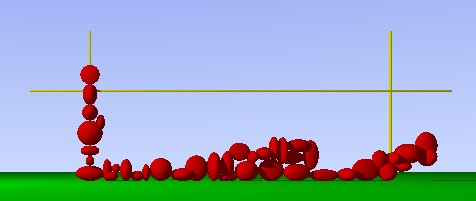
I'm working on a macro that will hopefully eventually generate a dry-stone wall,
but I'm running into problems. In the image below, the wall should approx. fill
the area marked out by the yellow cylinders, but it ain't.

If anyone can be bothered to:

a) work out what I'm trying to do
b) work out how I'm trying to do it
and
c) what's going wrong

then here is the code:

//start code

#version 3.5;

#include "colors.inc"

global_settings {
  assumed_gamma 1.0
}

// ----------------------------------------

camera {
  location  <0.0, 1.5, -100.0>
  look_at   <0.0, 1.5,  0.0>
}


light_source {
  <0, 0, 0>            // light's position (translated below)
  color rgb <1, 1, 1>  // light's color
  translate <-30, 30, -30>
}

// ----------------------------------------


#macro BuildWall()
  #declare Rand1 = seed(142);
  #declare Brick = sphere{0,1 pigment{Red}}
  #declare Ground = plane{y,0 pigment{Green}}
  #declare WallLen = 50;
  #declare WallHi = 15;
  #declare ThisLen = 0;
  #declare ThisHi = 0;
  #declare Wall = object{Ground}
  #while(ThisLen <= WallLen & ThisHi <= WallHi)
    #declare XScale = rand(Rand1)*2 + 0.5;
    #declare YScale = rand(Rand1)*2 + 0.5;
    #declare ZScale = rand(Rand1)*2 + 0.5;
    #declare ThisBrick = object{Brick scale<XScale, YScale, ZScale>}
    #if(ThisLen = 0)
      #declare Norm = <0, 0, 0>;
      #declare Start = <0,WallHi*2,0>;
      #declare InterA = trace ( Wall, Start, <0, -1, 0>, Norm );
      #declare Wall = union{
        object{Wall}
        object{ThisBrick translate y*(InterA.y + YScale)}
      }
      #declare ThisLen = XScale;
      #declare ThisHi = InterA.y + YScale;
    #else
      #declare Norm = <0, 0, 0>;
      #declare Start = <ThisLen+XScale,WallHi*2,0>;
      #declare InterA = trace ( Wall, Start, <0, -1, 0>, Norm );
      #if(InterA.y < ThisHi)
        #declare Norm = <0, 0, 0>;
        #declare Start = <WallLen*2,InterA.y + YScale,0>;
        #declare InterB = trace ( Wall, Start, <-1, 0, 0>, Norm );
        #declare Wall = union{
          object{Wall}
          object{ThisBrick translate<InterB.x + XScale, InterA.y + YScale, 0>}
        }
      #end
      #declare ThisLen = InterB.x + (XScale*2);
      #declare ThisHi = InterA.y + YScale;
      #if(ThisLen > WallLen & ThisHi <= WallHi)
        #declare ThisLen = 0;
      #end
    #end
  #end
#end

BuildWall()
object{Wall}

cylinder{0,y*25, 0.2 pigment{Yellow}}
cylinder{0,y*25, 0.2 pigment{Yellow} translate x*50}
cylinder{x*-10,x*60, 0.2 pigment{Yellow} translate y*15}

//end code

... and here is the image


--
#macro G(D,E,F)#local I=array[3]{D,E,F}#local B=0;triangle{#while(
B<3)#while(I[B])A[mod(I[B],10)]+#local I[B]=div(I[B],10);#end<-5,-
2,9>#local B=B+1;#end}#end #local A=array[7]{x,x*2,x*4,y,y*2,y*4,z
}light_source{-x*6-z*9,1}mesh{G(105,10,146)G(105,246,10)G(105,56,
146)G(105,1256,246)G(1256,126,220)G(22156,2216,201)pigment{rgb 1}}//TM
Post a reply to this message
Attachments:
Download 'dw1.jpg' (13 KB)
Preview of image 'dw1.jpg'
|
|
| |
| |
|
|
|
|
| |
| |
|
|
On Fri, 22 Mar 2002 13:23:26 -0000, "Tom Melly" <tom### [at] tomandlu couk> wrote:
> If anyone can be bothered to:
Sorry, i'm tired of functions currently and I want to not think for a moment
(only sigs can give me some enterainment) but take a look in Ken's macro
http://home.pacbell.net/tylereng/arbre.jpg. Perhaps something could be
borrowed. Personally I would use turbulenced isosurface of spheres (as
pattern) for such stones probably.
ABX couk> wrote:
> If anyone can be bothered to:
Sorry, i'm tired of functions currently and I want to not think for a moment
(only sigs can give me some enterainment) but take a look in Ken's macro
http://home.pacbell.net/tylereng/arbre.jpg. Perhaps something could be
borrowed. Personally I would use turbulenced isosurface of spheres (as
pattern) for such stones probably.
ABX
Post a reply to this message
|
|
| |
| |
|
|
|
|
| |
| |
|
|
"W³odzimierz ABX Skiba" <abx### [at] babilonorg> wrote in message
news:fhcm9u828ait8dv6qdnl804gj40jcrnj6a@4ax.com...

> Sorry, i'm tired of functions currently and I want to not think for a moment
> (only sigs can give me some enterainment) but take a look in Ken's macro
> http://home.pacbell.net/tylereng/arbre.jpg. Perhaps something could be
> borrowed. Personally I would use turbulenced isosurface of spheres (as
> pattern) for such stones probably.
>

I know the feeling...

I fully intend to use iso-surfaces when I get the basic code sorted - the
sphere's are just a quick and dirty temporary thing...

I'll take a look at Ken's macro (arbre.jpg?) - many thanks.
Post a reply to this message
|
|
| |
| |
|
|
|
|
| |
| |
|
|
"Tom Melly" <tom### [at] tomandlucouk> wrote in message
news:3c9b3ade$1@news.povray.org...
>
> I'll take a look at Ken's macro (arbre.jpg?) - many thanks.
>

Ah! - I suspect that this won't help me as his bricks are too regular for a
dry-stone wall (or at least of the type I'm trying to create).
Post a reply to this message
|
|
| |
| |
|
|
|
|
| |
| |
|
|
On Fri, 22 Mar 2002 14:09:54 -0000, "Tom Melly" <tom### [at] tomandlucouk> wrote:
> Ah! - I suspect that this won't help me as his bricks are too regular for a
> dry-stone wall (or at least of the type I'm trying to create).

I didn't looked at his macro (perhaps it is pigment) but You can use centers
of cells and dimensions as radius, then create isosurface and adjust
turbulencing.

ABX
Post a reply to this message
|
|
| |
| |
|
|
|
|
| |
| |
|
|
"Tom Melly" <tom### [at] tomandlucouk> wrote in message
news:3c9b304f@news.povray.org...
> I'm working on a macro that will hopefully eventually generate a dry-stone
wall,
> but I'm running into problems. In the image below, the wall should approx.
fill
> the area marked out by the yellow cylinders, but it ain't.
>
> If anyone can be bothered to:
>
> a) work out what I'm trying to do
> b) work out how I'm trying to do it
> and
> c) what's going wrong

    Well, skipping a) and b) and looking only at the image, it looks like
you have a mismatched loop somewhere. It goes across but not up. I will take
a few more minutes to look it over but so far your method befuddles* me.

    *Remembering that I am easily befuddled by math-like thingies.
Post a reply to this message
|
|
| |
| |
|
|
|
|
| |
| |
|
|
#while(ThisLen <= WallLen & ThisHi <= WallHi)

    Doesn't the above fail as soon as one of the conditions are met?
Shouldn't they be in two statements, one repeating until the other fails?
Post a reply to this message
|
|
| |
| |
|
|
|
|
| |
| |
|
|
Trace hits all of the stones in the first row, because they are all stacked
in a straight line. On subsequent rows, the trace is only hitting
occasionally. One miss starts you back on the ground.

 -Shay

Tom Melly <tom### [at] tomandlucouk> wrote in message
news:3c9b304f@news.povray.org...
Post a reply to this message
|
|
| |
| |
|
|
|
|
| |
| |
|
|
"Bill DeWitt" <bde### [at] cflrrcom> wrote in message
news:3c9b45fe$1@news.povray.org...
>   #while(ThisLen <= WallLen & ThisHi <= WallHi)
>
>     Doesn't the above fail as soon as one of the conditions are met?
> Shouldn't they be in two statements, one repeating until the other fails?
>

Ah! I think that's it - it should be an "or" rather than an "and". Ta.
Post a reply to this message
|
|
| |
| |
|
|
|
|
| |
| |
|
|
"Shay" <sah### [at] simcopartscom> wrote in message news:3c9b477a$1@news.povray.org...
> Trace hits all of the stones in the first row, because they are all stacked
> in a straight line. On subsequent rows, the trace is only hitting
> occasionally. One miss starts you back on the ground.
>

Hmm, no I think that's alright. At any rate, it's intended.... I think Bill has
spotted it.
Post a reply to this message
|
|
| |
| |
|
|
|
|
| |
| |
|
|
Tom Melly <tom### [at] tomandlucouk> wrote in message
news:3c9b493f$1@news.povray.org...
>
> Ah! I think that's it - it should be an "or" rather than an "and". Ta.
>

Your stones will go on for a very long distance this way.

 -Shay
Post a reply to this message
|
|
| |
| |
|
|
|
|
| |
| |
|
|
"Shay" <sah### [at] simcopartscom> wrote in message news:3c9b4ad9@news.povray.org...
>
> Tom Melly <tom### [at] tomandlucouk> wrote in message
> news:3c9b493f$1@news.povray.org...
> >
> > Ah! I think that's it - it should be an "or" rather than an "and". Ta.
> >
>
> Your stones will go on for a very long distance this way.
>

Yes - Bill's pointed out the problem, but I'm still working on the solution. I
don't think there's a perfect solution using this method, except to try
different random seeds. However, it's starting to look like it might produce
some nice results.... Hopefully I'll have a second image post RSN.
Post a reply to this message
|
|
| |
| |
|
|
|
|
| |
| |
|
|
Tom Melly <tom### [at] tomandlucouk> wrote in message
news:3c9b4eda$1@news.povray.org...

I'm still confident that it is the trace problem. Leave your code exactly as
it is in your post except for the following lines, and you will see what I
mean.

#declare XScale = 1;//rand(Rand1)*2 + 0.5;
#declare YScale = 1;//rand(Rand1)*2 + 0.5;
#declare ZScale = 1;//rand(Rand1)*2 + 0.5;

 -Shay
Post a reply to this message
|
|
| |
| |
|
|
|
|
| |
| |
|
|
"Shay" <sah### [at] simcopartscom> wrote in message news:3c9b5067$1@news.povray.org...
>
> I'm still confident that it is the trace problem. Leave your code exactly as
> it is in your post except for the following lines, and you will see what I
> mean.
>
> #declare XScale = 1;//rand(Rand1)*2 + 0.5;
> #declare YScale = 1;//rand(Rand1)*2 + 0.5;
> #declare ZScale = 1;//rand(Rand1)*2 + 0.5;
>

Hmm, okay - I'll have to think about this some more (probably when my brain
stops bleeding).
Post a reply to this message
|
|
| |
| |
|
|
|
|
| |
| |
|
|
I have the solution if you want it. I won't post without asking, because you
may want to think about it more yourself.

 -Shay

Tom Melly <tom### [at] tomandlucouk> wrote in message
news:3c9b51f7$1@news.povray.org...
Post a reply to this message
|
|
| |
| |
|
|
|
|
| |
| |
|
|
"Shay" <sah### [at] simcopartscom> wrote in message news:3c9b5483$1@news.povray.org...
> I have the solution if you want it. I won't post without asking, because you
> may want to think about it more yourself.
>

Nghhh - okay, post. No, no, I didn't mean that. Ah, hell.
Post a reply to this message
|
|
| |
| |
|
|
|
|
| |
| |
|
|
Tom Melly <tom### [at] tomandlucouk> wrote in message
news:3c9b562a$1@news.povray.org...
>
> Nghhh - okay, post. No, no, I didn't mean that. Ah, hell.
>
>

I guess that's a "no." I see another possible bug when you switch over to
side trace.

 -Shay
Post a reply to this message
|
|
| |
| |
|
|
|
|
| |
| |
|
|
I've been playing with your code a little bit, and I'm afraid that the
algorithm may be doomed. The only ways that I can think of for keeping the
bricks from overlapping are *very* complex. Hopefully someone can find a
simpler solution to the problems with the algorithm than I.

You might want to create another algorithm that places the stones
mathematically rather than with trace, but I don't think that any algorithm
will beat a random guess and check algorithm.

 -Shay

Shay <sah### [at] simcopartscom> wrote in message
news:3c9b5a8d$1@news.povray.org...
>
Post a reply to this message
|
|
| |
| |
|
|
|
|
| |
| |
|
|
"Shay" <sah### [at] simcopartscom> wrote in message news:3c9b5e6d$1@news.povray.org...
> I've been playing with your code a little bit, and I'm afraid that the
> algorithm may be doomed. The only ways that I can think of for keeping the
> bricks from overlapping are *very* complex. Hopefully someone can find a
> simpler solution to the problems with the algorithm than I.
>

Yes, some overlapping seems inevitable. My hope is that with the right random
seed the problem will not be visable. Partial results look ok.

Besides..... a lot of the wall will be hidden by snow ;)
Post a reply to this message
|
|
| |
| |
|
|
|
|
| |
| |
|
|
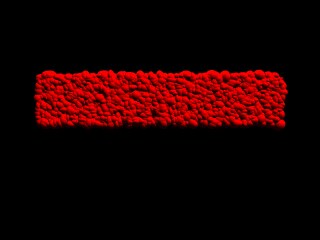
a)  Drive people absolutely nuts and job security...
b)  TOO complex
c)  TOO Much CODE.

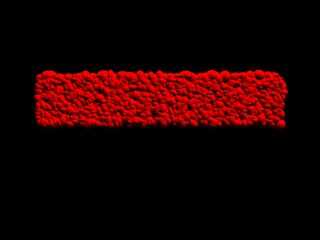
Here's my solution...

#declare RS=seed(9938);
//------------------------------------------------Wall
#declare R1=1;
#while(R1<3000)
  #declare RX=rand(RS)*50;
  #declare RY=rand(RS)*10;
  #declare ROD=rand(RS)*1+.5;
  #declare RSY=rand(RS)*.5+.5;
  #declare RSX=rand(RS)*.5+.5;
  sphere{<0,0,0>,ROD scale<RSX,RSY,1> translate<RX,RY,0>
texture{pigment{color Red}}}
  #declare R1=R1+1;
#end

I made it only 10 units tall instead of your 25.  Looks better.

Regards,
Robert J Becraft
aka cas### [at] aolcom

"Tom Melly" <tom### [at] tomandlucouk> wrote in message
news:3c9b304f@news.povray.org...
> I'm working on a macro that will hopefully eventually generate a dry-stone
wall,
> but I'm running into problems. In the image below, the wall should approx.
fill
> the area marked out by the yellow cylinders, but it ain't.
>
> If anyone can be bothered to:
>
> a) work out what I'm trying to do
> b) work out how I'm trying to do it
> and
> c) what's going wrong
>
> then here is the code:
>
> //start code
>
> #version 3.5;
>
> #include "colors.inc"
>
> global_settings {
>   assumed_gamma 1.0
> }
>
> // ----------------------------------------
>
> camera {
>   location  <0.0, 1.5, -100.0>
>   look_at   <0.0, 1.5,  0.0>
> }
>
>
> light_source {
>   <0, 0, 0>            // light's position (translated below)
>   color rgb <1, 1, 1>  // light's color
>   translate <-30, 30, -30>
> }
>
> // ----------------------------------------
>
>
>
> #macro BuildWall()
>   #declare Rand1 = seed(142);
>   #declare Brick = sphere{0,1 pigment{Red}}
>   #declare Ground = plane{y,0 pigment{Green}}
>   #declare WallLen = 50;
>   #declare WallHi = 15;
>   #declare ThisLen = 0;
>   #declare ThisHi = 0;
>   #declare Wall = object{Ground}
>   #while(ThisLen <= WallLen & ThisHi <= WallHi)
>     #declare XScale = rand(Rand1)*2 + 0.5;
>     #declare YScale = rand(Rand1)*2 + 0.5;
>     #declare ZScale = rand(Rand1)*2 + 0.5;
>     #declare ThisBrick = object{Brick scale<XScale, YScale, ZScale>}
>     #if(ThisLen = 0)
>       #declare Norm = <0, 0, 0>;
>       #declare Start = <0,WallHi*2,0>;
>       #declare InterA = trace ( Wall, Start, <0, -1, 0>, Norm );
>       #declare Wall = union{
>         object{Wall}
>         object{ThisBrick translate y*(InterA.y + YScale)}
>       }
>       #declare ThisLen = XScale;
>       #declare ThisHi = InterA.y + YScale;
>     #else
>       #declare Norm = <0, 0, 0>;
>       #declare Start = <ThisLen+XScale,WallHi*2,0>;
>       #declare InterA = trace ( Wall, Start, <0, -1, 0>, Norm );
>       #if(InterA.y < ThisHi)
>         #declare Norm = <0, 0, 0>;
>         #declare Start = <WallLen*2,InterA.y + YScale,0>;
>         #declare InterB = trace ( Wall, Start, <-1, 0, 0>, Norm );
>         #declare Wall = union{
>           object{Wall}
>           object{ThisBrick translate<InterB.x + XScale, InterA.y + YScale,
0>}
>         }
>       #end
>       #declare ThisLen = InterB.x + (XScale*2);
>       #declare ThisHi = InterA.y + YScale;
>       #if(ThisLen > WallLen & ThisHi <= WallHi)
>         #declare ThisLen = 0;
>       #end
>     #end
>   #end
> #end
>
> BuildWall()
> object{Wall}
>
> cylinder{0,y*25, 0.2 pigment{Yellow}}
> cylinder{0,y*25, 0.2 pigment{Yellow} translate x*50}
> cylinder{x*-10,x*60, 0.2 pigment{Yellow} translate y*15}
>
> //end code
>
> ... and here is the image
>
>
> --
> #macro G(D,E,F)#local I=array[3]{D,E,F}#local B=0;triangle{#while(
> B<3)#while(I[B])A[mod(I[B],10)]+#local I[B]=div(I[B],10);#end<-5,-
> 2,9>#local B=B+1;#end}#end #local A=array[7]{x,x*2,x*4,y,y*2,y*4,z
> }light_source{-x*6-z*9,1}mesh{G(105,10,146)G(105,246,10)G(105,56,
> 146)G(105,1256,246)G(1256,126,220)G(22156,2216,201)pigment{rgb 1}}//TM
>
>
>
Post a reply to this message
Attachments:
Download 'TESTwall.jpg' (10 KB)
Preview of image 'TESTwall.jpg'
|
|
| |
| |
|
|
|
|
| |
| |
|
|
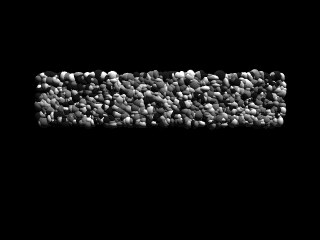
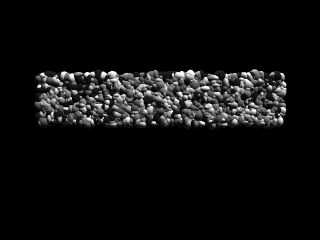
Version 2 w/ a color randomizer for the components...

#declare RS=seed(938);
//------------------------------------------------Wall

#declare R1=1;
#while(R1<3000)
  #declare RX=rand(RS)*50;
  #declare RY=rand(RS)*10;
  #declare ROD=rand(RS)*1+.5;
  #declare RSY=rand(RS)*.5+.5;
  #declare RSX=rand(RS)*.5+.5;
  #declare RC=int(rand(RS)*5+1);
  sphere{<0,0,0>,ROD scale<RSX,RSY,1> translate<RX,RY,0>
texture{pigment{color
       #switch(RC)
       #case(1) Gray10 #break
       #case(2) Gray40 #break
       #case(3) Gray50 #break
       #case(4) Gray80 #break
       #case(5) Gray90 #break
       #end
   }}}
  #declare R1=R1+1;
#end

"Robert J Becraft" <cas### [at] aolcom> wrote in message
news:3caa5992@news.povray.org...
> a)  Drive people absolutely nuts and job security...
> b)  TOO complex
> c)  TOO Much CODE.
>
> Here's my solution...
>
> #declare RS=seed(9938);
> //------------------------------------------------Wall
> #declare R1=1;
> #while(R1<3000)
>   #declare RX=rand(RS)*50;
>   #declare RY=rand(RS)*10;
>   #declare ROD=rand(RS)*1+.5;
>   #declare RSY=rand(RS)*.5+.5;
>   #declare RSX=rand(RS)*.5+.5;
>   sphere{<0,0,0>,ROD scale<RSX,RSY,1> translate<RX,RY,0>
> texture{pigment{color Red}}}
>   #declare R1=R1+1;
> #end
>
> I made it only 10 units tall instead of your 25.  Looks better.
>
> Regards,
> Robert J Becraft
> aka cas### [at] aolcom
>
> "Tom Melly" <tom### [at] tomandlucouk> wrote in message
> news:3c9b304f@news.povray.org...
> > I'm working on a macro that will hopefully eventually generate a
dry-stone
> wall,
> > but I'm running into problems. In the image below, the wall should
approx.
> fill
> > the area marked out by the yellow cylinders, but it ain't.
> >
> > If anyone can be bothered to:
> >
> > a) work out what I'm trying to do
> > b) work out how I'm trying to do it
> > and
> > c) what's going wrong
> >
> > then here is the code:
> >
> > //start code
> >
> > #version 3.5;
> >
> > #include "colors.inc"
> >
> > global_settings {
> >   assumed_gamma 1.0
> > }
> >
> > // ----------------------------------------
> >
> > camera {
> >   location  <0.0, 1.5, -100.0>
> >   look_at   <0.0, 1.5,  0.0>
> > }
> >
> >
> > light_source {
> >   <0, 0, 0>            // light's position (translated below)
> >   color rgb <1, 1, 1>  // light's color
> >   translate <-30, 30, -30>
> > }
> >
> > // ----------------------------------------
> >
> >
> >
> > #macro BuildWall()
> >   #declare Rand1 = seed(142);
> >   #declare Brick = sphere{0,1 pigment{Red}}
> >   #declare Ground = plane{y,0 pigment{Green}}
> >   #declare WallLen = 50;
> >   #declare WallHi = 15;
> >   #declare ThisLen = 0;
> >   #declare ThisHi = 0;
> >   #declare Wall = object{Ground}
> >   #while(ThisLen <= WallLen & ThisHi <= WallHi)
> >     #declare XScale = rand(Rand1)*2 + 0.5;
> >     #declare YScale = rand(Rand1)*2 + 0.5;
> >     #declare ZScale = rand(Rand1)*2 + 0.5;
> >     #declare ThisBrick = object{Brick scale<XScale, YScale, ZScale>}
> >     #if(ThisLen = 0)
> >       #declare Norm = <0, 0, 0>;
> >       #declare Start = <0,WallHi*2,0>;
> >       #declare InterA = trace ( Wall, Start, <0, -1, 0>, Norm );
> >       #declare Wall = union{
> >         object{Wall}
> >         object{ThisBrick translate y*(InterA.y + YScale)}
> >       }
> >       #declare ThisLen = XScale;
> >       #declare ThisHi = InterA.y + YScale;
> >     #else
> >       #declare Norm = <0, 0, 0>;
> >       #declare Start = <ThisLen+XScale,WallHi*2,0>;
> >       #declare InterA = trace ( Wall, Start, <0, -1, 0>, Norm );
> >       #if(InterA.y < ThisHi)
> >         #declare Norm = <0, 0, 0>;
> >         #declare Start = <WallLen*2,InterA.y + YScale,0>;
> >         #declare InterB = trace ( Wall, Start, <-1, 0, 0>, Norm );
> >         #declare Wall = union{
> >           object{Wall}
> >           object{ThisBrick translate<InterB.x + XScale, InterA.y +
YScale,
> 0>}
> >         }
> >       #end
> >       #declare ThisLen = InterB.x + (XScale*2);
> >       #declare ThisHi = InterA.y + YScale;
> >       #if(ThisLen > WallLen & ThisHi <= WallHi)
> >         #declare ThisLen = 0;
> >       #end
> >     #end
> >   #end
> > #end
> >
> > BuildWall()
> > object{Wall}
> >
> > cylinder{0,y*25, 0.2 pigment{Yellow}}
> > cylinder{0,y*25, 0.2 pigment{Yellow} translate x*50}
> > cylinder{x*-10,x*60, 0.2 pigment{Yellow} translate y*15}
> >
> > //end code
> >
> > ... and here is the image
> >
> >
> > --
> > #macro G(D,E,F)#local I=array[3]{D,E,F}#local B=0;triangle{#while(
> > B<3)#while(I[B])A[mod(I[B],10)]+#local I[B]=div(I[B],10);#end<-5,-
> > 2,9>#local B=B+1;#end}#end #local A=array[7]{x,x*2,x*4,y,y*2,y*4,z
> > }light_source{-x*6-z*9,1}mesh{G(105,10,146)G(105,246,10)G(105,56,
> > 146)G(105,1256,246)G(1256,126,220)G(22156,2216,201)pigment{rgb 1}}//TM
> >
> >
> >
>
>
>
Post a reply to this message
Attachments:
Download 'TESTwall.jpg' (11 KB)
Preview of image 'TESTwall.jpg'
|
|
| |
| |
|
|
|
|
| |
| |
|
|
The problem with this solution is that the "stones" blend into each other.

IIRC... the original problem was to build a realistic stone wall.

Scott

"Robert J Becraft" <cas### [at] aolcom> wrote in message
news:3caa5bc0@news.povray.org...
> Version 2 w/ a color randomizer for the components...
>
> #declare RS=seed(938);
> //------------------------------------------------Wall
>
> #declare R1=1;
> #while(R1<3000)
>   #declare RX=rand(RS)*50;
>   #declare RY=rand(RS)*10;
>   #declare ROD=rand(RS)*1+.5;
>   #declare RSY=rand(RS)*.5+.5;
>   #declare RSX=rand(RS)*.5+.5;
>   #declare RC=int(rand(RS)*5+1);
>   sphere{<0,0,0>,ROD scale<RSX,RSY,1> translate<RX,RY,0>
> texture{pigment{color
>        #switch(RC)
>        #case(1) Gray10 #break
>        #case(2) Gray40 #break
>        #case(3) Gray50 #break
>        #case(4) Gray80 #break
>        #case(5) Gray90 #break
>        #end
>    }}}
>   #declare R1=R1+1;
> #end
>
> "Robert J Becraft" <cas### [at] aolcom> wrote in message
> news:3caa5992@news.povray.org...
> > a)  Drive people absolutely nuts and job security...
> > b)  TOO complex
> > c)  TOO Much CODE.
> >
> > Here's my solution...
> >
> > #declare RS=seed(9938);
> > //------------------------------------------------Wall
> > #declare R1=1;
> > #while(R1<3000)
> >   #declare RX=rand(RS)*50;
> >   #declare RY=rand(RS)*10;
> >   #declare ROD=rand(RS)*1+.5;
> >   #declare RSY=rand(RS)*.5+.5;
> >   #declare RSX=rand(RS)*.5+.5;
> >   sphere{<0,0,0>,ROD scale<RSX,RSY,1> translate<RX,RY,0>
> > texture{pigment{color Red}}}
> >   #declare R1=R1+1;
> > #end
> >
> > I made it only 10 units tall instead of your 25.  Looks better.
> >
> > Regards,
> > Robert J Becraft
> > aka cas### [at] aolcom
> >
> > "Tom Melly" <tom### [at] tomandlucouk> wrote in message
> > news:3c9b304f@news.povray.org...
> > > I'm working on a macro that will hopefully eventually generate a
> dry-stone
> > wall,
> > > but I'm running into problems. In the image below, the wall should
> approx.
> > fill
> > > the area marked out by the yellow cylinders, but it ain't.
> > >
> > > If anyone can be bothered to:
> > >
> > > a) work out what I'm trying to do
> > > b) work out how I'm trying to do it
> > > and
> > > c) what's going wrong
> > >
> > > then here is the code:
> > >
> > > //start code
> > >
> > > #version 3.5;
> > >
> > > #include "colors.inc"
> > >
> > > global_settings {
> > >   assumed_gamma 1.0
> > > }
> > >
> > > // ----------------------------------------
> > >
> > > camera {
> > >   location  <0.0, 1.5, -100.0>
> > >   look_at   <0.0, 1.5,  0.0>
> > > }
> > >
> > >
> > > light_source {
> > >   <0, 0, 0>            // light's position (translated below)
> > >   color rgb <1, 1, 1>  // light's color
> > >   translate <-30, 30, -30>
> > > }
> > >
> > > // ----------------------------------------
> > >
> > >
> > >
> > > #macro BuildWall()
> > >   #declare Rand1 = seed(142);
> > >   #declare Brick = sphere{0,1 pigment{Red}}
> > >   #declare Ground = plane{y,0 pigment{Green}}
> > >   #declare WallLen = 50;
> > >   #declare WallHi = 15;
> > >   #declare ThisLen = 0;
> > >   #declare ThisHi = 0;
> > >   #declare Wall = object{Ground}
> > >   #while(ThisLen <= WallLen & ThisHi <= WallHi)
> > >     #declare XScale = rand(Rand1)*2 + 0.5;
> > >     #declare YScale = rand(Rand1)*2 + 0.5;
> > >     #declare ZScale = rand(Rand1)*2 + 0.5;
> > >     #declare ThisBrick = object{Brick scale<XScale, YScale, ZScale>}
> > >     #if(ThisLen = 0)
> > >       #declare Norm = <0, 0, 0>;
> > >       #declare Start = <0,WallHi*2,0>;
> > >       #declare InterA = trace ( Wall, Start, <0, -1, 0>, Norm );
> > >       #declare Wall = union{
> > >         object{Wall}
> > >         object{ThisBrick translate y*(InterA.y + YScale)}
> > >       }
> > >       #declare ThisLen = XScale;
> > >       #declare ThisHi = InterA.y + YScale;
> > >     #else
> > >       #declare Norm = <0, 0, 0>;
> > >       #declare Start = <ThisLen+XScale,WallHi*2,0>;
> > >       #declare InterA = trace ( Wall, Start, <0, -1, 0>, Norm );
> > >       #if(InterA.y < ThisHi)
> > >         #declare Norm = <0, 0, 0>;
> > >         #declare Start = <WallLen*2,InterA.y + YScale,0>;
> > >         #declare InterB = trace ( Wall, Start, <-1, 0, 0>, Norm );
> > >         #declare Wall = union{
> > >           object{Wall}
> > >           object{ThisBrick translate<InterB.x + XScale, InterA.y +
> YScale,
> > 0>}
> > >         }
> > >       #end
> > >       #declare ThisLen = InterB.x + (XScale*2);
> > >       #declare ThisHi = InterA.y + YScale;
> > >       #if(ThisLen > WallLen & ThisHi <= WallHi)
> > >         #declare ThisLen = 0;
> > >       #end
> > >     #end
> > >   #end
> > > #end
> > >
> > > BuildWall()
> > > object{Wall}
> > >
> > > cylinder{0,y*25, 0.2 pigment{Yellow}}
> > > cylinder{0,y*25, 0.2 pigment{Yellow} translate x*50}
> > > cylinder{x*-10,x*60, 0.2 pigment{Yellow} translate y*15}
> > >
> > > //end code
> > >
> > > ... and here is the image
> > >
> > >
> > > --
> > > #macro G(D,E,F)#local I=array[3]{D,E,F}#local B=0;triangle{#while(
> > > B<3)#while(I[B])A[mod(I[B],10)]+#local I[B]=div(I[B],10);#end<-5,-
> > > 2,9>#local B=B+1;#end}#end #local A=array[7]{x,x*2,x*4,y,y*2,y*4,z
> > > }light_source{-x*6-z*9,1}mesh{G(105,10,146)G(105,246,10)G(105,56,
> > > 146)G(105,1256,246)G(1256,126,220)G(22156,2216,201)pigment{rgb 1}}//TM
> > >
> > >
> > >
> >
> >
> >
>
>
>
Post a reply to this message
|
|
| |
| |
|
|
|
|
| |
| |
|
|
"Robert J Becraft" <cas### [at] aolcom> wrote in message
news:3caa5992@news.povray.org...

Ooo - not bad. I'm still working on my version (now much more simplified). RL
has got in the way, but hopefully something to post soon. Currently running into
a problem where, under certain conditions, the macro finds the same hole that
needs filling, fails to fill it, then finds the hole again - aka infinite loop.
Post a reply to this message
|
|
| |
| |
|
|
|
|
| |
|
|