|
|
|
|
|
|
| |
| |
|
|
|
|
| |
| |
|
|
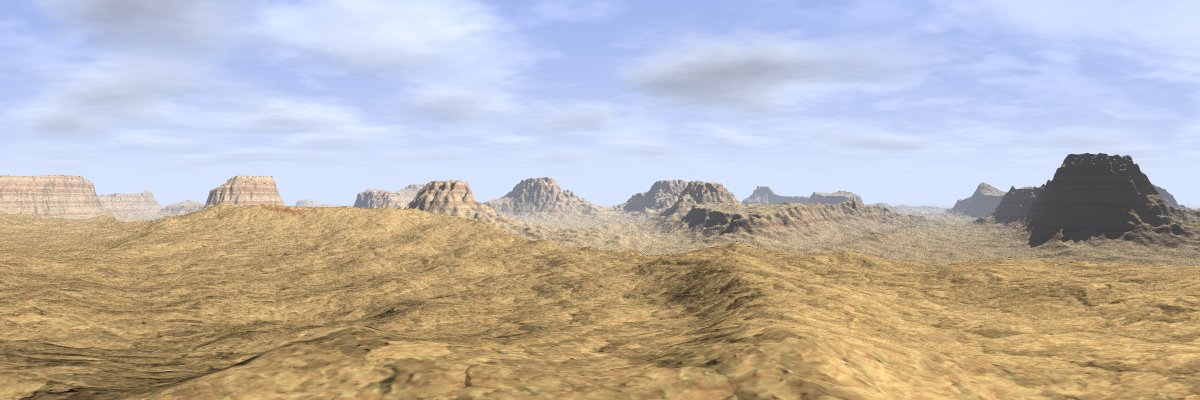
As the cracked look of the texture really was all wrong, I had to rework the
textures again. This time I've gotten something that I think look a bit more
right, but I'm still not sure about it.

Any suggestions for improvements (texture-wise or otherwise)?

Rune
--
3D images and anims, include files, tutorials and more:
Rune's World:    http://rsj.mobilixnet.dk (updated Feb 16)
POV-Ray Users:   http://rsj.mobilixnet.dk/povrayusers/
POV-Ray Webring: http://webring.povray.co.uk
Post a reply to this message
Attachments:
Download 'desert3.jpg' (89 KB)
Preview of image 'desert3.jpg'
|
|
| |
| |
|
|
|
|
| |
| |
|
|
> As the cracked look of the texture really was all wrong, I had to rework
> the textures again. This time I've gotten something that I think look a
> bit more right, but I'm still not sure about it.

I liked take2's textures better, especially close up
--
Rick

Kitty5 WebDesign - http://Kitty5.com
POV-Ray News & Resources - http://Povray.co.uk
TEL : +44 (01270) 501101 - FAX : +44 (01270) 251105 - ICQ : 15776037

PGP Public Key
http://pgpkeys.mit.edu:11371/pks/lookup?op=get&search=0x231E1CEA
Post a reply to this message
|
|
| |
| |
|
|
|
|
| |
| |
|
|
These textures are really impressive... so are the shapes. Could you explain
or at least give a hint as to what functions and objects you're using for
these?

- Slime
[ http://www.slimeland.com/ ]
[ http://www.slimeland.com/images/ ]>
Post a reply to this message
|
|
| |
| |
|
|
|
|
| |
| |
|
|
Rune -

No one seems to have mentioned this, but it seems important to me.

It looks like you are using crand in the texture.  The only reason I
bring it up is that crand does not fade with distance like it should,
and I was wondering if that's why the buttes in the distance seem really
noisy.

But maybe it's just a compression artifact, or maybe a sampling error if
you're using media for the atmosphere...

As for composition, I like the 1st post the best.  The foreground butte
seems to be obscuring too much of your wonderful background.

- Ben
Post a reply to this message
|
|
| |
| |
|
|
|
|
| |
| |
|
|
On Sun, 17 Mar 2002 00:59:02 +0100, "Rune"
<run### [at] mobilixnet dk> wrote:
>Any suggestions for improvements (texture-wise or otherwise)?
The clouds don't look like what you'd see in a desert, more like
typical continental rain clouds. Try the famous "web of fate" (I think
this is how they call in Swahili) which can be seen before a sand
storm. Long streaks of thin dark clouds, scarlet above, fading to dark
gray and black at the horizon. The whole cloud layer is shaped like a
giant horseshoe rotated slightly about its axis of symmetry, with the
whirlwind forming at the lower end.
You can try putting some cacti... maybe if you shift the setting it a
little more towards night time, you can have the cacti glow as well --
the most certain sign of an oncoming storm. That, and a night version
of the clouds.
A single vulture perching on a rock in the mid-distance could bring a
lot more to the picture than what I described above. Easier to do,
too. <g>
And by all means, render a version with either the spherical or
cylindrical camera... you know, for us cheaters :)
Peter Popov ICQ : 15002700
Personal e-mail : pet### [at] vipbg
TAG e-mail : pet### [at] tagpovrayorg dk> wrote:
>Any suggestions for improvements (texture-wise or otherwise)?
The clouds don't look like what you'd see in a desert, more like
typical continental rain clouds. Try the famous "web of fate" (I think
this is how they call in Swahili) which can be seen before a sand
storm. Long streaks of thin dark clouds, scarlet above, fading to dark
gray and black at the horizon. The whole cloud layer is shaped like a
giant horseshoe rotated slightly about its axis of symmetry, with the
whirlwind forming at the lower end.
You can try putting some cacti... maybe if you shift the setting it a
little more towards night time, you can have the cacti glow as well --
the most certain sign of an oncoming storm. That, and a night version
of the clouds.
A single vulture perching on a rock in the mid-distance could bring a
lot more to the picture than what I described above. Easier to do,
too. <g>
And by all means, render a version with either the spherical or
cylindrical camera... you know, for us cheaters :)
Peter Popov ICQ : 15002700
Personal e-mail : pet### [at] vipbg
TAG e-mail : pet### [at] tagpovrayorg
Post a reply to this message
|
|
| |
| |
|
|
|
|
| |
| |
|
|
"Rick [Kitty5]" wrote:
> I liked take2's textures better, especially close up

Hmm, I like the new one better. I don't think rock would have cracks like
those in take 2, as Kevin Ellis pointed out. That's more the case in a
desert of dried mud or something, which this isn't.

Rune
--
3D images and anims, include files, tutorials and more:
Rune's World:    http://rsj.mobilixnet.dk (updated Feb 16)
POV-Ray Users:   http://rsj.mobilixnet.dk/povrayusers/
POV-Ray Webring: http://webring.povray.co.uk
Post a reply to this message
|
|
| |
| |
|
|
|
|
| |
| |
|
|
"Ben Birdsey" wrote:
> It looks like you are using crand in the texture.

I didn't use crand - never have done, never will do. Crand is evil.

> But maybe it's just a compression artifact, or maybe a
> sampling error if you're using media for the atmosphere...

Not using media. I don't think it looks very noisy, but the little noise
there is must be caused by the normal, which of course gets very small with
distance.

> As for composition, I like the 1st post the best.  The
> foreground butte seems to be obscuring too much of your
> wonderful background.

That can be fixed in the still image, but in the animation that I'll be
using this scene in, the camera has to be near the ground where the action
takes place. :)

Rune
--
3D images and anims, include files, tutorials and more:
Rune's World:    http://rsj.mobilixnet.dk (updated Feb 16)
POV-Ray Users:   http://rsj.mobilixnet.dk/povrayusers/
POV-Ray Webring: http://webring.povray.co.uk
Post a reply to this message
|
|
| |
| |
|
|
|
|
| |
| |
|
|
"Peter Popov" wrote:
> The clouds don't look like what you'd see in a desert,
> more like typical continental rain clouds.

Hmm, I'm not sure that desert is the right term in the first place. I was a
little inspired by Grand Canyon - is Grand Canyon a desert? Anyway, I
haven't been there, I'm just looking at photos from the web.

I'll see if I can find some good inspiration for some different clouds.

> You can try putting some cacti...

Maybe...

> maybe if you shift the setting it a little more
> towards night time

No, I want bright sunshine. :)

> A single vulture perching on a rock in the mid-distance
> could bring a lot more to the picture than what I described
> above. Easier to do, too.  <g>

Easy? I don't think so! Besides, you do realize it would have to be a
slightly cartoony vulture to fit together with AL the Alien? ;)

> And by all means, render a version with either the spherical
> or cylindrical camera... you know, for us cheaters :)

Actually it is indeed rendered with the spherical camera already. Oh, you
mean a full 360x180 degree image so you can map it onto the sky_sphere in
your own scenes? Cheater! ;)

Rune
--
3D images and anims, include files, tutorials and more:
Rune's World:    http://rsj.mobilixnet.dk (updated Feb 16)
POV-Ray Users:   http://rsj.mobilixnet.dk/povrayusers/
POV-Ray Webring: http://webring.povray.co.uk
Post a reply to this message
|
|
| |
| |
|
|
|
|
| |
| |
|
|
"Slime" wrote:
> These textures are really impressive... so are the shapes.

Thanks! :)

> Could you explain or at least give a hint as to what
> functions and objects you're using for these?

It's a single height_field made from a function.

I start with a highly exponentally raised noise3d function:

#include "functions.inc"
#declare f_hills = function (x,y,z) {f_noise3d(x,y,z)^10*15}

I clip that function in the 0-1 range and add some smaller noise to it that
increases with altitude:

#declare f_nhills =
function (x,y,z) {
   min(
      1,
      (
         f_hills(x,y,z)
         * (1+f_noise3d(x*10,y*10,z*10)*1.0)
         * (1+f_noise3d(x*30,y*30,z*30)*0.5)
      )
   )
}

I then add together three of these f_nhills functions with different
strengths and also add a f_ridged_mf function to it all. The rest is
tweaking.

Hope that helps!

Rune
--
3D images and anims, include files, tutorials and more:
Rune's World:    http://rsj.mobilixnet.dk (updated Feb 16)
POV-Ray Users:   http://rsj.mobilixnet.dk/povrayusers/
POV-Ray Webring: http://webring.povray.co.uk
Post a reply to this message
|
|
| |
| |
|
|
|
|
| |
| |
|
|
Rune

Coming along very nicely, the textures seem fine now, although a bit green,
If they are to stay green then I suggest you add some green bushes or
something to set the colour off.

There doesn't seem to be any cloud shadows though which I would expect from
that sky and lighting. Also that ridge on the right could really do woth
some radiosity or even just a fill light.

Great work though, I'm sure Al will be quite happy there........ as long as
he has some food and water I suppose.

Any progress on the icy landscape?

Kev
Post a reply to this message
|
|
| |
| |
|
|
|
|
| |
| |
|
|
I suggest you use focal blur in your final scenes and animations; even just
a small blur in the horisont because it improves realism and beauty. And I
hope you will share your sky code before you write it over! They might not
be realistic for a desert when one thinks about it, but they are the best
procedural ones I've seen in POV that doesn't use media.

The ground ... is not sandy but rocky.. Obviously you're after a rocky
look.. I don't know how that looks in real life.. But sandy deserts are
pretty clean. No textures on the ground (except a tiny granite with specular
highlights). Just brown hills. No clouds.

Regards,
Hugo
Post a reply to this message
|
|
| |
| |
|
|
|
|
| |
| |
|
|
"Kevin Ellis" wrote:
> Coming along very nicely, the textures seem fine now,
> although a bit green, If they are to stay green then
> I suggest you add some green bushes or something to
> set the colour off.

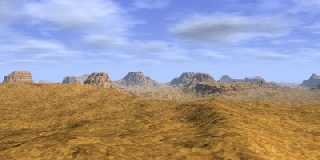
Actually the whole image is a little washed out, so I've added some more
contrast, as seen in the small attached image. Maybe it looks less green
now?

> There doesn't seem to be any cloud shadows though
> which I would expect from that sky and lighting.

I'm not sure of this myself. The clouds do cast shadows, as I have to double
up the light source intensity when I activate the clouds, but yet I can't
see any shadows from the clouds, or if it's actually one big shadow, then I
can't see any hole in that shadow. Maybe the clouds are too big and too far
away, so that the shadows are huge.

> Also that ridge on the right could really do
> woth some radiosity or even just a fill light.

Radiosity is slow - probably too slow for an animation I think - but I'll
investigate the possibilities.

> Great work though, I'm sure Al will be quite happy
> there........ as long as he has some food and water
> I suppose.

Or a portal to get away... :)

> Any progress on the icy landscape?

Haven't started yet.

Rune
--
3D images and anims, include files, tutorials and more:
Rune's World:  http://rsj.mobilixnet.dk (updated Feb 16)
POV-Ray Users: http://rsj.mobilixnet.dk/povrayusers/
POV-Ray Ring:  http://webring.povray.co.uk
Post a reply to this message
Attachments:
Download 'desert3b.jpg' (25 KB)
Preview of image 'desert3b.jpg'
|
|
| |
| |
|
|
|
|
| |
| |
|
|
"Hugo" wrote:
> I suggest you use focal blur in your final
> scenes and animations; even just a small blur
> in the horisont because it improves realism
> and beauty.

Focal blur is too slow. :(

> And I hope you will share your sky code before
> you write it over! They might not be realistic
> for a desert when one thinks about it, but they
> are the best procedural ones I've seen in POV
> that doesn't use media.

Really? I've seen very impressive clouds made of many stacked planes, but
the ones in this image were made of just 4 planes... Anyway, I'll put them
on my website sometime soon.

> The ground ... is not sandy but rocky.. Obviously
> you're after a rocky look..

Yes. Landscapes with "hills" like these ones usually are rocky, aren't they?
I've been looking at images from the web of Grand Canyon for inspiration.
Still not sure if it's actually a desert.

Rune
--
3D images and anims, include files, tutorials and more:
Rune's World:  http://rsj.mobilixnet.dk (updated Feb 16)
POV-Ray Users: http://rsj.mobilixnet.dk/povrayusers/
POV-Ray Ring:  http://webring.povray.co.uk
Post a reply to this message
|
|
| |
| |
|
|
|
|
| |
| |
|
|
I like the banding a lot better in this one, It might even looik better with
a 3rd color added for more variation, but I'm not sure if thats realsitic or
not, just a guess :) I liked the 2nd's normal the best but this one fits
better, maybe if you lowered its height or depth (whatever its called) it
might look like a better combination between  sand and rock. The sand in the
distance needs to look smoother I think too, maybe lowering the depth of the
normal would fix that? One thing that has beugged me about all 3 pics iss
the mountainthings in the middle. The ones on the sides look awsome but the
ones in the middle look TOO bumpy. Maybe its because I can see both light
AND shadow on the middle ones and it gives the bumps much more contrast
compared to the mountains on the sides. Perhaps moving the light source
would fix this or lowering the turbulence (correct term?) on the middle
ones. Still looks a LOT better than my few meager attempts at terrain. and
It's a big improvement!

Can't wait to see the next one!

Corey
Post a reply to this message
|
|
| |
| |
|
|
|
|
| |
| |
|
|
There doesn't appear to be any sedimentary buildup, which there should be. Still, you
have some great textures.

Grim
Post a reply to this message
|
|
| |
| |
|
|
|
|
| |
| |
|
|
"GrimDude" wrote:
> There doesn't appear to be any sedimentary buildup,
> which there should be.

I don't know what a sedimentary buildup looks like.

Rune
--
3D images and anims, include files, tutorials and more:
Rune's World:  http://rsj.mobilixnet.dk (updated Feb 16)
POV-Ray Users: http://rsj.mobilixnet.dk/povrayusers/
POV-Ray Ring:  http://webring.povray.co.uk
Post a reply to this message
|
|
| |
| |
|
|
|
|
| |
| |
|
|
"Corey Woodworth" wrote:
> I like the banding a lot better in this one, It
> might even looik better with a 3rd color added
> for more variation, but I'm not sure if thats
> realsitic or not, just a guess :)

I think it does occur in reality. But adding support for that would require
me to change the way my textures work, so I'm not sure about that. Maybe...

> I liked the 2nd's normal the best but this one fits
> better, maybe if you lowered its height or depth
> (whatever its called) it might look like a better
> combination between sand and rock.

It's not currently supposed to look like sand. Would there be sand in a
landscape like this? I'm in need of reference photos...

> One thing that has beugged me about all 3 pics is
> the mountainthings in the middle. The ones on the
> sides look awsome but the ones in the middle look
> TOO bumpy.

I'll see what I can do...

> Can't wait to see the next one!

Glad you like it. :)

Rune
--
3D images and anims, include files, tutorials and more:
Rune's World:  http://rsj.mobilixnet.dk (updated Feb 16)
POV-Ray Users: http://rsj.mobilixnet.dk/povrayusers/
POV-Ray Ring:  http://webring.povray.co.uk
Post a reply to this message
|
|
| |
| |
|
|
|
|
| |
| |
|
|
On Sun, 17 Mar 2002 12:15:17 +0100, "Rune"
<run### [at] mobilixnetdk> wrote:

> Cheater! ;)

And darn proud of it too! :)

And as of the vulture, look at "The Making of \"The Wet Bird\""


Peter Popov ICQ : 15002700
Personal e-mail : pet### [at] vipbg
TAG      e-mail : pet### [at] tagpovrayorg
Post a reply to this message
|
|
| |
| |
|
|
|
|
| |
| |
|
|
"Peter Popov" wrote:
> > Cheater! ;)
>
> And darn proud of it too! :)
>
> And as of the vulture, look at
> "The Making of \"The Wet Bird\""

Oh I remember how it was done - you want me to be a cheater too!

Rune
--
3D images and anims, include files, tutorials and more:
Rune's World:  http://rsj.mobilixnet.dk (updated Feb 16)
POV-Ray Users: http://rsj.mobilixnet.dk/povrayusers/
POV-Ray Ring:  http://webring.povray.co.uk
Post a reply to this message
|
|
| |
| |
|
|
|
|
| |
| |
|
|
On Sun, 17 Mar 2002 00:59:02 +0100, "Rune" <run### [at] mobilixnetdk>
wrote:

>As the cracked look of the texture really was all wrong, I had to rework the
>textures again. This time I've gotten something that I think look a bit more
>right, but I'm still not sure about it.

I like the mountains better than those in take 2, but preferred the
previous floor texture.

The current one somehow looks too... rich. Like it is fertile soil, rather
than completely dried out.

--
Marc van den Dikkenberg
--
The PowerBasic Archives -- http://www.xlsior.org
Post a reply to this message
|
|
| |
| |
|
|
|
|
| |
| |
|
|
"Marc van den Dikkenberg" wrote:
> I like the mountains better than those in take 2,
> but preferred the previous floor texture.
>
> The current one somehow looks too... rich. Like it
> is fertile soil, rather than completely dried out.

Hehe, obviously I'm not very good at textures. It's not supposed to be soil
at all, but rock...

Rune
--
3D images and anims, include files, tutorials and more:
Rune's World:  http://rsj.mobilixnet.dk (updated Feb 16)
POV-Ray Users: http://rsj.mobilixnet.dk/povrayusers/
POV-Ray Ring:  http://webring.povray.co.uk
Post a reply to this message
|
|
| |
| |
|
|
From: Christoph Hormann
Subject: Re: Desert Landscape take 3 (89kbu)
Date: 18 Mar 2002 05:37:09
Message: <3C95C355.863AEA13@gmx.de>
|
|
|
| |
| |
|
|
Rune wrote:
>
> As the cracked look of the texture really was all wrong, I had to rework the
> textures again. This time I've gotten something that I think look a bit more
> right, but I'm still not sure about it.
>
> Any suggestions for improvements (texture-wise or otherwise)?
>

I think the foreground is not so good in this version.  You might try
using a separate higher resolution heightfield for it.  Using such strong
and large scale normals is always problematic.

The foreground could also be less uniform i think.  Since it's fairly flat
in total it's likely to have some young sediments between more rocky
parts.

Using the same pattern for the texture as for the heightfield might be
useful.  You could make the lower parts more sandy while having the higher
parts made of stone material.

Christoph

--
POV-Ray tutorials, IsoWood include,
TransSkin and more: http://www.tu-bs.de/~y0013390/
Last updated 13 Mar. 2002 _____./\/^>_*_<^\/\.______
Post a reply to this message
|
|
| |
| |
|
|
|
|
| |
| |
|
|
Best so far I think. Colors seem to change too much between foreground and
background, though.

 -Shay
Rune <run### [at] mobilixnetdk> wrote in message
news:3c93dcb9@news.povray.org...
Post a reply to this message
|
|
| |
| |
|
|
|
|
| |
| |
|
|
Great. Here's an issue though. The crackle pattern is good
for a playa (dry lake bed), but not on dunes as you have
modeled here. A playa is totally flat, except for the cracked
surface pattern. I think you want more of a sandy surface.
Looks wonderful any way.

Harold


"Rune" <run### [at] mobilixnetdk> wrote in message
news:3c93dcb9@news.povray.org...
> As the cracked look of the texture really was all wrong, I had to rework
the
> textures again. This time I've gotten something that I think look a bit
more
> right, but I'm still not sure about it.
>
> Any suggestions for improvements (texture-wise or otherwise)?
>
> Rune
> --
> 3D images and anims, include files, tutorials and more:
> Rune's World:    http://rsj.mobilixnet.dk (updated Feb 16)
> POV-Ray Users:   http://rsj.mobilixnet.dk/povrayusers/
> POV-Ray Webring: http://webring.povray.co.uk
>
>
>
Post a reply to this message
|
|
| |
| |
|
|
|
|
| |
| |
|
|
"Rune" <run### [at] mobilixnetdk> wrote in message
news:3c947e3b$2@news.povray.org...
> "Slime" wrote:
> > These textures are really impressive... so are the shapes.
>
> Thanks! :)
>
> > Could you explain or at least give a hint as to what
> > functions and objects you're using for these?
>
> It's a single height_field made from a function.

How do you make a height_field with a functoin? I thought you MUST have an
image for a heightfield. I've been doing heightfields lately and the look
awful. :(

Corey
Post a reply to this message
|
|
| |
| |
|
|
|
|
| |
| |
|
|
On Tue, 19 Mar 2002 08:34:27 -0500, "Corey Woodworth" <cdw### [at] mpinetnet>
wrote:
> I thought you MUST have an
> image for a heightfield.

Not in 3.5

ABX
Post a reply to this message
|
|
| |
| |
|
|
|
|
| |
| |
|
|
"W³odzimierz ABX Skiba" <abx### [at] babilonorg> wrote in message
news:tnfe9ugp9k9b4qv852e73geekocm2fhkod@4ax.com...
> On Tue, 19 Mar 2002 08:34:27 -0500, "Corey Woodworth" <cdw### [at] mpinetnet>
> wrote:
> > I thought you MUST have an
> > image for a heightfield.
>
> Not in 3.5

cool, how do you do it?

> ABX
Post a reply to this message
|
|
| |
| |
|
|
|
|
| |
| |
|
|
On Tue, 19 Mar 2002 09:00:55 -0500, "Corey Woodworth" <cdw### [at] mpinetnet>
wrote:
> > > I thought you MUST have an
> > > image for a heightfield.
> >
> > Not in 3.5
>
> cool, how do you do it?

Not wasting time for wishes but reading documentation ;-)
Check 6.7.11.16 chapter of documentation if you have 3.5 installed or read
http://www.povray.org/working-docs/id000196.html#6_7_11_16

ABX
Post a reply to this message
|
|
| |
| |
|
|
|
|
| |
| |
|
|
In article <3c974364$1@news.povray.org>,
 "Corey Woodworth" <cdw### [at] mpinetnet> wrote:

> > > I thought you MUST have an
> > > image for a heightfield.
> >
> > Not in 3.5
>
> cool, how do you do it?

You use a function.

Not the answer you were looking for? ;-)
The syntax is described in the manual. As I recall, you replace the
image specification with "function xres, zres {BlahBlah}". Personally, I
think the height field macros in shapes.inc or isosurfaces produce
better results.

--
Christopher James Huff <chr### [at] maccom>
POV-Ray TAG e-mail: chr### [at] tagpovrayorg
TAG web site: http://tag.povray.org/
Post a reply to this message
|
|
| |
| |
|
|
|
|
| |
| |
|
|
"Christoph Hormann" wrote:
> I think the foreground is not so good in this version.
> You might try using a separate higher resolution
> heightfield for it.

Maybe...

> using such strong and large scale normals is always
> problematic.

I'm not using very strong or large scale normals IMO.

> Using the same pattern for the texture as for the
> heightfield might be useful.

Wouldn't that just give identical results as if I used a gradient y pattern?

> You could make the lower parts more sandy while having
> the higher parts made of stone material.

Or the flatter parts more sandy. So far it was supposed to look like rock
everywhere, but I'll give a combined sand and rock look a try.

Rune
--
3D images and anims, include files, tutorials and more:
Rune's World:  http://rsj.mobilixnet.dk (updated Feb 16)
POV-Ray Users: http://rsj.mobilixnet.dk/povrayusers/
POV-Ray Ring:  http://webring.povray.co.uk
Post a reply to this message
|
|
| |
| |
|
|
|
|
| |
| |
|
|
"Shay" wrote:
> Best so far I think.

Thanks! Definitely not the final one though.

> Colors seem to change too much between foreground
> and background, though.

I don't know if it's very visible, but the foreground is on top of a
plateau, thus where edge of the plateau is, the distance to the ground (and
the amount of fog looked through) changes abruptly.

Rune
--
3D images and anims, include files, tutorials and more:
Rune's World:  http://rsj.mobilixnet.dk (updated Feb 16)
POV-Ray Users: http://rsj.mobilixnet.dk/povrayusers/
POV-Ray Ring:  http://webring.povray.co.uk
Post a reply to this message
|
|
| |
| |
|
|
|
|
| |
| |
|
|
"Harold Baize" wrote:
> Great. Here's an issue though. The crackle pattern is good
> for a playa (dry lake bed), but not on dunes as you have
> modeled here.

There are no dunes here. It's supposed to be rock all over! As I said, my
texturing skills are not that good...

> A playa is totally flat, except for the cracked
> surface pattern. I think you want more of a sandy surface.

Probably. I'll try a more sandy look next time.

> Looks wonderful any way.

Thanks!

Rune
--
3D images and anims, include files, tutorials and more:
Rune's World:  http://rsj.mobilixnet.dk (updated Feb 16)
POV-Ray Users: http://rsj.mobilixnet.dk/povrayusers/
POV-Ray Ring:  http://webring.povray.co.uk
Post a reply to this message
|
|
| |
| |
|
|
From: Christoph Hormann
Subject: Re: Desert Landscape take 3 (89kbu)
Date: 19 Mar 2002 14:35:51
Message: <3C979314.583E7423@gmx.de>
|
|
|
| |
| |
|
|
Rune wrote:
>
> [...]
> > using such strong and large scale normals is always
> > problematic.
>
> I'm not using very strong or large scale normals IMO.

That depends on your point of view.  The normals are large scale in
contrast to small scale structures you would use for sand or gravel and
they are strong enough to cause shadows if they were not only normal
perturbations.

> > Using the same pattern for the texture as for the
> > heightfield might be useful.
>
> Wouldn't that just give identical results as if I used a gradient y pattern?
>

Not if you add some turbulence (or use less turbulence than for the
heightfield).

Christoph.

--
POV-Ray tutorials, IsoWood include,
TransSkin and more: http://www.tu-bs.de/~y0013390/
Last updated 18 Mar. 2002 _____./\/^>_*_<^\/\.______
Post a reply to this message
|
|
| |
| |
|
|
|
|
| |