|
|
|
|
|
|
| |
| |
|
|
|
|
| |
| |
|
|
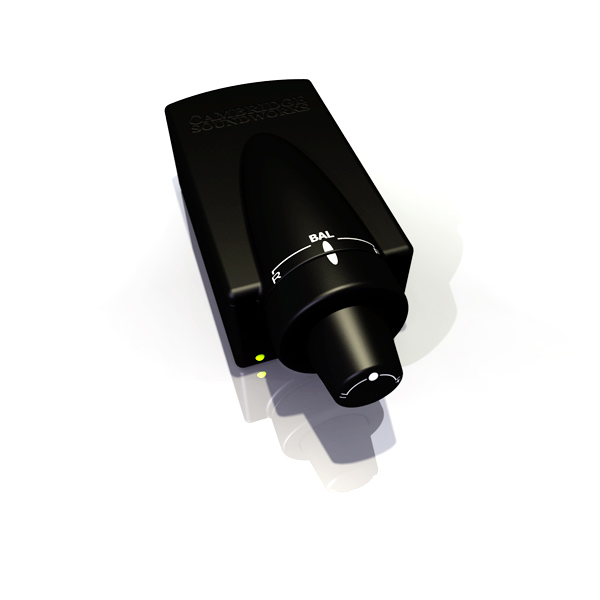
Well, as promised, after my exam in the morning (I missed only 1 question if
you were wondering), I played with it all afternoon and evening yesterday,
perfecting my model, and adding some better textures. I used focal_blur, but
I guess I made the aperture too low. Oh, well. I don't feel like waiting for
another render, so here you go. Enjoy. :)
Post a reply to this message
Attachments:
Download 'volumedial2.jpg' (33 KB)
Preview of image 'volumedial2.jpg'
|
|
| |
| |
|
|
|
|
| |
| |
|
|
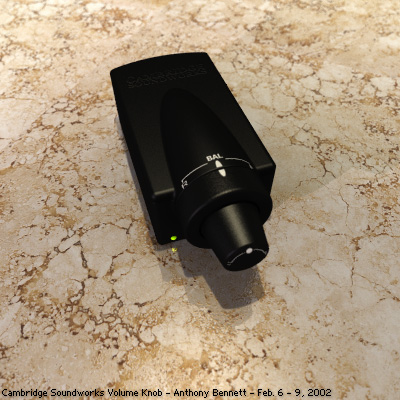
Here's the improved render I promised. You like?
Post a reply to this message
Attachments:
Download 'volumedial3.jpg' (79 KB)
Preview of image 'volumedial3.jpg'
|
|
| |
| |
|
|
|
|
| |
| |
|
|
> Here's the improved render I promised. You like?

Hi Tony!

It's much better now.  :o)  The ground texture is one thing, but I see
you've improved the black texture too, and that's especially important.. I
easily see the shape now!  I just think about, maybe it could benefit from
some blurred reflection.. It would add to the realism, although there's not
so much ...to reflect... as yet, except the ground.

As you might know: taking additional normal samples can be extremely slow..
It's mainly slow when a blurred surface reflects on itself, but I found a
little trick: Decrease max_trace_level in global settings to 3 or 4
(however this will unfortunately affect the whole scene) and use just 4 or 5
samples for the reflection blur.. Set adc_bailout to 1/128.. That's pretty
quick, and it seems you're using a small granite pattern to simulate
microfacets, so ... it will look pretty smooth.

It's just a suggestion - you may have noticed that I'm a nerd for realism..
I have a digital camera that made me realize how realistic real life looks.
:o)  It looks great and I want this in my renders too.. Anyway, you're
getting much closer to the real look.

Regards,
Hugo
Post a reply to this message
|
|
| |
| |
|
|
|
|
| |
| |
|
|
"Tony[B]" <ben### [at] catholic org> escribió en el mensaje
news:3c65a18a@news.povray.org...
> Here's the improved render I promised. You like?
Yes I do. Another pretty example of photorealism.
Keep up the good work.
Bye.
--
Txemi Jendrix
tji### [at] euskalnetnet
http://www.geocities.com/txemijendrix org> escribió en el mensaje
news:3c65a18a@news.povray.org...
> Here's the improved render I promised. You like?
Yes I do. Another pretty example of photorealism.
Keep up the good work.
Bye.
--
Txemi Jendrix
tji### [at] euskalnetnet
http://www.geocities.com/txemijendrix
Post a reply to this message
|
|
| |
| |
|
|
|
|
| |
| |
|
|
> Hi Tony!

Hi, Hugo!

> It's much better now.  :o)  The ground texture is one thing, but I see
> you've improved the black texture too, and that's especially important.

Actually, I didn't do much to the black texture, but I did reposition the
lights to properly show off the contours.

> I easily see the shape now!  I just think about, maybe it could benefit
from
> some blurred reflection.. It would add to the realism, although there's
not
> so much ...to reflect... as yet, except the ground.

Well, yes, you're right. It would be more physically accurate with blurred
reflection, but as there are no actual light objects (i.e. lamps, bulbs) to
reflect, you would not have seen any highlights on it at all, so I opted for
specular. If/when I integrate this into a real scene, I will redo the
texture.

> As you might know: taking additional normal samples can be extremely slow.

I really don't feel that it's so slow... Unless you make it reflect against
other blurred textures, but especially when you use it on transparent
objects, *then* it's slow - to the point of being impractical.

<snips trick> I'll keep it in mind, thanks.

> it seems you're using a small granite pattern to simulate
> microfacets, so ... it will look pretty smooth.

Actually, I just tweaked the image_map of the granite (desaturated, played
with levels), and used that as a bump_map. I wasn't really going for blurred
reflection, just trying to give the surface a more 3D feel.

> I have a digital camera that made me realize how realistic real life
looks.

I want a digital camera... waaa....

> Anyway, you're getting much closer to the real look.

Thanks. Although this should be my last render with this model. I would like
to move on and do others. It's satisfactory for me as-is. It's not
hyper-realistic, but realistic enough for me. :)
Post a reply to this message
|
|
| |
| |
|
|
|
|
| |
| |
|
|
> Yes I do. Another pretty example of photorealism.
> Keep up the good work.

Thanks! Will do. :)
Post a reply to this message
|
|
| |
| |
|
|
|
|
| |
| |
|
|
I liked very much the textures of everything. I've never seen a Cambridge
Soudworks (my computer sound system sucks) Volume knob, but I can say that
you render looks VERY realistic.

Congratulations,

Fernando.


"Tony[B]" <ben### [at] catholicorg> wrote in message
news:3c65a18a@news.povray.org...
> Here's the improved render I promised. You like?
>
>
>
Post a reply to this message
|
|
| |
| |
|
|
|
|
| |
| |
|
|
> I liked very much the textures of everything. I've never seen a Cambridge
> Soundworks (my computer sound system sucks) Volume knob, but I can
> say that you render looks VERY realistic.

Thank you! I attribute it to a number of factors:

1) using Jaime's lighting includes
2) using radiosity
3) using a bitmap of real marble for the texture of the marble
4) using focal_blur
5) making the marble slightly transparent and using a bright fade_color
(this may or may not have helped, but it didn't hurt :)

Still, it's not hyper-real, as I would have liked. I wish I could put my
finger on what it lacks. I know something about the plastic just isn't
right. I wish I knew what. <sigh>
Post a reply to this message
|
|
| |
| |
|
|
|
|
| |
| |
|
|
> Here's the improved render I promised. You like?

much better :)


--

Rick

Kitty5 WebDesign - http://Kitty5.com
POV-Ray News & Resources - http://Povray.co.uk
TEL : +44 (01270) 501101 - FAX : +44 (01270) 251105 - ICQ : 15776037

PGP Public Key
http://pgpkeys.mit.edu:11371/pks/lookup?op=get&search=0x231E1CEA
Post a reply to this message
|
|
| |
| |
|
|
|
|
| |
| |
|
|
Nice plastic. This has a super clean look that I like.

Tony[B] <ben### [at] catholicorg> wrote in message
news:3c65a18a@news.povray.org...
Post a reply to this message
|
|
| |
| |
|
|
|
|
| |
| |
|
|
> Nice plastic. This has a super clean look that I like.

Thanks... I don't like it because it makes things look CG... :)
Post a reply to this message
|
|
| |
| |
|
|
|
|
| |
| |
|
|
Tony[B] <ben### [at] catholicorg> wrote in message
news:3c67eb34@news.povray.org...
> Thanks... I don't like it because it makes things look CG... :)

Not necessarily a bad thing. Have you seen the new Volvo commercial? Film
footage was altered to look like CSG.

 -Shay
Post a reply to this message
|
|
| |
| |
|
|
|
|
| |
| |
|
|
> Still, it's not hyper-real, as I would have liked. I wish I could put my
> finger on what it lacks. I know something about the plastic just isn't
> right. I wish I knew what. <sigh>

I think I know what it is.. If you want to know.. It's 2 things:  The light
and the reflection.. Raytraced lights comes from an infinite small point,
and that's not realistic.. Look at the window next to you:  The light enters
the room from ALL the window; from the upper left corner to the lower right
corner, although there might be an angle where the light is most intense
(sunlight).

Even bulps are an "area" of light.. A small area, but since the light
usually bounces off the walls, it once again creates a very big area of
light.. You can simulate this in Pov with multiple light sources closely
around each other, either in shape of a window or a bulp, and use radiosity
for light bouncing off the walls.. Area_lights in Pov only makes the shadows
soft; they don't change the light itself.

Second thing is the reflection on the plastic. You use the specular keyword.
That's actually a shortcut for blurred reflection. The realistic thing would
be to turn off specular, and use blurred reflection. Even if there is just
the ground to reflect, this will be visible.

I know this smashes the render time, but there's no way around it..  :o/
You CAN however speed things up by using as few light_sources as possible
and by using Jaime Vives trick of a 2-pass rendering.. First save a
radiosity file rendered without blurred reflection. Then load the radiosity
file and render the scene WITH blurred reflection.. I would also mix the
specular keyword with a low-quality blurred reflection, for speed reasons.

Radiosity won't help the scene if there are no walls. Jaime's light macro
won't help if there are only small objects in the scene. I think it's mostly
useful with big scenes ala his office.

I hope this will help you.. Maybe you knew this already, but some people
probably does not..

Best wishes,
Hugo
Post a reply to this message
|
|
| |
| |
|
|
|
|
| |
| |
|
|
> I think I know what it is.. If you want to know.. It's 2 things:  The
light
> and the reflection.. Raytraced lights comes from an infinite small point,
> and that's not realistic...

Depends on the case... for some things, it's perfectly feasible, like light
sources that are reeeeally far away.

> Look at the window next to you:  The light enters
> the room from ALL the window; from the upper
> left corner to the lower right corner, although there
> might be an angle where the light is most intense

How did you know I have a window next to me? <looks around for spy cameras>

> Area_lights in Pov only makes the shadows
> soft; they don't change the light itself.

Yeah, I know.

> Second thing is the reflection on the plastic. You use the specular
keyword.
> That's actually a shortcut for blurred reflection.

For a shortcut, it's quite accurate. Blinn would be preferable, but this
ain't MegaPOV. I actually think it's the bumpiness of the surface. It's too
smooth in the rendering.

> and by using Jaime Vives trick of a 2-pass rendering.

Kari Kivisalo's trick (again!), actually... It was developed when (IIRC) JRG
had some trouble with a glass object.

> Radiosity won't help the scene if there are no walls.

Oh, yes, it will... Light bounces between the plane the object(s).

> Jaime's light macro won't help if there are
> only small objects in the scene.

Although it's best for closed environments, it made a nice difference on my
exterior scene.

> I hope this will help you.. Maybe you
> knew this already, but some people
> probably does not.

Yep. Thanks anyway.
Post a reply to this message
|
|
| |
| |
|
|
|
|
| |
| |
|
|
> > Raytraced lights comes from an infinite small point,
> > and that's not realistic...
>
> Depends on the case... for some things, it's perfectly feasible, like
light
> sources that are reeeeally far away.

Maybe you're right.. To my big surprise yesterday, I found that making a
"real" area light with lights placed similary to the fake area_light, makes
NO DIFFERENCE!

Now I don't understand anything anymore........

Hugo
Post a reply to this message
|
|
| |
| |
|
|
|
|
| |
| |
|
|
How are the white labels and the logo done... Please e mail me in response so i
do not forget... My time in the ng is sparatic and i space out where i left off
at... =] Well done man... =]

"Tony[B]" wrote:

> Well, as promised, after my exam in the morning (I missed only 1 question if
> you were wondering), I played with it all afternoon and evening yesterday,
> perfecting my model, and adding some better textures. I used focal_blur, but
> I guess I made the aperture too low. Oh, well. I don't feel like waiting for
> another render, so here you go. Enjoy. :)
>
>  [Image]
Post a reply to this message
|
|
| |
| |
|
|
|
|
| |
| |
|
|
Thanks for the info "TeeBee"
The marble needs some shiny ness to it, or highlights from the light hitting it
like a pane of glass, most marbles have this if they are polished... ??
What version of pov are you using, you said not mega... ?? I prefer mega to
anything else right now... others are 2 buggy and i really am attached to the old
mac giu and cuz i took so much time to press to get the mega into the old shell i
will stick with it till 3.5 is "finished" and maybe thereafter...?? We shall
see... =]
I think the plastic looks fine in the second render, in the first it shows too
much gradient maybe that's just the compression though... ??

>>How did you know I have a window next to me? < looks around for spy cameras >

I told ya all before they are in the TREES man in the TREES... <•: looking around
and crouching at the window sill :•>

>>Blinn would be preferable,

I use phong & specular in all my images they go quite well together... =]

TTFN... =]

Ryan Mooney wrote:

> How are the white labels and the logo done... Please e mail me in response so i
> do not forget... My time in the ng is sparatic and i space out where i left off
> at... =] Well done man... =]
>
> "Tony[B]" wrote:
>
> > Well, as promised, after my exam in the morning (I missed only 1 question if
> > you were wondering), I played with it all afternoon and evening yesterday,
> > perfecting my model, and adding some better textures. I used focal_blur, but
> > I guess I made the aperture too low. Oh, well. I don't feel like waiting for
> > another render, so here you go. Enjoy. :)
> >
> >  [Image]
Post a reply to this message
|
|
| |
| |
|
|
|
|
| |