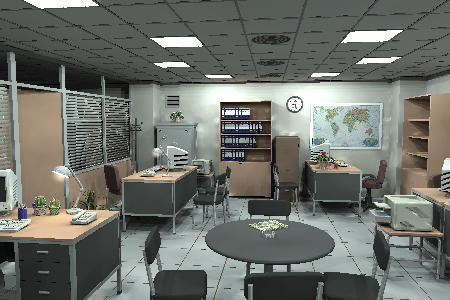
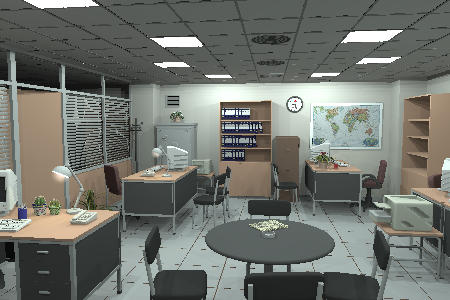
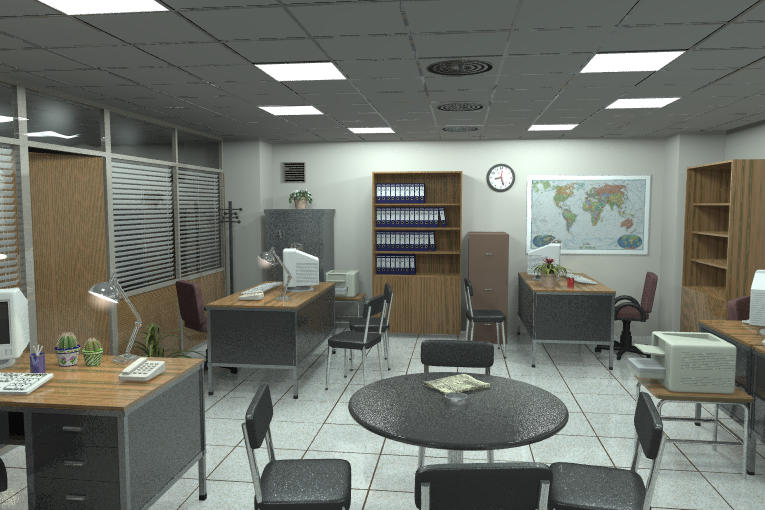
|
|
|
|
|
|
| |
| |
|
|
From: Jaime Vives Piqueres
Subject: artifacts & save/load radiosity (64KB)
Date: 17 Dec 2001 15:35:12
Message: <3c1e56f8@news.povray.org>
|
|
|
| |
| |
|
|
Hi all:

  I must admit this is the first time I've tried this wonderful trick of
saving radiosity with a "dummy" scene. It works pretty well. So well that
it even gets ride of the radiosity artifacts on my poor settings! I'm the
only who experienced this?

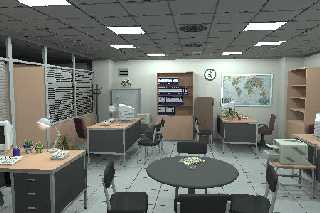
  I have a WIP with many objects and tracing very slow with "real"
radiosity, and producing very visible artifacts. Then I wrote a "dummy"
version of the textures and rendered saving radiosity (the first image
attached). As a first test, with the same faked textures, I re-rendered the
scene, this time loading the file and setting always_sample off and
pretraces to 1 (second image). As you can see, the artifacts magically
disapeared....

  !?

--
Jaime Vives Piqueres

La Persistencia de la Ignorancia
http://www.ignorancia.org
Post a reply to this message
Attachments:
Download 'office_rad_normal.jpg' (34 KB)
Download 'office_rad_normal_loaded.jpg' (31 KB)
Preview of image 'office_rad_normal.jpg'
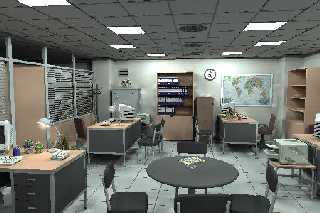
Preview of image 'office_rad_normal_loaded.jpg'
|
|
| |
| |
|
|
|
|
| |
| |
|
|
Wow. Very realistic, except for a few details here and there.

Do another one with AA =)

- Slime
[ http://www.slimeland.com/ ]
[ http://www.slimeland.com/images/ ]
Post a reply to this message
|
|
| |
| |
|
|
From: Christoph Hormann
Subject: Re: artifacts & save/load radiosity (64KB)
Date: 17 Dec 2001 17:08:48
Message: <3C1E6CE6.E1273A1B@gmx.de>
|
|
|
| |
| |
|
|
Jaime Vives Piqueres wrote:
>
> Hi all:
>
> I must admit this is the first time I've tried this wonderful trick of
> saving radiosity with a "dummy" scene. It works pretty well. So well that
> it even gets ride of the radiosity artifacts on my poor settings! I'm the
> only who experienced this?
>
I have not much tried this method yet, it seems that the results are less
'precise' (or 'realistic') but look fairly good. And if i understand it
right you can do any 'in between' version when you increase the complexity
of the dummy scene.
Could you show the geometry of your dummy scene?
Christoph
--
Christoph Hormann <chr### [at] gmx de>
IsoWood include, radiosity tutorial, TransSkin and other
things on: http://www.schunter.etc.tu-bs.de/~chris/ de>
IsoWood include, radiosity tutorial, TransSkin and other
things on: http://www.schunter.etc.tu-bs.de/~chris/
Post a reply to this message
|
|
| |
| |
|
|
From: Jaime Vives Piqueres
Subject: Re: artifacts & save/load radiosity (64KB)
Date: 17 Dec 2001 17:29:52
Message: <3c1e71df@news.povray.org>
|
|
|
| |
| |
|
|
Christoph Hormann wrote:

> And if i understand it right you can do any 'in between' version when you
> increase the complexity of the dummy scene.

  Hmmm... sorry, but I do not understand what you mean here... (my english,
sure).

> Could you show the geometry of your dummy scene?

  :) ...that's the dummy scene! Both images are rendered from the real
scene, but with all textures changed to simple pigments and removing all
glass. The real one it's just the same but with realistic textures and the
glass sheets. Indeed, the scene is no yet finished, I must add still more
objects and replace some placeholders. It started as a test for my light
macro, but I can't do test scenes... something always urges me to finish
them.

  I will trace the real scene with more resolution this night (with the
saved radiosity data), to see if it really lacks precision.

--
Jaime Vives Piqueres

La Persistencia de la Ignorancia
http://www.ignorancia.org
Post a reply to this message
|
|
| |
| |
|
|
From: Fabien Mosen
Subject: Re: artifacts & save/load radiosity (64KB)
Date: 17 Dec 2001 17:31:36
Message: <3C1E72B8.80909@skynet.be>
|
|
|
| |
| |
|
|
Jaime Vives Piqueres wrote:

>   I must admit this is the first time I've tried this wonderful trick of
> saving radiosity with a "dummy" scene. It works pretty well. So well that
> it even gets ride of the radiosity artifacts on my poor settings! I'm the
> only who experienced this?


I'm somewhat convinced that commercial rendering packages uses
simplified textures for their radiance samples, thus removing many
artefacts and improving speed.

I'd like to insist on this : there should be an option to turn off
reflection and refraction for radiance samples, and it's probably
time to find a modern usefulness to "quick_color"...

Fabien.
Post a reply to this message
|
|
| |
| |
|
|
From: Jaime Vives Piqueres
Subject: Re: artifacts & save/load radiosity (64KB)
Date: 17 Dec 2001 17:35:17
Message: <3c1e7324@news.povray.org>
|
|
|
| |
| |
|
|
Slime wrote:

> Wow. Very realistic, except for a few details here and there.

  Hey, don't go so fast to the attachments! I said they were tests! :) The
realistic part I hope it's comming from the light sources, obtained with a
macro I'm writing (no yet polished).

> Do another one with AA =)

  No. I'm planning to use focal blur for some reasons...

--
Jaime Vives Piqueres

La Persistencia de la Ignorancia
http://www.ignorancia.org
Post a reply to this message
|
|
| |
| |
|
|
From: Christoph Hormann
Subject: Re: artifacts & save/load radiosity (64KB)
Date: 18 Dec 2001 03:54:06
Message: <3C1F042D.4C280D15@gmx.de>
|
|
|
| |
| |
|
|
Jaime Vives Piqueres wrote:
>
>   :) ...that's the dummy scene! Both images are rendered from the real
> scene, but with all textures changed to simple pigments and removing all
> glass. The real one it's just the same but with realistic textures and the
> glass sheets. Indeed, the scene is no yet finished, I must add still more
> objects and replace some placeholders. It started as a test for my light
> macro, but I can't do test scenes... something always urges me to finish
> them.
>

So you did not change the scene geometry for these renders at all, seems i
got this wrong.

When you use 'always_sample off' it's usually important to use a low
pretrace_end and it can even be a good idea to do the radiosity-render at
higher resolution.  Otherwise the radiosity data would possibly not
correspond to the settings used.  In a convential radiosity render this is
not that important because samples are still taken during the final trace.

Christoph

--
Christoph Hormann <chr### [at] gmxde>
IsoWood include, radiosity tutorial, TransSkin and other
things on: http://www.schunter.etc.tu-bs.de/~chris/
Post a reply to this message
|
|
| |
| |
|
|
|
|
| |
| |
|
|
Fabien Mosen scribis news:3C1### [at] skynetbe:

> and it's probably time to find a modern usefulness to "quick_color"...

Lets see: quick_color would have to get enabled at the same quality
settings as radiosity or radiosity needs to be enabled at +q5.

personally, I think a command line/ ini file setting to enable quick_color
would be better.


--
"The only difference between me and a madman is I'm not mad" Salvidor Dali

Arto
Post a reply to this message
|
|
| |
| |
|
|
From: Jaime Vives Piqueres
Subject: Re: artifacts & save/load radiosity (65KB)
Date: 18 Dec 2001 10:07:50
Message: <3c1f5bbf@news.povray.org>
|
|
|
| |
| |
|
|
Jaime Vives Piqueres wrote:

>   I will trace the real scene with more resolution this night (with the
> saved radiosity data), to see if it really lacks precision.

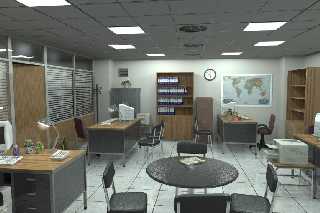
  That's a test render of the real scene, with the reflective textures  and
glass. It uses the radiosity saved on the first render posted (that with
the artifacts). I think the artifacts disapear by using pretrace start and
end set to 1.

  About the scene itself, I've still to work a lot more...

--
Jaime Vives Piqueres

La Persistencia de la Ignorancia
http://www.ignorancia.org
Post a reply to this message
Attachments:
Download 'office.jpg' (65 KB)
Preview of image 'office.jpg'
|
|
| |
| |
|
|
From: Christoph Hormann
Subject: Re: artifacts & save/load radiosity (65KB)
Date: 18 Dec 2001 11:51:24
Message: <3C1F740B.D22AEE80@gmx.de>
|
|
|
| |
| |
|
|
Jaime Vives Piqueres wrote:
>
> Jaime Vives Piqueres wrote:
>
> >   I will trace the real scene with more resolution this night (with the
> > saved radiosity data), to see if it really lacks precision.
>
>   That's a test render of the real scene, with the reflective textures  and
> glass. It uses the radiosity saved on the first render posted (that with
> the artifacts). I think the artifacts disapear by using pretrace start and
> end set to 1.

I think it looks good, NTL it will be interesting to see it with more
precise radiosity data.  The reflective textures with normal look somewhat
strange, maybe try the layered textures blurred reflection method.

>
>   About the scene itself, I've still to work a lot more...
>

I think there is already quite a lot of detail, the plants and other
decoration look really nice, only the wireless phones, monitors etc. are
somewhat remarkable. ;-)

Christoph

--
Christoph Hormann <chr### [at] gmxde>
IsoWood include, radiosity tutorial, TransSkin and other
things on: http://www.schunter.etc.tu-bs.de/~chris/
Post a reply to this message
|
|
| |
| |
|
|
|
|
| |
| |
|
|
Looks good. Same feeling as in those architectural Radiance
simulations.


_____________
Kari Kivisalo
Post a reply to this message
|
|
| |
| |
|
|
From: Jaime Vives Piqueres
Subject: Re: artifacts & save/load radiosity (65KB)
Date: 18 Dec 2001 12:09:57
Message: <3c1f7865@news.povray.org>
|
|
|
| |
| |
|
|
Christoph Hormann wrote:
>
> I think it looks good, NTL it will be interesting to see it with more
> precise radiosity data.  The reflective textures with normal look somewhat
> strange, maybe try the layered textures blurred reflection method.

  Thanks! And yes, radiosity is default Radiosity_Normal: I must fine tune
it for the final render (I was only playing with the "radiosity trick of
the moment":).

> decoration look really nice, only the wireless phones, monitors etc. are
> somewhat remarkable. ;-)

  That's what I call "a hard work". :-(

--
Jaime Vives Piqueres

La Persistencia de la Ignorancia
http://www.ignorancia.org
Post a reply to this message
|
|
| |
| |
|
|
From: Jaime Vives Piqueres
Subject: Re: artifacts & save/load radiosity (65KB)
Date: 18 Dec 2001 12:21:27
Message: <3c1f7b17@news.povray.org>
|
|
|
| |
| |
|
|
Kari Kivisalo wrote:

>
> Looks good. Same feeling as in those architectural Radiance
> simulations.

  Wow! Tha's exactly what I tought when first testing the scene. I think it
is due to the use of light_sources with extremelly high color values and
very low fade distances (and fade power 2, of course). The images on the
galleries at the Radiance server are often lighted this way, I think.

--
Jaime Vives Piqueres

La Persistencia de la Ignorancia
http://www.ignorancia.org
Post a reply to this message
|
|
| |
| |
|
|
From: Jaime Vives Piqueres
Subject: Re: artifacts & save/load radiosity (65KB)
Date: 18 Dec 2001 12:36:26
Message: <3c1f7e99@news.povray.org>
|
|
|
| |
| |
|
|
Christoph Hormann wrote:
> precise radiosity data.  The reflective textures with normal look somewhat
> strange, maybe try the layered textures blurred reflection method.

  I forgot to mention that I'm planning to use focal_blur as replacement
for aa on the final render. With 32 samples and little aperture it is not
much more slow than the trick... :)

--
Jaime Vives Piqueres

La Persistencia de la Ignorancia
http://www.ignorancia.org
Post a reply to this message
|
|
| |
| |
|
|
|
|
| |
| |
|
|
Looks great to me.

Kev
Post a reply to this message
|
|
| |
| |
|
|
|
|
| |
| |
|
|
rad lighting really seems to solve the headache of indoor lighting - think i
will have to give it a try on an office building scene i gave up on a couple
of years back


--

Rick

Kitty5 WebDesign - http://Kitty5.com
POV-Ray News & Resources - http://Povray.co.uk
TEL : +44 (01270) 501101 - FAX : +44 (01270) 251105 - ICQ : 15776037

PGP Public Key
http://pgpkeys.mit.edu:11371/pks/lookup?op=get&search=0x231E1CEA
Post a reply to this message
|
|
| |
| |
|
|
|
|
| |
| |
|
|
Arthur Flint wrote in message ...
>
>Lets see: quick_color would have to get enabled at the same quality
>settings as radiosity or radiosity needs to be enabled at +q5.
>
>personally, I think a command line/ ini file setting to enable quick_color
>would be better.


I wrote a patch to do that once: I added command-line switches to turn each
of the quality options on or off individually, rather than having to use the
+qn switches.  It might have made it into SkyPOV, or it might not.  I don't
remember.

--
Mark
Post a reply to this message
|
|
| |
| |
|
|
|
|
| |
| |
|
|
"Arthur Flint" <mra### [at] chesapeakenet> a écrit dans le message news:

> Lets see: quick_color would have to get enabled at the same quality
> settings as radiosity or radiosity needs to be enabled at +q5.

That's simple : you add a quick_color statement to your
object (or to your texture), and that's the color that will be used
for radiosity samples, if radiance is enabled.

If Q is under 6, it uses quick_color for everything.

Fabien.
Post a reply to this message
|
|
| |
| |
|
|
|
|
| |