|
|
|
|
|
|
| |
| |
|
|
|
|
| |
| |
|
|
Hi

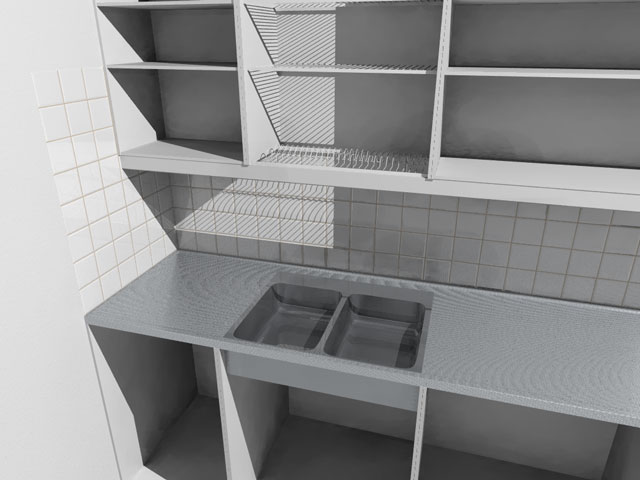
I've been working on this kitchen and ran into moire. Is there a way to get
rid of it or do I have to live with it?
Another question is the metal texture on the sink. Blurred reflection is too
slow and Rune's brushed metal looked weird. Does anyone have a nice fuzzy
metal texture in mind?

Ari-Matti
Post a reply to this message
Attachments:
Download 'kitchen.jpg' (42 KB)
Preview of image 'kitchen.jpg'
|
|
| |
| |
|
|
|
|
| |
| |
|
|
In article <3c129eb4@news.povray.org>, ari### [at] tut fi says...
> I've been working on this kitchen and ran into moire. Is there a way to get
> rid of it or do I have to live with it?
antialiasing method 2 perhaps? (+am2 in the command Line)
Lutz-Peter fi says...
> I've been working on this kitchen and ran into moire. Is there a way to get
> rid of it or do I have to live with it?
antialiasing method 2 perhaps? (+am2 in the command Line)
Lutz-Peter
Post a reply to this message
|
|
| |
| |
|
|
|
|
| |
| |
|
|
"Lutz-Peter Hooge" <lpv### [at] gmxde> wrote in message
news:MPG.167cbeadaff1ba6f9896c9@news.povray.org...
> In article <3c129eb4@news.povray.org>, ari### [at] tutfi says...
>
> antialiasing method 2 perhaps? (+am2 in the command Line)

+am2 +r5 +a0.1 wasn't enough.

Ari-Matti
Post a reply to this message
|
|
| |
| |
|
|
|
|
| |
| |
|
|
In article <3c12a1fe@news.povray.org>, ari### [at] tutfi says...

> +am2 +r5 +a0.1 wasn't enough.
Ouch...
Post a reply to this message
|
|
| |
| |
|
|
|
|
| |
| |
|
|
"Ari-Matti Leppanen" <ari### [at] tutfi> wrote in
news:3c129eb4@news.povray.org:

> I've been working on this kitchen and ran into moire. Is there a way to
> get rid of it or do I have to live with it?

Well, you could try rendering at four times your desired resolution,
applying a 4x4 smoothing filter then downsampling using an image editor.
Slow, but in all likelyhood it will work.
Post a reply to this message
|
|
| |
| |
|
|
|
|
| |
| |
|
|
Give us some source. The camera, light, and a plane with that texture giving
you problems would do.
Post a reply to this message
|
|
| |
| |
|
|
|
|
| |
| |
|
|
On Sun, 9 Dec 2001 01:14:57 +0200, "Ari-Matti Leppanen"
<ari### [at] tutfi> wrote:

>I've been working on this kitchen and ran into moire. Is there a way to get
>rid of it or do I have to live with it?

Massive antialiase jittering?


Peter Popov ICQ : 15002700
Personal e-mail : pet### [at] vipbg
TAG      e-mail : pet### [at] tagpovrayorg
Post a reply to this message
|
|
| |
| |
|
|
|
|
| |
| |
|
|
Ari-Matti Leppanen wrote:

> I've been working on this kitchen and ran into moire. Is there a way to get
> rid of it or do I have to live with it?


  Hmmmm... focal blur? I've not tested it, but I seem to remember Suzuky
saying he used focal blur to avoid moire patterns in one of his latest
posts.

> Another question is the metal texture on the sink. Blurred reflection is too
> slow and Rune's brushed metal looked weird. Does anyone have a nice fuzzy
> metal texture in mind?

  Search these newsgroups for the recent trick on blurred reflection
developed by Ron Parker and others. It's great!


--
Jaime Vives Piqueres

La Persistencia de la Ignorancia
http://www.ignorancia.org/
Post a reply to this message
|
|
| |
| |
|
|
|
|
| |
| |
|
|
"Coridon Henshaw" <che### [at] sympaticoca> wrote in message
news:Xns### [at] 204213191226...
> "Ari-Matti Leppanen" <ari### [at] tutfi> wrote in
> news:3c129eb4@news.povray.org:
>
>
> Well, you could try rendering at four times your desired resolution,
> applying a 4x4 smoothing filter then downsampling using an image
> editor. Slow, but in all likelyhood it will work.
>

Sounds painfull.. I think I'll save this for the last desperate trace when
all else has failed. But thanks anyway.

Ari-Matti
Post a reply to this message
|
|
| |
| |
|
|
|
|
| |
| |
|
|
"Tony[B]" <ben### [at] catholicorg> wrote in message
news:3c12b4a7@news.povray.org...
> Give us some source. The camera, light, and a plane with that texture
> giving you problems would do.

Here it is.

Ari-Matti

//------------------------------------
camera {
  right x*image_width/image_height
  location  <-80.0, 180.0, 25.0>
  look_at   <-120.0, 120.0,  160.5>
}


light_source { <0, 0, 0>
  color 1
  area_light <2, 0, 0>, <0, 2, 0>, 20, 20
  adaptive 1
  jitter
  circular
  orient

  translate <0, 250, 100>
  photons{refraction on reflection on}
}

plane {
  y, 89.5

  texture {
    pigment { rgb <0.39, 0.41, 0.43>  quick_color rgb 0.5 }

    finish {
      diffuse 0.8
      brilliance 5
      specular 0.80
      roughness 1/100
      metallic on
      reflection { 0.65 metallic }
    }

    normal {
      quilted control0 0.5 control1 1
      rotate y*45
      scale <1,1,0.4>
    }
  }
}
//------------------------------------
Post a reply to this message
|
|
| |
| |
|
|
|
|
| |
| |
|
|
>     normal {
>       quilted control0 0.5 control1 1
>       rotate y*45
>       scale <1,1,0.4>
>     }

Well, there's you're problem! This sort of pattern will quickly develop
moire! :) Use something like bumps. Or better yet, use Ron's blurred
reflection trick. I'll go whip up a version of this using his technique and
post it for you.
Post a reply to this message
|
|
| |
| |
|
|
|
|
| |
| |
|
|
I hope this does what you want. I didn't make it super-smooth because I
figured you wanted a little graininess.

camera {
  right x*image_width/image_height
  location  <-80.0, 180.0, 25.0>
  look_at   <-120.0, 120.0,  160.5>
}

light_source { <0, 0, 0>
  color 1
  area_light <2, 0, 0>, <0, 2, 0>, 20, 20
  adaptive 1
  jitter
  circular
  orient

  translate <0, 250, 100>
  photons{refraction on reflection on}
}

difference
{
 box {-1000,1000}
 box {-999,999}
 pigment {rgb 1}
}

#declare Metal =
texture
{
 pigment
 {
  rgb <0.39, 0.41, 0.43>
  quick_color rgb 0.5
 }
 finish
 {
  diffuse 0.8 brilliance 5
  specular 0.80 roughness 0.01
  metallic on
  reflection {0.65 metallic}
 }
}

#declare BlurredMetal =
texture
{
 average
 texture_map
 {
  #declare I = 0;
  #declare S = seed(7);
  #while (I<50)
   [1
    Metal
    normal
    {
     bumps scale 0.1 triangle_wave bump_size 0.125
     translate <rand(S),rand(S),rand(S)>*0.2
    }
   ]
   #declare I = I + 1;
  #end
 }
}

plane {y, 89.5 texture {BlurredMetal}}

sphere {y*109.5,20 pigment {red 1} translate <-120,0,160.5>}
Post a reply to this message
|
|
| |
| |
|
|
|
|
| |
| |
|
|
"Tony[B]" <ben### [at] catholicorg> wrote in message
news:3c1367df@news.povray.org...
> Well, there's you're problem! This sort of pattern will quickly develop
> moire! :) Use something like bumps. Or better yet, use Ron's blurred
> reflection trick. I'll go whip up a version of this using his technique
> and post it for you.
>
Well, I kinda know that. I want to get rid of moire not the texture. :) That
kind of quadrangular bump pattern is on my kitchen counter.
I have already tried the blurred reflection trick on the sinks, but it's
sooo sloooow.

But thanks for your effort!

Ari-Matti
Post a reply to this message
|
|
| |
| |
|
|
|
|
| |
| |
|
|
> Well, I kinda know that. I want to get rid of moire not the texture. :)
That
> kind of quadrangular bump pattern is on my kitchen counter.

Well, if you want to be physically accurate I can't help you. I only
provided a solution that works so it looks right.

> I have already tried the blurred reflection trick on the sinks, but it's
> sooo sloooow.

I often forget I'm running at 1.33GHz... :)

> But thanks for your effort!

You're welcome.
Post a reply to this message
|
|
| |
| |
|
|
|
|
| |
| |
|
|
"Tony[B]" <ben### [at] catholicorg> wrote in message
news:3c13bed5@news.povray.org...
> > I have already tried the blurred reflection trick on the sinks, but
> > it's sooo sloooow.
>
> I often forget I'm running at 1.33GHz... :)
>
Try replacing the plane in the scene you sent with this:

union {
    box {<-999, 89.5, -999><-150.1, 0, 999> }
    box {<-89.9, 89.5, -999><999, 0, 999> }
    box {<-150.1, 89.5, -999><-89.9, 0, 135.4> }
    box {<-150.1, 89.5, 185.6><-89.9, 0, 999> }

  difference {
    box {<-150.1, 89.5, 185.6><-89.9, 0, 135.4> }
    box {<-150, 89.6, 185.5><-90, 69.5, 135.5> }
  }

  texture {BlurredMetal}
}
and you'll see that some things are slow even with 1.33GHz. Tracing that is
at least ten times slower than it was with just a plane. I guess there's no
way to optimize that difference. :(

Ari-Matti

(PS. Hmm.. I wounder what happens, if I put some glass objects in my
kitchen, increase the max_trace_level to make them trace correctly AND use
the blurred reflection with I < 50. ;) )
Post a reply to this message
|
|
| |
| |
|
|
|
|
| |
| |
|
|
> (PS. Hmm.. I wounder what happens, if I put some glass objects in my
> kitchen, increase the max_trace_level to make them trace correctly AND use
> the blurred reflection with I < 50. ;) )

Do NOT use blurred reflection on transparent objects. It's TOO slow to
fathom.
Post a reply to this message
|
|
| |
| |
|
|
|
|
| |
| |
|
|
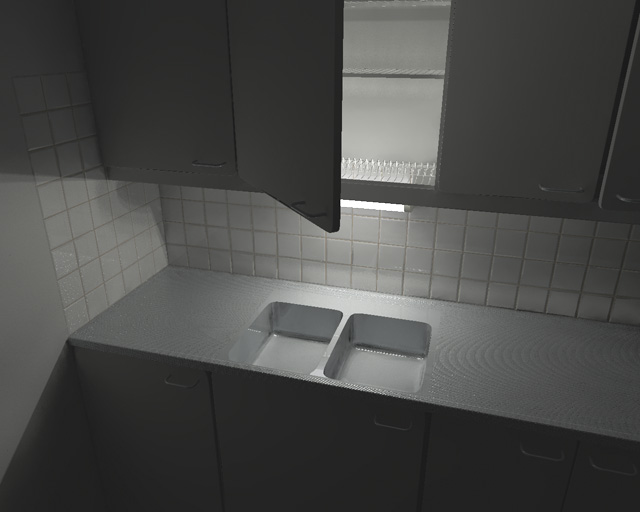
Hi

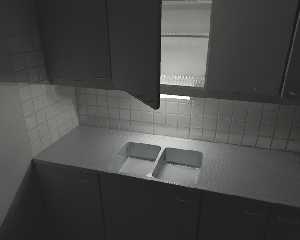
I got stuck playing with the lighting. Still haven't finished the faucet.
And I have to some plates, pots, glasses etc. It's a shame the multiple
instances are gone.
This version was done with that Dynamic Range Compression magic. A bit dark
I guess.. All lighting experts, the stage is yours.

Btw. the only way to get rid of the moire seems to be a four times bigger
picture scaled down and man it takes long. One test without reflections was
nearly a day. Thanks to all who gave suggestions to the earlier problems. :)

Ari-Matti
Post a reply to this message
Attachments:
Download 'k.jpg' (45 KB)
Preview of image 'k.jpg'
|
|
| |
| |
|
|
|
|
| |
| |
|
|
Ari-Matti Leppanen wrote:
>  [Image]

Hmm...I think the sink's a little small for the cabinets/light/tiles...
Other than that, I like it.  Needs more clutter, tho, to add realism ;)

--
Tim Cook
http://empyrean.scifi-fantasy.com

-----BEGIN GEEK CODE BLOCK-----
Version: 3.12
GFA dpu- s: a?-- C++(++++) U P? L E--- W++(+++)>$
N++ o? K- w(+) O? M-(--) V? PS+(+++) PE(--) Y(--)
PGP-(--) t* 5++>+++++ X+ R* tv+ b++(+++) DI
D++(---) G(++) e*>++ h+ !r--- !y--
------END GEEK CODE BLOCK------
Post a reply to this message
|
|
| |
| |
|
|
|
|
| |
| |
|
|
This definitely has that extra touch of realism that is missing
in plain vanilla renderings. The tube doesn't seem to be 36x1
in dimensions though, and my previous advice on the fade_distance
doesn't apply here unless you recalculated for the new geometry.

This a challenging scene for radiosity. Is the whole room modelled?
Just blank walls are enough for the out-of-frame parts and maybe
black patches for the window(s). The tonal balance looks ok for
sRGB image but more color variations would be nice. For the moire
I would try blurred version of the normal as normal map. If you
add glass to the scene the render time will explode unless it's
done is two steps.

The http news are broken at the moment so here's a NS link to
a thread where this glass and radiosity issue came up:
news://news.povray.org/3be39102%40news.povray.org
news://news.povray.org/3be532ca%40news.povray.org

First save the rad data from a "quick glass" render and reuse
it in the final render. The image is not important here so 1/2
resolution should be enough. Set glass or transparent objects like
this when saving rad data:

max_trace_level recursion_limit+1 (may need to be higher)
diffuse 0 ambient 0
no normal
no reflection

Then set them back to normal and:

load_file "rad.dat" always_sample off pretrace_start 1 pretrace_end 1


_____________
Kari Kivisalo
Post a reply to this message
|
|
| |
| |
|
|
|
|
| |
| |
|
|
Ari-Matti Leppanen wrote:
> I got stuck playing with the lighting. Still haven't finished the faucet.
> And I have to some plates, pots, glasses etc. It's a shame the multiple
> instances are gone.
> This version was done with that Dynamic Range Compression magic. A bit
> dark I guess.. All lighting experts, the stage is yours.

  Very good lighting! What is the scene scale, and what fade_distance you
used? (only curious)

--
Jaime Vives Piqueres

La Persistencia de la Ignorancia
http://www.ignorancia.org/
Post a reply to this message
|
|
| |
| |
|
|
|
|
| |
| |
|
|
"Jaime Vives Piqueres" <jai### [at] ignoranciaorg> wrote in message
news:3c1b9b50@news.povray.org...

> Very good lighting! What is the scene scale, and what fade_distance
> you used? (only curious)

Thanks. Scale is 1 pov-unit = 1 centimeter. fade_distance is about 3 for
every light source and the lamp has four of them.


Ari-Matti
Post a reply to this message
|
|
| |
| |
|
|
|
|
| |
| |
|
|
"Kari Kivisalo" <ray### [at] engineercom> wrote in message
news:3C1B2F05.3E150CF6@engineer.com...
>
> The tube doesn't seem to be 36x1 in dimensions though, and my
> previous advice on the fade_distance doesn't apply here unless you
> recalculated for the new geometry.

The "tube" you see is actually the plastic cover of the lamp. Inside it is a
35 units long cylinder with the same diameter so the fade_distance is
roughly 3.

> Is the whole room modelled? Just blank walls are enough for the
> out-of-frame parts and maybe black patches for the window(s).

Yep. White walls, no windows because I thought they wouldn't make a
difference.

> If you add glass to the scene the render time will explode unless it's
> done is two steps.

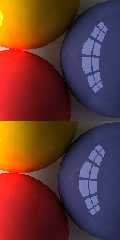
I've been using this with glass objects since it was discussed here. It's
been a really great help.

But how about reflective surfaces in general? A quick test shows that you
could trace any scene with this method. It's really fast because without
reflections you can use a lower max_trace_level and get the same result.
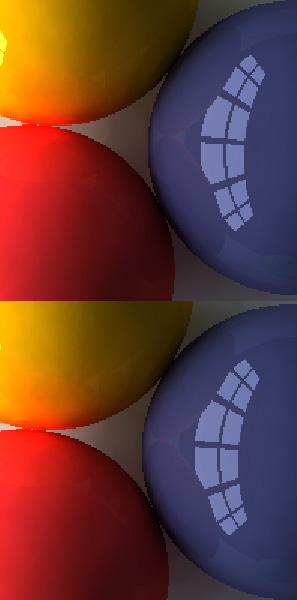
See the picture. The upper half was done in one trace with max_trace_level 7
(2m37s) and the lower was done in two traces, first save radiosity without
reflections with max_trace_level 4 (48s)and then load it with reflections
and max_trace_level 7 (19s). Difference in time is 1m30s and in quality
unnoticable.

Ari-Matti
Post a reply to this message
Attachments:
Download 'Balls3.jpg' (36 KB)
Preview of image 'Balls3.jpg'
|
|
| |
| |
|
|
|
|
| |
| |
|
|
Ari-Matti Leppanen wrote:
> Thanks. Scale is 1 pov-unit = 1 centimeter. fade_distance is about 3 for
> every light source and the lamp has four of them.

  Nice: we use the same scale! I'm also using lately very short values for
fade_distance and very high color intensities, always with fade_power 2.
It seems to work very well for realism.

--
Jaime Vives Piqueres

La Persistencia de la Ignorancia
http://www.ignorancia.org
Post a reply to this message
|
|
| |
| |
|
|
|
|
| |