|
|
|
|
|
|
| |
| |
|
|
|
|
| |
| |
|
|
From: "Mick Hazelgrove" <mic### [at] mhazelgrove fsnetcouk>
Subject:
Date: 15 November 2001 20:13
Hi
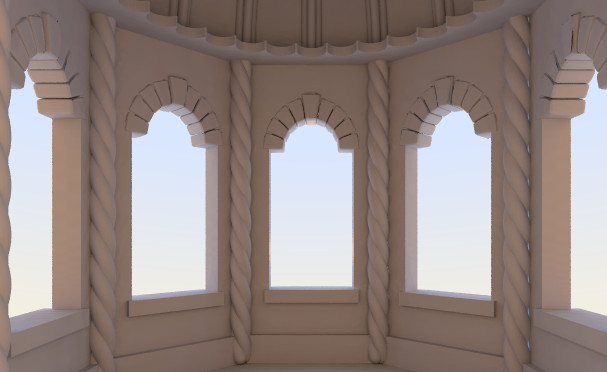
Notice the black marks aon the window arches. Any ideas what is causing them
or how I can get rid of them?
I suspect they are due to radiosity settings. The arches are basic triangle
meshes created in hamapatch and converted to pov by 3dwin.
Radiosity settings I'm using
radiosity{
pretrace_start 1//0.08
pretrace_end 1//0.04 //.004
count 400 // 2-400 in final
nearest_count 8
error_bound 0.15
recursion_limit 2
low_error_factor 0.5
gray_threshold 0
minimum_reuse 0.015
brightness 1.0
adc_bailout 0.01/2
normal on
media on
}
Any help gratefully received
Mick fsnetcouk>
Subject:
Date: 15 November 2001 20:13
Hi
Notice the black marks aon the window arches. Any ideas what is causing them
or how I can get rid of them?
I suspect they are due to radiosity settings. The arches are basic triangle
meshes created in hamapatch and converted to pov by 3dwin.
Radiosity settings I'm using
radiosity{
pretrace_start 1//0.08
pretrace_end 1//0.04 //.004
count 400 // 2-400 in final
nearest_count 8
error_bound 0.15
recursion_limit 2
low_error_factor 0.5
gray_threshold 0
minimum_reuse 0.015
brightness 1.0
adc_bailout 0.01/2
normal on
media on
}
Any help gratefully received
Mick
Post a reply to this message
Attachments:
Download 'Yuma Head.jpg' (41 KB)
Preview of image 'Yuma Head.jpg'
|
|
| |
| |
|
|
|
|
| |
| |
|
|
He he... it looks like posting messages with already-used titles is becoming
a very common mistake (in your case the message was attached to another
<no-title> message posted many months ago by... YOU (again) :-D

The black dots you're talking about are barely visible. Have you tried to
render it without radiosity? Are those dots still there? Otherwise they
might be due to bad convertion process (maybe inverted normals or something
like that).

Very nice scene.

--
Jonathan.

"Mick Hazelgrove" <mic### [at] mhazelgrovefsnetcouk> ha scritto nel messaggio
news:3bf4295c@news.povray.org...
> From: "Mick Hazelgrove" <mic### [at] mhazelgrovefsnetcouk>
> Subject:
> Date: 15 November 2001 20:13
>
> Hi
>
> Notice the black marks aon the window arches. Any ideas what is causing
them
> or how I can get rid of them?
>
> I suspect they are due to radiosity settings. The arches are basic
triangle
> meshes created in hamapatch and converted to pov by 3dwin.
>
> Radiosity settings I'm using
>
>     radiosity{
>        pretrace_start 1//0.08
>        pretrace_end   1//0.04  //.004
>        count 400  // 2-400 in final
>        nearest_count 8
>        error_bound 0.15
>        recursion_limit 2
>        low_error_factor 0.5
>        gray_threshold 0
>        minimum_reuse 0.015
>        brightness 1.0
>        adc_bailout 0.01/2
>    normal on
>    media on
>   }
>
> Any help gratefully received
>
> Mick
>
>
>
>
>
Post a reply to this message
|
|
| |
| |
|
|
|
|
| |
| |
|
|
I've just noticed one thing: the helix column on the right looks like it's
directly lit by the sky. Probably a radiosity accuracy problem.

--
Jonathan.

"Mick Hazelgrove" <mic### [at] mhazelgrovefsnetcouk> ha scritto nel messaggio
news:3bf4295c@news.povray.org...
> From: "Mick Hazelgrove" <mic### [at] mhazelgrovefsnetcouk>
> Subject:
> Date: 15 November 2001 20:13
>
> Hi
>
> Notice the black marks aon the window arches. Any ideas what is causing
them
> or how I can get rid of them?
>
> I suspect they are due to radiosity settings. The arches are basic
triangle
> meshes created in hamapatch and converted to pov by 3dwin.
>
> Radiosity settings I'm using
>
>     radiosity{
>        pretrace_start 1//0.08
>        pretrace_end   1//0.04  //.004
>        count 400  // 2-400 in final
>        nearest_count 8
>        error_bound 0.15
>        recursion_limit 2
>        low_error_factor 0.5
>        gray_threshold 0
>        minimum_reuse 0.015
>        brightness 1.0
>        adc_bailout 0.01/2
>    normal on
>    media on
>   }
>
> Any help gratefully received
>
> Mick
>
>
>
>
>
Post a reply to this message
|
|
| |
| |
|
|
|
|
| |
| |
|
|
Yes I noticed that - it might be lit from behind as there is a gap in the
wall I'll have to move it to find out.

Mick
Post a reply to this message
|
|
| |
| |
|
|
|
|
| |
| |
|
|
JRG wrote:
>
> He he... it looks like posting messages with already-used titles is becoming
> a very common mistake (in your case the message was attached to another
> <no-title> message posted many months ago by... YOU (again) :-D

The mistake is not that the person put in a preexisting subject line,
it's that the newsreader can't thread properly...

--
David Fontaine  <dav### [at] faricynet>  ICQ 55354965
My raytracing gallery:  http://davidf.faricy.net/
Post a reply to this message
|
|
| |
| |
|
|
|
|
| |
| |
|
|
I have a suggestion not related to the radiosity problem:

The arches look a bit odd. They would break down in the real world, because
they don't lie on the wall and the forces from above can't go to the bottom.
Make the windows a bit smaller or the arch wider.

I hope my english was clear enough to give you an understanding of what I'm
trying to say. It's difficult for me to explain something in a foreign
language when the discussion is about architecture or other special
fields...

So long,

Bonsai
Post a reply to this message
|
|
| |
| |
|
|
|
|
| |
| |
|
|
Nice pic :)

Are the pillars supposed to be rounded like that at the bottom? It wouldn't
really do the job of a pillar that way. Unless of course it's reinforced with
steel...

--
- Nekar

http://nekar_xenos.tripod.com/metanoia/


---
Outgoing mail is certified Virus Free.
Checked by AVG anti-virus system (http://www.grisoft.com).
Version: 6.0.286 / Virus Database: 152 - Release Date: 2001/10/09
Post a reply to this message
|
|
| |
| |
|
|
|
|
| |
| |
|
|
"Mick Hazelgrove" <mic### [at] mhazelgrovefsnetcouk> a écrit dans le message de
news: 3bf42f19@news.povray.org...
> Yes I noticed that - it might be lit from behind as there is a gap in the
> wall I'll have to move it to find out.

Perhaps related : I recently came upon a similar problem where rad light
managed to pass between two coincident boxes (a wall on a floor). The
problem disappeared when the wall was slightly lowered into the floor. I now
make sure that objects do not totally coincide.

G.

--

**********************
http://www.oyonale.com
**********************
- Graphic experiments
- POV-Ray and Poser computer images
- Posters
Post a reply to this message
|
|
| |
| |
|
|
|
|
| |
| |
|
|
"Bonsai" <bon### [at] b0n541net> wrote in message
news:3bf4cc82@news.povray.org...

> The arches look a bit odd. They would break down in the real world,
because
> they don't lie on the wall and the forces from above can't go to the
bottom.
> Make the windows a bit smaller or the arch wider.

Don't worry ther's another bit to go in when I've finished modelling it that
will support the arch!

Mick
Post a reply to this message
|
|
| |
| |
|
|
|
|
| |
| |
|
|
"Nekar Xenos" <j-p### [at] citywalkcoza> wrote in message
news:3bf4ce22@news.povray.org...

> Are the pillars supposed to be rounded like that at the bottom? It
wouldn't
> really do the job of a pillar that way. Unless of course it's reinforced
with
> steel...

Nope this is a WIP with a long, long way to go... I was hoping someone could
help with the black marks on the mesh.

Mick
Post a reply to this message
|
|
| |
| |
|
|
|
|
| |
| |
|
|
"Mick Hazelgrove" <mic### [at] mhazelgrovefsnetcouk> a écrit dans le message de
news: 3bf4295c@news.povray.org...
> Notice the black marks aon the window arches. Any ideas what is causing
them
> or how I can get rid of them?

Just thought of something (of little help) : there's an old problem with
smoothed meshes, even high-res ones, that makes the outline of a mesh black
and very apparent in some places, even with radiosity. I've been living with
this for a long while (it may be not very noticeable when the texture is
dark) but I don't have a workaround. In fact I had to brush out these
artefacts in a image editor more than once.
I guess it's worth a note in povray.pre-beta though, if only to have this
mentioned in the documentation.

G.
--

**********************
http://www.oyonale.com
**********************
- Graphic experiments
- POV-Ray and Poser computer images
- Posters
Post a reply to this message
|
|
| |
| |
|
|
|
|
| |
| |
|
|
"Mick Hazelgrove" <mic### [at] mhazelgrovefsnetcouk> wrote in message
news:3bf4295c@news.povray.org...
> From: "Mick Hazelgrove" <mic### [at] mhazelgrovefsnetcouk>
> Subject:
> Date: 15 November 2001 20:13
>
> Hi
>
> Notice the black marks aon the window arches. Any ideas what is causing them
> or how I can get rid of them?
>
> I suspect they are due to radiosity settings. The arches are basic triangle
> meshes created in hamapatch and converted to pov by 3dwin.
>
> Radiosity settings I'm using
>
>     radiosity{
>        pretrace_start 1//0.08
>        pretrace_end   1//0.04  //.004
>        count 400  // 2-400 in final
>        nearest_count 8
>        error_bound 0.15
>        recursion_limit 2
>        low_error_factor 0.5
>        gray_threshold 0
>        minimum_reuse 0.015
>        brightness 1.0
>        adc_bailout 0.01/2
>    normal on
>    media on
>   }
>

Well, except for one potentially problematic spot on the rightmost keystone, I
don't think this will really be an issue for you as you progress. Realistically,
dirt and grime will collect in these same areas making them darker anyway.

OK. This isn't a solution. But, if it is difficult to correct as Gilles
suggests, maybe this will help you move on. :D

Batronyx ^"^
Post a reply to this message
|
|
| |
| |
|
|
|
|
| |