|
|
|
|
|
|
| |
| |
|
|
|
|
| |
| |
|
|
After reading a couple chapters of Jeremy Birn's Digital Lighting &
Rendering, I decided to try rendering in passes (radiosity pass, shadow
pass, etc). Saves a lot of time and I can make slight adjustments with more
control, i.e. adjusting the darkness of the shadows.

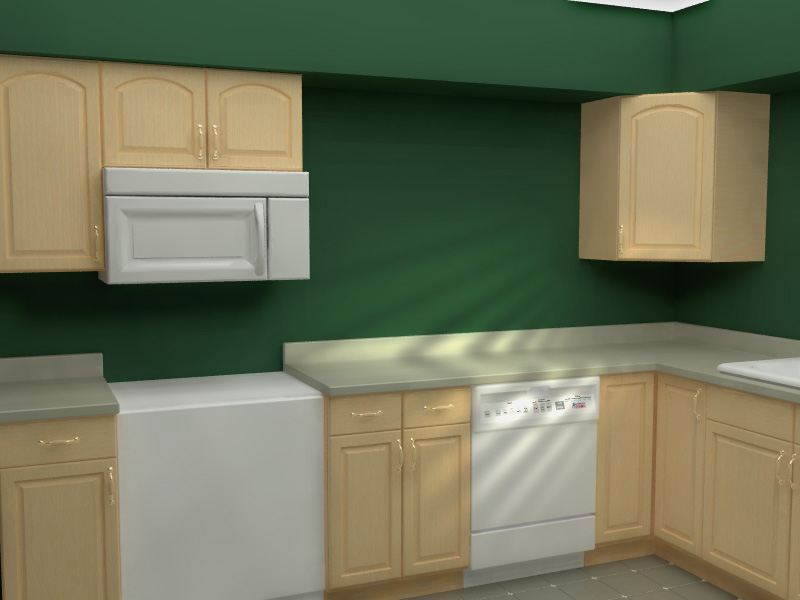
Anyway, here's the result of the effort so far--still a bit too finish:
stove, microwave, windows, etc--but comments welcome (about the image or
rendering in passes).  This image was done in 3 passes: radiosity pass (8 hr
render time), shadow pass (5 minutes) and sunlight pass (2 minutes). The
image was then put together in GIMP.
Post a reply to this message
Attachments:
Download 'kitchen2.jpg' (81 KB)
Preview of image 'kitchen2.jpg'
|
|
| |
| |
|
|
|
|
| |
| |
|
|
Jack wrote:
> Anyway, here's the result of the effort so far--still a bit to
> finish: stove, microwave, windows, etc--but comments welcome
> (about the image or rendering in passes).

I like the microwave as-is; you put the food in, it cooks it.
None of that plunking about with figuring out how long, the
microwave already knows...;)

As far as rendering in passes...it takes away from the idea of
doing the whole image with one program, with one pass.  That's
my motto...'one program, one pass'...eventually there'll
actually be software that can do that, with any scene at all.

--
Tim Cook
http://empyrean.scifi-fantasy.com

-----BEGIN GEEK CODE BLOCK-----
Version: 3.12
GFA dpu- s: a?-- C++(++++) U P? L E--- W++(+++)>$
N++ o? K- w(+) O? M-(--) V? PS+(+++) PE(--) Y(--)
PGP-(--) t* 5++>+++++ X+ R* tv+ b++(+++) DI
D++(---) G(++) e*>++ h+ !r--- !y--
------END GEEK CODE BLOCK------
Post a reply to this message
|
|
| |
| |
|
|
|
|
| |
| |
|
|
I've not tried this with pov but it is rapidly becomming the industry
standard method as it's faster and offers more control.

I may have to try this with my current work as the render time looks like it
will be months!

Mick
Post a reply to this message
|
|
| |
| |
|
|
|
|
| |
| |
|
|
Jack wrote:
>
> Anyway, here's the result of the effort so far--still a bit too finish:
> stove, microwave, windows, etc--but comments welcome (about the image or
> rendering in passes).  This image was done in 3 passes: radiosity pass (8 hr
> render time), shadow pass (5 minutes) and sunlight pass (2 minutes). The
> image was then put together in GIMP.

I have to say that the lighting looks rather fake to me.. except in the
spot where the sunlight hits the counter, that looks really good (huh?
go figure).

-Xplo
Post a reply to this message
|
|
| |
| |
|
|
|
|
| |
| |
|
|
Jack wrote:
>
> After reading a couple chapters of Jeremy Birn's Digital Lighting &
> Rendering, I decided to try rendering in passes (radiosity pass, shadow
> pass, etc). Saves a lot of time and I can make slight adjustments with more
> control, i.e. adjusting the darkness of the shadows.
>
> Anyway, here's the result of the effort so far--still a bit too finish:
> stove, microwave, windows, etc--but comments welcome (about the image or
> rendering in passes). This image was done in 3 passes: radiosity pass (8 hr
> render time), shadow pass (5 minutes) and sunlight pass (2 minutes). The
> image was then put together in GIMP.
>
It looks fairly good, but as i understand your method it's not very
realistic, the different aspects of lighting do not interact with one
another. For example if you have sunlight coming through a window this
should have strong influence on the radiosity distribution.
Christoph
--
Christoph Hormann <chr### [at] gmx de>
IsoWood include, radiosity tutorial, TransSkin and other
things on: http://www.schunter.etc.tu-bs.de/~chris/ de>
IsoWood include, radiosity tutorial, TransSkin and other
things on: http://www.schunter.etc.tu-bs.de/~chris/
Post a reply to this message
|
|
| |
| |
|
|
|
|
| |
| |
|
|
Hi tracers!

Jack schrieb:

> After reading a couple chapters of Jeremy Birn's Digital Lighting &
> Rendering, I decided to try rendering in passes (radiosity pass, shadow
> pass, etc). Saves a lot of time and I can make slight adjustments with more
> control, i.e. adjusting the darkness of the shadows.
>
> Anyway, here's the result of the effort so far--still a bit too finish:
> stove, microwave, windows, etc--but comments welcome (about the image or
> rendering in passes).  This image was done in 3 passes: radiosity pass (8 hr
> render time), shadow pass (5 minutes) and sunlight pass (2 minutes). The
> image was then put together in GIMP.
>
>  [Image]

Nice Bebraistic kitchen, especially the radiosity... but the whole thing looks
a bit sterile, no dust, no bread crumbs, no dancing dust particles in the
sunlight... hard to decide whether its a real or a dollhouse kitchen! And I
can't help, even the wooden doors look somewhat like plastic...

See you in Khyberspace - http://www.geocities.com/electricafghan/index-e.html
Afghanistan Chronicle: http://www.ndh.net/home/bleimann/

Yadgar
Post a reply to this message
|
|
| |
| |
|
|
|
|
| |
| |
|
|
On Sat, 10 Nov 2001 00:38:21 -0500, Jack wrote:
>After reading a couple chapters of Jeremy Birn's Digital Lighting &
>Rendering, I decided to try rendering in passes (radiosity pass, shadow
>pass, etc). Saves a lot of time and I can make slight adjustments with more
>control, i.e. adjusting the darkness of the shadows.
>
>Anyway, here's the result of the effort so far--still a bit too finish:
>stove, microwave, windows, etc--but comments welcome (about the image or
>rendering in passes).  This image was done in 3 passes: radiosity pass (8 hr
>render time), shadow pass (5 minutes) and sunlight pass (2 minutes). The
>image was then put together in GIMP.

I'd never use the dishwasher, too many buttons.

The rendering in passes idea is interesting, have you got a web space where
you can put all three images so that we can have a closer look?

--
Cheers
Steve              email mailto:ste### [at] zeroppsuklinuxnet

%HAV-A-NICEDAY Error not enough coffee  0 pps.

web http://www.zeropps.uklinux.net/

or  http://start.at/zero-pps

  2:22pm  up 33 days,  6:05,  1 user,  load average: 1.01, 1.03, 1.00
Post a reply to this message
|
|
| |
| |
|
|
|
|
| |
| |
|
|
I have not read the source you quote but the result is quite pleasing.  It goes
to underscore that there is no absolute standard for "realism".  The still,
suffuse sense of light reminds me of William Bailey paintings.

-Jim
Post a reply to this message
|
|
| |
| |
|
|
|
|
| |
| |
|
|
Is there additive layer mode in Gimp? Can it display real time
gamma corrected preview when layers are edited. Can it do this
for 48 bit images?

These are the requirements for high quality composites of
different light contributions. Because the source images
must be linear, 24 bits doesn't leave much room for editing.

Were the source images linear?

_____________
Kari Kivisalo
Post a reply to this message
|
|
| |
| |
|
|
|
|
| |
| |
|
|
Kari Kivisalo wrote:

> Is there additive layer mode in Gimp? Can it display real time
> gamma corrected preview when layers are edited. Can it do this
> for 48 bit images?

The stock Gimp still works in 24-bit colorspace, but there is a
"hollywood" branch that does 16 bits per component.

http://film.gimp.org/

--
Jon A. Cruz
http://www.geocities.com/joncruz/action.html
Post a reply to this message
|
|
| |
| |
|
|
|
|
| |
| |
|
|
I like your purist attitude, but I don't have the patience to wait 8 hours
each time I make a change, nor am I good enough to do it right the first
time (first 10 times?). In any case, I'm finding out that multiple passes
are kind of fun--I like the control that it offeres.

"Timothy R. Cook" <tim### [at] scifi-fantasycom> wrote in message
news:3BECCD86.E534895D@scifi-fantasy.com...
> Jack wrote:
> > Anyway, here's the result of the effort so far--still a bit to
> > finish: stove, microwave, windows, etc--but comments welcome
> > (about the image or rendering in passes).
>
> I like the microwave as-is; you put the food in, it cooks it.
> None of that plunking about with figuring out how long, the
> microwave already knows...;)
>
> As far as rendering in passes...it takes away from the idea of
> doing the whole image with one program, with one pass.  That's
> my motto...'one program, one pass'...eventually there'll
> actually be software that can do that, with any scene at all.
>
> --
> Tim Cook
> http://empyrean.scifi-fantasy.com
>
> -----BEGIN GEEK CODE BLOCK-----
> Version: 3.12
> GFA dpu- s: a?-- C++(++++) U P? L E--- W++(+++)>$
> N++ o? K- w(+) O? M-(--) V? PS+(+++) PE(--) Y(--)
> PGP-(--) t* 5++>+++++ X+ R* tv+ b++(+++) DI
> D++(---) G(++) e*>++ h+ !r--- !y--
> ------END GEEK CODE BLOCK------
Post a reply to this message
|
|
| |
| |
|
|
|
|
| |
| |
|
|
I agree the lighting looks fake--it is.

I'm open to suggestions on how to improve it--I'm just a beginner at this
pov stuff. In fact, this is my first radiosity image. What do you suggest?

Here's the settings now:
for the radiosity pass, I have one spot light on the floor pointing to the
ceiling, with these radiosity settings:
  pretrace_start 0.08
  pretrace_end   0.005
  count 100
  nearest_count 10
  error_bound 0.1
  recursion_limit 10
  low_error_factor .01
  gray_threshold 0
  minimum_reuse 0.001
  brightness 2
  adc_bailout 0.01/2
  max_sample 1.5

the shadow pass is a point light near the ceiling in the center, and the
sunlight pass is a spot shining through the window (out of view).

John

"Xplo Eristotle" <inq### [at] unforgettablecom> wrote in message
news:3BECFDA7.2872429E@unforgettable.com...
> Jack wrote:
> >
> > Anyway, here's the result of the effort so far--still a bit too finish:
> > stove, microwave, windows, etc--but comments welcome (about the image or
> > rendering in passes).  This image was done in 3 passes: radiosity pass
(8 hr
> > render time), shadow pass (5 minutes) and sunlight pass (2 minutes). The
> > image was then put together in GIMP.
>
> I have to say that the lighting looks rather fake to me.. except in the
> spot where the sunlight hits the counter, that looks really good (huh?
> go figure).
>
> -Xplo
Post a reply to this message
|
|
| |
| |
|
|
|
|
| |
| |
|
|
Can you explain how you got POV to separate the shadows, radiosity, etc.
into separate images?

Did you use alpha output?

John Haiducek
Post a reply to this message
|
|
| |
| |
|
|
|
|
| |
| |
|
|
Source images were bmp output from pov.
I'm not a graphics expert--you're out of my league in this area--but here's
how I layered the image:
shadows -- multiply, transparancy 51, added a little blur
sunlight -- addition, transparancy 61, added a little blur

GIMP is free, what can I say?


"Kari Kivisalo" <ray### [at] engineercom> wrote in message
news:3BED56CD.80884840@engineer.com...
>
> Is there additive layer mode in Gimp? Can it display real time
> gamma corrected preview when layers are edited. Can it do this
> for 48 bit images?
>
> These are the requirements for high quality composites of
> different light contributions. Because the source images
> must be linear, 24 bits doesn't leave much room for editing.
>
> Were the source images linear?
>
> _____________
> Kari Kivisalo
Post a reply to this message
|
|
| |
| |
|
|
|
|
| |
| |
|
|
Here you go:

http://members.tripod.com/johnkbradshaw/pov/pov.html


"Steve" <ste### [at] zeroppsuklinuxnet> wrote in message
news:slr### [at] zero-ppslocaldomain...
> On Sat, 10 Nov 2001 00:38:21 -0500, Jack wrote:
> >After reading a couple chapters of Jeremy Birn's Digital Lighting &
> >Rendering, I decided to try rendering in passes (radiosity pass, shadow
> >pass, etc). Saves a lot of time and I can make slight adjustments with
more
> >control, i.e. adjusting the darkness of the shadows.
> >
> >Anyway, here's the result of the effort so far--still a bit too finish:
> >stove, microwave, windows, etc--but comments welcome (about the image or
> >rendering in passes).  This image was done in 3 passes: radiosity pass (8
hr
> >render time), shadow pass (5 minutes) and sunlight pass (2 minutes). The
> >image was then put together in GIMP.
>
> I'd never use the dishwasher, too many buttons.
>
> The rendering in passes idea is interesting, have you got a web space
where
> you can put all three images so that we can have a closer look?
>
> --
> Cheers
> Steve              email mailto:ste### [at] zeroppsuklinuxnet
>
> %HAV-A-NICEDAY Error not enough coffee  0 pps.
>
> web http://www.zeropps.uklinux.net/
>
> or  http://start.at/zero-pps
>
>   2:22pm  up 33 days,  6:05,  1 user,  load average: 1.01, 1.03, 1.00
Post a reply to this message
|
|
| |
| |
|
|
|
|
| |
| |
|
|
The radiosity pass is normal, the shadows pass I did by using negative
illumination, then layering as multiply (color burn), the sunlight was just
a normal image with one spotlight and ambient light set to zero--this was
layered as addition.

I also used a little bit of blur on the shadows pass and the sunlight pass
and adjusted the transparency. Heres the link to the images if you want to
see:
http://members.tripod.com/johnkbradshaw/pov/pov.html


"John David Haiducek" <jha### [at] enginumichedu> wrote in message
news:Pin### [at] azureenginumichedu...
> Can you explain how you got POV to separate the shadows, radiosity, etc.
> into separate images?
>
> Did you use alpha output?
>
> John Haiducek
>
>
Post a reply to this message
|
|
| |
| |
|
|
|
|
| |
| |
|
|
Jack wrote:
> I like your purist attitude, but I don't have the patience to wait
> 8 hours each time I make a change, nor am I good enough to do it
> right the first time (first 10 times?).

Hmm...I use mosaic preview, so usually let it do only a few passes
before hitting 'cancel' and changing what I need to change...
More than that, the 3d camera view in Moray is a primary preview
of what the scene will be set up as (will you people hurry up and
finish POV 3.5 so Lutz can release a supportive version of Moray?).

However, I'm currently on day 3 of what amounts to a test render,
just to see what my WIP looks like with media as the materials.
--
Tim Cook
http://empyrean.scifi-fantasy.com

-----BEGIN GEEK CODE BLOCK-----
Version: 3.12
GFA dpu- s: a?-- C++(++++) U P? L E--- W++(+++)>$
N++ o? K- w(+) O? M-(--) V? PS+(+++) PE(--) Y(--)
PGP-(--) t* 5++>+++++ X+ R* tv+ b++(+++) DI
D++(---) G(++) e*>++ h+ !r--- !y--
------END GEEK CODE BLOCK------
Post a reply to this message
|
|
| |
| |
|
|
|
|
| |
| |
|
|
Jack wrote:

> Anyway, here's the result of the effort so far--still a bit too finish:

Well, it looks like the handles are floating. There's a little to do with the
lighting I think. But then there's also their positioning. If you look at the
pair of doors to the left of the dishwasher, then the pair of doors under the
sink, you'll see that one set is shifted to the right, while the other is
shifted to the left. That comes out as the parralax effect you'd get if they
were hovering an inch or so in front of the doors, instead of on them.

--
Jon A. Cruz
http://www.geocities.com/joncruz/action.html
Post a reply to this message
|
|
| |
| |
|
|
|
|
| |
| |
|
|
Jack wrote:
>
> shadows -- multiply, transparancy 51, added a little blur
> sunlight -- addition, transparancy 61, added a little blur

Sounds right but when doing these kind of composites the source
images must not be gamma corrected. POV-Ray outputs linear samples
(not corrected) when assumed_gamma is not set. Gamma is applied
to the final composite. The reason for this is that
(a+b)^c != a^c+b^c.

Default radiosity brightness is the correct one so no need to
touch that.

So, Gimp has additive layer mode which is missing in Photoshop.
If the new version runs longer than 5 minutes without crashing
I'm going to find out if it can do gamma preview :)

The Hollywood Gimp would be ideal for this kind of work but there
is no windows version.

_____________
Kari Kivisalo
Post a reply to this message
|
|
| |
| |
|
|
|
|
| |
| |
|
|
All the images were assumed_gamma 1.0

(a+b)^c != a^c+b^c ?   The math I get, but I don't understand how this
relates to compositing. c=gamma correction? Is this the reason why gamma
should be 1?

After Jon's post I looked at Hollywood GIMP. Didn't see anywhere to download
anything. As for no windows version, I've been wanting to use linux more
often. This may be a good excuse.


"Kari Kivisalo" <ray### [at] engineercom> wrote in message
news:3BEDC3AD.11E3B798@engineer.com...
> Jack wrote:
> >
> > shadows -- multiply, transparancy 51, added a little blur
> > sunlight -- addition, transparancy 61, added a little blur
>
> Sounds right but when doing these kind of composites the source
> images must not be gamma corrected. POV-Ray outputs linear samples
> (not corrected) when assumed_gamma is not set. Gamma is applied
> to the final composite. The reason for this is that
> (a+b)^c != a^c+b^c.
>
> Default radiosity brightness is the correct one so no need to
> touch that.
>
> So, Gimp has additive layer mode which is missing in Photoshop.
> If the new version runs longer than 5 minutes without crashing
> I'm going to find out if it can do gamma preview :)
>
> The Hollywood Gimp would be ideal for this kind of work but there
> is no windows version.
>
> _____________
> Kari Kivisalo
Post a reply to this message
|
|
| |
| |
|
|
|
|
| |
| |
|
|
Jack wrote:

> After Jon's post I looked at Hollywood GIMP. Didn't see anywhere to download
> anything. As for no windows version, I've been wanting to use linux more
> often. This may be a good excuse.

Dual boot! Dual boot!

Anyway, the page mentions:
For information about how to check out and compile the lastest version pleae
see the notes.
and links to
http://film.gimp.org/install_compile.html

BTW, here the person to contact with questions (Caroline Dahllof ) appears to
be an employee of Rhythm & Hues
http://www.rhythm.com/

--
Jon A. Cruz
http://www.geocities.com/joncruz/action.html
Post a reply to this message
|
|
| |
| |
|
|
|
|
| |
| |
|
|
Jack wrote:
>
> All the images were assumed_gamma 1.0

Should be no gamma at all.

> (a+b)^c != a^c+b^c ?   The math I get, but I don't understand how this
> relates to compositing.

Just try it. Render a two pass scene with two light sources with
assumed_gamma and do a composite. Then render both sources on
with assumed_gamma. The resulting images are not identical.


_____________
Kari Kivisalo
Post a reply to this message
|
|
| |
| |
|
|
|
|
| |
| |
|
|
Jack wrote:
>
>   pretrace_start 0.08
>   pretrace_end   0.005
>   count 100
>   nearest_count 10
>   error_bound 0.1
>   recursion_limit 10
>   low_error_factor .01
>   gray_threshold 0
>   minimum_reuse 0.001
>   brightness 2
>   adc_bailout 0.01/2
>   max_sample 1.5
>

I wonder how you choose that values, starting with settings from
rad_def.inc (in Povray 3.5) should usually lead to agreeable results, both
in quality and speed.

In detail:

- recursion_limit 10 must be incredibly slow.
- brightness 2 is exaggerated although it might serve some artistic
purpose.

Christoph

--
Christoph Hormann <chr### [at] gmxde>
IsoWood include, radiosity tutorial, TransSkin and other
things on: http://www.schunter.etc.tu-bs.de/~chris/
Post a reply to this message
|
|
| |
| |
|
|
|
|
| |
| |
|
|
Mick Hazelgrove wrote:
>
> I've not tried this with pov but it is rapidly becomming the industry
> standard method as it's faster and offers more control.

And how can radiance calculations be correct, if you don't have
lit/unlit areas ?  That's the whole concept behind "global
illumination", taking account of all interactions...

Fabien.
Post a reply to this message
|
|
| |
| |
|
|
|
|
| |
| |
|
|
Jack wrote:
>
> After reading a couple chapters of Jeremy Birn's Digital Lighting &
> Rendering, I decided to try rendering in passes (radiosity pass, shadow
> pass, etc). Saves a lot of time and I can make slight adjustments with more
> control, i.e. adjusting the darkness of the shadows.

BTW, is the kitchen already built, or is that a project ?
If it's a project, there's some ergonomic faults to correct...

Fabien.
Post a reply to this message
|
|
| |
| |
|
|
|
|
| |
| |
|
|
Jack wrote:
>
> I like your purist attitude

It's not about purism, it's about getting right result.
For example, the light passing trough the window blinds should "burn"
on the wall, and (through radiance) lighten the surfaces surrounding
the light spot.

Fabien.
Post a reply to this message
|
|
| |
| |
|
|
|
|
| |
| |
|
|
Kari Kivisalo wrote:

> Default radiosity brightness is the correct one so no need to
> touch that.

Some "exposure" filtering would be good, in the future, though.

Fabien.
Post a reply to this message
|
|
| |
| |
|
|
|
|
| |
| |
|
|
On Sun, 11 Nov 2001, Kari Kivisalo wrote:

> So, Gimp has additive layer mode which is missing in Photoshop.

I had thought that Photoshop's "Lighten" mode did addition. Am I wrong
about that?

I tried to duplicate Jack's image from the three layers (using the
"lighten" mode for the light source layer); without gamma
correction it's very dark but it becomes better after gamma correction.

> If the new version runs longer than 5 minutes without crashing
> I'm going to find out if it can do gamma preview :)
Post a reply to this message
|
|
| |
| |
|
|
|
|
| |
| |
|
|
It is a kitchen to be built, but like I said the rendering is a WIP. There
should be a window in the obvious empty space on the wall--nothing I can do
about placing cabinets over that. With that in mind, what do you suggest? I
would love to do something better with the kitchen, but unfortunately the 2
windows (one that is casting the sunlight shadow and the one that I haven't
placed in the scene yet) cut up my wall space.


"Fabien Mosen" <fab### [at] skynetbe> wrote in message
news:3BEE54A5.75A03C01@skynet.be...
> Jack wrote:
> >
> > After reading a couple chapters of Jeremy Birn's Digital Lighting &
> > Rendering, I decided to try rendering in passes (radiosity pass, shadow
> > pass, etc). Saves a lot of time and I can make slight adjustments with
more
> > control, i.e. adjusting the darkness of the shadows.
>
> BTW, is the kitchen already built, or is that a project ?
> If it's a project, there's some ergonomic faults to correct...
>
> Fabien.
Post a reply to this message
|
|
| |
| |
|
|
|
|
| |
| |
|
|
They are not correct, which is a downside of rendering in layers--parts of
the illumination have to be faked, requiring more artist time. The advantage
is that rendering time is MUCH less. I guess you have to find the right
balance between these two.


"Fabien Mosen" <fab### [at] skynetbe> wrote in message
news:3BEE5467.FEF6D860@skynet.be...
> Mick Hazelgrove wrote:
> >
> > I've not tried this with pov but it is rapidly becomming the industry
> > standard method as it's faster and offers more control.
>
> And how can radiance calculations be correct, if you don't have
> lit/unlit areas ?  That's the whole concept behind "global
> illumination", taking account of all interactions...
>
> Fabien.
Post a reply to this message
|
|
| |
| |
|
|
|
|
| |
| |
|
|
I chose recursion limit 10 because less seemed to not cover the corners (for
instance under the soffit). Part of the problem I suppose is that I chose to
only have reflected light in the radiosity pass. Perhaps lower the recursion
limit and add some direct lighting in the radiosity calculation?

Brightness of 2 came out of rendering a dark scene and needing it to be
lighter. Is the "limit" 1, (is 2 super-bright like rgb 2,2,2?).

"Christoph Hormann" <chr### [at] gmxde> wrote in message
news:3BEE4563.2C80E3ED@gmx.de...
>
>
> Jack wrote:
> >
> >   pretrace_start 0.08
> >   pretrace_end   0.005
> >   count 100
> >   nearest_count 10
> >   error_bound 0.1
> >   recursion_limit 10
> >   low_error_factor .01
> >   gray_threshold 0
> >   minimum_reuse 0.001
> >   brightness 2
> >   adc_bailout 0.01/2
> >   max_sample 1.5
> >
>
> I wonder how you choose that values, starting with settings from
> rad_def.inc (in Povray 3.5) should usually lead to agreeable results, both
> in quality and speed.
>
> In detail:
>
> - recursion_limit 10 must be incredibly slow.
> - brightness 2 is exaggerated although it might serve some artistic
> purpose.
>
> Christoph
>
> --
> Christoph Hormann <chr### [at] gmxde>
> IsoWood include, radiosity tutorial, TransSkin and other
> things on: http://www.schunter.etc.tu-bs.de/~chris/
Post a reply to this message
|
|
| |
| |
|
|
|
|
| |
| |
|
|
Jack wrote:
>
> It is a kitchen to be built, but like I said the rendering is a WIP. There
> should be a window in the obvious empty space on the wall--nothing I can do
> about placing cabinets over that. With that in mind, what do you suggest?

Do a wider-angle rendering of it (simple raytracing), so I can see
everything, and state me clearly the function of each device.

Fabien.
Post a reply to this message
|
|
| |
| |
|
|
|
|
| |
| |
|
|
John David Haiducek wrote:
>
> I had thought that Photoshop's "Lighten" mode did addition. Am I wrong
> about that?

Try 50% gray bg layer + 50% gray lighten layer. It's not white.
I just tried all the modes in 5.5 and none of them was additive.

The only way to add images is via Image/Calculations but it's
not good for interactive editing.


_____________
Kari Kivisalo
Post a reply to this message
|
|
| |
| |
|
|
|
|
| |
| |
|
|
Fabien Mosen wrote:
>
> > Default radiosity brightness is the correct one so no need to
> > touch that.
>
> Some "exposure" filtering would be good, in the future, though.

When a new MegaPOV version does gamma correction after
post_process and input to curves is not limited exposure
can be done with post_process.

_____________
Kari Kivisalo
Post a reply to this message
|
|
| |
| |
|
|
|
|
| |
| |
|
|
You're seeing all that I have done.

"Fabien Mosen" <fab### [at] skynetbe> wrote in message
news:3BEEC1DB.16B232F0@skynet.be...
> Jack wrote:
> >
> > It is a kitchen to be built, but like I said the rendering is a WIP.
There
> > should be a window in the obvious empty space on the wall--nothing I can
do
> > about placing cabinets over that. With that in mind, what do you
suggest?
>
> Do a wider-angle rendering of it (simple raytracing), so I can see
> everything, and state me clearly the function of each device.
>
> Fabien.
Post a reply to this message
|
|
| |
| |
|
|
|
|
| |
| |
|
|
Jack wrote:
>
> You're seeing all that I have done.

Of course not !
There is missing space to the right, especially.

Fabien.
Post a reply to this message
|
|
| |
| |
|
|
|
|
| |
| |
|
|
On Sun, 11 Nov 2001 08:02:17 -0500, John David Haiducek
<jha### [at] enginumichedu> wrote:

>I had thought that Photoshop's "Lighten" mode did addition. Am I wrong
>about that?

If layer A is above layer B, then for a pixel [x,y]:

f_lighten(A,B,[x,y]) = (lum(A,[x,y])>lum(B,[x,y]))?A[x,y]:B[x,y]

If you want to do addition, try screen mode or image/channel
composition.


Peter Popov ICQ : 15002700
Personal e-mail : pet### [at] vipbg
TAG      e-mail : pet### [at] tagpovrayorg
Post a reply to this message
|
|
| |
| |
|
|
|
|
| |
| |
|
|
Peter Popov wrote:
>
> If you want to do addition, try screen mode or image/channel
> composition.

screen mode: A + B - A*B


_____________
Kari Kivisalo
Post a reply to this message
|
|
| |
| |
|
|
|
|
| |
| |
|
|
On Sat, 13 Oct 2001 07:30:27 +0300, Kari Kivisalo
<ray### [at] engineercom> wrote:

>screen mode: A + B - A*B

I didn't know that. Do you have the mathematical description of the
other non-trivial ones such as Overlay or Soft/Hard Light? I don't see
them in the manual.


Peter Popov ICQ : 15002700
Personal e-mail : pet### [at] vipbg
TAG      e-mail : pet### [at] tagpovrayorg
Post a reply to this message
|
|
| |
| |
|
|
|
|
| |
| |
|
|
Peter Popov wrote:
>
> >screen mode: A + B - A*B
>
> Do you have the mathematical description of the
> other non-trivial ones such as Overlay or Soft/Hard Light?

Quick web search didn't turn up any equations for these
so I tried a few combinations to find out what screen mode
does.

_____________
Kari Kivisalo
Post a reply to this message
|
|
| |
| |
|
|
|
|
| |
| |
|
|
Hmm, looks pretty good.  Some textures are a little too translucenty
looking IMHO.  (Actually they might make good subsurface scattering
fakes... ;)

--
David Fontaine  <dav### [at] faricynet>  ICQ 55354965
My raytracing gallery:  http://davidf.faricy.net/
Post a reply to this message
|
|
| |
| |
|
|
|
|
| |