|
|
|
|
|
|
| |
| |
|
|
|
|
| |
| |
|
|
Hello,

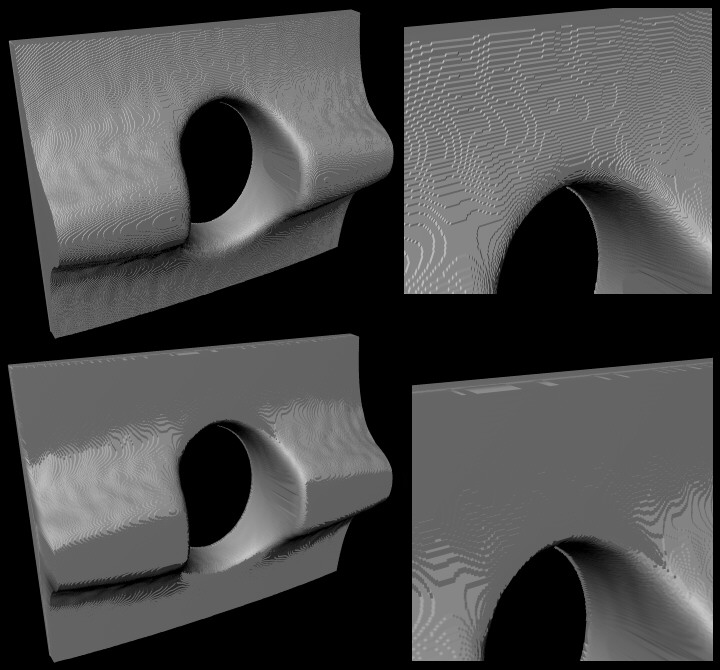
The attached picture show heightfields created from an isosurface. The
bottom ones are "smooth" but don't exactly look like I would expect, or like
I remember triangles do when they are smoothed correctly.. I tried different
lights.. I tried TGA, PNG and GIF.. I tried POV 3.5, MegaPOV 0.7 and POV
3.1g and two computers.. It's all the same..What do you think?


#version 3.5;

camera { right -1.33*x up 1*y direction 1*z
 location <-3.5,3.2,6>*.6 look_at 0 angle 48 }

light_source { <-25,25,25> color rgb 1 }

height_field { png "heightfield.png"
 water_level .000001 translate -.5
 scale <3,.75,2.75> rotate 90*x
 pigment { rgb 1 }
 finish { ambient 0 diffuse .67 specular .1 }
 no_shadow }
Post a reply to this message
Attachments:
Download 'Problem_Heightfield.JPG' (89 KB)
Preview of image 'Problem_Heightfield.JPG'
|
|
| |
| |
|
|
From: Christoph Hormann
Subject: Re: Problem with smooth heightfield
Date: 10 Oct 2001 10:29:21
Message: <3BC45B3A.71BEFC86@gmx.de>
|
|
|
| |
| |
|
|
Hugo wrote:
>
> Hello,
>
> The attached picture show heightfields created from an isosurface. The
> bottom ones are "smooth" but don't exactly look like I would expect, or like
> I remember triangles do when they are smoothed correctly.. I tried different
> lights.. I tried TGA, PNG and GIF.. I tried POV 3.5, MegaPOV 0.7 and POV
> 3.1g and two computers.. It's all the same..What do you think?
>
That looks much like the heightfield having only 8 bit resolution. Using
'hf_gray_16 on' in global_settings should help if you generate the
heightfield with Povray. But be careful when using png output in Povray
3.5 with this since it does not work correctly right now.
Christoph
--
Christoph Hormann <chr### [at] gmx de>
IsoWood include, radiosity tutorial, TransSkin and other
things on: http://www.schunter.etc.tu-bs.de/~chris/ de>
IsoWood include, radiosity tutorial, TransSkin and other
things on: http://www.schunter.etc.tu-bs.de/~chris/
Post a reply to this message
|
|
| |
| |
|
|
|
|
| |
| |
|
|
On Wed, 10 Oct 2001 16:29:14 +0200, Christoph Hormann wrote:
>
>
>Hugo wrote:
>>
>> Hello,
>>
>> The attached picture show heightfields created from an isosurface. The
>> bottom ones are "smooth" but don't exactly look like I would expect, or like
>> I remember triangles do when they are smoothed correctly.. I tried different
>> lights.. I tried TGA, PNG and GIF.. I tried POV 3.5, MegaPOV 0.7 and POV
>> 3.1g and two computers.. It's all the same..What do you think?
>>
>
>That looks much like the heightfield having only 8 bit resolution.  Using
>'hf_gray_16 on' in global_settings should help if you generate the
>heightfield with Povray.  But be careful when using png output in Povray
>3.5 with this since it does not work correctly right now.

Actually, the PNG output is fine.  It's the PNG input that's broken.

--
#macro R(L P)sphere{L F}cylinder{L P F}#end#macro P(V)merge{R(z+a z)R(-z a-z)R(a
-z-z-z a+z)torus{1F clipped_by{plane{a 0}}}translate V}#end#macro Z(a F T)merge{
P(z+a)P(z-a)R(-z-z-x a)pigment{rgbt 1}hollow interior{media{emission T}}finish{
reflection.1}}#end Z(-x-x.2y)Z(-x-x.4x)camera{location z*-10rotate x*90}
Post a reply to this message
|
|
| |
| |
|
|
From: Christoph Hormann
Subject: Re: Problem with smooth heightfield
Date: 10 Oct 2001 11:09:37
Message: <3BC464A8.DFAEFBFC@gmx.de>
|
|
|
| |
| |
|
|
Ron Parker wrote:
>
> Actually, the PNG output is fine.  It's the PNG input that's broken.
>

No, i have always (including last betas) used my 16 bit png's in Povray
heightfields without problems.

Christoph

--
Christoph Hormann <chr### [at] gmxde>
IsoWood include, radiosity tutorial, TransSkin and other
things on: http://www.schunter.etc.tu-bs.de/~chris/
Post a reply to this message
|
|
| |
| |
|
|
|
|
| |
| |
|
|
On Wed, 10 Oct 2001 17:09:28 +0200, Christoph Hormann wrote:
>
>
>Ron Parker wrote:
>>
>> Actually, the PNG output is fine.  It's the PNG input that's broken.
>>
>
>No, i have always (including last betas) used my 16 bit png's in Povray
>heightfields without problems.

16-bit greyscale PNGs?

--
#local R=rgb 99;#local P=R-R;#local F=pigment{gradient x}box{0,1pigment{gradient
y pigment_map{[.5F pigment_map{[.3R][.3F color_map{[.15red 99][.15P]}rotate z*45
translate x]}]#local H=pigment{gradient y color_map{[.5P][.5R]}scale 1/3}[.5F
pigment_map{[.3R][.3H][.7H][.7R]}]}}}camera{location.5-3*z}//only my opinions
Post a reply to this message
|
|
| |
| |
|
|
From: Christoph Hormann
Subject: Re: Problem with smooth heightfield
Date: 10 Oct 2001 12:20:31
Message: <3BC4754F.51931A2D@gmx.de>
|
|
|
| |
| |
|
|
Ron Parker wrote:
>
> 16-bit greyscale PNGs?
>

Yes! (should i post one?)

Christoph

--
Christoph Hormann <chr### [at] gmxde>
IsoWood include, radiosity tutorial, TransSkin and other
things on: http://www.schunter.etc.tu-bs.de/~chris/
Post a reply to this message
|
|
| |
| |
|
|
|
|
| |
| |
|
|
On Wed, 10 Oct 2001 18:20:31 +0200, Christoph Hormann wrote:
>
>
>Ron Parker wrote:
>>
>> 16-bit greyscale PNGs?
>>
>
>Yes! (should i post one?)

By all means.  I'd like to see what the difference is, since I haven't
seen any problems with the PNGs POV outputs.

--
#macro R(L P)sphere{L F}cylinder{L P F}#end#macro P(V)merge{R(z+a z)R(-z a-z)R(a
-z-z-z a+z)torus{1F clipped_by{plane{a 0}}}translate V}#end#macro Z(a F T)merge{
P(z+a)P(z-a)R(-z-z-x a)pigment{rgbf 1}hollow interior{media{emission 3-T}}}#end
Z(-x-x.2x)camera{location z*-10rotate x*90normal{bumps.02scale.05}}
Post a reply to this message
|
|
| |
| |
|
|
From: Christoph Hormann
Subject: Re: Problem with smooth heightfield
Date: 10 Oct 2001 15:11:10
Message: <3BC49D3F.5D87E8EB@gmx.de>
|
|
|
| |
| |
|
|
Ron Parker wrote:
>
> By all means.  I'd like to see what the difference is, since I haven't
> seen any problems with the PNGs POV outputs.
>

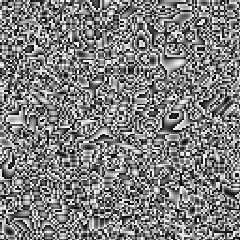
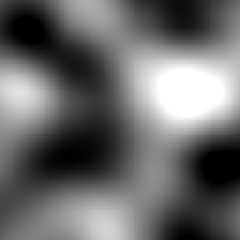
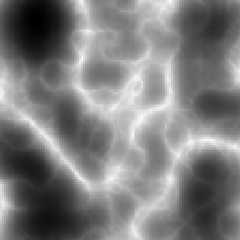
Here are three 128x128 16 bit png's:

hf_pov35_16.png      generated with POV 3.5 beta 6
hf_pov31_16.png      generated with POV 3.1
hf_xxx_16.png        generated with other program

Christoph

--
Christoph Hormann <chr### [at] gmxde>
IsoWood include, radiosity tutorial, TransSkin and other
things on: http://www.schunter.etc.tu-bs.de/~chris/
Post a reply to this message
Attachments:
Download 'hf_pov35_16.png' (25 KB)
Download 'hf_pov31_16.png' (25 KB)
Download 'hf_xxx_16.png' (29 KB)
Preview of image 'hf_pov35_16.png'
Preview of image 'hf_pov31_16.png'
Preview of image 'hf_xxx_16.png'
|
|
| |
| |
|
|
|
|
| |
| |
|
|
"Christoph Hormann" <chr### [at] gmxde> ha scritto nel messaggio
news:3BC49D3F.5D87E8EB@gmx.de...
> Here are three 128x128 16 bit png's:
>
> hf_xxx_16.png        generated with other program

Uh? Something like Ategeros? ;)
Remember that there are people who are waiting for that.

--
Jonathan.
Post a reply to this message
|
|
| |
| |
|
|
|
|
| |
| |
|
|
Hi,

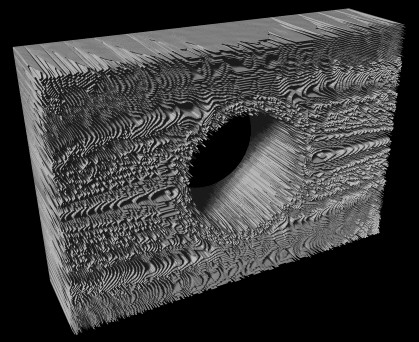
Thanks for the suggestion. I figured out myself that the 8 bit resolution
was the problem. However, wouldn't it be possible to make an "interpolate"
feature that make them appear as smooth as 16 bit?  For the user, it would
be easier to stick with 8 bit bitmaps because many paintprograms don't
support 16 bit greys.. I don't have one, that do.

I could also try another approch to store heightfields. To use the "trace"
command and make a grid of triangles myself.. I could get away with much
fewer triangles, if I am lucky to implement a triangle decimation algoritm.
This has proved hard in the past.

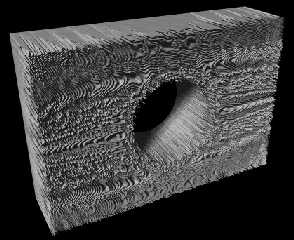
I tried to output a PNG 16 bit, and put "hf_gray_16" in global settings.. I
used POV 3.5 beta 5 and the result looks cool, as you can see.. I tried to
render the heightfield both in MegaPOV and POV 3.5 beta5, with same result.

Regards,
Hugo
Post a reply to this message
Attachments:
Download 'Problem_Heightfield2.JPG' (53 KB)
Preview of image 'Problem_Heightfield2.JPG'
|
|
| |
| |
|
|
From: Christoph Hormann
Subject: Re: Problem with smooth heightfield
Date: 10 Oct 2001 16:56:14
Message: <3BC4B5EE.2E13A371@gmx.de>
|
|
|
| |
| |
|
|
JRG wrote:
>
> Uh? Something like Ategeros? ;)
> Remember that there are people who are waiting for that.
>

I know, but it's quite problematic, things have grown over the years and
the structure of the program quite difficult to handle (in fact
*structure* is seriously missing :-).

I'm considering starting new from scratch, before i would like to release
an experimental version of the current state, but there are serious
problems with things becoming very slow after some time of use.  If i for
example apply a filter 100 times it's getting slower and slower and i
can't find the reason...

Christoph

--
Christoph Hormann <chr### [at] gmxde>
IsoWood include, radiosity tutorial, TransSkin and other
things on: http://www.schunter.etc.tu-bs.de/~chris/
Post a reply to this message
|
|
| |
| |
|
|
|
|
| |
| |
|
|
Hugo <hua### [at] post3teledk> schrieb in im Newsbeitrag:
3bc4b311@news.povray.org...
> Hi,
>
> Thanks for the suggestion. I figured out myself that the 8 bit resolution
> was the problem. However, wouldn't it be possible to make an "interpolate"
> feature that make them appear as smooth as 16 bit?  For the user, it would
> be easier to stick with 8 bit bitmaps because many paintprograms don't
> support 16 bit greys.. I don't have one, that do.
>
You could use your image as a image_map in a function then you could
use interpolate.
Post a reply to this message
|
|
| |
| |
|
|
|
|
| |
| |
|
|
"Christoph Hormann" <chr### [at] gmxde> ha scritto nel messaggio
news:3BC4B5EE.2E13A371@gmx.de...
> I know, but it's quite problematic, things have grown over the years and
> the structure of the program quite difficult to handle (in fact
> *structure* is seriously missing :-).

:-(

> I'm considering starting new from scratch, before i would like to release
> an experimental version of the current state, but there are serious
> problems with things becoming very slow after some time of use.  If i for
> example apply a filter 100 times it's getting slower and slower and i
> can't find the reason...

I lost you here... I know NOTHING about programming and similia so forgive
me if I say something silly: I always thought to h-f  utilities as image
processors which, through a series of fractal (or not) algorithms, alter (or
create from scratch) a bitmap in order to get a grayscale image usable in
POV. Once you apply a filter, you've got a new bitmap ready for other
filtering processes. No matter how many times you apply one or more filters,
every time the h-f utility treats the bitmap as if *it were the first time
it saw it*. Please tell me if I'm wrong.

--
Jonathan
> Christoph
>
> --
> Christoph Hormann <chr### [at] gmxde>
> IsoWood include, radiosity tutorial, TransSkin and other
> things on: http://www.schunter.etc.tu-bs.de/~chris/
Post a reply to this message
|
|
| |
| |
|
|
|
|
| |
| |
|
|
"Simon" <sim### [at] 12movede> wrote in message
news:3bc4b707@news.povray.org...
>
> Hugo <hua### [at] post3teledk> schrieb in im Newsbeitrag:
> 3bc4b311@news.povray.org...
> >
> > Thanks for the suggestion. I figured out myself that the 8 bit
resolution
> > was the problem. However, wouldn't it be possible to make an
"interpolate"
> > feature that make them appear as smooth as 16 bit?  For the user, it
would
> > be easier to stick with 8 bit bitmaps because many paintprograms don't
> > support 16 bit greys.. I don't have one, that do.
> >
> You could use your image as a image_map in a function then you could
> use interpolate.

A 'smooth' keyword exists and from what I read no one mentioned that.  Only
good on 256 color image files though from what I know.

Bob H.
Post a reply to this message
|
|
| |
| |
|
|
|
|
| |
| |
|
|
"Christoph Hormann" <chr### [at] gmxde> wrote in message
news:3BC49D3F.5D87E8EB@gmx.de...
>
> Here are three 128x128 16 bit png's:
>
> hf_pov35_16.png      generated with POV 3.5 beta 6

Yeah gee, that's what I was talking about before, chaotic.  Odd thing is
that a Targa file will look much the same way, except for not being
grayscale, and yet can render as a HF fine.  What I saw in the PNG-made HF
was partially okay and mostly not.  Chaotic mosaics mostly.

Bob H.

> hf_pov31_16.png      generated with POV 3.1
> hf_xxx_16.png        generated with other program
>
> Christoph
>
> --
> Christoph Hormann <chr### [at] gmxde>
> IsoWood include, radiosity tutorial, TransSkin and other
> things on: http://www.schunter.etc.tu-bs.de/~chris/


----------------------------------------------------------------------------
----


----------------------------------------------------------------------------
----


----------------------------------------------------------------------------
----
Post a reply to this message
|
|
| |
| |
|
|
From: Christoph Hormann
Subject: Re: Problem with smooth heightfield
Date: 10 Oct 2001 17:32:38
Message: <3BC4BE76.ACE1E01E@gmx.de>
|
|
|
| |
| |
|
|
"Bob H." wrote:
>
> A 'smooth' keyword exists and from what I read no one mentioned that.  Only
> good on 256 color image files though from what I know.
>

'smooth' in heightfield only interpolates the normal vectors.  Geometry is
not influenced.

Christoph

--
Christoph Hormann <chr### [at] gmxde>
IsoWood include, radiosity tutorial, TransSkin and other
things on: http://www.schunter.etc.tu-bs.de/~chris/
Post a reply to this message
|
|
| |
| |
|
|
From: Christoph Hormann
Subject: Re: Problem with smooth heightfield
Date: 10 Oct 2001 17:32:57
Message: <3BC4BE89.81EE0305@gmx.de>
|
|
|
| |
| |
|
|
JRG wrote:
>
> I lost you here... I know NOTHING about programming and similia so forgive
> me if I say something silly: I always thought to h-f  utilities as image
> processors which, through a series of fractal (or not) algorithms, alter (or
> create from scratch) a bitmap in order to get a grayscale image usable in
> POV. Once you apply a filter, you've got a new bitmap ready for other
> filtering processes. No matter how many times you apply one or more filters,
> every time the h-f utility treats the bitmap as if *it were the first time
> it saw it*. Please tell me if I'm wrong.
>

That's the theory, but since it is an interactive program, there are
things done after the steps (like displaying the changed bitmap) and
somewhere there must be the problem...

Christoph

--
Christoph Hormann <chr### [at] gmxde>
IsoWood include, radiosity tutorial, TransSkin and other
things on: http://www.schunter.etc.tu-bs.de/~chris/
Post a reply to this message
|
|
| |
| |
|
|
From: Christoph Hormann
Subject: Re: Problem with smooth heightfield
Date: 10 Oct 2001 17:40:51
Message: <3BC4C05B.EACE2539@gmx.de>
|
|
|
| |
| |
|
|
"Bob H." wrote:
>
> Yeah gee, that's what I was talking about before, chaotic.  Odd thing is
> that a Targa file will look much the same way, except for not being
> grayscale, and yet can render as a HF fine.  What I saw in the PNG-made HF
> was partially okay and mostly not.  Chaotic mosaics mostly.
>

Yes, it's the same pattern, but it's not chaotic, it's simply the less
significant byte, like the green channel in the tga file.

Christoph

--
Christoph Hormann <chr### [at] gmxde>
IsoWood include, radiosity tutorial, TransSkin and other
things on: http://www.schunter.etc.tu-bs.de/~chris/
Post a reply to this message
|
|
| |
| |
|
|
|
|
| |
| |
|
|
So, theorically, if you apply a filter with Ategeros, save the output, then
reload it and apply a new filter the problem shouldn't sussist. I don't
think this is a *so serious* bug for a (first) beta release... :-)
BTW who would want to apply 100 filters alltogether?

--
Jonathan

"Christoph Hormann" <chr### [at] gmxde> ha scritto nel messaggio
news:3BC4BE89.81EE0305@gmx.de...
>
>
> JRG wrote:
> >
> > I lost you here... I know NOTHING about programming and similia so
forgive
> > me if I say something silly: I always thought to h-f  utilities as image
> > processors which, through a series of fractal (or not) algorithms, alter
(or
> > create from scratch) a bitmap in order to get a grayscale image usable
in
> > POV. Once you apply a filter, you've got a new bitmap ready for other
> > filtering processes. No matter how many times you apply one or more
filters,
> > every time the h-f utility treats the bitmap as if *it were the first
time
> > it saw it*. Please tell me if I'm wrong.
> >
>
> That's the theory, but since it is an interactive program, there are
> things done after the steps (like displaying the changed bitmap) and
> somewhere there must be the problem...
>
> Christoph
>
> --
> Christoph Hormann <chr### [at] gmxde>
> IsoWood include, radiosity tutorial, TransSkin and other
> things on: http://www.schunter.etc.tu-bs.de/~chris/
Post a reply to this message
|
|
| |
| |
|
|
From: Christoph Hormann
Subject: Re: Problem with smooth heightfield
Date: 10 Oct 2001 17:46:24
Message: <3BC4C1AC.6759C511@gmx.de>
|
|
|
| |
| |
|
|
JRG wrote:
>
> So, theorically, if you apply a filter with Ategeros, save the output, then
> reload it and apply a new filter the problem shouldn't sussist.

If you restart the application in between too. ;-)

> BTW who would want to apply 100 filters alltogether?
>

When doing an animation...

And a lot of erosion filters need to be applied a lot of times to get good
results.

Christoph

--
Christoph Hormann <chr### [at] gmxde>
IsoWood include, radiosity tutorial, TransSkin and other
things on: http://www.schunter.etc.tu-bs.de/~chris/
Post a reply to this message
|
|
| |
| |
|
|
|
|
| |
| |
|
|
On Wed, 10 Oct 2001 21:10:55 +0200, Christoph Hormann wrote:
>This is a multi-part message in MIME format.
>--------------53C58C8C78D6DC69CDEC24AB
>Content-Type: text/plain; charset=us-ascii
>Content-Transfer-Encoding: 7bit
>
>
>
>Ron Parker wrote:
>>
>> By all means.  I'd like to see what the difference is, since I haven't
>> seen any problems with the PNGs POV outputs.
>>
>
>Here are three 128x128 16 bit png's:
>
>hf_pov35_16.png      generated with POV 3.5 beta 6
>hf_pov31_16.png      generated with POV 3.1
>hf_xxx_16.png        generated with other program

Only one of those works correctly with pngtopnm.  The others all have the
words in the wrong order.  I suppose this could be a flaw in pngtopnm, but
I prefer to believe that it's a flaw in everything else.

--
#local R=<7084844682857967,0787982,826975826580>;#macro L(P)concat(#while(P)chr(
mod(P,100)),#local P=P/100;#end"")#end background{rgb 1}text{ttf L(R.x)L(R.y)0,0
translate<-.8,0,-1>}text{ttf L(R.x)L(R.z)0,0translate<-1.6,-.75,-1>}sphere{z/9e3
4/26/2001finish{reflection 1}}//ron.parker@povray.org My opinions, nobody else's
Post a reply to this message
|
|
| |
| |
|
|
From: Christoph Hormann
Subject: Re: Problem with smooth heightfield
Date: 10 Oct 2001 18:08:18
Message: <3BC4C6CF.25AB0957@gmx.de>
|
|
|
| |
| |
|
|
Ron Parker wrote:
>
> Only one of those works correctly with pngtopnm.  The others all have the
> words in the wrong order.  I suppose this could be a flaw in pngtopnm, but
> I prefer to believe that it's a flaw in everything else.
>

Including all image viewers and paint programs that display the files with
8 bit?

Not to mention all past Povray versions and gforge etc.

Christoph

--
Christoph Hormann <chr### [at] gmxde>
IsoWood include, radiosity tutorial, TransSkin and other
things on: http://www.schunter.etc.tu-bs.de/~chris/
Post a reply to this message
|
|
| |
| |
|
|
|
|
| |