|
|
|
|
|
|
| |
| |
|
|
|
|
| |
| |
|
|
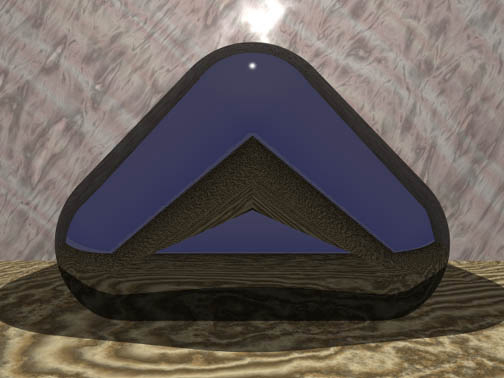
Patience is a virtue they say. Well I tested my patience with this one!
:)

  Again, the dreaded spheres - 323 of them.

  Is there a way to 'compact' the code to do this sort of thing?
  I moved the spheres in increments of .01.

   ~Steve~
Post a reply to this message
Attachments:
Download 'Smooth Triangle.jpg' (108 KB)
Preview of image 'Smooth Triangle.jpg'
|
|
| |
| |
|
|
|
|
| |
| |
|
|
25ct wrote:
>
>   Patience is a virtue they say. Well I tested my patience with this one!
> :)
>
>   Again, the dreaded spheres - 323 of them.
>
>   Is there a way to 'compact' the code to do this sort of thing?
>   I moved the spheres in increments of .01.

You did it...by hand?!

Povray has macros and loops structures. I've not used them yet (I'm
still trying to keep track of a few dozen primitives), but that's what
they're there for.

Derek Stark
Post a reply to this message
|
|
| |
| |
|
|
|
|
| |
| |
|
|
"D. Stark - eSN" <dms### [at] esupportnow com> wrote in message
news:3BA### [at] esupportnowcom...
> 25ct wrote:
> >
> > Patience is a virtue they say. Well I tested my patience with this
one!
> > :)
> >
> > Again, the dreaded spheres - 323 of them.
> >
> > Is there a way to 'compact' the code to do this sort of thing?
> > I moved the spheres in increments of .01.
>
> You did it...by hand?!
Well, 'cut and pasting', but yes it's one long code! :)
>
> Povray has macros and loops structures. I've not used them yet (I'm
> still trying to keep track of a few dozen primitives), but that's what
> they're there for.
Ah, that's what they're for. Thanks. I haven't a clue how to use them
though, can anyone explain?
~Steve~
>
> Derek Stark com> wrote in message
news:3BA### [at] esupportnowcom...
> 25ct wrote:
> >
> > Patience is a virtue they say. Well I tested my patience with this
one!
> > :)
> >
> > Again, the dreaded spheres - 323 of them.
> >
> > Is there a way to 'compact' the code to do this sort of thing?
> > I moved the spheres in increments of .01.
>
> You did it...by hand?!
Well, 'cut and pasting', but yes it's one long code! :)
>
> Povray has macros and loops structures. I've not used them yet (I'm
> still trying to keep track of a few dozen primitives), but that's what
> they're there for.
Ah, that's what they're for. Thanks. I haven't a clue how to use them
though, can anyone explain?
~Steve~
>
> Derek Stark
Post a reply to this message
|
|
| |
| |
|
|
|
|
| |
| |
|
|
try loops and macros

i.e.:

#macro SphereLine (startpt,endpt,rad,nsegments)
    union{
      #local i=0;
      #local seglen=(endpt-startpt)/nsegments;
      #while (i<=nsegments)
          sphere{0 rad translate startpt+seglen*i}
          #local i=i+1;
      #end
  }
#end


use like:
object{SphereLine(<-5,0,-5>,<2,1,2>,0.25,100) texture{MyTexture}}

creates a line from pt1 to pt2 using 100 evenly spaced spheres of radius
0.25

-tgq

"25ct" <25c### [at] lineonenet> wrote in message news:3ba1120e@news.povray.org...
>
> "D. Stark - eSN" <dms### [at] esupportnowcom> wrote in message
> news:3BA### [at] esupportnowcom...
> > 25ct wrote:
> > >
> > >   Patience is a virtue they say. Well I tested my patience with this
> one!
> > > :)
> > >
> > >   Again, the dreaded spheres - 323 of them.
> > >
> > >   Is there a way to 'compact' the code to do this sort of thing?
> > >   I moved the spheres in increments of .01.
> >
> > You did it...by hand?!
>
>     Well, 'cut and pasting', but yes it's one long code! :)
>
>
> >
> > Povray has macros and loops structures. I've not used them yet (I'm
> > still trying to keep track of a few dozen primitives), but that's what
> > they're there for.
>
>     Ah, that's what they're for. Thanks. I haven't a clue how to use them
> though, can anyone explain?
>
>   ~Steve~
>
>
> >
> > Derek Stark
>
>
Post a reply to this message
|
|
| |
| |
|
|
|
|
| |
| |
|
|
On Thu, 13 Sep 2001 20:33:58 +0100, 25ct wrote...
>   Patience is a virtue they say. Well I tested my patience with this one!
> :)
>
>   Again, the dreaded spheres - 323 of them.
>
>   Is there a way to 'compact' the code to do this sort of thing?
>   I moved the spheres in increments of .01.

Assuming you're using POV3.5b1, I would assume you could use a linear
Sphere sweep...

Bye for now,
     Jamie.
Post a reply to this message
|
|
| |
| |
|
|
|
|
| |
| |
|
|
"Jamie Davison" <jam### [at] ntlworldcom> wrote in message
news:MPG.160b343c90c149ee989a05@news.povray.org...

>
> Assuming you're using POV3.5b1, I would assume you could use a linear
> Sphere sweep...

     Aha,  I am using 3.5, so I'll give that a try too Jamie, thanks. I
didn't understand what a sphere sweep was, so didn't realise you could do
that.

     ~Steve~


>
> Bye for now,
>      Jamie.
Post a reply to this message
|
|
| |
| |
|
|
|
|
| |
| |
|
|
"Trevor Quayle" <Tin### [at] hotmailcom> wrote in message
news:3ba11f50$1@news.povray.org...
> try loops and macros
>
> i.e.:
>
> #macro SphereLine (startpt,endpt,rad,nsegments)
>     union{
>       #local i=0;
>       #local seglen=(endpt-startpt)/nsegments;
>       #while (i<=nsegments)
>           sphere{0 rad translate startpt+seglen*i}
>           #local i=i+1;
>       #end
>   }
> #end
>
>
> use like:
> object{SphereLine(<-5,0,-5>,<2,1,2>,0.25,100) texture{MyTexture}}
>
> creates a line from pt1 to pt2 using 100 evenly spaced spheres of radius
> 0.25

     That's great Trevor. I'll try that. Many thanks.

     ~Steve~


>
> -tgq
Post a reply to this message
|
|
| |
| |
|
|
|
|
| |
| |
|
|
Jamie Davison wrote:
> Assuming you're using POV3.5b1, I would assume you could use a linear
> Sphere sweep...

I'm not sure by looking at that image, but it the edges of the triangle
are not curved, also three cylinders and two spheres would do it. Or if
the vertices are curved, clipped tori instead of cylinders.

--
          /"\                           |    iki.
          \ /     ASCII Ribbon Campaign |    fi/
           X      Against HTML Mail     |    zds
          / \
Post a reply to this message
|
|
| |
| |
|
|
|
|
| |
| |
|
|
> > Assuming you're using POV3.5b1, I would assume you could use a linear
> > Sphere sweep...
>
> I'm not sure by looking at that image, but it the edges of the triangle
> are not curved, also three cylinders and two spheres would do it. Or if
> the vertices are curved, clipped tori instead of cylinders.

That was going to be my next suggestion, but I had to log off as someone
else wanted to use the phone line, and by the time the line was
available, I was asleep...

Bye for now,
     Jamie.
Post a reply to this message
|
|
| |
| |
|
|
|
|
| |
| |
|
|
"Jamie Davison" <jam### [at] ntlworldcom> wrote in message
news:MPG.160c6051bb9384c6989a07@news.povray.org...
> > > Assuming you're using POV3.5b1, I would assume you could use a linear
> > > Sphere sweep...
> >
> > I'm not sure by looking at that image, but it the edges of the triangle
> > are not curved, also three cylinders and two spheres would do it. Or if
> > the vertices are curved, clipped tori instead of cylinders.
>
> That was going to be my next suggestion, but I had to log off as someone
> else wanted to use the phone line, and by the time the line was
> available, I was asleep...

     Well yeah, I'd already thought of cylinders and 3 spheres, but I can't
move cylinders! Eek!  I find them really hard to move.... I don't know what
it is, am I missing something? Can anyone give me a way of moving these
easily??

     What do you do?

   ~Steve~  (PS. I would do something like I have done anyway, simply to see
what the image would look like).


>
> Bye for now,
>      Jamie.
Post a reply to this message
|
|
| |
| |
|
|
|
|
| |
| |
|
|
> > That was going to be my next suggestion, but I had to log off as someone
> > else wanted to use the phone line, and by the time the line was
> > available, I was asleep...
>
>      Well yeah, I'd already thought of cylinders and 3 spheres, but I can't
> move cylinders! Eek!  I find them really hard to move.... I don't know what
> it is, am I missing something? Can anyone give me a way of moving these
> easily??
>
>      What do you do?

I use Moray :)

I've attached a quick example of a CSG rounded triangle I put together in
about five minutes in Moray.  It consists of three Torii, three
Cylinders, six Cubes, and six CSG's - three differences, and three
unions.

Bye for now,
     Jamie.
Post a reply to this message
Attachments:
Download 'round_triangle.jpg' (39 KB)
Preview of image 'round_triangle.jpg'

|
|
| |
| |
|
|
From: 25ct
Subject: Re: Smooth Triangle. (107kbs) - round_triangle.jpg [1/1]
Date: 14 Sep 2001 17:55:02
Message: <3ba27cb6@news.povray.org>
|
|
|
| |
| |
|
|
"Jamie Davison" <jam### [at] ntlworldcom> wrote in message
news:MPG.160c7c5afaaff88e989a09@news.povray.org...
> > > That was going to be my next suggestion, but I had to log off as
someone
> > > else wanted to use the phone line, and by the time the line was
> > > available, I was asleep...
> >
> >      Well yeah, I'd already thought of cylinders and 3 spheres, but I
can't
> > move cylinders! Eek!  I find them really hard to move.... I don't know
what
> > it is, am I missing something? Can anyone give me a way of moving these
> > easily??
> >
> >      What do you do?
>
> I use Moray :)
>
> I've attached a quick example of a CSG rounded triangle I put together in
> about five minutes in Moray.  It consists of three Torii, three
> Cylinders, six Cubes, and six CSG's - three differences, and three
> unions.

     Thanks Jamie, that's the sort of thing I intended to do in the first
place, but with glass. It didn't quite come out that way though. Great image
for 5 minutes. I haven't got Moray at the moment, but with some of the
others suggestions, I'll give something else a go. Thanks for your time,
it's helped me.

   ~Steve~

[image]


>
> Bye for now,
>      Jamie.
>
>
Post a reply to this message
|
|
| |
| |
|
|
|
|
| |
| |
|
|
> > I use Moray :)
> >
> > I've attached a quick example of a CSG rounded triangle I put together in
> > about five minutes in Moray.  It consists of three Torii, three
> > Cylinders, six Cubes, and six CSG's - three differences, and three
> > unions.
>
>      Thanks Jamie, that's the sort of thing I intended to do in the first
> place, but with glass. It didn't quite come out that way though. Great image
> for 5 minutes. I haven't got Moray at the moment, but with some of the
> others suggestions, I'll give something else a go. Thanks for your time,
> it's helped me.

If you want the source that Moray spat out for this, then feel free to
ask.

Bye for now,
     Jamie.
Post a reply to this message
|
|
| |
| |
|
|
|
|
| |
| |
|
|
On Thu, 13 Sep 2001 20:33:58 +0100, "25ct" <25c### [at] lineonenet> wrote:

>  Patience is a virtue they say. Well I tested my patience with this one!
>:)
>
>  Again, the dreaded spheres - 323 of them.
>
>  Is there a way to 'compact' the code to do this sort of thing?
>  I moved the spheres in increments of .01.
>
>   ~Steve~
>
>
>begin 666 Smooth Triangle.jpg

Why not use 3 spheres and three cylinders?
Post a reply to this message
|
|
| |
| |
|
|
From: 25ct
Subject: Re: Smooth Triangle. (107kbs) - round_triangle.jpg [1/1]
Date: 16 Sep 2001 06:58:26
Message: <3ba485d2@news.povray.org>
|
|
|
| |
| |
|
|
"Jamie Davison" <jam### [at] ntlworldcom> wrote in message
news:MPG.160dcd2950340b68989a0a@news.povray.org...

>
> If you want the source that Moray spat out for this, then feel free to
> ask.

     Could you? You can mail it if you want. I'd appreciate it.

    ~Steve~


>
> Bye for now,
>      Jamie.
Post a reply to this message
|
|
| |
| |
|
|
|
|
| |
| |
|
|
<PeterC@nym.alias.net> wrote in message news:3ba3ad97.2556724@localhost...
> On Thu, 13 Sep 2001 20:33:58 +0100, "25ct" <25c### [at] lineonenet> wrote:
>
> >  Patience is a virtue they say. Well I tested my patience with this one!
> >:)
> >
> >  Again, the dreaded spheres - 323 of them.
> >
> >  Is there a way to 'compact' the code to do this sort of thing?
> >  I moved the spheres in increments of .01.
> >
> >   ~Steve~
> >
> >
> >begin 666 Smooth Triangle.jpg
>
> Why not use 3 spheres and three cylinders?

   I just wanted to see what it looked like the way I did it, and I find
cylinders hard to move, but I'm trying.  :o)

  ~Steve~

>
Post a reply to this message
|
|
| |
| |
|
|
|
|
| |
| |
|
|
25ct wrote:
>      Well yeah, I'd already thought of cylinders and 3 spheres,
> but I can't move cylinders! Eek!  I find them really hard to move....
> I don't know what it is, am I missing something? Can anyone give me
> a way of moving these easily??

Why would you need to move them?

	union {
	  sphere   { P0,     R }
	  cylinder { P0, P1, R }
	  sphere   { P1,     R }
	  cylinder { P1, P2, R }
	  sphere   { P2,     R }
	  cylinder { P2, P0, R }
	  }

--
Anton Sherwood  --  http://www.ogre.nu/ (online again, Nov.19)
Post a reply to this message
|
|
| |
| |
|
|
|
|
| |
| |
|
|
I think what 25ct means 'to position them in an equilateral triangle'. That
can be done fairly easily with the vrotate() function.

"Anton Sherwood" <bro### [at] poboxcom> wrote in message
news:3C00BFFA.1F005DBF@pobox.com...
> Why would you need to move them?
Post a reply to this message
|
|
| |
| |
|
|
|
|
| |