|
|
|
|
|
|
| |
| |
|
|
|
|
| |
| |
|
|
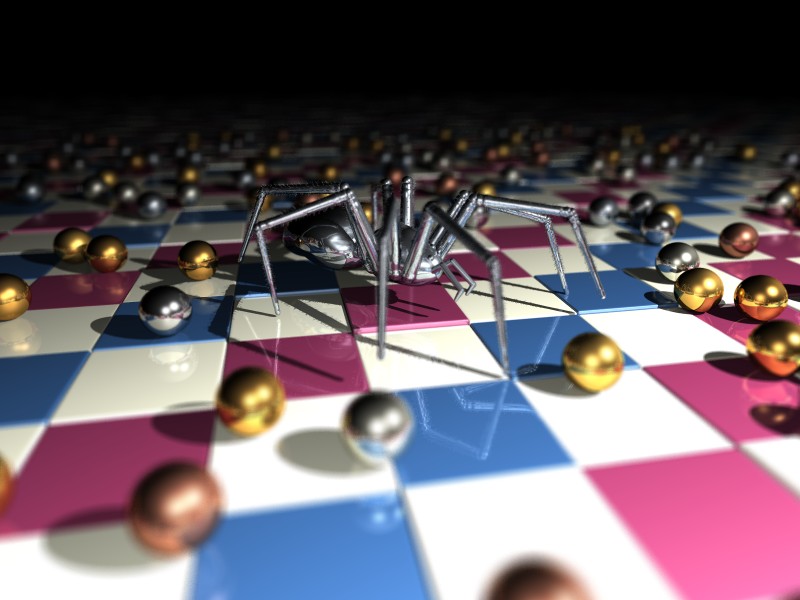
Simple scene to test some metallic textures.
The tiles are textured with eval_pigment (which makes things a lot faster),
and the spheres are placed with my clutter macro.
It's my first try with *real* focal blur, and I'm quite impressed... I
thought it would look grainy... and, I may be wrong, but its sampling method
looks even better than aa method 2 to me...

Cheers,

--
Jonathan
Post a reply to this message
Attachments:
Download 'dof.jpg' (76 KB)
Preview of image 'dof.jpg'
|
|
| |
| |
|
|
|
|
| |
| |
|
|
It's always amazing to see how a little focal blur can add so much realism
to a scene. :)
Post a reply to this message
|
|
| |
| |
|
|
|
|
| |
| |
|
|
"JRG wrote
> The tiles are textured with eval_pigment (which makes things a lot faster),
 > Jonathan
>
 You lost me there ... what are you evaluating ?
and ... faster than what ???
Sorry ... I'm confused. ( nothing new for me ;)
--
Y
Post a reply to this message
|
|
| |
| |
|
|
|
|
| |
| |
|
|
JRG wrote:
> Simple scene to test some metallic textures.

Nice pic. What metals are the spheres supposed to present? The "iron"
ones (white) look very real. The yellow ones (gold? brass?) do not look
very good. They look more like a plastic metallic spheres hung on x-mas
tree than real metal. I encountered similar problems when I tried to
create realistic antique gold texture based on your magnificent
iridescent metal but failed miserably. I think at the basic problem with
your spheres is that they are too polished and reflective; real gold
tends to not reflect a much, but instead it has highlights that have
this far been resisted all my attemps to model them with POV-Ray.
Combining strong highlites with a little different colour than the
diffuse color of the metal and possibly using blurred reflection is my
best guess right now.

In fact I almost came to conclusion that it's impossible to model
real-looking gold with POV-Ray, but you guys have repeatedly proved my
asumptations of this kind false, so I expect you to do it this time too.

One problem with gold is that it is not possible to have a real life
look at any golden item, that would have big smooth surfaces. I have to
rely on few very small gold items I own and to pictures. And almost all
the pictures are taken in studio environments, with no possibility to
know about lighting, surroundings etc. I have also noticed, that ancient
gold items semm to look more greenish, at least on hightlights, than
modern gold items - is this due to differences in alloy, environment of
the items in photographs or something completely else is something I
have not been able to find out this far.

The copper spheres (reddish brown) in your pic can't be judged, because
none of them are clearly visible.

--
          /"\                           |    iki.
          \ /     ASCII Ribbon Campaign |    fi/
           X      Against HTML Mail     |    zds
          / \
Post a reply to this message
|
|
| |
| |
|
|
|
|
| |
| |
|
|
They main problem with POV-Ray's focal blur is just that the *default*
settings produce a very grainy result, which is a shame because it gives
people the wrong impression.
  Fine-tuning the focal blur parameters can indeed give an excellent result
even without the rendering time going through the roof.

  The biggest advantage of using POV-Ray's own focal blur is physical
correctness. This can be seen specially in reflections (and refractions
if there would be any): It's impossible to get a physically correct
result in reflections/refractions with the post-process focal blur.

--
#macro N(D,I)#if(I<6)cylinder{M()#local D[I]=div(D[I],104);M().5,2pigment{
rgb M()}}N(D,(D[I]>99?I:I+1))#end#end#macro M()<mod(D[I],13)-6,mod(div(D[I
],13),8)-3,10>#end blob{N(array[6]{11117333955,
7382340,3358,3900569407,970,4254934330},0)}//                     - Warp -
Post a reply to this message
|
|
| |
| |
|
|
|
|
| |
| |
|
|
Warp wrote:
>
>   The biggest advantage of using POV-Ray's own focal blur is physical
> correctness.

Does it obey these equations?
http://www.outsight.com/hyperfocal.html#math

If I set the focal point to hyperfocal distance everything beyond
that should be in focus.

_____________
Kari Kivisalo
Post a reply to this message
|
|
| |
| |
|
|
|
|
| |
| |
|
|
Warp wrote:

>   The biggest advantage of using POV-Ray's own focal blur is physical
> correctness.

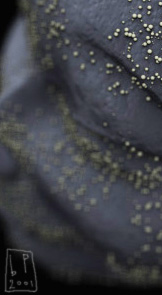
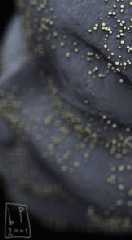
except for the fact that features in the blur (for example, the
highlights on the most blurred spheres) appear to diffuse into a square
shape due to the way pov distributes the blurring rays.
What would be ultra nice is if pov could send out rays in a circular
pattern or even hexagonal to mimic more closely the shape of a real
camera's apeture.
The way pov does it now isn't that obviously wrong, but i've had a few
circumstances where the square artifacts have been dissappointing.

see attatched pic for illustration of my point:
Post a reply to this message
Attachments:
Download 'bppixie_brokeh.jpg' (22 KB)
Preview of image 'bppixie_brokeh.jpg'
|
|
| |
| |
|
|
|
|
| |
| |
|
|
> Simple scene to test some metallic textures.
> The tiles are textured with eval_pigment (which makes things a lot
faster),
> and the spheres are placed with my clutter macro.
> It's my first try with *real* focal blur, and I'm quite impressed... I
> thought it would look grainy... and, I may be wrong, but its sampling
method
> looks even better than aa method 2 to me...

focal blur is truly a wondrous thing (and helps hide so much in the way of
shoddy backgrounds) - pity it renders like a pig :)


--
Rick

Kitty5 WebDesign - http://Kitty5.com
POV-Ray News & Resources - http://Povray.co.uk
TEL : +44 (01270) 501101 - FAX : +44 (01270) 251105 - ICQ : 15776037

PGP Public Key
http://pgpkeys.mit.edu:11371/pks/lookup?op=get&search=0x231E1CEA
Post a reply to this message
|
|
| |
| |
|
|
|
|
| |
| |
|
|
This is a very pretty image! Any chance for a larger version, say 1280x1024?
(hint, hint).
regards,
Simen Kvaal.
"JRG" <jrg### [at] hotmail com> wrote in message
news:3b881e41@news.povray.org...
> Simple scene to test some metallic textures.
> The tiles are textured with eval_pigment (which makes things a lot
faster),
> and the spheres are placed with my clutter macro.
> It's my first try with *real* focal blur, and I'm quite impressed... I
> thought it would look grainy... and, I may be wrong, but its sampling
method
> looks even better than aa method 2 to me...
>
> Cheers,
>
> --
> Jonathan
> com> wrote in message
news:3b881e41@news.povray.org...
> Simple scene to test some metallic textures.
> The tiles are textured with eval_pigment (which makes things a lot
faster),
> and the spheres are placed with my clutter macro.
> It's my first try with *real* focal blur, and I'm quite impressed... I
> thought it would look grainy... and, I may be wrong, but its sampling
method
> looks even better than aa method 2 to me...
>
> Cheers,
>
> --
> Jonathan
>
Post a reply to this message
|
|
| |
| |
|
|
|
|
| |
| |
|
|
"Y" <Hos### [at] nettaxicom> ha scritto nel messaggio
news:3b882a7f@news.povray.org...
> "JRG wrote
> > The tiles are textured with eval_pigment (which makes things a lot
faster),
>  > Jonathan
> >
>  You lost me there ... what are you evaluating ?

The single color of each tile.


> and ... faster than what ???

Than setting the color inside the loop which places the tiles, something
like #declare p1=0; #if (p1=0) #declare Color=red #else ...

--
Jonathan
Post a reply to this message
|
|
| |
| |
|
|
|
|
| |
| |
|
|
"Jari Juslin" <zds### [at] ikifi> ha scritto nel messaggio
news:3B8833EF.9DA81B52@iki.fi...
> JRG wrote:
> > Simple scene to test some metallic textures.
>
> Nice pic. What metals are the spheres supposed to present? The "iron"
> ones (white) look very real. The yellow ones (gold? brass?) do not look
> very good. They look more like a plastic metallic spheres hung on x-mas
> tree than real metal.

To me they look right, but de gustibus non est disputandum... ;)

>I encountered similar problems when I tried to
> create realistic antique gold texture based on your magnificent
> iridescent metal but failed miserably.

Which metal? I don't think to remember something like that.

>I think at the basic problem with
> your spheres is that they are too polished and reflective; real gold
> tends to not reflect a much, but instead it has highlights that have
> this far been resisted all my attemps to model them with POV-Ray.
> Combining strong highlites with a little different colour than the
> diffuse color of the metal and possibly using blurred reflection is my
> best guess right now.

Now that you make me notice that, I think youre right... In fact I'm using
finish_D (highly polished and reflective) from my metals.inc... the problem
here is that I have no gold here at the moment...;) BTW I think that (with
POV) it's best designing your metal textures according to the scene you're
developing. It's sad having to admit that there aren't settings which
combine physical correctness to realism at all (at least with POV)...

>
> In fact I almost came to conclusion that it's impossible to model
> real-looking gold with POV-Ray, but you guys have repeatedly proved my
> asumptations of this kind false, so I expect you to do it this time too.
> One problem with gold is that it is not possible to have a real life
> look at any golden item, that would have big smooth surfaces. I have to
> rely on few very small gold items I own and to pictures. And almost all
> the pictures are taken in studio environments, with no possibility to
> know about lighting, surroundings etc. I have also noticed, that ancient
> gold items semm to look more greenish, at least on hightlights, than
> modern gold items - is this due to differences in alloy, environment of
> the items in photographs or something completely else is something I
> have not been able to find out this far.

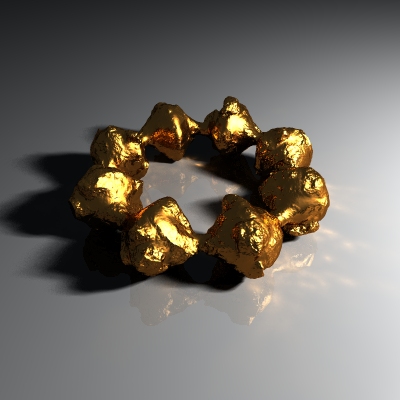
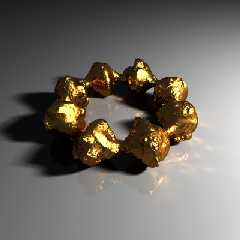
Normals or displacing can be handy here:
Post a reply to this message
Attachments:
Download 'gold.jpg' (63 KB)
Preview of image 'gold.jpg'
|
|
| |
| |
|
|
|
|
| |
| |
|
|
1024x960 maybe, to preserve aspect ratio.

"Simen Kvaal" <sim### [at] remove_mestudentmatnatuiono> ha scritto nel
messaggio news:3b890616$1@news.povray.org...
> This is a very pretty image! Any chance for a larger version, say
1280x1024?
> (hint, hint).
>
> regards,
> Simen Kvaal.
>
> "JRG" <jrg### [at] hotmailcom> wrote in message
> news:3b881e41@news.povray.org...
> > Simple scene to test some metallic textures.
> > The tiles are textured with eval_pigment (which makes things a lot
> faster),
> > and the spheres are placed with my clutter macro.
> > It's my first try with *real* focal blur, and I'm quite impressed... I
> > thought it would look grainy... and, I may be wrong, but its sampling
> method
> > looks even better than aa method 2 to me...
> >
> > Cheers,
> >
> > --
> > Jonathan
> >
>
>
>
Post a reply to this message
|
|
| |
| |
|
|
|
|
| |
| |
|
|
> >  You lost me there ... what are you evaluating ?
>
> The single color of each tile.
>
> > and ... faster than what ???
>
> Than setting the color inside the loop which places the tiles, something
> like #declare p1=0; #if (p1=0) #declare Color=red #else ...
> --
> Jonathan
>
Hmmmm ... so what is eval looking at to determine the color/texture ?
You still place the tiles but when and how do you color them ?
Sorry . . . how you are doing this still escapes me and it seems that a
decision still has to be made somewhere in the code to determine what
texture to apply . . .

An example would do me much better as then I can see it ...
would you be willing to share some simple code that demos the color
evaluation and then the coloring and placement?
Thanks.
--
Y
Post a reply to this message
|
|
| |
| |
|
|
|
|
| |
| |
|
|
Sorry, of course I meant 1280x960...

--
Jonathan

"Simen Kvaal" <sim### [at] remove_mestudentmatnatuiono> ha scritto nel
messaggio news:3b890616$1@news.povray.org...
> This is a very pretty image! Any chance for a larger version, say
1280x1024?
> (hint, hint).
>
> regards,
> Simen Kvaal.
>
> "JRG" <jrg### [at] hotmailcom> wrote in message
> news:3b881e41@news.povray.org...
> > Simple scene to test some metallic textures.
> > The tiles are textured with eval_pigment (which makes things a lot
> faster),
> > and the spheres are placed with my clutter macro.
> > It's my first try with *real* focal blur, and I'm quite impressed... I
> > thought it would look grainy... and, I may be wrong, but its sampling
> method
> > looks even better than aa method 2 to me...
> >
> > Cheers,
> >
> > --
> > Jonathan
> >
>
>
>
Post a reply to this message
|
|
| |
| |
|
|
|
|
| |
| |
|
|
#declare tile = superellipsoid { <0.03,0.03> translate -y scale 0.5}
#declare fin =finish {diffuse 0.7 specular 0.3 roughness 0.08 reflection
0.25}

#declare mio_pig=  pigment {pigment_pattern {checker color rgb 1, color rgb
0 scale 2}
                pigment_map {
                        [0 checker color rgb <.2,.35,.55>, color rgb
<1,1,.9>]
                        [1 checker color rgb <.55,.2,.35>, color rgb
<1,1,.9>]}
}

#declare land=
union{
#declare I=seed(0);
#declare i=-30;
#while (i<=30)
#declare j=40;
#while (j>=-10)
object {tile pigment {rgb eval_pigment(mio_pig,<i,0,j>)} finish {fin}
translate <i,-0.075+rand(I)*0.05,j>}
#declare j=j-1;
#end
#declare i=i+1;
#end
}

--
Jonathan
Post a reply to this message
|
|
| |
| |
|
|
|
|
| |
| |
|
|
"ben paschke" wrote :

> except for the fact that features in the blur (for example, the
> highlights on the most blurred spheres) appear to diffuse into a square
> shape due to the way pov distributes the blurring rays.
> What would be ultra nice is if pov could send out rays in a circular
> pattern or even hexagonal to mimic more closely the shape of a real
> camera's apeture.

There is a potential very interesting patch to introduce, here.
Look at this :

http://www.flarg.com/bokeh.html

That's a feature found in very high-end rendering software, and,
as far as I understand it, one just has to tweak to shape of the
distribution, and the relative weight of the samples.

Fabien.
Post a reply to this message
|
|
| |
| |
|
|
|
|
| |
| |
|
|
> object {tile pigment {rgb eval_pigment(mio_pig,<i,0,j>)} finish {fin}
 > --
> Jonathan
>
 Ah ha!!!  Thanks, Jonathan ...
now I can see the speed-up comes from.
Nice code.
--
Y
Post a reply to this message
|
|
| |
| |
|
|
|
|
| |
| |
|
|
Yes! I think it would be a great addition! A simple thing, yet so
effective: there's nothing like a good defocus effect.

Fabien Mosen wrote:
>
> "ben paschke" wrote :
>
> > except for the fact that features in the blur (for example, the
> > highlights on the most blurred spheres) appear to diffuse into a square
> > shape due to the way pov distributes the blurring rays.
> > What would be ultra nice is if pov could send out rays in a circular
> > pattern or even hexagonal to mimic more closely the shape of a real
> > camera's apeture.
>
> There is a potential very interesting patch to introduce, here.
> Look at this :
>
> http://www.flarg.com/bokeh.html
>
> That's a feature found in very high-end rendering software, and,
> as far as I understand it, one just has to tweak to shape of the
> distribution, and the relative weight of the samples.
>
> Fabien.
Post a reply to this message
|
|
| |
| |
|
|
|
|
| |