|
|
|
|
|
|
| |
| |
|
|
|
|
| |
| |
|
|
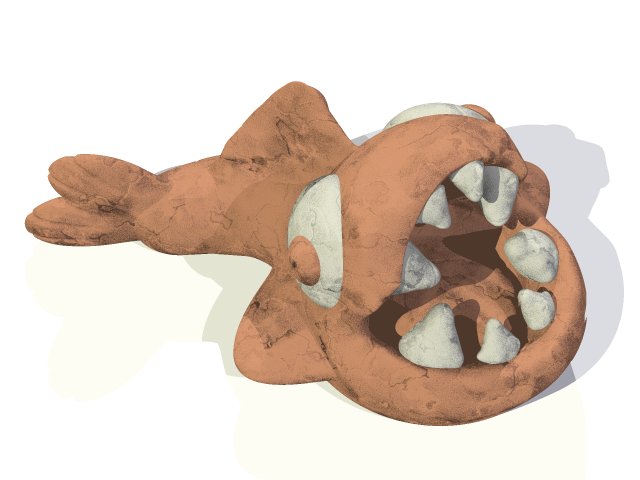
This is a clay model of a piranha fish. I made this clay model back when I
was a kid. Do not try to do a psychological analysis.

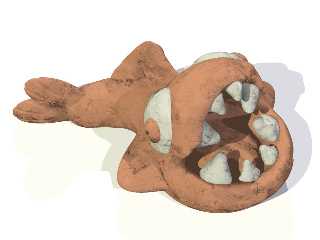
Anyway, I've always liked it, so I decided to try to model it in POV-Ray,
and here's the result so far.

There's some things I want to improve on the model, and I also imagine that
this image could be a good occasion to try out radiosity (which I have not
tried before).

I'd like to hear your comments and suggestions for improvement, both
regarding how to obtain photorealism as well as artistic advise (camera,
lights).

Rune
--
\ Include files, tutorials, 3D images, raytracing jokes,
/ The POV Desktop Theme, and The POV-Ray Logo Contest can
\ all be found at http://rsj.mobilixnet.dk (updated January 28)
/ Also visit http://www.povrayusers.org
Post a reply to this message
Attachments:
Download 'piranha.jpg' (34 KB)
Preview of image 'piranha.jpg'
|
|
| |
| |
|
|
|
|
| |
| |
|
|
Sweet.  Leggo my hand!!!!!

H.E. Day
<><
Post a reply to this message
|
|
| |
| |
|
|
|
|
| |
| |
|
|
"H.E. Day" wrote:
> Sweet.

Thank you!

Rune
--
\ Include files, tutorials, 3D images, raytracing jokes,
/ The POV Desktop Theme, and The POV-Ray Logo Contest can
\ all be found at http://rsj.mobilixnet.dk (updated January 28)
/ Also visit http://www.povrayusers.org
Post a reply to this message
|
|
| |
| |
|
|
|
|
| |
| |
|
|
Wow, that's pretty realistic! Cool model too :)
--
David Fontaine <dav### [at] faricy net> ICQ 55354965
My raytracing gallery: http://davidf.faricy.net/ net> ICQ 55354965
My raytracing gallery: http://davidf.faricy.net/
Post a reply to this message
|
|
| |
| |
|
|
|
|
| |
| |
|
|
Blast it all, Rune!
Don't post photos here.

--
Dan D.
Post a reply to this message
|
|
| |
| |
|
|
|
|
| |
| |
|
|
Hi Rune

I had to look twice to make sure it wasn't a photo - great job!

Mick
Post a reply to this message
|
|
| |
| |
|
|
|
|
| |
| |
|
|
It has a great texture to it,  radiosity could really make it look more life
life (as a clay sculpture, of course). It's a great piece of modeling.


--
Josh English -- Lexiphanic Lethomaniac
eng### [at] spiritonecom
The POV-Ray Cyclopedia http://www.spiritone.com/~english/cyclopedia/
"He who hebetates is last."
Post a reply to this message
|
|
| |
| |
|
|
|
|
| |
| |
|
|
> This is a clay model of a piranha fish. I made this clay model back when I
> was a kid.

is this the clay model or you pov render <g> - very realistic !

> Do not try to do a psychological analysis.

yes probably best to not go there :)


--
Rick

POV-Ray News & Resources - http://povray.co.uk
Kitty5 WebDesign - http://kitty5.com
Hi-Impact web site design & database driven e-commerce
TEL : +44 (01625) 266358 - FAX : +44 (01625) 611913 - ICQ : 15776037

PGP Public Key
http://pgpkeys.mit.edu:11371/pks/lookup?op=get&search=0x231E1CEA
Post a reply to this message
|
|
| |
| |
|
|
|
|
| |
| |
|
|
Rune wrote:
>
> I'd like to hear your comments and suggestions for improvement, both
> regarding how to obtain photorealism as well as artistic advise (camera,
> lights).
>

Whoa, I had to look twice to make sure you weren't BS-ing us with a photo - in
fact I'm still a bit suspicious :)
This looks like an ideal subject for radiosity lighting. I like the camera angle
as it is, the viewpoint gives the fish a slightly maniacal air... Not sure what
the setting should be, perhaps none is needed.

--
Margus Ramst

Personal e-mail: mar### [at] peakeduee
TAG (Team Assistance Group) e-mail: mar### [at] tagpovrayorg
Home page http://www.hot.ee/margusrt
Post a reply to this message
|
|
| |
| |
|
|
|
|
| |
| |
|
|
Rune wrote:
>
> This is a clay model of a piranha fish. I made this clay model back when I
> was a kid. Do not try to do a psychological analysis.
>
> Anyway, I've always liked it, so I decided to try to model it in POV-Ray,
> and here's the result so far.
>
> There's some things I want to improve on the model, and I also imagine that
> this image could be a good occasion to try out radiosity (which I have not
> tried before).
>
> I'd like to hear your comments and suggestions for improvement, both
> regarding how to obtain photorealism as well as artistic advise (camera,
> lights).
>

Very realistic, i would really try radiosity lighting.

Maybe put it right in front of a goldfish bowl... :-)

Christoph

--
Christoph Hormann <chr### [at] gmxde>
IsoWood include, radiosity tutorial, TransSkin and other
things on: http://www.schunter.etc.tu-bs.de/~chris/
Post a reply to this message
|
|
| |
| |
|
|
|
|
| |
| |
|
|
"David Fontaine" wrote:
> Wow, that's pretty realistic! Cool model too :)

Thank you! :)

Rune
--
\ Include files, tutorials, 3D images, raytracing jokes,
/ The POV Desktop Theme, and The POV-Ray Logo Contest can
\ all be found at http://rsj.mobilixnet.dk (updated January 28)
/ Also visit http://www.povrayusers.org
Post a reply to this message
|
|
| |
| |
|
|
|
|
| |
| |
|
|
"ddombrow" wrote:
> Blast it all, Rune!
> Don't post photos here.

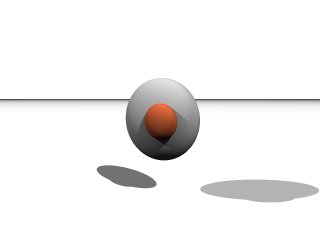
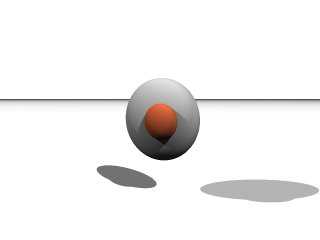
Oh, sorry, I posted the photo, but forgot to post the image of my POV-Ray
model. Here it is. I have not come very far yet, but it's getting there.

Rune
--
\ Include files, tutorials, 3D images, raytracing jokes,
/ The POV Desktop Theme, and The POV-Ray Logo Contest can
\ all be found at http://rsj.mobilixnet.dk (updated January 28)
/ Also visit http://www.povrayusers.org
Post a reply to this message
Attachments:
Download 'fishmodel.jpg' (4 KB)
Preview of image 'fishmodel.jpg'
|
|
| |
| |
|
|
|
|
| |
| |
|
|
"Mick Hazelgrove" wrote:
> I had to look twice to make sure it wasn't a photo - great job!

Thank you!

I will try to improve the lightning to take the realism a bit further.

Rune
--
\ Include files, tutorials, 3D images, raytracing jokes,
/ The POV Desktop Theme, and The POV-Ray Logo Contest can
\ all be found at http://rsj.mobilixnet.dk (updated January 28)
/ Also visit http://www.povrayusers.org
Post a reply to this message
|
|
| |
| |
|
|
|
|
| |
| |
|
|
"Josh English" wrote:
> It has a great texture to it,  radiosity could really make
> it look more life life (as a clay sculpture, of course).

I will look into it.

> It's a great piece of modeling.

Thanks! It's made of blobs if anyone was in doubt.

Rune
--
\ Include files, tutorials, 3D images, raytracing jokes,
/ The POV Desktop Theme, and The POV-Ray Logo Contest can
\ all be found at http://rsj.mobilixnet.dk (updated January 28)
/ Also visit http://www.povrayusers.org
Post a reply to this message
|
|
| |
| |
|
|
|
|
| |
| |
|
|
"Rick [Kitty5]" wrote:
> is this the clay model or you pov render <g> - very realistic !

Thank you! :D

Rune
--
\ Include files, tutorials, 3D images, raytracing jokes,
/ The POV Desktop Theme, and The POV-Ray Logo Contest can
\ all be found at http://rsj.mobilixnet.dk (updated January 28)
/ Also visit http://www.povrayusers.org
Post a reply to this message
|
|
| |
| |
|
|
|
|
| |
| |
|
|
"Margus Ramst" wrote:
> Whoa, I had to look twice to make sure you weren't BS-ing
> us with a photo - in fact I'm still a bit suspicious :)

Any particular thing that gives away that it isn't a photo?

> This looks like an ideal subject for radiosity lighting.

I thought so myself.

> I like the camera angle as it is, the viewpoint gives the
> fish a slightly maniacal air...

Yes, that's intentional. :)

> Not sure what the setting should be, perhaps none is needed.

Yeah, I have no plans of creating a setting...

Thanks for the feedback!

Rune
--
\ Include files, tutorials, 3D images, raytracing jokes,
/ The POV Desktop Theme, and The POV-Ray Logo Contest can
\ all be found at http://rsj.mobilixnet.dk (updated January 28)
/ Also visit http://www.povrayusers.org
Post a reply to this message
|
|
| |
| |
|
|
|
|
| |
| |
|
|
In article <3a9abd33@news.povray.org>, run### [at] inamecom says...
> Any particular thing that gives away that it isn't a photo?
The perfecly sharp shadows. -> Use area lights and/or radiosity.

Lutz-Peter
Post a reply to this message
|
|
| |
| |
|
|
|
|
| |
| |
|
|
"Rune" <run### [at] inamecom> wrote:
>
> Any particular thing that gives away that it isn't a photo?
>

As Lutz-Peter said, mostly the sharp shadows; also the way the texture is
lost in the shadow (e.g. inside the mouth). If you get the radiosity
lighting right, there should be very few obvious giveaways. The modelling
itself is all but ideal.

--
Margus Ramst

Personal e-mail: mar### [at] peakeduee
TAG (Team Assistance Group) e-mail: mar### [at] tagpovrayorg
Home page http://www.hot.ee/margusrt
Post a reply to this message
|
|
| |
| |
|
|
|
|
| |
| |
|
|
Hello Rune.

Like several others, I wondered for a moment whether I was looking at a
photo of the clay model.

What gave it away to me way the sharp shadows, and the lack of a background,
so in my humble opinion I'd suggest that is where the work is needed for a
phot-realistic effect. Area-lighting and a background - perhaps place it on
a pile of paper as though it's being used as a paper-weight.

I don't think you need to do anything to the model itself - I'd call it
photo-realistic already.

I was going to ask how you'd done it, I didn't think it could have been just
blobs and a surface normal, but your previous replies have confirmed that
this is the case.

A brilliant piece of work from a master of blobs.

--
Duncan Gray
(warning: may contain traces of nut)
Post a reply to this message
|
|
| |
| |
|
|
|
|
| |
| |
|
|
needs radiosity :)

--
Dan D.
Post a reply to this message
|
|
| |
| |
|
|
|
|
| |
| |
|
|
"Christoph Hormann" wrote:
> Very realistic, i would really try radiosity lighting.

Thank you, I will try out radiosity.

> Maybe put it right in front of a goldfish bowl... :-)

Nah, I don't think those would fit well together...

Rune
--
\ Include files, tutorials, 3D images, raytracing jokes,
/ The POV Desktop Theme, and The POV-Ray Logo Contest can
\ all be found at http://rsj.mobilixnet.dk (updated January 28)
/ Also visit http://www.povrayusers.org
Post a reply to this message
|
|
| |
| |
|
|
|
|
| |
| |
|
|
"Duncan Gray" wrote:
> What gave it away to me way the sharp shadows and the lack
> of a background, so in my humble opinion I'd suggest that
> is where the work is needed for a phot-realistic effect.

I will try out radiosity. As for a background I'm not sure. I personally
like the simple white plane, and photographs can also be made to look that
way, so I don't think it's required to obtain photo-realism.

> I was going to ask how you'd done it, I didn't think it
> could have been just blobs and a surface normal, but your
> previous replies have confirmed that this is the case.

Yes.

> A brilliant piece of work from a master of blobs.

Well, this is my most complicated blob so far; it's not like I have a lot of
experience with it. I think H.E. Day is more worthy of the title... But
thank you anyway! :)

Rune
--
\ Include files, tutorials, 3D images, raytracing jokes,
/ The POV Desktop Theme, and The POV-Ray Logo Contest can
\ all be found at http://rsj.mobilixnet.dk (updated January 28)
/ Also visit http://www.povrayusers.org
Post a reply to this message
|
|
| |
| |
|
|
|
|
| |
| |
|
|
In article <3a9abd30@news.povray.org>, "Rune" <run### [at] inamecom>
wrote:

> I will try to improve the lightning to take the realism a bit further.

Lightning? I didn't see any lightning...well, not in your image. We've
had some pretty odd weather though...
;-)

--
Christopher James Huff
Personal: chr### [at] maccom, http://homepage.mac.com/chrishuff/
TAG: chr### [at] tagpovrayorg, http://tag.povray.org/

<><
Post a reply to this message
|
|
| |
| |
|
|
|
|
| |
| |
|
|
Maybe I haven't seen enough clay, but I would have to dissagree with the
others about this being so "photorealistic". It looks like 3D to me, plain
and simple. You can see it in the missing normals in the shadow, and the
sharp shadows. I did not do a double-take, like most people here claim they
did. Sorry. :) Again, I think this is missing some radiosity and/or
area_lights. But I'm sure someone will help you with that. ;)

The model itself, on the other hand, is very interesting. I like the details
on the tail. The rounded teeth help it look less menacing, which is nice. I
kind of understand how you feel about it. I have little Nick which is still
around here somewhere. He's very dear to my heart. I just look at him and
think "Aren't you cute? Yes, you are. Yes, you are, you little clay
thingy...". 8-)
Post a reply to this message
|
|
| |
| |
|
|
|
|
| |
| |
|
|
"Chris Huff" wrote:
> "Rune" wrote:
>
> > I will try to improve the lightning to take the realism a
> > bit further.
>
> Lightning? I didn't see any lightning...well, not in your image.

Oh I see - I thought lighting and lightning were spelled the same way, but
they're not!

Lightning lighting lightning lighting lightning lighting.

I feel enlightninged now!

Rune
--
\ Include files, tutorials, 3D images, raytracing jokes,
/ The POV Desktop Theme, and The POV-Ray Logo Contest can
\ all be found at http://rsj.mobilixnet.dk (updated January 28)
/ Also visit http://www.povrayusers.org
Post a reply to this message
|
|
| |
| |
|
|
|
|
| |
| |
|
|
"Tony[B]" wrote:
> Maybe I haven't seen enough clay, but I would have to dissagree
> with the others about this being so "photorealistic".

I'm not sure what you mean.

I agree that the image as a whole is not photorealistic because of the
simple lighting.

But what is it about the clay that you think looks fake?

I would think that the image would become rather photorealistic if the
lighting was improved using radiosity, but maybe the model/texture needs
some improvements too?

> The model itself, on the other hand, is very interesting.

Thanks!

> I like the details on the tail. The rounded teeth help it look
> less menacing, which is nice.

Well, it's supposed to look menacing, not cute...

> I kind of understand how you feel about it. I have little Nick
> which is still around here somewhere. He's very dear to my heart.

Does the clayman Nick exist in reality too, or is he trapped inside the
computer?

> I just look at him and think "Aren't you cute? Yes, you are.
> Yes, you are, you little clay thingy...". 8-)

I look at the piranha and think "Aren't you absentminded? Yes you are. Your
eyes are looking in different directions and I can literally see there's
noting inside your head...".

Then I wave my hand just in front of it and it doesn't react.

Rune
--
\ Include files, tutorials, 3D images, raytracing jokes,
/ The POV Desktop Theme, and The POV-Ray Logo Contest can
\ all be found at http://rsj.mobilixnet.dk (updated January 28)
/ Also visit http://www.povrayusers.org
Post a reply to this message
|
|
| |
| |
|
|
|
|
| |
| |
|
|
> But what is it about the clay that you think looks fake?

The normals and lighting.

> Well, it's supposed to look menacing, not cute...

It's still menacing, but less-so... :)

> Does the clayman Nick exist in reality too, or is he trapped inside the
> computer?

He really is! :)

> Then I wave my hand just in front of it and it doesn't react.

:-D
Post a reply to this message
|
|
| |
| |
|
|
|
|
| |
| |
|
|
"Tony[B]" wrote:
> > But what is it about the clay that you think looks fake?
>
> The normals and lighting.

Do you mean that:

A) Because of the poor lighting the normals look fake, but when radiosity is
used, the normals will probably look fine.

B) The normals look fake no matter the lighting. The normals need to be
improved themselves.

If B, how could the normals be improved?

Rune
--
\ Include files, tutorials, 3D images, raytracing jokes,
/ The POV Desktop Theme, and The POV-Ray Logo Contest can
\ all be found at http://rsj.mobilixnet.dk (updated January 28)
/ Also visit http://www.povrayusers.org
Post a reply to this message
|
|
| |
| |
|
|
|
|
| |
| |
|
|
> A) Because of the poor lighting the normals look fake, but when radiosity
is
> used, the normals will probably look fine.

Radiosity will definitely help.

> If B, how could the normals be improved?

I really don't know. Like I said, maybe I haven't worked with enough clay,
but it looks awfully dirty. And I feel that we should be seeing some true
displacement, not just fake normals. Other than that, just relax... and send
me the source, already! I've been playing with radiosity all day waiting for
it.
Post a reply to this message
|
|
| |
| |
|
|
|
|
| |
| |
|
|
In article <3a9d7b0e@news.povray.org>, "Tony[B]" <ben### [at] catholicorg>
wrote:

> And I feel that we should be seeing some true displacement, not just
> fake normals.

This should be possible by using it as a blob pattern in a pigment
isosurface function, and displacing the isosurface.

--
Christopher James Huff
Personal: chr### [at] maccom, http://homepage.mac.com/chrishuff/
TAG: chr### [at] tagpovrayorg, http://tag.povray.org/

<><
Post a reply to this message
|
|
| |
| |
|
|
|
|
| |
| |
|
|
> This should be possible by using it as a blob pattern in a pigment
> isosurface function, and displacing the isosurface.

I hadn't thought of that. Good idea. Well, of course, you created it, so it
was obvious to you, I'm sure. :)
Post a reply to this message
|
|
| |
| |
|
|
|
|
| |
| |
|
|
"Chris Huff" wrote:
> "Tony[B]" wrote:
>
> > And I feel that we should be seeing some true displacement,
> > not just fake normals.
>
> This should be possible by using it as a blob pattern in a
> pigment isosurface function, and displacing the isosurface.

That originally was my plan, but it turned out not to work very well.

The problem is that the blob has blob elements of greatly varying strengths.
So some parts of the blob is greatly affected by displacement, while other
parts are almost not affected at all.

Another problem is that not all parts of the fish should be affected equally
much. The back fin, the teeth and the pupils should not be displaced very
much, while larger chunks of clay should get big bumps. That is almost
impossible to achieve.

So to sum up: The model is displaced unevenly in uncontrollable ways, but I
need it to be displaced unevenly in a controllable way. I don't think that's
possible.

Rune
--
\ Include files, tutorials, 3D images, raytracing jokes,
/ The POV Desktop Theme, and The POV-Ray Logo Contest can
\ all be found at http://rsj.mobilixnet.dk (updated January 28)
/ Also visit http://www.povrayusers.org
Post a reply to this message
|
|
| |
| |
|
|
|
|
| |
| |
|
|
In article <3a9e7e79@news.povray.org>, "Rune" <run### [at] inamecom>
wrote:

> So to sum up: The model is displaced unevenly in uncontrollable ways,
> but I need it to be displaced unevenly in a controllable way. I don't
> think that's possible.

It *is* possible to have displacement be independant of gradient...just
displace the coordinates you give to the blob function, instead of
adding to/subtracting from the function. Use 3 displacement functions
with outputs from -1 to 1, each one offset a bit so it doesn't
synchronize with the others, and add their results to the blob function
coordinates, multiplying by another function controlling the strength of
the displacement.

function {
    BlobFunc(
        DispFuncX(x, y, z)*StrengthFunc(x, y, z) + x,
        DispFuncY(x, y, z)*StrengthFunc(x, y, z) + y,
        DispFuncZ(x, y, z)*StrengthFunc(x, y, z) + z
    )
}

--
Christopher James Huff
Personal: chr### [at] maccom, http://homepage.mac.com/chrishuff/
TAG: chr### [at] tagpovrayorg, http://tag.povray.org/

<><
Post a reply to this message
|
|
| |
| |
|
|
|
|
| |
| |
|
|
In article <3a9d4d14@news.povray.org>, "Rune" <run### [at] inamecom>
wrote:

> Oh I see - I thought lighting and lightning were spelled the same way, but
> they're not!
>
> Lightning lighting lightning lighting lightning lighting.
>
> I feel enlightninged now!

Ahem, "enlightened". Being "enlightninged" sounds rather painful, and
potentially fatal.

"lighting": illumination. Position, brightness, color, etc. of lights in
a scene.

"lightening": making lighter in color, increasing the amount of light.

"lightning": atmospheric discharges of high-voltage static electricity.
Lightning has a lightening effect on the lighting of a scene, but is
otherwise unrelated.

BTW, textures.inc also got this wrong, with the Lightening1 and
Lightening2 textures, so don't feel too bad. It's called "English". ;-)

--
Christopher James Huff
Personal: chr### [at] maccom, http://homepage.mac.com/chrishuff/
TAG: chr### [at] tagpovrayorg, http://tag.povray.org/

<><
Post a reply to this message
|
|
| |
| |
|
|
|
|
| |
| |
|
|
"Chris Huff" wrote:
> "Rune" wrote:
>
> > Oh I see - I thought lighting and lightning were spelled
> > the same way, but they're not!
> >
> > Lightning lighting lightning lighting lightning lighting.
> >
> > I feel enlightninged now!
>
> Ahem, "enlightened". Being "enlightninged" sounds rather
> painful, and potentially fatal.

I know, I know! The last line was a joke! :)

Rune
--
\ Include files, tutorials, 3D images, raytracing jokes,
/ The POV Desktop Theme, and The POV-Ray Logo Contest can
\ all be found at http://rsj.mobilixnet.dk (updated January 28)
/ Also visit http://www.povrayusers.org
Post a reply to this message
|
|
| |
| |
|
|
|
|
| |
| |
|
|
"Chris Huff" wrote:
> It *is* possible to have displacement be independant of
> gradient... just displace the coordinates you give to the
> blob function, instead of adding to/subtracting from the
> function.

Aha, I didn't know that.

> Use 3 displacement functions with outputs from -1 to 1,
> each one offset a bit so it doesn't synchronize with the
> others

It sounds to me like a displacement pattern value will displace the surface
in a specific direction rather than displacing it in the direction of the
surface normal (or vnormalized gradient vector). That makes me think that it
is not useful for displacing a surface by a specific and detailed 3D solid
pattern. Is that correct? Maybe there's another method for handling this?

Rune
--
\ Include files, tutorials, 3D images, raytracing jokes,
/ The POV Desktop Theme, and The POV-Ray Logo Contest can
\ all be found at http://rsj.mobilixnet.dk (updated January 28)
/ Also visit http://www.povrayusers.org
Post a reply to this message
|
|
| |
| |
|
|
|
|
| |
| |
|
|
In article <3a9ecbf4@news.povray.org>, "Rune" <run### [at] inamecom>
wrote:

> It sounds to me like a displacement pattern value will displace the
> surface in a specific direction rather than displacing it in the
> direction of the surface normal (or vnormalized gradient vector).
> That makes me think that it is not useful for displacing a surface by
> a specific and detailed 3D solid pattern. Is that correct? Maybe
> there's another method for handling this?

Correct, it works more like the first type of displace warp (which
actually may be a more efficient way of doing it...), pushing the
surface in a direction depending only on it's position.
I'm not sure what you mean by "displacing a surface by a specific and
detailed 3D solid pattern", could you explain what you want?

Maybe another type of displace warp, using the gradient to determine the
direction of displacement, and another pattern to define the amount of
displacement. Also, the ability to use a spline as a "float_map" instead
of a pigment.

--
Christopher James Huff
Personal: chr### [at] maccom, http://homepage.mac.com/chrishuff/
TAG: chr### [at] tagpovrayorg, http://tag.povray.org/

<><
Post a reply to this message
|
|
| |
| |
|
|
|
|
| |
| |
|
|
Chris Huff wrote:
>
> Maybe another type of displace warp, using the gradient to determine the
> direction of displacement, and another pattern to define the amount of
> displacement.

I think that could approximately be done by using a pigment_map
construction or a function pigment combining both patterns, not totally
sure about it though.

> Also, the ability to use a spline as a "float_map" instead
> of a pigment.

Could you explain more detailed?

Christoph

--
Christoph Hormann <chr### [at] gmxde>
IsoWood include, radiosity tutorial, TransSkin and other
things on: http://www.schunter.etc.tu-bs.de/~chris/
Post a reply to this message
|
|
| |
| |
|
|
|
|
| |
| |
|
|
In article <3A9F5FAB.EC816B6E@gmx.de>, Christoph Hormann
<chr### [at] gmxde> wrote:

> I think that could approximately be done by using a pigment_map
> construction or a function pigment combining both patterns, not totally
> sure about it though.

I don't think so...well, you could do it all by hand, but it would be
extremely tedious, even using the blob_pigment feature. A modification
of the displace warp would be faster and tremendously easier.


> > Also, the ability to use a spline as a "float_map" instead
> > of a pigment.
>
> Could you explain more detailed?

The displace warp uses the gradient of the grayscale value of the color
of a pigment to determine the direction and amount of warping to do.
Instead of taking a pigment (pattern + color_map), it will be able to
take a pattern and spline, and get the float value directly instead of
converting colors to floats. In other words, using a spline {} as a
"float_map {}", mapping float values to pattern values.

--
Christopher James Huff
Personal: chr### [at] maccom, http://homepage.mac.com/chrishuff/
TAG: chr### [at] tagpovrayorg, http://tag.povray.org/

<><
Post a reply to this message
|
|
| |
| |
|
|
|
|
| |
| |
|
|
Chris Huff wrote:
>
> The displace warp uses the gradient of the grayscale value of the color
> of a pigment to determine the direction and amount of warping to do.
> Instead of taking a pigment (pattern + color_map), it will be able to
> take a pattern and spline, and get the float value directly instead of
> converting colors to floats. In other words, using a spline {} as a
> "float_map {}", mapping float values to pattern values.
>

Wouldn't a spline wavetype for patterns do that?

Christoph

--
Christoph Hormann <chr### [at] gmxde>
IsoWood include, radiosity tutorial, TransSkin and other
things on: http://www.schunter.etc.tu-bs.de/~chris/
Post a reply to this message
|
|
| |
| |
|
|
|
|
| |
| |
|
|
In article <3A9F97C4.1DEE44C9@gmx.de>, Christoph Hormann
<chr### [at] gmxde> wrote:

> Wouldn't a spline wavetype for patterns do that?

Right, you won't need separate patterns and splines, it would work just
fine using a pattern with a spline_wave waveform. I should have thought
of that, I *wrote* the patch!

--
Christopher James Huff
Personal: chr### [at] maccom, http://homepage.mac.com/chrishuff/
TAG: chr### [at] tagpovrayorg, http://tag.povray.org/

<><
Post a reply to this message
|
|
| |
| |
|
|
|
|
| |
| |
|
|
"Chris Huff" wrote:
> I'm not sure what you mean by "displacing a surface by
> a specific and detailed 3D solid pattern", could you
> explain what you want?

> Maybe another type of displace warp, using the gradient
> to determine the direction of displacement, and another
> pattern to define the amount of displacement.

I think so.

I want the function A to be displaced by the vector V according to the
pattern B. The direction (but not the length) of vector V is determined by
the gradient of function A (before displacement). The length of vector V is
determined by the value of pattern B.

As you can imagine, this will have an effect much like normals, except that
it isn't faked.

Rune
--
\ Include files, tutorials, 3D images, raytracing jokes,
/ The POV Desktop Theme, and The POV-Ray Logo Contest can
\ all be found at http://rsj.mobilixnet.dk (updated January 28)
/ Also visit http://www.povrayusers.org
Post a reply to this message
|
|
| |
| |
|
|
|
|
| |
| |
|
|
Rune <run### [at] inamecom> wrote in message
news:3a9abd33@news.povray.org...
> "Margus Ramst" wrote:
> > Whoa, I had to look twice to make sure you weren't BS-ing
> > us with a photo - in fact I'm still a bit suspicious :)
>
> Any particular thing that gives away that it isn't a photo?

Well to me most cgg stuff looks like clay anyway for some reason. I'm not
sure exactly what (probably the lighting and shadows like the others have
said) but something about it just says computer generated. (I've been
looking at cgg images too long probably and have learned to tell what to
look for ^_^)
Post a reply to this message
|
|
| |
| |
|
|
|
|
| |
| |
|
|
Rune <run### [at] inamecom> wrote in message
news:3a9bffdf$1@news.povray.org...
> "Christoph Hormann" wrote:
> > Very realistic, i would really try radiosity lighting.
>
> Thank you, I will try out radiosity.
>
> > Maybe put it right in front of a goldfish bowl... :-)
>
> Nah, I don't think those would fit well together...

A clay goldfish bowel ^_^
Post a reply to this message
|
|
| |
| |
|
|
|
|
| |
| |
|
|
> A clay goldfish bowel ^_^

You were correct in your other reply . . .
 . . . you have been looking at cgg images too long . . . :))
**
Y
Post a reply to this message
|
|
| |
| |
|
|
|
|
| |