|
|
|
|
|
|
| |
| |
|
|
|
|
| |
| |
|
|
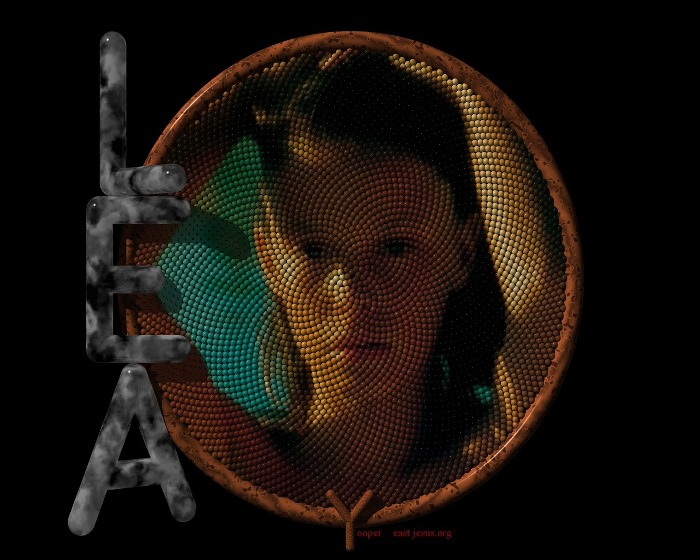
OK . . . having no luck getting the pic here so . . .
will just send the spiel to see if I at least can post a new message.
If this gets here . . . then at least I'm on the right track and there is
some problem with the impage or my ISP.

If this message makes it, I'll try posting the pic with a reply to it.

Thanks for yer indulgence . . . I will get this figured out somehow.
--------------

Shamelessly lifted the code from Tor's  "Fibonacci Stones"
and saw that it originally came from Alf Peake  . . .  thanks guyz.

  This started out as an attempt to render a stained-glass window
with light rays streaming through but, as usual, I got sidetracked
when I came across the Fibonacci scenes here.  So I decided to
see if I could project an image onto a pattern of blobs or spheres
and make them transparent.  Haven't been able to get the .png files
working that way but . . . liked how the beads looked so moved on.

  Opted to go for spheres instead of blobs so I could better control
the size and spacing ( I'm still workin' at understanding Tor's Anti-
Blobs ;) and used Alf's code to create a union of 3200 spheres.
Then just projected the pic at it.  Didn't have to worry about using
a transparent background 'cause . . . I just kept altering the number
of spheres until the union included the portion of the photo that I
wanted.  Just played with scaling and translating within the image
projection and altering the sphere size and spacing until I had what
I wanted. (many test renderings later ;)

  Did it in POV 3.1 . . . couldn't seem to get the ambient lighting bright
enough in Megapov 7 . . . without bumping it from 0.3 way up to 0.8
or so.  And I had to do that using the #default finish statement.  Have
not been able to find how to add the finish statement into the image
texture.  But I was tired by then so . . . will continue to experiment.
Also noticed changes in how the textures changed when I switched
between 3.1 and MP7 . . . is there something I need to change within
the INC files . . . interior statements for the finishes . . . ?

  Originally was gonna do a background but opted to leave it as is
'cause I didn't want to distract from the image . . . and it seemed to
have a nice balance to it.

  Rendered as 1280 x 1024 . . . knocked it down to 1024 to drop the
file size . . . it's still ok . . .800 really hurts it so . . .

  This is my 1st pic post ever so don't be too hard on me . . .
And I have isosurfaces yet to explore and all of the MegaPov tweaks.

I do enjoy all of the give and take here . . . seems like a big family.

Y :)
Post a reply to this message
|
|
| |
| |
|
|
|
|
| |
| |
|
|
Grrrrrrr . . . . .

  My email server here is dropping me out when I try to upload
  anything > 100K . . .
  Tried to use AOL to access the group but they do not see POVray.org
  as being one of their newsgroups so . . . ???
  If anyone knows how I can use AOL to post here, please let me know . . .
  here or in new users if that's better.
  Will eventually find a way to post the pic here in this thread.
  Even if I have to jjpg it to some small size.
  Sorry . . . sure would like to get this worked out.

  Thanks
  Y
Post a reply to this message
|
|
| |
| |
|
|
|
|
| |
| |
|
|
here's a small one . . .
you can at least get the idea.

Y
Post a reply to this message
Attachments:
Download 'FibLea4ss.jpg' (101 KB)
Preview of image 'FibLea4ss.jpg'
|
|
| |
| |
|
|
|
|
| |
| |
|
|
In article <3a95751a@news.povray.org>, yooper says...
> here's a small one . . .
> you can at least get the idea.
>
> Y
I like it: would like to see one with more detail - more beads?
Fibonacci always has its own mysterious charm...
--
Regards,  Sander
Post a reply to this message
|
|
| |
| |
|
|
|
|
| |
| |
|
|
yooper wrote:
>
> Grrrrrrr . . . . .
>
> My email server here is dropping me out when I try to upload
> anything > 100K . . .
> Tried to use AOL to access the group but they do not see POVray.org
> as being one of their newsgroups so . . . ???
> If anyone knows how I can use AOL to post here, please let me know . . .
> here or in new users if that's better.
> Will eventually find a way to post the pic here in this thread.
> Even if I have to jjpg it to some small size.
> Sorry . . . sure would like to get this worked out.
>
You should not need email server or other things from your provider, just
set your newsreader to use news.povray.org as newsserver and it should
work. No provider should have the povray newsgroup on it's newsserver.
See the postings in povray.announce.frequently-asked-questions for
details.
Furthermore it should rarely be necessary to post pictures larger than
100k. When looking trough older posts you will recognize that most
pictures posted here are smaller. If you want to show a higher quality
(png) pict, you might consider putting it on a website instead and posting
the link.
Nice picture BTW, i remember some similar pictures, not with fibonacci,
using megapov's eval_pigment to display pictures. Who is Lea?
Christoph
--
Christoph Hormann <chr### [at] gmx de>
IsoWood include, radiosity tutorial, TransSkin and other
things on: http://www.schunter.etc.tu-bs.de/~chris/ de>
IsoWood include, radiosity tutorial, TransSkin and other
things on: http://www.schunter.etc.tu-bs.de/~chris/
Post a reply to this message
|
|
| |
| |
|
|
|
|
| |
| |
|
|
You should not need email server or other things from your provider, just
set your newsreader to use news.povray.org as newsserver and it should
work.  No provider should have the povray newsgroup on it's newsserver.
See the postings in povray.announce.frequently-asked-questions for
details.

Furthermore it should rarely be necessary to post pictures larger than
100k.  When looking trough older posts you will recognize that most
pictures posted here are smaller.  If you want to show a higher quality
(png) pict, you might consider putting it on a website instead and posting
the link.

Nice picture BTW, i remember some similar pictures, not with fibonacci,
using megapov's eval_pigment to display pictures.  Who is Lea?

Christoph

*****

Well . . . for whatever reason, when I am in this town, using this ISP, I
can't
upload without losing the handshake or being disconnected.  Now I don't
have that problem with any other ISP (I am on the road a lot) and I don't
have it with AOL.  But I cannot figure out how to use the AOL dial-up with
newz-groups . . . they have there own list of them and it doesn't include
POV.
I have to do some sort of TCP thing and use their modems but I don't know
how to go about it.

  I understand about the 100K or so size . . . and I agree . . . stashing
them on
a web-page and providing a link would be the best way.  Just not enough time
in the day to work and play . . . and at this point, work is interferring :)

  And in this case, the pic sure does suffer . . . and I want to speak to
Sander
on this too . . . he wanted to see more spheres . . . that's fine, however,
it is
all a balancing act.  More spheres means smaller dia ones and at some point,
the visual effect is lost when the spheres are too small.  Thus . . . the
reason
for rendering at 1280 for these . . . that was the point where they still
looked
good.

  And . . . I have also imaged to other patterns . . . tightly packed hex
patterns
for example.  But the thing about fibonacci is - it seems to enhance the
natural
curves when a photo contains them.  Notice how the shape of the eyes and the
cheek and hair all seem to follow a series of spheres . . . any curved
object
can find a series of spheres that fits it and the eye is able to see that.
Hex
patterns tend to emphasize lines and diagonals and hide the natural curves
and actuall distort the eyes.  These spheres actually seem to follow them.
So, when I saw the first image that I traced . . . I was hooked . . . just
seems
the way to go when depicting nature.  I will also experiment with Tor's
anti-
blobs as soon as I can finger them out.

  Did this shot for a friend . . . this is an old pic of a girl he once met
in France.
He's very pleased with how it came out . . . I've been promising to do
something
for him with it for a long time.

  Thanks for the comments . . .

Y
Post a reply to this message
|
|
| |
| |
|
|
|
|
| |
| |
|
|
I like it: would like to see one with more detail - more beads?
Fibonacci always has its own mysterious charm...
--
Regards,  Sander
*****

Thanks Sander . . .

I did a lot of experimenting and it ends up being a balancing act . . .
More spheres means smaller dia ones and at some point, the visual
effect of glass beads is lost when the spheres are too small.
I played with various numbers of them and altered the dia and the
spacing until I had the desired effect.  Also depends on the photo . . .
and had to scale and translate the image to get the center at a point
where it didn't make a mess of some feature.  Also, that's the reason
for rendering at 1280 - to bring the size of the spheres up to a level
where they could still be seen as beads. Each image will vary and
it took many, many test renderings until I found this one.
  I'm pleased with it . . . will try to find a spot to stash the large one
and post a link to it . . . quite a different effect full-size.  I can see
some artifacts in this one.

  Now . . . back to thinking about stained glass and getting my .png
images to be transparent.  Anybody have any info or hints on that ?

TIA
Y
Post a reply to this message
|
|
| |
| |
|
|
|
|
| |
| |
|
|
In article <3a9590e4$1@news.povray.org>, yooper says...
<snip>
> I did a lot of experimenting and it ends up being a balancing act . . .
> More spheres means smaller dia ones and at some point, the visual
> effect of glass beads is lost when the spheres are too small.
> I played with various numbers of them and altered the dia and the
> spacing until I had the desired effect.  Also depends on the photo . . .
> and had to scale and translate the image to get the center at a point
> where it didn't make a mess of some feature.  Also, that's the reason
> for rendering at 1280 - to bring the size of the spheres up to a level
> where they could still be seen as beads. Each image will vary and
> it took many, many test renderings until I found this one.
>   I'm pleased with it . . . will try to find a spot to stash the large one
> and post a link to it . . . quite a different effect full-size.  I can see
> some artifacts in this one.
>
<snip>
Yes I see now. There's one thing I did: changed the brightness upwards
in Photoshop. IMHO this was an improvement: I could see more of her
eyes, and the contrast in the darker regions was improved favourably
too, I think.

--
Regards,  Sander
Post a reply to this message
|
|
| |
| |
|
|
|
|
| |
| |
|
|
Yes I see now. There's one thing I did: changed the brightness upwards
in Photoshop. IMHO this was an improvement: I could see more of her
eyes, and the contrast in the darker regions was improved favourably
too, I think.
--
Regards,  Sander
*****
One of the problems I had was getting the image map bright enough . . .
I had to bump up the global ambient settings to have it show up at all ...
esp when I tried to use MegaPOV . . . couldn't seem to tweak just the
image map.  Still trying to finger out why.
--
Y?
Post a reply to this message
|
|
| |
| |
|
|
|
|
| |
| |
|
|
"yooper" <Out### [at] huntelnet> wrote in message
news:3a956efa@news.povray.org...
>
>   Tried to use AOL to access the group but they do not see POVray.org
>   as being one of their newsgroups so . . . ???
>   If anyone knows how I can use AOL to post here, please let me know . . .
>   here or in new users if that's better.

AOL is frustrating.  You can suggest they add news.povray.org to their list
by going to the Newsgroup area but I think without enough demand for it they
probably won't.  I asked for it there long ago.  I always thought it amazing
how AOL intercepted my attempt at getting here from outside of the AOL
program, although only connected to Interent via AOL, using a newsreader;
the same error message would pop up that shows from within AOL saying these
news groups didn't exist or something.
So, I don't believe there is a way but one never knows for sure I guess.

Bob H.
Post a reply to this message
|
|
| |
| |
|
|
|
|
| |
| |
|
|
Hi. Love to see that code when you have a moment. I would like to try an
animation where an image comes in and out of clarity on a backdrop like the
stones. I saw something Sam Benge did with an image of Cézanne... I would be
happy to show you any results.
I don;t yet have any of my animation son the Web. They are rendered at 720 x
480 for projections on large screens and the Web presents too many
compromises (for now.) I think someone tried to do a compressed version
somewhere; I'll try to find the URL.
Thanks again.
Best,
D.
"Bob H." <omn### [at] msncom> wrote in message
news:3a968a40@news.povray.org...
> "yooper" <Out### [at] huntelnet> wrote in message
> news:3a956efa@news.povray.org...
> >
> >   Tried to use AOL to access the group but they do not see POVray.org
> >   as being one of their newsgroups so . . . ???
> >   If anyone knows how I can use AOL to post here, please let me know . .
.
> >   here or in new users if that's better.
>
> AOL is frustrating.  You can suggest they add news.povray.org to their
list
> by going to the Newsgroup area but I think without enough demand for it
they
> probably won't.  I asked for it there long ago.  I always thought it
amazing
> how AOL intercepted my attempt at getting here from outside of the AOL
> program, although only connected to Interent via AOL, using a newsreader;
> the same error message would pop up that shows from within AOL saying
these
> news groups didn't exist or something.
> So, I don't believe there is a way but one never knows for sure I guess.
>
> Bob H.
>
>
>
Post a reply to this message
|
|
| |
| |
|
|
|
|
| |
| |
|
|
"Bob H." wrote:

> AOL is frustrating.  You can suggest they add news.povray.org to their list
> by going to the Newsgroup area but I think without enough demand for it they
> probably won't.  I asked for it there long ago.  I always thought it amazing
> how AOL intercepted my attempt at getting here from outside of the AOL
> program, although only connected to Interent via AOL, using a newsreader;
> the same error message would pop up that shows from within AOL saying these
> news groups didn't exist or something.
> So, I don't believe there is a way but one never knows for sure I guess.

My question is why would anyone use AOL? Okay, they feed on ignorance, but then
haven't they been shut down? (Probably run out of Florida...)

--
David Fontaine  <dav### [at] faricynet>  ICQ 55354965
My raytracing gallery:  http://davidf.faricy.net/
Post a reply to this message
|
|
| |
| |
|
|
|
|
| |
| |
|
|
My question is why would anyone use AOL? Okay, they feed on ignorance, but
then
haven't they been shut down? (Probably run out of Florida...)

***
Shut down ??????  hehe . . . just the opposite I'm afraid . . . but they may
soon add POVray.org as they will soon own EVERYTHING !!!!!

Why use it ? . . . I keep it as a last resort as I am constantly on the road
and
need to be able to access the web from where ever.  If you have any tips on
finding a universal provider that will allow me to access from anywhere . .
.
please pass it on.  I hate it but . . . until i find something better . . .
--
Y
Post a reply to this message
|
|
| |
| |
|
|
|
|
| |
| |
|
|
Hi. Love to see that code when you have a moment.
***

  Will do so as soon as I clean it up a bit.  Changed it quite a bit today .
. .
shooting for making it brighter as Sander suggested. Went to specular
highlights and some metallic and came up with spheres that resemble little
pearls . . . at least the light colored ones.
  Still want to get back to trying to make them translucent . . . getting
there.

  Interesting idea . . . that fade animation . . .

  Will post it soon and link you to it.

Thanks
--
Y
Post a reply to this message
|
|
| |
| |
|
|
|
|
| |
| |
|
|
Hehe, here's a plan: use OE to post in sections. Wait for someone to complain
they can't look at it, someone else will compile and repost it for you, then you
can cancel the originals...

--
David Fontaine  <dav### [at] faricynet>  ICQ 55354965
My raytracing gallery:  http://davidf.faricy.net/
Post a reply to this message
|
|
| |
| |
|
|
|
|
| |
| |
|
|
Hehe, here's a plan: use OE to post in sections. Wait for someone to
complain
they can't look at it, someone else will compile and repost it for you, then
you
can cancel the originals...
***
hehe :)  ya . . . why didn't I think of that ?
I'll just keep 'em under 100K instead.
--
Y
Post a reply to this message
|
|
| |
| |
|
|
|
|
| |
| |
|
|
"yooper" <Out### [at] huntelnet> wrote in message
news:3a96e817@news.povray.org...
>
> Why use it ? . . . I keep it as a last resort as I am constantly on the
road
> and
> need to be able to access the web from where ever.  If you have any tips
on
> finding a universal provider that will allow me to access from anywhere .
.
> .
> please pass it on.  I hate it but . . . until i find something better . .
.

With AOL 6.0 they began a AOL Anywhere set of features to allow for access
via several optional methods.  They just sink their teeth in if you struggle
:-)
I've looked up the possibility of a ISP with a 1-800 phone number to forego
the need for local calls from anyplace but found none.
I currently have a year of free Dellnet by MSN which has a local number too,
as well as my cable modem ISP being local also.  So I get to choose from one
of the three, AOL, MSN, Charter Pipeline.  I remeber how it was trying out
NetZero and needing a expanded local calling area in order to use that.
It's hard to beat the big companies when it comes to accessibility, I agree.

Bob H.
Post a reply to this message
|
|
| |
| |
|
|
|
|
| |
| |
|
|
yooper wrote:
>
> here's a small one . . .
> you can at least get the idea.


Nice !

This image makes me want to do more Fibonacci images.

Maybe you could use area_light(s) to avoid the sharp
shadows from the letters.


BTW: What texture did you use for the letters ?

--
Best regards,

Tor Olav

mailto:tor### [at] hotmailcom
http://hjem.sol.no/t-o-k/tokpicts.html
http://www.crosswinds.net/~tok
Post a reply to this message
|
|
| |
| |
|
|
|
|
| |
| |
|
|
Tor Olav Kristensen wrote:
> BTW: What texture did you use for the letters ?

One of the standard Stones, no?
***
Started off as one of them but I made some changes . . .
don't recall what but it is in this incarnation:

#declare BW_MARB=
  texture {
    finish  {
      ambient 0.9//0.3
      diffuse 0.5//0.2
      reflection 0.1
      refraction 1
      ior 1.45
      specular 0.8
      roughness 0.003
      phong 1
      phong_size 400
    }
    pigment {
      bozo
      turbulence 0.9
      color_map {
        [0.0 1.0 color red 0.39 green 0.39 blue 0.39
                 color red 0.01 green 0.01 blue 0.01 ]
      }
      scale .75//10.4
      }
}
Post a reply to this message
|
|
| |
| |
|
|
|
|
| |
| |
|
|
Nice !

This image makes me want to do more Fibonacci images.

Maybe you could use area_light(s) to avoid the sharp
shadows from the letters.
***
Thanks . . .

Yes . . . of course they affect the highlights on the beads too . . .
I did a lot of changes today for the finish of the beads . . .
changed to specular and some metallic to make them glow a
bit . . . kind of a pearl look to the light colored ones.  But . . .
I don't like how the darker ones look with that and the beads
in the shadow look completely flat.  So . . . more work to be
done.  My original idea was to have them translucent with the
lighting shining thru from the back.

  I do like how the Fibonacci pattern enhances the curves.

Y
Post a reply to this message
|
|
| |
| |
|
|
|
|
| |
| |
|
|
Here's what I used Dennis:

This started with some of Alf Peak's code in his post
"Golden Ratio" to p.t.s-f  31. Aug;
news://news.povray.org/39ad9be0%40news.povray.org

and then Tor's "Fibonacci Stones" image got my attention . . .
news://news.povray.org/39B44A76.2ECBA98A%40online.no

Here's his source:
news://news.povray.org/39B59A50.66F1BAA7%40online.no

I dropped back to using spheres instead of Tor's AntiBlobs
as I'm still trying to finger out how he's doing that ;)

The simplified code for generating a union of spheres and
projecting an image onto it is attached.  A big 2K
Tried to comment it.
You will have to provide yer own pic ;)

**
Y
Post a reply to this message
Attachments:
Download 'FibBead.pov.txt' (3 KB)
|
|
| |
| |
|
|
|
|
| |
| |
|
|
I think I'm in love. I like.

The pics OK as well, maybe a bit dark for me without tweaking the
gamma. Do you realy need assumed_gamma 2.2? Try display_gamma=2.2
whatever to match YOUR monitor, in your povray.ini, then use
display_gamma 1 in your pov file.

I agree on bead size, less than around 5 pixels diameter each is not
so good. Have you tried a single colour per sphere instead of an image
map on the union? Megapov has an easier solution for this than pov3.1

BTW Compuserve has global access, providing there is a node in your
area, and you only need your password. They are now under AOL so I
would guess AOL should have similar facilities? It does allow
news.povray.org

--
Alf

http://www.peake42.freeserve.co.uk/
http://ourworld.compuserve.com/homepages/Alf_Peake/
gw3### [at] thersgbnet


"yooper" <Out### [at] huntelnet> wrote in message
news:3a95751a@news.povray.org...
> here's a small one . . .
> you can at least get the idea.
>
> Y
>
>
>
Post a reply to this message
|
|
| |
| |
|
|
|
|
| |
| |
|
|
. Have you tried a single colour per sphere instead of an image
map on the union? Megapov has an easier solution for this than pov3.1
***
 That's what my original intention was but . . . a bead for each pixel
really limits the size of the photograph that I can use.  Some small ones
would work but even at 400x400 . . . yikes !!!  So I just shot it at the
union and way very pleasently surprised by the result.
  And BTW . . . thanks for that Fib engine . . . way cool . . .

  The darkness was my fault . . . somehow had global finish in it for
this pic . . . fingered it out now and have control over the image
brightness.

Y
Post a reply to this message
|
|
| |
| |
|
|
|
|
| |
| |
|
|
"Alf Peake" <alf### [at] peake42freeservecouk> wrote in message
news:3a9844fe@news.povray.org...
[snip]
> whatever to match YOUR monitor, in your povray.ini, then use
> display_gamma 1 in your pov file.
>
Oops! Use assumed_gamma 1 in your pov file.
Sorry.

Alf
Post a reply to this message
|
|
| |
| |
|
|
|
|
| |
| |
|
|
"Alf Peake" <alf### [at] peake42freeservecouk> wrote in message
news:3a9844fe@news.povray.org...
[snip]
> whatever to match YOUR monitor, in your povray.ini, then use
> display_gamma 1 in your pov file.
>
Oops! Use assumed_gamma 1 in your pov file.
Sorry.

Alf
Post a reply to this message
|
|
| |
| |
|
|
|
|
| |
| |
|
|
In article <3a984907@news.povray.org>, "yooper" <Out### [at] huntelnet>
wrote:

> . Have you tried a single colour per sphere instead of an image
> map on the union? Megapov has an easier solution for this than pov3.1
> ***
>  That's what my original intention was but . . . a bead for each pixel
> really limits the size of the photograph that I can use.  Some small ones
> would work but even at 400x400 . . . yikes !!!  So I just shot it at the
> union and way very pleasently surprised by the result.

I don't think he meant a bead per pixel, just a single color for each
bead. In MegaPOV, you could use the eval_pigment() patch to get the
color of the image_map at the center of each bead. With the official
version, you would have to either code a program to get the needed
information, or just translate the texture so the portion at the bead
position is at < 0, 0, 0>, scale it large enough that you can't see any
color blend across it, then translate it to the bead position.

object {Bead
    texture {ImageTexture
        translate -BeadPosition
        scale 100// this should be big enough...
    }
    translate BeadPosition
}

--
Christopher James Huff
Personal: chr### [at] maccom, http://homepage.mac.com/chrishuff/
TAG: chr### [at] tagpovrayorg, http://tag.povray.org/

<><
Post a reply to this message
|
|
| |
| |
|
|
|
|
| |
| |
|
|
Hi Bob H., you recently wrote in povray.binaries.images:

> I've looked up the possibility of a ISP with a 1-800 phone number to forego
> the need for local calls from anyplace but found none.
I use attglobal.net when I travel. They have local dial-in nodes
almost everywhere in the world, plus they have a 1-800 number.

- Lutz
  email : lut### [at] stmuccom
  Web   : http://www.stmuc.com/moray
Post a reply to this message
|
|
| |
| |
|
|
|
|
| |
| |
|
|
Alf says:
Use assumed_gamma 1 in your pov file
and:
Use assumed_gamma 1 in your pov file
***
ok . . .ok . . . i get it :) hehe
or ... are you telling me to use it twice . . .?

Y
Post a reply to this message
|
|
| |
| |
|
|
|
|
| |
| |
|
|
I don't think he meant a bead per pixel, just a single color for each
bead. In MegaPOV, you could use the eval_pigment() patch to get the
color of the image_map at the center of each bead.
***

I see . . . just seems like that would be similar to 'posterizing' a pic . .
.
with a loss of definition. But I will give it a try and see what it looks
like . . .
**
Y
Post a reply to this message
|
|
| |
| |
|
|
|
|
| |
| |
|
|
Try display_gamma=2.2 or whatever to match YOUR monitor,
in your povray.ini, then use assumed_gamma 1 in your pov file.

***
   OK . . . I've read everything I can find on this and I understand
why these commands are used.  However, I cannot find the
dislplay_gamma setting anywhere and I have no clue as to what
I have to do to set it.  I don't know what I'm doing in these ini files
jand I've never used the command line so I'm not gonna muck around
in there and screw something up.
   Something has to be changed tho . . . if  I use assumed_gamma
of 1.0 . . . my rendered displays look horrible.
   How do I go about this ?  And understand . . . I don't have a
clue here . . . it's only easy if you know how and I don't  ;)
The Help files explain very well why . . . but assume (wrongly)
that I know how to do it.

TIA
**
Y
Post a reply to this message
|
|
| |
| |
|
|
|
|
| |
| |
|
|
Open your povray.ini, which will be in your povray folder, in any text
editor then add at the end:
Display_Gamma=2.2

For example an extract from mine:
  Library_Path=C:\DOS\POVRAY
  Library_Path=C:\DOS\POVRAY\include
  Library_Path=C:\DOS\POVRAY\include\mine
  Display=on
  Display_Gamma=2.1
  +dgt

For most PC monitors gamma 2.2ish should be OK, but I don't know about
LCDs or Macs. Anyone else with a different monitor gamma, but using
"your" pov source should then see what you see.
Check "3.2.2.2   Display Output Options" in the docs.

Hope this helps

Alf


"yooper" <Out### [at] huntelnet> wrote in message
news:3a9889fd@news.povray.org...
> Try display_gamma=2.2 or whatever to match YOUR monitor,
> in your povray.ini, then use assumed_gamma 1 in your pov file.
>
> ***
[snip]
>    OK . . . I've read everything I can find on this and I understand
> why these commands are used.  However, I cannot find the
> dislplay_gamma setting anywhere and I have no clue as to what
> I have to do to set it.  I don't know what I'm doing in these ini
files
Post a reply to this message
|
|
| |
| |
|
|
|
|
| |
| |
|
|
Couldn't see my post when I checked so sent it again to be sure.
Around midnight UTC I find povray.org a bit slow here :-(

Alf

"yooper" <Out### [at] huntelnet> wrote in message
news:3a987da9@news.povray.org...
> Alf says:
> Use assumed_gamma 1 in your pov file
> and:
> Use assumed_gamma 1 in your pov file
> ***
> ok . . .ok . . . i get it :) hehe
> or ... are you telling me to use it twice . . .?
>
> Y
>
>
Post a reply to this message
|
|
| |
| |
|
|
|
|
| |
| |
|
|
In article <3a987daa@news.povray.org>, "yooper" <Out### [at] huntelnet>
wrote:

> I see . . . just seems like that would be similar to 'posterizing' a
> pic . . . with a loss of definition. But I will give it a try and see
> what it looks like . . .

I think posterization only affects the number of levels of color in the
image. This would be more of a conversion to a completely different
pixel layout, as well as a resolution change. (Hmm, I wonder what a
computer screen with a Fibonacci layout would look like...and how would
the pixels be addressed?)

--
Christopher James Huff
Personal: chr### [at] maccom, http://homepage.mac.com/chrishuff/
TAG: chr### [at] tagpovrayorg, http://tag.povray.org/

<><
Post a reply to this message
|
|
| |
| |
|
|
|
|
| |
| |
|
|
"your" pov source should then see what you see.
Check "3.2.2.2   Display Output Options" in the docs.

Hope this helps

Alf
-------
it does indeed . . . I thank you sir . . .
**
Y
Post a reply to this message
|
|
| |
| |
|
|
|
|
| |
| |
|
|
I've put 3 images on my website that will give you an idea what
single-colour spheres will look like. All around 47k.

duck1.jpg and BlueFoot.jpg - from photos using spheres, and
RedBird.png using squares this time for a neighbour to use as a sewing
pattern.

http://www.peake42.freeserve.co.uk/pix2

Alf


"yooper" <Out### [at] huntelnet> wrote in message
news:3a987daa@news.povray.org...
> I don't think he meant a bead per pixel, just a single color for
each
> bead. In MegaPOV, you could use the eval_pigment() patch to get the
> color of the image_map at the center of each bead.
> ***
>
> I see . . . just seems like that would be similar to 'posterizing' a
pic . .
> .
> with a loss of definition. But I will give it a try and see what it
looks
> like . . .
> **
> Y
>
>
Post a reply to this message
|
|
| |
| |
|
|
|
|
| |