|
|
|
|
|
|
| |
| |
|
|
|
|
| |
| |
|
|
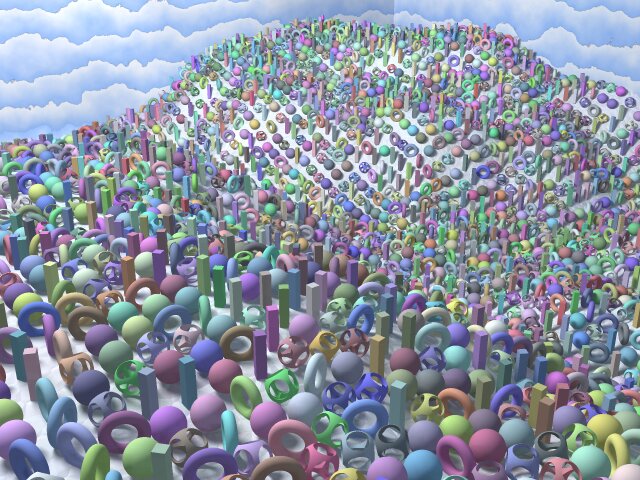
"Scatter"

Andy Cocker
Post a reply to this message
Attachments:
Download 'Scatter.jpg' (104 KB)
Preview of image 'Scatter.jpg'
|
|
| |
| |
|
|
|
|
| |
| |
|
|
That's nice,
is it completely random or did you use some ordered placement like
eval_pigment?
Christoph
--
Christoph Hormann <chr### [at] gmx de>
IsoWood include, radiosity tutorial, TransSkin and other
things on: http://www.schunter.etc.tu-bs.de/~chris/ de>
IsoWood include, radiosity tutorial, TransSkin and other
things on: http://www.schunter.etc.tu-bs.de/~chris/
Post a reply to this message
|
|
| |
| |
|
|
|
|
| |
| |
|
|
Nah, it's completely random. It was my first attempt at using trace(), but I
think I'll look into using eval_pigment next as well.

Andy

"Christoph Hormann" <chr### [at] gmxde> wrote in message
news:3A3D28E1.B4EF6FAC@gmx.de...
>
> That's nice,
>
> is it completely random or did you use some ordered placement like
> eval_pigment?
>
> Christoph
>
> --
> Christoph Hormann <chr### [at] gmxde>
> IsoWood include, radiosity tutorial, TransSkin and other
> things on: http://www.schunter.etc.tu-bs.de/~chris/
Post a reply to this message
|
|
| |
| |
|
|
|
|
| |
| |
|
|
"Andy Cocker" <big### [at] mariner9fsnetcouk> wrote in message
news:3a3d2785@news.povray.org...
> "Scatter"

    I like the way your very interesting clouds add to the whimsy of the
composition. I will have to sit right down and try to duplicate them.
Post a reply to this message
|
|
| |
| |
|
|
|
|
| |
| |
|
|
Thats really pretty - nice one


--
Rick

POVray News & Resources - http://povray.co.uk
Kitty5 WebDesign - http://www.kitty5.com
Hi-Impact web site design & database driven e-commerce
TEL : +44 (01625) 266358 - FAX : +44 (01625) 611913 - ICQ : 15776037

PGP Public Key
http://pgpkeys.mit.edu:11371/pks/lookup?op=get&search=0x231E1CEA
Post a reply to this message
|
|
| |
| |
|
|
|
|
| |
| |
|
|
"Bill DeWitt" <bde### [at] cflrrcom> wrote in message
news:3a3d378e$1@news.povray.org...
> "Andy Cocker" <big### [at] mariner9fsnetcouk> wrote in message
> news:3a3d2785@news.povray.org...
> > "Scatter"
>
>     I like the way your very interesting clouds add to the whimsy of the
> composition. I will have to sit right down and try to duplicate them.
>

They weren't originally intended to resemble clouds, as the blue used to be
orange, but they did end up looking quite like cloud banks, made to look
quite strange by the fact that they're on a box :-)

All they are is a gradient y color_map going from blue to white, with a
little turbulence.. 0.3 I think.

I'm a little disappointed that I forgot to take into account the extra
radius of the torus shapes, so instead of sitting atop the 'landscape', they
are slightly sunk into it.

I'm going to look into eval_pigment () now,

Andy
Post a reply to this message
|
|
| |
| |
|
|
|
|
| |
| |
|
|
This would be cool with slope/pattern-dependent
placement/coloration/etc.

--
David Fontaine  <dav### [at] faricynet>  ICQ 55354965
My raytracing gallery:  http://davidf.faricy.net/
Post a reply to this message
|
|
| |
| |
|
|
|
|
| |
| |
|
|
Very nice. :)
I love the random nature of this.
I still haven't figured out trace(), nor has any attempt been made to do so.

ian

Andy Cocker <big### [at] mariner9fsnetcouk> wrote in message
news:3a3d2785@news.povray.org...
Post a reply to this message
|
|
| |
| |
|
|
|
|
| |
| |
|
|
"ian mcdonald" <ian### [at] hotmailcom> wrote in message
news:3a3e15bd$1@news.povray.org...
> Very nice. :)
> I love the random nature of this.
> I still haven't figured out trace(), nor has any attempt been made to do
so.

Well, I should own up and say that I haven't figured it out either. This
image was made by adapting one of the demo files that come with megaPOV. :-)

I've just tried to change the scene so that the HF was replaced by some text
on a plane, but I couldn't get it to work. I don't quite understand what #if
(Norm.x != 0 | Norm.y != 0 | Norm.z != 0) means, but I've yet to really look
into it.

Andy
Post a reply to this message
|
|
| |
| |
|
|
|
|
| |
| |
|
|
In article <3a3e6b3d@news.povray.org>, "Andy Cocker"
<big### [at] mariner9fsnetcouk> wrote:

> I don't quite understand what #if (Norm.x != 0 | Norm.y != 0 | Norm.z
> != 0) means, but I've yet to really look into it.

If the trace() function doesn't find an intersection, it will return <
0, 0, 0> as the normal. This allows you to find out if it actually hit
something.

--
Christopher James Huff
Personal: chr### [at] maccom, http://homepage.mac.com/chrishuff/
TAG: chr### [at] tagpovrayorg, http://tag.povray.org/

<><
Post a reply to this message
|
|
| |
| |
|
|
|
|
| |
| |
|
|
"Chris Huff" <chr### [at] maccom> wrote in message
news:chrishuff-B4EB2C.15073418122000@news.povray.org...
> In article <3a3e6b3d@news.povray.org>, "Andy Cocker"
> <big### [at] mariner9fsnetcouk> wrote:
>
> > I don't quite understand what #if (Norm.x != 0 | Norm.y != 0 | Norm.z
> > != 0) means, but I've yet to really look into it.
>
> If the trace() function doesn't find an intersection, it will return <
> 0, 0, 0> as the normal. This allows you to find out if it actually hit
> something.

Thanks Chris. It was the ! and the | predominantly that I didn't understand,
but I think I've got it figured out... my new scene is behaving as I want it
to anyway.
Would I be correct in thinking that the ! stands for 'does not', and the |
signifies 'and', thus the code reads "unless the trace function returns
<0,0,0>, then parse the following.. otherwise goto #else"?
Forgive me, this is probably really elementary programming syntax, but I'm
no programmer. According to the docs then I think I'm right.

All the best,

Andy Cocker
Post a reply to this message
|
|
| |
| |
|
|
|
|
| |
| |
|
|
In article <3a3eca06@news.povray.org>, "Andy Cocker"
<big### [at] mariner9fsnetcouk> wrote:

> Would I be correct in thinking that the ! stands for 'does not', and
> the | signifies 'and', thus the code reads "unless the trace function
> returns <0,0,0>, then parse the following.. otherwise goto #else"?

Close, very close:
"!" means "not", like you said, so "!=" means "is not equal to". "|"
means "or", not "and", so this statement:

#if(Norm.x != 0 | Norm.y != 0 | Norm.z != 0)
A
#else
B
#end

Means:
"If Norm.x is not 0, or if Norm.y is not 0, or if Norm.z is not 0, do A,
otherwise do B."
In other words:
"If any component of Norm is not 0, do A, otherwise do B."


The "&" symbol means "and", so it could also be written as:
#if(!(Norm.x = 0 & Norm.y = 0 & Norm.z = 0))
Which translates nicely into English as:
"If not all the components of Norm are equal to 0..."

And the reason for all this is that you can't compare normals...I
usually use a vEq(V1, V2) macro:
#if(!vEq(Norm, < 0, 0, 0>))
or a vNull(V) macro:
#if(!VNull(Norm))

--
Christopher James Huff
Personal: chr### [at] maccom, http://homepage.mac.com/chrishuff/
TAG: chr### [at] tagpovrayorg, http://tag.povray.org/

<><
Post a reply to this message
|
|
| |
| |
|
|
|
|
| |
| |
|
|
Hey, thanks, that helped a lot. You certainly know your stuff...

So, I've figured out how to use trace () to 'drop' my objects onto my hf
etc... but at present they are all vertical. I'd really like to get them to
be perpendicular to the object they've landed on.. I take it I need to use
the data that  trace () returned to give me the surface normal, and then
rotate each object to match... at present I am very unclear how to do this,
but I realise it's bad practise to ask here before I've really tried to
achieve this myself , so I'll go away now and try to fathom it out.

Of course, there's no sense me trying to re-invent the wheel, so any
suggestions would be gratefully received.

All the best,

Andy Cocker
Post a reply to this message
|
|
| |
| |
|
|
|
|
| |
| |
|
|
In article <3a3ed2af@news.povray.org>, "Andy Cocker"
<big### [at] mariner9fsnetcouk> wrote:

> I take it I need to use the data that  trace () returned to give me
> the surface normal, and then rotate each object to match... at
> present I am very unclear how to do this,
...

Try the Reorient macro, it is on the Thoroughly Useful Macros page:
http://users4.50megs.com/enphilistor/macs.htm

--
Christopher James Huff
Personal: chr### [at] maccom, http://homepage.mac.com/chrishuff/
TAG: chr### [at] tagpovrayorg, http://tag.povray.org/

<><
Post a reply to this message
|
|
| |
| |
|
|
|
|
| |
| |
|
|
Chris Huff wrote in message ...
>In article <3a3ed2af@news.povray.org>, "Andy Cocker"
><big### [at] mariner9fsnetcouk> wrote:
>
>> I take it I need to use the data that  trace () returned to give me
>> the surface normal, and then rotate each object to match... at
>> present I am very unclear how to do this,
>...
>
>Try the Reorient macro, it is on the Thoroughly Useful Macros page:
>http://users4.50megs.com/enphilistor/macs.htm


Or get an include file that can do all that here:
http://www.geocities.com/Rengaw03/povray.html

It's the "vegetate.zip" file.

--
Mark
Post a reply to this message
|
|
| |
| |
|
|
|
|
| |
| |
|
|
"Mark Wagner" <mar### [at] gtenet> wrote in message
news:3a3f18aa$1@news.povray.org...
> Or get an include file that can do all that here:
> http://www.geocities.com/Rengaw03/povray.html
>
> It's the "vegetate.zip" file.

Great, thanks.

Andy Cocker
Post a reply to this message
|
|
| |
| |
|
|
|
|
| |