|
|
|
|
|
|
| |
| |
|
|
|
|
| |
| |
|
|
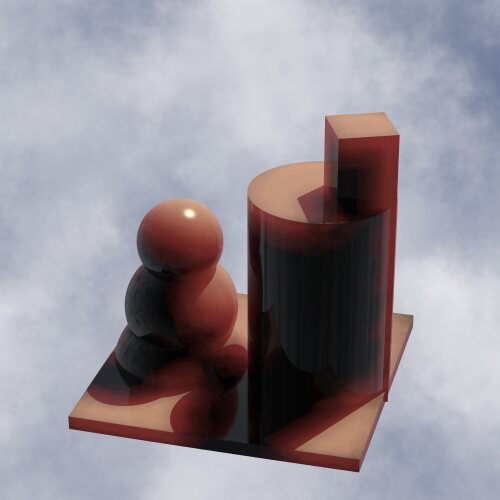
I think I have found a new way to simulate subsurface scattering(SSS). I
have attached an image of an object with a yellowish diffuse and reddish
SSS.
Can you tell how I did it? I did not use media or photons. I did not use
double_illuminate.
Four stars to the person who figures it out.
--
Samuel Benge
stb### [at] hotmail com
See my website@: http://www.goldrush.com/~abenge/Top/index.html com
See my website@: http://www.goldrush.com/~abenge/Top/index.html
Post a reply to this message
Attachments:
Download 'sss_test.jpg' (22 KB)
Preview of image 'sss_test.jpg'
|
|
| |
| |
|
|
From: Samuel Benge
Subject: Re: Subsurface Scattering: A Tuesday Mystery (21kb jpeg)
Date: 25 Nov 2003 21:38:03
Message: <3FC4120A.8000302@hotmail.com>
|
|
|
| |
| |
|
|
Oh yeah, and I used nothing but POV-Ray version 3.5;

Samuel Benge wrote:

> I think I have found a new way to simulate subsurface scattering(SSS). I
> have attached an image of an object with a yellowish diffuse and reddish
> SSS.
>
> Can you tell how I did it? I did not use media or photons. I did not use
> double_illuminate.
>
> Four stars to the person who figures it out.
>
>
> ------------------------------------------------------------------------
>


--
Samuel Benge

stb### [at] hotmailcom
See my website@: http://www.goldrush.com/~abenge/Top/index.html
Post a reply to this message
|
|
| |
| |
|
|
From: Hughes, B
Subject: Re: Subsurface Scattering: A Tuesday Mystery (21kb jpeg)
Date: 25 Nov 2003 22:51:30
Message: <3fc42342@news.povray.org>
|
|
|
| |
| |
|
|
"Samuel Benge" <sbe### [at] hotmailcom> wrote in message
news:3FC### [at] hotmailcom...
> I think I have found a new way to simulate subsurface scattering(SSS). I
> have attached an image of an object with a yellowish diffuse and reddish
> SSS.
>
> Can you tell how I did it? I did not use media or photons. I did not use
> double_illuminate.

Hey Samuel. You deserve the four stars yourself for the stuff you've come up
with.

This one has a unique look. Layering of multiple surfaces? Perhaps including
a fade color too?

There's some irregularity of the shading in certain places (at corners of
the base) so seems that radiosity might also be employed for this.

Bob H.
Post a reply to this message
|
|
| |
| |
|
|
From: Dennis Miller
Subject: Re: Subsurface Scattering: A Tuesday Mystery (21kb jpeg)
Date: 25 Nov 2003 22:59:44
Message: <3fc42530$1@news.povray.org>
|
|
|
| |
| |
|
|
That's really excellent. After you announce the winner, may we see the code?
I really would love to try the effect.
Great work (as always!)
D.

"Samuel Benge" <sbe### [at] hotmailcom> wrote in message
news:3FC### [at] hotmailcom...
> I think I have found a new way to simulate subsurface scattering(SSS). I
> have attached an image of an object with a yellowish diffuse and reddish
> SSS.
>
> Can you tell how I did it? I did not use media or photons. I did not use
> double_illuminate.
>
> Four stars to the person who figures it out.
>
> --
> Samuel Benge
>
> stb### [at] hotmailcom
> See my website@: http://www.goldrush.com/~abenge/Top/index.html
>


----------------------------------------------------------------------------
----
Post a reply to this message
|
|
| |
| |
|
|
From: Samuel Benge
Subject: Re: Subsurface Scattering: A Tuesday Mystery (21kb jpeg)
Date: 25 Nov 2003 23:02:01
Message: <3FC425B7.5000900@hotmail.com>
|
|
|
| |
| |
|
|
Hi Bob, long time between greetings.

Hughes, B. wrote:

> Hey Samuel. You deserve the four stars yourself for the stuff you've come up
> with.

Yes, four stars for the introverted hermit :)

> This one has a unique look. Layering of multiple surfaces? Perhaps including
> a fade color too?


Close.....


> There's some irregularity of the shading in certain places (at corners of
> the base)

Maybe a more advanced version of what I'm doing could clean that up.

>so seems that radiosity might also be employed for this.


Nope, way off.


--
Samuel Benge

stb### [at] hotmailcom
See my website@: http://www.goldrush.com/~abenge/Top/index.html
Post a reply to this message
|
|
| |
| |
|
|
From: Samuel Benge
Subject: Re: Subsurface Scattering: A Tuesday Mystery (21kb jpeg)
Date: 25 Nov 2003 23:05:52
Message: <3FC4269E.2020907@hotmail.com>
|
|
|
| |
| |
|
|
Dennis Miller wrote:

> That's really excellent. After you announce the winner, may we see the code?


Yes, of course! I will still need to fix a few things since it does not
currently work well with radiosity (but it should if things go well).


> I really would love to try the effect.

I have tested it successfully in a number of situations so far, and it seems to
perform well.


> Great work (as always!)
> D.

Thanks!

--
Samuel Benge

stb### [at] hotmailcom
See my website@: http://www.goldrush.com/~abenge/Top/index.html
Post a reply to this message
|
|
| |
| |
|
|
|
|
| |
| |
|
|
In article <3FC### [at] hotmailcom>,
 Samuel Benge <sbe### [at] hotmailcom> wrote:

> I think I have found a new way to simulate subsurface scattering(SSS). I
> have attached an image of an object with a yellowish diffuse and reddish
> SSS.

Very nice.


> Can you tell how I did it? I did not use media or photons. I did not use
> double_illuminate.

A semitransparent, porous isosurface filling the interior?

--
Christopher James Huff <cja### [at] earthlinknet>
http://home.earthlink.net/~cjameshuff/
POV-Ray TAG: chr### [at] tagpovrayorg
http://tag.povray.org/
Post a reply to this message
|
|
| |
| |
|
|
From: Samuel Benge
Subject: Re: Subsurface Scattering: A Tuesday Mystery (21kb jpeg)
Date: 26 Nov 2003 02:47:53
Message: <3FC45AA8.4090607@hotmail.com>
|
|
|
| |
| |
|
|
Christopher James Huff wrote:


> Very nice.


Thank you Chris.

>"Can you tell how I did it?"
>
> A semitransparent, porous isosurface filling the interior?


Nope, pretty far off. You know, I've tried doing it that way, but could
never get any good results.

Here's a hint: this method doesn't take the interior of the object into
account at all.

--
Samuel Benge

stb### [at] hotmailcom
See my website@: http://www.goldrush.com/~abenge/Top/index.html
Post a reply to this message
|
|
| |
| |
|
|
From: Nico
Subject: Re: Subsurface Scattering: A Tuesday Mystery (21kb jpeg)
Date: 26 Nov 2003 02:57:48
Message: <3fc45cfc$1@news.povray.org>
|
|
|
| |
| |
|
|
Samuel Benge wrote:
> I think I have found a new way to simulate subsurface scattering(SSS). I
> have attached an image of an object with a yellowish diffuse and reddish
> SSS.
>
> Can you tell how I did it? I did not use media or photons. I did not use
> double_illuminate.
>
> Four stars to the person who figures it out.
>
>
> ------------------------------------------------------------------------
>

The image is really nice and gorgeous...
Is your method faster than "regular" sss ?

Nico
Post a reply to this message
|
|
| |
| |
|
|
From: Samuel Benge
Subject: Re: Subsurface Scattering: A Tuesday Mystery (21kb jpeg)
Date: 26 Nov 2003 03:00:28
Message: <3FC45D9B.3000605@hotmail.com>
|
|
|
| |
| |
|
|
Nico wrote:


> The image is really nice and gorgeous...


Thanks.

> Is your method faster than "regular" sss ?
>
> Nico


If you are comparing it to media, then yes, it's much faster.


--
Samuel Benge

stb### [at] hotmailcom
See my website@: http://www.goldrush.com/~abenge/Top/index.html
Post a reply to this message
|
|
| |
| |
|
|
From: JC (Exether)
Subject: Re: Subsurface Scattering: A Tuesday Mystery (21kb jpeg)
Date: 26 Nov 2003 03:30:58
Message: <3fc464c2$1@news.povray.org>
|
|
|
| |
| |
|
|
This is really impressive. Did you try to do a candle ? Does your
technique work with a very close light ?

My guess for your technique is a two pass render, first pass with a
black and white spherical pigment depending on the light position that
you apply to all objects with subsurface scattering, and then a second
pass where you use the first one to evaluate the color. While explaining
my guess I have no really precise idea on the how you did it though.  :-)

Am I any close ??   8-p

JC

Samuel Benge wrote:
> I think I have found a new way to simulate subsurface scattering(SSS). I
> have attached an image of an object with a yellowish diffuse and reddish
> SSS.
>
> Can you tell how I did it? I did not use media or photons. I did not use
> double_illuminate.
>
> Four stars to the person who figures it out.
>
>
> ------------------------------------------------------------------------
>
Post a reply to this message
|
|
| |
| |
|
|
|
|
| |
| |
|
|
Samuel Benge wrote:
> I think I have found a new way to simulate subsurface scattering(SSS). I
> have attached an image of an object with a yellowish diffuse and reddish
> SSS.
>
> Can you tell how I did it? I did not use media or photons. I did not use
> double_illuminate.
>
> Four stars to the person who figures it out.

Tricky, but i have an idea.  Could you render it with the light source
in the middle between the two shapes?

Christoph

--
POV-Ray tutorials, include files, Sim-POV,
HCR-Edit and more: http://www.tu-bs.de/~y0013390/
Last updated 25 Oct. 2003 _____./\/^>_*_<^\/\.______
Post a reply to this message
|
|
| |
| |
|
|
From: Samuel Benge
Subject: Re: Subsurface Scattering: A Tuesday Mystery (21kb jpeg)
Date: 26 Nov 2003 10:21:10
Message: <3FC4C4E3.8020800@hotmail.com>
|
|
|
| |
| |
|
|
JC (Exether) wrote:

> This is really impressive. Did you try to do a candle ?


Thanks JC. Nope, haven't tried a candle yet, it was getting quite late
last night.

 > Does your
 > technique work with a very close light ?

I don't think it will, but only because my math is sloppy. I'm hoping
when I release the code that somebody with better coding skills will
develop it further.....


> My guess for your technique is a two pass render, first pass with a
> black and white spherical pigment depending on the light position that
> you apply to all objects with subsurface scattering, and then a second
> pass where you use the first one to evaluate the color. While explaining
> my guess I have no really precise idea on the how you did it though.  :-)
>
> Am I any close ??   8-p


You are very close. A black/white pigment is involved, and a preliminary
pass to establish subsurface scattering effects is used.


--
Samuel Benge

stb### [at] hotmailcom
See my website@: http://www.goldrush.com/~abenge/Top/index.html
Post a reply to this message
|
|
| |
| |
|
|
From: Samuel Benge
Subject: Re: Subsurface Scattering: A Tuesday Mystery (21kb jpeg)
Date: 26 Nov 2003 10:22:12
Message: <3FC4C522.3060606@hotmail.com>
|
|
|
| |
| |
|
|
Christoph Hormann wrote:

 > Tricky, but i have an idea.  Could you render it with the light source
 > in the middle between the two shapes?


Nope, not until the math is fixed. Then I should be able to render it
with very close light_sources.


--
Samuel Benge

stb### [at] hotmailcom
See my website@: http://www.goldrush.com/~abenge/Top/index.html
Post a reply to this message
|
|
| |
| |
|
|
|
|
| |
| |
|
|
Hi Samuel,

my guess is a mlpov render with use of shadow_pigment, use of the object on
itself, a nonzero ambient value for nonshadowed and ambient zero for
shadowed parts. For the smooth transition you perhaps used an area light to
define the shadow pigment and a point light for the scene.

Norbert


Samuel Benge wrote:
>I think I have found a new way to simulate subsurface scattering(SSS). I
>have attached an image of an object with a yellowish diffuse and reddish
>SSS.
>
>Can you tell how I did it? I did not use media or photons. I did not use
>double_illuminate.
>
>Four stars to the person who figures it out.
>
>--
>Samuel Benge
>
>stb### [at] hotmailcom
>See my website@: http://www.goldrush.com/~abenge/Top/index.html
>
Post a reply to this message
|
|
| |
| |
|
|
|
|
| |
| |
|
|
Samuel Benge wrote:
> Christoph Hormann wrote:
>
>  > Tricky, but i have an idea.  Could you render it with the light source
>  > in the middle between the two shapes?
>
> Nope, not until the math is fixed. Then I should be able to render it
> with very close light_sources.

Well, i thought the slope pattern might be involved.  In this case it
would only work well for a distant light source, otherwise you would
need the aoi pattern instead.

Looking closer at the image reveals that there are indeeed problems,
strong scattering occurs at places where it should not occur.

I have two other things in mind:

1) you use saved radiosity data from a different but related scene
setup.  This is far fetched of course but it might be an intersting idea
for such effects

2) you use trace() to place blob components on the surface and use the
blob with the object pattern (not sure how you could achieve the smooth
transit with this method though)

Christoph

--
POV-Ray tutorials, include files, Sim-POV,
HCR-Edit and more: http://www.tu-bs.de/~y0013390/
Last updated 25 Oct. 2003 _____./\/^>_*_<^\/\.______
Post a reply to this message
|
|
| |
| |
|
|
From: Samuel Benge
Subject: Re: Subsurface Scattering: A Tuesday Mystery (21kb jpeg)
Date: 26 Nov 2003 14:34:44
Message: <3FC50051.30406@hotmail.com>
|
|
|
| |
| |
|
|
Christoph Hormann wrote:

 >
 > 2) you use trace() to place blob components on the surface and use the
 > blob with the object pattern (not sure how you could achieve the smooth
 > transit with this method though)
 >
 > Christoph

* * * * !
Congratulations, you get four stars :) While you didn't explain the
whole technique, you explained the guts of my setup.

I used trace to place blob components randomly onto the object. The blob
object is made into a pigment using the object pattern . The blobby
pigment is then jittered about 100 times inside an average pattern's
color_map.

I have made a few enhancements and bug fixes, and I think it's about
ready to be released. In order to allow the use of multiple
light_sources I might have to make it into a macro which you place into
an average pattern's texture_map.

It will be ready very soon.

--
Samuel Benge

stb### [at] hotmailcom
See my website@: http://www.goldrush.com/~abenge/Top/index.html
Post a reply to this message
|
|
| |
| |
|
|
|
|
| |