|
|
|
|
|
|
| |
| |
|
|
|
|
| |
| |
|
|
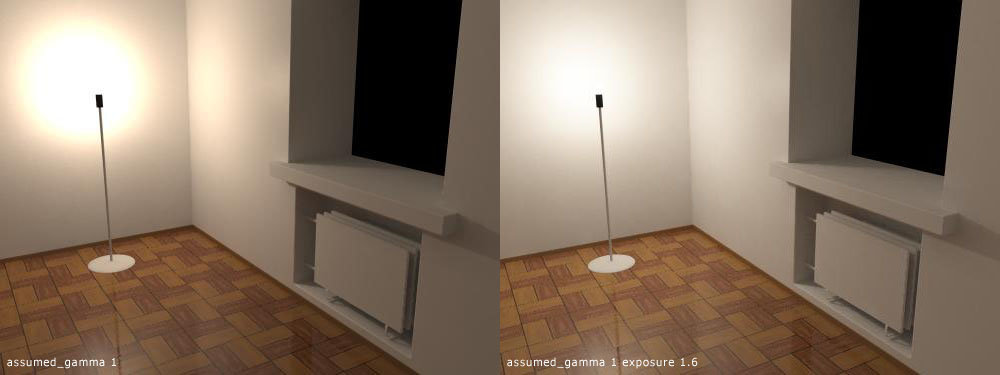
The patch simulates decrease of reactive chemicals in film
emulsion during exposure. The areas that have received more
light react less than other areas. Usefull for high contrast
scenes as it brings up the dark areas and limit bright areas.

I have combined aperture, film speed, and exposure time into
one exposure variable which goes into global_settings. The images
show the difference between normal and exposed image. I'll test
it some more to see if it works nicely with anti-aliasing and
focal blur.


_____________
Kari Kivisalo
Post a reply to this message
Attachments:
Download 'exposure.jpg' (39 KB)
Preview of image 'exposure.jpg'
|
|
| |
| |
|
|
|
|
| |
| |
|
|
Can we have a few more demos scenes - I for one fond this very interesting!

--

Rick

Kitty5 NewMedia http://Kitty5.co.uk
POV-Ray News & Resources http://Povray.co.uk
TEL : +44 (01270) 501101 - FAX : +44 (01270) 251105 - ICQ : 15776037

PGP Public Key
http://pgpkeys.mit.edu:11371/pks/lookup?op=get&search=0x231E1CEA


---
Outgoing mail is certified Virus Free.
Checked by AVG anti-virus system (http://www.grisoft.com).
Version: 6.0.416 / Virus Database: 232 - Release Date: 06/11/2002
Post a reply to this message
|
|
| |
| |
|
|
|
|
| |
| |
|
|
Kari Kivisalo escribió en el mensaje de noticias
3DCD3221.F40A6CBA@luxlab.com...
> The patch simulates decrease of reactive chemicals in film
> emulsion during exposure. The areas that have received more
> light react less than other areas. Usefull for high contrast
> scenes as it brings up the dark areas and limit bright areas.

Very interesting and useful patch. Looks great.
Waiting to see more examples

Txemi Jendrix
http://www.txemijendrix.com
Post a reply to this message
|
|
| |
| |
|
|
|
|
| |
| |
|
|
That sounds great. What about digi-cams? Are they inferior in this field?

Regards,
Hugo
Post a reply to this message
|
|
| |
| |
|
|
From: Johannes Dahlstrom
Subject: Re: Film exposure simulation patch
Date: 9 Nov 2002 14:32:32
Message: <3dcd62d0@news.povray.org>
|
|
|
| |
| |
|
|
Kari Kivisalo wrote:

>
> The patch simulates decrease of reactive chemicals in film
> emulsion during exposure. The areas that have received more
> light react less than other areas. Usefull for high contrast
> scenes as it brings up the dark areas and limit bright areas.

Heh, I made a patch just similar to yours a couple months ago... My first
Povray modification :) You're using the 1-exp(-x) function, right?
Post a reply to this message
|
|
| |
| |
|
|
|
|
| |
| |
|
|
Johannes Dahlstrom wrote:
>
> Heh, I made a patch just similar to yours a couple months ago...

And you kept in the desk drawer?


> You're using the 1-exp(-x) function, right?

It seems to be the simplest usable function for this purpose.


_____________
Kari Kivisalo
Post a reply to this message
|
|
| |
| |
|
|
|
|
| |
| |
|
|
Hugo wrote:
>
> What about digi-cams? Are they inferior in this field?

It seems that camera manufacturers aren't forthcoming about
the on-board image processing features. One transfer curve
I saw was definitely film-like which is kind of natural :)


_____________
Kari Kivisalo
Post a reply to this message
|
|
| |
| |
|
|
From: Johannes Dahlstrom
Subject: Re: Film exposure simulation patch
Date: 9 Nov 2002 16:03:04
Message: <3dcd7808@news.povray.org>
|
|
|
| |
| |
|
|
Kari Kivisalo wrote:


> And you kept in the desk drawer?
>

I was quite fond of it and was of course going to publish it here, but then
Kevin Loney came up with his own patch just before I was about to do so.
Post a reply to this message
|
|
| |
| |
|
|
|
|
| |
| |
|
|
Johannes Dahlstrom wrote:
>
> I was quite fond of it and was of course going to publish it here, but
> then Kevin Loney came up with his own patch just before I was about to
> do so.

His patch was going in different direction so I decided to make
this one.


_____________
Kari Kivisalo
Post a reply to this message
|
|
| |
| |
|
|
|
|
| |
| |
|
|
In article <3dcd5f8f$1@news.povray.org>, "Hugo" <hua### [at] post3 teledk>
wrote:
> That sounds great. What about digi-cams? Are they inferior in this field?
Not really sure what you are asking...the CCD will have a different
response curve than film or the human eye. Some of them might do
filtering to end up with something closer to film, or just something
that looks better. The design of the CCD element probably matters as
well.
They can't really be inferior or superior to POV, since they have quite
different information. POV has essentially unbounded float triples with
the "real" light intensities, cameras have fixed point values with the
raw output of CCD elements, restricted to a certain range.
--
Christopher James Huff <cja### [at] earthlinknet>
http://home.earthlink.net/~cjameshuff/
POV-Ray TAG: chr### [at] tagpovrayorg
http://tag.povray.org/ teledk>
wrote:
> That sounds great. What about digi-cams? Are they inferior in this field?
Not really sure what you are asking...the CCD will have a different
response curve than film or the human eye. Some of them might do
filtering to end up with something closer to film, or just something
that looks better. The design of the CCD element probably matters as
well.
They can't really be inferior or superior to POV, since they have quite
different information. POV has essentially unbounded float triples with
the "real" light intensities, cameras have fixed point values with the
raw output of CCD elements, restricted to a certain range.
--
Christopher James Huff <cja### [at] earthlinknet>
http://home.earthlink.net/~cjameshuff/
POV-Ray TAG: chr### [at] tagpovrayorg
http://tag.povray.org/
Post a reply to this message
|
|
| |
| |
|
|
|
|
| |
| |
|
|
Kari Kivisalo wrote:
>
> The patch simulates decrease of reactive chemicals in film
> emulsion during exposure. The areas that have received more
> light react less than other areas. Usefull for high contrast
> scenes as it brings up the dark areas and limit bright areas.
>
> I have combined aperture, film speed, and exposure time into
> one exposure variable which goes into global_settings. The images
> show the difference between normal and exposed image. I'll test
> it some more to see if it works nicely with anti-aliasing and
> focal blur.

I call it contrast masking, or dynamic range compression.
I used that method during development of black and white photos for an
exhibition I held about 15 years ago.
I used it for both the film and the paper with the film being a very high
resolution copy film with an ASA of about 12, a very high silver content
and almost invisible grain, even when 35mm frames were printed at 16X20
inches.

The subject matter was shot in full sunlight and included white marble and
black granite so you can imagine how massive the dynamic range was!

You place the developer saturated emulsion into a warm water bath (very
gently!) and then it continues to develop, but with the shadows held back
as they consume more of the locally available developer.

I think your patch will be very useful in some scenes.

--
Your connection failed because: need to wrap system in aluminum foil to fix
problem
Post a reply to this message
|
|
| |
| |
|
|
|
|
| |
| |
|
|
Daniel Matthews wrote:
>
> I call it contrast masking, or dynamic range compression.

Yes, I forgot to mention dynamic range compression :)


> The subject matter was shot in full sunlight and included white marble and
> black granite so you can imagine how massive the dynamic range was!

There is a company that has developed a CCD camera with automatic
dynamic range compression. It has an LCD element in front of the
CCD wich gets it's control voltage from the CCD. The more light
a pixel receives the darker the corresponding LCD pixel gets. They'd
love to use a scene like this for their demo.


> I think your patch will be very useful in some scenes.

I have studied transfer curves of Kodak films and some of the
slide films seem to match the simple exponential function.
I think this has wider use than just for the really hard cases.
Some people prefer to do all the tweaking within povray so I'll
add a gain keyword which will help to adjust scenes with lower
contrast ratios. assumed_gamma works as a contrast control when
combined with compression so that should cover the basics.

Of course it will be harder to develop scenes when adjusting
1 or 2 new variables so not many will try. It will most likely
not make an existing scene look better.


_____________
Kari Kivisalo
Post a reply to this message
|
|
| |
| |
|
|
|
|
| |
| |
|
|
in news:3DCE2184.862B3F26@luxlab.com Kari Kivisalo wrote:

> I have studied transfer curves of Kodak films and some of the
> slide films seem to match the simple exponential function.
> I think this has wider use than just for the really hard cases.

From a photographic point of view, have you ever looked into the "zone
system" (Minor White, Ansel Adams)? It's a practical way of dynamic range
control and an alternative for the scientific sensitometrics. The goal is
to pre-visualise how a certain amount of gray will look in the final
print. To control that there are two "variables" exposure and development
(assuming a standardised film and printing method). For a low contrast
scene you'll over-expose and under-develop, for high contrast scenes the
opposite.

Ingo
Post a reply to this message
|
|
| |
| |
|
|
|
|
| |
| |
|
|
> Not really sure what you are asking...
> They can't really be inferior or superior to POV

I meant if they were inferior to analog cams. Kari said the chemicals on
film influences the light-response curve. This is not possible with digital
cams (they don't use chemicals). But since many real-life situations
features strong contrast between light and shadow, I would consider digital
cams inferior if they just clipped the range, so, for example the sky gets
white and the ground gets black. This sometimes happen with my digi-cam. I
can think of at least 2 ways to solve the problem, one by software and
another by hardware of digital cams, but never mind.

I think it makes sense to have a feature in POV that mengles with the
light-response curve. It's much easier than using separate software.

Regards,
Hugo
Post a reply to this message
|
|
| |
| |
|
|
|
|
| |
| |
|
|
"Hugo" <hua### [at] post3teledk> wrote in message
news:3dce4ce6@news.povray.org...
>
> I meant if they were inferior to analog cams. Kari said the chemicals on
> film influences the light-response curve. This is not possible with
digital
> cams (they don't use chemicals). But since many real-life situations
> features strong contrast between light and shadow, I would consider
digital
> cams inferior if they just clipped the range, so, for example the sky gets
> white and the ground gets black. This sometimes happen with my digi-cam. I
> can think of at least 2 ways to solve the problem, one by software and
> another by hardware of digital cams, but never mind.
>
> I think it makes sense to have a feature in POV that mengles with the
> light-response curve. It's much easier than using separate software.

My digital camera does 10 bit analog to digital conversion and I know other
cameras are either less or more than that. So it does clip to a certain
range that way. People talk about it a lot in the digital camera message
boards.

What you suggest sounds, to me, like a variation on assumed_gamma. Something
which widens or narrows the range of visible color depth instead of just
raising or lowering that range. If I am thinking of this in the right way,
that doesn't seem too useful in typical renders. At least unless the output
image is above 24 bits, or the idea is to limit it to less than that in a 24
bit image. I'm just not knowledgable on this topic enough to see any
possible benefit, if done within POV-Ray anyhow.

--
Farewell,
Bob
Post a reply to this message
|
|
| |
| |
|
|
|
|
| |
| |
|
|
Kari wrote:
> It will most likely not make an existing
> scene look better.

Right. But I suppose your patch will help us to build scenes with a better
simulation of light, since light sources are usually much stronger in real
life than most POV'ers seem to think they are.. At least it's my impression
that many raytraced scenes look unnatural because we use far too weak
lights. We don't want the enlightened areas to 'clip' and yet we want all
our objects to be clearly visible. I can imagine this gives a strange spread
of light and wrong intensities of specular reflections.

But I'd like to see more examples, right now I'm using my imagination too
much.  :o)

Regards,
Hugo
Post a reply to this message
|
|
| |
| |
|
|
|
|
| |
| |
|
|
Hugo wrote:
>
> At least it's my impression that many raytraced scenes look unnatural
> because we use far too weak lights. ... I can imagine this gives a
> strange spread of light and wrong intensities of specular reflections.

You got it right but even though povray can be used for simulation
most of the time it's not necessary to go all the way, just enough
in the right direction will bring great results.


> But I'd like to see more examples, right now I'm using my imagination
> too much.  :o)

You can try it yourself if you have a compiler.
http://luxlab.com/files/exposure.htm


_____________
Kari Kivisalo
Post a reply to this message
|
|
| |
| |
|
|
|
|
| |
| |
|
|
ingo wrote:
>
> From a photographic point of view, have you ever looked into the "zone
> system" (Minor White, Ansel Adams)?

I have tried to find some hard data on this. So far all the documents I
have found have been for photographers and even to most extensive didn't
contain enough information for making a mathematical simulation.


_____________
Kari Kivisalo
Post a reply to this message
|
|
| |
| |
|
|
|
|
| |
| |
|
|
in news:3DCFA07F.B9CAE0CB@luxlab.com Kari Kivisalo wrote:

> I have tried to find some hard data on this.

maybe:
http://www.cs.utah.edu/~reinhard/cdrom/tonemap.pdf

Ingo
Post a reply to this message
|
|
| |
| |
|
|
|
|
| |
| |
|
|
On Sat, 09 Nov 2002 18:04:49 +0200, Kari Kivisalo
<pro### [at] luxlabcom> wrote:

This looks VERY promising. I've been wanting POV to include dynamic
range processing for a long time.

I think you might have made a strategic error in naming it a "film
exposure simulation", because film simulation is not the only
potential use for this sort of patch. In my opinion, "human vision
simulation" also needs something like this. In the past, I have tried
to model my own bedroom, which includes light sources in the scene. No
matter how I adjusted POV's lighting and gamma settings, there were
always unnatural looking hot spots on the white walls and ceiling,
near the light sources. Of course I could render a scene dark enough
to avoid the hot spots, but the rest of the scene looks far too dark.
A patch such as yours might finally allow me to properly render a good
representation of my room.

As far as film simulation goes, are you also modeling the "toe" of the
film response curve? This is the non-linear portion of the curve that
corresponds with shadow tones. There is something of a gentle
threshold that must be exceeded before any detail is recorded in the
shadow areas. Another way of phrasing this, is to say that the shadow
areas would also be compressed in dynamic range, in the rendered
image.

If anyone builds a windows binary of this patch, please let me know.
I'd love to try this patch out, but don't have a compiler handy.

later,
Glen


Later,
Glen

7no### [at] ezwvcom     (Remove the numeral "7")
Post a reply to this message
|
|
| |
| |
|
|
|
|
| |
| |
|
|
Glen Berry wrote:
>
> I think you might have made a strategic error in naming it a "film
> exposure simulation"

It's a simple exposure simulation derived from mathematics involved
in a chemical reaction. I may add another method derived from
photography.


> film simulation is not the only potential use for this sort of patch.

You are free to use it as you like.

> In my opinion, "human vision simulation" also needs something like this.

Good for that too to some extent. There is a link between these two but
I'm not trying to do human vision simulation, that would require way
too much work.


> As far as film simulation goes, are you also modeling the "toe" of the
> film response curve?

assumed_gamma can be abused to give this effect (just add a value to
your current assumed_gamma). I suppose there could also be a treshold
value.


> If anyone builds a windows binary of this patch, please let me know.
> I'd love to try this patch out, but don't have a compiler handy.

ABX may include it here:
http://www.abx.art.pl/pov/popov/


_____________
Kari Kivisalo
Post a reply to this message
|
|
| |
| |
|
|
|
|
| |