|
|
|
|
|
|
| |
| |
|
|
|
|
| |
| |
|
|
Hi all I need some help making some shapes,
I'm trying to kane an octahedron without taking a box and cutting off
edges, as I later want to make a regular dodecahedron and an icosahedron.
I finally found the prisim and it makes good stuff for other things but
i'm still new and cant find how to make the shapes above thanks for the
help!

this is what I have to do ?  but remember i'm new!

#declare cutter =
box {
<2.1,2.1,2.1>
<-2.1,-2.1,-2.1>
pigment {Green}
translate  <0,3.5,0>
}

difference {

box {
<2,2,2>
<-2,-2,-2>
pigment {Green}
}
object {cutter  rotate x*45}
object {cutter  rotate x*-45}
object {cutter  rotate x*45 scale -1}
object {cutter  rotate x*-45 scale -1}


object {cutter  rotate z*45}
object {cutter  rotate z*-45}
object {cutter  rotate z*45 scale -1}
object {cutter  rotate z*-45 scale -1}
}
Post a reply to this message
Attachments:
Download 'shapes for conn.bmp.dat' (226 KB)
|
|
| |
| |
|
|
|
|
| |
| |
|
|
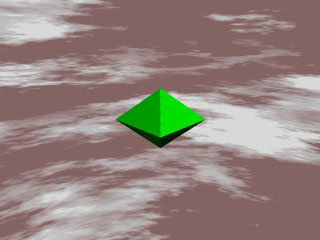
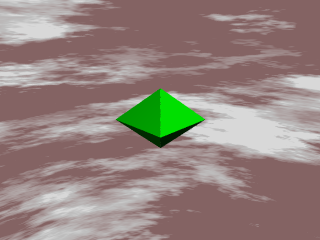
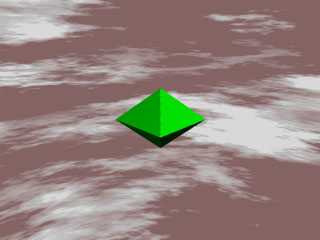
did the pic work It didnt on my end when I tried to use it so here it is
again
srry all

Flaming Monarch wrote:

> Hi all I need some help making some shapes,
> I'm trying to kane an octahedron without taking a box and cutting off
> edges, as I later want to make a regular dodecahedron and an icosahedron.
> I finally found the prisim and it makes good stuff for other things but
> i'm still new and cant find how to make the shapes above thanks for the
> help!
>
> this is what I have to do ?  but remember i'm new!
>
> #declare cutter =
> box {
> <2.1,2.1,2.1>
> <-2.1,-2.1,-2.1>
> pigment {Green}
> translate  <0,3.5,0>
> }
>
> difference {
>
> box {
> <2,2,2>
> <-2,-2,-2>
> pigment {Green}
> }
> object {cutter  rotate x*45}
> object {cutter  rotate x*-45}
> object {cutter  rotate x*45 scale -1}
> object {cutter  rotate x*-45 scale -1}
>
>
> object {cutter  rotate z*45}
> object {cutter  rotate z*-45}
> object {cutter  rotate z*45 scale -1}
> object {cutter  rotate z*-45 scale -1}
> }
Post a reply to this message
Attachments:
Download 'tetrahedron.jpg' (18 KB)
Preview of image 'tetrahedron.jpg'
|
|
| |
| |
|
|
|
|
| |
| |
|
|
I could see the first pic no problem.
I confess I have no idea how your box approach is working. The way I'd suggest
doing a regular octahedron is with plane intersections like this:
intersection {
plane { < 1, 1, 1>, 1 }
plane { < 1, 1,-1>, 1 }
plane { < 1,-1, 1>, 1 }
plane { < 1,-1,-1>, 1 }
plane { <-1, 1, 1>, 1 }
plane { <-1, 1,-1>, 1 }
plane { <-1,-1, 1>, 1 }
plane { <-1,-1,-1>, 1 }
}
8 planes to describe an 8 sided solid :)
Hope this helps.
--
Tek
http://www.evilsuperbrain.com
Flaming Monarch <fla### [at] gates com> wrote in message
news:3C9### [at] gatescom...
> did the pic work It didnt on my end when I tried to use it so here it is
> again
> srry all
>
> Flaming Monarch wrote:
>
> > Hi all I need some help making some shapes,
> > I'm trying to kane an octahedron without taking a box and cutting off
> > edges, as I later want to make a regular dodecahedron and an icosahedron.
> > I finally found the prisim and it makes good stuff for other things but
> > i'm still new and cant find how to make the shapes above thanks for the
> > help!
> >
> > this is what I have to do ? but remember i'm new!
> >
> > #declare cutter =
> > box {
> > <2.1,2.1,2.1>
> > <-2.1,-2.1,-2.1>
> > pigment {Green}
> > translate <0,3.5,0>
> > }
> >
> > difference {
> >
> > box {
> > <2,2,2>
> > <-2,-2,-2>
> > pigment {Green}
> > }
> > object {cutter rotate x*45}
> > object {cutter rotate x*-45}
> > object {cutter rotate x*45 scale -1}
> > object {cutter rotate x*-45 scale -1}
> >
> >
> > object {cutter rotate z*45}
> > object {cutter rotate z*-45}
> > object {cutter rotate z*45 scale -1}
> > object {cutter rotate z*-45 scale -1}
> > }
>
>
-------------------------------------------------------------------------------- com> wrote in message
news:3C9### [at] gatescom...
> did the pic work It didnt on my end when I tried to use it so here it is
> again
> srry all
>
> Flaming Monarch wrote:
>
> > Hi all I need some help making some shapes,
> > I'm trying to kane an octahedron without taking a box and cutting off
> > edges, as I later want to make a regular dodecahedron and an icosahedron.
> > I finally found the prisim and it makes good stuff for other things but
> > i'm still new and cant find how to make the shapes above thanks for the
> > help!
> >
> > this is what I have to do ? but remember i'm new!
> >
> > #declare cutter =
> > box {
> > <2.1,2.1,2.1>
> > <-2.1,-2.1,-2.1>
> > pigment {Green}
> > translate <0,3.5,0>
> > }
> >
> > difference {
> >
> > box {
> > <2,2,2>
> > <-2,-2,-2>
> > pigment {Green}
> > }
> > object {cutter rotate x*45}
> > object {cutter rotate x*-45}
> > object {cutter rotate x*45 scale -1}
> > object {cutter rotate x*-45 scale -1}
> >
> >
> > object {cutter rotate z*45}
> > object {cutter rotate z*-45}
> > object {cutter rotate z*45 scale -1}
> > object {cutter rotate z*-45 scale -1}
> > }
>
>
--------------------------------------------------------------------------------
Post a reply to this message
|
|
| |
| |
|
|
|
|
| |
| |
|
|
My box aproach was made by using the difference of the cutters and a
main box

Tek wrote:

> I could see the first pic no problem.
>
> I confess I have no idea how your box approach is working. The way I'd suggest
> doing a regular octahedron is with plane intersections like this:
>
> intersection {
>     plane { < 1, 1, 1>, 1 }
>     plane { < 1, 1,-1>, 1 }
>     plane { < 1,-1, 1>, 1 }
>     plane { < 1,-1,-1>, 1 }
>     plane { <-1, 1, 1>, 1 }
>     plane { <-1, 1,-1>, 1 }
>     plane { <-1,-1, 1>, 1 }
>     plane { <-1,-1,-1>, 1 }
> }
>
> 8 planes to describe an 8 sided solid :)
>
> Hope this helps.
>
> --
> Tek
> http://www.evilsuperbrain.com
>
>
> Flaming Monarch <fla### [at] gatescom> wrote in message
> news:3C9### [at] gatescom...
>
>>did the pic work It didnt on my end when I tried to use it so here it is
>>again
>>srry all
>>
>>Flaming Monarch wrote:
>>
>>
>>>Hi all I need some help making some shapes,
>>>I'm trying to kane an octahedron without taking a box and cutting off
>>>edges, as I later want to make a regular dodecahedron and an icosahedron.
>>>I finally found the prisim and it makes good stuff for other things but
>>>i'm still new and cant find how to make the shapes above thanks for the
>>>help!
>>>
>>>this is what I have to do ?  but remember i'm new!
>>>
>>>#declare cutter =
>>>box {
>>><2.1,2.1,2.1>
>>><-2.1,-2.1,-2.1>
>>>pigment {Green}
>>>translate  <0,3.5,0>
>>>}
>>>
>>>difference {
>>>
>>>box {
>>><2,2,2>
>>><-2,-2,-2>
>>>pigment {Green}
>>>}
>>>object {cutter  rotate x*45}
>>>object {cutter  rotate x*-45}
>>>object {cutter  rotate x*45 scale -1}
>>>object {cutter  rotate x*-45 scale -1}
>>>
>>>
>>>object {cutter  rotate z*45}
>>>object {cutter  rotate z*-45}
>>>object {cutter  rotate z*45 scale -1}
>>>object {cutter  rotate z*-45 scale -1}
>>>}
>>>
>>
>
>
> --------------------------------------------------------------------------------
>
>
>
>
>
>
>
Post a reply to this message
|
|
| |
| |
|
|
|
|
| |
| |
|
|
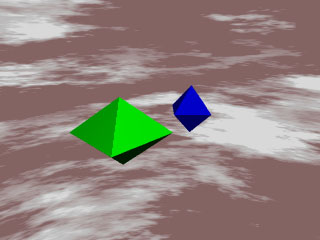
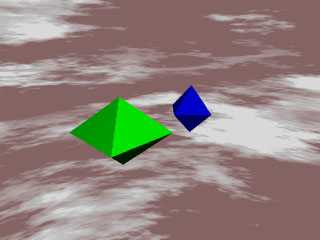
Cool I never thought of that way with the intersecting planes and stuff.
it worked and the code was tonnes shorter here is the way it loooked
the blue one is yours and the green mine

Tek wrote:

> I could see the first pic no problem.
>
> I confess I have no idea how your box approach is working. The way I'd suggest
> doing a regular octahedron is with plane intersections like this:
>
> intersection {
>     plane { < 1, 1, 1>, 1 }
>     plane { < 1, 1,-1>, 1 }
>     plane { < 1,-1, 1>, 1 }
>     plane { < 1,-1,-1>, 1 }
>     plane { <-1, 1, 1>, 1 }
>     plane { <-1, 1,-1>, 1 }
>     plane { <-1,-1, 1>, 1 }
>     plane { <-1,-1,-1>, 1 }
> }
>
> 8 planes to describe an 8 sided solid :)
>
> Hope this helps.
>
> --
> Tek
> http://www.evilsuperbrain.com
>
>
> Flaming Monarch <fla### [at] gatescom> wrote in message
> news:3C9### [at] gatescom...
>
>>did the pic work It didnt on my end when I tried to use it so here it is
>>again
>>srry all
>>
>>Flaming Monarch wrote:
>>
>>
>>>Hi all I need some help making some shapes,
>>>I'm trying to kane an octahedron without taking a box and cutting off
>>>edges, as I later want to make a regular dodecahedron and an icosahedron.
>>>I finally found the prisim and it makes good stuff for other things but
>>>i'm still new and cant find how to make the shapes above thanks for the
>>>help!
>>>
>>>this is what I have to do ?  but remember i'm new!
>>>
>>>#declare cutter =
>>>box {
>>><2.1,2.1,2.1>
>>><-2.1,-2.1,-2.1>
>>>pigment {Green}
>>>translate  <0,3.5,0>
>>>}
>>>
>>>difference {
>>>
>>>box {
>>><2,2,2>
>>><-2,-2,-2>
>>>pigment {Green}
>>>}
>>>object {cutter  rotate x*45}
>>>object {cutter  rotate x*-45}
>>>object {cutter  rotate x*45 scale -1}
>>>object {cutter  rotate x*-45 scale -1}
>>>
>>>
>>>object {cutter  rotate z*45}
>>>object {cutter  rotate z*-45}
>>>object {cutter  rotate z*45 scale -1}
>>>object {cutter  rotate z*-45 scale -1}
>>>}
>>>
>>
>
>
> --------------------------------------------------------------------------------
>
>
>
>
>
>
>
Post a reply to this message
Attachments:
Download 'two of em.jpg' (18 KB)
Preview of image 'two of em.jpg'
|
|
| |
| |
|
|
|
|
| |
| |
|
|
In article <3c913ee9$1@news.povray.org>, "Tek" <tek### [at] evilsuperbraincom>
wrote:

> I confess I have no idea how your box approach is working. The way
> I'd suggest doing a regular octahedron is with plane intersections
> like this:
...snip...
> 8 planes to describe an 8 sided solid :)

Note that POV has no idea how to bound this, so it is completely
unbounded...POV will test against it for every ray traced. This isn't
much of a problem just for one, but if you use a large number of them
you should use an appropriate bounded_by statement.

You could also use an intersection of 2 or more boxes, which might be
faster and won't need manual bounding as badly...POV will be able to
come up with a bounding box, just not a perfect one.

--
Christopher James Huff <chr### [at] maccom>
POV-Ray TAG e-mail: chr### [at] tagpovrayorg
TAG web site: http://tag.povray.org/
Post a reply to this message
|
|
| |
| |
|
|
|
|
| |
| |
|
|
The corners for the octahedron would be:
 Corner1 = <0,1,0>
Corner2 = <1,0,0>
Corner3 = <0,0,1>
Corner4 = <-1,0,0>
Corner5 = <0,0,-1>
Corner6 = <0,-1,0>

Just make triangles out of these. This will give you the fastest octahedron.

#mesh {
 triangle {Corner1, Corner2, Corner3}
 triangle {Corner1, Corner3, Corner4}
 triangle {Corner1, Corner4, Corner5}
 triangle {Corner1, Corner5, Corner2}
 triangle {Corner6, Corner2, Corner3}
 triangle {Corner6, Corner3, Corner4}
 triangle {Corner6, Corner4, Corner5}
 triangle {Corner6, Corner5, Corner2}
} /* end mesh */

 -Shay


 -Shay

"Flaming Monarch" <fla### [at] gatescom> wrote in message
news:3C9### [at] gatescom...
Post a reply to this message
|
|
| |
| |
|
|
|
|
| |
| |
|
|
The simplest way to make an octahedron is the intersection of two
rectangular boxes.

object {intersection {
  object {box{<-2,-1,-1>, <2,1,1>} rotate 45*x}
  object {box{<-1,-1,-2>, <1,1,2>} rotate 45*z}
  pigment {color Green}
  finish {roughness .1 specular .1} }
}

    Note that since the diagonal aspect is sqrt(2) you can take the 2's
above to 1.414 or so with the same results.  If you make it smaller than
that, it will trim the equator very nicely.  Now, two more rectangular
solids can trim the remaining 8 edges with no trouble at all.  Two solids,
one octahedron.  Four solids, one trimmed octahedron.
    For a perfectly symmetrical octahedron, scale the z axis to 1.414, for
obvious reasons.

Cheers!

Chip Shults
My robotics, space and CGI web page - http://home.cfl.rr.com/aichip
Post a reply to this message
|
|
| |
| |
|
|
From: Sir Charles W Shults III
Subject: Re: Help I need it- okay, here it is
Date: 14 Mar 2002 23:51:45
Message: <3c917de1@news.povray.org>
|
|
|
| |
| |
|
|
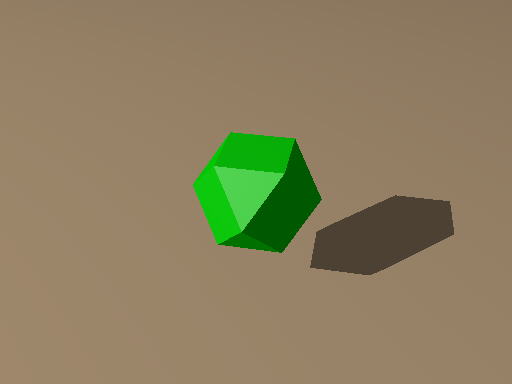
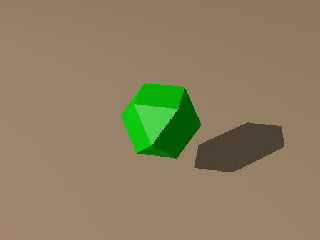
Oh, yes- once you scale the octahedron at 1.414*y, since it is perfectly
symmetrical, you can then use one more cube and trim it into a perfect
cuboctahedron like this:

// start of POV code

#declare octahedron = intersection {
  object {box{<-2,-1,-1>, <2,1,1>} rotate 45*x}
  object {box{<-1,-1,-2>, <1,1,2>} rotate 45*z}
  pigment {color Green}
  finish {roughness .1 specular .1}
}

object {intersection {
  object {octahedron scale 1.414*y }
  object {box{-1, 1} rotate 45*y pigment {color Green} finish {roughness .1
specular .1} }
} }

// end of POV code

  Note the attached image.

Cheers!

Chip Shults
My robotics, space and CGI web page - http://home.cfl.rr.com/aichip
Post a reply to this message
Attachments:
Download 'Octahedr.jpg' (8 KB)
Preview of image 'Octahedr.jpg'
|
|
| |
| |
|
|
|
|
| |
| |
|
|
Wasn't it Flaming Monarch who wrote:

>Hi all I need some help making some shapes,
>I'm trying to kane an octahedron without taking a box and cutting off
>edges, as I later want to make a regular dodecahedron and an icosahedron.
>I finally found the prisim and it makes good stuff for other things but
>i'm still new and cant find how to make the shapes above thanks for the
>help!

#include "shapes2.inc"
object {Octahedron}

--
Mike Williams
Gentleman of Leisure
Post a reply to this message
|
|
| |
| |
|
|
|
|
| |
| |
|
|
Flaming Monarch wrote:
>
> Hi all I need some help making some shapes,
> I'm trying to kane an octahedron without taking a box and cutting off
> edges, as I later want to make a regular dodecahedron and an icosahedron.
> I finally found the prisim and it makes good stuff for other things but
> i'm still new and cant find how to make the shapes above thanks for the
> help!

I made (by way of reinventing the wheel, apparently) a "platonic.inc" file
that has the solids, vertices and edges for all five of the Platonic
Solids.  If you want it, drop me an email.  If you'd rather do it yourself,
don't drop me an email.  Either way is fine with me.  :)

Deaken
Post a reply to this message
|
|
| |
| |
|
|
|
|
| |
| |
|
|
> #mesh {
Good idea, but where did you get the idea that mesh had a hash-mark?  If you
have the beta than you would be better off with a  mesh2 with all the
corners.
Post a reply to this message
|
|
| |
| |
|
|
|
|
| |
| |
|
|
RAY <RAY### [at] yahoocom> wrote in message news:3c91f780$1@news.povray.org...

> Good idea, but where did you get the idea that mesh had a hash-mark?

Just a type. I never use "mesh 1" and am used to putting the hash in front
of mesh2. I'm not sure if it is necessary there either.

> If you
> have the beta than you would be better off with a  mesh2 with all the
> corners.

Mesh2 would of course be preferable, but the syntax is not as clear to a
beginner like Flaming Monarch.

 -Shay
Post a reply to this message
|
|
| |
| |
|
|
|
|
| |
| |
|
|
Thank you all for your suggestions
and thanks to everyone for not overloading my limited pov brain with big
complex codes thankyou all!
:)
Post a reply to this message
|
|
| |
| |
|
|
|
|
| |
| |
|
|
225k Mar 15 15:45 Shapes for Conn.bmp

Taht's a bit much for a test object scene, try .jpg.

I hope you cancel this post that contains the bmp file.

--
#local i=.1;#local I=(i/i)/i;#local l=(i+i)/i;#local ll=(I/i)/l;box{<-ll,
-((I/I)+l),-ll><ll,-l,ll>pigment{checker scale l}finish{ambient((I/l)/I)+
(l/I)}}sphere{<i-i,l-l,(I/l)>l/l pigment{rgb((I/l)/I)}finish{reflection((
I/l)/I)-(l/I)specular(I/l)/I}}light_source{<I-l,I+I,(I-l)/l>l/l} // Steve
Post a reply to this message
|
|
| |
| |
|
|
|
|
| |
| |
|
|
srry dude next time Ill make sure that its jpg


Steve wrote:

> 225k Mar 15 15:45 Shapes for Conn.bmp
>
> Taht's a bit much for a test object scene, try .jpg.
>
> I hope you cancel this post that contains the bmp file.
>
> --
> #local i=.1;#local I=(i/i)/i;#local l=(i+i)/i;#local ll=(I/i)/l;box{<-ll,
> -((I/I)+l),-ll><ll,-l,ll>pigment{checker scale l}finish{ambient((I/l)/I)+
> (l/I)}}sphere{<i-i,l-l,(I/l)>l/l pigment{rgb((I/l)/I)}finish{reflection((
> I/l)/I)-(l/I)specular(I/l)/I}}light_source{<I-l,I+I,(I-l)/l>l/l} // Steve
>
Post a reply to this message
|
|
| |
| |
|
|
|
|
| |
| |
|
|
have I seen your work on a website somewhere?

its good
however I had to edit it to make it work something was wrong with the
glass texture

Deaken wrote:

> Flaming Monarch wrote:
>
>>Hi all I need some help making some shapes,
>>I'm trying to kane an octahedron without taking a box and cutting off
>>edges, as I later want to make a regular dodecahedron and an icosahedron.
>>I finally found the prisim and it makes good stuff for other things but
>>i'm still new and cant find how to make the shapes above thanks for the
>>help!
>>
>
> I made (by way of reinventing the wheel, apparently) a "platonic.inc" file
> that has the solids, vertices and edges for all five of the Platonic
> Solids.  If you want it, drop me an email.  If you'd rather do it yourself,
> don't drop me an email.  Either way is fine with me.  :)
>
> Deaken
>
Post a reply to this message
|
|
| |
| |
|
|
|
|
| |
| |
|
|
Flaming Monarch wrote:
>
> have I seen your work on a website somewhere?

I doubt it.

> its good

I believe the expression is "jaa, mata ne".  :)

> however I had to edit it to make it work something was wrong with the
> glass texture

Really?  What went wrong with it?  Oh, wait.  Are you using a beta?  That
glass texture is taken from 3.5b9.  If you're using something earlier, it
probably won't work.

Deaken
Post a reply to this message
|
|
| |
| |
|
|
|
|
| |
| |
|
|
I'm not sure what version it is but I fixed it by cancling out the glass
texture and changing the .inc file
it was just the normal name and I added a bit to the end
no biggy
still looks great

Deaken wrote:

> Flaming Monarch wrote:
>
>>have I seen your work on a website somewhere?
>>
>
> I doubt it.
>
>
>>its good
>>
>
> I believe the expression is "jaa, mata ne".  :)
>
>
>>however I had to edit it to make it work something was wrong with the
>>glass texture
>>
>
> Really?  What went wrong with it?  Oh, wait.  Are you using a beta?  That
> glass texture is taken from 3.5b9.  If you're using something earlier, it
> probably won't work.
>
> Deaken
>
Post a reply to this message
|
|
| |
| |
|
|
|
|
| |
|
|