|
|
|
|
|
|
| |
| |
|
|
|
|
| |
| |
|
|
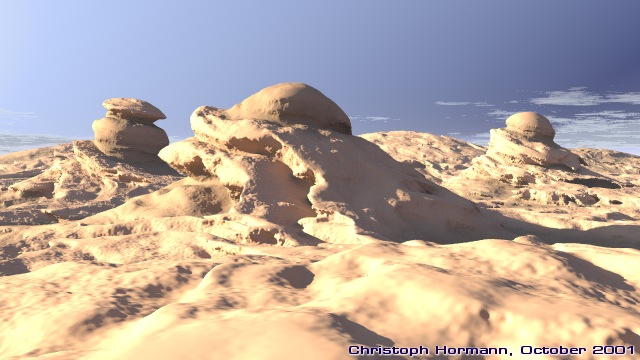
Isosurfaces with pigment functions are a really nice thing to play with.
You can spend hours searching for nice structures in the noise...
But in combination with radiosity it is really slow. I rendered this in
several parts and no more know the exact render time, but it has been
several days in total.
I wonder if adaptive accuracy would be useful for isosurfaces. As visible
in the near foreground the accuracy value is too high here, but the
horizon part would look all right with even higher values and would be
much faster then. Of course I could try to split it up in several
objects, but avoiding the gap between is difficult.
Radiosity quality settings are fairly high (error_bound 0.05) but the
structures in the shadow could still profit from better settings.
Christoph
--
Christoph Hormann <chr### [at] gmx de>
IsoWood include, radiosity tutorial, TransSkin and other
things on: http://www.schunter.etc.tu-bs.de/~chris/ de>
IsoWood include, radiosity tutorial, TransSkin and other
things on: http://www.schunter.etc.tu-bs.de/~chris/
Post a reply to this message
Attachments:
Download 'lscp_erosion1.jpg' (77 KB)
Preview of image 'lscp_erosion1.jpg'
|
|
| |
| |
|
|
|
|
| |
| |
|
|
Christoph Hormann escribió:
> Isosurfaces with pigment functions are a really nice thing to play with.
> You can spend hours searching for nice structures in the noise...

  Very natural look! I almost feel the erosion. Of course, the scene is
very well composed and lighted, too. A pain the render times...

--
Jaime Vives Piqueres

La Persistencia de la Ignorancia
http://www.ignorancia.org/
Post a reply to this message
|
|
| |
| |
|
|
|
|
| |
| |
|
|
Wow

I must admit I've stopped playing so much as I used to with pigment function
for the very reason you mentioned - speed. Perhaps I should try again.

MIck
Post a reply to this message
|
|
| |
| |
|
|
|
|
| |
| |
|
|
Jaime Vives Piqueres wrote:
>
>   Very natural look! I almost feel the erosion. Of course, the scene is
> very well composed and lighted, too. A pain the render times...
>

Thanks very much.

Christoph

--
Christoph Hormann <chr### [at] gmxde>
IsoWood include, radiosity tutorial, TransSkin and other
things on: http://www.schunter.etc.tu-bs.de/~chris/
Post a reply to this message
|
|
| |
| |
|
|
|
|
| |
| |
|
|
Mick Hazelgrove wrote:
>
> Wow
>

Thank you.

> I must admit I've stopped playing so much as I used to with pigment function
> for the very reason you mentioned - speed. Perhaps I should try again.
>

If you do the test render at small size without aa and radiosity it's
possible, although some patience is still required.

Christoph

--
Christoph Hormann <chr### [at] gmxde>
IsoWood include, radiosity tutorial, TransSkin and other
things on: http://www.schunter.etc.tu-bs.de/~chris/
Post a reply to this message
|
|
| |
| |
|
|
|
|
| |
| |
|
|
> I wonder if adaptive accuracy would be useful for isosurfaces.  As visible
> in the near foreground the accuracy value is too high here, but the
> horizon part would look all right with even higher values and would be
> much faster then.  Of course I could try to split it up in several
> objects, but avoiding the gap between is difficult.

That's an interesting idea... Anyone have any ideas on how to actually do it
or fake it?
Post a reply to this message
|
|
| |
| |
|
|
|
|
| |
| |
|
|
Awesome.
The sky is perfect too.
I only have to complain of the foregroung, which looks like it needs better
precision...

Several days with your Athlon?! You must be a very patient person.

p.s. Just curious: how much slower the first half was compared to the second
one?
--
Jonathan.

"Christoph Hormann" <chr### [at] gmxde> ha scritto nel messaggio
news:3BD52FDF.36E0175B@gmx.de...
>
> Isosurfaces with pigment functions are a really nice thing to play with.
> You can spend hours searching for nice structures in the noise...
>
> But in combination with radiosity it is really slow.  I rendered this in
> several parts and no more know the exact render time, but it has been
> several days in total.
>
> I wonder if adaptive accuracy would be useful for isosurfaces.  As visible
> in the near foreground the accuracy value is too high here, but the
> horizon part would look all right with even higher values and would be
> much faster then.  Of course I could try to split it up in several
> objects, but avoiding the gap between is difficult.
>
> Radiosity quality settings are fairly high (error_bound 0.05) but the
> structures in the shadow could still profit from better settings.
>
> Christoph
>
> --
> Christoph Hormann <chr### [at] gmxde>
> IsoWood include, radiosity tutorial, TransSkin and other
> things on: http://www.schunter.etc.tu-bs.de/~chris/


----------------------------------------------------------------------------
----
Post a reply to this message
|
|
| |
| |
|
|
|
|
| |
| |
|
|
Christoph Hormann wrote:
>
> I wonder if adaptive accuracy would be useful for isosurfaces.  As visible
> in the near foreground the accuracy value is too high here, but the
> horizon part would look all right with even higher values and would be
> much faster then.  Of course I could try to split it up in several
> objects, but avoiding the gap between is difficult.
>
> Radiosity quality settings are fairly high (error_bound 0.05) but the
> structures in the shadow could still profit from better settings.

The sky seems unnatural to me, and you're right about the error_bound
and need for accuracy in the foreground, but otherwise this is a great pic.

-Xplo
Post a reply to this message
|
|
| |
| |
|
|
|
|
| |
| |
|
|
JRG wrote:
>
> Awesome.
> The sky is perfect too.

Thanks.

> I only have to complain of the foregroung, which looks like it needs better
> precision...

As said, the accuracy value should have been lower, but that would have
been even slower of course.

> Several days with your Athlon?! You must be a very patient person.
>
> p.s. Just curious: how much slower the first half was compared to the second
> one?

I can't say precisely since i did not take that much care, but in general
in such scenes the horizon part is quite slow in comparison to the rest.

Christoph

--
Christoph Hormann <chr### [at] gmxde>
IsoWood include, radiosity tutorial, TransSkin and other
things on: http://www.schunter.etc.tu-bs.de/~chris/
Post a reply to this message
|
|
| |
| |
|
|
|
|
| |
| |
|
|
"Tony[B]" wrote:
>
> That's an interesting idea... Anyone have any ideas on how to actually do it
> or fake it?

Faking?  I doubt that's possible.

Implementing it will probably have to wait until the final version of
Povray 3.5.  I will surely have a look when the source code is available.

In general i think it's probably not very problematic to vary the accuracy
value.

Christoph

--
Christoph Hormann <chr### [at] gmxde>
IsoWood include, radiosity tutorial, TransSkin and other
things on: http://www.schunter.etc.tu-bs.de/~chris/
Post a reply to this message
|
|
| |
| |
|
|
|
|
| |
| |
|
|
Xplo Eristotle wrote:
>
> The sky seems unnatural to me, and you're right about the error_bound
> and need for accuracy in the foreground, but otherwise this is a great pic.

Thanks,

concerning the sky, it is meant to look a little unconventional, but i
have seen a lot of photos with much less natural sky than this.

Christoph

--
Christoph Hormann <chr### [at] gmxde>
IsoWood include, radiosity tutorial, TransSkin and other
things on: http://www.schunter.etc.tu-bs.de/~chris/
Post a reply to this message
|
|
| |
| |
|
|
|
|
| |
| |
|
|
Christoph Hormann a écrit :

> Xplo Eristotle wrote:
> >
> > The sky seems unnatural to me, and you're right about the error_bound
> > and need for accuracy in the foreground, but otherwise this is a great pic.
>
> Thanks,
>
> concerning the sky, it is meant to look a little unconventional, but i
> have seen a lot of photos with much less natural sky than this.
>
> Christoph

I personally feel that here is a very impressive computer generated
image ! The atmosphere seems to be almost perfect;  I mean,  something
serious "stand out" of the pict. We are looking through a very nice and cool
world.
I think this image is a good part of what CGI should be.

 Alex P


>
>
> --
> Christoph Hormann <chr### [at] gmxde>
> IsoWood include, radiosity tutorial, TransSkin and other
> things on: http://www.schunter.etc.tu-bs.de/~chris/
Post a reply to this message
|
|
| |
| |
|
|
|
|
| |
| |
|
|
That's impressive image!

"Christoph Hormann"  wrote
> I wonder if adaptive accuracy would be useful for isosurfaces.

Have you tried "adaptive max_gradient" technique, which is already
implemented in 3.5 beta?

I think "adaptive accuracy" is not so useful as "adaptive max_gradient",

The below code is an example.
If you render it with accuracy=0.002 instead of 0.0001, you will
see artifacts near the top of small peaks.
On the other hand, if you render it with adaptive max_gradient
(e.g. "evaluate 2, 1.2, 0.9" instead of "max_gradient 5") and with
accuracy=0.0001, the image quality will be much better and the
rendering speed will be comparable or rather faster than the above.

Note that this technique does not guarantee artifact-free image
and requires experiences to determine the "evaluate" parameters.
(So, this should be only for advanced users.)

BTW, have you tried normal function pattern like below
(commented out) for the foreground?   I usually use it in such
cases.

R. Suzuki

//--- the code ------
#version 3.5;
#include "functions.inc"

#declare Radiosity=off;

global_settings {
  assumed_gamma 1.0
  //max_trace_level 25
  #if (Radiosity)
    radiosity {
      pretrace_start 0.08
      pretrace_end   0.04
      count 35
      nearest_count 5
      error_bound 0.05
      recursion_limit 3
      low_error_factor .5
      gray_threshold 0.0
      minimum_reuse 0.015
      brightness 1

      adc_bailout 0.01/2
    }
  #end
}

#default {
  texture {
    pigment {rgb 1}
    #if (Radiosity)
      finish {
        ambient 0.0
        diffuse 0.6
        specular 0.3
      }
    #else
      finish {
        ambient 0.1
        diffuse 0.6
        specular 0.3
      }
    #end
  }
}

// ----------------------------------------

camera {
  right x*image_width/image_height
  location  <0,1.15,-4>
  look_at   <0,0.8,0>
}

light_source {
  <500,500,-500>
  color rgb <1, 1, 1>
}

sky_sphere {
  pigment {
    gradient y
    color_map {
      [0.0 rgb <0.6,0.7,1.0>]
      [0.7 rgb <0.0,0.1,0.8>]
    }
  }
}


isosurface {
  function { y+f_noise3d(x/6,0,z/6)*0.5
     +f_noise3d(x*12,y*1,z*12)*0.1
     +f_noise3d(x*56,y*20,z*56)*0.04
     +f_noise3d(x*120,y*20,z*120)*0.01
     +f_noise3d(x*311,y*53,z*311)*0.005
   }
  contained_by { box { <-150,-3,-150>, <150,0,150> } }
  accuracy 0.0001
  max_gradient 5
//  evaluate 2, 1.2, 0.9

  texture {
    pigment {
      checker
      color rgb <1.0, 0.8, 0.6>
      color rgb <1.0, 0.0, 0.0>
      scale 0.5
    }
/*    normal{ function{
            f_crackle(x*670,y*270,z*670)*0.2}
          slope_map {
          [0 <0, 1>]
          [0.4 <1, 1>]
          [0.65 <1,-1>]
          [1   <0,-1>] }
   }
*/
  }

  translate y*1.3
}
Post a reply to this message
|
|
| |
| |
|
|
|
|
| |
| |
|
|
"R. Suzuki" wrote:
>
> That's impressive image!
>

Thank you!

>
> Have you tried "adaptive max_gradient" technique, which is already
> implemented in 3.5 beta?
>
> I think "adaptive accuracy" is not so useful as "adaptive max_gradient",
>
> The below code is an example.
> If you render it with accuracy=0.002 instead of 0.0001, you will
> see artifacts near the top of small peaks.
> On the other hand, if you render it with adaptive max_gradient
> (e.g. "evaluate 2, 1.2, 0.9" instead of "max_gradient 5") and with
> accuracy=0.0001, the image quality will be much better and the
> rendering speed will be comparable or rather faster than the above.
>
> Note that this technique does not guarantee artifact-free image
> and requires experiences to determine the "evaluate" parameters.
> (So, this should be only for advanced users.)

Hmm, seems i don't understand completely how evaluate works, but i
remember in the past (with megapov) that scenes using 'eval' sometimes
were much faster than with a sufficient max_gradient value.  I will do
some more experiments on that...

NTL, what i meant with adaptive accuracy was adapting it to the distance
from viewpoint.  Of course it could be useful to adapt max_gradient in the
same way.

> BTW, have you tried normal function pattern like below
> (commented out) for the foreground?   I usually use it in such
> cases.
>

No, but it's an interesting idea, anyway i suppose with 'normal on' in
radiosity this will be quite slow too.

Christoph

--
Christoph Hormann <chr### [at] gmxde>
IsoWood include, radiosity tutorial, TransSkin and other
things on: http://www.schunter.etc.tu-bs.de/~chris/
Post a reply to this message
|
|
| |
| |
|
|
|
|
| |
| |
|
|
"F.Audet" wrote:
>
> I personally feel that here is a very impressive computer generated
> image ! The atmosphere seems to be almost perfect;  I mean,  something
> serious "stand out" of the pict. We are looking through a very nice and cool
> world.

Thanks, i think one could do quite a lot more with such a scene scene, if
it wasn't that slow.  You could call it somehow 'brute force realism'
since there is really not much apart from the isosurface function and
radiosity.

Christoph

--
Christoph Hormann <chr### [at] gmxde>
IsoWood include, radiosity tutorial, TransSkin and other
things on: http://www.schunter.etc.tu-bs.de/~chris/
Post a reply to this message
|
|
| |
| |
|
|
|
|
| |
|
|