|
|
|
|
|
|
| |
| |
|
|
|
|
| |
| |
|
|
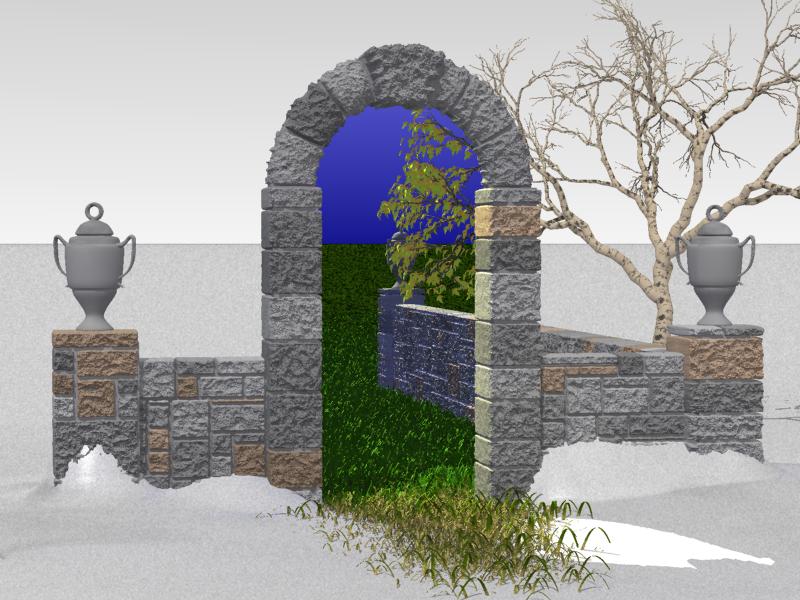
Well, I just saw the thread on Chris Huff's portal patch, so I thought I'd
post this.  This is one type of image that would be much easier to do with
such a patch, I'd imagine (though the patch doesn't allow light to pass
through)  It would certainly be faster than my method.

Speaking of which, my method isn't a camera trick.  I can place the camera
wherever I like and the scene doesn't go funky, up to and including the other
side of the doorway.

So what do folks think so far?  I'd like to increase the realism if possible,
because, somewhat counterintuitively, the more real I can get this, the less
real it'll seem.

Geoff
Post a reply to this message
Attachments:
Download 'summer.jpg' (84 KB)
Preview of image 'summer.jpg'
|
|
| |
| |
|
|
|
|
| |
| |
|
|
I love it!
I'm not sure if this would be possible, but maybe you could put some kind of
fog effect in to give the horizon more depth. I'd also suggest making the
stone texture finer and giving the vases a texture(I guess you 're still
going to do that anyway)
Nekar
Geoff Wedig <wed### [at] darwin cwruedu> wrote in message
news:3A9### [at] darwincwruedu...
> Well, I just saw the thread on Chris Huff's portal patch, so I thought I'd
> post this. This is one type of image that would be much easier to do with
> such a patch, I'd imagine (though the patch doesn't allow light to pass
> through) It would certainly be faster than my method.
>
> Speaking of which, my method isn't a camera trick. I can place the camera
> wherever I like and the scene doesn't go funky, up to and including the
other
> side of the doorway.
>
> So what do folks think so far? I'd like to increase the realism if
possible,
> because, somewhat counterintuitively, the more real I can get this, the
less
> real it'll seem.
>
> Geoff
>
----------------------------------------------------------------------------
---- cwruedu> wrote in message
news:3A9### [at] darwincwruedu...
> Well, I just saw the thread on Chris Huff's portal patch, so I thought I'd
> post this. This is one type of image that would be much easier to do with
> such a patch, I'd imagine (though the patch doesn't allow light to pass
> through) It would certainly be faster than my method.
>
> Speaking of which, my method isn't a camera trick. I can place the camera
> wherever I like and the scene doesn't go funky, up to and including the
other
> side of the doorway.
>
> So what do folks think so far? I'd like to increase the realism if
possible,
> because, somewhat counterintuitively, the more real I can get this, the
less
> real it'll seem.
>
> Geoff
>
----------------------------------------------------------------------------
----
Post a reply to this message
|
|
| |
| |
|
|
|
|
| |
| |
|
|
would it be possable to animate this, eg rotating the camera around the
doorway, perhaps using some creative bounding


--
Rick

POV-Ray News & Resources - http://povray.co.uk
Kitty5 WebDesign - http://kitty5.com
Hi-Impact web site design & database driven e-commerce
TEL : +44 (01625) 266358 - FAX : +44 (01625) 611913 - ICQ : 15776037

PGP Public Key
http://pgpkeys.mit.edu:11371/pks/lookup?op=get&search=0x231E1CEA
Post a reply to this message
|
|
| |
| |
|
|
|
|
| |
| |
|
|
Rick [Kitty5] <ric### [at] kitty5com> wrote:

> would it be possable to animate this, eg rotating the camera around the
> doorway, perhaps using some creative bounding

If I had a renderfarm (which I kinda do, but it's work related, and I'd feel
bad) This took 15 hours on a PII 400.  I'm using radiosity so there's some
bleed through of the light (in earlier pics, it gave a nice bluish highlight
to the snow, but I seem to have lost that somewhere).  My thought for the
anim (yeah, I've thought about it) was to have the camera go through the
door and look back.

Geoff
Post a reply to this message
|
|
| |
| |
|
|
|
|
| |
| |
|
|
Nekar Xenos <vir### [at] iconcoza> wrote:

> I love it!

> I'm not sure if this would be possible, but maybe you could put some kind of
> fog effect in to give the horizon more depth. I'd also suggest making the
> stone texture finer and giving the vases a texture(I guess you 're still
> going to do that anyway)

Well, I'm planning a copse of trees back on the horizon to the left, and
yeah, I'd like to do a fog effect, but I'm not sure how to do fog on just
the half of the scene I want it for.  I could do media, I suppose, but how
far is enough?  I had a lot of trouble feathering the grass into the ground
plane within the door so that I didn't have to have the grass go on forever,
and I'd be loathe to do it with media, especially since I'm using radiosity.

Geoff
Post a reply to this message
|
|
| |
| |
|
|
|
|
| |
| |
|
|
Personally, I want to see some cool skies, maybe Jaime's cload plane or some
other, this would increase realism dramatically, I feel. More variation in
the color of the bricks and maybe a tad less bump would do good. Some
crownwork or a flat railing on the stonework would be nice as well.
Something to break that horizon would be good.

I really like this, keep up the good work.

--
Dan D.
Post a reply to this message
|
|
| |
| |
|
|
|
|
| |
| |
|
|
On Tue, 20 Feb 2001 08:12:12 -0500, Geoff Wedig wrote:

>So what do folks think so far?  I'd like to increase the realism if possible,
>because, somewhat counterintuitively, the more real I can get this, the less
>real it'll seem.

Looking good so far, but the sky needs some work in both areas.

--
Cheers
Steve              email mailto:ste### [at] zeroppsuklinuxnet

%HAV-A-NICEDAY Error not enough coffee  0 pps.

web http://www.zeropps.uklinux.net/

or  http://start.at/zero-pps

  6:58pm  up 18 days, 20:38,  4 users,  load average: 1.00, 1.01, 1.00
Post a reply to this message
|
|
| |
| |
|
|
|
|
| |
| |
|
|
In article <3A9### [at] darwincwruedu>, Geoff Wedig says...
> Well, I just saw the thread on Chris Huff's portal patch, so I thought I'd
> post this.  This is one type of image that would be much easier to do with
> such a patch, I'd imagine (though the patch doesn't allow light to pass
> through)  It would certainly be faster than my method.
>
> Speaking of which, my method isn't a camera trick.  I can place the camera
> wherever I like and the scene doesn't go funky, up to and including the other
> side of the doorway.
>
> So what do folks think so far?  I'd like to increase the realism if possible,
> because, somewhat counterintuitively, the more real I can get this, the less
> real it'll seem.
>
> Geoff

I have been looking for a door like this for a long time now: wouldn't
it be nice to really find one?
Reminds me of a nice short story where one could get a ticket for a
journey to the land of eternal summer and happiness; you were herded
into a shabby shack and had to wait for a long time before the journey
would begin; the impatient chap got bored and left, and as he  was
returning into the rain he just could see the others leaving through
another door into the sunshine... Of course he was too late and he got
no refund.
--
Regards,  Sander
Post a reply to this message
|
|
| |
| |
|
|
|
|
| |
| |
|
|
Why not a portal from summer into winter? What's so great about summer? Wh...
never mind.

--
David Fontaine  <dav### [at] faricynet>  ICQ 55354965
My raytracing gallery:  http://davidf.faricy.net/
Post a reply to this message
|
|
| |
| |
|
|
|
|
| |
| |
|
|
Geoff -
I like the 'feel' of this. Plus, as a separate thing, all the details seem
superbly done (to me - but I'm no expert). The tree, the wall, the urns, the
grass - all extremely nice!

Setep
Post a reply to this message
|
|
| |
| |
|
|
|
|
| |
| |
|
|
"Geoff Wedig" <wed### [at] darwincwruedu> wrote in message
news:3A9### [at] darwincwruedu...
> > So what do folks think so far?  I'd like to increase the realism if
possible,
> because, somewhat counterintuitively, the more real I can get this, the
less
> real it'll seem.

Mr.Wedig, I think this is fantastic. My humble suggestion to increase the
realism would be to add snow to the top of the stone wall and maybe throw a
little snow onto the tree.

I really like the way the radiosity (I guess...) lights up the right side of
the portal - looks great! I'll really be looking forward to seeing how this
project develops.

Regards,
Dave
Post a reply to this message
|
|
| |
| |
|
|
|
|
| |
| |
|
|
> Well, I'm planning a copse of trees back on the horizon to the left, and
> yeah, I'd like to do a fog effect, but I'm not sure how to do fog on just
> the half of the scene I want it for.

I'm not sure by what you mean by 'half of the scene'.  If you mean the
colourful scene is one half and the grey scene as the other half then I'd
suggest you put the fog on both bparts of the scen becaouse both horizons
seem 'flat' if you get what I mean.

 I could do media, I suppose, but how
> far is enough?

Sorry, I don't know.

Keep up the good work.

Nekar
Post a reply to this message
|
|
| |
| |
|
|
|
|
| |
| |
|
|
Sander <san### [at] stolscom> wrote:

> In article <3A9### [at] darwincwruedu>, Geoff Wedig says...
>> Well, I just saw the thread on Chris Huff's portal patch, so I thought I'd
>> post this.  This is one type of image that would be much easier to do with
>> such a patch, I'd imagine (though the patch doesn't allow light to pass
>> through)  It would certainly be faster than my method.
>>
>> Speaking of which, my method isn't a camera trick.  I can place the camera
>> wherever I like and the scene doesn't go funky, up to and including the other
>> side of the doorway.
>>
>> So what do folks think so far?  I'd like to increase the realism if possible,
>> because, somewhat counterintuitively, the more real I can get this, the less
>> real it'll seem.
>>
>> Geoff

> I have been looking for a door like this for a long time now: wouldn't
> it be nice to really find one?
> Reminds me of a nice short story where one could get a ticket for a
> journey to the land of eternal summer and happiness; you were herded
> into a shabby shack and had to wait for a long time before the journey
> would begin; the impatient chap got bored and left, and as he  was
> returning into the rain he just could see the others leaving through
> another door into the sunshine... Of course he was too late and he got
> no refund.

Well, I've seen similar sorts of work done in drawings and paintings and the
like.  It's a good concept, and it speaks to us.  But that's easy.  To
render it, now that's a challenge. ;)  IMO, of course.

Geoff
Post a reply to this message
|
|
| |
| |
|
|
|
|
| |
| |
|
|
David Fontaine <dav### [at] faricynet> wrote:

> Why not a portal from summer into winter? What's so great about summer? Wh...
> never mind.

That actually works too.  Just put the camera through the portal....  I'll
see about posting a pic.

Geoff
Post a reply to this message
|
|
| |
| |
|
|
|
|
| |
| |
|
|
Setepenaset <ron### [at] hotmailcom> wrote:

> Geoff -
> I like the 'feel' of this. Plus, as a separate thing, all the details seem
> superbly done (to me - but I'm no expert). The tree, the wall, the urns, the
> grass - all extremely nice!

I can't take any real credit for the tree or grass.  Those were thanks to
Gilles Trans macros.  I did have to try a lot of combinations to get one I
liked, but that's hardly the same thing as building them myself.  I also had
to play with the textures a lot to get something reasonable, but I started
from the textures provided with the macros to begin with.

Everything else is my code, though.

Geoff
Post a reply to this message
|
|
| |
| |
|
|
|
|
| |
| |
|
|
Nekar Xenos <vir### [at] iconcoza> wrote:

>> Well, I'm planning a copse of trees back on the horizon to the left, and
>> yeah, I'd like to do a fog effect, but I'm not sure how to do fog on just
>> the half of the scene I want it for.

> I'm not sure by what you mean by 'half of the scene'.  If you mean the
> colourful scene is one half and the grey scene as the other half then I'd
> suggest you put the fog on both bparts of the scen becaouse both horizons
> seem 'flat' if you get what I mean.

I would like the fog to be on the winter side, but not the summer.  The
summer side should be almost preternaturally clear, IMO.  I'm considering
focal blur plus some 'hiding' of the horizon: trees or hills or something
off in the distance.

Geoff
Post a reply to this message
|
|
| |
| |
|
|
|
|
| |
| |
|
|
ddombrow <ddo### [at] vtedu> wrote:

> Personally, I want to see some cool skies, maybe Jaime's cload plane or some
> other, this would increase realism dramatically, I feel. More variation in
> the color of the bricks and maybe a tad less bump would do good. Some
> crownwork or a flat railing on the stonework would be nice as well.
> Something to break that horizon would be good.

> I really like this, keep up the good work.

I want to leave the winter side flat, because it looks a little barren and
desolate, upping the contrast.  My experiments with clouds on the summer
side met with limited success (the clouds on a skysphere don't flatten
towards the horizon, so it looked really fake)  So I just did a gradient of
blues.  I may try again, if I can find some good, fast rendering clouds.

Geoff
Post a reply to this message
|
|
| |
| |
|
|
|
|
| |
| |
|
|
> I would like the fog to be on the winter side, but not the summer.  The
> summer side should be almost preternaturally clear, IMO.  I'm considering
> focal blur plus some 'hiding' of the horizon: trees or hills or something
> off in the distance.

You're right - fog in summer !?!

I think the sky is too dark as well. Add a bit more green to it and let the
sky fade to an even lighter blue toward the horizon.

Nekar
Post a reply to this message
|
|
| |
| |
|
|
|
|
| |
| |
|
|
Nekar Xenos <vir### [at] iconcoza> wrote:

>> I would like the fog to be on the winter side, but not the summer.  The
>> summer side should be almost preternaturally clear, IMO.  I'm considering
>> focal blur plus some 'hiding' of the horizon: trees or hills or something
>> off in the distance.

> You're right - fog in summer !?!

> I think the sky is too dark as well. Add a bit more green to it and let the
> sky fade to an even lighter blue toward the horizon.

It currently fades to a darker blue towards the horizon, but I must admit, I
couldn't remember which way it went. It should also be brighter 'sunwards',
but I'm not certain how to accomplish that.

Geoff
Post a reply to this message
|
|
| |
| |
|
|
|
|
| |
| |
|
|
Hi Goeff!

> (the clouds on a skysphere don't flatten
> towards the horizon, so it looked really fake)

You can flatten them by attaching a scale like <1,.2,1> to the
sky_sphere's pigment.
But you shouldn't look upwards then. There are strange circles of
clouds above you...

Just an idea

Nice picture, btw. And I can't imagine how you did it - not using the
portal_pigment.

cukk
Post a reply to this message
|
|
| |
| |
|
|
|
|
| |
| |
|
|
KalleK <kal### [at] gmxde> wrote:

> Hi Goeff!

>> (the clouds on a skysphere don't flatten
>> towards the horizon, so it looked really fake)

> You can flatten them by attaching a scale like <1,.2,1> to the
> sky_sphere's pigment.
> But you shouldn't look upwards then. There are strange circles of
> clouds above you...

> Just an idea

> Nice picture, btw. And I can't imagine how you did it - not using the
> portal_pigment.

Nope, though the pp discussion made me want to post this, since people were
wondering what sorts of things it could be good for.  It does
require Megapov.

Geoff
Post a reply to this message
|
|
| |
| |
|
|
|
|
| |
| |
|
|
Excellent!  Summer is a bit dark.  On the other hand, a bright summer day
probably isn't as bright as a bright winter day with the snow reflections.  How
did you do the brick wall/arch?

Cris Williams

Geoff Wedig wrote:

> Well, I just saw the thread on Chris Huff's portal patch, so I thought I'd
> post this.  This is one type of image that would be much easier to do with
> such a patch, I'd imagine (though the patch doesn't allow light to pass
> through)  It would certainly be faster than my method.
>
> Speaking of which, my method isn't a camera trick.  I can place the camera
> wherever I like and the scene doesn't go funky, up to and including the other
> side of the doorway.
>
> So what do folks think so far?  I'd like to increase the realism if possible,
> because, somewhat counterintuitively, the more real I can get this, the less
> real it'll seem.
>
> Geoff
>
>   ------------------------------------------------------------------------
>  [Image]
Post a reply to this message
|
|
| |
| |
|
|
|
|
| |
| |
|
|
Actually it should get lighter toward the horizon. Lightness toward the sun
would be more of a 'cone' or lens-flare effect. The air and dust particles
in the air does actually give a slight 'fog' effect. That's why mountains
seem bluish in the distance.

Nekar

> It currently fades to a darker blue towards the horizon, but I must admit,
I
> couldn't remember which way it went. It should also be brighter
'sunwards',
> but I'm not certain how to accomplish that.
>
> Geoff
>
>
Post a reply to this message
|
|
| |
| |
|
|
|
|
| |
| |
|
|
Cris Williams <wor### [at] netscapenet> wrote:

> Excellent!  Summer is a bit dark.  On the other hand, a bright summer day
> probably isn't as bright as a bright winter day with the snow reflections.  How
> did you do the brick wall/arch?

Yeah, it's difficult to make the summer seem brighter, since the winter is
mostly white and light grey, so I settled for making it a lot more colorful.

The wall is from code that I designed called the ISW (Iso-stone Wall).
Originally, it started out as a port of the mur.inc to iso-surfaces, but I
found that mur.inc wasn't adequate for what I wanted to do.  So I rewrote it
from the ground up.  I built a lot more logic into the laying of stones, and
included a bunch of macros to allow me to make things like towers and tubes,
each with variable radius.  These are done by permutation functions to the
isosurface function.  I want to add a spherical and disc like as well, but
that's not done yet.  The arch is just a very short (one block long) half tube.

Incidentally, it's not just for stone.  I've made some really nice hardwood
floors with it and the isowood.inc just by re-defining a bunch of macros.

At some point, I need to write up a quick doc for it and then I'll release
it.  The code is pretty clean, but it's tricky to see what needs doing to
get the right effect without some guidance.

Geoff
Post a reply to this message
|
|
| |
| |
|
|
|
|
| |
| |
|
|
At some point, I need to write up a quick doc for it and then I'll release
it.  The code is pretty clean, but it's tricky to see what needs doing to
get the right effect without some guidance.

Geoff
*******
Great . . .
  Those stones are what draw me to this pic . . .
   Looking forward (my fav direction ;) to taking a look at it.
Thanks,
Y
Post a reply to this message
|
|
| |
| |
|
|
|
|
| |
| |
|
|
In article <3A9### [at] darwincwruedu>, spo### [at] corecom wrote:

> Well, I just saw the thread on Chris Huff's portal patch, so I
> thought I'd post this.  This is one type of image that would be much
> easier to do with such a patch, I'd imagine (though the patch doesn't
> allow light to pass through)

Actually, it would be possible to simulate the effect of light shining
through the portal...just create another copy of the lights you want to
shine through the portal, transform them to where they would be on the
"other side" when seen through the portal, and use the projected_through
feature to make them shine through the portal.
This wouldn't be perfect...a shadow on the other side of the portal
wouldn't pass through it. It would work in most situations, though.


> It would certainly be faster than my method.

What was your method?

--
Christopher James Huff
Personal: chr### [at] maccom, http://homepage.mac.com/chrishuff/
TAG: chr### [at] tagpovrayorg, http://tag.povray.org/

<><
Post a reply to this message
|
|
| |
| |
|
|
|
|
| |
| |
|
|
Chris Huff <chr### [at] maccom> wrote:

> In article <3A9### [at] darwincwruedu>, spo### [at] corecom wrote:

>> Well, I just saw the thread on Chris Huff's portal patch, so I
>> thought I'd post this.  This is one type of image that would be much
>> easier to do with such a patch, I'd imagine (though the patch doesn't
>> allow light to pass through)

> Actually, it would be possible to simulate the effect of light shining
> through the portal...just create another copy of the lights you want to
> shine through the portal, transform them to where they would be on the
> "other side" when seen through the portal, and use the projected_through
> feature to make them shine through the portal.
> This wouldn't be perfect...a shadow on the other side of the portal
> wouldn't pass through it. It would work in most situations, though.

Is the projected_through available now?  Last I heard, portals only did a
pigment, no light through the portal or photons or such.  Has it progressed,
then?


>> It would certainly be faster than my method.

> What was your method?

I was waiting for someone to ask. ;).  I created both scenes, then cut them
in half.  One half is set no_image and scaled <1,-1,1> (I use z as up.  More
intuitive for me) while the other is no_reflection.  Then I set up a perfect
mirror with a hole in it at the right place, and use light groups to get the
reflections lights to work right.

Only problem is that this makes essentially the entire picture one big
intersection.  Bounding goes out the window, and with all those isosurface
stone blocks, it slows to a crawl.  I've gotten away with a few things (the
tree, for instance doesn't pass the invisible wall so doesn't need to be
intersected), but for the most part, things get slow really quickly.

The advantage of doing all this is being able to set the camera up wherever
is convenient, and getting easy light pass through.  One disadvantage that I
noticed last night is that I can't use focal blur (post process), because
only the summer side gets blurred.  The winter side is all at the mirror
distance, rather than its 'true' distance, so doesn't get appropriately
blurred.  On the other hand, a portal would have the opposite problem, with
only the winter side blurring.

Geoff
Post a reply to this message
|
|
| |
| |
|
|
|
|
| |
| |
|
|
In article <3a955c4d@news.povray.org>, Geoff Wedig
<wed### [at] darwinepbicwruedu> wrote:

> Is the projected_through available now?

It's been around since the Superpatch days, I think.


> Last I heard, portals only did a pigment, no light through the portal
> or photons or such.  Has it progressed, then?

No, the projected_through feature has nothing to do with the portal
patch, it is a light_source feature that allows you to "project" light
through an object, making light shine through the object.


> One disadvantage that I noticed last night is that I can't use focal
> blur (post process), because only the summer side gets blurred.  The
> winter side is all at the mirror distance, rather than its 'true'
> distance, so doesn't get appropriately blurred.  On the other hand, a
> portal would have the opposite problem, with only the winter side
> blurring.

The ordinary focal blur should work fine, though...it would just make
your scene even slower.

--
Christopher James Huff
Personal: chr### [at] maccom, http://homepage.mac.com/chrishuff/
TAG: chr### [at] tagpovrayorg, http://tag.povray.org/

<><
Post a reply to this message
|
|
| |
| |
|
|
|
|
| |
| |
|
|
Chris Huff <chr### [at] maccom> wrote:

> In article <3a955c4d@news.povray.org>, Geoff Wedig
> <wed### [at] darwinepbicwruedu> wrote:

>> Is the projected_through available now?

> It's been around since the Superpatch days, I think.


>> Last I heard, portals only did a pigment, no light through the portal
>> or photons or such.  Has it progressed, then?

> No, the projected_through feature has nothing to do with the portal
> patch, it is a light_source feature that allows you to "project" light
> through an object, making light shine through the object.

Ok, now I'm confused.  Does that mean light only exists after the object,
that the light rays don't exist in the space between light and object, but
come from the object?


>> One disadvantage that I noticed last night is that I can't use focal
>> blur (post process), because only the summer side gets blurred.  The
>> winter side is all at the mirror distance, rather than its 'true'
>> distance, so doesn't get appropriately blurred.  On the other hand, a
>> portal would have the opposite problem, with only the winter side
>> blurring.

> The ordinary focal blur should work fine, though...it would just make
> your scene even slower.

Yeah, and I've found that the sampling menthods don't give good results,
IMO.  But maybe for a final render with *lots* of samples...

Geoff
Post a reply to this message
|
|
| |
| |
|
|
|
|
| |
| |
|
|
In article <3a956b79@news.povray.org>, Geoff Wedig
<wed### [at] darwinepbicwruedu> wrote:

> Ok, now I'm confused.  Does that mean light only exists after the object,
> that the light rays don't exist in the space between light and object, but
> come from the object?

Exactly. All areas that would be in the shadow of the projected_through
object are illuminated. You would just use a copy of the portal object
as the projected_through object, and transform copies of the necessary
light_sources to appear through the portal object as if they were on the
other end.


> > The ordinary focal blur should work fine, though...it would just make
> > your scene even slower.
>
> Yeah, and I've found that the sampling menthods don't give good results,
> IMO.  But maybe for a final render with *lots* of samples...

You can almost eliminate the grainyness if you use the right settings,
but it is slow...

--
Christopher James Huff
Personal: chr### [at] maccom, http://homepage.mac.com/chrishuff/
TAG: chr### [at] tagpovrayorg, http://tag.povray.org/

<><
Post a reply to this message
|
|
| |
| |
|
|
|
|
| |
| |
|
|
Chris Huff <chr### [at] maccom> wrote:

> In article <3a956b79@news.povray.org>, Geoff Wedig
> <wed### [at] darwinepbicwruedu> wrote:

>> Ok, now I'm confused.  Does that mean light only exists after the object,
>> that the light rays don't exist in the space between light and object, but
>> come from the object?

> Exactly. All areas that would be in the shadow of the projected_through
> object are illuminated. You would just use a copy of the portal object
> as the projected_through object, and transform copies of the necessary
> light_sources to appear through the portal object as if they were on the
> other end.

So with a portal object and the pass through, I could get such a light, but
that would only cast one way, and I'm not sure about the effects on
radiosity.

Anyway, when's the patch going to be available? ;)


>> > The ordinary focal blur should work fine, though...it would just make
>> > your scene even slower.
>>
>> Yeah, and I've found that the sampling menthods don't give good results,
>> IMO.  But maybe for a final render with *lots* of samples...

> You can almost eliminate the grainyness if you use the right settings,
> but it is slow...

Really slow.

Geoff
Post a reply to this message
|
|
| |
| |
|
|
|
|
| |
| |
|
|
In article <3a9697c2@news.povray.org>, Geoff Wedig
<wed### [at] darwinepbicwruedu> wrote:

> So with a portal object and the pass through, I could get such a
> light, but that would only cast one way, and I'm not sure about the
> effects on radiosity.

Portal objects are all one-way...to get a 2-way effect you would need 2
portal objects, one for each end, and more copies of light sources with
pass_through set up for the second portal.


> Anyway, when's the patch going to be available? ;)

Two Weeks, or Real Soon Now. ;-)
I really don't know, I'm working on MegaPOVPlus 0.7 mod 0.1 now, and
I've got the particle stuff and some other patches integrated, but have
yet to even start the portal pigment stuff. It requires some new
information to be passed through a lot of functions, so it will be a bit
tedious to add...and there is a lot of other stuff which I might do.

--
Christopher James Huff
Personal: chr### [at] maccom, http://homepage.mac.com/chrishuff/
TAG: chr### [at] tagpovrayorg, http://tag.povray.org/

<><
Post a reply to this message
|
|
| |
| |
|
|
|
|
| |
| |
|
|
Chris Huff <chr### [at] maccom> wrote:

> Two Weeks, or Real Soon Now. ;-)
> I really don't know, I'm working on MegaPOVPlus 0.7 mod 0.1 now, and
> I've got the particle stuff and some other patches integrated, but have
> yet to even start the portal pigment stuff. It requires some new
> information to be passed through a lot of functions, so it will be a bit
> tedious to add...and there is a lot of other stuff which I might do.

I can wait.  My system doesn't require certain kinds of grotty math that I
would be happy to avoid, and I've managed to cut the time down
significantly, as well, so maybe no big deal.

Geoff
Post a reply to this message
|
|
| |
| |
|
|
|
|
| |
| |
|
|
Chris Huff <chr### [at] maccom> wrote:

> In article <3a9697c2@news.povray.org>, Geoff Wedig
> <wed### [at] darwinepbicwruedu> wrote:

>> So with a portal object and the pass through, I could get such a
>> light, but that would only cast one way, and I'm not sure about the
>> effects on radiosity.

> Portal objects are all one-way...to get a 2-way effect you would need 2
> portal objects, one for each end, and more copies of light sources with
> pass_through set up for the second portal.

Maybe I'm missing something.  I did a search on the Pov docs and didn't find
any reference for pass_through.  I looked at the Megapov docs and only found
it for photons.  Can you do a pass through with normal light_sources?  If
so, I think I might have figured a way to make this image much easier, and
faster.

Geoff
Post a reply to this message
|
|
| |
| |
|
|
|
|
| |
| |
|
|
Geoff Wedig <wed### [at] darwinepbicwruedu> wrote in message
news:3a9becc7@news.povray.org...

> Maybe I'm missing something.  I did a search on the Pov docs and didn't
find
> any reference for pass_through.  I looked at the Megapov docs and only
found
> it for photons.  Can you do a pass through with normal light_sources?  If
> so, I think I might have figured a way to make this image much easier, and
> faster.

From the megapov docs:

6.5. Projected through
Author: Ronald L. Parker

syntax:

light_source {
  ...
  projected_through {object {...}}
}
The light rays that pass through the projected_through object will be the
only light rays that contribute to the scene. Any objects between the light
and the projected through object will not cast shadows for this light. Also
any surface within the projected through object will not cast shadows. Any
textures or interiors on the object will be stripped and the object will not
show up in the scene. This is if the ambient value in the finish {} is set
to 0.

HTH

Gail
********************************************************************
* gsh### [at] monotixcoza              * System.dat not found.         *
* http://www.rucus.ru.ac.za/~gail/ * Reformat hard drive Y)es O)k  *
********************************************************************
* If at first you don't succeed, call it version 1.0               *
********************************************************************
Post a reply to this message
|
|
| |
| |
|
|
|
|
| |
| |
|
|
Gail Shaw <gsh### [at] monotixcoza> wrote:


> Geoff Wedig <wed### [at] darwinepbicwruedu> wrote in message
> news:3a9becc7@news.povray.org...

>> Maybe I'm missing something.  I did a search on the Pov docs and didn't
> find
>> any reference for pass_through.  I looked at the Megapov docs and only
> found
>> it for photons.  Can you do a pass through with normal light_sources?  If
>> so, I think I might have figured a way to make this image much easier, and
>> faster.

> From the megapov docs:

> 6.5. Projected through
> Author: Ronald L. Parker

> syntax:

> light_source {
>   ...
>   projected_through {object {...}}
> }
> The light rays that pass through the projected_through object will be the
> only light rays that contribute to the scene. Any objects between the light
> and the projected through object will not cast shadows for this light. Also
> any surface within the projected through object will not cast shadows. Any
> textures or interiors on the object will be stripped and the object will not
> show up in the scene. This is if the ambient value in the finish {} is set
> to 0.

Ah.  Thanks.  I was looking for pass_through, per Chris's post, which is
photons.  I wonder if this should be made consistent... Not entirely sure
they do the same thing, though.

Geoff
Post a reply to this message
|
|
| |
| |
|
|
|
|
| |
| |
|
|
In article <3a9bf4b5@news.povray.org>, Geoff Wedig
<wed### [at] darwinepbicwruedu> wrote:

> Ah.  Thanks.  I was looking for pass_through, per Chris's post, which is
> photons.  I wonder if this should be made consistent... Not entirely sure
> they do the same thing, though.

I meant projected_through. And they don't do the same thing,
pass_through behaves more like shadowless (or maybe I mean no_shadow?
Those two *do* need to be made more consistent...), while
projected_through does a fancy spot light.

--
Christopher James Huff
Personal: chr### [at] maccom, http://homepage.mac.com/chrishuff/
TAG: chr### [at] tagpovrayorg, http://tag.povray.org/

<><
Post a reply to this message
|
|
| |
| |
|
|
|
|
| |
| |
|
|
Chris Huff <chr### [at] maccom> wrote:

> In article <3a9bf4b5@news.povray.org>, Geoff Wedig
> <wed### [at] darwinepbicwruedu> wrote:

>> Ah.  Thanks.  I was looking for pass_through, per Chris's post, which is
>> photons.  I wonder if this should be made consistent... Not entirely sure
>> they do the same thing, though.

> I meant projected_through. And they don't do the same thing,
> pass_through behaves more like shadowless (or maybe I mean no_shadow?
> Those two *do* need to be made more consistent...), while
> projected_through does a fancy spot light.

Yeah, that's kinda what I thought.  Now I just have to experiment to see if
my fancy method will work or not.

Geoff
Post a reply to this message
|
|
| |
| |
|
|
|
|
| |
|
|