|
|
|
|
|
|
| |
| |
|
|
From: Chris Colefax
Subject: Basket-weaving (fun with spline objects)
Date: 22 Oct 2000 23:39:26
Message: <39f3b2ee@news.povray.org>
|
|
|
| |
| |
|
|
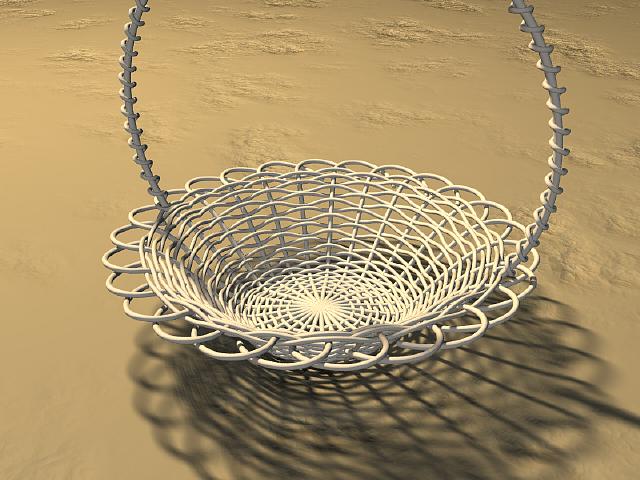
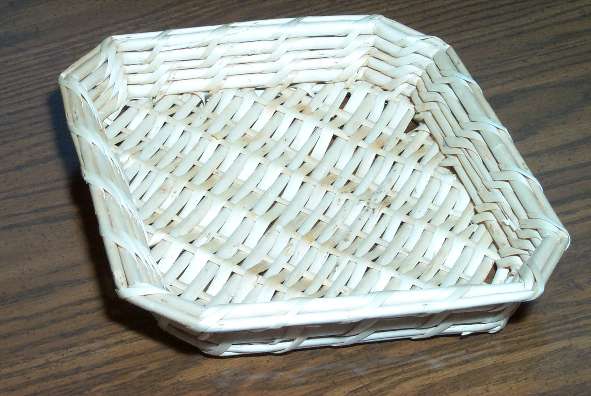
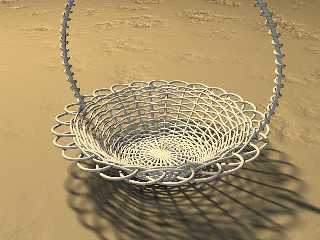
Created as a sample for my Spline Macro file
(http://www.geocities.com/ccolefax/spline), using the built-in spline
objects (no, they're not sphere sweeps...)
Post a reply to this message
Attachments:
Download 'basket.jpg' (55 KB)
Preview of image 'basket.jpg'
|
|
| |
| |
|
|
|
|
| |
| |
|
|
The basket looks great, nice work!

...and
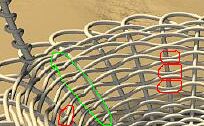
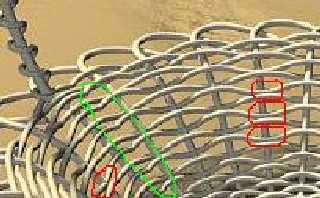
I hate to nit-pick, but I circled some spots that look like they
might be mistakes. The section in green looks like it might be a
joining area, possibly you intended this. The sections in red looks
to me like the horizontal part that's supposed to weave under the
verticle part is actually going through or on top.

(verticle part, horizontal part-- I guess I'm a little rusty on my
basket weaving tech lingo)


--
Phil
...coffee?...yes please! extra sugar,extra cream...Thank you.
Post a reply to this message
Attachments:
Download 'basket_q.jpg' (12 KB)
Preview of image 'basket_q.jpg'
|
|
| |
| |
|
|
|
|
| |
| |
|
|
"Chris Colefax" <chr### [at] tag povrayorg> wrote in message
news:39f3b2ee@news.povray.org...
> Created as a sample for my Spline Macro file
You gotta be kidding me! This is too cool... all the available stuff for
pov-ray is getting way beyond me. povrayorg> wrote in message
news:39f3b2ee@news.povray.org...
> Created as a sample for my Spline Macro file
You gotta be kidding me! This is too cool... all the available stuff for
pov-ray is getting way beyond me.
Post a reply to this message
|
|
| |
| |
|
|
From: Tony[B]
Subject: Re: Basket-weaving (fun with spline objects)
Date: 23 Oct 2000 02:05:47
Message: <39f3d53b@news.povray.org>
|
|
|
| |
| |
|
|
Wow... :) No one can handle a spline like you, sir.
Post a reply to this message
|
|
| |
| |
|
|
|
|
| |
| |
|
|
Chris Colefax wrote:
>
> Created as a sample for my Spline Macro file
> (http://www.geocities.com/ccolefax/spline), using the built-in spline
> objects (no, they're not sphere sweeps...)
>
>  [Image]

I like it, also the lighting is nice, although there seem to be some
inconsistences like those Phil mentioned and no overlapping in the center.

I wonder whether similar things would be possible as an isosurface, one could
take the "mesh1" function as a basis...

Christoph

--
Christoph Hormann <chr### [at] gmxde>
Homepage: http://www.schunter.etc.tu-bs.de/~chris/
Post a reply to this message
|
|
| |
| |
|
|
From: Bill DeWitt
Subject: Isosurface (was Re: Basket-weaving (fun with spline objects))
Date: 23 Oct 2000 13:58:53
Message: <39f47c5d@news.povray.org>
|
|
|
| |
| |
|
|
"Christoph Hormann" <Chr### [at] schunteretctu-bsde> wrote :
>
> I wonder whether similar things would be possible as an isosurface, one
could
> take the "mesh1" function as a basis...

    I like to think that -anything- can be done with isosurface if one can
figure out the formula. I cannot figure out anything but the basics, and
some random thrashing around with those. But I am still struggling with an
isosurface tree. So far I haven't even been able to reach my first goal, a
"Y"...
Post a reply to this message
|
|
| |
| |
|
|
|
|
| |
| |
|
|
Bill DeWitt wrote:
>
>     I like to think that -anything- can be done with isosurface if one can
> figure out the formula. I cannot figure out anything but the basics, and
> some random thrashing around with those. But I am still struggling with an
> isosurface tree. So far I haven't even been able to reach my first goal, a
> "Y"...

:-)

I just wrote some thoughts i had, maybe i will try it out myself sometime, it
should really be more simple than a realistic tree ...

Christoph

--
Christoph Hormann <chr### [at] gmxde>
Homepage: http://www.schunter.etc.tu-bs.de/~chris/
Post a reply to this message
|
|
| |
| |
|
|
From: Greg M Johnson
Subject: Re: Isosurface (was Re: Basket-weaving (fun with spline objects))
Date: 24 Oct 2000 10:09:49
Message: <39f5982d@news.povray.org>
|
|
|
| |
| |
|
|
�

Bill DeWitt wrote:

> But I am still struggling with an
> isosurface tree.

Did you see my example at� p.b.i.:

Title:��������� Towards a procedural tree macro (62kbbu)
Date:�������� Sat, 25 Mar 2000 22:17:52 -0500
�
Post a reply to this message
|
|
| |
| |
|
|
From: Bill DeWitt
Subject: Re: Isosurface (was Re: Basket-weaving (fun with spline objects))
Date: 24 Oct 2000 12:31:03
Message: <39f5b947$1@news.povray.org>
|
|
|
| |
| |
|
|
"Greg M. Johnson" <"gregj;-()"@aol.c;-()om> wrote in message
news:39f5982d@news.povray.org...
>
>
> Bill DeWitt wrote:
>
> > But I am still struggling with an
> > isosurface tree.
>
> Did you see my example at p.b.i.:

    Yes I did, but I was thinking of working from the trunk out, yours seems
to model the outer leaves only.... or do I misunderstand it?

    I want to make a branching shape that I can then put leaves on. I
suspect that it can be done, but I haven't been able to get anywhere with it
at all.
Post a reply to this message
|
|
| |
| |
|
|
|
|
| |
| |
|
|
In article <39f5b947$1@news.povray.org>, "Bill DeWitt"
<the### [at] earthlinknet> wrote:

>     I want to make a branching shape that I can then put leaves on. I
> suspect that it can be done, but I haven't been able to get anywhere
> with it at all.

I whipped up this isosurface tree in about 20 minutes...but I cheated.
:-)
I made a fractal blob, then used the blob pattern in a pigment in a
pigment function, and called that function from the isosurface. Not too
slow...and it still has many of the benefits of isosurfaces.

I don't think you are going to get a realistic looking, complex plant
out of an ordinary function...it would certainly be possible, but the
function would probably be horribly complex, inflexible, and slow
rendering. Maybe if you designed some new pattern and used that in the
isosurface...
You can get some odd branch-like structures that look fairly natural
from a distance pretty easily, just by displacing a sphere with a
pigment. Not exactly a tree though...

--
Christopher James Huff
Personal: chr### [at] maccom, http://homepage.mac.com/chrishuff/
TAG: chr### [at] tagpovrayorg, http://tag.povray.org/

<><
Post a reply to this message
Attachments:
Download 'isotree.jpg' (4 KB)
Preview of image 'isotree.jpg'

|
|
| |
| |
|
|
|
|
| |
| |
|
|
"Chris Huff" <chr### [at] maccom> wrote :
>
> I whipped up this isosurface tree in about 20 minutes...but I cheated.
> :-)

    Sure did! Cheaters never prosper....

> I don't think you are going to get a realistic looking, complex plant
> out of an ordinary function...

    Don't say things like that!

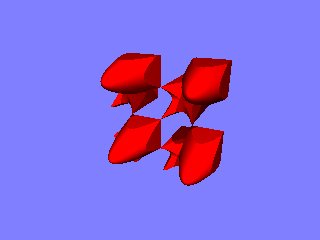
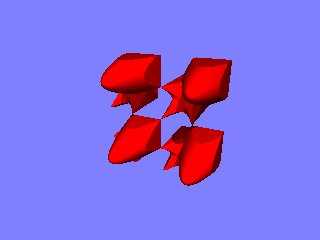
    I don't really think I will get it no matter if it is possible or not.
Below is how far I got today. And as I said, all I am trying for is a simple
"Y".
Post a reply to this message
Attachments:
Download 'Isotree0012.jpg' (7 KB)
Preview of image 'Isotree0012.jpg'
|
|
| |
| |
|
|
|
|
| |
| |
|
|
In article <39f62a60@news.povray.org>, "Bill DeWitt"
<the### [at] earthlinknet> wrote:

> Below is how far I got today. And as I said, all I am trying for is a
> simple "Y".

Just a "Y"? That's easy...
function {if(-y, R1(x,y,z), R1(-abs(x)+y,y,z))-1}

Getting the branches to branch is what would make the function so
complex, and getting random variations in branch numbers, size, length,
etc. will be even more difficult. And the result probably won't render
in a reasonable speed.

--
Christopher James Huff
Personal: chr### [at] maccom, http://homepage.mac.com/chrishuff/
TAG: chr### [at] tagpovrayorg, http://tag.povray.org/

<><
Post a reply to this message
|
|
| |
| |
|
|
|
|
| |
| |
|
|
Post a reply to this message
|
|
| |
| |
|
|
|
|
| |
| |
|
|
Bill DeWitt wrote:
>
> > And the result probably won't render
> > in a reasonable speed.
>
>     Well see that is what I was hoping you wouldn't say. There are
> various -great- tree macros to be had, but I was assuming that an isosurface
> would be quicker.

Concerning efficiency, both a macro tree and a (hypothetical) isosurface have
advantages, the macro tree would probably render faster as a single object
(assuming both are equally complicated), but when placing a lot of trees in one
scene, the isosurface has strong advantages because of fewer memory use.

Christoph

--
Christoph Hormann <chr### [at] gmxde>
Homepage: http://www.schunter.etc.tu-bs.de/~chris/
Post a reply to this message
|
|
| |
| |
|
|
|
|
| |
| |
|
|
Christoph Hormann wrote:

> Concerning efficiency, both a macro tree and a (hypothetical) isosurface have
> advantages, the macro tree would probably render faster as a single object
> (assuming both are equally complicated), but when placing a lot of trees in one
> scene, the isosurface has strong advantages because of fewer memory use.

LSystmes were designed for this purpose but have a bit of a learning
curve involved. Too bad there are no really good LSystem modelling
programs available.

--
Ken Tyler - 1400+ POV-Ray, Graphics, 3D Rendering, and Raytracing Links:
http://home.pacbell.net/tylereng/index.html http://www.povray.org/links/
Post a reply to this message
|
|
| |
| |
|
|
|
|
| |
| |
|
|
Ken wrote:
>
> LSystmes were designed for this purpose but have a bit of a learning
> curve involved. Too bad there are no really good LSystem modelling
> programs available.
>

L-Systems have the same disadvantages as tree macros (IIRC most tree macros are
essentially specialized l-systems with some improvements).

BTW, a l-system modelling program would be quite difficult, because l-systems
are coded in fact and therefore can't be modelled, you could only try to
generate the l-system definition from some modelled shape, but that would not be
of much use IMO.

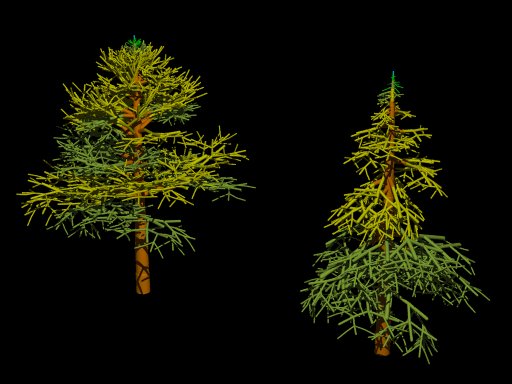
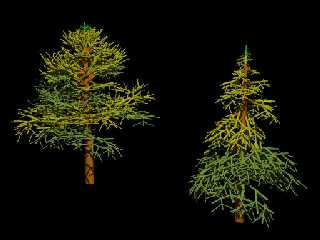
Attached are two coniferous trees i made with l-systems some years ago.

Christoph

--
Christoph Hormann <chr### [at] gmxde>
Homepage: http://www.schunter.etc.tu-bs.de/~chris/
Post a reply to this message
Attachments:
Download 'lsys_01.jpg' (38 KB)
Preview of image 'lsys_01.jpg'
|
|
| |
| |
|
|
|
|
| |
| |
|
|
Christoph Hormann wrote:

>L-Systems have the same disadvantages as tree macros (IIRC most tree
>macros are essentially specialized l-systems with some improvements).

Is it mathematically possible to somehow turn a L-system in to a function,
usable for an Isosurface?

What if you create a splines from an L-system, where the splines go from
the startpoint to every endpoint including all intermediate knots on the
path. Use this collection of splines for sweeps of blobs.

Ingo

--
Photography: http://members.home.nl/ingoogni/
Pov-Ray    : http://members.home.nl/seed7/
Post a reply to this message
|
|
| |
| |
|
|
|
|
| |
| |
|
|
In article <8FDAB812Aseed7@204.213.191.228>, ing### [at] homenl (ingo)
wrote:

> Is it mathematically possible to somehow turn a L-system in to a
> function, usable for an Isosurface?

Yes, in the same way as for any other object...an L-system simply tells
how to put the pieces together. Your question is a bit like asking if
there is a way to mathematically turn a macro that generates a complex
object file into an isosurface function.


> What if you create a splines from an L-system, where the splines go from
> the startpoint to every endpoint including all intermediate knots on the
> path. Use this collection of splines for sweeps of blobs.

The spline step seems unnecessary, it should be easy to just make blob
components. It shouldn't be extremely difficult to make an include file
that can parse L-systems, at least not for someone who knows how to use
them. I have played around with them a little, but have no idea how the
more complex ones work.

--
Christopher James Huff
Personal: chr### [at] maccom, http://homepage.mac.com/chrishuff/
TAG: chr### [at] tagpovrayorg, http://tag.povray.org/

<><
Post a reply to this message
|
|
| |
| |
|
|
|
|
| |
| |
|
|
In article <39F981BA.7159989D@schunter.etc.tu-bs.de>,
chr### [at] gmxde wrote:

> L-Systems have the same disadvantages as tree macros (IIRC most tree
> macros are essentially specialized l-systems with some improvements).

An L-system patch would process much faster than a macro...the problem
is, what would it be represented as? A union of cones and spheres? A
mesh? A blob or isosurface? A macro can easily be customized to do
whatever you need, but a patch would be too specialized...and there
doesn't seem to be much demand for an L-system macro/include file when
there are macros and include files designed to generate plants and
L-system programs that can output POV-Script.

If you could somehow retrieve data from an L-system patch, like my
particle system patch allows, it would be more useful, but you would
still pay for parsing speed with flexibility.

--
Christopher James Huff
Personal: chr### [at] maccom, http://homepage.mac.com/chrishuff/
TAG: chr### [at] tagpovrayorg, http://tag.povray.org/

<><
Post a reply to this message
|
|
| |
| |
|
|
|
|
| |
| |
|
|
Post a reply to this message
|
|
| |
| |
|
|
|
|
| |
| |
|
|
Post a reply to this message
|
|
| |
| |
|
|
|
|
| |
| |
|
|
In article <39F9FC96.7564437C@schunter.etc.tu-bs.de>,
chr### [at] gmxde wrote:

> And other than your particle patch the efficiency does not suffer
> that much if you use an external program.

Well, an external program can be a *real* pain when you are doing an
animation or blindly testing parameters. Perhaps a patch would be worth
it, even if it were limited to blob components...
Or maybe the patch could allow you to specify macros to use for creating
each part. That would be the most flexible, but I haven't figured out
how to do it yet. And I don't know much about L-systems anyway, so I
couldn't even begin to attempt one.

--
Christopher James Huff
Personal: chr### [at] maccom, http://homepage.mac.com/chrishuff/
TAG: chr### [at] tagpovrayorg, http://tag.povray.org/

<><
Post a reply to this message
|
|
| |
| |
|
|
|
|
| |
| |
|
|
I'm interested in wickerwork.  Did this nit ever get an answer from The
Master?

--John

"Phil Clute" <pcl### [at] tiacnet> wrote in message
news:39F3CA55.698E35C0@tiac.net...
> The basket looks great, nice work!
>
> ...and
> I hate to nit-pick, but I circled some spots that look like they
> might be mistakes. The section in green looks like it might be a
> joining area, possibly you intended this. The sections in red looks
> to me like the horizontal part that's supposed to weave under the
> verticle part is actually going through or on top.
>
> (verticle part, horizontal part-- I guess I'm a little rusty on my
> basket weaving tech lingo)
>
>
> --
> Phil
> ...coffee?...yes please! extra sugar,extra cream...Thank you.


----------------------------------------------------------------------------
----
Post a reply to this message
|
|
| |
| |
|
|
From: John M Dlugosz
Subject: Re: Basket-weaving (fun with spline objects)
Date: 15 Jan 2001 00:33:59
Message: <3a628bc7@news.povray.org>
|
|
|
| |
| |
|
|
"Chris Colefax" <chr### [at] tagpovrayorg> wrote in message
news:39f3b2ee@news.povray.org...
> Created as a sample for my Spline Macro file
> (http://www.geocities.com/ccolefax/spline), using the built-in spline
> objects (no, they're not sphere sweeps...)

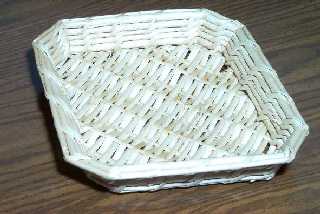
Chris, here is the illustration from the thread on p.a-u.

This is a photo of a basket that I was thinking of.
Post a reply to this message
Attachments:
Download 'P0005175-1.JPG' (36 KB)
Preview of image 'P0005175-1.JPG'
|
|
| |
| |
|
|
|
|
| |
| |
|
|
The texture on the basket needs a little more variation, and your wood
texture looks fake, maybe if you used the IsoWood include file... ;-)

Looks nice, though rather painful to model...getting those little
irregularities is a lot easier in real life. Maybe use a macro to
randomly adjust size of the reeds and add a little imperfection to the
overall shape of the basket (the eval_pattern(), eval_pigment(), and
vwarp() functions of MegaPOV might help here)...if you won't be looking
at it too closely, you may get away with separate parts for the bottom
and sides, and reeds that intersect each other, but you might want to
avoid those shortcuts just for "purist" reasons...

--
Christopher James Huff
Personal: chr### [at] maccom, http://homepage.mac.com/chrishuff/
TAG: chr### [at] tagpovrayorg, http://tag.povray.org/

<><
Post a reply to this message
|
|
| |
| |
|
|
From: Chris Colefax
Subject: Re: Basket-weaving (fun with spline objects)
Date: 15 Jan 2001 18:36:01
Message: <3a638961@news.povray.org>
|
|
|
| |
| |
|
|
"Phil Clute" <pcl### [at] tiacnet> wrote:
> The basket looks great, nice work!
>
> ...and
> I hate to nit-pick, but I circled some spots that look like they
> might be mistakes. The section in green looks like it might be a
> joining area, possibly you intended this. The sections in red looks
> to me like the horizontal part that's supposed to weave under the
> verticle part is actually going through or on top.

John M. Dlugosz <joh### [at] dlugoszcom> wrote:
> I'm interested in wickerwork.  Did this nit ever get an answer from The
> Master?

No, I don't think so...!  Still, there's no time like the present - my best
defence here, as elsewhere, is probably laziness.  That, and the fact that
the scene was created for a purpose (to illustrate certain features of the
Spline Macro File in an attractive way) which I think it serves.

For the most accurate results, I could have defined a spline that followed
the shape of the weft, weaving around each spine of the basket's profile,
adding semi-random variations for thickness and stiffness, etc.  Instead, as
I descried in povray.advanced-users, the entire basket is constructed  using
just four splines, and the weft using a single circular spline - and I can
still say I'm happy with the result!
Post a reply to this message
|
|
| |
| |
|
|
|
|
| |
| |
|
|
>
> No, I don't think so...!  Still, there's no time like the present - my
best
> defence here, as elsewhere, is probably laziness.  That, and the fact that
> the scene was created for a purpose (to illustrate certain features of the
> Spline Macro File in an attractive way) which I think it serves.
>
> For the most accurate results, I could have defined a spline that followed
> the shape of the weft, weaving around each spine of the basket's profile,
> adding semi-random variations for thickness and stiffness, etc.  Instead,
as
> I descried in povray.advanced-users, the entire basket is constructed
using
> just four splines, and the weft using a single circular spline - and I can
> still say I'm happy with the result!
>

I think the green "imperfections" are just fine, mimicing the seam on real
weaving.  The red marks just look funny.

adding semi-random variations... how can we manage that with your macro?
Iterate the basic shape and peterb a tad?  Use blobs so everything flows
together nicely instead of torii which have to match the spec?

--John
Post a reply to this message
|
|
| |
| |
|
|
From: Chris Colefax
Subject: Re: Basket-weaving (fun with spline objects)
Date: 15 Jan 2001 19:18:52
Message: <3a63936c@news.povray.org>
|
|
|
| |
| |
|
|
John M. Dlugosz <joh### [at] dlugoszcom> wrote:
> I think the green "imperfections" are just fine, mimicing the seam on real
> weaving.  The red marks just look funny.
>
> adding semi-random variations... how can we manage that with your macro?
> Iterate the basic shape and peterb a tad?  Use blobs so everything flows
> together nicely instead of torii which have to match the spec?

The Spline Macro File offers the framework in which to create your own,
completely custom spline-based object creation routines, without having to
worry about looping through and evaluating the spline itself (if you don't
want to).  This can include perturbing the shape of the spline and using
blobs, or using the torus_arc () sub macro with semi-random parameters.  Or,
you could algorithmically define a spline that followed the exact shape of
the weaving, e.g.:


   #declare SplinePoints = array[NumberOfStruts*2]

   #declare C = 0; #while (C < NumberOfStruts)
      #declare SplinePoints[C] = [alternating sides of adjacent struts];
   #declare C = C + 1;
      #declare SplinePoints[C] = [direction of weave];
   #declare C = C + 1; #end

   #declare WeaveSpline = create_spline (SplinePoints,
create_hermite_spline)

Using the hermite spline option means we can set a list of points and spline
directions/tangents.  In the loop that defines the points and tangents you
can add variations to either as you like.
Post a reply to this message
|
|
| |
| |
|
|
|
|
| |
| |
|
|
> Looks nice, though rather painful to model...getting those little
> irregularities is a lot easier in real life. Maybe use a macro to
> randomly adjust size of the reeds and add a little imperfection to the
> overall shape of the basket (the eval_pattern(), eval_pigment(), and
> vwarp() functions of MegaPOV might help here)...if you won't be looking
> at it too closely, you may get away with separate parts for the bottom
> and sides, and reeds that intersect each other, but you might want to
> avoid those shortcuts just for "purist" reasons...

Thanks for the pointers to eval... I'll look them up.

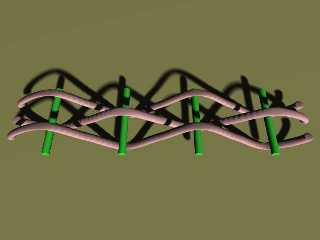
Here is a first cut at weaving.  This is like the bottom of the basket photo
in a few important ways.  I see the splines are rippled, though -- the
individual torii don't exactly line up, I guess.  It's not like other macros
where the component shapes are designed to meet perfectly.  I need a =lot=
of segments to make it smooth (enough), and the rendering slows down right
off the bat, so I suspect the bounding boxes aren't working as well as they
ought to.

--John
Post a reply to this message
Attachments:
Download 'test2.jpg' (14 KB)
Preview of image 'test2.jpg'
|
|
| |
| |
|
|
From: Chris Colefax
Subject: Re: Basket-weaving (fun with spline objects)
Date: 16 Jan 2001 18:23:00
Message: <3a64d7d4@news.povray.org>
|
|
|
| |
| |
|
|
John M. Dlugosz <joh### [at] dlugoszcom> wrote:
> Here is a first cut at weaving.  This is like the bottom of the basket
photo
> in a few important ways.  I see the splines are rippled, though -- the
> individual torii don't exactly line up, I guess.  It's not like other
macros
> where the component shapes are designed to meet perfectly.  I need a =lot=
> of segments to make it smooth (enough), and the rendering slows down right
> off the bat, so I suspect the bounding boxes aren't working as well as
they
> ought to.

Each torii segment starts with the tangent that the previous segment ended
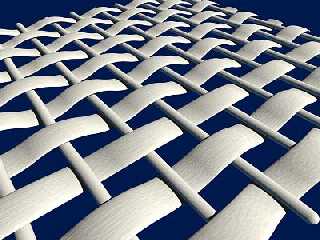
with, so the results certainly should be smooth.  This continuation of
tangents, however, can cause some rippling, like a sine wave along the
spline.  This is precisely the effect I used in the original basket at the
beginning of this thread, and also for the attached render.  This uses torus
pipe splines for the cross bars and weft, both with slightly randomised
starting tangents so they do ripple along their lengths.

As you can see in the code below, only one spline is used, a straight line
along the x-axis.  Note also the spline continuity of 1 - this ensures a
regular spacing of spline points in time and space.  Without the option, the
points will bunch up at the beginning and end of the spline (a natural
property of cubic splines).

If, however, you are using a spline that follows the shape of the weft up
and down between the bars, I might suggest you look at using blob splines -
these can be squashed and stretched, and many components (spline steps) can
be used with quite reasonable render times.  If you cut and paste the
contents of the blob_spline () macro into your own macro, you can modify the
spline_object () code to randomise the position, size and/or orientation of
each component, reusing a single spline rather than declaring separate
splines for each weft.

// Code for attached render

#include "spline\spline.mcr"

#declare BSpline = create_spline (array[3] {-x*5, x*0, x*5},
spline_continuity (1))

#declare BTexture = texture {
   pigment {rgb 1}
   normal {wood -.02 scallop_wave turbulence .3 scale <.05, .05, .5>}
   finish {brilliance .8 ambient .1 diffuse .8}
   }

#declare R1 = seed(0);

union {
   #declare X = -4.5; #while (X < 5)
      union {torus_pipe_spline (BSpline,
         spline_rotate (-y*90)
         + initial_torus_tangent (z + (<rand(R1), rand(R1),
rand(R1)>-.5)*.1)
         + spline_radius (.1)
         + spline_steps (int(3 + rand(R1)*5))
         )
         scale <1, .7, 1>
         translate x*X
         texture {BTexture translate <rand(R1), rand(R1), rand(R1)>*100}
         }
   #declare X = X + 1; #end

   #declare T = 1;
   #declare Z = -4.5; #while (Z < 5)
      union {torus_pipe_spline (BSpline,
         initial_torus_tangent (<1, .4, 0> + (<rand(R1), rand(R1),
rand(R1)>-.5)*.1)
         + spline_radius (.05)
         + spline_steps (10)
         )
         scale <1, T, 6>
         translate z*Z
         texture {BTexture rotate y*90 translate <rand(R1), rand(R1),
rand(R1)>*100}
         }
      #declare T = (T = 1 ? -1 : 1);
   #declare Z = Z + 1; #end
   }
Post a reply to this message
Attachments:
Download 'cc_weaving.jpg' (33 KB)
Preview of image 'cc_weaving.jpg'
|
|
| |
| |
|
|
From: John M Dlugosz
Subject: Re: Basket-weaving (fun with spline objects)
Date: 16 Jan 2001 22:58:33
Message: <3a651869@news.povray.org>
|
|
|
| |
| |
|
|
Chris, you sure make it look easy!

> Each torii segment starts with the tangent that the previous segment ended
> with, so the results certainly should be smooth.  This continuation of
> tangents, however, can cause some rippling, like a sine wave along the
> spline.

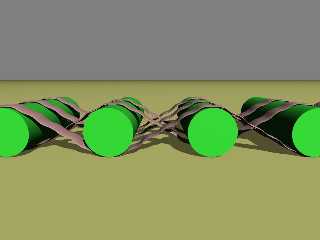
I still don't understand what causes this.  Look at this low-count version
(attached).  I jumped to the conclusion that the ripples are caused by
having too few torus segments, and each ripple is one such segment.  But,
they are regularly spaced, not bunched in the curved part.  So that's not
it, is it?

When reading your tutorial, I had also assumed that the purpose of using the
torii was as a curve-fit for one segment, but now I don't understand how
that can be, since a torus only has one curve everywhere (making it
ellipitical, as I had been thinking, would distort the cross-section of the
pipe, too).

--John
Post a reply to this message
Attachments:
Download 'test3.jpg' (25 KB)
Preview of image 'test3.jpg'
|
|
| |
| |
|
|
|
|
| |
| |
|
|
Chris Colefax wrote:

> Each torii segment starts with the tangent that the previous segment ended
> with, so the results certainly should be smooth.

Just to nitpick: though not the same effect as the ripples we saw, this would
have the same problem as the "roundbox" and related shapes where it looks like
there is an irregularity in the surface. Essentially there is, because there's a
discontinuity in the curvature of the surface, it's most noticeable when a
highlight falls on the discontinuous area. But to make a truly smooth surface
would be needlessly complicated and probably slow to render.

--
David Fontaine  <dav### [at] faricynet>  ICQ 55354965
My raytracing gallery:  http://davidf.faricy.net/
Post a reply to this message
|
|
| |
| |
|
|
From: Chris Colefax
Subject: Re: Basket-weaving (fun with spline objects)
Date: 17 Jan 2001 18:40:13
Message: <3a662d5d@news.povray.org>
|
|
|
| |
| |
|
|
John M. Dlugosz <joh### [at] dlugoszcom> wrote:
> Chris, you sure make it look easy!
>
> I still don't understand what causes this.  Look at this low-count version
> (attached).  I jumped to the conclusion that the ripples are caused by
> having too few torus segments, and each ripple is one such segment.  But,
> they are regularly spaced, not bunched in the curved part.  So that's not
> it, is it?
>
> When reading your tutorial, I had also assumed that the purpose of using
the
> torii was as a curve-fit for one segment, but now I don't understand how
> that can be, since a torus only has one curve everywhere (making it
> ellipitical, as I had been thinking, would distort the cross-section of
the
> pipe, too).

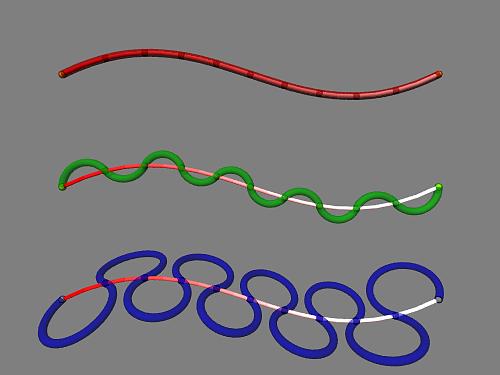
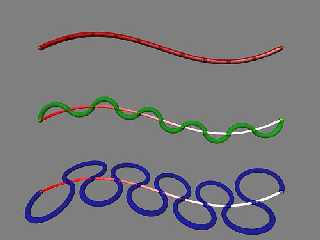
No, the torus pipe macro does not attempt to do any curve fitting.  Instead,
it simply joins each pair of adjacent spline points with a circular arc,
maintaining the continuity of curvature from one arc to the next (regardless
of the spline's curvature).  For the very first arc, we need a tangent, a
starting direction.  By default, the initial tangent of the spline is used,
and with a suitable spline steps value this can create reasonably accurate,
fast rendering, completely smooth splines (example #1 in the attached
image).

The next two examples use the same number of spline steps, but with
different initial torus tangent options.  Depending on how this is specified
and the number of spline steps, rippling can occur as in the middle example.
This rippling is precisely the effect I used in the previous renderings in
this thread, and this is why I wrote the torus pipe spline macro to behave
as it does.

If you want to use the torus pipe spline macro to smoothly follow a spline,
I'd suggest starting with a spline steps value equal to the number of spline
segments, and increasing it from there in multiples of the number of
segments.  Otherwise, I'd again suggest blob splines (see the squid recently
posted under "More fun with spline objects") as an alternative.
Post a reply to this message
Attachments:
Download 'torus_spline_examples.jpg' (16 KB)
Preview of image 'torus_spline_examples.jpg'
|
|
| |
| |
|
|
|
|
| |
| |
|
|
"John M. Dlugosz" wrote:

> When reading your tutorial, I had also assumed that the purpose of using the
> torii was as a curve-fit for one segment, but now I don't understand how
> that can be, since a torus only has one curve everywhere (making it
> ellipitical, as I had been thinking, would distort the cross-section of the
> pipe, too).

Precisely, two points and a tangent on one of them defines a circle, and the one
tangent comes from the previous segment. So curve-fitting would be impossible
with torical arcs.

--
David Fontaine  <dav### [at] faricynet>  ICQ 55354965
My raytracing gallery:  http://davidf.faricy.net/
Post a reply to this message
|
|
| |
| |
|
|
|
|
| |
| |
|
|
And a realistic texture will add as much imperfection, anyway.

"David Fontaine" <dav### [at] faricynet> wrote in message
news:3A6527A9.E755B450@faricy.net...
> Chris Colefax wrote:
>
> > Each torii segment starts with the tangent that the previous segment
ended
> > with, so the results certainly should be smooth.
>
> Just to nitpick: though not the same effect as the ripples we saw, this
would
> have the same problem as the "roundbox" and related shapes where it looks
like
> there is an irregularity in the surface. Essentially there is, because
there's a
> discontinuity in the curvature of the surface, it's most noticeable when a
> highlight falls on the discontinuous area. But to make a truly smooth
surface
> would be needlessly complicated and probably slow to render.
>
> --
> David Fontaine  <dav### [at] faricynet>  ICQ 55354965
> My raytracing gallery:  http://davidf.faricy.net/
>
>
Post a reply to this message
|
|
| |
| |
|
|
|
|
| |
| |
|
|
I see the algorithm now.  A torus is not really a good curve-fit for a
straight-ish curve, but cylinders would not work since they don't bend at
all.  If you want undilations, like when you specify the starting tangent,
the effect is intentional and beautiful, and the spline just specifies the
positions of the links, not the overall shape.

I suppose a shape that is to a parabola as a torus is to a circle would be
good for curve fitting, making a smooth curve with very few segments.

"Chris Colefax" <chr### [at] tagpovrayorg> wrote in message
news:3a662d5d@news.povray.org...
> John M. Dlugosz <joh### [at] dlugoszcom> wrote:
> > Chris, you sure make it look easy!
> >
> > I still don't understand what causes this.  Look at this low-count
version
> > (attached).  I jumped to the conclusion that the ripples are caused by
> > having too few torus segments, and each ripple is one such segment.
But,
> > they are regularly spaced, not bunched in the curved part.  So that's
not
> > it, is it?
> >
> > When reading your tutorial, I had also assumed that the purpose of using
> the
> > torii was as a curve-fit for one segment, but now I don't understand how
> > that can be, since a torus only has one curve everywhere (making it
> > ellipitical, as I had been thinking, would distort the cross-section of
> the
> > pipe, too).
>
> No, the torus pipe macro does not attempt to do any curve fitting.
Instead,
> it simply joins each pair of adjacent spline points with a circular arc,
> maintaining the continuity of curvature from one arc to the next
(regardless
> of the spline's curvature).  For the very first arc, we need a tangent, a
> starting direction.  By default, the initial tangent of the spline is
used,
> and with a suitable spline steps value this can create reasonably
accurate,
> fast rendering, completely smooth splines (example #1 in the attached
> image).
>
> The next two examples use the same number of spline steps, but with
> different initial torus tangent options.  Depending on how this is
specified
> and the number of spline steps, rippling can occur as in the middle
example.
> This rippling is precisely the effect I used in the previous renderings in
> this thread, and this is why I wrote the torus pipe spline macro to behave
> as it does.
>
> If you want to use the torus pipe spline macro to smoothly follow a
spline,
> I'd suggest starting with a spline steps value equal to the number of
spline
> segments, and increasing it from there in multiples of the number of
> segments.  Otherwise, I'd again suggest blob splines (see the squid
recently
> posted under "More fun with spline objects") as an alternative.
>
>
>
Post a reply to this message
|
|
| |
| |
|
|
|
|
| |
|
|