|
|
|
|
|
|
| |
| |
|
|
From: Jörg 'Yadgar' Bleimann
Subject: Afghan Sunrise (133K) - problem with star background
Date: 23 Sep 2000 12:59:52
Message: <39CCB00D.1012C1E3@ndh.net>
|
|
|
| |
| |
|
|
Hi Tracers!

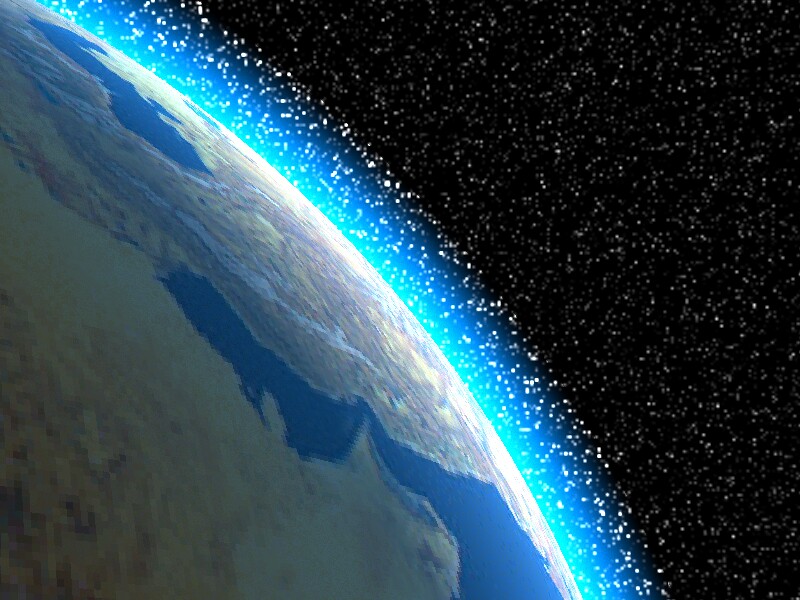
Finally, by trial and error, I found out how to render the atmosphere
from orbit correctly... but now a new problem occurs.

As you can see, I used a sky sphere with stars - and all stars behind
the media-filled sphere which makes up the atmosphere appear exaggerated
in size and brightness. Is there any way to avoid this effect?

Here the POV code for the "air" in the atmosphere sphere:

#declare Air =

   material  // Air

   {

      texture

      {

         pigment

         {

            color rgbft <1.0, 1.0, 1.0, 1.0, 1.0>

         }

      }

      interior

      {

         ior 1
         media

         {

            scattering

            {

               4 ,  rgb <0.0, 0.5, 1.0> // isotropic scattering

            }

            density

            {

               spherical

            }

         }

      }

   }
Post a reply to this message
Attachments:
Download 'afghan sunrise.jpg' (133 KB)
Preview of image 'afghan sunrise.jpg'
|
|
| |
| |
|
|
From: Bill DeWitt
Subject: Re: Afghan Sunrise (133K) - problem with star background
Date: 23 Sep 2000 13:26:43
Message: <39cce7d3$1@news.povray.org>
|
|
|
| |
| |
|
|
I am not going to be much help with your problem, media just acts that way
sometimes, but I wanted Ken to note the proper way to indent and arrange
code. Especially note the double spaced close-braces at the end.
"Jörg 'Yadgar' Bleimann" <j.b### [at] ndh net> wrote :
>
> #declare Air =
>
> material // Air
>
> {
>
> texture
>
> {
>
> pigment
>
> {
>
> color rgbft <1.0, 1.0, 1.0, 1.0, 1.0>
>
> }
>
> }
>
> interior
>
> {
>
> ior 1
> media
>
> {
>
> scattering
>
> {
>
> 4 , rgb <0.0, 0.5, 1.0> // isotropic scattering
>
> }
>
> density
>
> {
>
> spherical
>
> }
>
> }
>
> }
>
> }
> net> wrote :
>
> #declare Air =
>
> material // Air
>
> {
>
> texture
>
> {
>
> pigment
>
> {
>
> color rgbft <1.0, 1.0, 1.0, 1.0, 1.0>
>
> }
>
> }
>
> interior
>
> {
>
> ior 1
> media
>
> {
>
> scattering
>
> {
>
> 4 , rgb <0.0, 0.5, 1.0> // isotropic scattering
>
> }
>
> density
>
> {
>
> spherical
>
> }
>
> }
>
> }
>
> }
>
Post a reply to this message
|
|
| |
| |
|
|
From: ryan constantine
Subject: Re: Afghan Sunrise (133K) - problem with star background
Date: 23 Sep 2000 15:34:51
Message: <39CD05F0.ED41CF56@yahoo.com>
|
|
|
| |
| |
|
|
sorry to spoil it for you bill, but i think he's using moray.

Bill DeWitt wrote:
>
> I am not going to be much help with your problem, media just acts that way
> sometimes, but I wanted Ken to note the proper way to indent and arrange
> code. Especially note the double spaced close-braces at the end.
>
> "Jörg 'Yadgar' Bleimann" <j.b### [at] ndhnet> wrote :
> >
> > #declare Air =
> >
> >    material  // Air
> >
> >    {
> >
> >       texture
> >
> >       {
> >
> >          pigment
> >
> >          {
> >
> >             color rgbft <1.0, 1.0, 1.0, 1.0, 1.0>
> >
> >          }
> >
> >       }
> >
> >       interior
> >
> >       {
> >
> >          ior 1
> >          media
> >
> >          {
> >
> >             scattering
> >
> >             {
> >
> >                4 ,  rgb <0.0, 0.5, 1.0> // isotropic scattering
> >
> >             }
> >
> >             density
> >
> >             {
> >
> >                spherical
> >
> >             }
> >
> >          }
> >
> >       }
> >
> >    }
> >
Post a reply to this message
|
|
| |
| |
|
|
From: ryan constantine
Subject: Re: Afghan Sunrise (133K) - problem with star background
Date: 23 Sep 2000 15:39:34
Message: <39CD070C.113432D0@yahoo.com>
|
|
|
| |
| |
|
|
have you checked out any other planets people here have made?  i've done
some.  my latest (which i haven't posted) is pretty darn good in my
opinion.  i think i posted some source in p.t.s-f.  just look for my
name as the poster (postee?).  i based my atmosphere on jeff lee's
tutorial, but changed quite a few things.  i used image maps which
you'll have to replace with your own.  good luck.

Jörg 'Yadgar' Bleimann wrote:
>
> Hi Tracers!
>
> Finally, by trial and error, I found out how to render the atmosphere
> from orbit correctly... but now a new problem occurs.
>
> As you can see, I used a sky sphere with stars - and all stars behind
> the media-filled sphere which makes up the atmosphere appear exaggerated
> in size and brightness. Is there any way to avoid this effect?
>
> Here the POV code for the "air" in the atmosphere sphere:
>
> #declare Air =
>
>    material  // Air
>
>    {
>
>       texture
>
>       {
>
>          pigment
>
>          {
>
>             color rgbft <1.0, 1.0, 1.0, 1.0, 1.0>
>
>          }
>
>       }
>
>       interior
>
>       {
>
>          ior 1
>          media
>
>          {
>
>             scattering
>
>             {
>
>                4 ,  rgb <0.0, 0.5, 1.0> // isotropic scattering
>
>             }
>
>             density
>
>             {
>
>                spherical
>
>             }
>
>          }
>
>       }
>
>    }
>
>   ------------------------------------------------------------------------
>  [Image]
Post a reply to this message
|
|
| |
| |
|
|
From: Bob Hughes
Subject: Re: Afghan Sunrise (133K) - problem with star background
Date: 23 Sep 2000 15:59:05
Message: <39cd0b89@news.povray.org>
|
|
|
| |
| |
|
|
"Jörg 'Yadgar' Bleimann" <j.b### [at] ndhnet> wrote in message
news:39CCB00D.1012C1E3@ndh.net...
|
| As you can see, I used a sky sphere with stars - and all stars behind
| the media-filled sphere which makes up the atmosphere appear exaggerated
| in size and brightness. Is there any way to avoid this effect?

Try adding absorption <0.5,0.5,0.5> to media and adjust the vector to fit
what you need for color.  Also might want to try removing the transmit (rgbf
<1.0,1.0,1.0,1.0> instead) from the container pigment as well since that can
enhance background object colors causing a brightening.
This will cause a darkening of the media so scattering will need to be
changed to counteract.

Bob
Post a reply to this message
|
|
| |
| |
|
|
From: Jörg 'Yadgar' Bleimann
Subject: Re: Afghan Sunrise (133K) - problem with star background
Date: 23 Sep 2000 18:48:05
Message: <39CD0468.9E6CC15F@ndh.net>
|
|
|
| |
| |
|
|
ryan constantine schrieb:

> sorry to spoil it for you bill, but i think he's using moray.
>

Yes, I in fact use Moray... it's a good aid to control whether an object is
inside the field of view or not, in "pure" POV-Ray I found that VERY difficult
to do...

But nevertheless I also feel uncomfortable with Moray in some respects,
especially when it comes to the different coordinate system (z up instead of
y...), and still there are some features (like sky spheres) which are not even
supported by the 3.2 version...

See you in Khyberspace!

Yadgar
Post a reply to this message
|
|
| |
| |
|
|
From: Jörg 'Yadgar' Bleimann
Subject: Re: Afghan Sunrise (133K) - stars now correct, but surface in twilight
Date: 23 Sep 2000 18:48:08
Message: <39CD08B0.96EEB8B1@ndh.net>
|
|
|
| |
| |
|
|
Bob Hughes schrieb:

> Try adding absorption <0.5,0.5,0.5> to media and adjust the vector to fit
> what you need for color.  Also might want to try removing the transmit (rgbf
> <1.0,1.0,1.0,1.0> instead) from the container pigment as well since that can
> enhance background object colors causing a brightening.
> This will cause a darkening of the media so scattering will need to be
> changed to counteract.
>

I removed the translucency statement, and the distortion of the stars
disappeared... with enhanced scattering color (I used a multiplier
factor of 10!), the media, i. e. the gradiented fringe along the
horizon, also
retained its brightness... but, whether I use your proposed amount of
absorption
or no absorption at all, now the Earth's surface appears in dull
twilight,
just as if the sun still was below the horizon (which is not, in fact,
it's about
30° above, so the title "Afghan Sunrise" is a little misleading - in
future
versions I will rotate Earth a bit back, so that the sun actually can be
seen
(using a customized lensflare effect) slightly above the horizon).

Just increasing the sun's brightness only resulted in an "overexposure"
of the media, but not in a lit surface with realistic contrast... how to
fix
that?

See you in Khyberspace!

Yadgar
Post a reply to this message
|
|
| |
| |
|
|
From: Mark Wagner
Subject: Re: Afghan Sunrise (133K) - problem with star background
Date: 24 Sep 2000 03:06:52
Message: <39cda80c@news.povray.org>
|
|
|
| |
| |
|
|
>            color rgbft <1.0, 1.0, 1.0, 1.0, 1.0>


There's your problem.  Remove either the F or the T component.  Also, try
increasing the "diffuse" component of the planet's finish.

Mark
Post a reply to this message
|
|
| |
| |
|
|
From: sacrofts
Subject: Re: Afghan Sunrise (133K) - stars now correct, but surface in twilight
Date: 24 Sep 2000 04:47:58
Message: <39cdbfbe@news.povray.org>
|
|
|
| |
| |
|
|
I don't know if this will help, this is an adaptation from a tutorial I
was following.  I vaguely remember some improvement in making the
absorption media and scattering media in separate declarations.  The
tutorial advised dividing the color statement by the scale used to match
the radius of the atmosphere.

---code
#declare atmos = media {     file://atmospheric scatter
   scattering {4, rgb <.6,.5,1>/8280.5}
   intervals 1        file://set to 10 for final
   samples 2, 20
   confidence 0.9999
   variance 1/1000
   density {
      spherical
      color_map{
         [0,    rgbf <0,0,0,1>]
         [.075, rgbf <.75, .75, .75, 1>]
         [.15   rgbf 1]
         [.6,   rgbf 1]
         [.61,  rgbf <0,0,0,1>]
         [1,    rgbf <0,0,0,1>]
      }
   }
scale 8280.5}

#declare atmos2 = media {     file://atmospheric absorption
   absorption rgb <.6, .5, 0>/8280.5
   intervals 1      file://set to 20 for final
   samples 2, 20
   confidence 0.9999
   variance 1/1000
   density {
      spherical
      color_map{
         [0,    rgbf <0,0,0,1>]
         [.075, rgbf <.75, .75, .75, 1>]
         [.15   rgbf 1]
         [.6,   rgbf 1]
         [.61,  rgbf <0,0,0,1>]
         [1,    rgbf <0,0,0,1>]
      }
   }
scale 8280.5}

sphere {0, 8280.5 hollow    file://atmosphere upper layer (low
refraction)
   pigment{rgbt 1.0}
   interior {ior 1.000292 media {atmos} media {atmos2}} file://050
   }
---
Post a reply to this message
|
|
| |
| |
|
|
From: Bob Hughes
Subject: Re: Afghan Sunrise (133K) - stars now correct, but surface in twilight
Date: 24 Sep 2000 16:58:17
Message: <39ce6ae9@news.povray.org>
|
|
|
| |
| |
|
|
"sacrofts" <sac### [at] tinyonlinecouk> wrote in message
news:39cdbfbe@news.povray.org...
I don't know if this will help, this is an adaptation from a tutorial I was
following.  I vaguely remember some improvement in making the absorption
media and scattering media in separate declarations.  The tutorial advised
dividing the color statement by the scale used to match the radius of the
atmosphere.

Do you have the URL to that tutorial available to post here? TIA if you do
because I'm sure people will want a look.
Reason I said absorption <0.5,0.5,0.5> was because of the uncertainty about
how it would fit in to begin with, so I was really just saying try
absorption.

Bob
Post a reply to this message
|
|
| |
| |
|
|
From: sacrofts
Subject: Re: Afghan Sunrise (133K) - stars now correct, but surface in twilight
Date: 25 Sep 2000 08:37:31
Message: <39cf470b@news.povray.org>
|
|
|
| |
| |
|
|
The tutorial is On Darcy Johnston's website, under the tutorials
section.
Here's the URL
http://www.geocities.com/SiliconValley/Sector/4317/

even following the tutorial, it took me a little while to realize what
changes I would need for my own image but the results, I think, are very
effective.
hope it helps

Steve

> Do you have the URL to that tutorial available to post here? TIA if
you do
> because I'm sure people will want a look.
> Reason I said absorption <0.5,0.5,0.5> was because of the uncertainty
about
> how it would fit in to begin with, so I was really just saying try
> absorption.
>
> Bob
>
>
>
Post a reply to this message
|
|
| |
| |
|
|
From: Bob Hughes
Subject: Re: Afghan Sunrise (133K) - stars now correct, but surface in twilight
Date: 25 Sep 2000 17:46:05
Message: <39cfc79d@news.povray.org>
|
|
|
| |
| |
|
|
Thanks, I didn't have that bookmarked.

"sacrofts" <sac### [at] tinyonlinecouk> wrote in message
news:39cf470b@news.povray.org...
The tutorial is On Darcy Johnston's website, under the tutorials section.
Here's the URL
http://www.geocities.com/SiliconValley/Sector/4317/
Post a reply to this message
|
|
| |
| |
|
|
From: Jörg 'Yadgar' Bleimann
Subject: Re: Afghan Sunrise (133K) - stars now correct, but surface in twilight
Date: 26 Sep 2000 02:27:41
Message: <39CFA447.E933F693@ndh.net>
|
|
|
| |
| |
|
|
Hi Tracers!

sacrofts schrieb:

> The tutorial is On Darcy Johnston's website, under the tutorials section.
> Here's the URL
> http://www.geocities.com/SiliconValley/Sector/4317/

Yes, I tried absorption rgb <1, 0.5, 0> (according to my scattering rgb<0, 0.5, 1> and
reduced this filter, not translucency to 0... but Earth's surface still
remains dull and low in contrast! Also in Darcy's tutorial, I didn't find anything
about avoiding this effect... I browsed through the "finish" section of the
PoV-Ray manual, but it was also no help to me... is it avoidable at all or is it an
essential deficiency of raytracing?

See you in Khyberspace!

Yadgar
Post a reply to this message
|
|
| |
| |
|
|
From: sacrofts
Subject: Re. Afghan Sunrise (133K) - problem with star background
Date: 26 Sep 2000 14:12:13
Message: <39d0e6fd@news.povray.org>
|
|
|
| |
| |
|
|
> Yes, I tried absorption rgb <1, 0.5, 0> (according to my scattering
rgb<0, 0.5, 1> and reduced this filter, not translucency to 0... but
Earth's surface still
> remains dull and low in contrast! Also in Darcy's tutorial, I didn't
find anything about avoiding this effect... I browsed through the
"finish" section of the
> PoV-Ray manual, but it was also no help to me... is it avoidable at
all or is it an essential deficiency of raytracing?
>

I'm beginning to wonder whether this effect is what is supposed to
happen to the light as it travels through the simulated atmosphere.  For
a similar scene I'm working on, I'm afraid I cheated and used several
light sources, one the source of the rising sun, another shadowless
light to rim light the atmosphere and a bit of artistic license to add a
second sun into the scene from behind the viewer (well I'm not doing
earth!!) But I guess there's no harm in making use of shadowless lights
in this way.

Maybe some control over the contrast could be gained by using a
color_map on your spherical density, this should simulate a thinning of
the atmosphere from the planet's surface to the atmosphere's edge (index
1.0 on the color_map).

One thing my own image is lacking is a descent glow over the planet's
limb, any ideas?

Steve
website being built:
http://website.lineone.net/~sacrofts/home.htm
Post a reply to this message
|
|
| |
| |
|
|
From: Mark Wagner
Subject: Re: Afghan Sunrise (133K) - stars now correct, but surface in twilight
Date: 27 Sep 2000 01:23:49
Message: <39d18465@news.povray.org>
|
|
|
| |
| |
|
|
Jörg 'Yadgar' Bleimann wrote in message <39CFA447.E933F693@ndh.net>...
>Yes, I tried absorption rgb <1, 0.5, 0> (according to my scattering rgb<0,
0.5, 1> and reduced this filter, not translucency to 0... but Earth's
surface still
>remains dull and low in contrast! Also in Darcy's tutorial, I didn't find
anything about avoiding this effect... I browsed through the "finish"
section of the
>PoV-Ray manual, but it was also no help to me... is it avoidable at all or
is it an essential deficiency of raytracing?


Try increasing the "diffuse" component of the finish of the planet's surface
to something in the 2.0 to 6.0 range.

Mark
Post a reply to this message
|
|
| |
| |
|
|
From: Yadgar
Subject: Re: Afghan Sunrise (133K) - stars now correct, but surface in twilight
Date: 27 Sep 2000 22:22:50
Message: <39D23BB6.ABC2D76B@ndh.net>
|
|
|
| |
| |
|
|
Hi Tracers!

Mark Wagner schrieb:

> Jörg 'Yadgar' Bleimann wrote in message <39CFA447.E933F693@ndh.net>...
> >Yes, I tried absorption rgb <1, 0.5, 0> (according to my scattering rgb<0,
> 0.5, 1> and reduced this filter, not translucency to 0... but Earth's
> surface still
> >remains dull and low in contrast! Also in Darcy's tutorial, I didn't find
> anything about avoiding this effect... I browsed through the "finish"
> section of the
> >PoV-Ray manual, but it was also no help to me... is it avoidable at all or
> is it an essential deficiency of raytracing?
>
> Try increasing the "diffuse" component of the finish of the planet's surface
> to something in the 2.0 to 6.0 range.
>
> Mark

Thank you all for your advice, but in the meantime I found out, that in my
recent Iran/Afghanistan-from-orbit scene the (invisible, I commented out the
lensflare for convenience) sun was in fact very low, so that Earth surface just
could not be really bright.

I then moved the camera several dozen latitude degrees eastward into noon
sunlight over Eastern Siberia, and now I got the desired result!

Now I'm fiddling around with various texture patterns and noise modifiers to get
halfway realistic cloud swirls. The cloud layer is in fact a third concentric
sphere around my Earth, its surface 0.005 units (5 kms in my chosen scale) above
Earth surface, a comparatively simple color black-and-white (with a not too soft
transition between) map with filter values counter-corresponding to brightness
(black=1, white 0), so that the Earth surface is only hidden by the white clouds
(which cast nice shadows) ... at least, I found out that irrespective of
distribution patterns the white cloud areas need some relief to emulate the
cumuli structures, so I also have to add a bumpmap...

More on my cloud experiments later!

See you in Khyberspace!

Yadgar
Post a reply to this message
|
|
| |
| |
|
|
|
|
| |
| |
|
|
Bill DeWitt wrote:
>
> ...but I wanted Ken to note the proper way to indent and arrange
> code.

You talking to me boy ?

I will continue to produce my POV-Ray code as I see fit. I will not
conform. I don't want to and I don't have to.

--
Ken Tyler - 1400+ POV-Ray, Graphics, 3D Rendering, and Raytracing Links:
http://home.pacbell.net/tylereng/index.html http://www.povray.org/links/
Post a reply to this message
|
|
| |
| |
|
|
|
|
| |
|
|