|
|
|
|
|
|
| |
| |
|
|
|
|
| |
| |
|
|
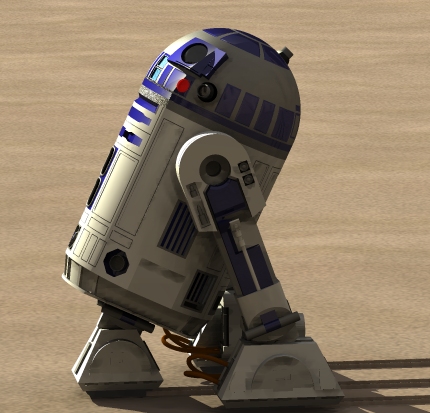
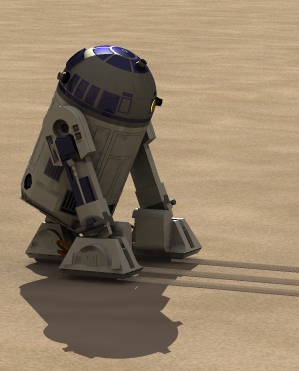
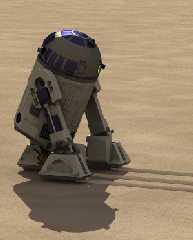
the really bright areas on r2's head goes right up to the shadow line.
why?  i don't think it should.  plus, the shadow line is rather harsh on
the head as well. i think it should be more gradual.  the songle light
source has magnintude of color*2.  is that my problem?  you can see in
the closeup that only the blue on the head has the sharp shadow, but in
the farther pic, the whole head has the sharp shadow.  i need to
decrease my error bound for radiosity.  notice a blue chunk is missing
from the middle of his leg.  that leg is a negative copy of the right
leg, but the right leg doesn't have that part missing.  any ideas why?
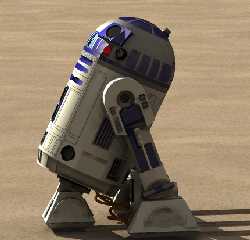
also, you can see in the closeup, my original tracks, then my second
version.  i have a third version that looks better.  any other
comments/suggestions/critisism?
Post a reply to this message
Attachments:
Download 'r2d2messeduptracks.jpg' (112 KB)
Download 'r2d2s33pre3.jpg' (70 KB)
Preview of image 'r2d2messeduptracks.jpg'
Preview of image 'r2d2s33pre3.jpg'
|
|
| |
| |
|
|
|
|
| |
| |
|
|
I can't help you with the problems you're describing, I just want to say
that this looks *very* good! At first I wondered which of the images were
the rendered one, and which were from the movie... Then I found out both
were rendered. Keep it up! :-)

Rune
--
\ Include files, tutorials, 3D images, raytracing jokes,
/ The POV Desktop Theme, and The POV-Ray Logo Contest can
\ all be found at http://rsj.mobilixnet.dk (updated July 23)
/ Also visit http://www.povrayusers.org
Post a reply to this message
|
|
| |
| |
|
|
|
|
| |
| |
|
|
The first one looks gradual enough to me. The second one is sharp, as you
say. This might be due to the brilliance value you used. I can't help you
with the rest. Sorry. Good work. I hope you get it just right. :)
Post a reply to this message
|
|
| |
| |
|
|
|
|
| |
| |
|
|
"ryan constantine" <rco### [at] yahoo com> wrote in message
news:39BFC330.499E0C1D@yahoo.com...
| the really bright areas on r2's head goes right up to the shadow line.
| notice a blue chunk is missing
| from the middle of his leg. that leg is a negative copy of the right
| leg, but the right leg doesn't have that part missing. any ideas why?
The shadow line is most likely caused by a combination of three things in
the finish: diffuse, brilliance, and specular highlighting. In this case it
looks like the highlight is the culprit most of all, along with a possible
negative brilliance. And that light with color*2 isn't helping matters I'm
sure. The strangest thing there is the plate where the electronic eye (?)
is. Looks like a reflection but doesn't make any sense to me.
The missing part might be either translated wrong, such as not remaining
attached, or perhaps it really is a flaw in the type of part. I can only
speculate, something I do best.
Bob com> wrote in message
news:39BFC330.499E0C1D@yahoo.com...
| the really bright areas on r2's head goes right up to the shadow line.
| notice a blue chunk is missing
| from the middle of his leg. that leg is a negative copy of the right
| leg, but the right leg doesn't have that part missing. any ideas why?
The shadow line is most likely caused by a combination of three things in
the finish: diffuse, brilliance, and specular highlighting. In this case it
looks like the highlight is the culprit most of all, along with a possible
negative brilliance. And that light with color*2 isn't helping matters I'm
sure. The strangest thing there is the plate where the electronic eye (?)
is. Looks like a reflection but doesn't make any sense to me.
The missing part might be either translated wrong, such as not remaining
attached, or perhaps it really is a flaw in the type of part. I can only
speculate, something I do best.
Bob
Post a reply to this message
|
|
| |
| |
|
|
|
|
| |
| |
|
|
First I want to say that these images are *incredible*...
Again :-)
I had similar problems once (about 4 years ago) when I was making my first
Liberator-model (from Blake's 7.  I lost that version.  Harddisk crash.
Lost three years of work :-(
I solved it by using the phong-highlights instead of specular.
Hope this helps...

Your images remind me that I should finish my Falcon-model :-)

ZK
http://www.povplace.be.tf
http://zknaepen.freeservers.com

ryan constantine <rco### [at] yahoocom> schreef in berichtnieuws
39BFC330.499E0C1D@yahoo.com...
> the really bright areas on r2's head goes right up to the shadow line.
> why?  i don't think it should.  plus, the shadow line is rather harsh on
> the head as well. i think it should be more gradual.  the songle light
> source has magnintude of color*2.  is that my problem?  you can see in
> the closeup that only the blue on the head has the sharp shadow, but in
> the farther pic, the whole head has the sharp shadow.  i need to
> decrease my error bound for radiosity.  notice a blue chunk is missing
> from the middle of his leg.  that leg is a negative copy of the right
> leg, but the right leg doesn't have that part missing.  any ideas why?
> also, you can see in the closeup, my original tracks, then my second
> version.  i have a third version that looks better.  any other
> comments/suggestions/critisism?
Post a reply to this message
|
|
| |
| |
|
|
|
|
| |
| |
|
|
ryan constantine wrote:
>
> the really bright areas on r2's head goes right up to the shadow line.
> why?  i don't think it should.  plus, the shadow line is rather harsh on
> the head as well. i think it should be more gradual.  the songle light
> source has magnintude of color*2.  is that my problem?  you can see in
> the closeup that only the blue on the head has the sharp shadow, but in
> the farther pic, the whole head has the sharp shadow.  i need to
> decrease my error bound for radiosity.  notice a blue chunk is missing
> from the middle of his leg.  that leg is a negative copy of the right
> leg, but the right leg doesn't have that part missing.  any ideas why?
> also, you can see in the closeup, my original tracks, then my second
> version.  i have a third version that looks better.  any other
> comments/suggestions/critisism?
>
>   ------------------------------------------------------------------------
>  [Image]  [Image]


(hopelessly geeky suggestion follows)

If R2 is on Tatooine, then at certain times of the day he would have
two shadows from the binary suns.  Would this help with the shading
problems?

http://www.starwars.com/locations/tatooine-iv/

Adam C.
Post a reply to this message
|
|
| |
| |
|
|
|
|
| |
| |
|
|
> The shadow line is most likely caused by a combination of three things in
> the finish: diffuse, brilliance, and specular highlighting.  In this case it
> looks like the highlight is the culprit most of all, along with a possible
> negative brilliance.

brilliance was either 1 or 2.  might 'metallic->influence' have
something to do with this?  the angle of reflection is whatever the
angle is between the light that bounces near the shadow toward the
camera.  which affects reflection or highlight angle most; diffuse,
brilliance, or spec. highlight?

> And that light with color*2 isn't helping matters I'm
> sure.

do you think i should change the light to just 'color'?

>  The strangest thing there is the plate where the electronic eye (?)
> is.  Looks like a reflection but doesn't make any sense to me.

yes, that is because the main square part surrounding the eye is curved
the same as his head, but the rectangle to the right (r2d2's left) of
the eye frame (which is also blue) is actually rectangle, so the two
surfaces react differently to the same light.  the abrupt change occurs
where the surfaces change.

> The missing part might be either translated wrong, such as not remaining
> attached, or perhaps it really is a flaw in the type of part.  I can only
> speculate, something I do best.

i'll have to take a look at the other side again.  i haven't done
renders of that side since the last time i posted, so i could've messed
something up and not known it.

thanks for the input.
Post a reply to this message
|
|
| |
| |
|
|
|
|
| |
| |
|
|
good point, but i hadn't thought about where he is.  and isn't one sun
red?  although it doesn't show up in the lighting in the movies.  i
never noticed two shadows for anything in the movies.  at some points in
the yearly orbit, one sun probably eclipses the other.

Adam Coffman wrote:
>
> ryan constantine wrote:
> >
> > the really bright areas on r2's head goes right up to the shadow line.
> > why?  i don't think it should.  plus, the shadow line is rather harsh on
> > the head as well. i think it should be more gradual.  the songle light
> > source has magnintude of color*2.  is that my problem?  you can see in
> > the closeup that only the blue on the head has the sharp shadow, but in
> > the farther pic, the whole head has the sharp shadow.  i need to
> > decrease my error bound for radiosity.  notice a blue chunk is missing
> > from the middle of his leg.  that leg is a negative copy of the right
> > leg, but the right leg doesn't have that part missing.  any ideas why?
> > also, you can see in the closeup, my original tracks, then my second
> > version.  i have a third version that looks better.  any other
> > comments/suggestions/critisism?
> >
> >   ------------------------------------------------------------------------
> >  [Image]  [Image]
>
> (hopelessly geeky suggestion follows)
>
> If R2 is on Tatooine, then at certain times of the day he would have
> two shadows from the binary suns.  Would this help with the shading
> problems?
>
> http://www.starwars.com/locations/tatooine-iv/
>
> Adam C.
Post a reply to this message
|
|
| |
| |
|
|
|
|
| |
| |
|
|
> I solved it by using the phong-highlights instead of specular.
> Hope this helps...

i'll look into that.

> Your images remind me that I should finish my Falcon-model :-)

yes you should because i want it!  have you been to the site where the
guy has something like 40 pages of the inconsistancies of the exterior
and interior sets?  in the end he produces plans for how big the
exterior should be (the current one is WAY too small), and makes the
much needed inside layout changes.  i really like the way he did it,
even if it isn't EXACTLY the way the real interior set was.  if you
finish the exterior and size it correctly (did you know the ertl/amt
model is all messed up? the outer ring is too tall, the upper and lower
dishes not deep enough etc.) then i'd like to try and put the above
mentioned interior inside!  i bet i could literally cram a million
object inside that model.  btw, what scale are you using?  please say 1
unit = 1 meter!  if you need more reference pictures, i think i have
about 100.  some are very huge.  i just sent either bob or bill (bill i
think) a couple even though some one else already had and he was going
to do the project over because they are great images.  i'm still redoing
my xwing fuselage.  i'm giving up on the solid mesh idea and am going to
cut out what i need in the original model.  then i'm going to uv map
images on it to be used as material maps (i hope that's possible), so
the final textures will still be procedural, but each area will be
defined via the uvmap.  although i've got to fix r2 first.  wish me
luck.
Post a reply to this message
|
|
| |
| |
|
|
|
|
| |
| |
|
|
> > Your images remind me that I should finish my Falcon-model :-)
>
> yes you should because i want it!
I want it too :-)

> have you been to the site where the
> guy has something like 40 pages of the inconsistancies of the exterior
> and interior sets?  in the end he produces plans for how big the
Sure I have!  Almost all the information I used came from that site!

> exterior should be (the current one is WAY too small), and makes the
> much needed inside layout changes.  i really like the way he did it,
> even if it isn't EXACTLY the way the real interior set was.  if you
> finish the exterior and size it correctly (did you know the ertl/amt
I will, but it's not very likely I make the interior.
What's ertl/amt?  I thought I knew most of the SW-shorts.

> model is all messed up? the outer ring is too tall, the upper and lower
> dishes not deep enough etc.) then i'd like to try and put the above
> mentioned interior inside!  i bet i could literally cram a million
> object inside that model.  btw, what scale are you using?  please say 1
> unit = 1 meter!  if you need more reference pictures, i think i have
I'm not really using a fixed scale right now...
Well, of course I am, but I don't know what it is.  It's about as big as my
previous model was, but I don't know that scale.  But It shouldn't be too
difficult to scale it to 1unit=1 meter.

> about 100.  some are very huge.  i just sent either bob or bill (bill i
I think I have about everything I need to finish it.  Maybe a more detailed
picture of the bottom (for the armor-plating)

> think) a couple even though some one else already had and he was going
> to do the project over because they are great images.  i'm still redoing
I think that 'someone else' might have been me :-)

> my xwing fuselage.  i'm giving up on the solid mesh idea and am going to
> cut out what i need in the original model.  then i'm going to uv map
> images on it to be used as material maps (i hope that's possible), so
If you're using MegaPov (which I believe you are) I recommend you use
image_pattern.  I think it's more flexible.

> the final textures will still be procedural, but each area will be
Oh, in that case material_maps might be more useful.

> defined via the uvmap.  although i've got to fix r2 first.  wish me
> luck.
I wish you luck.

What's your next project?  I believe you once mentioned the DeathStar?

Cu!
ZK
http://www.povplace.be.tf
Post a reply to this message
|
|
| |
| |
|
|
|
|
| |
| |
|
|
> have you been to the site where the
> guy has something like 40 pages of the inconsistancies of the exterior
> and interior sets?
You did mean 'B squared StarWars stuff' didn't you?

ZK
http://www.povplace.be.tf
Post a reply to this message
|
|
| |
| |
|
|
|
|
| |
| |
|
|
> > have you been to the site where the
> > guy has something like 40 pages of the inconsistancies of the exterior
> > and interior sets?  in the end he produces plans for how big the
> Sure I have!  Almost all the information I used came from that site!

great.

> > exterior should be (the current one is WAY too small), and makes the
> > much needed inside layout changes.  i really like the way he did it,
> > even if it isn't EXACTLY the way the real interior set was.  if you
> > finish the exterior and size it correctly (did you know the ertl/amt
> I will, but it's not very likely I make the interior.
> What's ertl/amt?  I thought I knew most of the SW-shorts.

ertl/amt makes plastic model kits.  i used their model as the basis for
my xwing, using dial calipers to measure the parts, but comparing to
pics from the movies to make up for problems in the model.

>  But It shouldn't be too
> difficult to scale it to 1unit=1 meter.

my xwing was roughly a meter=unit, but had to scale it a little in the
end to make it longer.  i knew the overall length, and i knew my
proportions were correct, so i just made a box the right length and then
made sure it barely fit inside length wise.

> I think I have about everything I need to finish it.  Maybe a more detailed
> picture of the bottom (for the armor-plating)

i have a huge one of the bottom straight on.  want me to email it to
you?

> If you're using MegaPov (which I believe you are) I recommend you use
> image_pattern.  I think it's more flexible.

i'll look at that route.  thanks.

> Oh, in that case material_maps might be more useful.

still, it's good to have options.

> I wish you luck.

thanks again.

> What's your next project?  I believe you once mentioned the DeathStar?

next project is a far model of the death star (i'll eventually do 3
models; far (low detail), medium (a chunk of it where you can see
detail, but also the curvature), and a close model (for running through
the trench)).  right after i do the far model, i'm going to blow it up
using a combination of several explosions others have posted that i feel
i can modify and put together to get EXACTLY the same result as the
movie.  that'll be exciting.  thanks for asking!
Post a reply to this message
|
|
| |
| |
|
|
|
|
| |
| |
|
|
oh yeah, that's what it was called!

Zeger Knaepen wrote:
>
> > have you been to the site where the
> > guy has something like 40 pages of the inconsistancies of the exterior
> > and interior sets?
> You did mean 'B squared StarWars stuff' didn't you?
>
> ZK
> http://www.povplace.be.tf
Post a reply to this message
|
|
| |
| |
|
|
|
|
| |
| |
|
|
First of all, very nice work! :) (My son says, "Awesome Rolex!") heh

I am very interested in looking at your finish statement. Obviously, your
phong/specular settings are at odds with R2, but your reflection settings
intrigue me for some reason.

Grim
Post a reply to this message
|
|
| |
| |
|
|
|
|
| |
| |
|
|
> next project is a far model of the death star (i'll eventually do 3
> models; far (low detail), medium (a chunk of it where you can see
> detail, but also the curvature), and a close model (for running through
> the trench)).  right after i do the far model, i'm going to blow it up
> using a combination of several explosions others have posted that i feel
> i can modify and put together to get EXACTLY the same result as the
> movie.  that'll be exciting.  thanks for asking!

You are soooo lazy!
All sarcasm aside, do you find time to sleep. -- Oh yeah, when the scenes
are rendering!

Anyway that all sounds real cool, hope to see these soon. Although, I
somehow doubt we'll see the Deathstar explosion scene too soon.


--
H²

http://www.capital.net/~hhawkins
Post a reply to this message
|
|
| |
| |
|
|
|
|
| |
| |
|
|
here are the settings for the blue, if you'd like more, let me know.

color is .179,.171,.517
normal is granite with .01 for bump depth and bumpsize
in finish, ambient is zero, diffuse is .4, brilliance is 1, phong zero,
specular 0.9, roughness 0.05, reflection is on and set to 0.1, metallic
is on with influence of 1.2.  that is all.  any ideas about my
problems?  i was going to use blurred reflection and one other megapov
feature, but i'm not sure i need to.  on the other hand, maybe it would
help with the problem i'm having.

if anyone would like the model, the mdl should fit on this server, and
i'm sure the pov file can't be too big since it parses in no time at
all.  i gave a copy to lutz, but he hasn't had time to update the
website.  i also gave him the texture libraries for r2 and the xwing.  i
even gave him the original texture i used to make r2d2's head.  it was
1000 lines long in pov code (mostly because moray doesn't let you
reference other textures), and i used it to turn his head into an image
which i now use as a material map and a bump map.

> First of all, very nice work! :) (My son says, "Awesome Rolex!") heh

thanks, although i don't think i'm quite there yet <g>
Post a reply to this message
|
|
| |
| |
|
|
|
|
| |
| |
|
|
These look REALLY good!

--
- Doug Eichenberg
  http://www.getinfo.net/douge
  dou### [at] nlsnet
Post a reply to this message
|
|
| |
| |
|
|
|
|
| |
| |
|
|
thanks.  i'm blushing.

Doug Eichenberg wrote:
>
> These look REALLY good!
>
> --
> - Doug Eichenberg
>   http://www.getinfo.net/douge
>   dou### [at] nlsnet
Post a reply to this message
|
|
| |
| |
|
|
|
|
| |
| |
|
|
"ryan constantine" <rco### [at] yahoocom> wrote in message
news:39BFE9A2.80DD1D36@yahoo.com...
|
| brilliance was either 1 or 2.  might 'metallic->influence' have
| something to do with this?  the angle of reflection is whatever the
| angle is between the light that bounces near the shadow toward the
| camera.  which affects reflection or highlight angle most; diffuse,
| brilliance, or spec. highlight?

metallic isn't going to make a whole lot of difference about the brighter
region; it's the specular and granite normal doing it, I'm fairly positive,
because it's allowing the highlight to reach around the curvature more than
a non-normal surface would.
As I understand things the brilliance isn't going to show according to light
sources but rather from camera viewpoint, just don't take my word for it
though.

| > And that light with color*2 isn't helping matters I'm
| > sure.
|
| do you think i should change the light to just 'color'?

It's almost certainly making the highlight spread farther, appear brighter,
but that isn't really what's at the root of it.  Must be the specular
highlight and normal.  Chances are that you'll have to drop the bump size
down even more than it already is.

Bob
Post a reply to this message
|
|
| |
| |
|
|
|
|
| |
| |
|
|
"ryan constantine" <rco### [at] yahoocom> wrote in message
news:39BFEB81.4FD74A93@yahoo.com...
| good point, but i hadn't thought about where he is.  and isn't one sun
| red?  although it doesn't show up in the lighting in the movies.  i
| never noticed two shadows for anything in the movies.  at some points in
| the yearly orbit, one sun probably eclipses the other.

They were both yellow G type suns like our solar system Sun.  The reddened
one you're thinking of was lower on the horizon than the other.  Oddly
enough the closer zoom view shown after that one has them both as very much
yellow and no longer a red one.
I'm going by the movie though, not the story itself so I could be way off.
They should have orbited each other at a rate of around several days not in
months or years.  So the planet orbit to make for a eclipse isn't needed but
that would have been the only possibility for a eclipse if the two suns
revolved in a plane not on the planets ecliptic of course.

Bob
Post a reply to this message
|
|
| |
| |
|
|
|
|
| |
| |
|
|
Yes, by all means use the variable reflection! It's not completely
realistic, but it is much better then flat reflectivity (heh). I think R2's
roughness is excessive. .001 might work better, but certainly your specular
setting will have to change as well. This will bring more metal feeling in
too. I think a reflection_min of eight-tenths to nine-tenths of your current
reflection (as reflection_max) will make you happy. Reflection_blur will
probably not satisfy you. JMHO

Hey, another scene to toy with shall always be graciously accepted! :)

Grim
Post a reply to this message
|
|
| |
| |
|
|
|
|
| |
| |
|
|
That is a really great rendering.  From the sand to the colors to the
textures.  Just great!

	And I think the problem with the shadow line is POV's problem.  You
see, in real life a light source will illuminate a surface less
efficiently the farther it is away from the surface normal.  So, as you
get closer and closer to the shadow line, the intensity of the highlight
should really trail off.  This is a *real physics* effect, but it is
less pronounced on rough surfaces. (like  when the rough bits peek up
over the horizon when everything around it is still in shadow)

	The problem with POV is that neither phong nor specular take this
effect into account, only diffuse does. (I don't know about Blinn...)

	Another *real physics* effect that you have some control over is the
size of the sun.  If you're not using an area light for the sun, I'd
suggest one.  On the earth, the sun's diameter takes up about 2 degrees
of the sky.  It really does have an effect if you look at the edges of
shadows cast by buildings and tree leaves, etc.  Maybe it would smooth
the shadow out over a couple of degrees around R2's dome.

BTW great render and great model!

In Him,
Ben
Post a reply to this message
|
|
| |
| |
|
|
|
|
| |
| |
|
|
which flavor would you prefer i post?  would you like it after i make my
first attempt at the new textures?  should be thursday night at the
latest.

GrimDude wrote:
>
> Yes, by all means use the variable reflection! It's not completely
> realistic, but it is much better then flat reflectivity (heh). I think R2's
> roughness is excessive. .001 might work better, but certainly your specular
> setting will have to change as well. This will bring more metal feeling in
> too. I think a reflection_min of eight-tenths to nine-tenths of your current
> reflection (as reflection_max) will make you happy. Reflection_blur will
> probably not satisfy you. JMHO
>
> Hey, another scene to toy with shall always be graciously accepted! :)
>
> Grim
Post a reply to this message
|
|
| |
| |
|
|
|
|
| |
| |
|
|
any suggestions for size and placement of the sun?  i'm using 1 unit = 1
meter.

Ben Birdsey wrote:
>
>         That is a really great rendering.  From the sand to the colors to the
> textures.  Just great!
>
>         And I think the problem with the shadow line is POV's problem.  You
> see, in real life a light source will illuminate a surface less
> efficiently the farther it is away from the surface normal.  So, as you
> get closer and closer to the shadow line, the intensity of the highlight
> should really trail off.  This is a *real physics* effect, but it is
> less pronounced on rough surfaces. (like  when the rough bits peek up
> over the horizon when everything around it is still in shadow)
>
>         The problem with POV is that neither phong nor specular take this
> effect into account, only diffuse does. (I don't know about Blinn...)
>
>         Another *real physics* effect that you have some control over is the
> size of the sun.  If you're not using an area light for the sun, I'd
> suggest one.  On the earth, the sun's diameter takes up about 2 degrees
> of the sky.  It really does have an effect if you look at the edges of
> shadows cast by buildings and tree leaves, etc.  Maybe it would smooth
> the shadow out over a couple of degrees around R2's dome.
>
> BTW great render and great model!
>
> In Him,
> Ben
Post a reply to this message
|
|
| |
| |
|
|
|
|
| |
| |
|
|
By all means, take your time. I've got plenty to toy with :)

Flavor?

Grim
Post a reply to this message
|
|
| |
| |
|
|
|
|
| |
| |
|
|
ryan constantine wrote:
>
> any suggestions for size and placement of the sun?  i'm using 1 unit = 1
> meter.
>

Some time ago, we came to Diameter/Distance = 1/100
(in Thread Radiosity test #2)

Of course this is only true for our local sun :-)

Christoph

--
Christoph Hormann <chr### [at] gmxde>
Homepage: http://www.schunter.etc.tu-bs.de/~chris/
Post a reply to this message
|
|
| |
| |
|
|
|
|
| |
| |
|
|
"Ben Birdsey" <cla### [at] netscapenet> wrote in message
news:39C05E87.2C284B3D@netscape.net...
|
| Another *real physics* effect that you have some control over is the
| size of the sun.  If you're not using an area light for the sun, I'd
| suggest one.  On the earth, the sun's diameter takes up about 2 degrees
| of the sky.  It really does have an effect if you look at the edges of
| shadows cast by buildings and tree leaves, etc.  Maybe it would smooth
| the shadow out over a couple of degrees around R2's dome.

Unfortunately I don't think it's possible.  Area lights only effect shadows
as they fall onto other objects not the object creating the shadow.  I'm
sure many people have tried many times to get a area light to do this and
found the same thing.  Seems they will only affect the shadow which is cast
away from the object.  And the highlights don't change whether from point
sources or area lights either, same goes for the diffuse too I guess.  So
any such attempt is probably futile.

Bob
Post a reply to this message
|
|
| |
| |
|
|
|
|
| |
| |
|
|
flavor: moray or povray?

GrimDude wrote:
>
> By all means, take your time. I've got plenty to toy with :)
>
> Flavor?
>
> Grim
Post a reply to this message
|
|
| |
| |
|
|
From: ryan constantine
Subject: Re: wip needs help: light and the sun (or suns if you are on tatooine)
Date: 14 Sep 2000 04:48:02
Message: <39C08E5D.682CD947@yahoo.com>
|
|
|
| |
| |
|
|
> Unfortunately I don't think it's possible.  Area lights only effect shadows
> as they fall onto other objects not the object creating the shadow.  I'm
> sure many people have tried many times to get a area light to do this and
> found the same thing.  Seems they will only affect the shadow which is cast
> away from the object.  And the highlights don't change whether from point
> sources or area lights either, same goes for the diffuse too I guess.  So
> any such attempt is probably futile.

i do remember that limitation of area lights, but that makes them faster
than a bunch of points right?  but how about a small array of points for
this?  or maybe spots?  can an angle of close to 180 be specified?  are
there any calculation speed ups with spots since light obviously can't
go behind them?  or are light calculations done another way?  and can
spot lights have their penumbra (is that the right word?) set to zero so
all light from the spot light is of the same intensity (ie no lateral
falloff)?  let's say i make a planet 70000 units in radius, how should i
go about finding the minimum acceptable distance (given the
size/distance ratio of 1/100 in christopher's post)?  would i use
different distances for spots than i would for points?  and what about
all those new keywords in megapov like circular and parallel?  might
they be of any use here?  has anyone ever done a looks_like to make a
sun?
Post a reply to this message
|
|
| |
| |
|
|
|
|
| |
| |
|
|
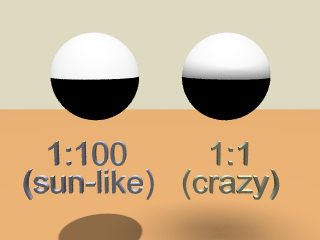
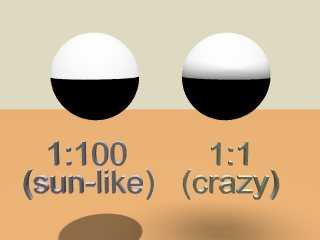
Basically, I agree with you.  The highlight position or shape won't
change and it won't get bigger, even though the light source is now
bigger.

	But, the block_area_light function basically figures out how much of
the area light is visible from any point and multiplies the phong or
specular or whatever highlight by that percentage.  This is totally
visible in this post.

	However, you can still see that POV cheats!  The sharp shadow line on
the second sphere wouldn't be there in reality, because part of the
light is still visible over the horizon.  There should be a smooth
transition.

	Well the idea works, but it looks like a 1:100 sun won't do anything
for you.

In Him,
	Ben
Post a reply to this message
Attachments:
Download 'orient_area_light.jpg' (9 KB)
Preview of image 'orient_area_light.jpg'
|
|
| |
| |
|
|
From: Bob Hughes
Subject: Re: wip needs help: light and the sun (or suns if you are on tatooine)
Date: 14 Sep 2000 05:51:52
Message: <39c09fb8@news.povray.org>
|
|
|
| |
| |
|
|
"ryan constantine" <rco### [at] yahoocom> wrote in message
news:39C08E5D.682CD947@yahoo.com...
| > Unfortunately I don't think it's possible.  Area lights only effect
shadows
| > as they fall onto other objects not the object creating the shadow.
|
| i do remember that limitation of area lights, but that makes them faster
| than a bunch of points right?  but how about a small array of points for
| this?  or maybe spots?  can an angle of close to 180 be specified?  are
| there any calculation speed ups with spots since light obviously can't
| go behind them?  or are light calculations done another way?  and can
| spot lights have their penumbra (is that the right word?) set to zero so
| all light from the spot light is of the same intensity (ie no lateral
| falloff)?  let's say i make a planet 70000 units in radius, how should i
| go about finding the minimum acceptable distance (given the
| size/distance ratio of 1/100 in christopher's post)?  would i use
| different distances for spots than i would for points?  and what about
| all those new keywords in megapov like circular and parallel?  might
| they be of any use here?  has anyone ever done a looks_like to make a
| sun?

Wow, so many questions :-)
I just noticed you said before that you thought the Sun is 2 degrees across.
Wrong.  It's closer to 0.5 degree, but then there is the surrounding
brightness in the air.  Still probably not 2 degrees wide of a source of
light enough to contribute to the main source, I wouldn't think anyway.
So the Sun is 1/360th of the arc of the whole sky.
Not sure what is meant by that 1:100 ratio.  The Sun being about 864,000
miles across and 93 million miles away and the Earth being about 8,000 miles
across makes for about a 1:11,625 ratio of Earth diameter to Sun distance,
with about a 1:107 ratio for Sun diameter to Earth distance.  Must be the
Sun then eh? :-)
70,000 unit planet isn't the thing to figure from anyway, just the sun(s)
size(s) and that's still solar system-like.
All moot if Tatooine and it's system is totally different, but judging from
the movie the ratios are probably going to be similar.  Simply add the
second sun.
Anyhow, back to the spotlight question(s).
You can go up to but not quite 90 for the both radius and falloff (same
value each), that's what you'd want to do for the non-penumbra form (not
certain of use of that word concerning lights, umbra should mean the unlit
area though and penumbra the partially lit).  But you really wouldn't need
it that wide I'd think.  If everything were to scale then a 1 degree light
ought to be fine for the distance you would have.
Not sure if it matters at all as long as no other object is in the scene
away from the planet, concerning the speed of render.  Also 'tightness 1'
(or zero?) will close the penumbral part of a spotlight if you were to use a
falloff larger than the radius.
You do know of course that area_light using spotlight will be the same way
as a point light too.  That array of spotlights could be a real slowdown but
maybe it wouldn't be too slow.

Bob
Post a reply to this message
|
|
| |
| |
|
|
From: Kari Kivisalo
Subject: Re: wip needs help: light and the sun (or suns if you are on tatooine)
Date: 14 Sep 2000 06:12:27
Message: <39C0A4BE.94AE1C4@kivisalo.net>
|
|
|
| |
| |
|
|
Bob said:
>
> Not sure what is meant by that 1:100 ratio.

I was the one to come up with this ratio. See, I thought it would
be easy to remember: "Put the sun area_light at a distance of 100 times
the area_light size." :)

______________________________________________________________________
Kari Kivisalo                                  http://www.kivisalo.net
Post a reply to this message
|
|
| |
| |
|
|
|
|
| |
| |
|
|
> > > exterior should be (the current one is WAY too small), and makes the
> > > much needed inside layout changes.  i really like the way he did it,
> > > even if it isn't EXACTLY the way the real interior set was.  if you
> > > finish the exterior and size it correctly (did you know the ertl/amt
> > I will, but it's not very likely I make the interior.
> > What's ertl/amt?  I thought I knew most of the SW-shorts.
>
> ertl/amt makes plastic model kits.  i used their model as the basis for
> my xwing, using dial calipers to measure the parts, but comparing to
> pics from the movies to make up for problems in the model.
At B squared they said you couldn't trust these kits, so I didn't even think
about looking at one.
Another reason I didn't might be that I don't have one...

> >  But It shouldn't be too
> > difficult to scale it to 1unit=1 meter.
>
> my xwing was roughly a meter=unit, but had to scale it a little in the
> end to make it longer.  i knew the overall length, and i knew my
> proportions were correct, so i just made a box the right length and then
> made sure it barely fit inside length wise.

What size should I use for the Falcon?  25m is too small, but 35m is too big
I think.

> > I think I have about everything I need to finish it.  Maybe a more
detailed
> > picture of the bottom (for the armor-plating)
>
> i have a huge one of the bottom straight on.  want me to email it to
> you?
It's possible that's the one I already have, but If it's not to big (-500KB)
you can email it.
unless someone else wants it too, then it might be a better idea to post it
here.

> > If you're using MegaPov (which I believe you are) I recommend you use
> > image_pattern.  I think it's more flexible.
>
> i'll look at that route.  thanks.
>
> > Oh, in that case material_maps might be more useful.
>
> still, it's good to have options.
Right, but you have to make a choice :-)

> > I wish you luck.
>
> thanks again.
>
> > What's your next project?  I believe you once mentioned the DeathStar?
>
> next project is a far model of the death star (i'll eventually do 3
> models; far (low detail), medium (a chunk of it where you can see
> detail, but also the curvature), and a close model (for running through
> the trench)).  right after i do the far model, i'm going to blow it up
> using a combination of several explosions others have posted that i feel
> i can modify and put together to get EXACTLY the same result as the
> movie.  that'll be exciting.  thanks for asking!

Good luck!  It'll be very difficult to make the exact same explosion!
I think after the Falcon is finished (next year?) I'll finish my
StarDestroyer.  Have you already seen it?

ZK
http://www.povplace.be.tf
Post a reply to this message
|
|
| |
| |
|
|
From: ryan constantine
Subject: Re: wip needs help: light and the sun (or suns if you are on tatooine)
Date: 14 Sep 2000 06:52:44
Message: <39C0AB65.CC1090EE@yahoo.com>
|
|
|
| |
| |
|
|
> Wow, so many questions :-)
> I just noticed you said before that you thought the Sun is 2 degrees across.
> Wrong.  It's closer to 0.5 degree, but then there is the surrounding
> brightness in the air.  Still probably not 2 degrees wide of a source of
> light enough to contribute to the main source, I wouldn't think anyway.
> So the Sun is 1/360th of the arc of the whole sky.
> Not sure what is meant by that 1:100 ratio.  The Sun being about 864,000
> miles across and 93 million miles away and the Earth being about 8,000 miles
> across makes for about a 1:11,625 ratio of Earth diameter to Sun distance,
> with about a 1:107 ratio for Sun diameter to Earth distance.  Must be the
> Sun then eh? :-)
> 70,000 unit planet isn't the thing to figure from anyway, just the sun(s)
> size(s) and that's still solar system-like.
> All moot if Tatooine and it's system is totally different, but judging from
> the movie the ratios are probably going to be similar.  Simply add the
> second sun.

someone else mentioned the 1/100, and since i don't know about those
things, i figured it was right.  the reason i mentioned the planet size
is because i don't want to make the sun the right size at the right
distance.  what i want is to bring the sun closer, and make it smaller
because pov freaks out when you have both really big and really small
numbers in the same scene.  so if i could make the sun proportionately
closer so that it were still 1% and illuminate the planet as if it were
at the correct size and distance, that would be great.  and what about
the parallel keyword?

> Anyhow, back to the spotlight question(s).
> You can go up to but not quite 90 for the both radius and falloff (same
> value each), that's what you'd want to do for the non-penumbra form (not
> certain of use of that word concerning lights, umbra should mean the unlit
> area though and penumbra the partially lit).  But you really wouldn't need
> it that wide I'd think.  If everything were to scale then a 1 degree light
> ought to be fine for the distance you would have.
> Not sure if it matters at all as long as no other object is in the scene
> away from the planet, concerning the speed of render.  Also 'tightness 1'
> (or zero?) will close the penumbral part of a spotlight if you were to use a
> falloff larger than the radius.
> You do know of course that area_light using spotlight will be the same way
> as a point light too.  That array of spotlights could be a real slowdown but
> maybe it wouldn't be too slow.
>
> Bob
Post a reply to this message
|
|
| |
| |
|
|
|
|
| |
| |
|
|
> > ertl/amt makes plastic model kits.  i used their model as the basis for
> > my xwing, using dial calipers to measure the parts, but comparing to
> > pics from the movies to make up for problems in the model.
> At B squared they said you couldn't trust these kits, so I didn't even think
> about looking at one.
> Another reason I didn't might be that I don't have one...

right, they can't be trusted, but there are enough accurization websites
out there to tell you exactly what is wrong and how to fix them.  the
xwing is probably one of their least screwed up.  the falcon is really
close, except for a few big mistakes.

> > >  But It shouldn't be too
> > > difficult to scale it to 1unit=1 meter.
> >
> > my xwing was roughly a meter=unit, but had to scale it a little in the
> > end to make it longer.  i knew the overall length, and i knew my
> > proportions were correct, so i just made a box the right length and then
> > made sure it barely fit inside length wise.
>
> What size should I use for the Falcon?  25m is too small, but 35m is too big
> I think.

if 35m is what b squared says, i'd do it!  i think the overal multiplier
he gave was 40% larger, which is 35m right?

> > > I think I have about everything I need to finish it.  Maybe a more
> detailed
> > > picture of the bottom (for the armor-plating)
> >
> > i have a huge one of the bottom straight on.  want me to email it to
> > you?
> It's possible that's the one I already have, but If it's not to big (-500KB)
> you can email it.
> unless someone else wants it too, then it might be a better idea to post it
> here.

> Good luck!  It'll be very difficult to make the exact same explosion!
> I think after the Falcon is finished (next year?) I'll finish my
> StarDestroyer.  Have you already seen it?

nope.  haven't seen it.
Post a reply to this message
|
|
| |
| |
|
|
|
|
| |
| |
|
|
>
> if 35m is what b squared says, i'd do it!  i think the overal multiplier
> he gave was 40% larger, which is 35m right?
I don't remember if he said 35m, but 35m is indeed 40% more than 25m, so
that had to be it :-)

> > I think after the Falcon is finished (next year?) I'll finish my
> > StarDestroyer.  Have you already seen it?
>
> nope.  haven't seen it.
It's on my site.  Well, some images are.

ZK
http://www.povplace.be.tf
Post a reply to this message
|
|
| |
| |
|
|
|
|
| |
| |
|
|
i dont know?, the second image look perfect (real perfect!) untill you
notice the shadow covered highlight..

Rick
Post a reply to this message
|
|
| |
| |
|
|
|
|
| |
| |
|
|
Pov, I don't use Moray anymore :) Good program, I just don't use it.

Grim
"ryan constantine" <rco### [at] yahoocom> wrote in message
news:39C08B45.654599ED@yahoo.com...
> flavor: moray or povray?
>
> GrimDude wrote:
> >
> > By all means, take your time. I've got plenty to toy with :)
> >
> > Flavor?
> >
> > Grim
Post a reply to this message
|
|
| |
| |
|
|
From: GrimDude
Subject: Re: wip needs help: light and the sun (or suns if you are on tatooine)
Date: 16 Sep 2000 03:32:12
Message: <39c321fc@news.povray.org>
|
|
|
| |
| |
|
|
"Kari Kivisalo" <kar### [at] kivisalonet> wrote in message
news:39C### [at] kivisalonet...
> I was the one to come up with this ratio. See, I thought it would
> be easy to remember: "Put the sun area_light at a distance of 100 times
> the area_light size." :)
>
> ______________________________________________________________________
> Kari Kivisalo                                  http://www.kivisalo.net

Where is it that you are posting these little tidbits? Images just isn't
getting it for me anymore. :)

Grim
Post a reply to this message
|
|
| |
| |
|
|
From: Kari Kivisalo
Subject: Re: wip needs help: light and the sun (or suns if you are on tatooine)
Date: 16 Sep 2000 06:27:31
Message: <39C34B49.BD10F95C@kivisalo.net>
|
|
|
| |
| |
|
|
GrimDude wrote:
>
> > [1:100]
>
> Where is it that you are posting these little tidbits?

So it was you who checked my site looking for more tidbits.

One of Gilles' radiosity tests used way too big sun, someone commented
on this and I posted this fact I grabbed from an old source file.

I'm thinking of making some kind of presentation that pulls together
monitor adjustment, monitor gamma, radiosity, realistic diffuse values,
realistic light intensities and dynamic range compression.

"Technical Approach for Photorealism"

This all was inspired by a question in a news group:
"How do I put a 60 watt light bulb in pov scene?". "Use radiance" was
the correct answer at that time. It still is if the goal is to produce
accurate simulations for engineers. My goal is photorealistic simulation
and all these tests with MP radiosity have convinced me that it is
possible. I still have to test the dynamic range compression idea.

Oh, and I like ryan's robot :)


______________________________________________________________________
Kari Kivisalo                                  http://www.kivisalo.net
Post a reply to this message
|
|
| |
| |
|
|
From: ryan constantine
Subject: Re: wip needs help: light and the sun (or suns if you are on tatooine)
Date: 16 Sep 2000 15:09:43
Message: <39C3C581.C7365C27@yahoo.com>
|
|
|
| |
| |
|
|
i like these kinds of conversations.  i would love a source of
information that had light settings for accurate depiction of various
wattages of light bulb, and real diffuse settings for matterials, and
how to depict the sun and sky at various times of day.  maybe a file
similar in format to the newior.inc would do the trick.  good luck on
your researching this!

Kari Kivisalo wrote:
>
> GrimDude wrote:
> >
> > > [1:100]
> >
> > Where is it that you are posting these little tidbits?
>
> So it was you who checked my site looking for more tidbits.
>
> One of Gilles' radiosity tests used way too big sun, someone commented
> on this and I posted this fact I grabbed from an old source file.
>
> I'm thinking of making some kind of presentation that pulls together
> monitor adjustment, monitor gamma, radiosity, realistic diffuse values,
> realistic light intensities and dynamic range compression.
>
> "Technical Approach for Photorealism"
>
> This all was inspired by a question in a news group:
> "How do I put a 60 watt light bulb in pov scene?". "Use radiance" was
> the correct answer at that time. It still is if the goal is to produce
> accurate simulations for engineers. My goal is photorealistic simulation
> and all these tests with MP radiosity have convinced me that it is
> possible. I still have to test the dynamic range compression idea.
>
> Oh, and I like ryan's robot :)
>
> ______________________________________________________________________
> Kari Kivisalo                                  http://www.kivisalo.net
Post a reply to this message
|
|
| |
| |
|
|
From: Darcy Johnston
Subject: Re: wip needs help: light and the sun (or suns if you are on tatooine)
Date: 16 Sep 2000 18:10:53
Message: <39c3efed@news.povray.org>
|
|
|
| |
| |
|
|
"ryan constantine" <rco### [at] yahoocom> wrote in message
news:39C3C581.C7365C27@yahoo.com...
> i like these kinds of conversations.  i would love a source of
> information that had light settings for accurate depiction of various
> wattages of light bulb, and real diffuse settings for matterials, and
> how to depict the sun and sky at various times of day.  maybe a file
> similar in format to the newior.inc would do the trick.  good luck on
> your researching this!

The best I can offer that's even close to this is a bunch of colors for
different types of light. I got the colors from a web page some time back
(can't remember the url) that explained color. It had a list of different
light colors you can expect from different types of light. I used an image
viewer to pull the rgb values since the pages only showed the colors, and
did not give the actualy values.

I'll post the file in p.t.s-c.

Darcy
Post a reply to this message
|
|
| |
| |
|
|
From: GrimDude
Subject: Re: wip needs help: light and the sun (or suns if you are on tatooine)
Date: 17 Sep 2000 03:43:52
Message: <39c47638@news.povray.org>
|
|
|
| |
| |
|
|
"Kari Kivisalo" <kar### [at] kivisalonet> wrote in message
news:39C34B49.BD10F95C@kivisalo.net...
> accurate simulations for engineers. My goal is photorealistic simulation
> and all these tests with MP radiosity have convinced me that it is
> possible. I still have to test the dynamic range compression idea.
>
> Oh, and I like ryan's robot :)
>

I like Artoo, too. :)

Kari, you are way ahead of me. I haven't put anywhere near that level of
thought into Pov. :)

If you received correspondence from your site, I don't think it was me. Not
recently, at any rate. If you often visit another pov group though, please
let it be known. :)

Grim
Post a reply to this message
|
|
| |
| |
|
|
From: Kari Kivisalo
Subject: Re: wip needs help: light and the sun (or suns if you are on tatooine)
Date: 17 Sep 2000 06:32:36
Message: <39C49DFA.54CBDC3A@kivisalo.net>
|
|
|
| |
| |
|
|
ryan constantine wrote:
>
> how to depict the sun and sky at various times of day.

I found this: A Practical Analytic Model for Daylight.
The images look just great and I think this model could be merged
into povray (source available). It doesn't model clouds yet but
it's been researched I'm sure.

http://www.cs.utah.edu/vissim/papers/sunsky/

______________________________________________________________________
Kari Kivisalo                                  http://www.kivisalo.net
Post a reply to this message
|
|
| |
| |
|
|
|
|
| |
| |
|
|
In article <39C49DFA.54CBDC3A@kivisalo.net>, Kari Kivisalo
<kar### [at] kivisalonet> wrote:

> I found this: A Practical Analytic Model for Daylight.
> The images look just great and I think this model could be merged
> into povray (source available). It doesn't model clouds yet but
> it's been researched I'm sure.

This looks interesting, I downloaded the paper and am going to try to
figure it out.

--
Christopher James Huff
Personal: chr### [at] maccom, http://homepage.mac.com/chrishuff/
TAG: chr### [at] tagpovrayorg, http://tag.povray.org/

<><
Post a reply to this message
|
|
| |
| |
|
|
From: ryan constantine
Subject: Re: wip needs help: light and the sun (or suns if you are on tatooine)
Date: 17 Sep 2000 16:03:19
Message: <39C52390.C555E342@yahoo.com>
|
|
|
| |
| |
|
|
great! may the force be with you!

Chris Huff wrote:
>
> In article <39C49DFA.54CBDC3A@kivisalo.net>, Kari Kivisalo
> <kar### [at] kivisalonet> wrote:
>
> > I found this: A Practical Analytic Model for Daylight.
> > The images look just great and I think this model could be merged
> > into povray (source available). It doesn't model clouds yet but
> > it's been researched I'm sure.
>
> This looks interesting, I downloaded the paper and am going to try to
> figure it out.
>
> --
> Christopher James Huff
> Personal: chr### [at] maccom, http://homepage.mac.com/chrishuff/
> TAG: chr### [at] tagpovrayorg, http://tag.povray.org/
>
> <><
Post a reply to this message
|
|
| |
| |
|
|
From: ryan constantine
Subject: Re: wip needs help: light and the sun (or suns if you are on tatooine)
Date: 17 Sep 2000 16:26:39
Message: <39C52903.989517BA@yahoo.com>
|
|
|
| |
| |
|
|
what about this?  any use?
http://www.cs.utah.edu/~shirley/papers/thesis/
http://www.cs.utah.edu/~shirley/papers/gi90/gi90.ps.Z
http://www.cs.utah.edu/~shirley/papers/rw91/rw91.ps.Z
http://www.cs.utah.edu/~shirley/papers/mc94/mc94.ps.Z
http://www.cs.utah.edu/~shirley/papers/spencer95.pdf
http://www.cs.utah.edu/vissim/papers/reflect/

Kari Kivisalo wrote:
>
> ryan constantine wrote:
> >
> > how to depict the sun and sky at various times of day.
>
> I found this: A Practical Analytic Model for Daylight.
> The images look just great and I think this model could be merged
> into povray (source available). It doesn't model clouds yet but
> it's been researched I'm sure.
>
> http://www.cs.utah.edu/vissim/papers/sunsky/
>
> ______________________________________________________________________
> Kari Kivisalo                                  http://www.kivisalo.net
Post a reply to this message
|
|
| |
| |
|
|
From: ryan constantine
Subject: Re: wip needs help: light and the sun (or suns if you are on tatooine)
Date: 17 Sep 2000 16:43:16
Message: <39C52CE2.E3846529@yahoo.com>
|
|
|
| |
| |
|
|
and
http://www.graphics.cornell.edu/~eric/

Kari Kivisalo wrote:
>
> ryan constantine wrote:
> >
> > how to depict the sun and sky at various times of day.
>
> I found this: A Practical Analytic Model for Daylight.
> The images look just great and I think this model could be merged
> into povray (source available). It doesn't model clouds yet but
> it's been researched I'm sure.
>
> http://www.cs.utah.edu/vissim/papers/sunsky/
>
> ______________________________________________________________________
> Kari Kivisalo                                  http://www.kivisalo.net
Post a reply to this message
|
|
| |
| |
|
|
|
|
| |