|
|
|
|
|
|
| |
| |
|
|
|
|
| |
| |
|
|
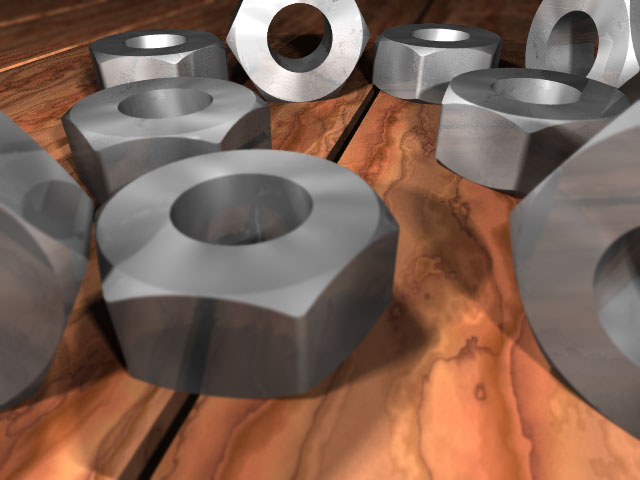
Just playing with focal post-processing. What a speed-up compared to the

standard focal blur !
This one takes only 10 minutes to render.
I did an animation with this feature with 100 pictures, and I get some
artifacts (not shown in this picture).

Is there some way to get rid of them ?

My line for the post-processing is :

post_process{ focal_blur{ 150, 1, 4, 1} }

I'll try some rust on the nuts ( or bolts : I am not sure which is
which)


Fabien
Post a reply to this message
Attachments:
Download 'boulon.jpg' (49 KB)
Preview of image 'boulon.jpg'
|
|
| |
| |
|
|
|
|
| |
| |
|
|
"Fabien Hénon" <ffj### [at] club-internet fr> wrote in message
news:3991D540.CC9D05E8@club-internet.fr...
|
| I did an animation with this feature with 100 pictures, and I get some
| artifacts (not shown in this picture).
|
| Is there some way to get rid of them ?
No idea.
| I'll try some rust on the nuts ( or bolts : I am not sure which is
| which)
Um, those would be called nuts or hex-nuts, need some threads in there more
than the rust. Very good looking render anyway.
Bob fr> wrote in message
news:3991D540.CC9D05E8@club-internet.fr...
|
| I did an animation with this feature with 100 pictures, and I get some
| artifacts (not shown in this picture).
|
| Is there some way to get rid of them ?
No idea.
| I'll try some rust on the nuts ( or bolts : I am not sure which is
| which)
Um, those would be called nuts or hex-nuts, need some threads in there more
than the rust. Very good looking render anyway.
Bob
Post a reply to this message
|
|
| |
| |
|
|
|
|
| |
| |
|
|
That's some good lighting and texturing...
Your nuts aren't threaded BTW.

--
David Fontaine     <dav### [at] faricynet>     ICQ 55354965
Please visit my website: http://www.faricy.net/~davidf/
Post a reply to this message
|
|
| |
| |
|
|
|
|
| |
| |
|
|
Fabien Hénon <ffj### [at] club-internetfr> wrote...
>
> I did an animation with this feature with 100 pictures, and I get some
> artifacts (not shown in this picture).
>
> Is there some way to get rid of them ?

What do the artifacts look like (since they're not shown in this picture).
Are they related to anti-aliasing?

-Nathan
Post a reply to this message
|
|
| |
| |
|
|
|
|
| |
| |
|
|
Uh, Marc Schimmler has created a Nut & Bolt Macro. He may have posted it
over on P.B.S.F, don't really know, but I think you would find it useful.

Great looking texture there. :) I understand you probably left the threads
out in order to work out details of your texture. The wood needs something,
though.

Grim
Post a reply to this message
|
|
| |
| |
|
|
|
|
| |
| |
|
|
GrimDude wrote:
>
> Uh, Marc Schimmler has created a Nut & Bolt Macro. He may have posted it
> over on P.B.S.F, don't really know, but I think you would find it useful.

http://www.ica.uni-stuttgart.de/~marc/nuts.html
http://www.ica.uni-stuttgart.de/~marc/bolts.html

--
Ken Tyler - 1400+ POV-Ray, Graphics, 3D Rendering, and Raytracing Links:
http://home.pacbell.net/tylereng/index.html http://www.povray.org/links/
Post a reply to this message
|
|
| |
| |
|
|
|
|
| |
| |
|
|
Thanks, Ken. :)

Grim
Post a reply to this message
|
|
| |
| |
|
|
|
|
| |
| |
|
|
Thanks Ken.
I am going to use the macro because the nuts are mesh and the compressed files
are quite large, especially for the thread I have just added.
I did not want to bother with CSG this time.


Ken a écrit :

> GrimDude wrote:
> >
> > Uh, Marc Schimmler has created a Nut & Bolt Macro. He may have posted it
> > over on P.B.S.F, don't really know, but I think you would find it useful.
>
> http://www.ica.uni-stuttgart.de/~marc/nuts.html
> http://www.ica.uni-stuttgart.de/~marc/bolts.html
>
> --
> Ken Tyler - 1400+ POV-Ray, Graphics, 3D Rendering, and Raytracing Links:
> http://home.pacbell.net/tylereng/index.html http://www.povray.org/links/
Post a reply to this message
|
|
| |
| |
|
|
|
|
| |
| |
|
|
It's as though the cameraman kept shaking from left to right at a rate of
about 8 times a second.
I'll post the source when I replace the meshes with the macro. For the time
being it's too large.
In the animation, I wanted to make a changing focal_point from close to far
away.

Fabien

Nathan Kopp a écrit :

> Fabien Hénon <ffj### [at] club-internetfr> wrote...
> >
> > I did an animation with this feature with 100 pictures, and I get some
> > artifacts (not shown in this picture).
> >
> > Is there some way to get rid of them ?
>
> What do the artifacts look like (since they're not shown in this picture).
> Are they related to anti-aliasing?
>
> -Nathan
Post a reply to this message
|
|
| |
| |
|
|
|
|
| |
| |
|
|
Good looking image, I'll have to look into focal blur.

--
Cheers
Steve              email mailto:ste### [at] zeroppsuklinuxnet

%HAV-A-NICEDAY Error not enough coffee  0 pps.

web http://www.zeropps.uklinux.net/

or  http://start.at/zero-pps

 12:04am  up 25 days, 22:30,  2 users,  load average: 1.21, 1.10, 1.02
Post a reply to this message
|
|
| |
| |
|
|
|
|
| |
| |
|
|
Nice texturing, neat.
You use radiosity? (I think no but...)

Fabian.


Fabien Hénon a écrit :
>
> Just playing with focal post-processing. What a speed-up compared to the
>
> standard focal blur !
> This one takes only 10 minutes to render.
> I did an animation with this feature with 100 pictures, and I get some
> artifacts (not shown in this picture).
>
> Is there some way to get rid of them ?
>
> My line for the post-processing is :
>
> post_process{ focal_blur{ 150, 1, 4, 1} }
>
> I'll try some rust on the nuts ( or bolts : I am not sure which is
> which)
>
> Fabien
>
>   ------------------------------------------------------------------------
>  [Image]
Post a reply to this message
|
|
| |
| |
|
|
|
|
| |
| |
|
|
I tried radiosity, but that did not help much ( the nuts already reflects the
color of the planks).

The hardest has not been texturing, but to set the lights properly and with the
right intensities.

Thanks for the comments

Fabian BRAU a écrit :

> Nice texturing, neat.
> You use radiosity? (I think no but...)
>
> Fabian.
>
> Fabien Hénon a écrit :
> >
> > Just playing with focal post-processing. What a speed-up compared to the
> >
> > standard focal blur !
> > This one takes only 10 minutes to render.
> > I did an animation with this feature with 100 pictures, and I get some
> > artifacts (not shown in this picture).
> >
> > Is there some way to get rid of them ?
> >
> > My line for the post-processing is :
> >
> > post_process{ focal_blur{ 150, 1, 4, 1} }
> >
> > I'll try some rust on the nuts ( or bolts : I am not sure which is
> > which)
> >
> > Fabien
> >
> >   ------------------------------------------------------------------------
> >  [Image]
Post a reply to this message
|
|
| |
| |
|
|
|
|
| |