|
|
|
|
|
|
| |
| |
|
|
|
|
| |
| |
|
|
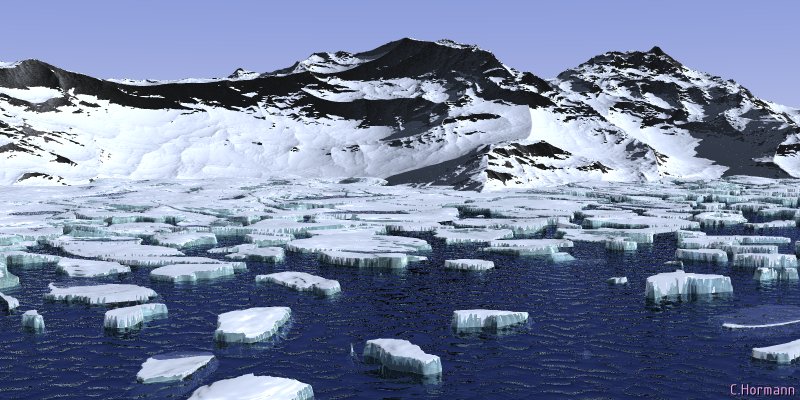
second version,
I increased resolution of the ice heightfield, and changed textures for water
and ice, looks much *colder*, doesn't it ?
The ice is with transparency, no media, the water is RMF now, with transparency
too and angle dependant reflection.
I did not yet work on the sky, it looks more like overcast weather now, so i
should add some clouds...
I also tried radiosity, but it did not change anything :-( is there any tutorial
on outside radiosity?
Comments still welcome,
Christoph
--
Christoph Hormann <chr### [at] gmx de>
Homepage: http://www.schunter.etc.tu-bs.de/~chris/ de>
Homepage: http://www.schunter.etc.tu-bs.de/~chris/
Post a reply to this message
Attachments:
Download 'arctic_02.jpg' (101 KB)
Preview of image 'arctic_02.jpg'
|
|
| |
| |
|
|
|
|
| |
| |
|
|
This is really coming along.  I would think twice before changing
anything (and make sure you keep a snapshot of your source as
of right now because I think you will want to come back to it :-)

In particular I would not change the sky.  I live in Canada and I
can tell you that cold days are normally cloud-free.  In fact if you
add some clouds I bet your scene will feel "warmer".

Perfect just the way it is!

"Christoph Hormann" <Chr### [at] schunteretctu-bsde> wrote in
message news:397C9F3C.D3A126AE@schunter.etc.tu-bs.de...
>
> second version,
>
> I increased resolution of the ice heightfield, and changed textures for
water
> and ice, looks much *colder*, doesn't it ?
>
> The ice is with transparency, no media, the water is RMF now, with
transparency
> too and angle dependant reflection.
>
> I did not yet work on the sky, it looks more like overcast weather now, so
i
> should add some clouds...
>
> I also tried radiosity, but it did not change anything :-( is there any
tutorial
> on outside radiosity?
>
> Comments still welcome,
>
> Christoph
>
> --
> Christoph Hormann <chr### [at] gmxde>
> Homepage: http://www.schunter.etc.tu-bs.de/~chris/
Post a reply to this message
|
|
| |
| |
|
|
|
|
| |
| |
|
|
In article <397C9F3C.D3A126AE@schunter.etc.tu-bs.de>,
chr### [at] gmxde wrote:

> I increased resolution of the ice heightfield, and changed textures
> for water and ice, looks much *colder*, doesn't it ?
>
> The ice is with transparency, no media, the water is RMF now, with
> transparency too and angle dependant reflection.

It looks great now! Like a photo...and I only see one "spike" of ice,
and that one looks like it is connected to a floe, which would explain
why it doesn't tip over.


> I did not yet work on the sky, it looks more like overcast weather
> now, so i should add some clouds...

I agree, some clouds would help. Or just change to color of the sky to a
medium blue-gray, like an even cover of clouds.


> I also tried radiosity, but it did not change anything :-( is there
> any tutorial on outside radiosity?

Did you remember to turn it on? Simply specifying the radiosity options
in global_settings isn't enough.

--
Christopher James Huff - Personal e-mail: chr### [at] maccom
TAG(Technical Assistance Group) e-mail: chr### [at] tagpovrayorg
Personal Web page: http://homepage.mac.com/chrishuff/
TAG Web page: http://tag.povray.org/
Post a reply to this message
|
|
| |
| |
|
|
|
|
| |
| |
|
|
Spock wrote:
>
> This is really coming along.  I would think twice before changing
> anything (and make sure you keep a snapshot of your source as
> of right now because I think you will want to come back to it :-)
>

Already to late :-) But honestly, if I would document every change, I would
never come along.

> In particular I would not change the sky.  I live in Canada and I
> can tell you that cold days are normally cloud-free.  In fact if you
> add some clouds I bet your scene will feel "warmer".
>
> Perfect just the way it is!
>

Thanks, I never thought about a sky totally covered by clouds, but NTL, i think
it needs at least a bit of structure and some dust on the lower part.

Christoph

--
Christoph Hormann <chr### [at] gmxde>
Homepage: http://www.schunter.etc.tu-bs.de/~chris/
Post a reply to this message
|
|
| |
| |
|
|
|
|
| |
| |
|
|
Chris Huff wrote:
>
>
> It looks great now! Like a photo...and I only see one "spike" of ice,
> and that one looks like it is connected to a floe, which would explain
> why it doesn't tip over.
>

Did I miss one :-) In fact they disappeared accidently, I don't really know what
change was responsible.

[...]
>
> > I also tried radiosity, but it did not change anything :-( is there
> > any tutorial on outside radiosity?
>
> Did you remember to turn it on? Simply specifying the radiosity options
> in global_settings isn't enough.
>

You are right, forgot +QR, even though, program output is a bit irritationg: the
megapov/official incompatibility warning for radiosity also appears, when it's
switched off...

Christoph

--
Christoph Hormann <chr### [at] gmxde>
Homepage: http://www.schunter.etc.tu-bs.de/~chris/
Post a reply to this message
|
|
| |
| |
|
|
|
|
| |
| |
|
|
Christoph Hormann wrote:
> I also tried radiosity, but it did not change anything :-( is there any tutorial
> on outside radiosity?

See the dome image as an example what to expect from radiosity.
news://news.povray.org/3947AB86.1450F605%40kivisalo.net

K.K.
Post a reply to this message
|
|
| |
| |
|
|
|
|
| |
| |
|
|
On Mon, 24 Jul 2000 23:27:20 +0200 Christoph Hormann
<Chr### [at] schunteretctu-bsde> wrote:

>You are right, forgot +QR, even though, program output is a bit irritationg: the
>megapov/official incompatibility warning for radiosity also appears, when it's
>switched off...

  Hi, Christoph. Any time radiosity is specified in the global_settings
block, you will receive the 'experimental feature' warning, whether or
not you've actually turned on the radiosity feature during the render.

--
Alan - ako### [at] povrayorg - a k o n g <at> p o v r a y <dot> o r g
http://www.povray.org - Home of the Persistence of Vision Ray Tracer
Post a reply to this message
|
|
| |
| |
|
|
|
|
| |
| |
|
|
Whoa, this is very good scenery.  I like the snow-atop-ice look of the
bergs.  The water could still use a clear pigment with 'interior
{fade_color}' to do the filtering.

Bob
Post a reply to this message
|
|
| |
| |
|
|
|
|
| |
| |
|
|
On Mon, 24 Jul 2000 23:15:51 +0200, Christoph Hormann
<Chr### [at] schunteretctu-bsde> wrote:

>Thanks, I never thought about a sky totally covered by clouds, but NTL, i think
>it needs at least a bit of structure and some dust on the lower part.

Nay, just make it bluish and getting lighter along te vertical.


Peter Popov ICQ : 15002700
Personal e-mail : pet### [at] usanet
TAG      e-mail : pet### [at] tagpovrayorg
Post a reply to this message
|
|
| |
| |
|
|
|
|
| |
| |
|
|
On Mon, 24 Jul 2000 21:55:40 +0200, Christoph Hormann
<Chr### [at] schunteretctu-bsde> wrote:

>Comments still welcome,

Stunningly realistic!


Peter Popov ICQ : 15002700
Personal e-mail : pet### [at] usanet
TAG      e-mail : pet### [at] tagpovrayorg
Post a reply to this message
|
|
| |
| |
|
|
|
|
| |
| |
|
|
when using megapov, it is easiest to have radiosity on all the time in
your ini file and then just use it or not in your scene file as that
will turn it on and off.  this doesn't work in 3.1 as that version
applies default radiosity settings if the switch is in the ini.  at
least, that's how i think things work.

Christoph Hormann wrote:
>
> Chris Huff wrote:
> >
> >
> > It looks great now! Like a photo...and I only see one "spike" of ice,
> > and that one looks like it is connected to a floe, which would explain
> > why it doesn't tip over.
> >
>
> Did I miss one :-) In fact they disappeared accidently, I don't really know what
> change was responsible.
>
> [...]
> >
> > > I also tried radiosity, but it did not change anything :-( is there
> > > any tutorial on outside radiosity?
> >
> > Did you remember to turn it on? Simply specifying the radiosity options
> > in global_settings isn't enough.
> >
>
> You are right, forgot +QR, even though, program output is a bit irritationg: the
> megapov/official incompatibility warning for radiosity also appears, when it's
> switched off...
>
> Christoph
>
> --
> Christoph Hormann <chr### [at] gmxde>
> Homepage: http://www.schunter.etc.tu-bs.de/~chris/
Post a reply to this message
|
|
| |
| |
|
|
|
|
| |
| |
|
|
ryan constantine wrote:
>
> when using megapov, it is easiest to have radiosity on all the time in
> your ini file and then just use it or not in your scene file as that
> will turn it on and off.  this doesn't work in 3.1 as that version
> applies default radiosity settings if the switch is in the ini.  at
> least, that's how i think things work.
>

As i already said, i just forgot to turn it really on ;-) BTW, i usually use
megapov's "ini_option" for those things.

I'm just rendering a version with radiosity and it gets very bright, i wonder if
you have to use different finishes for the textures for with/without radiosity.
Maybe i just have to play with the radiosity parameters a bit...

Christoph

--
Christoph Hormann <chr### [at] gmxde>
Homepage: http://www.schunter.etc.tu-bs.de/~chris/
Post a reply to this message
|
|
| |
| |
|
|
|
|
| |
| |
|
|
try turning down your brightness.  i use moray and the default
brightness was 3.3.  i change mine to 1.0.  i don't know what most
people use.

Christoph Hormann wrote:
>
> ryan constantine wrote:
> >
> > when using megapov, it is easiest to have radiosity on all the time in
> > your ini file and then just use it or not in your scene file as that
> > will turn it on and off.  this doesn't work in 3.1 as that version
> > applies default radiosity settings if the switch is in the ini.  at
> > least, that's how i think things work.
> >
>
> As i already said, i just forgot to turn it really on ;-) BTW, i usually use
> megapov's "ini_option" for those things.
>
> I'm just rendering a version with radiosity and it gets very bright, i wonder if
> you have to use different finishes for the textures for with/without radiosity.
> Maybe i just have to play with the radiosity parameters a bit...
>
> Christoph
>
> --
> Christoph Hormann <chr### [at] gmxde>
> Homepage: http://www.schunter.etc.tu-bs.de/~chris/
Post a reply to this message
|
|
| |
| |
|
|
|
|
| |
| |
|
|
ryan constantine wrote:
>
> try turning down your brightness.  i use moray and the default
> brightness was 3.3.  i change mine to 1.0.  i don't know what most
> people use.
>

It's already at 1.0, but i have quite high diffuse finish (0.9 for the snow), so
I probably have to change that.

Christoph

--
Christoph Hormann <chr### [at] gmxde>
Homepage: http://www.schunter.etc.tu-bs.de/~chris/
Post a reply to this message
|
|
| |
| |
|
|
|
|
| |
| |
|
|
This really is superb.

After looking at it for a long time I now see some flaws:
some of the ice floes look asthough they've had white paint
spilled on them, the white isn't only on top of the floe, but
appears to drip down the sides but where it drips it's
apsilutely flat against the ice.  This aspect looks a bit
strange but it's something that may be completely hidden/blended
by radiosity.

--
Cheers
Steve              email mailto:ste### [at] zeroppsuklinuxnet

%HAV-A-NICEDAY Error not enough coffee  0 pps.

web http://www.zeropps.uklinux.net/

or  http://start.at/zero-pps

 12:58am  up 9 days, 23:24,  2 users,  load average: 1.21, 1.06, 1.02
Post a reply to this message
|
|
| |
| |
|
|
|
|
| |
| |
|
|
Steve wrote:
>
> This really is superb.
>

Thanks.

> After looking at it for a long time I now see some flaws:
> some of the ice floes look asthough they've had white paint
> spilled on them, the white isn't only on top of the floe, but
> appears to drip down the sides but where it drips it's
> apsilutely flat against the ice.  This aspect looks a bit
> strange but it's something that may be completely hidden/blended
> by radiosity.
>

It's a slope texture, if i make it less snow, i get some parts of the floes'
surface free of snow.  I will probably have to work out something more
complicated...

Right now i'm doing some tries with radiosity, but they do not hide much of it.

Christoph

--
Christoph Hormann <chr### [at] gmxde>
Homepage: http://www.schunter.etc.tu-bs.de/~chris/
Post a reply to this message
|
|
| |
| |
|
|
|
|
| |
| |
|
|
last night i rendered a version with radiosity, took about 6 hours, here is the
result, it's much more blueish, but i somehow like it too.

http://www.schunter.etc.tu-bs.de/~chris/arctic_a03.jpg

I changed the camera position a bit to have a closer look at some of the floes,
i added fading to the water's interior, but it's not very visible right now.

Christoph

--
Christoph Hormann <chr### [at] gmxde>
Homepage: http://www.schunter.etc.tu-bs.de/~chris/
Post a reply to this message
|
|
| |
| |
|
|
|
|
| |
| |
|
|
Wow, I really like this one! Any change to see some code? I never tried most
of the features you used here and I would be glad to see them in action.
I really, really like it ....

Marc-Hendrik


Christoph Hormann schrieb in Nachricht
<397EAA20.A01EE8D2@schunter.etc.tu-bs.de>...
>
>last night i rendered a version with radiosity, took about 6 hours, here is
the
>result, it's much more blueish, but i somehow like it too.
>
>http://www.schunter.etc.tu-bs.de/~chris/arctic_a03.jpg
>
>I changed the camera position a bit to have a closer look at some of the
floes,
>i added fading to the water's interior, but it's not very visible right
now.
>
>Christoph
>
>--
>Christoph Hormann <chr### [at] gmxde>
>Homepage: http://www.schunter.etc.tu-bs.de/~chris/
Post a reply to this message
|
|
| |
| |
|
|
|
|
| |
| |
|
|
Marc-Hendrik Bremer wrote:
>
> Wow, I really like this one! Any change to see some code? I never tried most
> of the features you used here and I would be glad to see them in action.
> I really, really like it ....
>
> Marc-Hendrik
>

Thanks,

most of the features are quite conventional, no media, no isosurfaces.  I'm not
going to publish the whole scene, but if you are interested in a specific
element, that should not be the problem.

Christoph

--
Christoph Hormann <chr### [at] gmxde>
Homepage: http://www.schunter.etc.tu-bs.de/~chris/
Post a reply to this message
|
|
| |
| |
|
|
|
|
| |
| |
|
|
Christoph Hormann wrote in message
<397EBE9B.CF6DDBCA@schunter.etc.tu-bs.de>...
>
>
>Thanks,
>
>most of the features are quite conventional, no media, no isosurfaces.  I'm
not
>going to publish the whole scene, but if you are interested in a specific
>element, that should not be the problem.
>
>Christoph
>


I'd be very interested to see the texture for the distant mountains. I
haven't
had much success with slope dependent textures.

Thanks
Gail
********************************************************************
* gsh### [at] monotixcoza              * Reality.dat not found         *
* http://www.rucus.ru.ac.za/~gail/ * Attempting to reboot universe *
********************************************************************
* The best way to accelerate Windows NT is at 9.8 m/s^2      *
********************************************************************
Post a reply to this message
|
|
| |
| |
|
|
|
|
| |
| |
|
|
Gail Shaw wrote:
>
>
> I'd be very interested to see the texture for the distant mountains. I
> haven't
> had much success with slope dependent textures.
>

Oh, that's really simple:

#declare T_ARCTIC_01 =
texture{
    slope -z
    texture_map{
      [0.1 T_SnowA ] //flatter
      [0.1 T_Rock ]  //steeper
    }
}

in left handed system, you would use slope y.

I use different settings for  T_SnowA and T_Rock for w/o radiosity and changing
the values quite often, good values are also dependant on the lighting
situation.

one example (i think i used this for the radiosity version):

#declare T_SnowA =
texture {
   pigment { rgb 1 }
   finish {
      ambient 0.0
      diffuse 0.6
      specular 0.3
      roughness 0.6
      brilliance 0.4
   }
}

Christoph

--
Christoph Hormann <chr### [at] gmxde>
Homepage: http://www.schunter.etc.tu-bs.de/~chris/
Post a reply to this message
|
|
| |
| |
|
|
|
|
| |
| |
|
|
Hi Christoph, great scene!

Christoph Hormann wrote:
>
> Marc-Hendrik Bremer wrote:
> >
> > Wow, I really like this one! Any change to see some code? I never tried most
> > of the features you used here and I would be glad to see them in action.
> > I really, really like it ....
> >
> > Marc-Hendrik
> >
>
> Thanks,
>
> most of the features are quite conventional, no media, no isosurfaces.  I'm not
> going to publish the whole scene, but if you are interested in a specific
> element, that should not be the problem.

Ha, if this is so then let me ask for the most secret part
of the scene ;-)
Any chance to get the parameters of the RMFs? (I guess it's
a superposition of more than one RMF, right?)

Two other things that come to mind: Scaling down the ice floes
by say 0.5 or 0.3 would make the mountains look more majestic.
And then: Wouldn't the moving water leave dark areas on the snow
near the water line?

Well, I'm nitpicking, I know ...

-Hans-
Post a reply to this message
|
|
| |
| |
|
|
|
|
| |
| |
|
|
Hans-Detlev Fink wrote:
>
> Hi Christoph, great scene!
>

Thanks.

>
> Ha, if this is so then let me ask for the most secret part
> of the scene ;-)
> Any chance to get the parameters of the RMFs? (I guess it's
> a superposition of more than one RMF, right?)

No, it's one simple RMF:

H: 0.1
lacunarity: 3.1
octaves: 8
offset: 0.7
gain: 0.8

But it's generated with a seperate program using a different random number
generator, so results will not be the same in POV :-)

>
> Two other things that come to mind: Scaling down the ice floes
> by say 0.5 or 0.3 would make the mountains look more majestic.

maybe, i will think about it...

> And then: Wouldn't the moving water leave dark areas on the snow
> near the water line?
>

I'm already working on that.


Christoph

--
Christoph Hormann <chr### [at] gmxde>
Homepage: http://www.schunter.etc.tu-bs.de/~chris/
Post a reply to this message
|
|
| |
| |
|
|
|
|
| |
| |
|
|
On Wed, 26 Jul 2000 11:06:40 +0200, Christoph Hormann wrote:
>
>last night i rendered a version with radiosity, took about 6 hours, here is the
>result, it's much more blueish, but i somehow like it too.
>
>http://www.schunter.etc.tu-bs.de/~chris/arctic_a03.jpg

Probably won't get to see this as I'll have to dial in
especially to see it.

--
Cheers
Steve              email mailto:ste### [at] zeroppsuklinuxnet

%HAV-A-NICEDAY Error not enough coffee  0 pps.

web http://www.zeropps.uklinux.net/

or  http://start.at/zero-pps

 10:36pm  up 11 days, 21:02,  2 users,  load average: 1.00, 1.00, 1.00
Post a reply to this message
|
|
| |
| |
|
|
|
|
| |
| |
|
|
Steve wrote:
>
> On Wed, 26 Jul 2000 11:06:40 +0200, Christoph Hormann wrote:
> >
> >last night i rendered a version with radiosity, took about 6 hours, here is the
> >result, it's much more blueish, but i somehow like it too.
> >
> >http://www.schunter.etc.tu-bs.de/~chris/arctic_a03.jpg
>
> Probably won't get to see this as I'll have to dial in
> especially to see it.
>

Oh i'm sorry, but are you not curious enough to do that ?

I just did not want to occupy space with so many versions of the same scene.  If
you really have problems, I can send it via email :-)

Christoph

--
Christoph Hormann <chr### [at] gmxde>
Homepage: http://www.schunter.etc.tu-bs.de/~chris/
Post a reply to this message
|
|
| |
| |
|
|
|
|
| |
| |
|
|
Thanks for the parms, Christoph!

This is interesting. Just out of curiosity: Why do you use
an external program? Speed?
And how does this prog interface to pov? Do you import the
result as a height-field?
I found that iso's get _very_ slow when superposing eg 3 or
more RMFs, so using an external prog might speed it up a lot.

Eagerly waiting for Icy Coast 4 ...

-Hans-

Christoph Hormann wrote:
>
> Hans-Detlev Fink wrote:
> >
> > Hi Christoph, great scene!
> >
>
> Thanks.
>
> >
> > Ha, if this is so then let me ask for the most secret part
> > of the scene ;-)
> > Any chance to get the parameters of the RMFs? (I guess it's
> > a superposition of more than one RMF, right?)
>
> No, it's one simple RMF:
>
> H: 0.1
> lacunarity: 3.1
> octaves: 8
> offset: 0.7
> gain: 0.8
>
> But it's generated with a seperate program using a different random number
> generator, so results will not be the same in POV :-)
>
> >
> > Two other things that come to mind: Scaling down the ice floes
> > by say 0.5 or 0.3 would make the mountains look more majestic.
>
> maybe, i will think about it...
>
> > And then: Wouldn't the moving water leave dark areas on the snow
> > near the water line?
> >
>
> I'm already working on that.
>
> Christoph
>
> --
> Christoph Hormann <chr### [at] gmxde>
> Homepage: http://www.schunter.etc.tu-bs.de/~chris/
Post a reply to this message
|
|
| |
| |
|
|
|
|
| |
| |
|
|
Hans-Detlev Fink wrote:
>
> Thanks for the parms, Christoph!
>
> This is interesting. Just out of curiosity: Why do you use
> an external program? Speed?

It's faster to try different parameters and also easier.

In povray you have to render the scene to see the result.  Furthermore, if you
do not like a particular arrangement, you have to do some translate stuff to get
something different, I only have to take a different random seed.

> And how does this prog interface to pov? Do you import the
> result as a height-field?

Yes.

> I found that iso's get _very_ slow when superposing eg 3 or
> more RMFs, so using an external prog might speed it up a lot.

As i already said, i currently only use one RMF.  In my program, superposing 3
calculations would require 3x the time.  I expect, it's the same with an
isosurface.

>
> Eagerly waiting for Icy Coast 4 ...
>

It will probably come... sometime

Christoph

--
Christoph Hormann <chr### [at] gmxde>
Homepage: http://www.schunter.etc.tu-bs.de/~chris/
Post a reply to this message
|
|
| |
| |
|
|
|
|
| |
| |
|
|
Iceberg Lake, Glacier-Waterton...
Looks like a HF?

--
David Fontaine     <dav### [at] faricynet>     ICQ 55354965
Please visit my website: http://www.faricy.net/~davidf/
Post a reply to this message
|
|
| |
| |
|
|
|
|
| |
| |
|
|
> Looks like a HF?

Of course, I missed that in the original

--
David Fontaine     <dav### [at] faricynet>     ICQ 55354965
Please visit my website: http://www.faricy.net/~davidf/
Post a reply to this message
|
|
| |
| |
|
|
|
|
| |