|
|
|
|
|
|
| |
| |
|
|
|
|
| |
| |
|
|
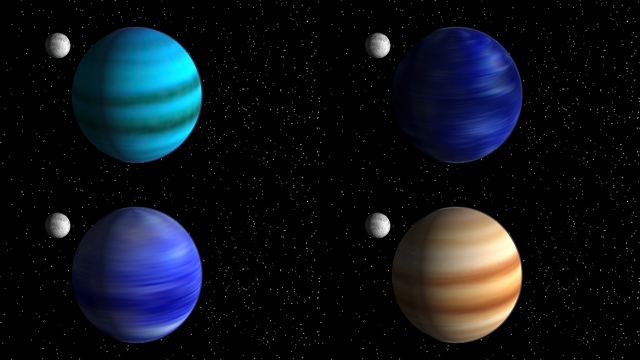
here are some planet image maps i made in paint shop pro
Post a reply to this message
Attachments:
Download 'fourplanets.jpg' (112 KB)
Preview of image 'fourplanets.jpg'
|
|
| |
| |
|
|
|
|
| |
| |
|
|
"ryan constantine" <rco### [at] yahoo com> wrote in message
news:396C0055.9F1D1799@yahoo.com...
> here are some planet image maps i made in paint shop pro
Very nice, especially the brown one. Is it my imagination (I'm usually wrong
on things like this...), or does the lower left one appear kind of pointed
on top?
Regards,
Dave com> wrote in message
news:396C0055.9F1D1799@yahoo.com...
> here are some planet image maps i made in paint shop pro
Very nice, especially the brown one. Is it my imagination (I'm usually wrong
on things like this...), or does the lower left one appear kind of pointed
on top?
Regards,
Dave
Post a reply to this message
|
|
| |
| |
|
|
|
|
| |
| |
|
|
ha! it does look pointy! of course, it's not.  i'm sure if i rotated it
a bit the dark and light area on the image map would go better with the
real light and shadowed areas of the sphere.  oh well, maybe i should
clip and rescale the image...

Dave Blandston wrote:
>
> "ryan constantine" <rco### [at] yahoocom> wrote in message
> news:396C0055.9F1D1799@yahoo.com...
> > here are some planet image maps i made in paint shop pro
>
> Very nice, especially the brown one. Is it my imagination (I'm usually wrong
> on things like this...), or does the lower left one appear kind of pointed
> on top?
>
> Regards,
> Dave
Post a reply to this message
|
|
| |
| |
|
|
|
|
| |
| |
|
|
"Dave Blandston" <gra### [at] earthlinknet> wrote in message
news:396c148f@news.povray.org...
|
| Very nice, especially the brown one.

Maybe it's because it's the familiar Jupiter look of it.  I like the upper
left one secondly.

Bob
Post a reply to this message
|
|
| |
| |
|
|
|
|
| |
| |
|
|
Could spots that look like Jupiter's Great Red Spot be made?  These planets
can be done with gradients.  How can spots be made within POV-Ray?  If a map
is made within POV-Ray, image_map it once onto a rectangular polygon with a
2:1 aspect ratio to make a map.  All of the maps I have downloaded are 2:1.
Brendan

ryan constantine wrote:

> here are some planet image maps i made in paint shop pro
>
>   ------------------------------------------------------------------------
>  [Image]
Post a reply to this message
|
|
| |
| |
|
|
|
|
| |
| |
|
|
ryan constantine wrote:
>
> here are some planet image maps i made in paint shop pro

The shadows seems a bit bright.. a thick atmosphere and/or moonlight can
help spread the light around a little, but generally, shadows in space
are very, VERY dark (you'd be amazed just how weak ambient starlight is
by itself).
Post a reply to this message
|
|
| |
| |
|
|
|
|
| |
| |
|
|
"Andrea Ryan" <ary### [at] global2000net> wrote in message
news:396C72C4.44097E4E@global2000.net...
| Could spots that look like Jupiter's Great Red Spot be made?

Yes, in a way, using the 'black_hole' warp in the pigment.  Problem is you
need a color for it already present in the gradient color map, and it's just
not easy to work with in my experience anyway.  A layered texture could do
fairly well but then you don't get the good transition from lines to spot you
could get with the warp.

Bob
Post a reply to this message
|
|
| |
| |
|
|
|
|
| |
| |
|
|
Not intentionally moving in on you Ryan but I've posted my idea of Jupiter at
povray.text.scene-files, can't miss it, subject says "Jupiter-like".  Nothing
perfected about it at
all, something for anyone to tinker with though.

Bob
Post a reply to this message
|
|
| |
| |
|
|
|
|
| |
| |
|
|
i was thinking it would be cool if there were a "spin" and a "wind"
pattern or warp in povray.  what you would do is use it in a layered
texture.  all other layers would define the patterns and colors, and
then the wind and spin would streak it in a certain direction.  wind
would be linear and spin would be axial.  any programmers out there
reading this?

Bob Hughes wrote:
>
> "Andrea Ryan" <ary### [at] global2000net> wrote in message
> news:396C72C4.44097E4E@global2000.net...
> | Could spots that look like Jupiter's Great Red Spot be made?
>
> Yes, in a way, using the 'black_hole' warp in the pigment.  Problem is you
> need a color for it already present in the gradient color map, and it's just
> not easy to work with in my experience anyway.  A layered texture could do
> fairly well but then you don't get the good transition from lines to spot you
> could get with the warp.
>
> Bob
Post a reply to this message
|
|
| |
| |
|
|
|
|
| |
| |
|
|
say hello to mister gamma.  on my monitor, the shadows ARE very dark.
no color at all.:(  maybe i should do that gamma test someone mentioned.

Xplo Eristotle wrote:
>
> ryan constantine wrote:
> >
> > here are some planet image maps i made in paint shop pro
>
> The shadows seems a bit bright.. a thick atmosphere and/or moonlight can
> help spread the light around a little, but generally, shadows in space
> are very, VERY dark (you'd be amazed just how weak ambient starlight is
> by itself).
Post a reply to this message
|
|
| |
| |
|
|
|
|
| |
| |
|
|
Each band can be given turbulence by having a layered texture that are partly
transparent except for
some bands.  There will be one texture for each color of band.  Each texture will have
different
amounts of turbulence.
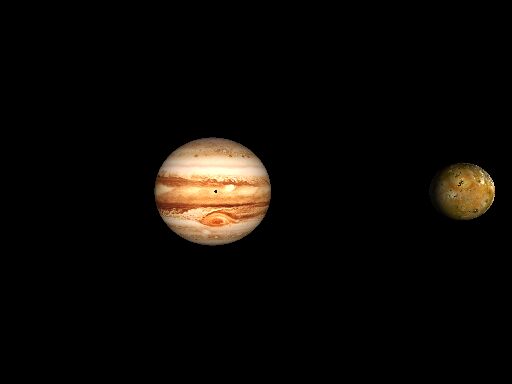
Here is a image of Jupiter and Io using image_maps.
Now I'm off to POV-Ray to try out the layered texture idea.
Brendan
Post a reply to this message
Attachments:
Download 'jupiter.jpg' (9 KB)
Preview of image 'jupiter.jpg'
|
|
| |
| |
|
|
|
|
| |
| |
|
|
In article <396CE66F.D1AD3870@yahoo.com>, ryan constantine
<rco### [at] yahoocom> wrote:

> i was thinking it would be cool if there were a "spin" and a "wind"
> pattern or warp in povray.  what you would do is use it in a layered
> texture.  all other layers would define the patterns and colors, and
> then the wind and spin would streak it in a certain direction.  wind
> would be linear and spin would be axial.  any programmers out there
> reading this?

I have done a "push" warp, which displaces a texture in a specified
direction by an amount depending on how close it is to the center of the
warp. I am also planning a spin warp, which would be similar to what you
described, but would have a spherical range of effect.

--
Christopher James Huff - Personal e-mail: chr### [at] maccom
TAG(Technical Assistance Group) e-mail: chr### [at] tagpovrayorg
Personal Web page: http://homepage.mac.com/chrishuff/
TAG Web page: http://tag.povray.org/
Post a reply to this message
|
|
| |
| |
|
|
|
|
| |
| |
|
|
ryan constantine wrote:
>
> say hello to mister gamma.  on my monitor, the shadows ARE very dark.
> no color at all.:(  maybe i should do that gamma test someone mentioned.

Ah, of course. The gamma.

(I'm on a Mac.)
Post a reply to this message
|
|
| |
| |
|
|
|
|
| |
| |
|
|
win98 here.  that explains it.  assumed gamma of 2.2.

Xplo Eristotle wrote:
>
> ryan constantine wrote:
> >
> > say hello to mister gamma.  on my monitor, the shadows ARE very dark.
> > no color at all.:(  maybe i should do that gamma test someone mentioned.
>
> Ah, of course. The gamma.
>
> (I'm on a Mac.)
Post a reply to this message
|
|
| |
| |
|
|
|
|
| |
| |
|
|
"Chris Huff" <chr### [at] maccom> wrote in message
news:chrishuff-18F203.21555912072000@news.povray.org...
|
| I am also planning a spin warp, which would be similar to what you
| described, but would have a spherical range of effect.

Which leads me to ask about nonuniform scaling of warps.  I tried in vain to get the
Great Red Spot
to flatten out.  Only succeeded in moving it around.
This wind idea is a good one for sure, sounds like a matrix kind of thing.

Bob
Post a reply to this message
|
|
| |
| |
|
|
|
|
| |