|
|
|
|
|
|
| |
| |
|
|
|
|
| |
| |
|
|
Unfortunately I do not have much time to
play with POV-Ray these days.
But today I just had to set aside some time
for an idea I have been thinking of lately.
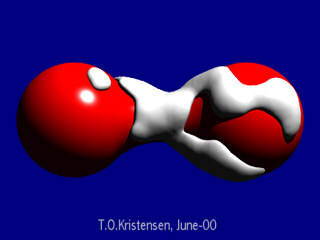
The image shows one blob wrapped around
the surface of another one in a random way.
Could this be useful for any scenes ?
Please comment.
Tor Olav
--
mailto:tor### [at] hotmail com
http://www.crosswinds.net/~tok/tokrays.html com
http://www.crosswinds.net/~tok/tokrays.html
Post a reply to this message
Attachments:
Download 'blobtest08.jpg' (14 KB)
Preview of image 'blobtest08.jpg'
|
|
| |
| |
|
|
|
|
| |
| |
|
|
Yeah, I'm thinking cream, wet snow, even a cream pie animation.

"Tor Olav Kristensen" <tor### [at] onlineno> wrote in message
news:39569C98.C54D2542@online.no...
>
> Unfortunately I do not have much time to
> play with POV-Ray these days.
>
> But today I just had to set aside some time
> for an idea I have been thinking of lately.
>
> The image shows one blob wrapped around
> the surface of another one in a random way.
>
> Could this be useful for any scenes ?
>
> Please comment.
>
>
> Tor Olav
> --
> mailto:tor### [at] hotmailcom
> http://www.crosswinds.net/~tok/tokrays.html


----------------------------------------------------------------------------
----
Post a reply to this message
|
|
| |
| |
|
|
|
|
| |
| |
|
|
Tor Olav Kristensen wrote:
>
> Unfortunately I do not have much time to
> play with POV-Ray these days.
>
> But today I just had to set aside some time
> for an idea I have been thinking of lately.
>
> The image shows one blob wrapped around
> the surface of another one in a random way.
>
> Could this be useful for any scenes ?
>
> Please comment.
>

Hi Tor.

Let my tell you that in this moment, I'm thinking about a big ice cream.
:-)
Regards. Alberto.
Post a reply to this message
|
|
| |
| |
|
|
|
|
| |
| |
|
|
I'm sorry to disrupt the thoughts of pleasant ice cream, but it reminds more
of mold on two berries...
Post a reply to this message
|
|
| |
| |
|
|
|
|
| |
| |
|
|
Tor Olav Kristensen wrote:
>
> Unfortunately I do not have much time to
> play with POV-Ray these days.
>
> But today I just had to set aside some time
> for an idea I have been thinking of lately.
>
> The image shows one blob wrapped around
> the surface of another one in a random way.
>
> Could this be useful for any scenes ?
>
> Please comment.
>
	trace()?

	I guess that would be very useful to put icing on cakes and
such...

		Jerome
--
******************************* Jérôme M. BERGER
* Doctor Jekyll had something * mailto:ber### [at] inamecom
* to Hyde...                  * http://www.enst.fr/~jberger
*******************************
Post a reply to this message
|
|
| |
| |
|
|
|
|
| |
| |
|
|
With some texture changes it could be encrustations of coral and other
sea life on a part of a sunken ship.
Or maybe frozen oxygen between the poles of a magnet.
Or a fungus of some sort attacking a plant.

--
Christopher James Huff - Personal e-mail: chr### [at] maccom
TAG(Technical Assistance Group) e-mail: chr### [at] tagpovrayorg
Personal Web page: http://homepage.mac.com/chrishuff/
TAG Web page: http://tag.povray.org/
Post a reply to this message
|
|
| |
| |
|
|
|
|
| |
| |
|
|
Jerome wrote:

> Tor Olav Kristensen wrote:
> ...
> > The image shows one blob wrapped around
> > the surface of another one in a random way.
> >
> > Could this be useful for any scenes ?
> >
> > Please comment.
> >
>         trace()?

No ... ehh .... what is trace() ?
Is it a function in one of the new patches ?

I'm only using plain POV v3.1.

A macro I made calculates where the surface of a blob is.
(The red one in this image.) I used information from this macro
to place the spheres in second blob (the white one).

The removing of the "ice" in some areas is done by inserting some
spheres with negative strength randomly around on the surface.
Post a reply to this message
|
|
| |
| |
|
|
|
|
| |
| |
|
|
Tor Olav Kristensen wrote:

> ...
> Could this be useful for any scenes ?
>
> Please comment.
> ...

Thank you all for commenting.

I now see that this gives you people associations towards snow,
ice and ice cream.

(Except for Kettch who is thinking about something that must be
Siamese berries !)

Btw.: Here on the west coast of Norway it hasn't been much ice-
cream weather yet this summer =(


Tor Olav
--
mailto:tor### [at] hotmailcom
http://www.crosswinds.net/~tok/tokrays.html
Post a reply to this message
|
|
| |
| |
|
|
|
|
| |
| |
|
|
Chris Huff wrote:

> With some texture changes it could be encrustations of coral and other
> sea life on a part of a sunken ship.
> Or maybe frozen oxygen between the poles of a magnet.
> Or a fungus of some sort attacking a plant.

Hmmm... Interesting ideas !   Thank you.

Any suggestion for coral like textures ?


Tor Olav
--
mailto:tor### [at] hotmailcom
http://www.crosswinds.net/~tok/tokrays.html
Post a reply to this message
|
|
| |
| |
|
|
|
|
| |
| |
|
|
On Mon, 26 Jun 2000 01:58:17 +0200, Tor Olav Kristensen
<tor### [at] onlineno> wrote:

>Could this be useful for any scenes ?

Yes, you'll only need some hair and a Gillete razor <grin>


Peter Popov ICQ : 15002700
Personal e-mail : pet### [at] usanet
TAG      e-mail : pet### [at] tagpovrayorg
Post a reply to this message
|
|
| |
| |
|
|
|
|
| |
| |
|
|
Peter Popov wrote:

> On Mon, 26 Jun 2000 01:58:17 +0200, Tor Olav Kristensen
> <tor### [at] onlineno> wrote:
>
> >Could this be useful for any scenes ?
>
> Yes, you'll only need some hair and a Gillete razor <grin>

So you are thinking about shaving foam. - I like that idea.

Funny I didn't see that myself:  "Once upon a time" I was
fascinated about taking macro pictures of  different shaving
foam "shapes".

Amongst the many things on my to-do list is modelling an
old Gillette razor with one of these thin double edged razor
blades. This foam could come in handy for such a scene.


Tor Olav
--
mailto:tor### [at] hotmailcom
http://www.crosswinds.net/~tok/tokrays.html
Post a reply to this message
|
|
| |
| |
|
|
|
|
| |
| |
|
|
"Tor Olav Kristensen" <tto### [at] onlineno> wrote in message
news:39577684.362EF60F@online.no...
|
| Jerome wrote:
|
| >         trace()?
|
| No ... ehh .... what is trace() ?
| Is it a function in one of the new patches ?
|
| I'm only using plain POV v3.1.
|
| A macro I made calculates where the surface of a blob is.
| (The red one in this image.) I used information from this macro
| to place the spheres in second blob (the white one).
|
| The removing of the "ice" in some areas is done by inserting some
| spheres with negative strength randomly around on the surface.

Figured there had to be negative strength blob at work here.  It's great,
except your macro might very well become extinct because of 'trace()',
although only in that the check for blob surface would no longer be
manually(?) done.
MegaPov ( http://www.nathan.kopp.com/patched.htm ) is what has the trace
function, useable for locating surfaces and their normals.

Bob
Post a reply to this message
|
|
| |
| |
|
|
|
|
| |
| |
|
|
Bob Hughes wrote:

> "Tor Olav Kristensen" <tto### [at] onlineno> wrote in message
> news:39577684.362EF60F@online.no...
> |
> | Jerome wrote:
> |
> | >         trace()?
> |
> | No ... ehh .... what is trace() ?
> | Is it a function in one of the new patches ?
> |
> | I'm only using plain POV v3.1.
> |
> | A macro I made calculates where the surface of a blob is.
> | (The red one in this image.) I used information from this macro
> | to place the spheres in second blob (the white one).
> |
> | The removing of the "ice" in some areas is done by inserting some
> | spheres with negative strength randomly around on the surface.
>
> Figured there had to be negative strength blob at work here.  It's great,
> except your macro might very well become extinct because of 'trace()',
> although only in that the check for blob surface would no longer be
> manually(?) done.

I just downloaded the html documentation for MegaPov and as far as
I can see it would be difficult to use trace() to locate "every" part of the
surface of an object if it's surface is not convex.

(Othervise one would then have to test for surfaces behind surfaces.
And one would have to move around and "radiate" vectors from several
points in space to be sure that surfaces that otherwise would be
perpendicular to the ray centre, get enough vector "hits".
Hmmm... maybe this could be an interesting macro to make !)

So I think my "manual" macro has an advantage here :-)
It can can "map" any blob surface topology.
But its parsing very slowly. Maybe I'll combine trace() with my macro later.

Thank you for commenting.


Tor Olav
--
mailto:tor### [at] hotmailcom
http://www.crosswinds.net/~tok/tokrays.html
Post a reply to this message
|
|
| |
| |
|
|
|
|
| |
| |
|
|
In article <39590205.8CE9B9B6@online.no>, Tor Olav Kristensen
<tto### [at] onlineno> wrote:

> So I think my "manual" macro has an advantage here :-)
> It can can "map" any blob surface topology.
> But its parsing very slowly. Maybe I'll combine trace() with my macro
> later.

You could probably use the blob pattern patch with eval_pattern() or
eval_pigment() to do the same thing...it would probably render faster.
BTW, I have been working on adding new component types to the blob
pattern. So far I have added "box"(pretty obvious), "pigment"(where the
grayscale value of the pigment at each point is the field value of the
component at that point.), and "blob"(which takes an ordinary blob
object as input) component types.

--
Christopher James Huff - Personal e-mail: chr### [at] maccom
TAG(Technical Assistance Group) e-mail: chr### [at] tagpovrayorg
Personal Web page: http://homepage.mac.com/chrishuff/
TAG Web page: http://tag.povray.org/
Post a reply to this message
|
|
| |
| |
|
|
|
|
| |
| |
|
|
Chris Huff wrote:

> In article <39590205.8CE9B9B6@online.no>, Tor Olav Kristensen
> <tto### [at] onlineno> wrote:
>
> > So I think my "manual" macro has an advantage here :-)
> > It can can "map" any blob surface topology.
> > But its parsing very slowly. Maybe I'll combine trace() with my macro
> > later.
>
> You could probably use the blob pattern patch with eval_pattern() or
> eval_pigment() to do the same thing...it would probably render faster.

I don't understand. Please explain this. And what is blob pattern patch ?


> BTW, I have been working on adding new component types to the blob
> pattern. So far I have added "box"(pretty obvious), "pigment"(where the
> grayscale value of the pigment at each point is the field value of the
> component at that point.), and "blob"(which takes an ordinary blob
> object as input) component types.

Ahhh...Yes !

Please, please include a torus component !
(I love torii and therefore I've been missing a torus component
for a long time.)

And maybe a cone component !

The "blob" type component I don't understand.

Tor Olav
--
mailto:tor### [at] hotmailcom
http://www.crosswinds.net/~tok/tokrays.html
Post a reply to this message
|
|
| |
| |
|
|
|
|
| |
| |
|
|
In article <39590943.6E32D6BD@online.no>, Tor Olav Kristensen
<tto### [at] onlineno> wrote:

> > You could probably use the blob pattern patch with eval_pattern() or
> > eval_pigment() to do the same thing...it would probably render faster.
>
> I don't understand. Please explain this. And what is blob pattern patch ?

The first two are new functions: eval_pattern() takes a point and a
pattern, and returns the value of the pattern at that point, while
eval_pigment() takes a point and a pigment, and returns the rgb color of
the pigment at that point.
The blob pattern...
Well, blobs are defined as the surface formed by all points where the
total "field strength" of several field emitting components is equal to
a certain threshold, I think you already understand this quite well
because it seems to be part of what your macro does. The blob pattern
returns this field strength value, it basically lets you use blob
components to control a pattern. I originally designed it to be mainly a
media density pattern, but when used in a pigment function for an
isosurface, it allows you to make blobs in the isosurface.
The blob pigment is similar, but each component has a pigment and the
pigment colors are blended together instead of the component fields.


> Please, please include a torus component !
> (I love torii and therefore I've been missing a torus component
> for a long time.)
> And maybe a cone component !

I do plan on adding torus and cone components. :-)


> The "blob" type component I don't understand.

It just adds the contribution of the blob into the rest of the pattern.
I added it so you don't have to translate/duplicate a blob object into
the blob pattern.

--
Christopher James Huff - Personal e-mail: chr### [at] maccom
TAG(Technical Assistance Group) e-mail: chr### [at] tagpovrayorg
Personal Web page: http://homepage.mac.com/chrishuff/
TAG Web page: http://tag.povray.org/
Post a reply to this message
|
|
| |
| |
|
|
|
|
| |
| |
|
|
Chris Huff wrote:

> In article <39590943.6E32D6BD@online.no>, Tor Olav Kristensen
> <tto### [at] onlineno> wrote:
>
> > > You could probably use the blob pattern patch with eval_pattern() or
> > > eval_pigment() to do the same thing...it would probably render faster.
> >
> > I don't understand. Please explain this. And what is blob pattern patch ?
>
> The first two are new functions: eval_pattern() takes a point and a
> pattern, and returns the value of the pattern at that point, while
> eval_pigment() takes a point and a pigment, and returns the rgb color of
> the pigment at that point.
> The blob pattern...
> Well, blobs are defined as the surface formed by all points where the
> total "field strength" of several field emitting components is equal to
> a certain threshold, I think you already understand this quite well
> because it seems to be part of what your macro does. The blob pattern
> returns this field strength value, it basically lets you use blob
> components to control a pattern. I originally designed it to be mainly a
> media density pattern, but when used in a pigment function for an
> isosurface, it allows you to make blobs in the isosurface.
> The blob pigment is similar, but each component has a pigment and the
> pigment colors are blended together instead of the component fields.

This sounds like a lot of useful functions to me.
And the blob pattern sounds really cool !


> > Please, please include a torus component !
> > (I love torii and therefore I've been missing a torus component
> > for a long time.)
> > And maybe a cone component !
>
> I do plan on adding torus and cone components. :-)

Good.
Any chance of a torus segment component as well ?
(E.g.: Give a normal vector for the torus and a point in the "ring",
the angle it covers and the minor radius.)

Maybe im going to far now, but how about making it possible to
cut in the strength field of a component with primitive shapes ?
(I.e.: "CSG-light" for blobs)


> > The "blob" type component I don't understand.
>
> It just adds the contribution of the blob into the rest of the pattern.
> I added it so you don't have to translate/duplicate a blob object into
> the blob pattern.

Smart.
So then one can make nested blobs (or even recursive ones) ?

Thank you very much for explaining.


Tor Olav
--
mailto:tor### [at] hotmailcom
http://www.crosswinds.net/~tok/tokrays.html
Post a reply to this message
|
|
| |
| |
|
|
|
|
| |
| |
|
|
In article <395916CA.D8746C63@online.no>, Tor Olav Kristensen
<tto### [at] onlineno> wrote:

> > I do plan on adding torus and cone components. :-)
>
> Good.
> Any chance of a torus segment component as well ?
> (E.g.: Give a normal vector for the torus and a point in the "ring",
> the angle it covers and the minor radius.)

Maybe...


> Maybe im going to far now, but how about making it possible to
> cut in the strength field of a component with primitive shapes ?
> (I.e.: "CSG-light" for blobs)

This should be possible with the "pigment" component type using the blob
pattern with the object pattern.


> > It just adds the contribution of the blob into the rest of the pattern.
> > I added it so you don't have to translate/duplicate a blob object into
> > the blob pattern.
>
> Smart.
> So then one can make nested blobs (or even recursive ones) ?
>
> Thank you very much for explaining.

No nested blobs, it just allows you to add a blob *object* to a blob
*pattern*. Though the syntax looks like one blob nested within another...

--
Christopher James Huff - Personal e-mail: chr### [at] maccom
TAG(Technical Assistance Group) e-mail: chr### [at] tagpovrayorg
Personal Web page: http://homepage.mac.com/chrishuff/
TAG Web page: http://tag.povray.org/
Post a reply to this message
|
|
| |
| |
|
|
|
|
| |
| |
|
|
> Please, please include a torus component !
> (I love torii and therefore I've been missing a torus component
> for a long time.)
>
> And maybe a cone component !
>
> The "blob" type component I don't understand.

I think he means he can now construct nested blobs, which have been asked
for a few times previously.

I could be wrong, and I could certainly have made that clearer if I knew
what I was talking about :)

Bye for now,
     Jamie.
Post a reply to this message
|
|
| |
| |
|
|
|
|
| |
| |
|
|
In article <MPG### [at] newsstmuccom>,
jam### [at] dh70qdu-netcom (Jamie Davison) wrote:

> I think he means he can now construct nested blobs, which have been asked
> for a few times previously.

No, it simply means you can now use blob objects in the blob pattern.

--
Christopher James Huff - Personal e-mail: chr### [at] maccom
TAG(Technical Assistance Group) e-mail: chr### [at] tagpovrayorg
Personal Web page: http://homepage.mac.com/chrishuff/
TAG Web page: http://tag.povray.org/
Post a reply to this message
|
|
| |
| |
|
|
|
|
| |
| |
|
|
Chris Huff wrote:

> In article <395916CA.D8746C63@online.no>, Tor Olav Kristensen
> <tto### [at] onlineno> wrote:
>
> > Any chance of a torus segment component as well ?
> > (E.g.: Give a normal vector for the torus and a point in the "ring",
> > the angle it covers and the minor radius.)
>
> Maybe...

Then I hope so,
because I want to be able to make smooth, "turning" blobs.
(Torii segments in combinations with cylinders to make "spaghetti-blobs".)


> > Maybe im going to far now, but how about making it possible to
> > cut in the strength field of a component with primitive shapes ?
> > (I.e.: "CSG-light" for blobs)
>
> This should be possible with the "pigment" component type using the blob
> pattern with the object pattern.

Hmmm... I will have to think about this a little bit...

(Maybe I should have called it "CSG-Lite")


> > > It just adds the contribution of the blob into the rest of the pattern.
> > > I added it so you don't have to translate/duplicate a blob object into
> > > the blob pattern.
> >
> > Smart.
> > So then one can make nested blobs (or even recursive ones) ?
> > ...
>
> No nested blobs, it just allows you to add a blob *object* to a blob
> *pattern*. Though the syntax looks like one blob nested within another...

Sorry. I didn't read your last sentence thoroughly


Tor Olav
--
mailto:tor### [at] hotmailcom
http://www.crosswinds.net/~tok/tokrays.html
Post a reply to this message
|
|
| |
| |
|
|
|
|
| |
| |
|
|
very interesting...
have you taken the ink blot test...?

"Lt. Ketch" wrote:

> I'm sorry to disrupt the thoughts of pleasant ice cream, but it reminds more
> of mold on two berries...
Post a reply to this message
|
|
| |
| |
|
|
|
|
| |