|
|
|
|
|
|
| |
| |
|
|
|
|
| |
| |
|
|
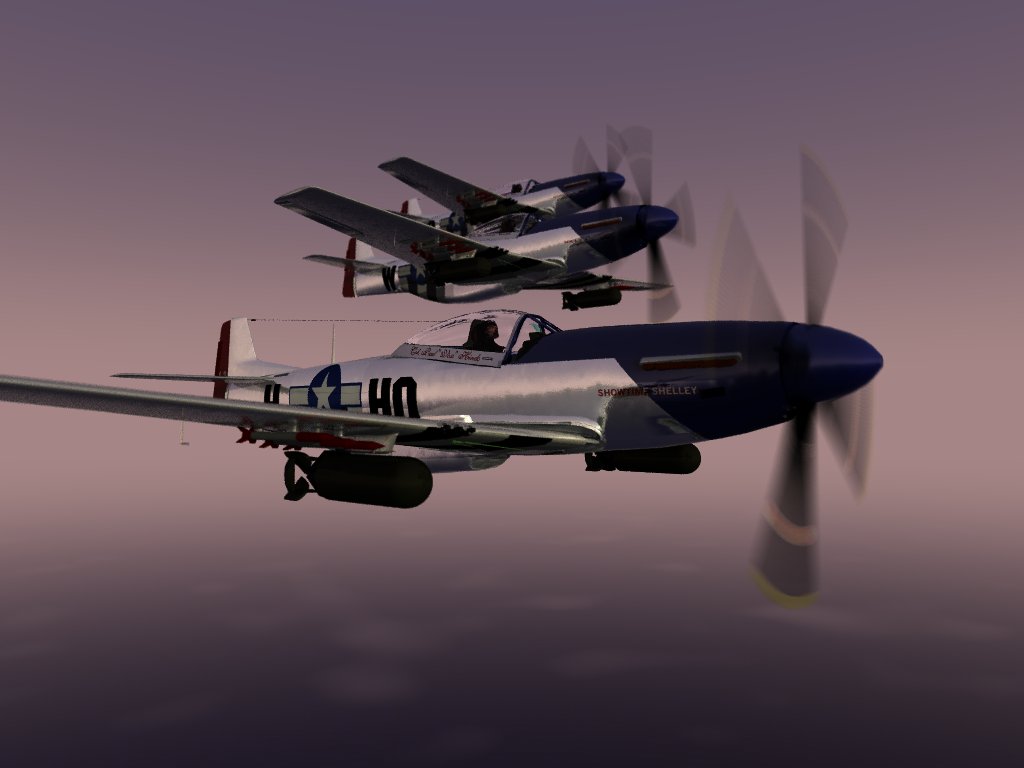
I haven't applied the rivets. Yet.
There are still a few other details which require attention.
What do you think? Is it getting there?

Grim
Post a reply to this message
Attachments:
Download 'Real51-2.jpg' (53 KB)
Preview of image 'Real51-2.jpg'
|
|
| |
| |
|
|
|
|
| |
| |
|
|
Very cool stuff.  I have to wonder about your 'jitter' setting though, is it
default of 1 or off or what?

Bob
Post a reply to this message
|
|
| |
| |
|
|
|
|
| |
| |
|
|
Probably just me, but the formation seems off, like they are to close
together. Also, cut small lines going up/down on the main body, so it
does not look like on piece of metal. Good job other wise...
Post a reply to this message
|
|
| |
| |
|
|
|
|
| |
| |
|
|
GrimDude wrote:
>
> I haven't applied the rivets. Yet.
> There are still a few other details which require attention.
> What do you think? Is it getting there?
>
> Grim
>
great modelling work! the bombs are a bit to black, some light from
below would be good.
IMO, the metal should be slightly more dull.
I really like the sky and the bottom clouds.
Christoph
--
Christoph Hormann <chr### [at] gmx de>
Homepage: http://www.schunter.etc.tu-bs.de/~chris/ de>
Homepage: http://www.schunter.etc.tu-bs.de/~chris/
Post a reply to this message
|
|
| |
| |
|
|
|
|
| |
| |
|
|
No offense but are the mustangs your own models or a Mesh?   if mesh
what was the beginning format and if your own how long did it take you
to get them the way they are now?


GrimDude wrote:

> I haven't applied the rivets. Yet.
> There are still a few other details which require attention.
> What do you think? Is it getting there?
>
> Grim
>
>  [Image]

--
"Don't give fish to the beggar, teach him how to fish"
Post a reply to this message
|
|
| |
| |
|
|
|
|
| |
| |
|
|
On Sun, 25 Jun 2000 02:45:42 -0500, "GrimDude" <vos### [at] yahoocom> wrote:

>I haven't applied the rivets. Yet.
>There are still a few other details which require attention.
>What do you think? Is it getting there?
>
>Grim
>
An excellent in-flight scene Grim. I think the formation looks very realistic.
The texture of the aluminum is good and with some lines of rivets will be even
better.

<nitpicking/on>
 The exhaust needs some detailing, and perhaps, as this is an evening/early
morning scene, an exhaust glow would enhance the realism. The jpg compression is
hurting things a bit and the aerial wire seems to be suffering from a lack of
aa.
Your fuselage appears to be too well rounded.  In my pictures of mustangs, the
fuselage has flattened sides around the engine and under the cockpit. (photo
attached) But apart from that it is very convincing.
<nitpicking/off>

I really like the atmosphere of your image please post some more!

David
dav### [at] hamiltonitecom
http://www.hamiltonite.com/
Post a reply to this message
Attachments:
Download 'Mustang1small.jpg' (8 KB)
Preview of image 'Mustang1small.jpg'

|
|
| |
| |
|
|
From: Bob Hughes
Subject: Re: MegaPov Mustang - Closeup ~58k BU - Mustang1small.jpg
Date: 25 Jun 2000 09:44:44
Message: <39560ccc@news.povray.org>
|
|
|
| |
| |
|
|
A truly superb render!  ;-)  Why can't GrimDude do this type of stuff!  j/k

Bob
Post a reply to this message
|
|
| |
| |
|
|
|
|
| |
| |
|
|
When you scroll across the screen the props. really look like they are
in motion...?

GrimDude wrote:

> I haven't applied the rivets. Yet.
> There are still a few other details which require attention.
> What do you think? Is it getting there?
>
> Grim
>
>  [Image]
Post a reply to this message
|
|
| |
| |
|
|
|
|
| |
| |
|
|
Interesting...

Grim
Post a reply to this message
|
|
| |
| |
|
|
|
|
| |
| |
|
|
> No offense but are the mustangs your own models or a Mesh?   if mesh
> what was the beginning format and if your own how long did it take you
> to get them the way they are now?
>

Why would I be offended? :)

I don't really understand your question, but...

I created the model in Truespace. I exported the model to .dxf form and
translated using WCVT2POV to .inc form. Separate entities (unions of
triangles) were conserved using this technique. I used MSWord to break the
individual unions into separate meshes. I work infrequently on this model
while 'playing' with various aspects of Pov and MegaPov. It has been a
little more then a year since I started on it. It took less then a day to
create the base form, but I have gone back and changed several things along
the way.

As David pointed out, there are still a few things I could improve upon.
From above and the sides the model is faithful to the original. Modifying
the 'sweep' as the the fuselage took form was not easily accomplished, so I
left some curvatures in place. If, I ever get good enough to use 'pure
Pov'...

I have compressed this conglomerate of meshes and saved a ton of disk space.
I may go back and 'straighten' a few things out before doing the panels, but
then again maybe not.

Grim
Post a reply to this message
|
|
| |
| |
|
|
|
|
| |
| |
|
|
> Very cool stuff.  I have to wonder about your 'jitter' setting though, is
it
> default of 1 or off or what?
>
> Bob
>
default of 1.

I used focal blur on this rendering, too. Just a touch, though.

Grim
Post a reply to this message
|
|
| |
| |
|
|
From: GrimDude
Subject: Re: MegaPov Mustang - Closeup ~58k BU - Mustang1small.jpg
Date: 26 Jun 2000 05:22:46
Message: <395720e6@news.povray.org>
|
|
|
| |
| |
|
|
Nitpicking? Heh...

I recreated the original 'booted' prop, which is not what your plane has ;)
'Candyman' must be an early 'D' model.

I tried recreating the fuselage in detail, but the tools in Truespace were
counter-intuitive to me, and proved too difficult. The program is buggy,
too, which adds to the aggrivation. I have another years' experience now,
though, and may try again. It is a lot of work, still.

I like the 'blinn' highlighting on your canopy! lol

Grim
Post a reply to this message
|
|
| |
| |
|
|
|
|
| |
| |
|
|
These guys always tuck it in real tight for photo opps ;)

Rivets = panels too.

Grim

"Lt. Kettch" <AKK### [at] aolcom> wrote in message
news:3955C42C.5C426782@aol.com...
> Probably just me, but the formation seems off, like they are to close
> together. Also, cut small lines going up/down on the main body, so it
> does not look like on piece of metal. Good job other wise...
>
Post a reply to this message
|
|
| |
| |
|
|
|
|
| |
| |
|
|
> Rivets = panels too.
>
>

Oh, sorry, I thought they were nuts and bolts.
Post a reply to this message
|
|
| |
| |
|
|
|
|
| |
| |
|
|
Hrm...

I haven't gotten , much into fasteners. I will probably use an
image_map(more then one certainly) for any visible external disturbances in
the aircraft's surface. I have recognized differences like stimples,
pop_rivets, rivets, and welds, as well as the flush mounts near the exhaust,
forward of the cockpit, etc.

This plane, like a lot of period aircraft, have a large number of stencils,
markings, and other surface features. I thought it (the P-51) an ample
example. :) If you look closely at the prop you may see two examples, and no
the tip is not one of them. ;)

I intend to replicate every piece of the original, and I'll probably work on
it for decades. ...not!

...however, I think most of the 'rivet lines' will be really easy to do,
though it will require a TON of code. I have 72 include files, so far. This
operation will probably require editing one of them. ;)

 Grim
"Lt. Kettch" <AKK### [at] aolcom> wrote in message
news:3957C37C.3529782B@aol.com...
>
>
> > Rivets = panels too.
> >
> >
>
> Oh, sorry, I thought they were nuts and bolts.
>
>
Post a reply to this message
|
|
| |
| |
|
|
|
|
| |
| |
|
|
"GrimDude" <vos### [at] yahoocom> wrote in message
news:39571f8e@news.povray.org...
| > Very cool stuff.  I have to wonder about your 'jitter' setting though, is
| it
| > default of 1 or off or what?
| >
| > Bob
| >
| default of 1.
|
| I used focal blur on this rendering, too. Just a touch, though.

Okay, thanks.  Now I wonder if 'jitter' is even used when 'focal_blur' is
used...?  Anyone know?

Bob
Post a reply to this message
|
|
| |
| |
|
|
|
|
| |
| |
|
|
> Okay, thanks.  Now I wonder if 'jitter' is even used when 'focal_blur' is
> used...?  Anyone know?
>
> Bob
>
>
It looks like the variance and confidence switches perhaps override jitter?
I would guess jitter is ignored in focal blur.

Grim
Post a reply to this message
|
|
| |
| |
|
|
|
|
| |
| |
|
|
"GrimDude" <vos### [at] yahoocom> wrote in message
news:3958fef0@news.povray.org...
| > Okay, thanks.  Now I wonder if 'jitter' is even used when 'focal_blur' is
| > used...?  Anyone know?
| >
| It looks like the variance and confidence switches perhaps override jitter?
| I would guess jitter is ignored in focal blur.

I think that's a fair assumption anyway.

Bob
Post a reply to this message
|
|
| |
| |
|
|
|
|
| |
| |
|
|
*more* detail?!
it's already approaching a photograph...

--
David Fontaine     <dav### [at] faricynet>     ICQ 55354965
Please visit my website: http://www.faricy.net/~davidf/
Post a reply to this message
|
|
| |
| |
|
|
|
|
| |
| |
|
|
GrimDude wrote:
>
> I haven't applied the rivets. Yet.
> There are still a few other details which require attention.
> What do you think? Is it getting there?

I think it has been getting there for a long time now but your
dedication to this project is nothing short of amazing.

--
Ken Tyler - 1400+ POV-Ray, Graphics, 3D Rendering, and Raytracing Links:
http://home.pacbell.net/tylereng/index.html http://www.povray.org/links/
Post a reply to this message
|
|
| |
| |
|
|
|
|
| |