|
|
|
|
|
|
| |
| |
|
|
|
|
| |
| |
|
|
As you all know, Nathan fixed noise3d in megapov 0.5 to get
rid of the plateau effect. But his fix makes for radically
different scenes (unless you modify your source to
compensate). I'm suggesting another way to fix it that makes
for much less difference in existing code.
Pros:
- the results are very similar to those of the old noise3d
making for easier adaptation (in particular, any scene made
with the original should render nearly the same unless it
relied on the plateau effect).
Cons:
- it's slightly slower
- the statistical distribution is heavily distorted (who
cares?)
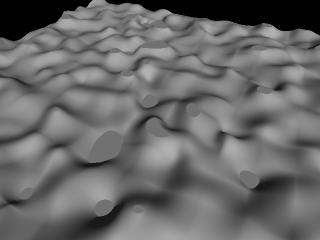
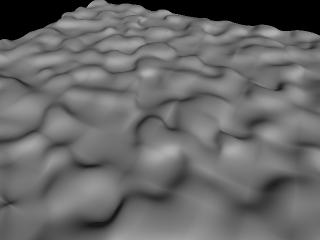
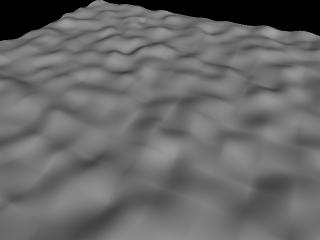
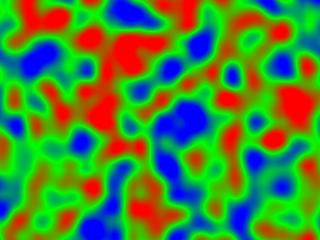
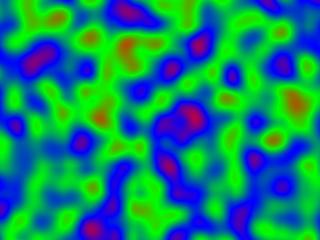
Attached are 3 pics:
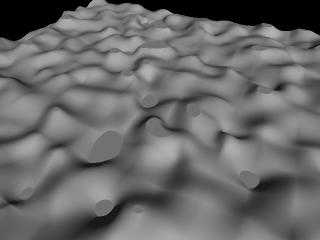
* noise3d isosurface rendered with megapov 0.4
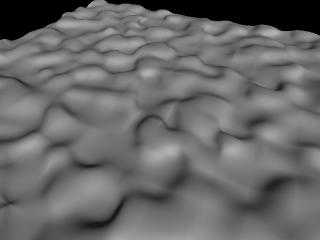
* the same rendered with my modified version of megapov 0.4
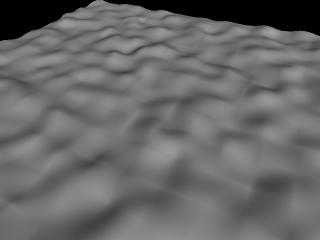
* the same rendered with megapov 0.5
What do you think?
Jerome
--
******************************* Jérôme M. BERGER
* Doctor Jekyll had something * mailto:ber### [at] iname com
* to Hyde... * http://www.enst.fr/~jberger
******************************* com
* to Hyde... * http://www.enst.fr/~jberger
*******************************
Post a reply to this message
Attachments:
Download 'noise1.jpg' (8 KB)
Download 'noise2.jpg' (7 KB)
Download 'noise3.jpg' (6 KB)
Preview of image 'noise1.jpg'
Preview of image 'noise2.jpg'
Preview of image 'noise3.jpg'
|
|
| |
| |
|
|
|
|
| |
| |
|
|
I think this clearly shows why clouds in paticular modeled in MP05 are too
soft. Someone suggested a colour map fix for density which helped. I shall
have to look up the message.

Mick

"Jerome" <ber### [at] inamecom> wrote in message
news:394F4E3B.17BA4A12@iname.com...
> As you all know, Nathan fixed noise3d in megapov 0.5 to get
> rid of the plateau effect. But his fix makes for radically
> different scenes (unless you modify your source to
> compensate). I'm suggesting another way to fix it that makes
> for much less difference in existing code.
>
> Pros:
> - the results are very similar to those of the old noise3d
> making for easier adaptation (in particular, any scene made
> with the original should render nearly the same unless it
> relied on the plateau effect).
>
> Cons:
> - it's slightly slower
> - the statistical distribution is heavily distorted (who
> cares?)
>
> Attached are 3 pics:
> * noise3d isosurface rendered with megapov 0.4
> * the same rendered with my modified version of megapov 0.4
> * the same rendered with megapov 0.5
>
> What do you think?
>
> Jerome
> --
> ******************************* Jérôme M. BERGER
> * Doctor Jekyll had something * mailto:ber### [at] inamecom
> * to Hyde...                  * http://www.enst.fr/~jberger
> *******************************


----------------------------------------------------------------------------
----


----------------------------------------------------------------------------
----


----------------------------------------------------------------------------
----
Post a reply to this message
|
|
| |
| |
|
|
|
|
| |
| |
|
|
Perhaps it would be a good keyword to go in global_settings?

Jerome wrote:

>         Attached are 3 pics:
> * noise3d isosurface rendered with megapov 0.4
> * the same rendered with my modified version of megapov 0.4
> * the same rendered with megapov 0.5
>
>         What do you think?
>
>                 Jerome
> --
> ******************************* Jérôme M. BERGER
> * Doctor Jekyll had something * mailto:ber### [at] inamecom
> * to Hyde...                  * http://www.enst.fr/~jberger
> *******************************
>
>   ------------------------------------------------------------------------
>  [Image]  [Image]  [Image]
Post a reply to this message
|
|
| |
| |
|
|
|
|
| |
| |
|
|
I like your fix much better... I miss the drastic affects made by the old
N3D... How does it work...? Will you be sharing the patch soon...?

Jerome wrote:

> As you all know, Nathan fixed noise3d in megapov 0.5 to get
> rid of the plateau effect. But his fix makes for radically
> different scenes (unless you modify your source to
> compensate). I'm suggesting another way to fix it that makes
> for much less difference in existing code.
>
> Pros:
> - the results are very similar to those of the old noise3d
> making for easier adaptation (in particular, any scene made
> with the original should render nearly the same unless it
> relied on the plateau effect).
>
> Cons:
> - it's slightly slower
> - the statistical distribution is heavily distorted (who
> cares?)
>
>         Attached are 3 pics:
> * noise3d isosurface rendered with megapov 0.4
> * the same rendered with my modified version of megapov 0.4
> * the same rendered with megapov 0.5
>
>         What do you think?
>
>                 Jerome
> --
> ******************************* Jérôme M. BERGER
> * Doctor Jekyll had something * mailto:ber### [at] inamecom
> * to Hyde...                  * http://www.enst.fr/~jberger
> *******************************
>
>   ------------------------------------------------------------------------
>  [Image]  [Image]  [Image]
Post a reply to this message
|
|
| |
| |
|
|
|
|
| |
| |
|
|
Why does this happen so often? Someone makes a (good) proposition and
everyone says that it's good, that they like it, that it's marvelous, that it's
better than the original, and so on and so on, and I am the only one who
dares to disagree with everyone else.

  Your solution certainly looks better than those flat plateaus, but in my
opinion it's not the right solution.
  The original noise3d generates smooth curves, where the curvature of the
surface is never too high. The fixed version on mp0.5 just scales the amplitude
of the curve so that it doesn't exceed the limits.
  You solution, however, changes the shape of the curve. It's not the same
function anymore. The curvature of the surface is very high in some places
making the shape different from the regular noise3d.

  Think about a simple example:
  Let's suppose that we have a sine curve which amplitude is for some reason
higher than 1 (like 1.2 or so). This generates a problem when the curve is
needed in a place where the amplitude should not exceed 1. The default solution
in povray is to clamp the values that are too high or too low.
  Now a fix is made so that the sine curve amplitude is lowered to 1. Now the
amplitude is lower, resulting in a visibly different result, but there's no
need to clamp anymore, so we get a perfect sine wave.
  Your fix (as far as I can deduce from the images) would be to keep the
wrong amplitude of the sine curve, but when it approaches 1 it's multiplied
with a correcting factor that lowers the highest parts of the curve so that
it fits under the amplitude of 1. This results in an apparently smooth curve,
but it's wrong in one sense: It's not a sine wave anymore. It doesn't have
the properties of the sine wave and the curvature of the curve is artificially
modified so that it breaks the original curvature. This new curve can't be
used as a sine wave anymore.
  The consecuences of your fix may not be as drastical as I made it sound, but
in my opinion it changes the function so much that it's not the same noise3d
function anymore, but it's a completely different function.
  It might sound a bit offending, but the fix is more or less a kludge.
  The correct way of fixing a buggy feature is make it right and change the
scene to use it in the right way.
  For example if a scene uses buggy normal modifier scaling in the wrong way,
the right solution is to change the scene to use it as it should and not
use the buggy version anymore.

  Of course your function looks good, but if it's added in megapov, in my
opinion it should be added with just another name, not noise3d.

  (Darn, how do I manage every time to sound so aggressive, so attacking?
My intention is not to attack you nor to say that I do not appreciate
your work; I just try to express my opinion, although I often fail to do it
in a way that doesn't sound so aggressive...)

--
main(i,_){for(_?--i,main(i+2,"FhhQHFIJD|FQTITFN]zRFHhhTBFHhhTBFysdB"[i]
):5;i&&_>1;printf("%s",_-70?_&1?"[]":" ":(_=0,"\n")),_/=2);} /*- Warp -*/
Post a reply to this message
|
|
| |
| |
|
|
|
|
| |
| |
|
|
On 21 Jun 2000 06:33:59 -0400, Warp <war### [at] tagpovrayorg> wrote:

>  It might sound a bit offending, but the fix is more or less a kludge.
>  The correct way of fixing a buggy feature is make it right and change the
>scene to use it in the right way.

I agree totally with this. Please, let's keep the new noise3d as it
is.

Perhaps someone would like to write some sort of utility or tutorial
for updating old texures to work better with the new noise3d? This is
what *should* be attempted, not "patching the patch."

Later,
Glen Berry

( Remove the "7" from 7no### [at] ezwvcom to email me. )
Post a reply to this message
|
|
| |
| |
|
|
|
|
| |
| |
|
|
Warp wrote:
> <rautalankaa> ... </rautalankaa>

I agree completely.


_______________________________________________________________________
Kari Kivisalo                                          www.kivisalo.net
Post a reply to this message
|
|
| |
| |
|
|
|
|
| |
| |
|
|
> My intention is not to attack you nor to say that I do not appreciate
> your work; I just try to express my opinion, although I often fail to do it
> in a way that doesn't sound so aggressive...)
>

You should perhaps put this in your signature instead of the code below
;).

Fabian.

> --
> main(i,_){for(_?--i,main(i+2,"FhhQHFIJD|FQTITFN]zRFHhhTBFHhhTBFysdB"[i]
> ):5;i&&_>1;printf("%s",_-70?_&1?"[]":" ":(_=0,"\n")),_/=2);} /*- Warp -*/
Post a reply to this message
|
|
| |
| |
|
|
|
|
| |
| |
|
|
Warp wrote:
>
> Lots of interesting stuff
>
	You're right, that's what I meant when I said that the
statistical distribution is heavily distorted. On the other
hand, does it matter so much since it is basically a random
function anyway? My correction ensures that the function
gets changed as little as possible (in value as well as in
slope) which has two advantages in my eyes:
* it's easier to use for those who are used to the old one
(and it doesn't change anything for the others);
* it gives more variation than Nathan's fix (ok, you can get
as much variation by using a color_map where it is possible,
but what about the way it changes other functions such as
ridged multifractal for example?)

	So I guess, my question is: both changes (mine and
Nathan's) have advantages and drawbacks, which would you
prefer to see included in pov? Or would you like to see both
with an option? (that would also allow to keep the old
noise3d) knowing that I think this option would have to
affect the whole scene...

		Jerome
PS:
> Your fix (as far as I can deduce from the images) would be to keep the
> wrong amplitude of the sine curve, but when it approaches 1 it's multiplied
> with a correcting factor that lowers the highest parts of the curve so that
> it fits under the amplitude of 1.
	You're basically right. I'd just like to add that the
change is continuous (so you won't see a line in your pic
with the old moise3d on one side and a scaled version on the
other).

--
******************************* Jérôme M. BERGER
* Doctor Jekyll had something * mailto:ber### [at] inamecom
* to Hyde...                  * http://www.enst.fr/~jberger
*******************************
Post a reply to this message
|
|
| |
| |
|
|
|
|
| |
| |
|
|
Please use my algorithm to compute the vol% vs. threshold for your new
function. See my algorithm at:

p.b.i

Subject: Volume fraction of noise3d vs threshold vs. mega version 39kbbu)
Date:    Thu, 18 May 2000 13:51:08 -0400

Jerome wrote:

> As you all know, Nathan fixed noise3d in megapov 0.5 to get
> rid of the plateau effect. But his fix makes for radically
> different scenes (unless you modify your source to
> compensate). I'm suggesting another way to fix it that makes
> for much less difference in existing code.
>
> Pros:
> - the results are very similar to those of the old noise3d
> making for easier adaptation (in particular, any scene made
> with the original should render nearly the same unless it
> relied on the plateau effect).
>
> Cons:
> - it's slightly slower
> - the statistical distribution is heavily distorted (who
> cares?)
>
>         Attached are 3 pics:
> * noise3d isosurface rendered with megapov 0.4
> * the same rendered with my modified version of megapov 0.4
> * the same rendered with megapov 0.5
>
>         What do you think?
>
>                 Jerome
> --
> ******************************* Jérôme M. BERGER
> * Doctor Jekyll had something * mailto:ber### [at] inamecom
> * to Hyde...                  * http://www.enst.fr/~jberger
> *******************************
>
>   ------------------------------------------------------------------------
>  [Image]  [Image]  [Image]
Post a reply to this message
|
|
| |
| |
|
|
|
|
| |
| |
|
|
Jerome <ber### [at] inamecom> wrote:
: * it's easier to use for those who are used to the old one
: (and it doesn't change anything for the others);

  Why should it be easier to make a (new) object with your function than with
the current function? I don't understand.

: * it gives more variation than Nathan's fix

  But is it a good thing? You say it as if it was an advantage, but I don't
see why it's that.
  AFAIK, what Nathan did was not to fix the function itself, but the scaling.
The function is exactly the same as before only that now the "amplitude" is
correct. So there was nothing wrong with the function itself and thus he
didn't fix anything about the function.
  As you said, if one want more variation it can be done with the color map.
What if one does NOT want more variation, but the old regular smooth noise3d?
I think it will be a bit hard to do with your function.

: 	So I guess, my question is: both changes (mine and
: Nathan's) have advantages and drawbacks

  Sorry, I don't see any drawbacks in the corrected noise3d in megapov.

, which would you
: prefer to see included in pov?

  I don't think they are mutually exclusive. Both could be included and
allowed to be used at the same time. The question is if it's needed.
  I still think that your function should be renamed if included.

  I don't see any need for this function to replace the current noise3d,
as well as I don't see any need for keeping the old buggy normal pattern
scale.

--
main(i,_){for(_?--i,main(i+2,"FhhQHFIJD|FQTITFN]zRFHhhTBFHhhTBFysdB"[i]
):5;i&&_>1;printf("%s",_-70?_&1?"[]":" ":(_=0,"\n")),_/=2);} /*- Warp -*/
Post a reply to this message
|
|
| |
| |
|
|
|
|
| |
| |
|
|
Warp wrote:
>
> Jerome <ber### [at] inamecom> wrote:
> : * it's easier to use for those who are used to the old one
> : (and it doesn't change anything for the others);
>
>   Why should it be easier to make a (new) object with your function than with
> the current function? I don't understand.
>
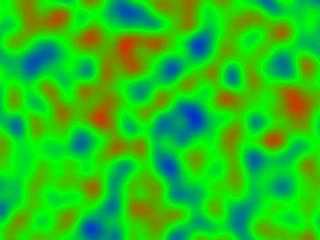
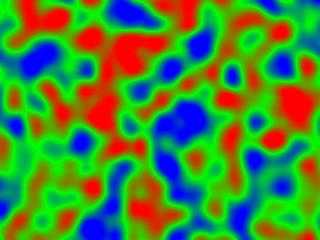
	Well, suppose you want to make an object with a bozo
pigment that goes from red to green to blue, you would
naturally tend to use a color_map like this:
{
  [ 0.0 color Red ]
  [ 0.5 color Green ]
  [ 1.0 color Blue ]
}

	With standard pov (or my patch), it gives what you expect,
but in megapov 0.5 the result is mostly green. Granted, you
*can* use a different color_map to get the same effect, but
you need to know how to change it.

> : * it gives more variation than Nathan's fix
>
>   But is it a good thing? You say it as if it was an advantage, but I don't
> see why it's that.
	Look at the attached pics...

>   AFAIK, what Nathan did was not to fix the function itself, but the scaling.
> The function is exactly the same as before only that now the "amplitude" is
> correct. So there was nothing wrong with the function itself and thus he
> didn't fix anything about the function.
	He did exactly the same thing I did: he took the result
from the old function before it is truncated and applied a
transformation to it (other than truncating) to force the
result to be between 0 and 1. The only differece between his
patch and mine is that he applied a linear transform and I
applied a non-linear one.

>   As you said, if one want more variation it can be done with the color map.
> What if one does NOT want more variation, but the old regular smooth noise3d?
	Regular and smooth? Mine is as regular and smooth as the
old one and has as much variation as the old one, whereas
Nathan's has less and therefore is more different from the
old one than mine...

> I think it will be a bit hard to do with your function.
	You can do it with mine by changing the color_map too (or
by using a function pigment). On the other hand, once you've
finally mastered the parameters to make a ridged
multifractal mountain range, you won't like it if you're
told that you need to start over because some change in the
bozo pattern (which you don't use) radically alters your
mountain (as posted by somebody recently).

>
> :       So I guess, my question is: both changes (mine and
> : Nathan's) have advantages and drawbacks
>
>   Sorry, I don't see any drawbacks in the corrected noise3d in megapov.
	The statistical distribution is very much in favor of the
middle-range values (around 0.5) to the exclusion of the
others (near 0 or 1). This results in the megapov 0.5 sample
to be mostly green while the color_map tends to suggest
something more evenly distributed.

>
> , which would you
> : prefer to see included in pov?
>
>   I don't think they are mutually exclusive. Both could be included and
> allowed to be used at the same time. The question is if it's needed.
	I agree.

>   I still think that your function should be renamed if included.
	I disagree, mine has no more reason to be renamed then
Nathan's. (actually, I think it has less reason to be
renamed since it gives nearly the same results than the
old). Moreover, noise3d is used in a *lot* of places (and
not just in isosurfaces) like bozo, bumps, spotted, ridged
multifractals... Remember that the noise3d function was in
povray long before the function patch allowed the user to
have direct access to it. Therefore simply renaming the
function won't work anyway. The easiest way to allow the
user to choose is with a global_settings parameter (which is
very similar to the way megapov 0.5 chooses between old and
new noise3d according to the version number). I'm not sure
how you could go about implementing the choice on a
per-object (or pattern) basis so that it works in *all*
instances where noise3d is used.

		Jerome
--
******************************* Jérôme M. BERGER
* Doctor Jekyll had something * mailto:ber### [at] inamecom
* to Hyde...                  * http://www.enst.fr/~jberger
*******************************
Post a reply to this message
Attachments:
Download 'noise3d.jpg' (10 KB)
Download 'noise3d1.jpg' (13 KB)
Preview of image 'noise3d.jpg'
Preview of image 'noise3d1.jpg'
|
|
| |
| |
|
|
|
|
| |
| |
|
|
Greg M. Johnson wrote:
>
> Please use my algorithm to compute the vol% vs. threshold for your new
> function. See my algorithm at:
>
> p.b.i
>
> Subject: Volume fraction of noise3d vs threshold vs. mega version 39kbbu)
> Date:    Thu, 18 May 2000 13:51:08 -0400
>
	I've downloaded it and I'll check it. I'll post the results
later this week.

		Jerome
--
******************************* Jérôme M. BERGER
* Doctor Jekyll had something * mailto:ber### [at] inamecom
* to Hyde...                  * http://www.enst.fr/~jberger
*******************************
Post a reply to this message
|
|
| |
| |
|
|
|
|
| |
| |
|
|
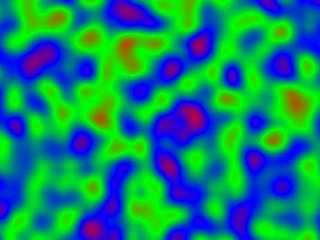
Maybe I should have precised: the first image is megapov
0.5, the second one is standard pov. I don't have my patch
at hand here, but I'll post its results later this week.

		Jerome
--
******************************* Jérôme M. BERGER
* Doctor Jekyll had something * mailto:ber### [at] inamecom
* to Hyde...                  * http://www.enst.fr/~jberger
*******************************
Post a reply to this message
|
|
| |
| |
|
|
|
|
| |
| |
|
|
Jerome <ber### [at] inamecom> wrote:
: 	Well, suppose you want to make an object with a bozo
: pigment that goes from red to green to blue, you would
: naturally tend to use a color_map like this:
: {
:   [ 0.0 color Red ]
:   [ 0.5 color Green ]
:   [ 1.0 color Blue ]
: }

: 	With standard pov (or my patch), it gives what you expect,
: but in megapov 0.5 the result is mostly green.

  But the latter _is_ the correct behaviour.
  Think about the color map:
  From 0 to 0.25 the red component is predominant (ie. it's larger than the
other components), from 0.25 to 0.75 the green component is predominant and
from 0.75 to 1 the blue is predominant.
  This means that 50% of the pigment should be predominatly green, 25% red
and 25% blue.
  Thus, having the result mostly green is the correct behaviour and should
be expected. This should happen with every pattern that has even distribution.

  If you want each color component to cover the same percentage of the pigment,
you'll have to set it up so that each of them gets 33.33% of it. For example:

  [ 0/3 rgb Red ]
  [ 1/3 rgb Green ]
  [ 2/3 rgb Blue ]
  [ 3/3 rgb Red ]

  Now you have an equal amount of each color (ie. 33.33% of each). This should
work with every pattern which has even distribution.

  This also means that your pattern does NOT have even distribution, but
prefers some values more than others.

: 	He did exactly the same thing I did: he took the result
: from the old function before it is truncated and applied a
: transformation to it (other than truncating) to force the
: result to be between 0 and 1. The only differece between his
: patch and mine is that he applied a linear transform and I
: applied a non-linear one.

  Multiplying the function with a scalar only changes its amplitude, not
its shape. Your non-linear transformation makes it a completely different
function.

: 	Regular and smooth? Mine is as regular and smooth as the
: old one and has as much variation as the old one

  Nope. The curvature of the surface in some places is higher in your
function than in the old one (if we don't count the plateaus produced by
the clamping). This makes it less smooth.
  A sphere is smoother than an ellipsoid.

, whereas
: Nathan's has less and therefore is more different from the
: old one than mine...

  Nathan's function is _exactly_ the same as the old one. Only the amplitude
has changed.
  A sine wave does not stop being a sine wave if we multiply it by a scalar.
However if we make a non-uniform transform to it, then it stops being a
sine wave.

: 	The statistical distribution is very much in favor of the
: middle-range values

  As I said that happened only because your color_map was in favor of the
green value (50%) and not the others (25% each).

:>   I still think that your function should be renamed if included.
: 	I disagree, mine has no more reason to be renamed then
: Nathan's.

  Wrong. Nathan's fix did not change the function. Yours did. Your function
is thus a different one.

--
main(i,_){for(_?--i,main(i+2,"FhhQHFIJD|FQTITFN]zRFHhhTBFHhhTBFysdB"[i]
):5;i&&_>1;printf("%s",_-70?_&1?"[]":" ":(_=0,"\n")),_/=2);} /*- Warp -*/
Post a reply to this message
|
|
| |
| |
|
|
|
|
| |
| |
|
|
Warp wrote:
>
>   If you want each color component to cover the same percentage of the pigment,
> you'll have to set it up so that each of them gets 33.33% of it. For example:
>
>   [ 0/3 rgb Red ]
>   [ 1/3 rgb Green ]
>   [ 2/3 rgb Blue ]
>   [ 3/3 rgb Red ]
>
>   Now you have an equal amount of each color (ie. 33.33% of each). This should
> work with every pattern which has even distribution.
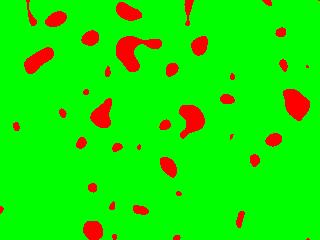
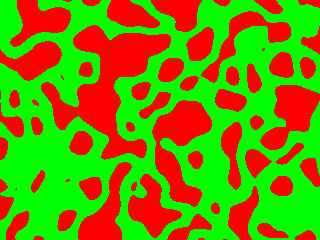
>
	See the attached result: there is much less red than any of
the others, so this isn't the correct behavior either...

>   Multiplying the function with a scalar only changes its amplitude, not
> its shape. Your non-linear transformation makes it a completely different
> function.
>
	Both make it a completely different function then. The only
meaningful way yet devised to compute how much two function
f and g differ is to integrate abs(f()-g()) (or some
variants involving exposants). Using that distance, my
function is less different than Nathan's from either the
truncated or the non truncated original functions

>   Nope. The curvature of the surface in some places is higher in your
> function than in the old one (if we don't count the plateaus produced by
> the clamping). This makes it less smooth.
>   A sphere is smoother than an ellipsoid.
>
	You can't really talk about the curvature of a function
that goes from 3D space to 1D... If you want to speak about
the curvature of the isosurfaces of this function, they are
the same as for the old one (possibly less but certainly not
more) and Nathan's has the same behavior too. If you want to
speak about the second order derivatives, I agree that mine
can be more than the non-truncated function but not by much
whereas Nathan's are *a lot* less...

>   Nathan's function is _exactly_ the same as the old one. Only the amplitude
> has changed.
	See above...

>   A sine wave does not stop being a sine wave if we multiply it by a scalar.
> However if we make a non-uniform transform to it, then it stops being a
> sine wave.
	That's only a matter of the way a sine-wave has been
defined. Add two polynomials and you get a polynomial, add
two sine waves and you won't always get a sine-wave. Noise3d
is neither a sine-wave (nor a polynomial) so you can't apply
the same rules to it (for example add two noise3ds, what do
you get? I think you get another noise3d, so the strict sine
wave rules don't apply).

>   As I said that happened only because your color_map was in favor of the
> green value (50%) and not the others (25% each).
>
	The attached pic uses the color_map which you said was
evenly distributed and yet the red is not very present.
Again, I say that Nathan's function is biased towards the
middle values (I'll concede that mine and the old one are
probably biased towards the sides, but Nathan's is no more
correct)

>   Wrong. Nathan's fix did not change the function. Yours did. Your function
> is thus a different one.
	Again, I say that my function is no more different than
Nathan's and probably even less so.

	This isn't going anywhere. I think we should define what
exactly we expect from a noise3d function before we can
start arguing over which one does it better (or whether we
should change it completely). My goal was to change the
original function (plateaus and all) as little as possible
while getting rid of the plateaus, and in this regard it
obviously succeded better than Nathan's. But if we don't
decide first on what the correct behavior should be (without
relation to the old one since the plateaus obviously weren't
correct behavior) we can't really argue over wich is
better...

		Jerome
--
******************************* Jérôme M. BERGER
* Doctor Jekyll had something * mailto:ber### [at] inamecom
* to Hyde...                  * http://www.enst.fr/~jberger
*******************************
Post a reply to this message
Attachments:
Download 'noise3d.jpg' (12 KB)
Preview of image 'noise3d.jpg'
|
|
| |
| |
|
|
|
|
| |
| |
|
|
Jerome wrote:
>
> Greg M. Johnson wrote:
> >
> > Please use my algorithm to compute the vol% vs. threshold for your new
> > function. See my algorithm at:
> >
> > p.b.i
> >
> > Subject: Volume fraction of noise3d vs threshold vs. mega version 39kbbu)
> > Date:    Thu, 18 May 2000 13:51:08 -0400
> >
>         I've downloaded it and I'll check it. I'll post the results
> later this week.
>
	Mumble, grumble, damn floppy! When I got home the file was
empty... I'll try again :(

		Jerome
--
******************************* Jérôme M. BERGER
* Doctor Jekyll had something * mailto:ber### [at] inamecom
* to Hyde...                  * http://www.enst.fr/~jberger
*******************************
Post a reply to this message
|
|
| |
| |
|
|
|
|
| |
| |
|
|
In article <395888ED.2795AED3@iname.com>, Jerome <ber### [at] inamecom>
wrote:

> 	See the attached result: there is much less red than any of
> the others, so this isn't the correct behavior either...

What waveform are you using? You should be using ramp_wave if you want
to compare this sort of thing. Other waveforms will throw it off, I
think the default for bozo is sine_wave.


> 	Both make it a completely different function then. The only
> meaningful way yet devised to compute how much two function
> f and g differ is to integrate abs(f()-g()) (or some
> variants involving exposants). Using that distance, my
> function is less different than Nathan's from either the
> truncated or the non truncated original functions

No. The function is the same, only the amplitude is different. It is the
same function. Your function is different, and has a very different
distribution. The only reason it resembles the original in any way is
that the original was faulty.


> 	The attached pic uses the color_map which you said was
> evenly distributed and yet the red is not very present.

Did you use ramp_wave?


> Again, I say that Nathan's function is biased towards the
> middle values (I'll concede that mine and the old one are
> probably biased towards the sides, but Nathan's is no more
> correct)

Nathan's *is* more correct, because it fixes the clipping without
introducing a bias toward the sides. When designing an isosurface using
noise3d() or a pigment function, I expect a nice, fairly linear
function. I often couldn't get the right effect because of the sudden
"clipping" of the old noise3d(), your function would have a similar
(though not as severe) problem. The same goes when I am designing
textures.
Anyway, this looks like it would be better implemented as a pattern
waveform...it sounds like it will work for any values in the 0-1 range.
You could also adjust the "flatness" of the ends this way. And I don't
think the "problems" with functions like multifractals are really as
severe as you say...people won't have to re-learn them, just adapt to
the new, corrected noise3d(). Or use #version.

--
Christopher James Huff - Personal e-mail: chr### [at] maccom
TAG(Technical Assistance Group) e-mail: chr### [at] tagpovrayorg
Personal Web page: http://homepage.mac.com/chrishuff/
TAG Web page: http://tag.povray.org/
Post a reply to this message
|
|
| |
| |
|
|
|
|
| |
| |
|
|
I'd like to have all versions avalaible, with no #version switch necessary.
Either using different names (bumps, bumps2, bumps3, koppbumps, jeromebumps)
or using a "type" keyword {bumps{type 2}}.
Post a reply to this message
|
|
| |
| |
|
|
|
|
| |
| |
|
|
"Philippe Debar" <phi### [at] hotmailcom> wrote in message
news:3959eb9c$1@news.povray.org...
| I'd like to have all versions avalaible, with no #version switch necessary.
| Either using different names (bumps, bumps2, bumps3, koppbumps, jeromebumps)
| or using a "type" keyword {bumps{type 2}}.

<repetition>
Hmm, and others might call that scripting clutter to have so many keywords
which are basically the same thing having personal distinctions about how they
ought to work.  Not that I'm against more additions or anything, just that
there must be a correct way and incorrect way a feature works.  For instance
you wouldn't want two 'color' keywords, one that is the way it is now and
another that inverts the rgb into bgr?
Sorry, I realize I'm chiseling at a valid point you're making.  The various
ways everything is done should be within reason or it would be out of control
I believe.  Priority needs to go to physical correctness and I have no qualms
about that, even if the breaking of old scenes is caused.  All this has been
rehashed again and again, sorry for this redundant message.
All keywords being able work together would mean a consolidation of the
programs source I guess.  Maybe that could be something planned for version
4.0 at least.  Just as long as there isn't straggler code in it like
acceptance of POV-Ray 1.0 or 2.0 syntax.  '#version' is obviously only a
compatibility feature, having no redeeming value other than to confine parts
of source code to their respective areas.  Anyway, I'm only interested in all
of this from afar, it's not something I know about from the inside.

Bob
</repetition>
Post a reply to this message
|
|
| |
| |
|
|
|
|
| |
| |
|
|
Greg M. Johnson wrote:
>
> Please use my algorithm to compute the vol% vs. threshold for your new
> function. See my algorithm at:
>
	I've done it, I get exactly the same results with my
changes than the standard version.

		Jerome
--
******************************* Jérôme M. BERGER
* Doctor Jekyll had something * mailto:ber### [at] inamecom
* to Hyde...                  * http://www.enst.fr/~jberger
*******************************
Post a reply to this message
|
|
| |
| |
|
|
|
|
| |
| |
|
|
Chris Huff wrote:
>
> What waveform are you using? You should be using ramp_wave if you want
> to compare this sort of thing. Other waveforms will throw it off, I
> think the default for bozo is sine_wave.
>
	I used the default, but there were no changes when I
specified ramp_wave...

> No. The function is the same, only the amplitude is different. It is the
> same function. Your function is different, and has a very different
> distribution. The only reason it resembles the original in any way is
> that the original was faulty.
>
	From the instant the values taken by the function is
different, then it is a different function, period. It may
be in the same class of functions but it's not the same.
Sine-waves are a class of function that have certain
properties, polynomials are another with different
properties and so are C0, C1, C2... Noise3d is *not* a
sine-wave, so what properties should it have?

> >       The attached pic uses the color_map which you said was
> > evenly distributed and yet the red is not very present.
>
> Did you use ramp_wave?
>
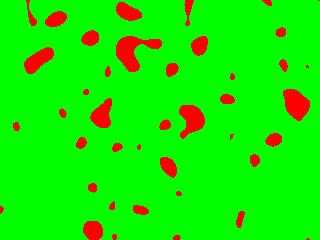
	I did, and I've attached another:
  pigment {
    bozo
    color_map {
      [ 1/4 color rgb <1, 0, 0> ]
      [ 1/4 color rgb <0, 1, 0> ]
      [ 3/4 color rgb <0, 1, 0> ]
      [ 3/4 color rgb <1, 0, 0> ]
    }
    ramp_wave
  }
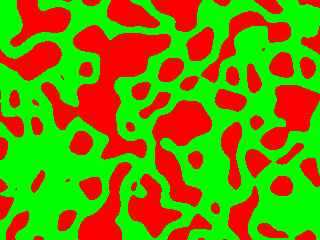
	Which should be equally distributed too, shouldn't it? (the
standard pattern does much better in that respect, see the
second image)

> Nathan's *is* more correct, because it fixes the clipping without
> introducing a bias toward the sides.
	It introduced a bias towards the middle... Now, I can
probably adapt mine to get a more evenly distributed effect
(but I probably won't have time before the end of next week)

> When designing an isosurface using
> noise3d() or a pigment function, I expect a nice, fairly linear
> function. I often couldn't get the right effect because of the sudden
> "clipping" of the old noise3d(), your function would have a similar
> (though not as severe) problem. The same goes when I am designing
> textures.
	What do you mean by fairly linear?

> Anyway, this looks like it would be better implemented as a pattern
> waveform...it sounds like it will work for any values in the 0-1 range.
	In fact it works with anything in the minus infinity - plus
infinity range, which is exactly the point since it's used
to bring the values that are outside the 0-1 range inside
it.

> You could also adjust the "flatness" of the ends this way. And I don't
> think the "problems" with functions like multifractals are really as
> severe as you say...people won't have to re-learn them, just adapt to
> the new, corrected noise3d().
	Which is exactly what I meant, it's hard enough to find the
right parameters for the effect you want, if everything you
learned by trying to adjust the parameters stops working
because the function was radically altered, you lose a lot
of time.

> Or use #version.
>
	#version shouldn't be used that way. #version should only
be used to render old scenes that were written for a former
version of pov. The correct way if we want to allow several
noises to coexist is to add a keyword to choose.

		Jerome

PS: I keep asking for your criteria for the noise3d, but I
didn't give mine... Here they are:
- it should be at least C1 (continuously derivable);
- its gradient should be majored (to avoid too abrupt
changes);
- its gradient should be minored (to guarantee some change);
- it should be relatively evenly distributed
	Both Nathan's and mine verify all four criteria. Standard
isn't C1. However I think mine does better on the 3rd and
4th point...

PS2: Does anybody know why the original noise was clipped
rather than being scaled (like Nathan did) or any other
continuous transform? My guess (and it *is* just a guess, I
haven't got a scrap of evidence) would be that it was to
ensure a reasonably even distribution (and anyway the
clipping wasn't really a problem for the bozo pigment...)
Anybody has more info?

--
******************************* Jérôme M. BERGER
* Doctor Jekyll had something * mailto:ber### [at] inamecom
* to Hyde...                  * http://www.enst.fr/~jberger
*******************************
Post a reply to this message
Attachments:
Download 'noise3d.jpg' (9 KB)
Download 'stdnoise3d.jpg' (12 KB)
Preview of image 'noise3d.jpg'
Preview of image 'stdnoise3d.jpg'
|
|
| |
| |
|
|
|
|
| |
| |
|
|
In article <395B382C.6739148A@iname.com>, Jerome <ber### [at] inamecom>
wrote:

> > Anyway, this looks like it would be better implemented as a pattern
> > waveform...it sounds like it will work for any values in the 0-1 range.
> 	In fact it works with anything in the minus infinity - plus
> infinity range, which is exactly the point since it's used
> to bring the values that are outside the 0-1 range inside
> it.

What is the exact math you are using? I am interested in adapting this
as a waveform...there are a few other patterns that could use something
like this. My blob pattern for instance.


> PS2: Does anybody know why the original noise was clipped
> rather than being scaled (like Nathan did) or any other
> continuous transform? My guess (and it *is* just a guess, I
> haven't got a scrap of evidence) would be that it was to
> ensure a reasonably even distribution (and anyway the
> clipping wasn't really a problem for the bozo pigment...)

My guess is that they didn't know how much it went out of range, and
just used clipping as a temporary workaround. Or they didn't notice it
went out of range until it was already released...it mostly shows up in
fine-tuned textures, height fields, and isosurfaces. Too bad...it has
certainly caused enough trouble since then. :-(

--
Christopher James Huff - Personal e-mail: chr### [at] maccom
TAG(Technical Assistance Group) e-mail: chr### [at] tagpovrayorg
Personal Web page: http://homepage.mac.com/chrishuff/
TAG Web page: http://tag.povray.org/
Post a reply to this message
|
|
| |
| |
|
|
|
|
| |
| |
|
|
> What is the exact math you are using? I am interested in adapting this
> as a waveform...there are a few other patterns that could use something
> like this. My blob pattern for instance.
>
	atan(x*M_PI_2)/M_PI_2

	Everything is brought into the [-1, 1] range. Order is
preserved and it is very near identity around 0...

		Jerome
--
******************************* Jérôme M. BERGER
* Doctor Jekyll had something * mailto:ber### [at] inamecom
* to Hyde...                  * http://www.enst.fr/~jberger
*******************************
Post a reply to this message
|
|
| |
| |
|
|
|
|
| |
| |
|
|
This thread has been turned into an almost-flame-war when discussing about
which method is better.
  I would like to give an additional point of view besides the ones I have
already made. And it's related to those images.
  If we think about it, the regular noise3d gives smooth bumps and it can be
used, for example, to get a water surface with little waves. I have used
bozo (which uses the noise3d function) many times when making water.
  The noise3d in the official povray is scaled too big, so it has been scaled
correctly in megapov. Noise3d can still be used to get the same water effect
than before, but without the possible plateaus.
  Your patch, however, tries to keep the height of the original noise3d but
"smoothing" those plateaus. This, of course, changes the smoothness of the
function.
  Now tell me honestly: Which one of those images, the second or the third,
looks better if you think about it as a water surface?
  If you are completely honest, you will admit that the third image has
preserved better this feature of the noise3d function. If you imagine the
second image as a water surface, it looks quite unnatural, while the third
image looks much better.
  If it was unclear to you what are the (or my) requisites for noise3d, this
should give an idea of it.

--
main(i,_){for(_?--i,main(i+2,"FhhQHFIJD|FQTITFN]zRFHhhTBFHhhTBFysdB"[i]
):5;i&&_>1;printf("%s",_-70?_&1?"[]":" ":(_=0,"\n")),_/=2);} /*- Warp -*/
Post a reply to this message
|
|
| |
| |
|
|
|
|
| |
| |
|
|
"Warp" <war### [at] tagpovrayorg> wrote in message news:395b531e@news.povray.org...
|  Which one of those images, the second or the third,
| looks better if you think about it as a water surface?

I wasn't asked, directly anyway, but I have to agree that Jerome's method is
different and that the most water-worthy is the currently used noise3d in
MegaPov, plus a little scaling up of y and not x and z.
It really comes down to the wire when you need a definition of what noise3d is
actually supposed to be in the first place, which I assume is a common pattern
algorithm(?).  A quick search and I found a web page listing many patterns:
http://www.cinegrfx.com/tour/opbox-descriptions/Patterns.html  for a program
called GenShade which outputs shaders for Renderman, BMRT... too bad they
don't list the equations  :-)
Anyhow, I have to say that the "bump-like" quality of Jerome's patch is a
different animal--- for all I know about it, which is nothing.  noise3d seems
to be soley based on fairly even-sloping undulation.

Bob
Post a reply to this message
|
|
| |
| |
|
|
|
|
| |
| |
|
|
"Bob Hughes" <per### [at] aolcom?subject=PoV-News:> wrote in message
news:395a1633@news.povray.org...
> Hmm, and others might call that scripting clutter to have so many keywords
> which are basically the same thing having personal distinctions about how
they
> ought to work. Not that I'm against more additions or anything, just that
> there must be a correct way and incorrect way a feature works.

I perceive the mathematical correctness you refer to, but in this case that
has nothing to do with what you do with the pattern. The way I see things,
there is no "correct" way to behave for patterns/functions : they are just
tools you use to model. The more tools you have, the better (but I prefer
one tool with much flexibility to a clutter of near identical specialised
ones). Even for features for which physical/mathematical correctness is
important (imho), like highlights, lighting model or radiosity, some variety
is good.

Now, there is one thing I do not know and which may invalidate to my own
eyes what I just wrote : is bumps a standard keyword/function with a
excepted and well defined behaviour in the cg world? If so, it would be
better if the bumps keyword was reserved for that behaviour. Otoh, modifiers
or other keywords would still be a bonus for other sorts of bumps.


> For instance
> you wouldn't want two 'color' keywords, one that is the way it is now and
> another that inverts the rgb into bgr?

<g> there are two color keywords : "color" & "colour" </g>
I think there is a very important difference here : if someone has a bgr
colour, he does not have much work to do to use the standard (in pov and in
the cg world) rgb colour; but I do not know how one could easily use
Megapov's corrected bumps to make a pov's bumps or a Jerome's bumps.


> Sorry, I realize I'm chiseling at a valid point you're making.

mmh
So am I, so am I.


> The various
> ways everything is done should be within reason or it would be out of
control
> I believe. Priority needs to go to physical correctness and I have no
qualms
> about that, even if the breaking of old scenes is caused. All this has
been
> rehashed again and again, sorry for this redundant message.

Many things are rehashed forever, and people do not seem to bore (I speak of
people as a whole, not of particular individuals). (Things like art, death,
beauty, moral, gun control, God(s), MSWindows vs. Linux, bumps, ...)


> All keywords being able work together would mean a consolidation of the
> programs source I guess. Maybe that could be something planned for version
> 4.0 at least. Just as long as there isn't straggler code in it like
> acceptance of POV-Ray 1.0 or 2.0 syntax. '#version' is obviously only a
> compatibility feature, having no redeeming value other than to confine
parts
> of source code to their respective areas. Anyway, I'm only interested in
all
> of this from afar, it's not something I know about from the inside.

My own <repetition> I still think that Pov could use some syntax rewritings
</repetition>.


Povingly,

Philippe
Post a reply to this message
|
|
| |
| |
|
|
|
|
| |
| |
|
|
In article <395b6115@news.povray.org>, "Philippe Debar"
<phi### [at] hotmailcom> wrote:

> I perceive the mathematical correctness you refer to, but in this
> case that has nothing to do with what you do with the pattern. The
> way I see things, there is no "correct" way to behave for
> patterns/functions...

Well, the problem with the old noise3d() and bozo was that it was that
the plateaus were limiting their usefulness in isosurfaces, height
fields, normals, etc.


> ...is bumps a standard keyword/function with a excepted and well
> defined behaviour in the cg world? If so, it would be better if the
> bumps keyword was reserved for that behaviour.

"bumps" isn't standard, but this type of noise is a commonly used
feature.
However, it isn't a standard. As far as I know, the only requirement is
that it is a pseudo-random smoothly changing function which is
relatively uniform at large scales.


> ...I do not know how one could easily use Megapov's corrected bumps
> to make a pov's bumps or a Jerome's bumps.

Just extend the colors at each end of the color_map(compressing the
other values toward the center), so there is an area of flat color at
each end, and you will end up with plateaus just like the official
version's. Making it more like Jerome's would be a bit more work, but I
think it could be done easily as a waveform or isosurface function.


> Many things are rehashed forever, and people do not seem to bore (I
> speak of people as a whole, not of particular individuals). (Things
> like art, death, beauty, moral, gun control, God(s), MSWindows vs.
> Linux, bumps, ...)

You forgot MSWindows vs. Macintosh. And the meaning of the answer to the
Ultimate Question. :-)


> My own <repetition> I still think that Pov could use some syntax
> rewritings </repetition>.

You are not alone...I would prefer a completely different way of
layering textures, and a slightly different syntax for
patterns...#for(;;) loops, #set, etc would also be nice.

--
Christopher James Huff - Personal e-mail: chr### [at] maccom
TAG(Technical Assistance Group) e-mail: chr### [at] tagpovrayorg
Personal Web page: http://homepage.mac.com/chrishuff/
TAG Web page: http://tag.povray.org/
Post a reply to this message
|
|
| |
| |
|
|
|
|
| |
| |
|
|
"Philippe Debar" <phi### [at] hotmailcom> wrote in message
news:395b6115@news.povray.org...
|
| > For instance
| > you wouldn't want two 'color' keywords, one that is the way it is now and
| > another that inverts the rgb into bgr?
|
| <g> there are two color keywords : "color" & "colour" </g>

You cornered me on that one  :-)

| My own <repetition> I still think that Pov could use some syntax rewritings
| </repetition>.

Sigh.  No doubt all the more as time goes on.  I'm content to try any changes,
but I'll never hack at the POV-Ray source code to make changes like 'phong'
into "gloss" and 'phong_size' into "gloss_size" ever again.  That was pretty
bad having to change a lot of my previously done scenes and break so many
others.

Bob
Post a reply to this message
|
|
| |
| |
|
|
|
|
| |
| |
|
|
Bob Hughes wrote:

> It really comes down to the wire when you need a definition of what noise3d is
> actually supposed to be in the first place, which I assume is a common pattern
> algorithm(?).  A quick search and I found a web page listing many patterns:
> http://www.cinegrfx.com/tour/opbox-descriptions/Patterns.html  for a program
> called GenShade which outputs shaders for Renderman, BMRT... too bad they
> don't list the equations  :-)

noise3d is commonly reffered to as "perlin noise". You can find a good
description of it at Hugo's site -

http://freespace.virgin.net/hugo.elias/models/m_perlin.htm

A web search will un doubtably return other good results. If you are
really interested in noise functions I also recomment searching through
the RTNews archives at -

http://www.acm.org/tog/resources/RTNews/html/

--
Ken Tyler - 1400+ POV-Ray, Graphics, 3D Rendering, and Raytracing Links:
http://home.pacbell.net/tylereng/index.html http://www.povray.org/links/
Post a reply to this message
|
|
| |
| |
|
|
|
|
| |
| |
|
|
Thanks Ken... I think.  Guess using "noise3d" alone as a search keyword wasn't
so great an idea before or I just didn't look long enough.

Bob
Post a reply to this message
|
|
| |
| |
|
|
|
|
| |
| |
|
|
Ken wrote in message <395B9350.2299A357@pacbell.net>...
>noise3d is commonly reffered to as "perlin noise". You can find a good
>description of it at Hugo's site -


noise3d is actually a single octave of perlin noise.  True perlin noise is
the sum of several sets of differently-scaled noise3d.

Mark
Post a reply to this message
|
|
| |
| |
|
|
|
|
| |
| |
|
|
Warp wrote:
>
>   Now tell me honestly: Which one of those images, the second or the third,
> looks better if you think about it as a water surface?
>   If you are completely honest, you will admit that the third image has
> preserved better this feature of the noise3d function. If you imagine the
> second image as a water surface, it looks quite unnatural, while the third
> image looks much better.
>   If it was unclear to you what are the (or my) requisites for noise3d, this
> should give an idea of it.
>
	Now, I understand better. Yes, you're right that Megapov's
gives a more "watery" surface. OTOH I still think that in
other cases, my version is better (notice that I never said
it was better as an absolute, but only that there were
points where it was doing better ond other where it's not so
good). Now, the question remains: what do other people
think? If I'm the only one to see some good with my
function, I'll just shut up, but if enough people are
interrested, we should discuss how best to include both...

		Jerome
--
******************************* Jérôme M. BERGER
* Doctor Jekyll had something * mailto:ber### [at] inamecom
* to Hyde...                  * http://www.enst.fr/~jberger
*******************************
Post a reply to this message
|
|
| |
| |
|
|
|
|
| |
| |
|
|
"Chris Huff" <chr### [at] maccom> wrote in message
news:chrishuff-66E8D2.10304829062000@news.povray.org...

> Well, the problem with the old noise3d() and bozo was that it was that
> the plateaus were limiting their usefulness in isosurfaces, height
> fields, normals, etc.

> "bumps" isn't standard, but this type of noise is a commonly used
> feature.
> However, it isn't a standard. As far as I know, the only requirement is
> that it is a pseudo-random smoothly changing function which is
> relatively uniform at large scales.

Known and agreed, but I would not say that it was useless. Any great images
were created with the good'ol "faulty" bumps. And many people are used to
use it, and know how to code a map which will give them the result they are
looking for. (And I am still not writing of backward compatibility - oops, I
just did.) SO, please, keep them near at hand (and, no, I do not like using
#version in the middle of a scene).


> Just extend the colors at each end of the color_map(compressing the
> other values toward the center), so there is an area of flat color at
> each end, and you will end up with plateaus just like the official
> version's. Making it more like Jerome's would be a bit more work, but I
> think it could be done easily as a waveform or isosurface function.

So, could we use a #macro mapOldBump(mapValue) that could use the exactly
correct function to switch to different bumps' incarnation. Can anyone with
access to source do this?


> > My own <repetition> I still think that Pov could use some syntax
> > rewritings </repetition>.
>
> You are not alone...I would prefer a completely different way of
> layering textures, and a slightly different syntax for
> patterns...#for(;;) loops, #set, etc would also be nice.

One of the many problem being that everybody has its preferences. We need
pov-team benevolent and knowledgeable dictatorship.

Povingly,


Philippe
Post a reply to this message
|
|
| |
| |
|
|
|
|
| |
| |
|
|
On Fri, 30 Jun 2000 02:43:32 -0400, "Mark Wagner"
<mar### [at] gtenet> wrote:

>>noise3d is commonly reffered to as "perlin noise". You can find a good
>>description of it at Hugo's site -
>
>noise3d is actually a single octave of perlin noise.  True perlin noise is
>the sum of several sets of differently-scaled noise3d.

Like the granite pattern?


Peter Popov ICQ : 15002700
Personal e-mail : pet### [at] usanet
TAG      e-mail : pet### [at] tagpovrayorg
Post a reply to this message
|
|
| |
| |
|
|
|
|
| |
| |
|
|
In article <64qpls4m889imjg9002mr03jar85id340o@4ax.com>, Peter Popov
<pet### [at] usanet> wrote:

> Like the granite pattern?

Or the wrinkles pattern, or turbulence.

--
Christopher James Huff - Personal e-mail: chr### [at] maccom
TAG(Technical Assistance Group) e-mail: chr### [at] tagpovrayorg
Personal Web page: http://homepage.mac.com/chrishuff/
TAG Web page: http://tag.povray.org/
Post a reply to this message
|
|
| |
| |
|
|
|
|
| |
| |
|
|
In article <395cb293$1@news.povray.org>, "Philippe Debar"
<phi### [at] hotmailcom> wrote:

> Known and agreed, but I would not say that it was useless.

I didn't say it was useless, just that it was limited by the plateus. I
ran into them several times, and either abandoned the scene or wasted
time looking for some way to work around it.


> So, could we use a #macro mapOldBump(mapValue) that could use the
> exactly correct function to switch to different bumps' incarnation.
> Can anyone with access to source do this?

Yes, you could probably make a macro to correct the blend map values,
then all you would have to do is duplicate the end ones...or you could
use the function pattern and reproduce the older version or both new
versions without even touching the blend map.

--
Christopher James Huff - Personal e-mail: chr### [at] maccom
TAG(Technical Assistance Group) e-mail: chr### [at] tagpovrayorg
Personal Web page: http://homepage.mac.com/chrishuff/
TAG Web page: http://tag.povray.org/
Post a reply to this message
|
|
| |
| |
|
|
|
|
| |
| |
|
|
Philippe Debar wrote in message <395cb293$1@news.povray.org>...
>So, could we use a #macro mapOldBump(mapValue) that could use the exactly
>correct function to switch to different bumps' incarnation. Can anyone with
>access to source do this?


The procedure for converting a blend map:
Divide each value by 2 and add 0.25

Mark
Post a reply to this message
|
|
| |
| |
|
|
|
|
| |
| |
|
|
"Chris Huff" <chr### [at] maccom> wrote in message
news:chrishuff-97A564.17491930062000@news.povray.org...
> I didn't say it was useless, just that it was limited by the plateus. I
> ran into them several times, and either abandoned the scene or wasted
> time looking for some way to work around it.

I am awfully sorry. I never wanted to put words in your mouth.

I must say I was surprised to find my post a bit harsh when I re-read it
today. I wasn't my intention at all.

All in all, what I wanted to say is that I was a little disappointed that
the old bumps was accessible only through #version, because I thought that
it still has uses in current megapov (future pov?) versions. But as it seems
it is easy to make it work in povscript , all is well.


> Yes, you could probably make a macro to correct the blend map values,
> then all you would have to do is duplicate the end ones...or you could
> use the function pattern and reproduce the older version or both new
> versions without even touching the blend map.

Great. I suppose the corrected-map solution would be the quickest
(render-time-wise). For the function pattern, I suppose you mean wrapping an
"adapter" function around the noise/bumps.

Just for interest's sake: is it possible to re-write the old noise/bumps
function from scratch in povscript? Isn't the noise function iterative? Is
it possible to write iterative functions for the function pattern or
isosurface?


Thank you for your explanations (I _like_ the TAG team),


Povingly,


Philippe
Post a reply to this message
|
|
| |
| |
|
|
|
|
| |
| |
|
|
"Mark Wagner" <mar### [at] gtenet> wrote in message
news:395ee45a@news.povray.org...
> The procedure for converting a blend map:
> Divide each value by 2 and add 0.25


Thank you very much, Mark.


Philippe
Post a reply to this message
|
|
| |
| |
|
|
|
|
| |
| |
|
|
In article <39609879@news.povray.org>, "Philippe Debar"
<phi### [at] hotmailcom> wrote:

> Great. I suppose the corrected-map solution would be the quickest
> (render-time-wise). For the function pattern, I suppose you mean
> wrapping an "adapter" function around the noise/bumps.

I'm not sure what you mean...I meant something like this:

#declare oldBozo = function {max(0, min(1, noise3d(x,y,z)*1.5 - 0.25))}

This should be pretty close to the original bozo, though I was just
guessing at the range(this one goes from -0.25 to 1.25 before clipping
to create the plateaus, I don't know how far the original went). And it
should also be quite fast...I rarely notice any speed difference with
functions this simple.


> Just for interest's sake: is it possible to re-write the old noise/bumps
> function from scratch in povscript? Isn't the noise function iterative?
> Is it possible to write iterative functions for the function pattern
> or isosurface?

You could...but it would be a huge pain and would parse slowly. This was
why I added noise3d() for use outside isosurfaces, and the eval_*()
functions. And I wouldn't be able to, I don't know anything about noise
and hash functions except for what they do.
BTW, what do you mean by "iterative function"? Do you mean recursive or
looping?

--
Christopher James Huff - Personal e-mail: chr### [at] maccom
TAG(Technical Assistance Group) e-mail: chr### [at] tagpovrayorg
Personal Web page: http://homepage.mac.com/chrishuff/
TAG Web page: http://tag.povray.org/
Post a reply to this message
|
|
| |
| |
|
|
|
|
| |
| |
|
|
Chris Huff wrote:
> BTW, what do you mean by "iterative function"? Do you mean recursive or
> looping?

An iterative function is a function that uses a previous result
of itself at each step :
 a = a² + b
Any fractal function is iterative.
Post a reply to this message
|
|
| |
| |
|
|
|
|
| |
| |
|
|
Hi again!

"Chris Huff" <chr### [at] maccom> wrote in message
news:chrishuff-DB8295.09271003072000@news.povray.org...
> I'm not sure what you mean...I meant something like this:
>
> #declare oldBozo = function {max(0, min(1, noise3d(x,y,z)*1.5 - 0.25))}

That's exactly what I meant... I guess I am too lazy - and maybe I like to
much being cryptic ;-)


<snip>
> BTW, what do you mean by "iterative function"? Do you mean recursive or
> looping?


Yes that's what I was trying to say. You are getting very good at reading
minds... now, let's do telekinesis :-)


Povingly,


Philippe
Post a reply to this message
|
|
| |
| |
|
|
|
|
| |
|
|