|
|
|
|
|
|
| |
| |
|
|
|
|
| |
| |
|
|
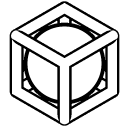
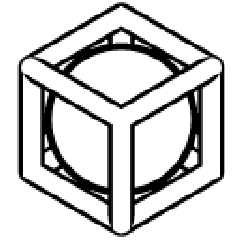
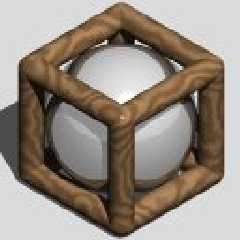
This is my latest attempt at making a logo for POV-Ray. It's a simple logo
showing a sphere inside a box thing.

Both the sphere and the box fits just exactly inside a unit cube, and the
sphere exactly just touches the box. Oh, and both versions were made in
POV-Ray...

I don't think this logo is that nice compared to certain other logos, but i
thought I'd post it anyway.

So, what do you think?

Greetings,

Rune

---
Updated April 25: http://rsj.mobilixnet.dk
Containing 3D images, stereograms, tutorials,
The POV Desktop Theme, 350+ raytracing jokes,
miscellaneous other things, and a lot of fun!
Post a reply to this message
Attachments:
Download 'spherecube.gif' (3 KB)
Download 'spherecube.jpg' (5 KB)
Preview of image 'spherecube.gif'
Preview of image 'spherecube.jpg'
|
|
| |
| |
|
|
|
|
| |
| |
|
|
I really like it.
"Rune" <run### [at] iname com> wrote in message
news:39181b28@news.povray.org...
> This is my latest attempt at making a logo for POV-Ray. It's a simple logo
> showing a sphere inside a box thing.
>
> Both the sphere and the box fits just exactly inside a unit cube, and the
> sphere exactly just touches the box. Oh, and both versions were made in
> POV-Ray...
>
> I don't think this logo is that nice compared to certain other logos, but
i
> thought I'd post it anyway.
>
> So, what do you think?
>
> Greetings,
>
> Rune
>
> ---
> Updated April 25: http://rsj.mobilixnet.dk
> Containing 3D images, stereograms, tutorials,
> The POV Desktop Theme, 350+ raytracing jokes,
> miscellaneous other things, and a lot of fun!
>
>
> com> wrote in message
news:39181b28@news.povray.org...
> This is my latest attempt at making a logo for POV-Ray. It's a simple logo
> showing a sphere inside a box thing.
>
> Both the sphere and the box fits just exactly inside a unit cube, and the
> sphere exactly just touches the box. Oh, and both versions were made in
> POV-Ray...
>
> I don't think this logo is that nice compared to certain other logos, but
i
> thought I'd post it anyway.
>
> So, what do you think?
>
> Greetings,
>
> Rune
>
> ---
> Updated April 25: http://rsj.mobilixnet.dk
> Containing 3D images, stereograms, tutorials,
> The POV Desktop Theme, 350+ raytracing jokes,
> miscellaneous other things, and a lot of fun!
>
>
>
Post a reply to this message
|
|
| |
| |
|
|
|
|
| |
| |
|
|
"Bill DeWitt" wrote:
> I really like it.

Thanks! :-)

Greetings,

Rune

---
Updated April 25: http://rsj.mobilixnet.dk
Containing 3D images, stereograms, tutorials,
The POV Desktop Theme, 350+ raytracing jokes,
miscellaneous other things, and a lot of fun!
Post a reply to this message
|
|
| |
| |
|
|
|
|
| |
| |
|
|
On Tue, 9 May 2000 15:31:55 +0200, "Rune" <run### [at] inamecom>
wrote:

>This is my latest attempt at making a logo for POV-Ray. It's a simple logo
>showing a sphere inside a box thing.

Very simple, yet very good! My only objection is that on the b/w scale
some of the seams of the cylinders forming the cube edges are visible
and some are not.


Peter Popov ICQ : 15002700
Personal e-mail : pet### [at] usanet
TAG      e-mail : pet### [at] tagpovrayorg
Post a reply to this message
|
|
| |
| |
|
|
|
|
| |
| |
|
|
In article <39181b28@news.povray.org>, "Rune" <run### [at] inamecom>
wrote:

> This is my latest attempt at making a logo for POV-Ray. It's a simple
> logo showing a sphere inside a box thing.
>
> Both the sphere and the box fits just exactly inside a unit cube, and the
> sphere exactly just touches the box. Oh, and both versions were made in
> POV-Ray...

I like it...I don't see any relationship to the name "POV-Ray", but that
isn't a requirement. It is a nice logo, how does it hold up to smaller
resolutions?
Oh, and how did you do the outline version? It looks like the output of
the find_edges post process filter, but you would have had to compile
your own version to use that...I am guessing a very high brilliance
value?

--
Christopher James Huff - Personal e-mail: chr### [at] yahoocom
TAG(Technical Assistance Group) e-mail: chr### [at] tagpovrayorg
Personal Web page: http://chrishuff.dhs.org/
TAG Web page: http://tag.povray.org/
Post a reply to this message
|
|
| |
| |
|
|
|
|
| |
| |
|
|
I like this.  I'm not sure about the texture on the cube though.

Rune wrote:
>
> This is my latest attempt at making a logo for POV-Ray. It's a simple logo
> showing a sphere inside a box thing.
>
> Both the sphere and the box fits just exactly inside a unit cube, and the
> sphere exactly just touches the box. Oh, and both versions were made in
> POV-Ray...
>
> I don't think this logo is that nice compared to certain other logos, but i
> thought I'd post it anyway.
>
> So, what do you think?
>
> Greetings,
>
> Rune
>
> ---
> Updated April 25: http://rsj.mobilixnet.dk
> Containing 3D images, stereograms, tutorials,
> The POV Desktop Theme, 350+ raytracing jokes,
> miscellaneous other things, and a lot of fun!
>
>  [Image]
>
>  [Image]
Post a reply to this message
|
|
| |
| |
|
|
|
|
| |
| |
|
|
Nice.

>Both the sphere and the box fits just exactly inside a unit cube, and the
>sphere exactly just touches the box. Oh, and both versions were made in
>POV-Ray...

Cool.

>I don't think this logo is that nice compared to certain other logos, but i
>thought I'd post it anyway.

You are your own worst critic. :)

>So, what do you think?

Work on the box texture in the color version. Also, I would recommend you
post in icon size so we can look at that. Good work. :)
Post a reply to this message
|
|
| |
| |
|
|
|
|
| |
| |
|
|
nice concept you have there.

Rick
Post a reply to this message
|
|
| |
| |
|
|
|
|
| |
| |
|
|
"Peter Popov" wrote:
> > This is my latest attempt at making a
> > logo for POV-Ray. It's a simple logo
> > showing a sphere inside a box thing.
>
> Very simple, yet very good!

Thanks!

> My only objection is that on the b/w
> scale some of the seams of the cylinders
> forming the cube edges are visible and
> some are not.

It's supposed to be that way.
That's a result of the shading of the object.
The point is that surface normals close to perpendicular to the viewing
direction are black.

Greetings,

Rune

---
Updated April 25: http://rsj.mobilixnet.dk
Containing 3D images, stereograms, tutorials,
The POV Desktop Theme, 350+ raytracing jokes,
miscellaneous other things, and a lot of fun!
Post a reply to this message
|
|
| |
| |
|
|
|
|
| |
| |
|
|
"Chris Huff" wrote:
> "Rune" wrote:
> > This is my latest attempt at making a
> > logo for POV-Ray. It's a simple logo
> > showing a sphere inside a box thing.
>
> I like it...

Glad you do!

> It is a nice logo, how does it hold up
> to smaller resolutions?

I'll post an icon size version...

> Oh, and how did you do the outline
> version? It looks like the output of the
> find_edges post process filter, but you
> would have had to compile your own
> version to use that...I am guessing a
> very high brilliance value?

I presume you meant a very low brilliance value?
A very low brilliance value wouldn't work because the whole half part of an
object would be lit, and thus you can't have a black line at both sides of
the object.

It's not a post-process filter either.

It's a contrast "filter" made inside POV-Ray.

The object itself is shaded by a light at the same location as the camera.

In front of the object I have a plane with color rgb 0.5 and transmit 100
and ambient 1 and diffuse 0. Well, not exactly. Because of an unwanted
"feature" in POV-Ray the actual method is slightly more complicated. You can
read more about it in povray.general in the thread "transmit > 1".
Unfortunately not many did reply to my questions there! :-(

Greetings,

Rune

---
Updated April 25: http://rsj.mobilixnet.dk
Containing 3D images, stereograms, tutorials,
The POV Desktop Theme, 350+ raytracing jokes,
miscellaneous other things, and a lot of fun!
Post a reply to this message
|
|
| |
| |
|
|
|
|
| |
| |
|
|
"Rick [Kitty5]" wrote:
> nice concept you have there.

Thanks!

Greetings,

Rune

---
Updated April 25: http://rsj.mobilixnet.dk
Containing 3D images, stereograms, tutorials,
The POV Desktop Theme, 350+ raytracing jokes,
miscellaneous other things, and a lot of fun!
Post a reply to this message
|
|
| |
| |
|
|
|
|
| |
| |
|
|
"Nick Portelli" wrote:
> I like this.

Thanks!

> I'm not sure about the texture on the cube though.

The color version is just an *example* of how the logo could be presented.
My example doesn't have to be perfect, because people can always make their
own versions. :-)

Greetings,

Rune

---
Updated April 25: http://rsj.mobilixnet.dk
Containing 3D images, stereograms, tutorials,
The POV Desktop Theme, 350+ raytracing jokes,
miscellaneous other things, and a lot of fun!
Post a reply to this message
|
|
| |
| |
|
|
|
|
| |
| |
|
|
"TonyB" wrote:
> Nice.
>
> Cool.

Thanks!

> Work on the box texture in the color version.

The color version is not the logo itself. It is just an example of how it
could be presented. Therefore the example doesn't have to be perfect,
because people can just make their own versions!

> Also, I would recommend you post in icon
> size so we can look at that.

I will do that!

Greetings,

Rune

---
Updated April 25: http://rsj.mobilixnet.dk
Containing 3D images, stereograms, tutorials,
The POV Desktop Theme, 350+ raytracing jokes,
miscellaneous other things, and a lot of fun!
Post a reply to this message
|
|
| |
| |
|
|
|
|
| |
| |
|
|
On Wed, 10 May 2000 17:04:35 +0200, "Rune" <run### [at] inamecom>
wrote:

>> My only objection is that on the b/w
>> scale some of the seams of the cylinders
>> forming the cube edges are visible and
>> some are not.
>
>It's supposed to be that way.
>That's a result of the shading of the object.
>The point is that surface normals close to perpendicular to the viewing
>direction are black.

I know, it's because you actually rendered it in POV (very high
brilliance, right?). Still, try retouching it in a paint program and
see if looks better. I think it will.


Peter Popov ICQ : 15002700
Personal e-mail : pet### [at] usanet
TAG      e-mail : pet### [at] tagpovrayorg
Post a reply to this message
|
|
| |
| |
|
|
|
|
| |
| |
|
|
In article <391992f0@news.povray.org>, "Rune" <run### [at] inamecom>
wrote:

> I presume you meant a very low brilliance value?
> A very low brilliance value wouldn't work because the whole half part
> of an object would be lit, and thus you can't have a black line at
> both sides of the object.

No, I meant a high value. If you use a value of around 15 or more, and
have the main light source very near the camera, the "shading" becomes
highly exaggerated, there are large areas of nearly flat color and the
objects have black edges.


> It's not a post-process filter either.
>
> It's a contrast "filter" made inside POV-Ray.
>
> The object itself is shaded by a light at the same location as the
> camera.
>
> In front of the object I have a plane with color rgb 0.5 and transmit
> 100 and ambient 1 and diffuse 0. Well, not exactly. Because of an
> unwanted "feature" in POV-Ray the actual method is slightly more
> complicated. You can read more about it in povray.general in the
> thread "transmit > 1". Unfortunately not many did reply to my
> questions there! :-(

Hmm, an interesting way to do it...the same as the "high brilliance"
method up to the point of the transmitting plane...

--
Christopher James Huff - Personal e-mail: chr### [at] yahoocom
TAG(Technical Assistance Group) e-mail: chr### [at] tagpovrayorg
Personal Web page: http://chrishuff.dhs.org/
TAG Web page: http://tag.povray.org/
Post a reply to this message
|
|
| |
| |
|
|
|
|
| |
| |
|
|
Here's a simple b&w in 32x32 and another similar, but with colored
background.

Greetings,

Rune

---
Updated April 25: http://rsj.mobilixnet.dk
Containing 3D images, stereograms, tutorials,
The POV Desktop Theme, 350+ raytracing jokes,
miscellaneous other things, and a lot of fun!
Post a reply to this message
Attachments:
Download 'icon1.gif' (1 KB)
Download 'icon2.gif' (1 KB)
Preview of image 'icon1.gif'

Preview of image 'icon2.gif'

|
|
| |
| |
|
|
|
|
| |
| |
|
|
"Chris Huff" wrote:
> > I presume you meant a very low
> > brilliance value?
>
> No, I meant a high value. If you use a
> value of around 15 or more, and have the
> main light source very near the camera,
> the "shading" becomes highly exaggerated,
> there are large areas of nearly flat color
> and the objects have black edges.

This way the object becomes too dark and you still don't get the sharp edges
between black and white.

> > It's a contrast "filter" made inside
> > POV-Ray.
>
> Hmm, an interesting way to do it...the
> same as the "high brilliance" method up
> to the point of the transmitting plane...

Well, the transmitting plane is the whole point...

But as I said, there's a problem in POV-Ray.
If you know or is able to obtain knowledge of how POV-Ray handles transmit
values internally, would you reply to the thread "transmit > 1" in
povray.general? Please?

Greetings,

Rune

---
Updated April 25: http://rsj.mobilixnet.dk
Containing 3D images, stereograms, tutorials,
The POV Desktop Theme, 350+ raytracing jokes,
miscellaneous other things, and a lot of fun!
Post a reply to this message
|
|
| |
| |
|
|
|
|
| |
| |
|
|
"Peter Popov" wrote:
> I know, it's because you actually rendered
> it in POV (very high brilliance, right?).

No, that wouldn't work, see the reply to Chris Huff.

> Still, try retouching it in a paint program and
> see if looks better. I think it will.

I think it looks nice as is, and I'm not sure exactly what you mean anyway,
so I won't. However, you are welcome to "steal" the logo and try to improve
it yourself, and then present it in this newsgroup and hear if people like
your version better! :-)

Greetings,

Rune

---
Updated April 25: http://rsj.mobilixnet.dk
Containing 3D images, stereograms, tutorials,
The POV Desktop Theme, 350+ raytracing jokes,
miscellaneous other things, and a lot of fun!
Post a reply to this message
|
|
| |
| |
|
|
|
|
| |
|
|