|
|
|
|
|
|
| |
| |
|
|
|
|
| |
| |
|
|
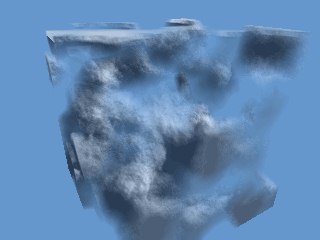
Okay, these are really volume clouds this time. I stumbled on the
technique today (goofing around at work). I was playing with
motion_blur, finding ways to exploit its properties. On a whim I decided
to add the clock value to the threshold of an isosurface. To my
surprise, it appeared to have volumetric properties. I kept on prodding,
amazed it was actually creating shadows and stuff. I went with it, until
I got the render you see before you. I didn't add the clouds to a plane
density, since it increases the render time.
What do you all think? Do these clouds have promise? I already know the
answer to that question :) They render faster than media, according to
my limited comparison studies. I'd like to see somebody with more mhz do
something with them. This image took 30 minutes and 49 seconds on my
P166 mhz without aa.
//*************Code!
global_settings{ motion_blur 20,1 }
background{<.4 .6 .8>}
#declare Tex=function{pigment{bumps scale .5 turbulence .25
color_map{[.5 rgb 1][1 rgb 0]}}}
motion_blur{
isosurface{
function Tex(x,y,z)+.1
threshold .5+clock sign 1
accuracy .01 method 2 eval
contained_by{box{-1,1}}
pigment{rgb 1} finish{diffuse .85 ambient<.4 .6 .8>*.35}
double_illuminate
}
}
--
Samuel Benge
E-Mail: STB### [at] aol com
Visit the still unfinished isosurface tutorial:
http://members.aol.com/stbenge com
Visit the still unfinished isosurface tutorial:
http://members.aol.com/stbenge
Post a reply to this message
Attachments:
Download 'blur_clouds.jpg' (11 KB)
Preview of image 'blur_clouds.jpg'
|
|
| |
| |
|
|
|
|
| |
| |
|
|
Promising, no doubt! But what happens when the clouds cover the entire sky?
Will the isosurface-render drastically slow down? (Of course it will, but
how much?)

One problem is that the clouds look a bit dense; I suppose it is because of
this new "media type" is in principle absorbing, and that the pigment is
simpy white. Adding trasmittance/filter will probably make lighter clouds,
although it might be difficult to adjust the amount correctly. (I think.)


Simen.


>What do you all think? Do these clouds have promise? I already know the
>answer to that question :) They render faster than media, according to
>my limited comparison studies. I'd like to see somebody with more mhz do
>something with them. This image took 30 minutes and 49 seconds on my
>P166 mhz without aa.
>
Post a reply to this message
|
|
| |
| |
|
|
|
|
| |
| |
|
|
> What do you all think? Do these clouds have promise?

-Oh my god Holy s**t that is cool
Post a reply to this message
|
|
| |
| |
|
|
|
|
| |
| |
|
|
Looks great for smoke! Great job!
Post a reply to this message
|
|
| |
| |
|
|
|
|
| |
| |
|
|
In article <38F2B256.E12E59E9@aol.com>, "SamuelT." <STB### [at] aolcom>
wrote:

> Okay, these are really volume clouds this time. I stumbled on the
> technique today (goofing around at work). I was playing with
> motion_blur, finding ways to exploit its properties. On a whim I decided
> to add the clock value to the threshold of an isosurface. To my
> surprise, it appeared to have volumetric properties. I kept on prodding,
> amazed it was actually creating shadows and stuff. I went with it, until
> I got the render you see before you. I didn't add the clouds to a plane
> density, since it increases the render time.

Try playing with the brilliance value in finish, decreasing
ambient(which probably acts something like emission media), and giving
some transparence to the color(like decreasing extinction in media). The
brilliance will vary the amount of "scattering" dependant on angle. At
least, I think it should, it has in my other tests of this sort.

I never thought of trying motion_blur though(well, I tried it with
isosurfaces, and even used it to control the threshold, but never
thought of doing clouds or smoke)...these might behave differently under
those circumstances.

--
Christopher James Huff - Personal e-mail: chr### [at] yahoocom
TAG(Technical Assistance Group) e-mail: chr### [at] tagpovrayorg
Personal Web page: http://chrishuff.dhs.org/
TAG Web page: http://tag.povray.org/
Post a reply to this message
|
|
| |
| |
|
|
|
|
| |
| |
|
|
Pabs wrote:
>
> > What do you all think? Do these clouds have promise?
>
> -Oh my god Holy s**t that is cool

my sentiments exactly, this is so very cool. how did you do this again?

source code! source code!
Post a reply to this message
|
|
| |
| |
|
|
|
|
| |
| |
|
|
> source code! source code!
it's there on his original message (read the entire thing ;-)

Andre
Post a reply to this message
|
|
| |
| |
|
|
|
|
| |
| |
|
|
Andre wrote:
>
> > source code! source code!
> it's there on his original message (read the entire thing ;-)
>
> Andre


oh, i guess I was too busy drooling!
Post a reply to this message
|
|
| |
| |
|
|
|
|
| |
| |
|
|
Simen Kvaal wrote:

> Promising, no doubt! But what happens when the clouds cover the entire sky?
> Will the isosurface-render drastically slow down? (Of course it will, but
> how much?)

A lot. It should still be faster than media, though.

>
> One problem is that the clouds look a bit dense; I suppose it is because of
> this new "media type" is in principle absorbing, and that the pigment is
> simpy white. Adding trasmittance/filter will probably make lighter clouds,
> although it might be difficult to adjust the amount correctly. (I think.)
>
> Simen.

I think if transparency were added to the clouds, they might render even
slower.

This technique is closer to scattering media, I think.

--
Samuel Benge

E-Mail: STB### [at] aolcom

Visit the still unfinished isosurface tutorial: http://members.aol.com/stbenge
Post a reply to this message
|
|
| |
| |
|
|
|
|
| |
| |
|
|
Yes, I'm developing some smoke. Other functions render faster, by the
way.

TonyB wrote:

> Looks great for smoke! Great job!

--
Samuel Benge

E-Mail: STB### [at] aolcom

Visit the still unfinished isosurface tutorial:
http://members.aol.com/stbenge
Post a reply to this message
|
|
| |
| |
|
|
|
|
| |
| |
|
|
Chris Huff wrote:

> Try playing with the brilliance value in finish, decreasing
> ambient(which probably acts something like emission media), and giving
> some transparence to the color(like decreasing extinction in media).

I think maybe increasing the ambient will give it the appearance of being less
dense, as well as lowering the diffuse.


> The brilliance will vary the amount of "scattering" dependant on angle. At
> least, I think it should, it has in my other tests of this sort.

Good idea.


--
Samuel Benge

E-Mail: STB### [at] aolcom

Visit the still unfinished isosurface tutorial: http://members.aol.com/stbenge
Post a reply to this message
|
|
| |
| |
|
|
|
|
| |
| |
|
|
You know what, this is actually the perfect density for cotton candy :)

I think this image will cause me to begin toying with isosurfaces...
Post a reply to this message
|
|
| |
| |
|
|
|
|
| |
| |
|
|
In article <38F3E638.AC081566@aol.com>, "SamuelT." <STB### [at] aolcom>
wrote:

> I think maybe increasing the ambient will give it the appearance of being
> less dense, as well as lowering the diffuse.

My reasoning was that ambient makes it visible without light falling on
it, similar to emitting media.


> > The brilliance will vary the amount of "scattering" dependant on angle.
> > At least, I think it should, it has in my other tests of this sort.
>
> Good idea.

Hmm, turns out that because of the different directions the surfaces
point in(I used planar surfaces in my experiments), the results are not
always what you expect. I had some interesting results by placing a
light_source right in the middle of the smoke, though...

--
Christopher James Huff - Personal e-mail: chr### [at] yahoocom
TAG(Technical Assistance Group) e-mail: chr### [at] tagpovrayorg
Personal Web page: http://chrishuff.dhs.org/
TAG Web page: http://tag.povray.org/
Post a reply to this message
|
|
| |
| |
|
|
|
|
| |
| |
|
|
Chris Huff wrote:

> My reasoning was that ambient makes it visible without light falling on
> it, similar to emitting media.

Yes, I know what you were getting at, and you are right. I used just the right
ambient to make the smoke look like it's disappearing. It only works good if
the ambient value matches the objects behind the smoke.


> Hmm, turns out that because of the different directions the surfaces
> point in(I used planar surfaces in my experiments), the results are not
> always what you expect. I had some interesting results by placing a
> light_source right in the middle of the smoke, though...

I had interesting results too, but not very realistic. Perhaps a spherical
pigment with high ambient values can be translated on the isosurface where the
light_source is to produce a more realistic effect. It would be cheating in a
way, but it would probably look good.


--
Samuel Benge

E-Mail: STB### [at] aolcom

Visit the still unfinished isosurface tutorial: http://members.aol.com/stbenge
Post a reply to this message
|
|
| |
| |
|
|
|
|
| |
| |
|
|
On Mon, 10 Apr 2000 22:04:22 -0700 "SamuelT." <STB### [at] aolcom> wrote:

>//*************Code!

  Hi, Samuel. Very nice work. Can you tell me what camera and lighting
settings you used for your scene?

--
Alan - ako### [at] povrayorg - a k o n g <at> p o v r a y <dot> o r g
http://www.povray.org - Home of the Persistence of Vision Ray Tracer
Post a reply to this message
|
|
| |
| |
|
|
|
|
| |
| |
|
|
Hello Alan. I don't have the original code any longer. Sorry! I can only
guess at what I used. Try something like this:

camera{location<0,5,-10> look_at 0 rotate y*-35}

light_source{<200, 100, -50>,1}

P.S. You're a member of the Pov Team, aren't you? I'm sure I've said this
before: thank you all very much! Pov is *the* best program I have ever
used. Allowing everyone to access the code and change it has helped it
become even better.


Alan Kong wrote:

> On Mon, 10 Apr 2000 22:04:22 -0700 "SamuelT." <STB### [at] aolcom> wrote:
>
> >//*************Code!
>
>   Hi, Samuel. Very nice work. Can you tell me what camera and lighting
> settings you used for your scene?
>
> --
> Alan - ako### [at] povrayorg - a k o n g <at> p o v r a y <dot> o r g
> http://www.povray.org - Home of the Persistence of Vision Ray Tracer

--
Samuel Benge

E-Mail: STB### [at] aolcom

Visit the still unfinished isosurface tutorial:
http://members.aol.com/stbenge
Post a reply to this message
|
|
| |
| |
|
|
|
|
| |
| |
|
|
On Mon, 17 Apr 2000 19:18:11 -0700 "SamuelT." <STB### [at] aolcom> wrote:

>Sorry! I can only guess at what I used. Try something like this:

>camera{location<0,5,-10> look_at 0 rotate y*-35}
>light_source{<200, 100, -50>,1}

  Thanks, Samuel. Earlier, I placed a camera and lightsource in your
scene and it rendered nicely but not nearly as nice as your originally
posted image, hence the reason I was curious. No sweat, just trying to
keep from getting too rusty...

>Pov is *the* best program I have ever
>used. Allowing everyone to access the code and change it has helped it
>become even better.

  It's very gratifying to the POV-Team when people come up with novel
ways to use both the official version and MegaPOV. First, it gives
others inspiration to keep creating new images and it also vindicates
the use of the various patches that people write for the benefit of
others. Thanks for your participation.

--
Alan - ako### [at] povrayorg - a k o n g <at> p o v r a y <dot> o r g
http://www.povray.org - Home of the Persistence of Vision Ray Tracer
Post a reply to this message
|
|
| |
| |
|
|
|
|
| |