|
|
|
|
|
|
| |
| |
|
|
|
|
| |
| |
|
|
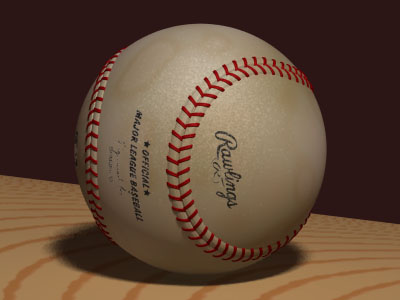
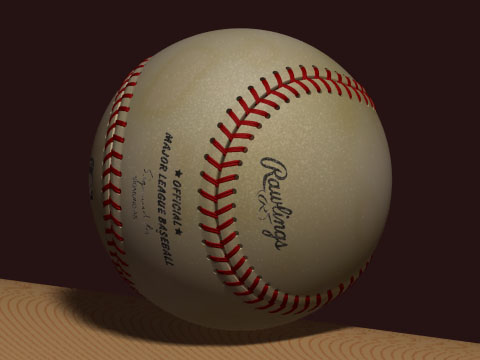
Here is my current project and two questions:

* Why can't I get blobs blobby? This is my first attempt with blobs, and as you
can see there is a sharp edge where the bump making spheres intersects the ball
sphere.

* How do I prevent the image maps from appearing at the reverse side? I've
tried gradient texture maps, but was told that texture maps couldn't be used in
layered textures. (or something)

sig.
Post a reply to this message
Attachments:
Download 'baseball.jpg' (24 KB)
Preview of image 'baseball.jpg'
|
|
| |
| |
|
|
|
|
| |
| |
|
|
"Sigmund Kyrre Aas" <as### [at] stud ntnuno> wrote in message
news:38AFF53B.4A483B33@stud.ntnu.no...
>
> Here is my current project and two questions:
>
> * Why can't I get blobs blobby? This is my first attempt
> with blobs, and as you can see there is a sharp edge
> where the bump making spheres intersects the ball
> sphere.
>
> * How do I prevent the image maps from appearing at
> the reverse side? I've tried gradient texture maps, but
> was told that texture maps couldn't be used in layered
> textures. (or something)
While I can't answer your first question, here's a link to a tutorial
dealing with your second:
http://members.xoom.com/yang4yang/pov/imap1.html
Good luck.
Eric
--------------------
http://www.datasync.com/~ericfree
--------------------
"The whole problem with the world is that fools and fanatics are always so
certain of themselves, but wiser people so full of doubts."
--Bertrand Russel ntnuno> wrote in message
news:38AFF53B.4A483B33@stud.ntnu.no...
>
> Here is my current project and two questions:
>
> * Why can't I get blobs blobby? This is my first attempt
> with blobs, and as you can see there is a sharp edge
> where the bump making spheres intersects the ball
> sphere.
>
> * How do I prevent the image maps from appearing at
> the reverse side? I've tried gradient texture maps, but
> was told that texture maps couldn't be used in layered
> textures. (or something)
While I can't answer your first question, here's a link to a tutorial
dealing with your second:
http://members.xoom.com/yang4yang/pov/imap1.html
Good luck.
Eric
--------------------
http://www.datasync.com/~ericfree
--------------------
"The whole problem with the world is that fools and fanatics are always so
certain of themselves, but wiser people so full of doubts."
--Bertrand Russel
Post a reply to this message
|
|
| |
| |
|
|
|
|
| |
| |
|
|
Are you enclosing the ball sphere and the bump spheres in a single blob{}
statement? If you have them in separate blob{} statements, they won't blob
together when they intersect.

--
Paul Vanukoff
van### [at] primenetcom


Sigmund Kyrre Aas wrote in message <38AFF53B.4A483B33@stud.ntnu.no>...
>Here is my current project and two questions:
>
>* Why can't I get blobs blobby? This is my first attempt with blobs, and as
you
>can see there is a sharp edge where the bump making spheres intersects the
ball
>sphere.
Post a reply to this message
|
|
| |
| |
|
|
|
|
| |
| |
|
|
Paul Vanukoff wrote:
>
> Are you enclosing the ball sphere and the bump spheres in a single blob{}
> statement? If you have them in separate blob{} statements, they won't blob

Yes. Here it is:

blob {
    threshold .8
    sphere {<0, 0, 0>, R*3.05, 1.004 }
    $a=0;
    $AntKuler=500;
    $d=1/AntKuler;
    #while (a<1)
        $Her=eval_3d_spline("Seam",a);
        $Der=eval_3d_spline("Seam",a+d);
        $Retn=vnormalize( Der-Her);
        $Tvers=vnormalize(vcross(Retn,Her) );
        $Norm=vnormalize(Her);
        sphere { 0, .25 ,1.2 scale <.33,1,1>  // bulk utover
            matrix <Norm.x,Norm.y,Norm.z,
                    Retn.x,Retn.y,Retn.z,
                    Tvers.x,Tvers.y,Tvers.z,
                    0   ,0   ,0    >
            translate Her*.99
        }
        sphere { 0, .2 ,-1                 // skøyt
            matrix <Norm.x,Norm.y,Norm.z,
                    Retn.x,Retn.y,Retn.z,
                    Tvers.x*.2,Tvers.y*.2,Tvers.z*.2,
                    0   ,0   ,0    >
            translate Her*1.02
        }
        sphere { 0, .14 ,-1               // meir avrunding av skøyten
            matrix <Norm.x,Norm.y,Norm.z,
                    Retn.x,Retn.y,Retn.z,
                    Tvers.x,Tvers.y,Tvers.z,
                    0   ,0   ,0    >
            translate Her*1.04
        }
        $a=a+d;
    #end
    texture{pigment {Green}}
    texture{pigment {Svart}}
    texture {pigment {Batter}}
    texture {pigment {Logo}}
    texture {pigment {Major}}
    finish {specular .1 roughness .05}
    normal { granite 0.5  scale .01 }
}
Post a reply to this message
|
|
| |
| |
|
|
|
|
| |
| |
|
|
Eric Freeman wrote:
> While I can't answer your first question, here's a link to a tutorial
> dealing with your second:
>
> http://members.xoom.com/yang4yang/pov/imap1.html

Nice tutorial, but it didn't solve my problem.

Now I've tried material maps too, but I get the same message when I try to use
them in layers: "Cannot layer a patterned texture over another"

sig.
Post a reply to this message
|
|
| |
| |
|
|
|
|
| |
| |
|
|
'threshold .8' might be a little tight, perhaps lower that.  'blob' hardly ever
loses it's creases between components completely though.

Bob

"Sigmund Kyrre Aas" <as### [at] studntnuno> wrote in message
news:38B01B76.9AB0BDE7@stud.ntnu.no...
| Paul Vanukoff wrote:
| >
| > Are you enclosing the ball sphere and the bump spheres in a single blob{}
| > statement? If you have them in separate blob{} statements, they won't blob
|
| Yes. Here it is:
|
| blob {
|     threshold .8
|     sphere {<0, 0, 0>, R*3.05, 1.004 }
|     $a=0;
|     $AntKuler=500;
|     $d=1/AntKuler;
|     #while (a<1)
|         $Her=eval_3d_spline("Seam",a);
|         $Der=eval_3d_spline("Seam",a+d);
|         $Retn=vnormalize( Der-Her);
|         $Tvers=vnormalize(vcross(Retn,Her) );
|         $Norm=vnormalize(Her);
|         sphere { 0, .25 ,1.2 scale <.33,1,1>  // bulk utover
|             matrix <Norm.x,Norm.y,Norm.z,
|                     Retn.x,Retn.y,Retn.z,
|                     Tvers.x,Tvers.y,Tvers.z,
|                     0   ,0   ,0    >
|             translate Her*.99
|         }
|         sphere { 0, .2 ,-1                 // skøyt
|             matrix <Norm.x,Norm.y,Norm.z,
|                     Retn.x,Retn.y,Retn.z,
|                     Tvers.x*.2,Tvers.y*.2,Tvers.z*.2,
|                     0   ,0   ,0    >
|             translate Her*1.02
|         }
|         sphere { 0, .14 ,-1               // meir avrunding av skøyten
|             matrix <Norm.x,Norm.y,Norm.z,
|                     Retn.x,Retn.y,Retn.z,
|                     Tvers.x,Tvers.y,Tvers.z,
|                     0   ,0   ,0    >
|             translate Her*1.04
|         }
|         $a=a+d;
|     #end
|     texture{pigment {Green}}
|     texture{pigment {Svart}}
|     texture {pigment {Batter}}
|     texture {pigment {Logo}}
|     texture {pigment {Major}}
|     finish {specular .1 roughness .05}
|     normal { granite 0.5  scale .01 }
| }
Post a reply to this message
|
|
| |
| |
|
|
|
|
| |
| |
|
|
Sigmund Kyrre Aas wrote:

> Here is my current project and two questions:

I can't answer either of your questions, but I am mightly impressed with the ball.

Could you post the texture you used for the leather? Very nice!

Simon
Post a reply to this message
|
|
| |
| |
|
|
|
|
| |
| |
|
|
> * Why can't I get blobs blobby? This is my first attempt with blobs, and as you
> can see there is a sharp edge where the bump making spheres intersects the ball
> sphere.

First, decrease your threshold to .1.  As for the intersections, you should make
multiple copies of the objects you wish to blob. Make the components increase in
diameter, and decrease the component power.  This "feathers" the edges, resulting
in a much smoother edge.


> * How do I prevent the image maps from appearing at the reverse side? I've
> tried gradient texture maps, but was told that texture maps couldn't be used in
> layered textures. (or something)

This actually works just fine. The texture on my sports car is entirely dependent
on this working just fine. my suggestion is to experiment.


--
H.E. Day
Post a reply to this message
|
|
| |
| |
|
|
|
|
| |
| |
|
|
"Sigmund Kyrre Aas" <as### [at] studntnuno> wrote in message
news:38B02C3E.D0BC1000@stud.ntnu.no...
>
> Nice tutorial, but it didn't solve my problem.
>
> Now I've tried material maps too, but I get the
> same message when I try to use them in layers:
> "Cannot layer a patterned texture over another"
>
> sig.

Here's a code snippet from a drinking glass I made using a different
technique.  Basically you create a second object (slightly larger than the
original and hollow), apply the logo image map to it, and chop off the back
half by differencing it with a box.

// make a drinking glass from the difference
// of two cylinders
#declare GlassMain = difference {
  cylinder {
    <0,0,0>,
    <0,Hite,0>
    Rad
  }
  cylinder {
    <0,0.1,0>,
    <0,Hite+1,0>
    Rad*0.9
  }
  material {GlassMat}
}

// make another hollow cylinder with a slightly larger
// radius than the drinking glass and chop off the back
// of it by differencing it with a box
#declare Logo = difference {
  cylinder { // main cylinder
    <0, -0.7, 0>,
    <0,  0.7, 0>
    Rad+0.00002
  }
  cylinder { // cut-out
    <0,-0.71,0>,
    <0,0.71,0>
    Rad+0.00001
  }
  box { // chop off the back half of the cylinder
    <-Rad-0.1,-0.71,0>,
    <Rad+0.1,0.71,Rad+0.1>
  }
  texture {
    pigment {
      image_map {
        gif "logo_image.gif"
        transmit 209, 1.0 // make the background of the image transparent
        once
        map_type 0
        interpolate 2
      }
    }
    // scale the logo to fit
    translate <-0.5,-0.5,0>
    scale <224/167,1,1>
    scale 1.4
  }
  // position the logo cylinder on the drinking glass
  translate <0,3.75,0>
  rotate y*11
}

#declare DrinkingGlass = union {
  object {GlassMain}
  object {Logo}
}

Eric
--------------------
http://www.datasync.com/~ericfree
--------------------
"The whole problem with the world is that fools and fanatics are always so
certain of themselves, but wiser people so full of doubts."
--Bertrand Russel
Post a reply to this message
|
|
| |
| |
|
|
|
|
| |
| |
|
|
Simon de Vet wrote:
>
> I can't answer either of your questions, but I am mightly impressed with the ball.
>
> Could you post the texture you used for the leather? Very nice!


Thanks! It's quite simple actually. I got it pretty much at first attempt:

$Green=
pigment { bozo
    colour_map {
        [0 rgb <255,249,227>/255]
        [0.5 rgb <233,255,227>/255 ]
        [0.8 rgb <219,205,150>/255 ]
        [1 rgb <255,249,227>/255]
    }
}
$Svart=
pigment { ripples
    colour_map {
        [0 rgb 1]
        [0.8 rgbf <131,105,55,90>/255 ]
        [1 rgbf 1]
    }
}

(see previous posting for the rest)

sig.
Post a reply to this message
|
|
| |
| |
|
|
|
|
| |
| |
|
|
"H.E. Day" wrote:
> First, decrease your threshold to .1.  As for the intersections, you should make
> multiple copies of the objects you wish to blob. Make the components increase in
> diameter, and decrease the component power.  This "feathers" the edges, resulting
> in a much smoother edge.

That worked like a dream, thank you very much.
It must feel great to have control of these evasive shapes..

> > * How do I prevent the image maps from appearing at the reverse side? I've
> > tried gradient texture maps, but was told that texture maps couldn't be used in
> > layered textures. (or something)
>
> This actually works just fine. The texture on my sports car is entirely dependent
> on this working just fine. my suggestion is to experiment.

Guess you're right! Just bad nesting on my part.

<bow> <scrape>

sig.
Post a reply to this message
|
|
| |
| |
|
|
|
|
| |
| |
|
|
I can see this working, but won't the differencing make the scene a lot slower?

sig.

Eric Freeman wrote:
>
> "Sigmund Kyrre Aas" <as### [at] studntnuno> wrote in message
> news:38B02C3E.D0BC1000@stud.ntnu.no...
> >
> > Nice tutorial, but it didn't solve my problem.
> >
> > Now I've tried material maps too, but I get the
> > same message when I try to use them in layers:
> > "Cannot layer a patterned texture over another"
> >
> > sig.
>
> Here's a code snippet from a drinking glass I made using a different
> technique.  Basically you create a second object (slightly larger than the
> original and hollow), apply the logo image map to it, and chop off the back
> half by differencing it with a box.
>
> // make a drinking glass from the difference
> // of two cylinders
> #declare GlassMain = difference {
>   cylinder {
>     <0,0,0>,
>     <0,Hite,0>
>     Rad
>   }
>   cylinder {
>     <0,0.1,0>,
>     <0,Hite+1,0>
>     Rad*0.9
>   }
>   material {GlassMat}
> }
>
> // make another hollow cylinder with a slightly larger
> // radius than the drinking glass and chop off the back
> // of it by differencing it with a box
> #declare Logo = difference {
>   cylinder { // main cylinder
>     <0, -0.7, 0>,
>     <0,  0.7, 0>
>     Rad+0.00002
>   }
>   cylinder { // cut-out
>     <0,-0.71,0>,
>     <0,0.71,0>
>     Rad+0.00001
>   }
>   box { // chop off the back half of the cylinder
>     <-Rad-0.1,-0.71,0>,
>     <Rad+0.1,0.71,Rad+0.1>
>   }
>   texture {
>     pigment {
>       image_map {
>         gif "logo_image.gif"
>         transmit 209, 1.0 // make the background of the image transparent
>         once
>         map_type 0
>         interpolate 2
>       }
>     }
>     // scale the logo to fit
>     translate <-0.5,-0.5,0>
>     scale <224/167,1,1>
>     scale 1.4
>   }
>   // position the logo cylinder on the drinking glass
>   translate <0,3.75,0>
>   rotate y*11
> }
>
> #declare DrinkingGlass = union {
>   object {GlassMain}
>   object {Logo}
> }
>
> Eric
> --------------------
> http://www.datasync.com/~ericfree
> --------------------
> "The whole problem with the world is that fools and fanatics are always so
> certain of themselves, but wiser people so full of doubts."
> --Bertrand Russel
Post a reply to this message
|
|
| |
| |
|
|
|
|
| |
| |
|
|
Sigmund Kyrre Aas wrote:
<snip>

> * How do I prevent the image maps from appearing at the reverse side? I've
> tried gradient texture maps, but was told that texture maps couldn't be used in
> layered textures. (or something)

http://www.spiritone.com/~english/cyclopdia/bottle.html

Hopefully this will help. I'm not the linkmaster Ken is, I only know of this on
because I wrote it.

--
Josh English
eng### [at] spiritonecom
"May your hopes, dreams, and plans not be destroyed by a few zeros."
Post a reply to this message
|
|
| |
| |
|
|
|
|
| |
| |
|
|
On Mon, 21 Feb 2000 11:21:36 +0100, Sigmund Kyrre Aas
<as### [at] studntnuno> wrote:

>I can see this working, but won't the differencing make the scene a lot slower?
>
>sig.

Probably, try clipping it with a plane instead.


Peter Popov
pet### [at] usanet
ICQ: 15002700
Post a reply to this message
|
|
| |
| |
|
|
|
|
| |
| |
|
|
Real nice photograph,  but if you want to render it
be prepared to be dissapointed, it'll take you hours
and hours, and you'll still be nowhere close to the
photo version.

--
Cheers
Steve              email mailto:sjl### [at] ndirectcouk

%HAV-A-NICEDAY Error not enough coffee  0 pps.

web http://www.ndirect.co.uk/~sjlen/

or  http://start.at/zero-pps

  8:55pm  up 7 days,  7:58,  5 users,  load average: 2.10, 2.04, 1.79
Post a reply to this message
|
|
| |
| |
|
|
|
|
| |
| |
|
|
Josh English wrote:
..
> http://www.spiritone.com/~english/cyclopdia/bottle.html
..

cyclop_e_dia
Hm, yes, using radial is a bit more elegant than gradient. Ah, well who cares
as long as it works..

I also found a thread in this group concerning my other problem:

On 23 Nov 1999 11:29:02 -0500, Nieminen Juha wrote:
>  When I was making my irtc animation entry, povray told me this:
>
>error: Cannot layer over a patterned texture.

but I got around this since I didn't actually need a texture_map, just a
pigment_map.

Btw I'm planning to make a bunch of baseball artifacts for the Knickers web
site. Can't wait to start on that glove :-[ Nice excuse to learn spatch..

sig.
Post a reply to this message
Attachments:
Download 'baseball2.jpg' (28 KB)
Preview of image 'baseball2.jpg'
|
|
| |
| |
|
|
|
|
| |
| |
|
|
"Sigmund Kyrre Aas" <as### [at] studntnuno> wrote in message
news:38B1C5D8.DFBABF96@stud.ntnu.no...
>
> Btw I'm planning to make a bunch of baseball artifacts
> for the Knickers web site. Can't wait to start on that
> glove :-[ Nice excuse to learn spatch..

Very nice image.  You might consider Rhino for making that glove.  You can
download a fully functional demo that limits you to a total of 25 saves.  It
exports to POV and is VERY powerful.  If you're a student they offer a great
discount (my wife just started back to school to finish her MBA... time to
buy it!!!).

http://www.rhino3d.com/

Eric
--------------------
http://www.datasync.com/~ericfree
--------------------
"The whole problem with the world is that fools and fanatics are always so
certain of themselves, but wiser people so full of doubts."
--Bertrand Russel
Post a reply to this message
|
|
| |
| |
|
|
|
|
| |
| |
|
|
On Mon, 21 Feb 2000 17:25:37 -0600, "Eric Freeman"
<eri### [at] datasynccom> wrote:

>"Sigmund Kyrre Aas" <as### [at] studntnuno> wrote in message
>news:38B1C5D8.DFBABF96@stud.ntnu.no...
>>
>> Btw I'm planning to make a bunch of baseball artifacts
>> for the Knickers web site. Can't wait to start on that
>> glove :-[ Nice excuse to learn spatch..
>
>Very nice image.  You might consider Rhino for making that glove.  You can
>download a fully functional demo that limits you to a total of 25 saves.  It
>exports to POV and is VERY powerful.  If you're a student they offer a great
>discount (my wife just started back to school to finish her MBA... time to
>buy it!!!).

That was 15 uses last that I checked (the day before). If you can keep
an uptime of two or three days you'll learn most of the stuff you'll
need. The tutorials are good and the help, though a bit on the
reference side, is, well, quite helpful. I was able to create a pretty
complex (for me, anyway) model in less than 6 hours and I don't think
I am any exception to the learning curve statistics.


Peter Popov
pet### [at] usanet
ICQ: 15002700
Post a reply to this message
|
|
| |
| |
|
|
|
|
| |
| |
|
|
"Peter Popov" <pet### [at] usanet> wrote in message
news:icmxOENZS=HNRkK3xJBEpCLUsq+o@4ax.com...
>
> On Mon, 21 Feb 2000 17:25:37 -0600, "Eric Freeman"
> <eri### [at] datasynccom> wrote:
> >
> > Very nice image.  You might consider Rhino for making
> > that glove.  You can download a fully functional demo
> > that limits you to a total of 25 saves.  It exports to POV
> > and is VERY powerful.  If you're a student they offer a
> > great discount (my wife just started back to school to
> > finish her MBA... time to buy it!!!).
>
> That was 15 uses last that I checked (the day before).

They must have changed it... I just checked mine and it said I have 25 saves
left (I haven't made anything good enuf to save yet).

Eric
--------------------
http://www.datasync.com/~ericfree
--------------------
"The whole problem with the world is that fools and fanatics are always so
certain of themselves, but wiser people so full of doubts."
--Bertrand Russel
Post a reply to this message
|
|
| |
| |
|
|
|
|
| |
| |
|
|
"Eric Freeman" <eri### [at] datasynccom> writes:

> Very nice image.  You might consider Rhino for making that glove.  You can
...

I'll check it out. I've seen some very nice models done with Rhino, but I
didn't know there was a trial version. How good is the pov-export? Do you
have good control of object groups/unions?

--
Sigmund Kyrre Aas
Post a reply to this message
|
|
| |
| |
|
|
|
|
| |
| |
|
|
Kill Rhino and, while your at it, destroy your gifs.

Just My Not So Humble Opinion.

Peter Warren
war### [at] hotmailcom
Post a reply to this message
|
|
| |
| |
|
|
|
|
| |
| |
|
|
Very nice.

Is that a bat?

Personal to me:  Jr is now #30. But who will break 714(?).
Mac or the Cry Baby?

Peter Warren
war### [at] hotmailcom
Post a reply to this message
|
|
| |
| |
|
|
|
|
| |
| |
|
|
On 22 Feb 2000 12:43:01 +0100, as### [at] jeevesstudntnuno (Sigmund Kyrre
Ås) wrote:

>"Eric Freeman" <eri### [at] datasynccom> writes:
>
>> Very nice image.  You might consider Rhino for making that glove.  You can
>...
>
>I'll check it out. I've seen some very nice models done with Rhino, but I
>didn't know there was a trial version. How good is the pov-export? Do you
>have good control of object groups/unions?

The POV export is pretty good. It can export a big POV file or a small
POV file and a separate INC for every object. It would have been good
if all elements on a layer could be made into a single mesh, but even
now preparing a 50 MB exported mesh for rendering takes about 5
minutes.


Peter Popov
pet### [at] usanet
ICQ: 15002700
Post a reply to this message
|
|
| |
| |
|
|
|
|
| |
| |
|
|
"Peter Warren" <int### [at] halcyoncom> writes:
> Very nice.
>
> Is that a bat?

Thanks, and yes. A bat with 100 inch radius.

> Personal to me:  Jr is now #30. But who will break 714(?).
> Mac or the Cry Baby?

I don't get it.
But then again I didn't get your statement about gifs either. Surrealism?

personal to me:
Are you sure that personal to you?

Jr is now #30
Is it because of your plans that you say jr is now 30?

But who will break 714(?)
Does it bother you that who will break 714?

Mac or the Cry Baby?
Is it because of the people you hang around with that you are going through
all this?

--
Sigmund Kyrre Aas
Post a reply to this message
|
|
| |
| |
|
|
|
|
| |
| |
|
|
On Mon, 21 Feb 2000 21:26:23 -0600, "Eric Freeman"
<eri### [at] datasynccom> wrote:

>They must have changed it... I just checked mine and it said I have 25 saves
>left (I haven't made anything good enuf to save yet).

I am seriously considering registering it. I'll have to see the terms
and conditions for a student's license and of course I'll have to
figure a way to pay (I hope they accept cash).


Peter Popov
pet### [at] usanet
ICQ: 15002700
Post a reply to this message
|
|
| |
| |
|
|
|
|
| |
| |
|
|
"Peter Popov" <pet### [at] usanet> wrote in message
news:HqWyOM4Yx6HXaCziDQceHNvVKS0I@4ax.com...
>
> I am seriously considering registering it. I'll have to
> see the terms and conditions for a student's license

If I recall from reading their web page (emphasis on "if") it's just a
discount on price... same terms and conditions.

Eric
--------------------
http://www.datasync.com/~ericfree
--------------------
"The whole problem with the world is that fools and fanatics are always so
certain of themselves, but wiser people so full of doubts."
--Bertrand Russel
Post a reply to this message
|
|
| |
| |
|
|
|
|
| |
| |
|
|
Anton Sherwood wrote:
>
> Sigmund Kyrre Aas wrote:
> > * How do I prevent the image maps from appearing at the reverse side?
>
> I haven't used image maps, but isn't there a cylindrical map type?

Yes. But then I have to make the maps 4 times bigger, cause they wrap all the
way around. And I like to keep memory usage down. I'm using a radial pigment
map now, just as Josh English suggested earlier in this thread.

sig.
Post a reply to this message
|
|
| |
| |
|
|
|
|
| |
| |
|
|
Just realized how lame this post was. To defend myself, it was Dr. Emacs who
spoke, not me.

sig.

"Sigmund Kyrre Ås" wrote:
..
> personal to me:
> Are you sure that personal to you?
>
> Jr is now #30
> Is it because of your plans that you say jr is now 30?
>
> But who will break 714(?)
> Does it bother you that who will break 714?
>
> Mac or the Cry Baby?
> Is it because of the people you hang around with that you are going through
> all this?
>
> --
> Sigmund Kyrre Aas
Post a reply to this message
|
|
| |
| |
|
|
|
|
| |
| |
|
|
On Sat, 26 Feb 2000 10:53:29 +0100, Sigmund Kyrre Aas <as### [at] studntnuno> wrote:
>Anton Sherwood wrote:
>>
>> Sigmund Kyrre Aas wrote:
>> > * How do I prevent the image maps from appearing at the reverse side?
>>
>> I haven't used image maps, but isn't there a cylindrical map type?
>
>Yes. But then I have to make the maps 4 times bigger, cause they wrap all the
>way around. And I like to keep memory usage down. I'm using a radial pigment
>map now, just as Josh English suggested earlier in this thread.

4.7.8.9.1 The once Option
Normally there are an infinite number of repeating image maps,
bump maps or material maps created over every unit square of the
x-y-plane like tiles. By adding the once keyword after a file
name you can eliminate all other copies of the map except the one
at (0,0) to (1,1). In image maps, areas outside this unit square
are treated as fully transparent. In bump maps, areas outside
this unit square are left flat with no normal modification.  In
material maps, areas outside this unit square are textured with
the first texture of the texture list.

For example:

  image_map {
    gif "mypic.gif"
    once
  }


--
Cheers
Steve              email mailto:sjl### [at] ndirectcouk

%HAV-A-NICEDAY Error not enough coffee  0 pps.

web http://www.ndirect.co.uk/~sjlen/

or  http://start.at/zero-pps

 10:52pm  up 18:44,  6 users,  load average: 2.00, 2.09, 2.10
Post a reply to this message
|
|
| |
| |
|
|
|
|
| |
| |
|
|
A cylindrical image map will wrap all the way around the ball, regardless of
wether once is used. My png-s are covering an 40 deg. angle. To avoid they
getting stretched beyond recognition, I would have to make them looong.

sig.

Steve wrote:
>
> On Sat, 26 Feb 2000 10:53:29 +0100, Sigmund Kyrre Aas <as### [at] studntnuno> wrote:
> >Anton Sherwood wrote:
> >>
> >> Sigmund Kyrre Aas wrote:
> >> > * How do I prevent the image maps from appearing at the reverse side?
> >>
> >> I haven't used image maps, but isn't there a cylindrical map type?
> >
> >Yes. But then I have to make the maps 4 times bigger, cause they wrap all the
> >way around. And I like to keep memory usage down. I'm using a radial pigment
> >map now, just as Josh English suggested earlier in this thread.
>
> 4.7.8.9.1 The once Option
> Normally there are an infinite number of repeating image maps,
> bump maps or material maps created over every unit square of the
> x-y-plane like tiles. By adding the once keyword after a file
> name you can eliminate all other copies of the map except the one
> at (0,0) to (1,1). In image maps, areas outside this unit square
> are treated as fully transparent. In bump maps, areas outside
> this unit square are left flat with no normal modification.  In
> material maps, areas outside this unit square are textured with
> the first texture of the texture list.
>
> For example:
>
>   image_map {
>     gif "mypic.gif"
>     once
>   }
>
> --
> Cheers
> Steve              email mailto:sjl### [at] ndirectcouk
>
> %HAV-A-NICEDAY Error not enough coffee  0 pps.
>
> web http://www.ndirect.co.uk/~sjlen/
>
> or  http://start.at/zero-pps
>
>  10:52pm  up 18:44,  6 users,  load average: 2.00, 2.09, 2.10
Post a reply to this message
|
|
| |
| |
|
|
|
|
| |
| |
|
|
Never tried this myself, but try using "once" and "frequency" on a radial
map.
Another possibility : radial texture_map with something like:
[0.00 texture{myImageMap}]
[0.25 texture{myImageMap}]
[0.25 texture{Invisible}]}]
[1.00 texture{Invisible}]

I hope this helps,

Povingly


Philippe
Post a reply to this message
|
|
| |
| |
|
|
|
|
| |
| |
|
|
Thanks for your time, but as you can see from previous posts, I have solved
this. You would also see that texture maps cannot be layered..

sig.

Philippe Debar wrote:
>
> Never tried this myself, but try using "once" and "frequency" on a radial
> map.
> Another possibility : radial texture_map with something like:
> [0.00 texture{myImageMap}]
> [0.25 texture{myImageMap}]
> [0.25 texture{Invisible}]}]
> [1.00 texture{Invisible}]
>
> I hope this helps,
>
> Povingly
>
> Philippe
Post a reply to this message
|
|
| |
| |
|
|
|
|
| |
| |
|
|
"Sigmund Kyrre Aas" <as### [at] studntnuno> wrote in message
news:38BD1028.1180E8E9@stud.ntnu.no...
> Thanks for your time,
You're welcome

> but as you can see from previous posts, I have solved
> this. You would also see that texture maps cannot be layered..

oops

*blushes*

 ^_^'


Well,... er

never mind

Philippe
Post a reply to this message
|
|
| |
| |
|
|
|
|
| |
|
|