|
|
|
|
|
|
| |
| |
|
|
|
|
| |
| |
|
|
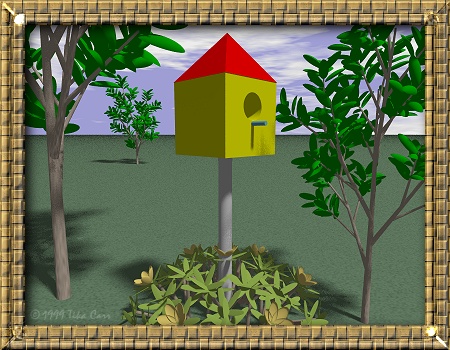
Well, I'm gaining. <G> Excuse the jpg compression. I say work in progress
because I have some ideas on what to do with it, like maybe a rock-pond or
river in the back. I would probably like to use a texture map for grass as
opposed to scaling bumps on a plane. The trees and flowers are from a plant
model set I found on the web.

<humor>
If you look closely at the birdhouse post, you'll see that the post apparently
goes right through the center of a flower and leaf cluster! I have no idea how
that happened and didn't even notice it until after I rendered an 800 x 600
image. Only a computer could think of such things! <LOL>
</humor>


--

Tika

Tika's Graphics: http://www.5thpower.com/tika/
Post a reply to this message
Attachments:
Download 'Garden.jpg' (95 KB)
Preview of image 'Garden.jpg'
|
|
| |
| |
|
|
|
|
| |
| |
|
|
Tika wrote:
>
> Well, I'm gaining. <G> Excuse the jpg compression. I say work in progress
> because I have some ideas on what to do with it, like maybe a rock-pond or
> river in the back. I would probably like to use a texture map for grass as
> opposed to scaling bumps on a plane. The trees and flowers are from a plant
> model set I found on the web.

Congratulations ! You have taken a powerful 3D raytracing program and made
2D art with it. Not everyone has the talent to do that :)

As far as grass goes there has been a few grass example files posted in
the scene files groups in the past. A search through those groups would
give you a few good examples to work with. Much better than an image
map on a plane.

--
Ken Tyler
1100+ Povray, Graphics, 3D Rendering, and Raytracing Links:
http://home.pacbell.net/tylereng/index.html
Post a reply to this message
|
|
| |
| |
|
|
|
|
| |
| |
|
|
Appears to be too much 'ambient' for the birdhouse and maybe even the rest
too, the hole should probably go dark, almost black.
I think this is great, has a paper cutout graphics look to it. Nice going
so far, hope to see the additions to the landscape. You might try looking
into the clouds technique which Jaime Vives Piqueres did in Stsky.pov
posted at the povray.text.scene-files (or p.binaries.s-f.?) group a month or
so ago, I think you would like it.
Bob
Ken <tyl### [at] pacbell net> wrote in message
news:37F848C6.240948FC@pacbell.net...
>
>
> Tika wrote:
> >
> > Well, I'm gaining. <G> Excuse the jpg compression. I say work in
progress
> > because I have some ideas on what to do with it, like maybe a rock-pond
or
> > river in the back. I would probably like to use a texture map for grass
as
> > opposed to scaling bumps on a plane. The trees and flowers are from a
plant
> > model set I found on the web.
>
> Congratulations ! You have taken a powerful 3D raytracing program and made
> 2D art with it. Not everyone has the talent to do that :)
>
> As far as grass goes there has been a few grass example files posted in
> the scene files groups in the past. A search through those groups would
> give you a few good examples to work with. Much better than an image
> map on a plane.
>
> --
> Ken Tyler
> 1100+ Povray, Graphics, 3D Rendering, and Raytracing Links:
> http://home.pacbell.net/tylereng/index.html net> wrote in message
news:37F848C6.240948FC@pacbell.net...
>
>
> Tika wrote:
> >
> > Well, I'm gaining. <G> Excuse the jpg compression. I say work in
progress
> > because I have some ideas on what to do with it, like maybe a rock-pond
or
> > river in the back. I would probably like to use a texture map for grass
as
> > opposed to scaling bumps on a plane. The trees and flowers are from a
plant
> > model set I found on the web.
>
> Congratulations ! You have taken a powerful 3D raytracing program and made
> 2D art with it. Not everyone has the talent to do that :)
>
> As far as grass goes there has been a few grass example files posted in
> the scene files groups in the past. A search through those groups would
> give you a few good examples to work with. Much better than an image
> map on a plane.
>
> --
> Ken Tyler
> 1100+ Povray, Graphics, 3D Rendering, and Raytracing Links:
> http://home.pacbell.net/tylereng/index.html
Post a reply to this message
|
|
| |
| |
|
|
|
|
| |
| |
|
|
Ken <tyl### [at] pacbellnet> wrote in message
news:37F848C6.240948FC@pacbell.net...

> Congratulations ! You have taken a powerful 3D raytracing program and made
> 2D art with it. Not everyone has the talent to do that :)

I don't know if that's good or bad. <G> Normally I thought folks would think
of it as a humiliating step down for a 3D program to do a 2D picture since 3D
is suppposed to be supperior to 2D. But I have to admit, I did the frame and
stamped my name using Paint Shop Pro 5 and Blade Pro (for the frame). I added
drop shadow around the frame in Paint Shop Pro 5. But the picture itself was
rendered entirely in POV-Ray 3.1g. I've done 2D art for many years so I guess
it'll influence my 3D work somehow.

> As far as grass goes there has been a few grass example files posted in
> the scene files groups in the past. A search through those groups would
> give you a few good examples to work with. Much better than an image
> map on a plane.

I'll have to reset my list and go through those posts for grass stuff. In
fact, I think I might already have downloaded a couple examples that I didn't
get to yet. After I sort the goodies I grabbed from the ngs here, I'll go back
for a few more. :)


--

Tika

Tika's Graphics: http://www.5thpower.com/tika/
Post a reply to this message
|
|
| |
| |
|
|
|
|
| |
| |
|
|
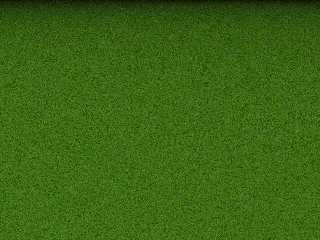
A bit of grass for you.  If you want the source just ask.

Tika wrote:
>
> Well, I'm gaining. <G> Excuse the jpg compression. I say work in progress
> because I have some ideas on what to do with it, like maybe a rock-pond or
> river in the back. I would probably like to use a texture map for grass as
> opposed to scaling bumps on a plane. The trees and flowers are from a plant
> model set I found on the web.
>
> <humor>
> If you look closely at the birdhouse post, you'll see that the post apparently
> goes right through the center of a flower and leaf cluster! I have no idea how
> that happened and didn't even notice it until after I rendered an 800 x 600
> image. Only a computer could think of such things! <LOL>
> </humor>
>
> --
>
> Tika
>
> Tika's Graphics: http://www.5thpower.com/tika/
>
>  [Image]

--
Cheers
Steve              email mailto:sjl### [at] ndirectcouk

%HAV-A-NICEDAY Error not enough coffee  0 pps.

web http://www.ndirect.co.uk/~sjeln/

or  http://start.at/zero-pps
Post a reply to this message
Attachments:
Download 'mygrass.jpg' (79 KB)
Preview of image 'mygrass.jpg'
|
|
| |
| |
|
|
|
|
| |
| |
|
|
I hadn't even considered the frame being 2D the dop shadow might have been a
tip-off but you have good area light shadows in the picture besides too,
unless of course you were post-processing on those also. heh-heh
I don't think it's a bad thing to make 3D look 2D, just another form really
using a different medium.  It's all relative anyhow, someone else is not
going to see what I see, exactly anyway.

Bob

Tika <sum### [at] hotmailcom> wrote in message
news:37f84457@news.povray.org...
> Well, I'm gaining. <G> Excuse the jpg compression. I say work in progress
> because I have some ideas on what to do with it, like maybe a rock-pond or
> river in the back. I would probably like to use a texture map for grass as
> opposed to scaling bumps on a plane. The trees and flowers are from a
plant
> model set I found on the web.
>
> <humor>
> If you look closely at the birdhouse post, you'll see that the post
apparently
> goes right through the center of a flower and leaf cluster! I have no idea
how
> that happened and didn't even notice it until after I rendered an 800 x
600
> image. Only a computer could think of such things! <LOL>
> </humor>
>
>
> --
>
> Tika
>
> Tika's Graphics: http://www.5thpower.com/tika/
>
>
>
>
>
Post a reply to this message
|
|
| |
| |
|
|
|
|
| |
| |
|
|
I saved your suggestions. :)

Bob Hughes <inv### [at] aolcom> wrote in message
news:37f8b5ec@news.povray.org...

> Appears to be too much 'ambient' for the birdhouse and maybe even the rest
> too,

What is 'ambient'? I mean, I have heard the term before but never really
understood it's meaning. Is it too light? Too dark? Sometimes the gamma on my
system is different than that on others. I've noticed downloading pics, that
some appear too dark to see any detail. And too, the .jpg compression (eww...)

I tried to add some shine to the birdhouse but no luck yet...

>the hole should probably go dark, almost black.

I was thinking about that but I wanted a hole one could actually be able to
peer into, sort of give it realistic depth... Probably would been easier your
way though. Just slap a circle on the face of that cube. :)

> I think this is great, has a paper cutout graphics look to it.

Ick.. Here I was hoping for more realism. <G> I'm working on it though.

> Nice going so far, hope to see the additions to the landscape.  You might
> try looking into the clouds technique which Jaime Vives Piqueres did in
> Stsky.pov posted at the povray.text.scene-files (or p.binaries.s-f.?) group
> a month or so ago, I think you would like it.

Problem with me is, I'm finding that most of these files are way over my
head - very difficult to impossible to understand. I'm just learning so if it
looks way too complex, I just don't bother with it right now. I have Terragen
and Paint Shop Pro 5 so... anything's possible! <G> But I hope to make this
scene 100% POV-Ray... I'll get there.


--

Tika

Tika's Graphics: http://www.5thpower.com/tika/
Post a reply to this message
|
|
| |
| |
|
|
|
|
| |
| |
|
|
Steve <sjl### [at] ndirectcouk> wrote in message
news:37F8E9F3.6754ADFB@ndirect.co.uk...
> A bit of grass for you.  If you want the source just ask.

Hey! I think I know how to do that! :) Thanks for the idea...


--

Tika

Tika's Graphics: http://www.5thpower.com/tika/
Post a reply to this message
|
|
| |
| |
|
|
|
|
| |
| |
|
|
'ambient', if too high (1 max is typical, 0.1 is default) will tend to
flatten the colors on shapes and leave you without enough contrast.  Same
can happen if adding 'no_shadow' to the object or 'shadowless' to your
light.  Takes some learning time, just keep at it.  The variations are so
endless that unless you use defaults you could end up with anything
practically.
If by "shine" you mean let the light shine off of it like a reflected glare,
that can be tough since it gets based upon orientation of all three things,
camera, light and object.  You have to think in terms of real world
instances of things and position accordingly.  Other than that, by varying
the 'roughness' for 'specular' you can change how much and how wide a
surface area gets affected.  Using a roughness of 1 and specular of 1 will
almost certainly show a highlight, unless the object is a box with only a
corner pointing in the direction of both light and camera.  Which kind of
resembles your birdhouses in a way.  Adding and raising reflection sort of
goes hand in hand with specular highlighting usually.
Anyhow the possiblities of the real and unreal are so much that it isn't
something easily taught without the basics being covered foremost.
Btw, please don't put a black 'disc' on there for the openings, okay?  : )

Bob

Tika <sum### [at] hotmailcom> wrote in message
news:37f94cda@news.povray.org...
> I saved your suggestions. :)
>
> Bob Hughes <inv### [at] aolcom> wrote in message
> news:37f8b5ec@news.povray.org...
>
> > Appears to be too much 'ambient' for the birdhouse and maybe even the
rest
> > too,
>
> What is 'ambient'? I mean, I have heard the term before but never really
> understood it's meaning. Is it too light? Too dark? Sometimes the gamma on
my
> system is different than that on others. I've noticed downloading pics,
that
> some appear too dark to see any detail. And too, the .jpg compression
(eww...)
>
> I tried to add some shine to the birdhouse but no luck yet...
>
> >the hole should probably go dark, almost black.
>
> I was thinking about that but I wanted a hole one could actually be able
to
> peer into, sort of give it realistic depth... Probably would been easier
your
> way though. Just slap a circle on the face of that cube. :)
>
> > I think this is great, has a paper cutout graphics look to it.
>
> Ick.. Here I was hoping for more realism. <G> I'm working on it though.
>
> > Nice going so far, hope to see the additions to the landscape.  You
might
> > try looking into the clouds technique which Jaime Vives Piqueres did in
> > Stsky.pov posted at the povray.text.scene-files (or p.binaries.s-f.?)
group
> > a month or so ago, I think you would like it.
>
> Problem with me is, I'm finding that most of these files are way over my
> head - very difficult to impossible to understand. I'm just learning so if
it
> looks way too complex, I just don't bother with it right now. I have
Terragen
> and Paint Shop Pro 5 so... anything's possible! <G> But I hope to make
this
> scene 100% POV-Ray... I'll get there.
>
>
> --
>
> Tika
>
> Tika's Graphics: http://www.5thpower.com/tika/
>
>
Post a reply to this message
|
|
| |
| |
|
|
|
|
| |
| |
|
|
Bob Hughes wrote:
>
> Btw, please don't put a black 'disc' on there for the openings, okay?  : )
	OTOH you could difference a box inside: right now it looks like a solid
box with a circular hole rather than an empty box with a circular
opening...

		Jerome

--
*******************************
* Always listen to experts,   * Jérôme M. BERGER
* they'll tell you what can't * mailto:ber### [at] inamecom
* be done and why...          * http://www.enst.fr/~jberger
* Then do it.                 *
*******************************
Post a reply to this message
|
|
| |
| |
|
|
|
|
| |
| |
|
|
Bob Hughes <inv### [at] aolcom> wrote in message
news:37f948f2@news.povray.org...

> I hadn't even considered the frame being 2D the dop shadow might have been a
> tip-off but you have good area light shadows in the picture besides too,
> unless of course you were post-processing on those also.

I don't think I did any post-processing of the lighting. Sometimes I do adjust
gamma and brightness but this one I didn't have to. The frame is two Blade Pro
Presets (www.flamingpear.com) for Photoshop/Paint Shop Pro. The basket weave
is one of my own presets and the golden frame color is one I found on the
'net. I just put one over the other (white area, basketweave, then again with
gold). I normally add drop shadow for frames.

I'm so used to "framing" my objects for two reasons: One being that I frequent
alt.binaries.comp-graphics which is 2D and 3D art and I like to keep the
images small, and picture-like, and two - I like to have it look like
something for a gallery (ie. my art gallery found at my site :) I have to get
with it and update the gallery, too, and add my models I made.


--

Tika

Tika's Graphics: http://www.5thpower.com/tika/
Post a reply to this message
|
|
| |
| |
|
|
|
|
| |
| |
|
|
Bob Hughes <inv### [at] aolcom> wrote in message
news:37f950f7@news.povray.org...
> 'ambient', if too high (1 max is typical, 0.1 is default) will tend to
> flatten the colors on shapes and leave you without enough contrast.  Same
> can happen if adding 'no_shadow' to the object or 'shadowless' to your
> light.  Takes some learning time, just keep at it.  The variations are so
> endless that unless you use defaults you could end up with anything
> practically.

Well, I never set any 'ambient' in the picture that I know of... I just used
defaults that came up when I inserted code from the code menu or made myself.
I'll have to experiement with ambient to see what it does to the picture.

> If by "shine" you mean let the light shine off of it like a reflected glare,
> that can be tough since it gets based upon orientation of all three things,
> camera, light and object.  You have to think in terms of real world
> instances of things and position accordingly.  Other than that, by varying
> the 'roughness' for 'specular' you can change how much and how wide a
> surface area gets affected.

Ah, ok. I'm thinking, I want the treehouse roof, house, hole and perch to look
like painted wood, and the post to look like painted rough metal (you know,
the kind of posts with little dimples in it :) I think I'll try and make my
own textures (not image maps :) for that - if I learn how to make textures,
that is. <G>

> Btw, please don't put a black 'disc' on there for the openings, okay?  : )

I don't want to either. :) I wanted the hole to look real - like you can peer
into it, so I think I'll leave the hole as is. After all, a real birdhouse
actually has a *hole* in it, so thus should my model, IMHO.


--

Tika

Tika's Graphics: http://www.5thpower.com/tika/
Post a reply to this message
|
|
| |
| |
|
|
|
|
| |
| |
|
|
Jerome M. BERGER <jbe### [at] enstfr> wrote in message
news:37F95350.975D0136@enst.fr...

> Bob Hughes wrote:
>> Btw, please don't put a black 'disc' on there for the openings, okay?  : )

> OTOH you could difference a box inside: right now it looks like a solid
> box with a circular hole rather than an empty box with a circular
> opening...

Oh, NOW I see what you're saying... I think instead of the cube I made up in
sPatch, I will use some planes to make a hollow box intead. That'll be
tricky - not sure if POV-Ray has square surfaces that can be put together.


--

Tika

Tika's Graphics: http://www.5thpower.com/tika/
Post a reply to this message
|
|
| |
| |
|
|
|
|
| |
| |
|
|
Tika wrote:
>
> Jerome M. BERGER <jbe### [at] enstfr> wrote in message
> news:37F95350.975D0136@enst.fr...
>
> > Bob Hughes wrote:
> >> Btw, please don't put a black 'disc' on there for the openings, okay?  : )
>
> > OTOH you could difference a box inside: right now it looks like a solid
> > box with a circular hole rather than an empty box with a circular
> > opening...
>
> Oh, NOW I see what you're saying... I think instead of the cube I made up in
> sPatch, I will use some planes to make a hollow box intead. That'll be
> tricky - not sure if POV-Ray has square surfaces that can be put together.
>
> --
>
> Tika
>
> Tika's Graphics: http://www.5thpower.com/tika/

	I'm not sure planes would do what you want: plane are actually solid
object, not surfaces, in POV: one side is "inside" and the other is
"outside" so if you difference a cylinder from a plane you won't get a
hole that allows you to see what's on the other side, but you'll get the
same kind of hole you already have with your box. I believe the easiest
way to get what you want is to difference a slightly smaller box from
the birdhouse:

difference {
  box { -1, 1 }
  box { -0.9, 0.9 }
  cylinder { 0, x, 0.3 }
  pigment { color Yellow }
}

		Jerome

--
*******************************
* Always listen to experts,   * Jérôme M. BERGER
* they'll tell you what can't * mailto:ber### [at] inamecom
* be done and why...          * http://www.enst.fr/~jberger
* Then do it.                 *
*******************************
Post a reply to this message
|
|
| |
| |
|
|
|
|
| |
| |
|
|
Tika wrote:

> > OTOH you could difference a box inside: right now it looks like a solid
> > box with a circular hole rather than an empty box with a circular
> > opening...
>
> Oh, NOW I see what you're saying... I think instead of the cube I made up in
> sPatch, I will use some planes to make a hollow box intead. That'll be
> tricky - not sure if POV-Ray has square surfaces that can be put together.
>
> --
>
> Tika

Here is an example of "differencing" one object from another as was
suggested before. Triangles may not work well for your application
because they have no thickness plus you cannot cut a hole through
the face of a triangle so modelling the hole would be a real problem.
While a plane may be ok for making a box I think you will be much
better off if you spend some time learning how to use the box object
instead. It is one of the most important objects in POV-Ray and if
you don't spend some time with the basics you will never get anywhere
with the program.

In this example the first box is the shell of the bird house, the second
box is used to hollow it out, and the cylinder is used to cut the hole
in the face of the house. I added a simple camera and light source so
that you can render it to see how effective it is.

camera{ location<-1.5,0,-5>look_at 0}
light_source {<-20,0,-50>rgb 1}

difference {
             box {  -1, 1 }
             box { -.9,.9 }
        cylinder { < 0, 0,-1.1>,<0,0,-.75>,.3}
          pigment{ rgb 1}
}

Enjoy,

--
Ken Tyler
1100+ Povray, Graphics, 3D Rendering, and Raytracing Links:
http://home.pacbell.net/tylereng/index.html
Post a reply to this message
|
|
| |
| |
|
|
|
|
| |
| |
|
|
Glad a couple people caught this in time (hopefully).  May as well use that
'disc' with a black 'pigment' on there if using just planes for box sides,
unless they are CSG'd together right (I think).

Bob

Ken <tyl### [at] pacbellnet> wrote in message
news:37FA4542.8DC01535@pacbell.net...
>
>
> Tika wrote:
>
> > > OTOH you could difference a box inside: right now it looks like a
solid
> > > box with a circular hole rather than an empty box with a circular
> > > opening...
> >
> > Oh, NOW I see what you're saying... I think instead of the cube I made
up in
> > sPatch, I will use some planes to make a hollow box intead. That'll be
> > tricky - not sure if POV-Ray has square surfaces that can be put
together.
> >
> > --
> >
> > Tika
>
> Here is an example of "differencing" one object from another as was
> suggested before. Triangles may not work well for your application
> because they have no thickness plus you cannot cut a hole through
> the face of a triangle so modelling the hole would be a real problem.
> While a plane may be ok for making a box I think you will be much
> better off if you spend some time learning how to use the box object
> instead. It is one of the most important objects in POV-Ray and if
> you don't spend some time with the basics you will never get anywhere
> with the program.
>
> In this example the first box is the shell of the bird house, the second
> box is used to hollow it out, and the cylinder is used to cut the hole
> in the face of the house. I added a simple camera and light source so
> that you can render it to see how effective it is.
>
> camera{ location<-1.5,0,-5>look_at 0}
> light_source {<-20,0,-50>rgb 1}
>
> difference {
>              box {  -1, 1 }
>              box { -.9,.9 }
>         cylinder { < 0, 0,-1.1>,<0,0,-.75>,.3}
>           pigment{ rgb 1}
> }
>
> Enjoy,
>
> --
> Ken Tyler
> 1100+ Povray, Graphics, 3D Rendering, and Raytracing Links:
> http://home.pacbell.net/tylereng/index.html
Post a reply to this message
|
|
| |
| |
|
|
|
|
| |
| |
|
|
'normal' is what you need to look into then for causing some surface changes
which will then be made more visible by the 'specular' or 'phong'
highlighting.

Crash course POV-Ray Instructor,
Bob (aka computer-crash Bob) j/k!

Tika <sum### [at] hotmailcom> wrote in message
news:37fa3f4c@news.povray.org...
> Bob Hughes <inv### [at] aolcom> wrote in message
> news:37f950f7@news.povray.org...
> > 'ambient', if too high (1 max is typical, 0.1 is default) will tend to
> > flatten the colors on shapes and leave you without enough contrast.
Same
> > can happen if adding 'no_shadow' to the object or 'shadowless' to your
> > light.  Takes some learning time, just keep at it.  The variations are
so
> > endless that unless you use defaults you could end up with anything
> > practically.
>
> Well, I never set any 'ambient' in the picture that I know of... I just
used
> defaults that came up when I inserted code from the code menu or made
myself.
> I'll have to experiement with ambient to see what it does to the picture.
>
> > If by "shine" you mean let the light shine off of it like a reflected
glare,
> > that can be tough since it gets based upon orientation of all three
things,
> > camera, light and object.  You have to think in terms of real world
> > instances of things and position accordingly.  Other than that, by
varying
> > the 'roughness' for 'specular' you can change how much and how wide a
> > surface area gets affected.
>
> Ah, ok. I'm thinking, I want the treehouse roof, house, hole and perch to
look
> like painted wood, and the post to look like painted rough metal (you
know,
> the kind of posts with little dimples in it :) I think I'll try and make
my
> own textures (not image maps :) for that - if I learn how to make
textures,
> that is. <G>
>
> > Btw, please don't put a black 'disc' on there for the openings, okay?
 : )
>
> I don't want to either. :) I wanted the hole to look real - like you can
peer
> into it, so I think I'll leave the hole as is. After all, a real birdhouse
> actually has a *hole* in it, so thus should my model, IMHO.
>
>
> --
>
> Tika
>
> Tika's Graphics: http://www.5thpower.com/tika/
>
>
Post a reply to this message
|
|
| |
| |
|
|
|
|
| |
| |
|
|
Real neat place there, I checked out most of the images.  If you have a
monitor like my old 486 PC had it would explain why you generally have
brighter, and thus faded pictures compared to what I'm seeing here on this
current one.
Always hard to tell if it's intentional or out of neccessity when the
pictures are light or dark.

Bob

Tika <sum### [at] hotmailcom> wrote in message
news:37fa3f4a@news.povray.org...
> Bob Hughes <inv### [at] aolcom> wrote in message
> news:37f948f2@news.povray.org...
>
> > I hadn't even considered the frame being 2D the dop shadow might have
been a
> > tip-off but you have good area light shadows in the picture besides too,
> > unless of course you were post-processing on those also.
>
> I don't think I did any post-processing of the lighting. Sometimes I do
adjust
> gamma and brightness but this one I didn't have to. The frame is two Blade
Pro
> Presets (www.flamingpear.com) for Photoshop/Paint Shop Pro. The basket
weave
> is one of my own presets and the golden frame color is one I found on the
> 'net. I just put one over the other (white area, basketweave, then again
with
> gold). I normally add drop shadow for frames.
>
> I'm so used to "framing" my objects for two reasons: One being that I
frequent
> alt.binaries.comp-graphics which is 2D and 3D art and I like to keep the
> images small, and picture-like, and two - I like to have it look like
> something for a gallery (ie. my art gallery found at my site :) I have to
get
> with it and update the gallery, too, and add my models I made.
>
>
> --
>
> Tika
>
> Tika's Graphics: http://www.5thpower.com/tika/
>
>
Post a reply to this message
|
|
| |
| |
|
|
|
|
| |
| |
|
|
Jerome M. BERGER <jbe### [at] enstfr> wrote in message
news:37FA423A.38626F35@enst.fr...

> I'm not sure planes would do what you want: plane are actually solid
> object, not surfaces, in POV: one side is "inside" and the other is
> "outside" so if you difference a cylinder from a plane you won't get a
> hole that allows you to see what's on the other side, but you'll get the
> same kind of hole you already have with your box. I believe the easiest
> way to get what you want is to difference a slightly smaller box from
> the birdhouse:

I was just thinking the same before I checked my messages. :) I'll try out
your code - thanks.

--

Tika

Tika's Graphics: http://www.5thpower.com/tika/
Post a reply to this message
|
|
| |
| |
|
|
|
|
| |
| |
|
|
Ken <tyl### [at] pacbellnet> wrote in message
news:37FA4542.8DC01535@pacbell.net...

> better off if you spend some time learning how to use the box object
> instead. It is one of the most important objects in POV-Ray and if
> you don't spend some time with the basics you will never get anywhere
> with the program.

Thanks... I forgot about the box object - I had used it some while doing some
of the POV Tutorials. Thanks for the code too... I'll try this out.


--

Tika

Tika's Graphics: http://www.5thpower.com/tika/
Post a reply to this message
|
|
| |
| |
|
|
|
|
| |
| |
|
|
Bob Hughes <inv### [at] aolcom> wrote in message
news:37fa6c00@news.povray.org...
> Real neat place there, I checked out most of the images.

Thanks. :) Most stuff in my gallery at my site was done in Paint Shop Pro.

> If you have a monitor like my old 486 PC had it would explain why
> you generally have brighter, and thus faded pictures compared to
> what I'm seeing here on this current one. Always hard to tell if
> it's intentional or out of neccessity when the pictures are light
> or dark.

I have a CTX VL-400 and only a bit over a year old. And using Win98, then
there's color management to worry about (or else what I see in other programs
won't match what I see in PSP). Now days, getting things to look the same on
all monitors is nothing short of rocket science, IMHO. It looks fine on my
system. I've never had anyone mention that my pictures are "faded" looking,
either. That's the first I've ever heard that.

Not to offend, but maybe your brightness and contrast isn't near "center"? Or
the monitor might be going? I had that happen on an older CTX one time before
the brightness circuitry went haywire. (Thus why I bought my VL-400 :)

I'll leave things as is though, unless I get many others having the same
problem.


--

Tika

Tika's Graphics: http://www.5thpower.com/tika/
Post a reply to this message
|
|
| |
| |
|
|
|
|
| |
| |
|
|
The monitor adjustments I try are usually in vain.  It's a two year + old
IBM monitor, probably fine.  But I can never seem to get the "black" nothing
onscreen background without reducing everything to a darkened mess or
terrible contrast.  Basically I don't think this thing ever could do a pure
black screen.

Bob

Tika <sum### [at] hotmailcom> wrote in message
news:37fbd0c1@news.povray.org...
> Not to offend, but maybe your brightness and contrast isn't near "center"?
Or
> the monitor might be going? I had that happen on an older CTX one time
before
> the brightness circuitry went haywire. (Thus why I bought my VL-400 :)
Post a reply to this message
|
|
| |
| |
|
|
|
|
| |
| |
|
|
Same here, Bob.

--
GrimDude
gri### [at] netzerocom

Bob Hughes <inv### [at] aolcom> wrote in message
news:37fd3900@news.povray.org...
> The monitor adjustments I try are usually in vain.  It's a two year + old
> IBM monitor, probably fine.  But I can never seem to get the "black"
nothing
> onscreen background without reducing everything to a darkened mess or
> terrible contrast.  Basically I don't think this thing ever could do a
pure
> black screen.
>
> Bob
Post a reply to this message
|
|
| |
| |
|
|
|
|
| |
| |
|
|
Bob Hughes <inv### [at] aolcom> wrote in message
news:37fd3900@news.povray.org...

> The monitor adjustments I try are usually in vain.  It's a two year + old
> IBM monitor, probably fine.  But I can never seem to get the "black" nothing
> onscreen background without reducing everything to a darkened mess or
> terrible contrast.  Basically I don't think this thing ever could do a pure
> black screen.

Ahhh. ok. That's why things will look so bright and washed out on your
monitor. My monitor can give me a totally black background and yet produce
rich, vivid colors as well, all on the same screen. My other CTX I had before
this one took 5 years of almost constant use (on 3 different computers, and
survived when I had to move) before the thing went "too bright" - like your
IBM, you got a charcoal dark dark grey background but never pure black (where
before the brightness circuit blew, it would give pure black). But 2 years
seems an awful short life span for a monitor. Sounds like a not-so-good
monitor. CTX's VL-400 I bought for around $153 shipped from CMO/New MMI about
a year or so ago. I'm happy with it so far.


--

Tika

Tika's Graphics: http://www.5thpower.com/tika/
Post a reply to this message
|
|
| |
| |
|
|
|
|
| |
|
|