|
|
|
|
|
|
| |
| |
|
|
|
|
| |
| |
|
|
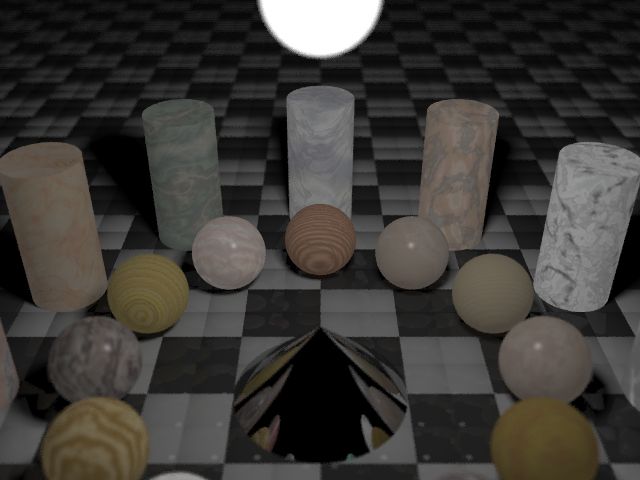
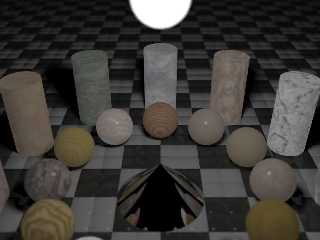
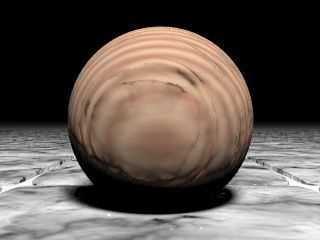
Just tinkering with photo-realism, wanted to see what people thought as to
what could be improved.

This image is NOT that exciting for content though :) I'm looking at the
light/camera settings for maximum realism.

This image uses focal blur of 0.3, an area light, and standard level 5
radiosity settings.

And this image took 6.5 hours for my P133 :(
Post a reply to this message
Attachments:
Download 'camtestf.jpg' (34 KB)
Preview of image 'camtestf.jpg'
|
|
| |
| |
|
|
|
|
| |
| |
|
|
For real realism, I suggest cylinders with bevelled/rounded edges. Some
scratches (ever so faint) would help too (that goes for all surfaces,
actually - especially the wood could use some roughening).
Even though it is quite possible to create totally polished and smooth
marble, stone and wood cylinders (with razor-sharp edges) and spheres in
reality, the illusion of photo-realism is much more believable if the
objects are *not* that perfect. Mind: They don't have to look weathered.
Just that little tiny touch of imperfection that is hardly visible to the
eye, but gets recognized subconciously.

Is the image supposed to be so dark? It looks a little bit washed-out into
the grey direction.
Also I don't get the bright globe at the top. I guess it is some kind of
lamp? Is it so blurry because of the focal blur or did you use media?

So long,
Johannes.


Charles Krause wrote in message <370f04f6.0@news.povray.org>...
>Just tinkering with photo-realism, wanted to see what people thought as to
>what could be improved.
>
>This image is NOT that exciting for content though :) I'm looking at the
>light/camera settings for maximum realism.
>
>This image uses focal blur of 0.3, an area light, and standard level 5
>radiosity settings.
>
>And this image took 6.5 hours for my P133 :(
>
>
>
>
>
>
>
Post a reply to this message
|
|
| |
| |
|
|
|
|
| |
| |
|
|
>For real realism, I suggest cylinders with bevelled/rounded edges. Some
>scratches (ever so faint) would help too (that goes for all surfaces,
>actually - especially the wood could use some roughening).


Good idea. How do you model this however? Rounding/bevelling I can see, but
the scratches? Altering the texture somehow? I can see making the surface
normal vary according to some pattern ( large scale agate? ), but that's not
scatches.

>Even though it is quite possible to create totally polished and smooth
>marble, stone and wood cylinders (with razor-sharp edges) and spheres in
>reality, the illusion of photo-realism is much more believable if the
>objects are *not* that perfect. Mind: They don't have to look weathered.
>Just that little tiny touch of imperfection that is hardly visible to the
>eye, but gets recognized subconciously.


Hmm - I wasn't looking at the models at all in this image, just the
camera/lighting - but you have a good point, yes.

>
>Is the image supposed to be so dark? It looks a little bit washed-out into
>the grey direction.


It's not supposed to be so dark, no - but the wash out occurs with the focal
blur, and I've corrected it with resetting the assumed_gamma, which just
changes the color of the wash out I guess.

>Also I don't get the bright globe at the top. I guess it is some kind of
>lamp? Is it so blurry because of the focal blur or did you use media?
>


It's the light source, yes, an area light with a looks_like { sphere ..... }
statement. As for the blur, that is only due to the focal blur.

>So long,
>Johannes.
>


Thanks for your input :)
Post a reply to this message
|
|
| |
| |
|
|
|
|
| |
| |
|
|
Charles Krause wrote:
>
> >For real realism, I suggest cylinders with bevelled/rounded edges. Some
> >scratches (ever so faint) would help too (that goes for all surfaces,
> >actually - especially the wood could use some roughening).
>
> Good idea. How do you model this however? Rounding/bevelling I can see, but
> the scratches? Altering the texture somehow? I can see making the surface
> normal vary according to some pattern ( large scale agate? ), but that's not
> scatches.

A single scratch can be applied by using an image that is all white with
one or more black lines on it. Use this as a bump map in a normal statement.

--
Ken Tyler

mailto://tylereng@pacbell.net
Post a reply to this message
|
|
| |
| |
|
|
|
|
| |
| |
|
|
Charles Krause wrote in message <370f7806.0@news.povray.org>...
>
>Good idea. How do you model this however? Rounding/bevelling I can see, but
>the scratches? Altering the texture somehow? I can see making the surface
>normal vary according to some pattern ( large scale agate? ), but that's
not
>scatches.
>


In most cases, you have to use a slope_map to make both fine scratches and
grooves in a wood texture. For stone textures, I usually apply a slightly
turbulent crackle normal with very fine grooves.

Margus
Post a reply to this message
|
|
| |
| |
|
|
|
|
| |
| |
|
|
Camera settings are not where realism fails in most images, neither is
radiosity or lighting. I have followed almost every image posted here
and in the IRTC and the one thing that always bothers me is textures. If
you want to improve realism, consider spending time on getting the
phong/specular highlights, the diffuse and ambient settings right. For
example, in your image, you might consider playing around with the
settings to improve the depth shown by the shading, your spheres look
rather flat. This would probably be best remedied by decreasing the
ambient. Also consider increasing the brightness of the highlights in
your textures. Everything else falls into place naturally once you have
the textures looking right. What you have is an excellent start, keep up
the good work.
Charles Krause wrote:
>
> Just tinkering with photo-realism, wanted to see what people thought as to
> what could be improved.
>
> This image is NOT that exciting for content though :) I'm looking at the
> light/camera settings for maximum realism.
>
> This image uses focal blur of 0.3, an area light, and standard level 5
> radiosity settings.
>
> And this image took 6.5 hours for my P133 :(
>
> [Image]
--
Chris Maryan
mailto:cma### [at] geocities com
***
Will work for cash.
***
Email me if you are interested in donating
to the Chris Maryan needs money fund.
We will also accept donations to the Chris
needs a Pentium III or SGI workstation
fund and the Chris needs a car fund. com
***
Will work for cash.
***
Email me if you are interested in donating
to the Chris Maryan needs money fund.
We will also accept donations to the Chris
needs a Pentium III or SGI workstation
fund and the Chris needs a car fund.
Post a reply to this message
|
|
| |
| |
|
|
|
|
| |
| |
|
|
Hmmm - any better?
Post a reply to this message
Attachments:
Download 'camtestb.jpg' (11 KB)
Preview of image 'camtestb.jpg'
|
|
| |
| |
|
|
|
|
| |
| |
|
|
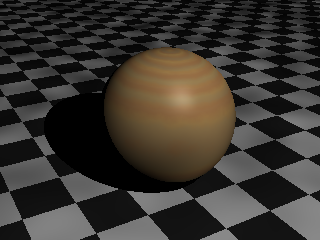
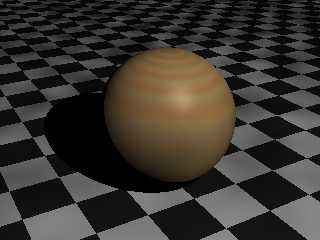
Slight improvement with the brightness. I think your diffuse and
brilliance might be too high, try the default settings of 0.6 and 1.0
respectively, as for ambient, I find the default of 0.1 to be
unrealistically low for typical situations, try 0.2-0.3. One of the
problems seems to be the contrast between the bright and dark parts of
the image, raising the ambient should fix this. In the example below, a
subtle highlight really helps the texture (after all, most wood surfaces
have some degree of polish), look at the specular and roughness
settings.

I fiddled around with something similar and came up with the attached
code. Sorry, jpg, just png, I all my conversion programs seem to be
crashing lately. Mine might be a little too dark. This is the code for
the wood (based on one of the textures in the Moray library, I added the
finish settings):

BTW: Anyone know why the background is patchy in the attached .png? It
seems to happen very often in my images.

#declare _auto_name_no_1_ =
   texture  // txt_84
   {
      pigment
      {
         wood
         color_map
         {
            [ 0.0     rgbft <1.0, 0.85, 0.5, 0.0, 0.0> ]
            [ 0.5     rgbft <0.9, 0.7, 0.46, 0.0, 0.0> ]
            [ 0.7     rgbft <0.9, 0.7, 0.46, 0.0, 0.0> ]
            [ 1.0     rgbft <1.0, 0.85, 0.5, 0.0, 0.0> ]
         }
         turbulence 0.02
         octaves 4
         lambda 3.0
         ramp_wave
         scale  0.175
         rotate    <2.0, 2.0, 0.0>
      }
      finish
      {
         ambient 0.3066
         phong_size 0.0
         specular 0.155633
         roughness 0.014533
      }
   }
   texture  // txt_85
   {
      pigment
      {
         wood
         color_map
         {
            [ 0.0     rgbft <1.0, 0.45, 0.1, 0.8, 0.0> ]
            [ 0.5     rgbft <0.85, 0.65, 0.4, 0.4, 0.0> ]
            [ 0.7     rgbft <0.85, 0.65, 0.4, 0.4, 0.0> ]
            [ 1.0     rgbft <1.0, 0.45, 0.1, 0.8, 0.0> ]
         }
         turbulence 0.02
         octaves 4
         lambda 2.8
         ramp_wave
         scale  <0.2, 0.2, 0.2>
         rotate    <2.0, 2.0, 0.0>
         translate    <0.0175, 0.0175, 0.0175>
      }
   }

--
Chris Maryan
mailto:cma### [at] geocitiescom
***
Will work for cash.
***
Email me if you are interested in donating
to the Chris Maryan needs money fund.
We will also accept donations to the Chris
needs a Pentium III or SGI workstation
fund and the Chris needs a car fund.
Post a reply to this message
Attachments:
Download 'trial_1.png' (37 KB)
Preview of image 'trial_1.png'
|
|
| |
| |
|
|
|
|
| |
| |
|
|
Chris Maryan wrote:

> BTW: Anyone know why the background is patchy in the attached .png? It
> seems to happen very often in my images.

I have never seen that behaviour before in 4 years of using the program.
I also have not used the .png file output option and it might be related
to that. Another possibility is with all of the default setting that moray
has a tendancy to set for you. I use the standard pov defaults except
in very rare cases as they keep consistancy from scene to scene.

  I would like to try rendering your code and see if it manifests itself
on my system with tga output. If you provide the rest of the scene file
you used such as camera and lighting I will check to see if I can reproduce
it and will get back to you with the results. Also If you have moray created
ini file I would like to see what's in that as well.


--
Ken Tyler

mailto://tylereng@pacbell.net
Post a reply to this message
|
|
| |
| |
|
|
|
|
| |
| |
|
|
that's much better

Charles Krause wrote in message <370fb90e.0@news.povray.org>...
>Hmmm - any better?
>
>
>
>
>
Post a reply to this message
|
|
| |
| |
|
|
|
|
| |
| |
|
|
The problem has shown up in the past and it does not seem to be
resticted to .png output. I've attached all of the associated files.

Ken wrote:
>
> Chris Maryan wrote:
>
> > BTW: Anyone know why the background is patchy in the attached .png? It
> > seems to happen very often in my images.
>
> I have never seen that behaviour before in 4 years of using the program.
> I also have not used the .png file output option and it might be related
> to that. Another possibility is with all of the default setting that moray
> has a tendancy to set for you. I use the standard pov defaults except
> in very rare cases as they keep consistancy from scene to scene.
>
>   I would like to try rendering your code and see if it manifests itself
> on my system with tga output. If you provide the rest of the scene file
> you used such as camera and lighting I will check to see if I can reproduce
> it and will get back to you with the results. Also If you have moray created
> ini file I would like to see what's in that as well.
>
> --
> Ken Tyler
>
> mailto://tylereng@pacbell.net

--
Chris Maryan
mailto:cma### [at] geocitiescom
***
Will work for cash.
***
Email me if you are interested in donating
to the Chris Maryan needs money fund.
We will also accept donations to the Chris
needs a Pentium III or SGI workstation
fund and the Chris needs a car fund.
Post a reply to this message
Attachments:
Download 'trial_1.ini.txt' (2 KB)
Download 'trial_1.pov.txt' (3 KB)
Download 'us-ascii' (2 KB)
Download 'trial_1.mdl.dat' (3 KB)
|
|
| |
| |
|
|
|
|
| |
| |
|
|
Chris Maryan wrote:
>
> Camera settings are not where realism fails in most images, neither is
> radiosity or lighting. I have followed almost every image posted here
> and in the IRTC and the one thing that always bothers me is textures. If

I agree with you

> you want to improve realism, consider spending time on getting the
> phong/specular highlights, the diffuse and ambient settings right. For
> example, in your image, you might consider playing around with the
> settings to improve the depth shown by the shading, your spheres look
> rather flat. This would probably be best remedied by decreasing the
> ambient. Also consider increasing the brightness of the highlights in
> your textures. Everything else falls into place naturally once you have
> the textures looking right. What you have is an excellent start, keep up
> the good work.

Don't forget brilliance for a very final touch.
Post a reply to this message
|
|
| |
| |
|
|
|
|
| |
| |
|
|
Chris Maryan wrote:
>
> The problem has shown up in the past and it does not seem to be
> resticted to .png output. I've attached all of the associated files.

 Chris,

 I am happy (sad ?) to report that regardless of what I tried I could
not repeat the blotchy pattern that you are seeing when rendering the
same scene. I tried it with the included .ini file, with different
output image file formats, turned radiosity on and off, tried it
with the .ini file and the global settings commented out, several
combinations with and without AA, with the global settings used but
no ini file, and with both the global settings and the .ini file not
used. I basically ran out of possible combinations to try to reproduce
the blotchy appearance but failed at every attempt.
  The only thing I can think of that I did try, but failed because
I have an older version, is to render the file while inside Moray
itself. There might be a bug in the way that Moray is working with
Pov as an external rendering process. You did not mention if this
behaviour manifests itself when you render directly within Pov and
have Moray shut down but I suspect you like most Moray users seldom
use Pov as a stand alone program.
 I would suggest we get another Moray user to try the .mdl file and
see if they can reproduce the same problem you are seeing. If they
can duplicate the problem it's time to talk to Lutz about how to
correct this abhorrent behaviour you are observing.
  You might try to render it directly in Pov to see if the output
is the same. If you can't reproduce it directly in Pov but it comes
back in Moray it is something to get worried about.


--
Ken Tyler

mailto://tylereng@pacbell.net
Post a reply to this message
|
|
| |
| |
|
|
|
|
| |
| |
|
|
Perhaps this is related to the problem I was having with the degradation of my JPEG
images when
they were posted. I know this this has to do with the way Netscape displays image.

Chris Maryan wrote:

> The problem has shown up in the past and it does not seem to be
> resticted to .png output. I've attached all of the associated files.
>
> Ken wrote:
> >
> > Chris Maryan wrote:
> >
> > > BTW: Anyone know why the background is patchy in the attached .png? It
> > > seems to happen very often in my images.
> >
> > I have never seen that behaviour before in 4 years of using the program.
> > I also have not used the .png file output option and it might be related
> > to that. Another possibility is with all of the default setting that moray
> > has a tendancy to set for you. I use the standard pov defaults except
> > in very rare cases as they keep consistancy from scene to scene.
> >
> >   I would like to try rendering your code and see if it manifests itself
> > on my system with tga output. If you provide the rest of the scene file
> > you used such as camera and lighting I will check to see if I can reproduce
> > it and will get back to you with the results. Also If you have moray created
> > ini file I would like to see what's in that as well.
> >
> > --
> > Ken Tyler
> >
> > mailto://tylereng@pacbell.net
>
> --
> Chris Maryan
> mailto:cma### [at] geocitiescom
> ***
> Will work for cash.
> ***
> Email me if you are interested in donating
> to the Chris Maryan needs money fund.
> We will also accept donations to the Chris
> needs a Pentium III or SGI workstation
> fund and the Chris needs a car fund.
>
>   ------------------------------------------------------------------------
>                   Name: trial_1.INI
>    trial_1.INI    Type: INI File (application/x-unknown-content-type-*inifile)
>               Encoding: base64
>
>                   Name: trial_1.pov
>    trial_1.pov    Type: POV-Ray scene file
(application/x-unknown-content-type-POV-Ray.Scene)
>               Encoding: base64
>
>   ------------------------------------------------------------------------
> //  Texture Include file.
> //
> //  This file was generated for POV-Ray V3.1 by
> //  NOTE: Do *NOT* remove the comment lines containing '$MRY$'.
> //        To make Moray not re-export the texture, change
> //        the '$MRY$' to '$MRX$'.
> //
>
> //
> // ********  TEXTURES  *******
> //
>
> // Textures from previous exports [MRY]
>
> // Textures exported in this run [MRY]
>
> //  $MRY$: 'T_Wood10'
>
> #declare _auto_name_no_1_ =
>    texture  // txt_84
>    {
>       pigment
>       {
>          wood
>          color_map
>          {
>             [ 0.0     rgbft <1.0, 0.85, 0.5, 0.0, 0.0> ]
>             [ 0.5     rgbft <0.9, 0.7, 0.46, 0.0, 0.0> ]
>             [ 0.7     rgbft <0.9, 0.7, 0.46, 0.0, 0.0> ]
>             [ 1.0     rgbft <1.0, 0.85, 0.5, 0.0, 0.0> ]
>          }
>          turbulence 0.02
>          octaves 4
>          lambda 3.0
>          ramp_wave
>          scale  0.175
>          rotate    <2.0, 2.0, 0.0>
>       }
>       finish
>       {
>          ambient 0.3066
>          phong_size 0.0
>          specular 0.155633
>          roughness 0.014533
>       }
>    }
>    texture  // txt_85
>    {
>       pigment
>       {
>          wood
>          color_map
>          {
>             [ 0.0     rgbft <1.0, 0.45, 0.1, 0.8, 0.0> ]
>             [ 0.5     rgbft <0.85, 0.65, 0.4, 0.4, 0.0> ]
>             [ 0.7     rgbft <0.85, 0.65, 0.4, 0.4, 0.0> ]
>             [ 1.0     rgbft <1.0, 0.45, 0.1, 0.8, 0.0> ]
>          }
>          turbulence 0.02
>          octaves 4
>          lambda 2.8
>          ramp_wave
>          scale  <0.2, 0.2, 0.2>
>          rotate    <2.0, 2.0, 0.0>
>          translate    <0.0175, 0.0175, 0.0175>
>       }
>    }
>
> #declare T_Wood10 =
>    material  // T_Wood10
>    {
>       texture { _auto_name_no_1_ }
>    }
>
> //  $MRY$: 'Material1'
>
> #declare Material1 =
>    material  // Material1
>    {
>       texture
>       {
>          pigment
>          {
>             checker
>                color rgb <0.9, 0.9, 0.9>
>                color rgb <0.1, 0.1, 0.1>
>          }
>          finish
>          {
>             ambient 0.301867
>          }
>       }
>    }
>
>   ------------------------------------------------------------------------
>                   Name: trial_1.mdl
>    trial_1.mdl    Type: MorayW Document
(application/x-unknown-content-type-MorayWin.Document)
>               Encoding: base64
Post a reply to this message
|
|
| |
| |
|
|
|
|
| |
| |
|
|
I would be willing to try and render the image out of Moray. Just post the
mdl in moray.binaries.

Ken wrote:

> Chris Maryan wrote:
> >
> > The problem has shown up in the past and it does not seem to be
> > resticted to .png output. I've attached all of the associated files.
>
>  Chris,
>
>  I am happy (sad ?) to report that regardless of what I tried I could
> not repeat the blotchy pattern that you are seeing when rendering the
> same scene. I tried it with the included .ini file, with different
> output image file formats, turned radiosity on and off, tried it
> with the .ini file and the global settings commented out, several
> combinations with and without AA, with the global settings used but
> no ini file, and with both the global settings and the .ini file not
> used. I basically ran out of possible combinations to try to reproduce
> the blotchy appearance but failed at every attempt.
>   The only thing I can think of that I did try, but failed because
> I have an older version, is to render the file while inside Moray
> itself. There might be a bug in the way that Moray is working with
> Pov as an external rendering process. You did not mention if this
> behaviour manifests itself when you render directly within Pov and
> have Moray shut down but I suspect you like most Moray users seldom
> use Pov as a stand alone program.
>  I would suggest we get another Moray user to try the .mdl file and
> see if they can reproduce the same problem you are seeing. If they
> can duplicate the problem it's time to talk to Lutz about how to
> correct this abhorrent behaviour you are observing.
>   You might try to render it directly in Pov to see if the output
> is the same. If you can't reproduce it directly in Pov but it comes
> back in Moray it is something to get worried about.
>
> --
> Ken Tyler
>
> mailto://tylereng@pacbell.net
Post a reply to this message
|
|
| |
| |
|
|
|
|
| |
| |
|
|
Thomas Lake wrote:
>
> I would be willing to try and render the image out of Moray. Just post the
> mdl in moray.binaries.

The .mdl is at the bottom of Chris's last message ( the one I responded to).

--
Ken Tyler

mailto://tylereng@pacbell.net
Post a reply to this message
|
|
| |
| |
|
|
|
|
| |
| |
|
|
Ah yes there it is, my eyes must be going or something. Maybe raytracing too
long.

Ken wrote:

> Thomas Lake wrote:
> >
> > I would be willing to try and render the image out of Moray. Just post the
> > mdl in moray.binaries.
>
> The .mdl is at the bottom of Chris's last message ( the one I responded to).
>
> --
> Ken Tyler
>
> mailto://tylereng@pacbell.net
Post a reply to this message
|
|
| |
| |
|
|
|
|
| |
| |
|
|
I downloaded the moray mdl file and tried rendering it on my computer but like
Ken I to could not reproduce this effect. I also tried playing around with the
rendering settings in moray without being able to reproduce it. Perhaps if you
posted the exact settings you used to render the image, including the
radiocity settings.

Chris Maryan wrote:

> Slight improvement with the brightness. I think your diffuse and
> brilliance might be too high, try the default settings of 0.6 and 1.0
> respectively, as for ambient, I find the default of 0.1 to be
> unrealistically low for typical situations, try 0.2-0.3. One of the
> problems seems to be the contrast between the bright and dark parts of
> the image, raising the ambient should fix this. In the example below, a
> subtle highlight really helps the texture (after all, most wood surfaces
> have some degree of polish), look at the specular and roughness
> settings.
>
> I fiddled around with something similar and came up with the attached
> code. Sorry, jpg, just png, I all my conversion programs seem to be
> crashing lately. Mine might be a little too dark. This is the code for
> the wood (based on one of the textures in the Moray library, I added the
> finish settings):
>
> BTW: Anyone know why the background is patchy in the attached .png? It
> seems to happen very often in my images.
>
> #declare _auto_name_no_1_ =
>    texture  // txt_84
>    {
>       pigment
>       {
>          wood
>          color_map
>          {
>             [ 0.0     rgbft <1.0, 0.85, 0.5, 0.0, 0.0> ]
>             [ 0.5     rgbft <0.9, 0.7, 0.46, 0.0, 0.0> ]
>             [ 0.7     rgbft <0.9, 0.7, 0.46, 0.0, 0.0> ]
>             [ 1.0     rgbft <1.0, 0.85, 0.5, 0.0, 0.0> ]
>          }
>          turbulence 0.02
>          octaves 4
>          lambda 3.0
>          ramp_wave
>          scale  0.175
>          rotate    <2.0, 2.0, 0.0>
>       }
>       finish
>       {
>          ambient 0.3066
>          phong_size 0.0
>          specular 0.155633
>          roughness 0.014533
>       }
>    }
>    texture  // txt_85
>    {
>       pigment
>       {
>          wood
>          color_map
>          {
>             [ 0.0     rgbft <1.0, 0.45, 0.1, 0.8, 0.0> ]
>             [ 0.5     rgbft <0.85, 0.65, 0.4, 0.4, 0.0> ]
>             [ 0.7     rgbft <0.85, 0.65, 0.4, 0.4, 0.0> ]
>             [ 1.0     rgbft <1.0, 0.45, 0.1, 0.8, 0.0> ]
>          }
>          turbulence 0.02
>          octaves 4
>          lambda 2.8
>          ramp_wave
>          scale  <0.2, 0.2, 0.2>
>          rotate    <2.0, 2.0, 0.0>
>          translate    <0.0175, 0.0175, 0.0175>
>       }
>    }
>
> --
> Chris Maryan
> mailto:cma### [at] geocitiescom
> ***
> Will work for cash.
> ***
> Email me if you are interested in donating
> to the Chris Maryan needs money fund.
> We will also accept donations to the Chris
> needs a Pentium III or SGI workstation
> fund and the Chris needs a car fund.
>
>   ------------------------------------------------------------------------
>  [Image]
Post a reply to this message
|
|
| |
| |
|
|
|
|
| |
| |
|
|
Your default texture has a normal of bumps 0.3, and this is not overridden in
your plane texture. The splotches are caused by this normal. I would remove this
default texture statement, or remove the normal from it.

Chris Maryan wrote:

> The problem has shown up in the past and it does not seem to be
> resticted to .png output. I've attached all of the associated files.
>
> Ken wrote:
> >
> > Chris Maryan wrote:
> >
> > > BTW: Anyone know why the background is patchy in the attached .png? It
> > > seems to happen very often in my images.
> >
> > I have never seen that behaviour before in 4 years of using the program.
> > I also have not used the .png file output option and it might be related
> > to that. Another possibility is with all of the default setting that moray
> > has a tendancy to set for you. I use the standard pov defaults except
> > in very rare cases as they keep consistancy from scene to scene.
> >
> >   I would like to try rendering your code and see if it manifests itself
> > on my system with tga output. If you provide the rest of the scene file
> > you used such as camera and lighting I will check to see if I can reproduce
> > it and will get back to you with the results. Also If you have moray created
> > ini file I would like to see what's in that as well.
> >
> > --
> > Ken Tyler
> >
> > mailto://tylereng@pacbell.net
>
> --
> Chris Maryan
> mailto:cma### [at] geocitiescom
> ***
> Will work for cash.
> ***
> Email me if you are interested in donating
> to the Chris Maryan needs money fund.
> We will also accept donations to the Chris
> needs a Pentium III or SGI workstation
> fund and the Chris needs a car fund.
>
>   ------------------------------------------------------------------------
>                   Name: trial_1.INI
>    trial_1.INI    Type: application/x-unknown-content-type-inifile
>               Encoding: base64
>
>                   Name: trial_1.pov
>    trial_1.pov    Type: application/x-unknown-content-type-POV-Ray.Scene
>               Encoding: base64
>
>   ------------------------------------------------------------------------
> //  Texture Include file.
> //
> //  This file was generated for POV-Ray V3.1 by
> //  NOTE: Do *NOT* remove the comment lines containing '$MRY$'.
> //        To make Moray not re-export the texture, change
> //        the '$MRY$' to '$MRX$'.
> //
>
> //
> // ********  TEXTURES  *******
> //
>
> // Textures from previous exports [MRY]
>
> // Textures exported in this run [MRY]
>
> //  $MRY$: 'T_Wood10'
>
> #declare _auto_name_no_1_ =
>    texture  // txt_84
>    {
>       pigment
>       {
>          wood
>          color_map
>          {
>             [ 0.0     rgbft <1.0, 0.85, 0.5, 0.0, 0.0> ]
>             [ 0.5     rgbft <0.9, 0.7, 0.46, 0.0, 0.0> ]
>             [ 0.7     rgbft <0.9, 0.7, 0.46, 0.0, 0.0> ]
>             [ 1.0     rgbft <1.0, 0.85, 0.5, 0.0, 0.0> ]
>          }
>          turbulence 0.02
>          octaves 4
>          lambda 3.0
>          ramp_wave
>          scale  0.175
>          rotate    <2.0, 2.0, 0.0>
>       }
>       finish
>       {
>          ambient 0.3066
>          phong_size 0.0
>          specular 0.155633
>          roughness 0.014533
>       }
>    }
>    texture  // txt_85
>    {
>       pigment
>       {
>          wood
>          color_map
>          {
>             [ 0.0     rgbft <1.0, 0.45, 0.1, 0.8, 0.0> ]
>             [ 0.5     rgbft <0.85, 0.65, 0.4, 0.4, 0.0> ]
>             [ 0.7     rgbft <0.85, 0.65, 0.4, 0.4, 0.0> ]
>             [ 1.0     rgbft <1.0, 0.45, 0.1, 0.8, 0.0> ]
>          }
>          turbulence 0.02
>          octaves 4
>          lambda 2.8
>          ramp_wave
>          scale  <0.2, 0.2, 0.2>
>          rotate    <2.0, 2.0, 0.0>
>          translate    <0.0175, 0.0175, 0.0175>
>       }
>    }
>
> #declare T_Wood10 =
>    material  // T_Wood10
>    {
>       texture { _auto_name_no_1_ }
>    }
>
> //  $MRY$: 'Material1'
>
> #declare Material1 =
>    material  // Material1
>    {
>       texture
>       {
>          pigment
>          {
>             checker
>                color rgb <0.9, 0.9, 0.9>
>                color rgb <0.1, 0.1, 0.1>
>          }
>          finish
>          {
>             ambient 0.301867
>          }
>       }
>    }
>
>   ------------------------------------------------------------------------
>                   Name: trial_1.mdl
>    trial_1.mdl    Type: application/x-unknown-content-type-MorayWin.Document
>               Encoding: base64
Post a reply to this message
|
|
| |
| |
|
|
|
|
| |
| |
|
|
Default texture? Bumps? That would definately explain things but where
is this default texture declared? Also, why doesn't it show up in the
renderings from the polyray plugin for Moray (does polyray even support
bump maps)?

Chris Huff wrote:
>
> Your default texture has a normal of bumps 0.3, and this is not overridden in
> your plane texture. The splotches are caused by this normal. I would remove this
> default texture statement, or remove the normal from it.
>
> Chris Maryan wrote:
>
> > The problem has shown up in the past and it does not seem to be
> > resticted to .png output. I've attached all of the associated files.


--
Chris Maryan
mailto:cma### [at] geocitiescom
***
Will work for cash.
***
Email me if you are interested in donating
to the Chris Maryan needs money fund.
We will also accept donations to the Chris
needs a Pentium III or SGI workstation
fund and the Chris needs a car fund.
Post a reply to this message
|
|
| |
| |
|
|
|
|
| |
| |
|
|
Ignore that, I found it. It's in the MorayPov.inc, the standard include
file that gets thrown in with every image. All problems have been
remedied and all is well.

Chris Maryan wrote:
>
> Default texture? Bumps? That would definately explain things but where
> is this default texture declared? Also, why doesn't it show up in the
> renderings from the polyray plugin for Moray (does polyray even support
> bump maps)?

--
Chris Maryan
mailto:cma### [at] geocitiescom
***
Will work for cash.
***
Email me if you are interested in donating
to the Chris Maryan needs money fund.
We will also accept donations to the Chris
needs a Pentium III or SGI workstation
fund and the Chris needs a car fund.
Post a reply to this message
|
|
| |
| |
|
|
|
|
| |
| |
|
|
After an in depth study of wood textures (actually fifteen minutes of
trial and error) these points are the points I came up with:

- The lighted area should be bright enough so that it is not grayed out
and details are clearly visible.
- The dark area should have the ambient set so that it is dark enough to
have a good contrast with the light area and brightr enough to show the
details of the texture.
- The border between light and dark should be a gradient, not a definite
change.
- Specular and roughness are very important, for wood, try 0.1 and 0.015
respectively. This corresponds to a highlight on a fairly reflective but
still imperfect surface.
- And finally, because the specular highlight will have a perfect shape
normally, distort it by adding a bumps normal scaled to be minimally
visible in terms of surface shading, but be enough to make the specular
highlight slightly distorted.

Please note that these points work under standard lighting conditions,
changes would have to be made to get this to look right under very
bright conditions.

For the wood texture, these settings worked best and by varying the
global ambient, I was able to get the scene to vary accurately from dim
lighting to harsh outdoor lighting:

Ambient: 0.3
Diffuse: 0.8
Briliance: 1 (anything higher than 1.5 seemed too brilliant, anything
lower than 1.0 caused the line between light and dark to look unnatural)
Specular: 0.1
Roughness: 0.015

normal: bumps 0.1
	scaled to <0.1,0.1,0.1>

I hope this has helped all those interested, any coments would be
appreciated.

--
Chris Maryan
mailto:cma### [at] geocitiescom
***
Will work for cash.
***
Email me if you are interested in donating
to the Chris Maryan needs money fund.
We will also accept donations to the Chris
needs a Pentium III or SGI workstation
fund and the Chris needs a car fund.
Post a reply to this message
|
|
| |
| |
|
|
|
|
| |
| |
|
|
Chris

Rendered this via Moray, and don't get the blotches.

Steve

Chris Maryan wrote:
>
> The problem has shown up in the past and it does not seem to be
> resticted to .png output. I've attached all of the associated files.
>
> Ken wrote:
> >
> > Chris Maryan wrote:
> >
> > > BTW: Anyone know why the background is patchy in the attached .png? It
> > > seems to happen very often in my images.
> >
> > I have never seen that behaviour before in 4 years of using the program.
> > I also have not used the .png file output option and it might be related
> > to that. Another possibility is with all of the default setting that moray
> > has a tendancy to set for you. I use the standard pov defaults except
> > in very rare cases as they keep consistancy from scene to scene.
> >
> >   I would like to try rendering your code and see if it manifests itself
> > on my system with tga output. If you provide the rest of the scene file
> > you used such as camera and lighting I will check to see if I can reproduce
> > it and will get back to you with the results. Also If you have moray created
> > ini file I would like to see what's in that as well.
> >
> > --
> > Ken Tyler
> >
> > mailto://tylereng@pacbell.net
>
> --
> Chris Maryan
> mailto:cma### [at] geocitiescom
> ***
> Will work for cash.
> ***
> Email me if you are interested in donating
> to the Chris Maryan needs money fund.
> We will also accept donations to the Chris
> needs a Pentium III or SGI workstation
> fund and the Chris needs a car fund.
>
>   -----------------------------------------------------------------
>
>                      Name: trial_1.INI
>    trial_1.INI       Type: Configuration Settings
(application/x-unknown-content-type-inifile)
>                  Encoding: base64
>
>                      Name: trial_1.pov
>    trial_1.pov       Type: POV-Ray scene file
(application/x-unknown-content-type-POV-Ray.Scene)
>                  Encoding: base64
>
>   -----------------------------------------------------------------
> //  Texture Include file.
> //
> //  This file was generated for POV-Ray V3.1 by
> //  NOTE: Do *NOT* remove the comment lines containing '$MRY$'.
> //        To make Moray not re-export the texture, change
> //        the '$MRY$' to '$MRX$'.
> //
>
> //
> // ********  TEXTURES  *******
> //
>
> // Textures from previous exports [MRY]
>
> // Textures exported in this run [MRY]
>
> //  $MRY$: 'T_Wood10'
>
> #declare _auto_name_no_1_ =
>    texture  // txt_84
>    {
>       pigment
>       {
>          wood
>          color_map
>          {
>             [ 0.0     rgbft <1.0, 0.85, 0.5, 0.0, 0.0> ]
>             [ 0.5     rgbft <0.9, 0.7, 0.46, 0.0, 0.0> ]
>             [ 0.7     rgbft <0.9, 0.7, 0.46, 0.0, 0.0> ]
>             [ 1.0     rgbft <1.0, 0.85, 0.5, 0.0, 0.0> ]
>          }
>          turbulence 0.02
>          octaves 4
>          lambda 3.0
>          ramp_wave
>          scale  0.175
>          rotate    <2.0, 2.0, 0.0>
>       }
>       finish
>       {
>          ambient 0.3066
>          phong_size 0.0
>          specular 0.155633
>          roughness 0.014533
>       }
>    }
>    texture  // txt_85
>    {
>       pigment
>       {
>          wood
>          color_map
>          {
>             [ 0.0     rgbft <1.0, 0.45, 0.1, 0.8, 0.0> ]
>             [ 0.5     rgbft <0.85, 0.65, 0.4, 0.4, 0.0> ]
>             [ 0.7     rgbft <0.85, 0.65, 0.4, 0.4, 0.0> ]
>             [ 1.0     rgbft <1.0, 0.45, 0.1, 0.8, 0.0> ]
>          }
>          turbulence 0.02
>          octaves 4
>          lambda 2.8
>          ramp_wave
>          scale  <0.2, 0.2, 0.2>
>          rotate    <2.0, 2.0, 0.0>
>          translate    <0.0175, 0.0175, 0.0175>
>       }
>    }
>
> #declare T_Wood10 =
>    material  // T_Wood10
>    {
>       texture { _auto_name_no_1_ }
>    }
>
> //  $MRY$: 'Material1'
>
> #declare Material1 =
>    material  // Material1
>    {
>       texture
>       {
>          pigment
>          {
>             checker
>                color rgb <0.9, 0.9, 0.9>
>                color rgb <0.1, 0.1, 0.1>
>          }
>          finish
>          {
>             ambient 0.301867
>          }
>       }
>    }
>
>   -----------------------------------------------------------------
>
>                      Name: trial_1.mdl
>    trial_1.mdl       Type: AudioRack32 Shell Extension
(application/x-unknown-content-type-ESSPlayList)
>                  Encoding: base64
Post a reply to this message
|
|
| |
| |
|
|
|
|
| |
|
|