|
|
|
|
|
|
| |
| |
|
|
|
|
| |
| |
|
|
Strange...
I always thought that POV-ray's rendered images were always
exactly the same for the same code, like with 'normal'(?)
instructions.

Example: if you calculate tan 1 with a calculator, you
always
get the same result: 1.55740772465490223050697480745836(...)

However, it appears this doesn't work this way for POV-ray
image output (?).
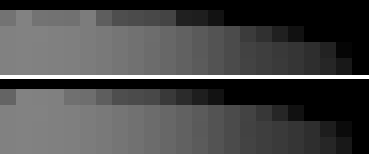
I've rendered the same POV code more than once on the same
computer without using any jittering or crand or any other
random
function that I know of. The results were slightly
different, as
you can see in the attached image (that's why I posted it in
this group)
(close-ups of the rendered images).
Can anybody tell me why the output is different?

Just wondering...

Julius
Post a reply to this message
Attachments:
Download 'renders.jpg' (6 KB)
Preview of image 'renders.jpg'
|
|
| |
| |
|
|
|
|
| |
| |
|
|
Julius Klatte wrote:
> (close-ups of the rendered images).
> Can anybody tell me why the output is different?
> Just wondering...
> Julius

 Maybe it's gremlins.

 What do you want for free ?

 Have you checked for viruses lately ?

 Did someone turn on a blender or something while the image was rendering ?

 Seriously I haven't a clue. Sorry.

--
Ken Tyler

mailto://tylereng@pacbell.net
Post a reply to this message
|
|
| |
| |
|
|
|
|
| |
| |
|
|
Did you use any #macros or looping runs (#if   #while, etc.) ?

KB-

Julius Klatte wrote:

> Strange...
> I always thought that POV-ray's rendered images were always
> exactly the same for the same code, like with 'normal'(?)
> instructions.
>
> Example: if you calculate tan 1 with a calculator, you
> always
> get the same result: 1.55740772465490223050697480745836(...)
>
> However, it appears this doesn't work this way for POV-ray
> image output (?).
> I've rendered the same POV code more than once on the same
> computer without using any jittering or crand or any other
> random
> function that I know of. The results were slightly
> different, as
> you can see in the attached image (that's why I posted it in
> this group)
> (close-ups of the rendered images).
> Can anybody tell me why the output is different?
>
> Just wondering...
>
> Julius
>
>  [Image]
Post a reply to this message
|
|
| |
| |
|
|
|
|
| |
| |
|
|
Is there any possibility that anti-aliasing uses a rand function? Did you
render this with AA on or off?
Julius Klatte <jku### [at] hotmail com> wrote in message
news:370e8cb3.0@news.povray.org...
> Strange...
> I always thought that POV-ray's rendered images were always
> exactly the same for the same code, like with 'normal'(?)
> instructions.
>
> Example: if you calculate tan 1 with a calculator, you
> always
> get the same result: 1.55740772465490223050697480745836(...)
>
> However, it appears this doesn't work this way for POV-ray
> image output (?).
> I've rendered the same POV code more than once on the same
> computer without using any jittering or crand or any other
> random
> function that I know of. The results were slightly
> different, as
> you can see in the attached image (that's why I posted it in
> this group)
> (close-ups of the rendered images).
> Can anybody tell me why the output is different?
>
> Just wondering...
>
> Julius
>
>
> com> wrote in message
news:370e8cb3.0@news.povray.org...
> Strange...
> I always thought that POV-ray's rendered images were always
> exactly the same for the same code, like with 'normal'(?)
> instructions.
>
> Example: if you calculate tan 1 with a calculator, you
> always
> get the same result: 1.55740772465490223050697480745836(...)
>
> However, it appears this doesn't work this way for POV-ray
> image output (?).
> I've rendered the same POV code more than once on the same
> computer without using any jittering or crand or any other
> random
> function that I know of. The results were slightly
> different, as
> you can see in the attached image (that's why I posted it in
> this group)
> (close-ups of the rendered images).
> Can anybody tell me why the output is different?
>
> Just wondering...
>
> Julius
>
>
>
Post a reply to this message
|
|
| |
| |
|
|
|
|
| |
| |
|
|
In answer to your (pretty quick!) reactions:

>Did you use any #macros or looping runs (#if   #while,
etc.) ?
No. But that shouldn't influence the render result either...

>Maybe it's gremlins.
Hmmm... there's an interesting suggestion...
>What do you want for free ?
I'm not complaining!
>Have you checked for viruses lately?
Yes. I spoke to some of them yesterday. But they didn't tell
me: "Hey, we're not going to mess up your system, just the
tiny details of your POV images." Not that you can trust 'em
of course.
>Did someone turn on a blender or something while the image
was rendering ?
Well, the neighbours were having a fight...
>Seriously I haven't a clue. Sorry.
You're disappointing me... :)

>Is there any possibility that anti-aliasing uses a rand
function? Did you
>render this with AA on or off?
That was my first guess as well. I'm not sure if
anti-aliasing is random. I always thought it was a standard
per-pixel routine.
The image(s) I attached were with anti-aliasing, but I tried
another time with AA off and that sure made things
blockier..., but still there were slight variations in the
images.

I'm not really having any problem with the phenomenon, since
the effect is invisible for unzoomed rendered images, but it
just struck me as strange...

Thanks anyway

Julius
Post a reply to this message
|
|
| |
| |
|
|
|
|
| |
| |
|
|
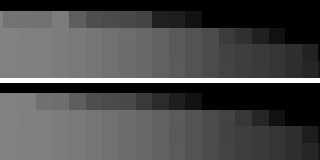
I don't have an answer either, but from the looks of this image, which
looks to be enlarged to almost the nonoscopic level:-) you could hardly
notice these variances.

Julius Klatte wrote:

> Strange...
> I always thought that POV-ray's rendered images were always
> exactly the same for the same code, like with 'normal'(?)
> instructions.
>
> Example: if you calculate tan 1 with a calculator, you
> always
> get the same result: 1.55740772465490223050697480745836(...)
>
> However, it appears this doesn't work this way for POV-ray
> image output (?).
> I've rendered the same POV code more than once on the same
> computer without using any jittering or crand or any other
> random
> function that I know of. The results were slightly
> different, as
> you can see in the attached image (that's why I posted it in
> this group)
> (close-ups of the rendered images).
> Can anybody tell me why the output is different?
>
> Just wondering...
>
> Julius
>
>  [Image]
Post a reply to this message
|
|
| |
| |
|
|
|
|
| |
| |
|
|
It is most definitely the AA. That is random in it's treatment of
pixels. You've really got me there on how it looks different even with
AA off. The only logical explanation is the gremlins, as Mr. Tyler
suggested.
Post a reply to this message
|
|
| |
| |
|
|
|
|
| |
| |
|
|
Try the same code numerous times on another computer.

GrimDude
vos### [at] arkansasnet
Post a reply to this message
|
|
| |
| |
|
|
|
|
| |
| |
|
|
'jitter' as you all might know is random on a frame by frame basis, not
to be used when making animation frames you know.
If no AA there is no jitter as I understood it, but makes me wonder now.
It has the ability to be on, off, off with a number which will be used
on the next render, etc. so maybe the answer lies there.


Julius Klatte wrote:
>
> In answer to your (pretty quick!) reactions:
>
> >Did you use any #macros or looping runs (#if   #while,
> etc.) ?
> No. But that shouldn't influence the render result either...
>
> >Maybe it's gremlins.
> Hmmm... there's an interesting suggestion...
> >What do you want for free ?
> I'm not complaining!
> >Have you checked for viruses lately?
> Yes. I spoke to some of them yesterday. But they didn't tell
> me: "Hey, we're not going to mess up your system, just the
> tiny details of your POV images." Not that you can trust 'em
> of course.
> >Did someone turn on a blender or something while the image
> was rendering ?
> Well, the neighbours were having a fight...
> >Seriously I haven't a clue. Sorry.
> You're disappointing me... :)
>
> >Is there any possibility that anti-aliasing uses a rand
> function? Did you
> >render this with AA on or off?
> That was my first guess as well. I'm not sure if
> anti-aliasing is random. I always thought it was a standard
> per-pixel routine.
> The image(s) I attached were with anti-aliasing, but I tried
> another time with AA off and that sure made things
> blockier..., but still there were slight variations in the
> images.
>
> I'm not really having any problem with the phenomenon, since
> the effect is invisible for unzoomed rendered images, but it
> just struck me as strange...
>
> Thanks anyway
>
> Julius

--
 omniVERSE: beyond the universe
  http://members.aol.com/inversez/homepage.htm
 mailto:inv### [at] aolcom?Subject=PoV-News
Post a reply to this message
|
|
| |
| |
|
|
|
|
| |
| |
|
|
This phenomenon appears to me to be cyclical, suggesting that it
may be memory getting full, and clearing out and starting again,
something like that.

We know nothing about the size of the whole image, the object
count, are you using atmosphere, I'm sure that has some random
factor, media too.

I'd be tempted to look at the code.

Steve

Julius Klatte wrote:
>
> Strange...
> I always thought that POV-ray's rendered images were always
> exactly the same for the same code, like with 'normal'(?)
> instructions.
>
> Example: if you calculate tan 1 with a calculator, you
> always
> get the same result: 1.55740772465490223050697480745836(...)
>
> However, it appears this doesn't work this way for POV-ray
> image output (?).
> I've rendered the same POV code more than once on the same
> computer without using any jittering or crand or any other
> random
> function that I know of. The results were slightly
> different, as
> you can see in the attached image (that's why I posted it in
> this group)
> (close-ups of the rendered images).
> Can anybody tell me why the output is different?
>
> Just wondering...
>
> Julius
>
>  [Image]
Post a reply to this message
|
|
| |
| |
|
|
|
|
| |
| |
|
|
+AD4-We know nothing about the size of the whole image, the
object
+AD4-count, are you using atmosphere, I'm sure that has some
random
+AD4-factor, media too.
+AD4-
+AD4-I'd be tempted to look at the code.


I could post the code, but I don't think it would make much
sense. There was no media or atmosphere. At the first render
there were lots of objects in the scene, but I commented all
but one out when I started to look at the tiny details (to
spare some time).

I still think it's just the anti-aliasing. Does any of the
programmers around here know if POV uses a random function
for AA?
I'm going to have another look at the no-AA renders. Maybe
there was no difference after all.. (that would mean no
gremlins either).

It's really an 'academic' problem, for the differences
between the images are invisible... but I'm just curious...

Greetings all

Julius
Post a reply to this message
|
|
| |
| |
|
|
From: Lance Birch
Subject: Re: Not always the same render results?? <<<----- WAIT A SECOND THERE!!!
Date: 11 Apr 1999 13:28:11
Message: <3710cd9b.0@news.povray.org>
|
|
|
| |
| |
|
|
Hmm, I've had this problem too... I was trying to get my RLE encoder to work
properly but it wouldn't because the images changed slightly...  The way
around it I found was to go into POV-Ray, render... exit POV-Ray, go back in
and render again and you'll get the same image (providing you don't use any
AA jitter or crand).

Then again, it's already @725 here in Australia so I'm tired... I'm going to
sleep... Maybe I'll get in a Lucid Dream if I'm lucky too...

--
Lance.


---
For the latest 3D Studio MAX plug-ins, images and much more, go to:
The Zone - http://come.to/the.zone
Post a reply to this message
|
|
| |
| |
|
|
|
|
| |
| |
|
|
Crand and jitter are the only really random functions... Well, probably
media, too.

Margus

Julius Klatte wrote in message <3710a905.0@news.povray.org>...
>
>I could post the code, but I don't think it would make much
>sense. There was no media or atmosphere. At the first render
>there were lots of objects in the scene, but I commented all
>but one out when I started to look at the tiny details (to
>spare some time).
>
>I still think it's just the anti-aliasing. Does any of the
>programmers around here know if POV uses a random function
>for AA?
>I'm going to have another look at the no-AA renders. Maybe
>there was no difference after all.. (that would mean no
>gremlins either).
>
>It's really an 'academic' problem, for the differences
>between the images are invisible... but I'm just curious...
>
>Greetings all
>
>Julius
>
>
Post a reply to this message
|
|
| |
| |
|
|
|
|
| |
| |
|
|
I think it's AA jitter. Set jitter to 0.0 (+j0.0) regardless of your
AA setting (turn it off as well). Maybe jitter randomises the ray
position within the bounds of the current pixel even though
anti-aliasing is turned on. Is the opposite explicitly stated
anywhere?

---------
Peter Popov
ICQ: 15002700
Post a reply to this message
|
|
| |
| |
|
|
|
|
| |
| |
|
|
Yip

In you go out of Windoze and go back in probably you've cleared
the registers.

Lance's post made me think of something.  The images we saw in
your post were grey, I don't know how many decimal places the RGB
settings were using, maybe depending on certain things (such as
memory usage), it only rounds up or down to a certain distance.
You or I couldn't tell the difference between 0.989877754142 and
0.989877754141 could we, so maybe in certain circumstances it
rounds down or up closer to the decimal point.

I'm not sure about any of this, havn't tested any of it, it's
just an idea that someone with more time might want to look into.

Cheers
Steve


Lance Birch wrote:
>
> Hmm, I've had this problem too... I was trying to get my RLE encoder to work
> properly but it wouldn't because the images changed slightly...  The way
> around it I found was to go into POV-Ray, render... exit POV-Ray, go back in
> and render again and you'll get the same image (providing you don't use any
> AA jitter or crand).
>
> Then again, it's already @725 here in Australia so I'm tired... I'm going to
> sleep... Maybe I'll get in a Lucid Dream if I'm lucky too...
>
> --
> Lance.
>
> ---
> For the latest 3D Studio MAX plug-ins, images and much more, go to:
> The Zone - http://come.to/the.zone
Post a reply to this message
|
|
| |
| |
|
|
From: Lance Birch
Subject: Re: Not always the same render results?? <<<----- WAIT A SECOND THERE!!!
Date: 11 Apr 1999 22:12:00
Message: <37114860.0@news.povray.org>
|
|
|
| |
| |
|
|
OK, I've woken up now... :-)  Nice dreams but not Lucid... :-(

Anyway, back to the subject, ahem, no, I don't think this would happen
because then it would basically undermine the whole idea of computers being
accurate+ACEAIQAh-  So I still think that it must be either a pseudo random number
thing (that is affected by previous renders) or it is something to do with
jittering in AA, even though it's set to 0 maybe it's not really off or
something...  Just a thought...

Then again, it might just be a memory thing... Who knows?

--
Lance.


---
For the latest 3D Studio MAX plug-ins, images and much more, go to:
The Zone - http://come.to/the.zone
Post a reply to this message
|
|
| |
| |
|
|
|
|
| |
| |
|
|
Think so too.
Did you mean to say "anti-aliasing turned off" instead of "on"?
Anyhow, arealights can use jitter, though not on until the keyword is
used. Focal blur mentions jitter however possibly not the same type of
thing at all since only animation and arealight is said to cause
randomization of pixels.
Would like to hear about the further results of tests just in case
though. I sound lazy don't I, anyone should be able to do a quick check.


Peter Popov wrote:
>
> I think it's AA jitter. Set jitter to 0.0 (+j0.0) regardless of your
> AA setting (turn it off as well). Maybe jitter randomises the ray
> position within the bounds of the current pixel even though
> anti-aliasing is turned on. Is the opposite explicitly stated
> anywhere?
>
> ---------
> Peter Popov
> ICQ: 15002700

--
 omniVERSE: beyond the universe
  http://members.aol.com/inversez/homepage.htm
 mailto:inv### [at] aolcom?Subject=PoV-News
Post a reply to this message
|
|
| |
| |
|
|
|
|
| |
| |
|
|
Post the code here and let a few of us try rendering it and
report our results back to the group.

Steve

Julius Klatte wrote:
>
> Strange...
> I always thought that POV-ray's rendered images were always
> exactly the same for the same code, like with 'normal'(?)
> instructions.
>
> Example: if you calculate tan 1 with a calculator, you
> always
> get the same result: 1.55740772465490223050697480745836(...)
>
> However, it appears this doesn't work this way for POV-ray
> image output (?).
> I've rendered the same POV code more than once on the same
> computer without using any jittering or crand or any other
> random
> function that I know of. The results were slightly
> different, as
> you can see in the attached image (that's why I posted it in
> this group)
> (close-ups of the rendered images).
> Can anybody tell me why the output is different?
>
> Just wondering...
>
> Julius
>
>  [Image]
Post a reply to this message
|
|
| |
| |
|
|
|
|
| |
| |
|
|
I think Peter just pointed out the answer: AA jitter.

Here come the docs (subject: "jitter", actually about NOT
using jitter for animations):

"Jitter is a very small amount of random ray perturbation
designed to diffuse tiny !!!aliasing!!! errors that might
not otherwise totally disappear, even with intense
anti-aliasing. By randomizing the placement of erroneous
pixels, the error becomes less noticeable to the human eye,
because the eye and mind are naturally inclined to look for
regular patterns rather than random distortions."

Conclusion: there is a random function in AA.
the docs continue:
"For this reason, we should always set jitter to off in area
lights and !!!anti-aliasing!!! options when preparing a
scene for an animation."

Conclusion: beside area lights, jitter is also used in AA.
Problem solved?

Thanks for the many replies

Julius Klatte

>I think it's AA jitter. Set jitter to 0.0 (+j0.0)
regardless of your
>AA setting (turn it off as well). Maybe jitter randomises
the ray
>position within the bounds of the current pixel even though
>anti-aliasing is turned on. Is the opposite explicitly
stated
>anywhere?
Post a reply to this message
|
|
| |
| |
|
|
From: Julius Klatte
Subject: Re: Not always the same render results?? <<<----- WAIT A SECOND THERE!!!
Date: 13 Apr 1999 19:39:00
Message: <3713c784.0@news.povray.org>
|
|
|
| |
| |
|
|
>I don't think this would happen
>because then it would basically undermine the whole idea of
computers being
>accurate

That's why the thing surprised me so much in the first
place...

Julius Klatte
Post a reply to this message
|
|
| |
| |
|
|
|
|
| |
| |
|
|
Hmm, was this before or after JPEG conversion? and, were you looking at a
full-24/32bit disply at the moment ?


Julius Klatte wrote:
>
> Strange...
> I always thought that POV-ray's rendered images were always
> exactly the same for the same code, like with 'normal'(?)
> instructions.
>
> Example: if you calculate tan 1 with a calculator, you
> always
> get the same result: 1.55740772465490223050697480745836(...)
>
> However, it appears this doesn't work this way for POV-ray
> image output (?).
> I've rendered the same POV code more than once on the same
> computer without using any jittering or crand or any other
> random
> function that I know of. The results were slightly
> different, as
> you can see in the attached image (that's why I posted it in
> this group)
> (close-ups of the rendered images).
> Can anybody tell me why the output is different?
>
> Just wondering...
>
> Julius
>
>  [Image]

--
//Spider
        [ spi### [at] bahnhofse ]-[ http://www.bahnhof.se/~spider/ ]
What I can do and what I could do, I just don't know anymore
                "Marian"
        By: "Sisters Of Mercy"
Post a reply to this message
|
|
| |
| |
|
|
|
|
| |
| |
|
|
No it doesn't matter... I had the problem when saving to TGAs last year...

--
Lance.


---
For the latest 3D Studio MAX plug-ins, images and much more, go to:
The Zone - http://come.to/the.zone
For a totally different experience, visit my Chroma Key Website:
Colorblind - http://www.fortunecity.com/skyscraper/parallax/359/colorblind

Spider wrote in message <3713670B.C1D10D92@bahnhof.se>...
>Hmm, was this before or after JPEG conversion? and, were you looking at a
>full-24/32bit disply at the moment ?
Post a reply to this message
|
|
| |
| |
|
|
|
|
| |
| |
|
|
ok.


Lance Birch wrote:
>
> No it doesn't matter... I had the problem when saving to TGAs last year...
>
> --
> Lance.
>
> Spider wrote in message <3713670B.C1D10D92@bahnhof.se>...
> >Hmm, was this before or after JPEG conversion? and, were you looking at a
> >full-24/32bit disply at the moment ?

--
//Spider
        [ spi### [at] bahnhofse ]-[ http://www.bahnhof.se/~spider/ ]
What I can do and what I could do, I just don't know anymore
                "Marian"
        By: "Sisters Of Mercy"
Post a reply to this message
|
|
| |
| |
|
|
|
|
| |