|
|
|
|
|
|
| |
| |
|
|
|
|
| |
| |
|
|
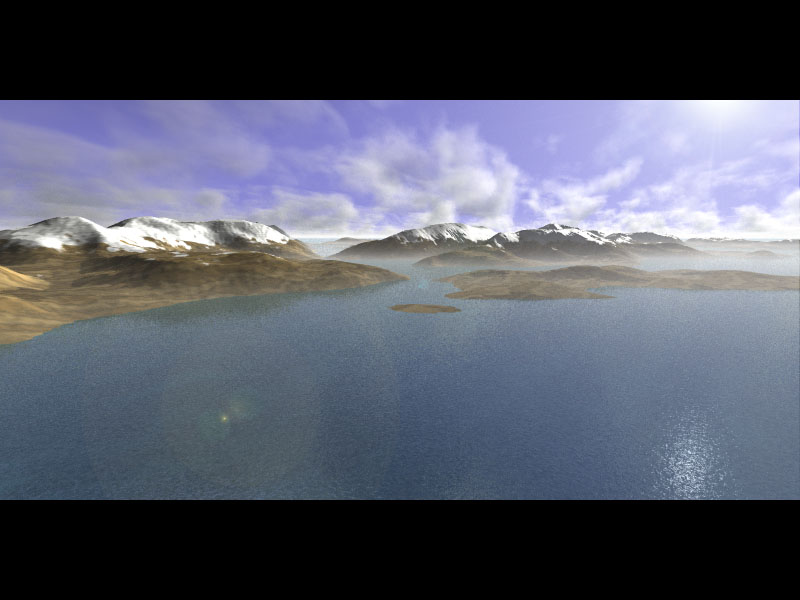
This picture took my K6-200 about 50 hours to render. The reason for
such a long time is the media feature to model the clouds. I'll buy a
Cray next time !!!
The first quarter of this image was rendered using Pov for Dos 3.1a.
The last three-quarters were rendered using Mark Gordon's 'still
unofficial' release of POVLINUX.
I was afraid I might get a different rendering, but no.
By the way, any news of a new official release soon Mark? (if you read
this).

Once again, thanks to the POV-TEAM and the programmers around the world
who developped for or around this great renderer.

Fabien Hénon
Post a reply to this message
Attachments:
Download 'paysage.jpg' (58 KB)
Preview of image 'paysage.jpg'
|
|
| |
| |
|
|
|
|
| |
| |
|
|
Fabien HENON wrote:
>
> This picture took my K6-200 about 50 hours to render. The reason for
> such a long time is the media feature to model the clouds. I'll buy a
> Cray next time !!!
> The first quarter of this image was rendered using Pov for Dos 3.1a.
> The last three-quarters were rendered using Mark Gordon's 'still
> unofficial' release of POVLINUX.
> I was afraid I might get a different rendering, but no.
> By the way, any news of a new official release soon Mark? (if you read
> this).
>
> Once again, thanks to the POV-TEAM and the programmers around the world
> who developped for or around this great renderer.
>
> Fabien Hénon

Nice, thought the mountains could use a bit of editing but guess 50
hours of waiting really discourages to render it again :)

I like it

Juha Leppälä aka Jide
Post a reply to this message
|
|
| |
| |
|
|
|
|
| |
| |
|
|
Actually, rendering without the clouds just takes 10 minutes with AA0.2 at
800*400 pixels.
Improving the texture of the mountain would not be too much of a problem. I
would just re-render it during the next week-end.

Fabien Hénon


Juha =?iso-8859-1?Q?Lepp=E4l=E4?= a écrit:

> Fabien HENON wrote:
> >
> > This picture took my K6-200 about 50 hours to render. The reason for
> > such a long time is the media feature to model the clouds. I'll buy a
> > Cray next time !!!
> > The first quarter of this image was rendered using Pov for Dos 3.1a.
> > The last three-quarters were rendered using Mark Gordon's 'still
> > unofficial' release of POVLINUX.
> > I was afraid I might get a different rendering, but no.
> > By the way, any news of a new official release soon Mark? (if you read
> > this).
> >
> > Once again, thanks to the POV-TEAM and the programmers around the world
> > who developped for or around this great renderer.
> >
> > Fabien Hénon
>
> Nice, thought the mountains could use a bit of editing but guess 50
> hours of waiting really discourages to render it again :)
>
> I like it
>
> Juha Leppälä aka Jide
Post a reply to this message
|
|
| |
| |
|
|
|
|
| |
| |
|
|
beautiful.
Fabien HENON wrote:
>
> This picture took my K6-200 about 50 hours to render. The reason for
> such a long time is the media feature to model the clouds. I'll buy a
> Cray next time !!!
> The first quarter of this image was rendered using Pov for Dos 3.1a.
> The last three-quarters were rendered using Mark Gordon's 'still
> unofficial' release of POVLINUX.
> I was afraid I might get a different rendering, but no.
> By the way, any news of a new official release soon Mark? (if you read
> this).
>
> Once again, thanks to the POV-TEAM and the programmers around the world
> who developped for or around this great renderer.
>
> Fabien Hénon
>
> ---------------------------------------------------------------------
-----------
> [Image]
--
//Spider
[ spi### [at] bahnhof se ]-[ http://www.bahnhof.se/~spider/ ]
What I can do and what I could do, I just don't know anymore
"Marian"
By: "Sisters Of Mercy" se ]-[ http://www.bahnhof.se/~spider/ ]
What I can do and what I could do, I just don't know anymore
"Marian"
By: "Sisters Of Mercy"
Post a reply to this message
|
|
| |
| |
|
|
|
|
| |
| |
|
|
Inspiring! I would really like to see the media code.

GrimDude
vos### [at] arkansasnet
Post a reply to this message
|
|
| |
| |
|
|
|
|
| |
| |
|
|
Wow! Those clouds are really great!
Post a reply to this message
|
|
| |
| |
|
|
|
|
| |
| |
|
|
Very nice. Think you could manage a shoreline? The water could use some
wave breaking and the land an "edge"--- rocky, sandy, whatever--- at the
beach zone. How many times has this been said in other such instances? I
know, I'm just remarking so you don't go home with just good words.
I realize the distance is great and they might not be very visible but
just a slight touch and there wouldn't be such a sudden polar ice cap
melt look to this thing maybe.
Hope I can make such pictures too someday.


Fabien HENON wrote:
>
> This picture took my K6-200 about 50 hours to render. The reason for
> such a long time is the media feature to model the clouds. I'll buy a
> Cray next time !!!
> The first quarter of this image was rendered using Pov for Dos 3.1a.
> The last three-quarters were rendered using Mark Gordon's 'still
> unofficial' release of POVLINUX.
> I was afraid I might get a different rendering, but no.
> By the way, any news of a new official release soon Mark? (if you read
> this).
>
> Once again, thanks to the POV-TEAM and the programmers around the world
> who developped for or around this great renderer.
>
> Fabien Hénon
>
>   ------------------------------------------------------------------------
>  [Image]

--
 omniVERSE: beyond the universe
  http://members.aol.com/inversez/homepage.htm
 mailto:inv### [at] aolcom?Subject=PoV-News
Post a reply to this message
|
|
| |
| |
|
|
|
|
| |
| |
|
|
Bob Hughes a écrit:

> Very nice. Think you could manage a shoreline? The water could use some
> wave breaking and the land an "edge"--- rocky, sandy, whatever--- at the
> beach zone.

Well, I did think of adding a shore line with a breaking waves. The problem is
that I have not figured out (yet how to match the decreasing bump_map as it goes
away from the mountains. Besudes, the waves should be roughly parallel to the
contours of the mountains. With a good use of Photoshop maybe ?

> How many times has this been said in other such instances? I
> know, I'm just remarking so you don't go home with just good words.
> I realize the distance is great and they might not be very visible but
> just a slight touch and there wouldn't be such a sudden polar ice cap
> melt look to this thing maybe.
> Hope I can make such pictures too someday.

I thought of posting the script but the mere size of the height_field (~1.3 Mb
with a png file) deterred me from doing it.

Thakns for all your comments. Yours and those of the others I did not reply to.

Fabien Hénon


>
> Fabien HENON wrote:
> >
> > This picture took my K6-200 about 50 hours to render. The reason for
> > such a long time is the media feature to model the clouds. I'll buy a
> > Cray next time !!!
> > The first quarter of this image was rendered using Pov for Dos 3.1a.
> > The last three-quarters were rendered using Mark Gordon's 'still
> > unofficial' release of POVLINUX.
> > I was afraid I might get a different rendering, but no.
> > By the way, any news of a new official release soon Mark? (if you read
> > this).
> >
> > Once again, thanks to the POV-TEAM and the programmers around the world
> > who developped for or around this great renderer.
> >
> > Fabien Hénon
> >
> >   ------------------------------------------------------------------------
> >  [Image]
>
> --
>  omniVERSE: beyond the universe
>   http://members.aol.com/inversez/homepage.htm
>  mailto:inv### [at] aolcom?Subject=PoV-News
Post a reply to this message
|
|
| |
| |
|
|
|
|
| |
| |
|
|
I meant to say, afterthought actually, that using a post-process, like
digitally painting a shoreline, isn't exactly treason you all know I
hope. I myself have done touch-ups now and then, however usually on
scales of a mere dozens of pixels. All out painting onto a render isn't
going to break a law anyway, except maybe the law of art ;] since I
realize many of us 3D modeller/raytracer/renderer people can be clumsy
oafs with a paintbrush. Nothing personal, just summing up what I've
heard people say about themselves.


Fabien HENON wrote:
>
> Bob Hughes a écrit:
>
> > Very nice. Think you could manage a shoreline? The water could use some
> > wave breaking and the land an "edge"--- rocky, sandy, whatever--- at the
> > beach zone.
>
> Well, I did think of adding a shore line with a breaking waves. The problem is
> that I have not figured out (yet how to match the decreasing bump_map as it goes
> away from the mountains. Besudes, the waves should be roughly parallel to the
> contours of the mountains. With a good use of Photoshop maybe ?
>
> > How many times has this been said in other such instances? I
> > know, I'm just remarking so you don't go home with just good words.
> > I realize the distance is great and they might not be very visible but
> > just a slight touch and there wouldn't be such a sudden polar ice cap
> > melt look to this thing maybe.
> > Hope I can make such pictures too someday.
>
> I thought of posting the script but the mere size of the height_field (~1.3 Mb
> with a png file) deterred me from doing it.
>
> Thakns for all your comments. Yours and those of the others I did not reply to.
>
> Fabien Hénon
>
> >
> > Fabien HENON wrote:
> > >
> > > This picture took my K6-200 about 50 hours to render. The reason for
> > > such a long time is the media feature to model the clouds. I'll buy a
> > > Cray next time !!!
> > > The first quarter of this image was rendered using Pov for Dos 3.1a.
> > > The last three-quarters were rendered using Mark Gordon's 'still
> > > unofficial' release of POVLINUX.
> > > I was afraid I might get a different rendering, but no.
> > > By the way, any news of a new official release soon Mark? (if you read
> > > this).
> > >
> > > Once again, thanks to the POV-TEAM and the programmers around the world
> > > who developped for or around this great renderer.
> > >
> > > Fabien Hénon
> > >
> > >   ------------------------------------------------------------------------
> > >  [Image]
> >
> > --
> >  omniVERSE: beyond the universe
> >   http://members.aol.com/inversez/homepage.htm
> >  mailto:inv### [at] aolcom?Subject=PoV-News

--
 omniVERSE: beyond the universe
  http://members.aol.com/inversez/homepage.htm
 mailto:inv### [at] aolcom?Subject=PoV-News
Post a reply to this message
|
|
| |
| |
|
|
|
|
| |
| |
|
|
Bob Hughes wrote:
>
> I meant to say, afterthought actually, that using a post-process, like
> digitally painting a shoreline, isn't exactly treason you all know I
> hope. I myself have done touch-ups now and then, however usually on
> scales of a mere dozens of pixels. All out painting onto a render isn't
> going to break a law anyway, except maybe the law of art ;] since I
> realize many of us 3D modeller/raytracer/renderer people can be clumsy
> oafs with a paintbrush. Nothing personal, just summing up what I've
> heard people say about themselves.


  Real pov snobs would never admit to touching up one of their images.
It just isn't someting you say in public without risking rejection by
ones peers. That is unless of course the effect you produce is so
completely astonishing that they can overlook it to find out how you
accomplished it.


--
Ken Tyler

mailto://tylereng@pacbell.net
Post a reply to this message
|
|
| |
| |
|
|
|
|
| |
| |
|
|
What I meant by using Photoshop, was not post processing to add waves along
the shores via Photoshop, but to use it to create the a bump_map to put as a
texture for the sea.

I did use post-processing for the lens-flare and increase the contrast.

Fabien Hénon

Ken a écrit:

> Bob Hughes wrote:
> >
> > I meant to say, afterthought actually, that using a post-process, like
> > digitally painting a shoreline, isn't exactly treason you all know I
> > hope. I myself have done touch-ups now and then, however usually on
> > scales of a mere dozens of pixels. All out painting onto a render isn't
> > going to break a law anyway, except maybe the law of art ;] since I
> > realize many of us 3D modeller/raytracer/renderer people can be clumsy
> > oafs with a paintbrush. Nothing personal, just summing up what I've
> > heard people say about themselves.
>
>   Real pov snobs would never admit to touching up one of their images.
> It just isn't someting you say in public without risking rejection by
> ones peers. That is unless of course the effect you produce is so
> completely astonishing that they can overlook it to find out how you
> accomplished it.
>
> --
> Ken Tyler
>
> mailto://tylereng@pacbell.net
Post a reply to this message
|
|
| |
| |
|
|
|
|
| |
| |
|
|
Fabien HENON wrote:
>
> What I meant by using Photoshop, was not post processing to add waves along
> the shores via Photoshop, but to use it to create the a bump_map to put as a
> texture for the sea.
>
> I did use post-processing for the lens-flare and increase the contrast.
>
> Fabien Hénon

That comment was not really for you. I was pestering Bob a little bit.

--
Ken Tyler

mailto://tylereng@pacbell.net
Post a reply to this message
|
|
| |
| |
|
|
|
|
| |
| |
|
|
I imagine the clouds at the left should look a bit brighter. Perhaps you
should decrease extinction a bit (supposedly not realistic, but I have
noticed that when the media represents particles with a high albedo, the
default extincion looks too dark).

Margus

Fabien HENON wrote in message <36F39875.65C694FF@club-internet.fr>...
>This picture took my K6-200 about 50 hours to render. The reason for
>such a long time is the media feature to model the clouds. I'll buy a
>Cray next time !!!
>The first quarter of this image was rendered using Pov for Dos 3.1a.
>The last three-quarters were rendered using Mark Gordon's 'still
>unofficial' release of POVLINUX.
>I was afraid I might get a different rendering, but no.
>By the way, any news of a new official release soon Mark? (if you read
>this).
>
>Once again, thanks to the POV-TEAM and the programmers around the world
>who developped for or around this great renderer.
>
>Fabien Hénon
>
>
>
Post a reply to this message
|
|
| |
| |
|
|
|
|
| |
| |
|
|
GrimDude wrote in message <36f3f118.0@news.povray.org>...
>Inspiring! I would really like to see the media code.
>
>GrimDude
>vos### [at] arkansasnet
>
>

[Sigh!]
Post a reply to this message
|
|
| |
| |
|
|
|
|
| |
| |
|
|
Yes the darkish clouds on the left gave me some headache. I did not know how
to solve that problem
As you suggested, I tried to lower the extinction value form 1.0 to 0.2 but
ALL the clouds became too white --> I had to lower the RGB value of the
scattering  --> it boiled down to the same.
If you have any other tip, they are welcome.

Fabien Hénon


Margus Ramst a écrit:

> I imagine the clouds at the left should look a bit brighter. Perhaps you
> should decrease extinction a bit (supposedly not realistic, but I have
> noticed that when the media represents particles with a high albedo, the
> default extincion looks too dark).
>
> Margus
>
> Fabien HENON wrote in message <36F39875.65C694FF@club-internet.fr>...
> >This picture took my K6-200 about 50 hours to render. The reason for
> >such a long time is the media feature to model the clouds. I'll buy a
> >Cray next time !!!
> >The first quarter of this image was rendered using Pov for Dos 3.1a.
> >The last three-quarters were rendered using Mark Gordon's 'still
> >unofficial' release of POVLINUX.
> >I was afraid I might get a different rendering, but no.
> >By the way, any news of a new official release soon Mark? (if you read
> >this).
> >
> >Once again, thanks to the POV-TEAM and the programmers around the world
> >who developped for or around this great renderer.
> >
> >Fabien Hénon
> >
> >
> >
Post a reply to this message
|
|
| |
| |
|
|
|
|
| |
| |
|
|
I have posted the scripts at text.scenes.files .
Lum.pov is to create the H_F and nuages2.pov is the one to render.

Be warned though, the script is very messy. Anyway you should manage to
see the media keyword in that shamble.

Fabien Hénon

GrimDude a écrit:

> GrimDude wrote in message <36f3f118.0@news.povray.org>...
> >Inspiring! I would really like to see the media code.
> >
> >GrimDude
> >vos### [at] arkansasnet
> >
> >
>
> [Sigh!]
Post a reply to this message
|
|
| |
| |
|
|
|
|
| |
| |
|
|
I know, I know. Render with POV only and leave painting to the Photo
Shop users, right?
I did say though I only change a few pixels sometimes. Usually its a
case of bad CSG done or a slight malformation due to refraction and the
max_trace_level needed turning up. So instead of spending too much time
on one thing and move on I am sometimes forced to correct a tiny bit
before using a rendered image as my latest Windows wallpaper.
Not proud of this fact I assure you. Call it a supplement to my being
able to continue raytracing with POV-Ray and not stuck on just an
infinite plane.
The bump_map sounds like a good idea Fabien. Using anything but P-R 3.1d
that is. You could make a orthogonal view image from above the scene and
use it. Add in a small wave-breaking shoreline all along the water edge.
Got me wondering now how this could be done with straight POV.


Ken wrote:
>
> Fabien HENON wrote:
> >
> > What I meant by using Photoshop, was not post processing to add waves along
> > the shores via Photoshop, but to use it to create the a bump_map to put as a
> > texture for the sea.
> >
> > I did use post-processing for the lens-flare and increase the contrast.
> >
> > Fabien Hénon
>
> That comment was not really for you. I was pestering Bob a little bit.
>
> --
> Ken Tyler
>
> mailto://tylereng@pacbell.net

--
 omniVERSE: beyond the universe
  http://members.aol.com/inversez/homepage.htm
 mailto:inv### [at] aolcom?Subject=PoV-News
Post a reply to this message
|
|
| |
| |
|
|
|
|
| |
| |
|
|
Bob Hughes a écrit:

> I know, I know. Render with POV only and leave painting to the Photo
> Shop users, right?
> I did say though I only change a few pixels sometimes. Usually its a
> case of bad CSG done or a slight malformation due to refraction and the
> max_trace_level needed turning up. So instead of spending too much time
> on one thing and move on I am sometimes forced to correct a tiny bit
> before using a rendered image as my latest Windows wallpaper.
> Not proud of this fact I assure you. Call it a supplement to my being
> able to continue raytracing with POV-Ray and not stuck on just an
> infinite plane.
> The bump_map sounds like a good idea Fabien. Using anything but P-R 3.1d
> that is. You could make a orthogonal view image from above the scene and
> use it. Add in a small wave-breaking shoreline all along the water edge.
>

> Got me wondering now how this could be done with straight POV.
>

Anyone who has the answer will be rewarded with a Free Licence of POVRAY 3.1a.
<grin>.


Fabien Hénon

>
> Ken wrote:
> >
> > Fabien HENON wrote:
> > >
> > > What I meant by using Photoshop, was not post processing to add waves along
> > > the shores via Photoshop, but to use it to create the a bump_map to put as a
> > > texture for the sea.
> > >
> > > I did use post-processing for the lens-flare and increase the contrast.
> > >
> > > Fabien Hénon
> >
> > That comment was not really for you. I was pestering Bob a little bit.
> >
> > --
> > Ken Tyler
> >
> > mailto://tylereng@pacbell.net
>
> --
>  omniVERSE: beyond the universe
>   http://members.aol.com/inversez/homepage.htm
>  mailto:inv### [at] aolcom?Subject=PoV-News
Post a reply to this message
|
|
| |
| |
|
|
|
|
| |