|
|
|
|
|
|
| |
| |
|
|
|
|
| |
| |
|
|
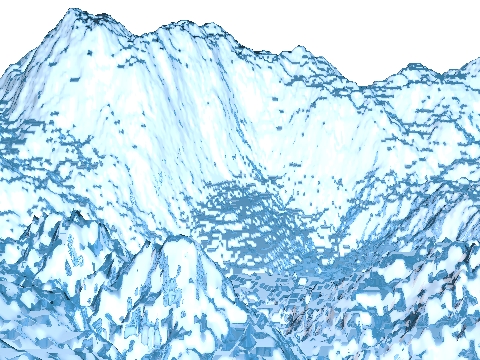
As you can see it, this part of height-field is a bit too much
pixellised (we see big squares on the slopes). Unfortunately, when I use
a better defined grayscale image, I don't have enough memory to render
it.
Does someone have an idea ?

Noé
--
"Je ne deteste que les bourreaux" -- Albert Camus

Pour m'écrire, veuillez enlever PASDEPUB de mon adresse ;P
Post a reply to this message
Attachments:
Download 'reve.jpg' (207 KB)
Preview of image 'reve.jpg'
|
|
| |
| |
|
|
From: Hughes, B
Subject: Re: A bad height-field (first binary post. pliz tell if wrong)
Date: 22 Aug 2003 06:10:55
Message: <3f45ec2f@news.povray.org>
|
|
|
| |
| |
|
|
"Noé Falzon" <PAS### [at] tiscali fr> wrote in message
news:1g03c5r.1ugst2b961wgfN%PASDEPUBnoe.falzon@tiscali.fr...
> As you can see it, this part of height-field is a bit too much
> pixellised (we see big squares on the slopes). Unfortunately, when I use
> a better defined grayscale image, I don't have enough memory to render
> it.
> Does someone have an idea ?
Add the keyword 'smooth' to the HF statement. Other than higher resolution
that's about all I know to do (When I remember to use it myself! Long story,
recent event.)
Bob H. fr> wrote in message
news:1g03c5r.1ugst2b961wgfN%PASDEPUBnoe.falzon@tiscali.fr...
> As you can see it, this part of height-field is a bit too much
> pixellised (we see big squares on the slopes). Unfortunately, when I use
> a better defined grayscale image, I don't have enough memory to render
> it.
> Does someone have an idea ?
Add the keyword 'smooth' to the HF statement. Other than higher resolution
that's about all I know to do (When I remember to use it myself! Long story,
recent event.)
Bob H.
Post a reply to this message
|
|
| |
| |
|
|
From: Chris Johnson
Subject: Re: A bad height-field (first binary post. pliz tell if wrong)
Date: 22 Aug 2003 06:25:47
Message: <3f45efab@news.povray.org>
|
|
|
| |
| |
|
|
The smooth keyword sometimes helps, and sometimes doesn't. Often a
height-field needs to be generated in 16-bit to avoid artifacts (see pov-ray
documentation).

-Chris
Post a reply to this message
|
|
| |
| |
|
|
From: JC (Exether)
Subject: Re: A bad height-field (first binary post. pliz tell if wrong)
Date: 22 Aug 2003 09:01:41
Message: <3f461435@news.povray.org>
|
|
|
| |
| |
|
|
Buy some more memory or another computer ...  :-)

Apart from smooth keyword and using a higher resolution hf image, I
don't see anything else.

Depending on the shape you want (btw, I couldn't read attached image)
you can also try isosurfaces with adequate noise3D + f_granite for
example. It takes more time to render but uses less memory. It's also
perfectly smooth whatever the resolution.

JC

Noé Falzon wrote:
> As you can see it, this part of height-field is a bit too much
> pixellised (we see big squares on the slopes). Unfortunately, when I use
> a better defined grayscale image, I don't have enough memory to render
> it.
> Does someone have an idea ?
>
> Noé
Post a reply to this message
|
|
| |
| |
|
|
From: Aaron Gillies
Subject: Re: A bad height-field (first binary post. pliz tell if wrong)
Date: 22 Aug 2003 09:04:44
Message: <3f4614ec$1@news.povray.org>
|
|
|
| |
| |
|
|
Noe:

Hmm ...  Are you already using the smooth keyword on this?
There is some rather odd artifacting going on.

I would actually turn smooth off and try to optimize the look
of the "mountain" using trees, texture, etc.  Toss a bunch of
green things on the naturally flat places.  Use a texture that has
a normal map containing different uses of granite at a larger
scale, for example.  Also, vary the color on the surface.

You can hide a lot of problems this way.

Aaron


"Noé Falzon" <PAS### [at] tiscalifr> wrote in message
news:1g03c5r.1ugst2b961wgfN%PASDEPUBnoe.falzon@tiscali.fr...
> As you can see it, this part of height-field is a bit too much
> pixellised (we see big squares on the slopes). Unfortunately, when I use
> a better defined grayscale image, I don't have enough memory to render
> it.
> Does someone have an idea ?
>
> Noé
> --
> "Je ne deteste que les bourreaux" -- Albert Camus
>
> Pour m'écrire, veuillez enlever PASDEPUB de mon adresse ;P
>
>
>
Post a reply to this message
|
|
| |
| |
|
|
From: Shay
Subject: Re: A bad height-field (first binary post. pliz tell if wrong)
Date: 22 Aug 2003 10:27:34
Message: <3f462856$1@news.povray.org>
|
|
|
| |
| |
|
|
"Noé Falzon" <PAS### [at] tiscalifr> wrote in message
news:1g03c5r.1ugst2b961wgfN%PASDEPUBnoe.falzon@tiscali.fr...

| Does someone have an idea ?
|

Height-fields themselves are pretty half-455ed, and making one from an
image_map only adds another layer of half-455ness. I'm not suggesting
that your effort is in any way half-455ed. The image map you have
generated is quite nice, but even an isosurface created from an image
map is going to be jagged unless the image map is *huge*.

The first step towards getting a decent looking mountain will be to
describe a similar looking map with functions. That will solve your
resolution problems without using any memory. Once you have the
function, you can create an isosurface if you have the patience for it
to render.

If memory is a problem at all, then a high-resolution height-field like
this isn't going to leave much memory for additional elements in the
scene. Doesn't matter anyway, generalized algorithms like the
height-field give 5h!++y results, and increasing the resolution to
stupid levels only makes them somewhat less 5h!++y, not good. My
suggestion would be to create a medium resolution height-field and to
then add a granite or similar normal.

 -Shay
Post a reply to this message
|
|
| |
| |
|
|
|
|
| |
| |
|
|
Thanks for all your comments.
Actually, there is already the smooth keyword. I ill increase the
resolution of my greyscale image, even if I don't have enough memory to
render it ;)

Noé
--
"Je ne deteste que les bourreaux" -- Albert Camus

Pour m'écrire, veuillez enlever PASDEPUB de mon adresse ;P
Post a reply to this message
|
|
| |
| |
|
|
From: Aaron Gillies
Subject: Re: A bad height-field (first binary post. pliz tell if wrong)
Date: 22 Aug 2003 12:14:38
Message: <3f46416e$1@news.povray.org>
|
|
|
| |
| |
|
|
I would offer to render it for you (I have 512 Mb memory), but my machine
is struggling through an image with lots of focal blur at the moment ...

> Actually, there is already the smooth keyword. I ill increase the
> resolution of my greyscale image, even if I don't have enough memory to
> render it ;)
>
Post a reply to this message
|
|
| |
| |
|
|
From: Shay
Subject: Re: A bad height-field (first binary post. pliz tell if wrong)
Date: 22 Aug 2003 13:06:22
Message: <3f464d8e$1@news.povray.org>
|
|
|
| |
| |
|
|
"Noé Falzon" <PAS### [at] tiscalifr> wrote in message
news:1g03tnq.ihl98hcm907bN%PASDEPUBnoe.falzon@tiscali.fr...

| I ill increase the
| resolution of my greyscale image, even if I don't have
| enough memory to render it ;)
|

*sigh* Another one gone over to brute force. You'll find that road
doesn't take you very far.

 -Shay
Post a reply to this message
|
|
| |
| |
|
|
From: Slime
Subject: Re: A bad height-field (first binary post. pliz tell if wrong)
Date: 22 Aug 2003 15:26:45
Message: <3f466e75$1@news.povray.org>
|
|
|
| |
| |
|
|
These artifacts are caused by a bug in the height field smoothing algorithm.
Simply put, it causes flat areas to become "too flat" (vertical normals are
weighted more heavily than other normals). I discovered and fixed the bug in
Slime-POV ( http://www.slimeland.com/slimepov/ ), and I believe the fix made
it into MegaPov 1.0. In addition, I think the bugfix will be in POV-Ray
3.5.1, but there's no ETA on that right now.

 - Slime
 [ http://www.slimeland.com/ ]
Post a reply to this message
|
|
| |
| |
|
|
|
|
| |
| |
|
|
Shay <sah### [at] simcopartscom> wrote:

> The first step towards getting a decent looking mountain will be to
> describe a similar looking map with functions. That will solve your
> resolution problems without using any memory. Once you have the
> function, you can create an isosurface if you have the patience for it
> to render.

I think it is impossible here, since I drew the image by hand, so it
fits exactly the scene I desired. I don't think you can find a fonction
to every scene you have.

Noé
--
"Je ne deteste que les bourreaux" -- Albert Camus

Pour m'écrire, veuillez enlever PASDEPUB de mon adresse ;P
Post a reply to this message
|
|
| |
| |
|
|
From: Sir Charles W Shults III
Subject: Re: A bad height-field (first binary post. pliz tell if wrong)
Date: 22 Aug 2003 16:05:08
Message: <3f467774$1@news.povray.org>
|
|
|
| |
| |
|
|
"Noé Falzon" <PAS### [at] tiscalifr> wrote in message
news:1g03ukr.1jgkf3qyjuf0qN%PASDEPUBnoe.falzon@tiscali.fr...
> Shay <sah### [at] simcopartscom> wrote:
>
> > The first step towards getting a decent looking mountain will be to
> > describe a similar looking map with functions. That will solve your
> > resolution problems without using any memory. Once you have the
> > function, you can create an isosurface if you have the patience for it
> > to render.
>
> I think it is impossible here, since I drew the image by hand, so it
> fits exactly the scene I desired. I don't think you can find a fonction
> to every scene you have.

    Actually, yes- you can!  Start with simple sine/cosine stuff and add in
wavelets.  That is one approach.  Also, there are some range tricks you can do
with a function that will blend a curve into a normal.  Once you have your basic
forms, they are simply summed in one function.
    It can be a little tricky at first, but soon you develop a sense of which
curve will fit in place.  Each function can be scaled and operated on, then all
summed to create what you want.

Cheers!

Chip Shults
My robotics, space and CGI web page - http://home.cfl.rr.com/aichip
Post a reply to this message
|
|
| |
| |
|
|
From: Chris Johnson
Subject: Re: A bad height-field (first binary post. pliz tell if wrong)
Date: 22 Aug 2003 16:20:02
Message: <3f467af2@news.povray.org>
|
|
|
| |
| |
|
|
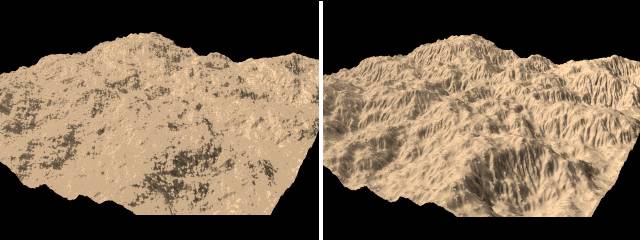
I'm almost certain the errors aren't caused by bugs to any significant
extent, but are caused as I said in my earlier post by using an 8-bit rather
than a 16-bit height map. The attached image shows two almost identical
height fields - the left hand one is 8-bit, and the right-hand one is a
16-bit version of exactly the same height field. The resolution of the
heightfield is 500x500 in both cases, and the smooth keyword is used for
both images.

The reason I think this is the problem is that the artifacts in your image
are very similar to the ones in my 8-bit height-field image.

-Chris
Post a reply to this message
Attachments:
Download 'heightfields.jpg' (27 KB)
Preview of image 'heightfields.jpg'
|
|
| |
| |
|
|
From: Slime
Subject: Re: A bad height-field (first binary post. pliz tell if wrong)
Date: 22 Aug 2003 21:23:18
Message: <3f46c206$1@news.povray.org>
|
|
|
| |
| |
|
|
> I'm almost certain the errors aren't caused by bugs to any significant
> extent, but are caused as I said in my earlier post by using an 8-bit
rather
> than a 16-bit height map. The attached image shows two almost identical
> height fields - the left hand one is 8-bit, and the right-hand one is a
> 16-bit version of exactly the same height field. The resolution of the
> heightfield is 500x500 in both cases, and the smooth keyword is used for
> both images.

Yes, the differences between the 16- and 8-bit images are significant,
obviously. In the images you gave, the difference is caused 99% by the bit
depth of the images. However, Noe Falzon's image, you'll notice, doesn't
have large, flat areas. Rather, it has lots of small, flat areas, which sort
of look like rounded squares which correspond to the grid of the height
field.

> The reason I think this is the problem is that the artifacts in your image
> are very similar to the ones in my 8-bit height-field image.

The bug I mentioned *is* displayed (slightly) in your 8-bit image. Since the
8-bit image has lots of flat areas, you can see that the edges of the flat
areas appear to be too "square." It's hardly, if at all, a problem in your
16-bit image, since that one doesn't have any significantly flat areas. I
would not be surprised if the greater bit depth helps to hide the bug I
mentioned.

The presence of the rounded-square artifacts in Falzon's image convinces me
that the majority of the problem he's having is due to the normal-smoothing
bug. If it were caused by bit depth problems, I would expect something more
like contour-line flatness, as displayed in your first image.

 - Slime
 [ http://www.slimeland.com ]
Post a reply to this message
|
|
| |
| |
|
|
|
|
| |
| |
|
|
Here's an idea that could help with the problem, but it would involve
patching POVRay. Add an interpolation feature to the heightfield object, so
that POVRay can smooth things out in whichever dimension you select.

For example you could have something like this:

height_field{
  gif "land.gif"
  interpolate <1,8,1>, 1
  pigment{rgb 1}
  translate<-0.5,0,-0.5>
  }

The interpolate value indicates how much to boost the resolution by in that
dimension, and which method to use to do it. Eg here it would boost the
vertical resolution 8 times, using interpolation method 1 (whatever that
gets assigned to).

Rohan _e_ii
Post a reply to this message
|
|
| |
| |
|
|
|
|
| |
| |
|
|
I've read all the replies but I have another idea. It involves using a third
software, to optimize the heightfield data. This is called a triangle
decimation. The output will be mesh2 for POV-Ray, and although this format
uses more memory on file, it may still end up using less memory, because all
redundant triangles have been removed. Your heightfield is very bumpy
though, and only triangles that don't contribute much to the shape will be
removed. I don't know exactly how many percent of memory will be freed.

It can be tricky to find freeware applications for this purpose, but it's
possible. The wizup optimiser is a little standalone program for triangle
decimation - and there is a free version of it - but you will need a
converter to get the heightfield into wizup. I think the format needs to be
vrml... (I use AccuTrans for converting but it's not freeware.)

There's another option that I'm willing to do: You send me the image, and I
return it to you as an optimised mesh2.

Regards,
Hugo
Post a reply to this message
|
|
| |
| |
|
|
|
|
| |
| |
|
|
"Hugo Asm" <hua### [at] post3teledk> wrote in message
news:3f474ece$1@news.povray.org...

> This is called a triangle decimation.

I have seen stuff about triangle decimation. It is used to try and improve
already crappy data from generalized algorithms like marching cubes. A much
better idea if you're going to go that far is to make data from the
beginning whis *isn't* crappy, and therefore doesn't need fixing. A height
field map is so simple, there are surely *much* better ways of making a mesh
from it than just pushing a ridiculous number of vertices up from a plane.

 -Shay
Post a reply to this message
|
|
| |
| |
|
|
|
|
| |
| |
|
|
I get the message; no need to yell.  :o)

But you're talking about a mathematical approch to building the map. If Noé
uses a paintprogram to build the map - by hand - it's not an option to use a
function. He/she might be doing some manual painting, for good reasons.

Triangle decimation is also well known among users of polygon modelling..
You know.. Build your model.. Use subdivision.. Optimise the mesh after that
because it becomes unnecessary dense with triangles.

The same method could be useful for heightfields. I've done this procedure a
couple of days back, and it worked pretty well.. I was not using a landscape
type of heightfield but something, that contained a lot of flat areas so I
don't
know, how many percent can be saved with the landscape, that is more
bumpy. I just thought, it's worth a try.

Regards,
Hugo
Post a reply to this message
|
|
| |
| |
|
|
|
|
| |
| |
|
|
"Hugo Asm" <hua### [at] post3teledk> wrote in message
news:3f48012d$3@news.povray.org...

There are still other problems with this. The first, and in most cases
worst, problem is that the mesh decimation procedure (as I understand
it) will be least likely to remove the worst-looking vertices, those
which are part of the "step" problem caused by the small height-field
map. The second major problem is that the near-vertical areas will still
not have a dense enough mesh to work with unless the height field is
rendered at hella resolution before the mesh decimation procedure is
applied, so the memory limit will be a limitation anyway.

I came up with a better way Saturday night after reading your post. I'll
put up a picture later, but the code is here at work on a floppy, and I
haven't gotten around to rendering anything with it yet.

 -Shay
Post a reply to this message
|
|
| |
| |
|
|
|
|
| |
| |
|
|
Hugo Asm wrote:
> Triangle decimation is also well known among users of polygon modelling..
> You know.. Build your model.. Use subdivision.. Optimise the mesh after that
> because it becomes unnecessary dense with triangles.

Ah!  Is that what Surface Evolver does?
http://www.susqu.edu/facstaff/b/brakke/evolver/evolver.html

--
Anton Sherwood, http://www.ogre.nu/
Post a reply to this message
|
|
| |
| |
|
|
|
|
| |
| |
|
|
Anton Sherwood wrote:
> Ah!  Is that what Surface Evolver does?
> http://www.susqu.edu/facstaff/b/brakke/evolver/evolver.html

I don't think so. The surface evolver is an interesting and highly
mathematical application. But I've never tried to use it, because I'm not
that "mathematic minded". It seems though, it evolves a surface (or you
could say: it refines a simple surface) based on data that is supposed to
simulate real-life behaviour of liquids, and possibly other things.

Subdivision on the other hand, does not try to simulate physics. It's used
in many artistic modelling applications to smoothen edges on any surface.
You can get an overview of the formulas:
http://www.ke.ics.saitama-u.ac.jp/xuz/mid-subdivision.html

...And eventually you can search on www.google.com for more information
about the behaviour of specific formulas. That is, supposed you are
mathematically minded.

Where subdivision adds triangles, decimation takes them away. That's another
story. It may appear like the opposite is happening. Triangle decimation
scans a surface and removes triangles that lack importance to the overall
shape. There are also different formulas for this purpose... But it doesn't
seem like the "surface evoler" you pointed me to, has this feature.

:o)
Regards,
Hugo
Post a reply to this message
|
|
| |
| |
|
|
|
|
| |