 |
|
|
|
|
|
| |
| |
|
|
|
|
| |
| |
|
|
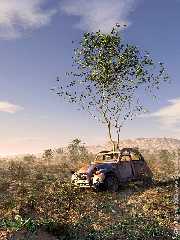
Here's a little pic I made.
- Terragen sky. Actually, it's a terragen-made panorama linked to the sun
position.
- isosurface terrain (ridged multifractal)
- xfrog plants : for those who don't know it, xfrog can be described as
Poser for plants, with animation and modelling abilities.
(http://www.xfrog.com, fully-functional 30-day trial version available).
Some of the plants (the tree, the dandelion) are derived from the models
bundled with the software and I made others (imaginary ones...). Norbert
Kern's IRTC winner "warm up" used a lot of xfrog trees. Here there are
around 17000 plants.
- 2cv car by De Espona, with some parts remodelled in Rhino. Rust texture
borrowed from HE Day.
- low quality radiosity (runs quite fast in fact, 8 hours at 1200*1600 on my
P733).
The image was rendered with assumed_gamma = 1. The gamma and contrast were
adjusted by post-processing. It could use more contrast actually. I couldn't
get rid of that painterly look but it's not so bad after all.

G.
--

**********************
http://www.oyonale.com
**********************
- Graphic experiments
- POV-Ray and Poser computer images
- Posters
Post a reply to this message
Attachments:
Download '2cv_09_sm.jpg' (120 KB)
Preview of image '2cv_09_sm.jpg'

|
|
| |
| |
|
|
|
|
| |
| |
|
|
Impressive! (As always...)
On one side, I always see the technical background you probably
have in order to create such images.
On the other side, I see the imagination you probably have
in order to come up with such images.
You've definitely got a good combination there...
Gilles Tran wrote:
> Here's a little pic I made.
> - Terragen sky. Actually, it's a terragen-made panorama linked to the sun
> position.
> - isosurface terrain (ridged multifractal)
> - xfrog plants : for those who don't know it, xfrog can be described as
> Poser for plants, with animation and modelling abilities.
> (http://www.xfrog.com, fully-functional 30-day trial version available).
> Some of the plants (the tree, the dandelion) are derived from the models
> bundled with the software and I made others (imaginary ones...). Norbert
> Kern's IRTC winner "warm up" used a lot of xfrog trees. Here there are
> around 17000 plants.
> - 2cv car by De Espona, with some parts remodelled in Rhino. Rust texture
> borrowed from HE Day.
> - low quality radiosity (runs quite fast in fact, 8 hours at 1200*1600 on my
> P733).
> The image was rendered with assumed_gamma = 1. The gamma and contrast were
> adjusted by post-processing. It could use more contrast actually. I couldn't
> get rid of that painterly look but it's not so bad after all.
>
> G.
> --
>
> **********************
> http://www.oyonale.com
> **********************
> - Graphic experiments
> - POV-Ray and Poser computer images
> - Posters
>
> [Image]
--
Tim Nikias
Homepage: http://www.digitaltwilight.de/no_lights/index.html
Email: Tim### [at] gmx de de
Post a reply to this message
|
|
| |
| |
|
|
|
|
| |
| |
|
|
Absolutely stunning.

I'd suggest put some focal blur on it and add a little roughness to the tree
bark, other than that it looks like a photo!

Nice one :)

--
Tek
http://www.evilsuperbrain.com
Post a reply to this message
|
|
| |
| |
|
|
|
|
| |
| |
|
|
A spectacular success. High praise.

DZ


Gilles Tran wrote:

> Here's a little pic I made.
> - Terragen sky. Actually, it's a terragen-made panorama linked to the sun
> position...
Post a reply to this message
|
|
| |
| |
|
|
|
|
| |
| |
|
|
Very Beautifull!

Sebastian H.
Post a reply to this message
|
|
| |
| |
|
|
|
|
| |
| |
|
|
People like you make me sick!
excellent job.

Is

Gilles Tran wrote:
> Here's a little pic I made.
> - Terragen sky. Actually, it's a terragen-made panorama linked to the sun
> position.
> - isosurface terrain (ridged multifractal)
> - xfrog plants : for those who don't know it, xfrog can be described as
> Poser for plants, with animation and modelling abilities.
> (http://www.xfrog.com, fully-functional 30-day trial version available).
> Some of the plants (the tree, the dandelion) are derived from the models
> bundled with the software and I made others (imaginary ones...). Norbert
> Kern's IRTC winner "warm up" used a lot of xfrog trees. Here there are
> around 17000 plants.
> - 2cv car by De Espona, with some parts remodelled in Rhino. Rust texture
> borrowed from HE Day.
> - low quality radiosity (runs quite fast in fact, 8 hours at 1200*1600 on my
> P733).
> The image was rendered with assumed_gamma = 1. The gamma and contrast were
> adjusted by post-processing. It could use more contrast actually. I couldn't
> get rid of that painterly look but it's not so bad after all.
>
> G.
> --
>
> **********************
> http://www.oyonale.com
> **********************
> - Graphic experiments
> - POV-Ray and Poser computer images
> - Posters
>
>
>
>
Post a reply to this message
|
|
| |
| |
|
|
|
|
| |
| |
|
|
The only thing I think it needs is focal_blur. Other than that, superb job
(as usual), Gilles.
Post a reply to this message
|
|
| |
| |
|
|
|
|
| |
| |
|
|
To me it looks more like a painting  (as Mr Tran himself said).


"Tek" <tek### [at] evilsuperbraincom> wrote in message
news:3ce2a35b$1@news.povray.org...
> Absolutely stunning.
>
> I'd suggest put some focal blur on it and add a little roughness to the
tree
> bark, other than that it looks like a photo!
>
> Nice one :)
>
> --
> Tek
> http://www.evilsuperbrain.com
>
>
>
>
>
Post a reply to this message
|
|
| |
| |
|
|
|
|
| |
| |
|
|
Oh, forgot to say;   it's amazing :-)


"Alastair Murray" <ala### [at] hotmailcom> wrote in message
news:3ce2c405@news.povray.org...
> To me it looks more like a painting  (as Mr Tran himself said).
>
>
> "Tek" <tek### [at] evilsuperbraincom> wrote in message
> news:3ce2a35b$1@news.povray.org...
> > Absolutely stunning.
> >
> > I'd suggest put some focal blur on it and add a little roughness to the
> tree
> > bark, other than that it looks like a photo!
> >
> > Nice one :)
> >
> > --
> > Tek
> > http://www.evilsuperbrain.com
> >
> >
> >
> >
> >
>
>
Post a reply to this message
|
|
| |
| |
|
|
|
|
| |
| |
|
|
On Wed, 15 May 2002 15:16:40 -0500, "Tony[B]" <ben### [at] catholicorg>
wrote:

>The only thing I think it needs is focal_blur. Other than that, superb job
>(as usual), Gilles.
>

Well, I was skeptical at first, but I simulated focal blur in
Photoshop LE, and I have to agree with you. If a SMALLl amount of blur
is applied to the objects farther away than the tree, it looks good.


Later,
Glen

7no### [at] ezwvcom     (Remove the numeral "7")
Post a reply to this message
|
|
| |
| |
|
|
From: Christoph Hormann
Subject: Re: Not for sale anymore (120 kbu)
Date: 15 May 2002 16:30:05
Message: <3CE2C54A.95E9A567@gmx.de>
|
|
|
| |
| |
|
|
Gilles Tran wrote:
>
> Here's a little pic I made.
> [...]

Neat.

The small bush in the foreground looks a bit like a small scale version of
the tree.

Are all plants made with xfrog?

> - low quality radiosity (runs quite fast in fact, 8 hours at 1200*1600 on my
> P733).

i suppose this is a scaled version then?  If not i wonder what aa settings
you used, the more distant trees look nicely smoothed.

Higher quality radiosity settings would probably improve the sense of
depth between the plants.

Christoph

--
POV-Ray tutorials, IsoWood include,
TransSkin and more: http://www.tu-bs.de/~y0013390/
Last updated 05 May. 2002 _____./\/^>_*_<^\/\.______
Post a reply to this message
|
|
| |
| |
|
|
|
|
| |
| |
|
|
On Wed, 15 May 2002 19:34:32 +0200, "Gilles Tran" <tra### [at] inapginrafr>
wrote:

>The image was rendered with assumed_gamma = 1. The gamma and contrast were
>adjusted by post-processing. It could use more contrast actually. I couldn't
>get rid of that painterly look but it's not so bad after all.

Since you opened the topic of needing contrast, and trying to lose the
"painterly effect", I toyed with your image in Photoshop LE, for a
little while, trying to make it more photographic looking.

In my opinion, the rusty vehicle texture needs more color saturation.
This was one of the best tweaks I found for this image. Perhaps there
is too much radiosity, or too high of an ambient level specified in
the rust texture? I also selectively darkened the shadow tones on the
right side of the vehicle, without also darkening the highlights or
midtones.

The foreground has a subtle haze clouding it. I manipulated the darker
tones of the foreground to he slightly darker. This got rid of a lot
of the hazey look. I left the haze in the background, because it seems
appropriate there.

If there really is some sort of haze/fog/media/atmosphere type of
effect coded into the scene, it need to only be applied to the
background area beyond the tree. If there are no atmospheric effects
used in the scene file, then perhaps the ambient level/ radiosity
level needs to be reduced in the foreground? Perhaps your textures and
colors  need to be tweaked for a bit more color saturation in the
foreground?

All those haze comments are assuming that the scene was meant to have
a warm, late-afternoon sunlight effect, with somewhat warmer and
bolder colors and contrast.

I increased the color saturation of the blue and cyan tones in the
sky. Either try more saturated colors in your sky description, or
perhaps use a less hazey sky?

I also darkened the shadow areas of the tree leaves, increased the
color saturation of the green leaves, and brightened the highlights of
the green leaves.

This was just done in a few minutes in Photoshop LE, and is not
intended to be my best effort, but a simple exploration of what might
be tweaked.

I hope you appreciate the comments, and I hope you post more of your
excellent images to the newsgroup in the near future. I've been
missing your contributions here.

Later,
Glen Berry


Later,
Glen

7no### [at] ezwvcom     (Remove the numeral "7")
Post a reply to this message
Attachments:
Download 'Not_4_Sale.jpg' (121 KB)
Preview of image 'Not_4_Sale.jpg'
|
|
| |
| |
|
|
|
|
| |
| |
|
|
On Wed, 15 May 2002 15:16:40 -0500, "Tony[B]" <ben### [at] catholicorg>
wrote:

>The only thing I think it needs is focal_blur. Other than that, superb job
>(as usual), Gilles.
>

I've attached two more quick Photoshop variations. The first one is
Not_4_Sale_fb.jpg:

This image simulates focal blur by selectively applying gaussian blur
to the areas behind the tree. I  used an amount of "1" for the
gaussian blur. The effect is somewhat subtle. Higher amounts didn't
look like focal blur, but simply a poorly-focused image.

The second image is Not_4_Sale_Fog.jpg:

This is a simulation of fog, by applying a huge amount of gaussian
blur to the background areas behind the tree. I selected those areas
with Photoshop's lasso tool, and feathered the selection by 45 pixels.
The gaussian blur amount was set to "48", which is a LOT of blur.

These are just quick explorations what might be done, either within
POV-Ray itself, or in a post-process. I think the results are
interesting.

Oh, I should mention that Gilles himself thought it would be good to
post some of my comments here, as I had earlier sent him only private
emails. He thought that some of the information might be useful to the
rest of the newsgroup.


Later,
Glen

7no### [at] ezwvcom     (Remove the numeral "7")
Post a reply to this message
|
|
| |
| |
|
|
|
|
| |
| |
|
|
Post a reply to this message
Attachments:
Download 'Not_4_Sale.jpg' (1 KB)
Download 'Not_4_Sale_fog.jpg' (102 KB)
Download 'Not_4_Sale_fb.jpg' (110 KB)
Preview of image 'Not_4_Sale_fog.jpg'

Preview of image 'Not_4_Sale_fb.jpg'

|
|
| |
| |
|
|
|
|
| |
| |
|
|
Now that is one masterpiece!! Your amount of plants are higher than I would
dare, though. You mean, you're using 17000 unique meshes? That takes a lot
of memory. I would have sticked to 20, perhaps 30 different meshes and
reused them... Even in my wildest fantasy.

Regards,
Hugo
Post a reply to this message
|
|
| |
| |
|
|
|
|
| |
| |
|
|
"Hugo" <hua### [at] post3teledk> a écrit dans le message de news:
3ce2c948$1@news.povray.org...
> Now that is one masterpiece!! Your amount of plants are higher than I
would
> dare, though. You mean, you're using 17000 unique meshes? That takes a lot
> of memory. I would have sticked to 20, perhaps 30 different meshes and
> reused them... Even in my wildest fantasy.

In mine too :-) I wonder when I could have produced 17000 different meshes,
and where I could have stored them... No, it's just 10 or so different
meshes replicated thousands of times.

G.


--

**********************
http://www.oyonale.com
**********************
- Graphic experiments
- POV-Ray and Poser computer images
- Posters
Post a reply to this message
|
|
| |
| |
|
|
|
|
| |
| |
|
|
"Christoph Hormann" <chr### [at] gmxde> a écrit dans le message de news:
3CE2C54A.95E9A567@gmx.de...

> The small bush in the foreground looks a bit like a small scale version of
> the tree.
Hmm, I guess I'm not proficient yet with xfrog.
>
> Are all plants made with xfrog?

Yes. The tree and the dandelion were ready-made models (I just changed the
leaves on the trees). The others were created from scratch.

> i suppose this is a scaled version then?  If not i wonder what aa settings
> you used, the more distant trees look nicely smoothed.

It's a scaled version of a 1200*1600, with a slight "accentuation"
filtering. I remember seeing recently interesting tips about aa somewhere in
this ng but I couldn't find them.

> Higher quality radiosity settings would probably improve the sense of
> depth between the plants.
Possibly. The truth is that I'm already in the 400 Mb range of RAM use and
that higher rad settings would certainly cause problems.

G.

--

**********************
http://www.oyonale.com
**********************
- Graphic experiments
- POV-Ray and Poser computer images
- Posters
Post a reply to this message
|
|
| |
| |
|
|
|
|
| |
| |
|
|
Wow great picture as always! One thing, I'm sure this is a result of scaling
down the image from 1200*1600 but incase it isn't, your tree has a number of
floating leaves, that is leaves that don't seem to be atached to anything,
though I'm sure in the full sized image they are just attached to very small
twigs.
Post a reply to this message
|
|
| |
| |
|
|
|
|
| |
| |
|
|
WOW !
Impressive !!!

[FR] Gilles arrète ! stp ! tu nous fout le moral à zéro avec nos images qui
n'arrivent même pas au dixième de la qualité des tiennes ;-) ...

--
Luis


****************************************************
Lightning Generator
http://www.lightning-generator.fr.st
http://LG666.ifrance.com
POV-Wip (co-développeur)
http://www.pov-wip.fr.st
POV-Monde (co-rrecteur ;-) Suivi Code et mise à jour)
http://www.pov-monde.org
Chan IRC sur eu.undernet.org : #povray-fr
****************************************************
"Gilles Tran" <tra### [at] inapginrafr> a écrit dans le message de news:
3ce29c12@news.povray.org...
> Here's a little pic I made.
> - Terragen sky. Actually, it's a terragen-made panorama linked to the sun
> position.
> - isosurface terrain (ridged multifractal)
> - xfrog plants : for those who don't know it, xfrog can be described as
> Poser for plants, with animation and modelling abilities.
> (http://www.xfrog.com, fully-functional 30-day trial version available).
> Some of the plants (the tree, the dandelion) are derived from the models
> bundled with the software and I made others (imaginary ones...). Norbert
> Kern's IRTC winner "warm up" used a lot of xfrog trees. Here there are
> around 17000 plants.
> - 2cv car by De Espona, with some parts remodelled in Rhino. Rust texture
> borrowed from HE Day.
> - low quality radiosity (runs quite fast in fact, 8 hours at 1200*1600 on
my
> P733).
> The image was rendered with assumed_gamma = 1. The gamma and contrast were
> adjusted by post-processing. It could use more contrast actually. I
couldn't
> get rid of that painterly look but it's not so bad after all.
>
> G.
> --
>
> **********************
> http://www.oyonale.com
> **********************
> - Graphic experiments
> - POV-Ray and Poser computer images
> - Posters
>
>
>
>
Post a reply to this message
|
|
| |
| |
|
|
From: Jaime Vives Piqueres
Subject: Re: Not for sale anymore (120 kbu)
Date: 16 May 2002 04:19:20
Message: <3ce36b88@news.povray.org>
|
|
|
| |
| |
|
|
Hmmm... err... ahhh! (looking at the "little pic" from top to bottom).

--
Jaime Vives Piqueres

La Persistencia de la Ignorancia
http://www.ignorancia.org
Post a reply to this message
|
|
| |
| |
|
|
|
|
| |
| |
|
|
Gilles - I hate you ;-)

well, not really - your images teach me each time my limits in imagination
and technical realisation ...
your image is impressive as usual


Wolfgang
Post a reply to this message
|
|
| |
| |
|
|
|
|
| |
| |
|
|
in news:DsjiPCazuvsuNqyThQYZf0QwGI7s@4ax.com Glen Berry wrote:

> Attachment saved: C:\TEMP\Not_4_Sale_fog.jpg
>

The foggy one looks better than the blurred one.
The blurred one looks a bit strange to me. To get that amount of blur at
that position in a photo, you'd have to use a big telelens. Then the
forground would also be blurred. Also the 'perspective' doesn't match with
a telephoto.

Ingo
Post a reply to this message
|
|
| |
| |
|
|
|
|
| |
| |
|
|
"Thomas Lake" <tla### [at] REMOVE-THISshawca> a écrit dans le message de news:
3ce31078@news.povray.org...
> that don't seem to be atached to anything,
> though I'm sure in the full sized image they are just attached to very
small
> twigs.

No you're right. There are some tiny twigs but looking closer I can see now
that some leaves actually float in the air. Weird. I'll have to check the
model.

G.


--

**********************
http://www.oyonale.com
**********************
- Graphic experiments
- POV-Ray and Poser computer images
- Posters

>
Post a reply to this message
|
|
| |
| |
|
|
|
|
| |
| |
|
|
Post a reply to this message
|
|
| |
| |
|
|
From: Gilles Tran
Subject: Re: Not for sale anymore (120 kbu) (1/1)
Date: 16 May 2002 11:36:26
Message: <3ce3d1fa@news.povray.org>
|
|
|
| |
| |
|
|
"Glen Berry" <7no### [at] ezwvcom> a écrit dans le message de news:
XcXjPBsriyKH8vQxmIfuefbvVqsc@4ax.com...
> You have made me curious about something. I would like to know what
> camera angle Gilles used in this scene? I think the angle of view is
> perhaps more "telephoto-ish" than you might think.

Ingo is right in fact, the angle is 90°.

camera {    location  <0, 1, -9>
  direction z*1
  sky       y
  up        y
  right     x*image_width/image_height
  look_at   <0,2.5,0>
  translate -x
}
I did play with smaller angles but I wanted the upper sky to show up.

G.

--

**********************
http://www.oyonale.com
**********************
- Graphic experiments
- POV-Ray and Poser computer images
- Posters


>
> later,
> Glen
>
>
> Later,
> Glen
>
> 7no### [at] ezwvcom     (Remove the numeral "7")
Post a reply to this message
|
|
| |
| |
|
|
|
|
| |
| |
|
|
Post a reply to this message
|
|
| |
| |
|
|
|
|
| |
| |
|
|
in news:Ld7jPJT1Hiw1qvpBZEmV2qvk5VD3@4ax.com Glen Berry wrote:

> On Thu, 16 May 2002 17:36:52 +0200, "Gilles Tran" <tra### [at] inapginrafr>
> wrote:
>
>>Ingo is right in fact, the angle is 90°.
>>
>>camera {    location  <0, 1, -9>
>>  direction z*1
>>  sky       y
>>  up        y
>>  right     x*image_width/image_height
>>  look_at   <0,2.5,0>
>>  translate -x
>>}
>>I did play with smaller angles but I wanted the upper sky to show up.
>
> Since you didn't specify angle with the angle keyword, I'm assuming
> that  90° is the default horizontal angle of view?
>

the default angle:
 ~67.380 (direction_length=0.5*right_length/tan(angle/2))

in this image that would be the vertical angle.

Ingo
Post a reply to this message
|
|
| |
| |
|
|
|
|
| |
| |
|
|
Post a reply to this message
|
|
| |
| |
|
|
|
|
| |
| |
|
|
in news:XcXjPBsriyKH8vQxmIfuefbvVqsc@4ax.com Glen Berry wrote:

> You would need a large lens aperture, however.
>

One of the nice things of POV-Ray, one can use extreme apertures. A 17mm
lens with a DOF of a few mm's.

> Of course this was only a rough simulation, and was not intended to be
> an accurate modeling of any particular lens focal length and aperture
> combination.

I know. Else I would have complained about the lack of blurr on the
mountains above the 2CV :)

> You have made me curious about something. I would like to know what
> camera angle Gilles used in this scene? I think the angle of view is
> perhaps more "telephoto-ish" than you might think.
>

Wouldn't be fair to guess/answer that now, after reading the other posts
on the subject.

Ingo
Post a reply to this message
|
|
| |
| |
|
|
|
|
| |
| |
|
|
"Glen Berry" <7no### [at] ezwvcom> a écrit dans le message de news:
Ld7jPJT1Hiw1qvpBZEmV2qvk5VD3@4ax.com...
> Since you didn't specify angle with the angle keyword, I'm assuming
> that  90° is the default horizontal angle of view?

90° seems to be the vertical angle, or so it says in the const.inc file.
Not that I'm sure of what it means anyway, which is why I keep using
"direction" instead...

G.

--

**********************
http://www.oyonale.com
**********************
- Graphic experiments
- POV-Ray and Poser computer images
- Posters
Post a reply to this message
|
|
| |
| |
|
|
|
|
| |
| |
|
|
in news:C+vjPEcZkwirthwHPTNSSxwgE4zg@4ax.com Glen Berry wrote:

> I'm just not sure how the "horizontal" viewing angle applies to the
> vertical dimension in this case.
>

Lazy as I am I didn't calulate anything. In the default situation with a
aspect ratio 4/3 and a direction length of 1 the angle is ~67°. In Gilles
images the only difference is that the aspect ratio is 3/4. As if you
rotate your 35mm camera 90°. The horizontal angle becomes the vertical
angle. The diagonal angle stays the same.

Ingo
Post a reply to this message
|
|
| |
| |
|
|
|
|
| |
| |
|
|
Gilles Tran <tra### [at] inapginrafr> wrote in message
news:3ce3eec5$1@news.povray.org...
> 90° seems to be the vertical angle...

Yeah, because you specified up right and direction, that will determine the
angle. In this case direction is the same length as up, which means you'll have
a 90 degree vertical angle (i.e. both the top and bottom of the view fustrum
will be at 45 degrees from the direction, so 90 degrees in total).

This means your horizontal view angle will be
2*degrees(atan2(image_width/image_height,1))
but now I'm just trying to blind you all with maths :)

--
Tek
http://www.evilsuperbrain.com
Post a reply to this message
|
|
| |
| |
|
|
|
|
| |
| |
|
|
truly inspiring, gilles.  i don't think i've ever seen anybody
with such a great combined talent in art AND programming.

miker
Post a reply to this message
|
|
| |
| |
|
|
|
|
| |
| |
|
|
I rendered this xfrog tree with high resolution.
You can see some limitations of the standard xfrog trees, but no leaf is
floating in the air.


Norbert


> No you're right. There are some tiny twigs but looking closer I can see
now
> that some leaves actually float in the air. Weird. I'll have to check the
> model.
>
> G.
Post a reply to this message
Attachments:
Download 'xfrog1.jpg' (64 KB)
Download 'xfrog2.jpg' (74 KB)
Preview of image 'xfrog1.jpg'

Preview of image 'xfrog2.jpg'

|
|
| |
| |
|
|
From: Christoph Hormann
Subject: Re: Not for sale anymore (120 kbu)
Date: 16 May 2002 15:24:25
Message: <3CE40767.97F8C656@gmx.de>
|
|
|
| |
| |
|
|
Norbert Kern wrote:
>
> I rendered this xfrog tree with high resolution.
> You can see some limitations of the standard xfrog trees, but no leaf is
> floating in the air.

That really does not look good, are those lines produced by broken
image_map textures?  I think the 'maketree approach' is probably better
for modelling leaves than using partly transparent textures, despite
higher triangle counts it could even be faster.

Christoph

--
POV-Ray tutorials, IsoWood include,
TransSkin and more: http://www.tu-bs.de/~y0013390/
Last updated 05 May. 2002 _____./\/^>_*_<^\/\.______
Post a reply to this message
|
|
| |
| |
|
|
|
|
| |
| |
|
|
Christoph , you are right. I do not like the leafes of the standard Xfrog
trees too.
But you can also define leafes out of triangles within Xfrog.
Therefore you can make the best conifers with this program.
Or can you show me a better mesh pine?

Norbert


> That really does not look good, are those lines produced by broken
> image_map textures?  I think the 'maketree approach' is probably better
> for modelling leaves than using partly transparent textures, despite
> higher triangle counts it could even be faster.
>
> Christoph
Post a reply to this message
Attachments:
Download 'xfrog3.jpg' (67 KB)
Preview of image 'xfrog3.jpg'

|
|
| |
| |
|
|
|
|
| |
| |
|
|
Gilles Tran schrieb:

> Here's a little pic I made.

High!

Must be somewhere in southern Afghanistan - once a top travel destination among
hippie 2CV enthusiasts, probably near the Herat-Kandahar highway between
Daulatabad and Girishk! Are the trees in fact tamarisks?

See you in Khyberspace!

Yadgar

Now playing: Halali (Zara-Thustra - neo-Wagnerian German New Wave!)
Post a reply to this message
|
|
| |
| |
|
|
From: Christoph Hormann
Subject: Re: Not for sale anymore (120 kbu)
Date: 16 May 2002 16:54:55
Message: <3CE41C9F.90540568@gmx.de>
|
|
|
| |
| |
|
|
Norbert Kern wrote:
>
> Christoph , you are right. I do not like the leafes of the standard Xfrog
> trees too.
> But you can also define leafes out of triangles within Xfrog.
> Therefore you can make the best conifers with this program.
> Or can you show me a better mesh pine?

I have not worked much on coniferous trees, but the growth of trunk and
twigs in this one is far from being realistic.

Christoph

--
POV-Ray tutorials, IsoWood include,
TransSkin and more: http://www.tu-bs.de/~y0013390/
Last updated 05 May. 2002 _____./\/^>_*_<^\/\.______
Post a reply to this message
|
|
| |
| |
|
|
|
|
| |
| |
|
|
> but no leaf is floating in the air.

Actually I beg to differ, take a look at the blown up images attached. Again
I think this is a result of sizing the image down from its original
resolution. The small twigs get so small, smaller than a pixel, that they
are left out entirely.
Post a reply to this message
Attachments:
Download 'floating Leaves2.jpg' (24 KB)
Download 'floating Leaves1.jpg' (27 KB)
Preview of image 'floating Leaves2.jpg'

Preview of image 'floating Leaves1.jpg'

|
|
| |
| |
|
|
|
|
| |
| |
|
|
"Norbert Kern" <nor### [at] t-onlinede> a écrit dans le message de
news: 3ce405c9@news.povray.org...
> I rendered this xfrog tree with high resolution.
> You can see some limitations of the standard xfrog trees, but no leaf is
> floating in the air.

In fact I'm really not sure of that... These are 5th level branches and I
couldn't see them at very high res. Also I had changed the leaf model and
some bits of the tree structure. Now I've stopped the growth at the 4th
level and it looks much better (see pic below).

G.
--

**********************
http://www.oyonale.com
**********************
- Graphic experiments
- POV-Ray and Poser computer images
- Posters
Post a reply to this message
Attachments:
Download 'leavesdetail.jpg' (17 KB)
Preview of image 'leavesdetail.jpg'

|
|
| |
| |
|
|
|
|
| |
| |
|
|
"Christoph Hormann" <chr### [at] gmxde> a écrit dans le message de news:
3CE40767.97F8C656@gmx.de...
> That really does not look good, are those lines produced by broken
> image_map textures?  I think the 'maketree approach' is probably better
> for modelling leaves than using partly transparent textures, despite
> higher triangle counts it could even be faster.

In fact there are several ways to define leaves in xfrog. One is a simple
square with a image_map, but you can also have (almost) complete control on
the shape of the leaf (using a spline) , its texture and curvature. I'm
still new at this though.

G.

--

**********************
http://www.oyonale.com
**********************
- Graphic experiments
- POV-Ray and Poser computer images
- Posters

>
> Christoph
>
> --
> POV-Ray tutorials, IsoWood include,
> TransSkin and more: http://www.tu-bs.de/~y0013390/
> Last updated 05 May. 2002 _____./\/^>_*_<^\/\.______
Post a reply to this message
|
|
| |
| |
|
|
|
|
| |
| |
|
|
In article <3ce29c12@news.povray.org>, tra### [at] inapginrafr says...
> Here's a little pic I made.

One of the loveliest pieces of art ever!

Subject, form, colour, lighting, emotion, story and history; as well as
the eternal raytracer's challenge: Realism.

All round a beautiful statement.  Absolutely...

Brian.
--
"Strictly UNIX"    To dance is to live.
bel### [at] gilcomau
Post a reply to this message
|
|
| |
| |
|
|
|
|
| |








