|
|
|
|
|
|
| |
| |
|
|
|
|
| |
| |
|
|
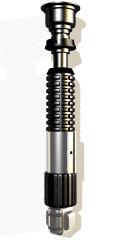
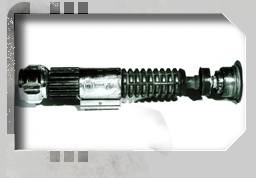
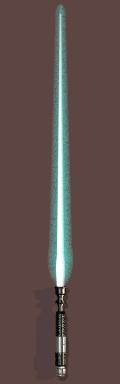
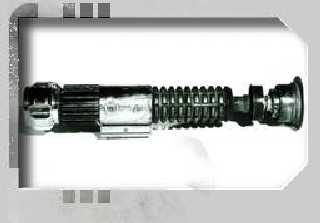
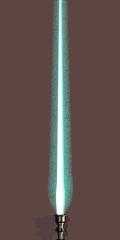
This is Lukes First Lightsabre given to him by Obi-Wan.
I included a picture of the real prop that I lifted(hey it was in my
cache...)
from starwars.com. I'm still not quite happy with my lighting...

--
...coffee?...yes please! extra sugar,extra cream...Thank you.
Post a reply to this message
Attachments:
Download 'forcels.jpg' (5 KB)
Download 'lightsaber1_sm.jpg' (7 KB)
Download 'forcelsb.jpg' (4 KB)
Preview of image 'forcels.jpg'
Preview of image 'lightsaber1_sm.jpg'
Preview of image 'forcelsb.jpg'
|
|
| |
| |
|
|
|
|
| |
| |
|
|
cooooooooooool... Now that is one sweet lookin' sabre. How did you do the
blade?
KB-

Phil Clute wrote:

> This is Lukes First Lightsabre given to him by Obi-Wan.
> I included a picture of the real prop that I lifted(hey it was in my
> cache...)
> from starwars.com. I'm still not quite happy with my lighting...
>
> --
> ...coffee?...yes please! extra sugar,extra cream...Thank you.
>
>   ------------------------------------------------------------------------
>  [Image]  [Image]  [Image]
Post a reply to this message
|
|
| |
| |
|
|
|
|
| |
| |
|
|
>How did you do the blade?

This was the first time I really tried playing with media so there's
probably a better way to do it...

//-----------------------Blade
Media----------------------------------------
#declare Outer = media {
      intervals 2
      samples 1, 2
      confidence 0.9
      variance 1/1000
      emission rgb<0,1,1>
      density {
                radial
                turbulence 0.0009
                color_map {
                        [0.0 color rgb <0, 1, 1>]
                        [0.2 color rgb <0, 1, .9>*15]
                        [0.5 color rgb <0, 1, 1>]
                        [1.0 color rgb <0, 1, 1>]
                }
      }
}
#declare Inner = media {
        intervals 2
        samples 1,2
        confidence 0.9
        variance 1/1000
        emission rgb<1,1,1>
        density {
                radial
                turbulence 0.0009
                color_map {
                        [0.0 color rgb <1, 1, 1>]
                        [0.2 color rgb <1, 1, 1>*55]
                        [0.4 color rgb <1, 1, 1>*55]
                        [1.0 color rgb <0, 1, 1>]
                }
        }
}
//-------------------------BLADE-------------------------------------
#declare BLADE = object{ union{
merge{
        cone {  <0,0.96,0>,.003        //blade core
                <0,0.24,0>,0.0125
                hollow on
        }
        sphere{ <0.0,0.195,0.0>,.045
                scale<0.32,1.45,0.32>
                hollow on
        }
        pigment { color rgbf <1, 1, 1,.95> }  //changing transmit to
filter causes shadows (red ones that is)
        finish{ambient .8}
        interior{ media{Inner} }
}
merge{                              //blade glow
        sphere {<0,0.97,0>,.015     //tip
                hollow on
        }
        cone {  <0,0.97,0>,.017
                <0,0.313,0>,0.0385
                hollow on
        }
        sphere {<0,0.313,0>,.075
                hollow on
                scale<0.55,1.0,0.55>
        }
        pigment { color rgbf <1, 1, 1,1> }  //changing transmit to
filter causes shadows (red ones that is)
        finish{ambient .02}
        interior{ media{Outer} }
}
}//***end of union***
}//***End of object = Blade

object{BLADE}

--
...coffee?...yes please! extra sugar,extra cream...Thank you.
Post a reply to this message
|
|
| |
| |
|
|
|
|
| |
| |
|
|
I forgot to mention that this Blade doesn't work with a bright
background.
It effectively disappears. I expect the white part of the blade to be
lost
against a white background but not the blue glow.
I'd be interested to know why.

--
...coffee?...yes please! extra sugar,extra cream...Thank you.
Post a reply to this message
|
|
| |
| |
|
|
|
|
| |
| |
|
|
Phil Clute wrote:
>
> I forgot to mention that this Blade doesn't work with a bright
> background.
> It effectively disappears. I expect the white part of the blade to be
> lost
> against a white background but not the blue glow.
> I'd be interested to know why.
>
> --
> ...coffee?...yes please! extra sugar,extra cream...Thank you.

Emmision level. Try adding emmision with scattering and you are less likely
to wash out against a light background.

--
Ken Tyler

mailto://tylereng@pacbell.net
Post a reply to this message
|
|
| |
| |
|
|
|
|
| |
| |
|
|
Ken wrote:
>
> Phil Clute wrote:
> >
> > I forgot to mention that this Blade doesn't work with a bright
> > background.
> > It effectively disappears. I expect the white part of the blade to be
> > lost
> > against a white background but not the blue glow.
> > I'd be interested to know why.
> >
> > --
> > ...coffee?...yes please! extra sugar,extra cream...Thank you.
>
> Emmision level. Try adding emmision with scattering and you are less likely
> to wash out against a light background.
>

Scattering or absorption. I recommend the latter, actually. Renders faster and
I don't believe the blade of a lightsabre is made up of scattering particles.
Anyway, in either case it's very difficult to balance emission/absorption
components just right. Good luck.

Margus
Post a reply to this message
|
|
| |
| |
|
|
|
|
| |
| |
|
|
Phil Clute heeft geschreven in bericht <37085369.DA13C24E@tiac.net>...
>This is Lukes First Lightsabre given to him by Obi-Wan.
>I included a picture of the real prop that I lifted(hey it was in my
>cache...)
>from starwars.com. I'm still not quite happy with my lighting...
>
>--
>...coffee?...yes please! extra sugar,extra cream...Thank you.
>


I've been watching StarWars yesterday, and I have a few comments.
1: The handle (or how is it called) is super-realistic.  I would really like
the source of that for my StarWars collection! However I think this looks
more like Obi Wan's lightsabre.  I think  Luke's lightsabre looks more like
Darth Vader's lightsabre (but I'm not sure at all).
2: The blade should be whiter and less conical.
3: Is the first image raytraced? It doesn't really look like!

ZK
Post a reply to this message
|
|
| |
| |
|
|
|
|
| |
| |
|
|
Hey, great job, that's excellent!!!

Did you know that they shattered 500 of those in one day of shooting for
Episode 1?  Wow, talk about smashing them... (BTW, it's worth the download
of the 2:30 minute trailer @ 25Mb...  EXCELLENT!!!  Can't wait to see it on
the big screen!!!)

--
Lance.


---
For the latest 3D Studio MAX plug-ins, images and much more, go to:
The Zone - http://come.to/the.zone
Post a reply to this message
|
|
| |
| |
|
|
|
|
| |
| |
|
|
Lance Birch heeft geschreven in bericht <3708ba63.0@news.povray.org>...
>Hey, great job, that's excellent!!!
>
>Did you know that they shattered 500 of those in one day of shooting for
>Episode 1?  Wow, talk about smashing them... (BTW, it's worth the download
>of the 2:30 minute trailer @ 25Mb...  EXCELLENT!!!  Can't wait to see it on
>the big screen!!!)
>
>--
>Lance.


I've just downloaded it for the second time.  All I get is sound.

ZK
Post a reply to this message
|
|
| |
| |
|
|
|
|
| |
| |
|
|
It means you haven't got the right decompressor for the video... a common
problem with MOV files...  If you're running through a Microsoft program,
forget it, they never have the Sorenson MOV decompressor...

I suggest running it through Quicktime's Player.  (you don't get as much
audio ripping either)

--
Lance.


---
For the latest 3D Studio MAX plug-ins, images and much more, go to:
The Zone - http://come.to/the.zone
Post a reply to this message
|
|
| |
| |
|
|
|
|
| |
| |
|
|
Lance Birch heeft geschreven in bericht <3708be3b.0@news.povray.org>...
>It means you haven't got the right decompressor for the video... a common
>problem with MOV files...  If you're running through a Microsoft program,
>forget it, they never have the Sorenson MOV decompressor...
>
>I suggest running it through Quicktime's Player.  (you don't get as much
>audio ripping either)
>
>--
>Lance.


I'm downloading Quicktime for Windows right now (3.51 of 7 Megs).

ZK
Post a reply to this message
|
|
| |
| |
|
|
|
|
| |
| |
|
|
YEAH!  Now you'll finally get to see the awesome video!!!  :)))))

--
Lance.


---
For the latest 3D Studio MAX plug-ins, images and much more, go to:
The Zone - http://come.to/the.zone
Post a reply to this message
|
|
| |
| |
|
|
|
|
| |
| |
|
|
I agree with Margus.  Just add another media in the same object (not another
density, but another media), and make it an absorbing media with exactly
the opposite colors in the color_map.  Here's an example for the "Outer"
media (each color = <1,1,1> - previous_color):

#declare Outer = media {
      intervals 2
      samples 1, 2
      confidence 0.9
      variance 1/1000
      //emission rgb<0,1,1>
      absorbtion <1,0,0>
      density {
                radial
                turbulence 0.0009
                color_map {
                        //[0.0 color rgb <0, 1, 1>]
                        [0.0 color rgb <1, 0, 0>]
                        //[0.2 color rgb <0, 1, .9>*15]
                        [0.2 color rgb <1, 1-0.15, 1-0.9*0.15>]
                        //[0.5 color rgb <0, 1, 1>]
                        [0.5 color rgb <1, 0, 0>]
                        //[1.0 color rgb <0, 1, 1>]
                        [1.0 color rgb <1, 0, 0>]
                }
      }
}

I hope this works (not yet tested).

-Nathan

Margus Ramst wrote:
>
> Scattering or absorption. I recommend the latter, actually. Renders faster and
> I don't believe the blade of a lightsabre is made up of scattering particles.
> Anyway, in either case it's very difficult to balance emission/absorption
> components just right. Good luck.
>
> Margus
Post a reply to this message
|
|
| |
| |
|
|
|
|
| |
| |
|
|
How about if you changed filter to transmit on the interior blade, but
leave the outer blade filter, then change the wave pattern from radial to
planar or sine? Just a thought ;-]
KB-
Post a reply to this message
|
|
| |
| |
|
|
|
|
| |
| |
|
|
now these i like - especailly the handle close ups.

Rick

Phil Clute wrote in message <37085369.DA13C24E@tiac.net>...
>This is Lukes First Lightsabre given to him by Obi-Wan.
>I included a picture of the real prop that I lifted(hey it was in my
>cache...)
>from starwars.com. I'm still not quite happy with my lighting...
>
>--
>...coffee?...yes please! extra sugar,extra cream...Thank you.
>
>
Post a reply to this message
|
|
| |
| |
|
|
|
|
| |
| |
|
|
oops!

maybe i should have read the message first! the light saber is nice, but do
a close up of the handle, sorry :)

Rick
Phil Clute wrote in message <37085369.DA13C24E@tiac.net>...
>This is Lukes First Lightsabre given to him by Obi-Wan.
>I included a picture of the real prop that I lifted(hey it was in my
>cache...)
>from starwars.com. I'm still not quite happy with my lighting...
>
>--
>...coffee?...yes please! extra sugar,extra cream...Thank you.
>
>
Post a reply to this message
|
|
| |
| |
|
|
|
|
| |
| |
|
|
Great... simply great.
--
//Spider
[ spi### [at] bahnhof se ]-[ http://www.bahnhof.se/~spider/ ]
What I can do and what I could do, I just don't know anymore
"Marian"
By: "Sisters Of Mercy" se ]-[ http://www.bahnhof.se/~spider/ ]
What I can do and what I could do, I just don't know anymore
"Marian"
By: "Sisters Of Mercy"
Post a reply to this message
|
|
| |
| |
|
|
|
|
| |
| |
|
|
Well, I can admit when I'm wrong...
My VCR was on the fritz when I made this sabre so I was going by a Darth
Vader
calender and sources around the internet.Never trust a second  hand
source.
My VCR is "working" now and I can see I've made an error or two...

ZK wrote:
>I've been watching StarWars yesterday, and I have a few comments.
>1: The handle (or how is it called) is super-realistic.  I would really
like
>the source of that for my StarWars collection! However I think this
looks
>more like Obi Wan's lightsabre.  I think  Luke's lightsabre looks more
like
>Darth Vader's lightsabre (but I'm not sure at all).
>2: The blade should be whiter and less conical.
>3: Is the first image raytraced? It doesn't really look like!

1.I'll post my source in the povray.binaries.scenefiles once I staighten
out the blade
(and I do mean "straighten", turns out the blade should be  closer to
being a cylinder
than I had thought, as H.E.Day had pointed out but I refuted in a
previous post
(sorry H.E.Day, you were right).
And...it is Obi-Wan's sabre not Luke's(I've included an image of what
Luke's first
really looks like).

2.Yes you're correct.

3.I'll take that as a compliment! Yes the Handle that is upright, and
obviously the one
with the blade(conical...oops)are both raytraced. The one with the extra
border designs
that make it look like it's inset comes from starwars.com/weapons.

--
...coffee?...yes please! extra sugar,extra cream...Thank you.
Post a reply to this message
|
|
| |
| |
|
|
|
|
| |
| |
|
|
Lance Birch wrote:
>Hey, great job, that's excellent!!!

Thanks!

>Did you know that they shattered 500 of those in one day of shooting
for
>Episode 1?Wow, talk about smashing them...

Yeah, I guess everyone was goofing off playing with the sabres one day
and
Jake(young Anakin) put some bruises on people.

>(BTW, it's worth the download
>of the 2:30 minute trailer @ 25Mb...  EXCELLENT!!!  Can't wait to see
it on
>the big screen!!!)

I've had it since it first came out, and I've watched it about a hundred
times
(secretly dreaming that I raytraced the entire thing by myself, and
wondering
how I might do it in reality!!  : )  ).


--
...coffee?...yes please! extra sugar,extra cream...Thank you.
Post a reply to this message
|
|
| |
| |
|
|
|
|
| |
| |
|
|
Rick wrote:
>oops!
>
>maybe i should have read the message first! the light saber is nice,
but do
>a close up of the handle, sorry :)

Thanks!! That's the best compliment yet!! In fact one IS a close-up of
the handle.
Two images are my raytraces, one(the one with the extra border stuff)is
from
starwars.com which I used as a guide to make my own.


--
...coffee?...yes please! extra sugar,extra cream...Thank you.
Post a reply to this message
|
|
| |
| |
|
|
|
|
| |
| |
|
|
> This is Lukes First Lightsabre given to him by Obi-Wan.
> I included a picture of the real prop that I lifted(hey it was in my
> cache...)
> from starwars.com. I'm still not quite happy with my lighting...

When you are finished, perhaps you will consider submitting your model of
the saber to Star Wars: The Povray Collection? You can find it at:
http://www.ug.ecs.soton.ac.uk/~dmb197/starwars.html

--
Darcy
djo### [at] inamecomNOSPAM
http://www.geocities.com/SiliconValley/Sector/4317
Post a reply to this message
|
|
| |
| |
|
|
|
|
| |