|
|
|
|
|
|
| |
| |
|
|
|
|
| |
| |
|
|
Greetings Friends,

More than ten years ago I made a scene that I didn't think turned out quite
right so I set it aside until recently. I re-worked some of the textures and
made some improvements. One of the improvements was to change the flag from a
flat box with fake shadows to simulate ripples (not very convincing) to a mesh2
object. Since the mesh2 is easily animatable with a simple sine function that
led to this animation:

https://www.youtube.com/watch?v=gYJac3vCHu8

The message of the image is anti-war and it's based on the Metallica song
Disposable Heroes, so I've decided to add the music to the animation and try
animating the inside (currently green) portion of the Metallica logo. My goal is
to animate the logo in such a manner that the animation is synchronized with the
music, similar to the visualizations in Windows Media Player and other music
players. It will be a big job to do by hand. One thing that would help would be
a software application that would analyze the music and generate a list of exact
times when a change occurs in the music and save the list as a text file that
POV-Ray could read, but creating a program that does that is beyond my ability
so I will try doing it by hand. There are endless possibilities so this will be
a fun project! One thing that I have working at this point is using video frames
as the pigment for one or more letters of the logo at a time, which can be
combined with procedural textures.

Kind regards,
Dave Blandston
Post a reply to this message
|
|
| |
| |
|
|
|
|
| |
| |
|
|
On 11/04/2021 8:20 am, Dave Blandston wrote:
> Greetings Friends,
>
> More than ten years ago I made a scene that I didn't think turned out quite
> right so I set it aside until recently. I re-worked some of the textures and
> made some improvements. One of the improvements was to change the flag from a
> flat box with fake shadows to simulate ripples (not very convincing) to a mesh2
> object. Since the mesh2 is easily animatable with a simple sine function that
> led to this animation:
>
> https://www.youtube.com/watch?v=gYJac3vCHu8
>
> The message of the image is anti-war and it's based on the Metallica song
> Disposable Heroes, so I've decided to add the music to the animation and try
> animating the inside (currently green) portion of the Metallica logo. My goal is
> to animate the logo in such a manner that the animation is synchronized with the
> music, similar to the visualizations in Windows Media Player and other music
> players. It will be a big job to do by hand. One thing that would help would be
> a software application that would analyze the music and generate a list of exact
> times when a change occurs in the music and save the list as a text file that
> POV-Ray could read, but creating a program that does that is beyond my ability
> so I will try doing it by hand. There are endless possibilities so this will be
> a fun project! One thing that I have working at this point is using video frames
> as the pigment for one or more letters of the logo at a time, which can be
> combined with procedural textures.
>
> Kind regards,
> Dave Blandston
>

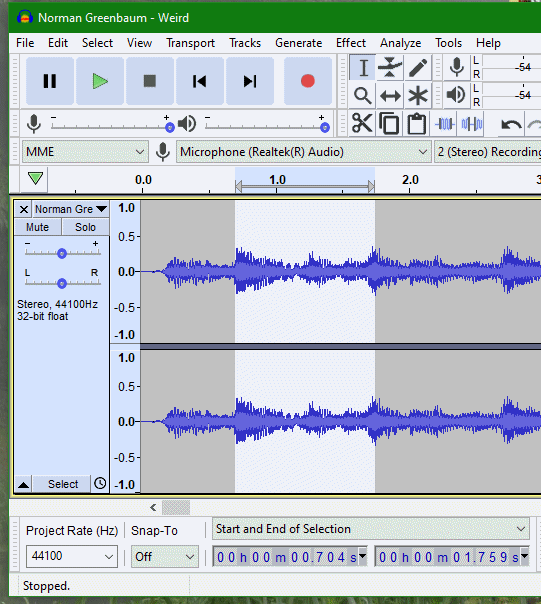
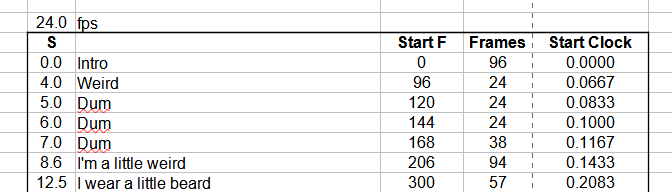
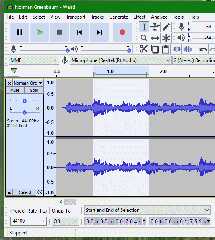
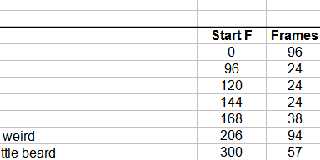
I use Audacity to find the start time of each phrase in the song, I then
put these times in a spreadsheet to get the clock values and frame
numbers for POV-Ray .
See screen shots.

Best wishes,
m@
Post a reply to this message
Attachments:
Download 'aud1.gif' (42 KB)
Download 'spread1.gif' (9 KB)
Preview of image 'aud1.gif'
Preview of image 'spread1.gif'
|
|
| |
| |
|
|
|
|
| |
| |
|
|
"m@b" <sai### [at] googlemail com> wrote:
> I use Audacity to find the start time of each phrase in the song, I then
> put these times in a spreadsheet to get the clock values and frame
> numbers for POV-Ray .
> See screen shots.
>
> Best wishes,
> m@
That's almost exactly what I'm planning to do (minus the spreadsheet) but I
think it will be painstaking. How has this method worked out for you? I have
written a POV-Ray macro that will keep track of the number of frames and elapsed
time so that will help a little. Choosing a song that's over eight minutes long
might not have been the best idea for me...
Have a great day! com> wrote:
> I use Audacity to find the start time of each phrase in the song, I then
> put these times in a spreadsheet to get the clock values and frame
> numbers for POV-Ray .
> See screen shots.
>
> Best wishes,
> m@
That's almost exactly what I'm planning to do (minus the spreadsheet) but I
think it will be painstaking. How has this method worked out for you? I have
written a POV-Ray macro that will keep track of the number of frames and elapsed
time so that will help a little. Choosing a song that's over eight minutes long
might not have been the best idea for me...
Have a great day!
Post a reply to this message
|
|
| |
| |
|
|
|
|
| |
| |
|
|
On 11/04/2021 10:22 am, Dave Blandston wrote:
> "m@b" <sai### [at] googlemailcom> wrote:
>> I use Audacity to find the start time of each phrase in the song, I then
>> put these times in a spreadsheet to get the clock values and frame
>> numbers for POV-Ray .
>> See screen shots.
>>
>> Best wishes,
>> m@
>
> That's almost exactly what I'm planning to do (minus the spreadsheet) but I
> think it will be painstaking. How has this method worked out for you? I have
> written a POV-Ray macro that will keep track of the number of frames and elapsed
> time so that will help a little. Choosing a song that's over eight minutes long
> might not have been the best idea for me...
>
> Have a great day!
>

I don't find it takes too much time, admittedly I chose shorter and much
  slower songs than you are planning.

If there is a constant beat throughout the song you can set up a
variable direct from clock which can be used to animate all sorts of things.

See:
<https://www.tiktok.com/@m### [at] thewbradwell/video/6944909548163484930>
and
<https://www.youtube.com/watch?v=djJGXZB6yRE>

Best,
m@

p.s. I just watched the song - there is a lot going on there!
Post a reply to this message
|
|
| |
| |
|
|
|
|
| |
| |
|
|
"m@b" <sai### [at] googlemailcom> wrote:
> I don't find it takes too much time, admittedly I chose shorter and much
>   slower songs than you are planning.
>
> If there is a constant beat throughout the song you can set up a
> variable direct from clock which can be used to animate all sorts of things.
>
> See:
> <https://www.tiktok.com/@m### [at] thewbradwell/video/6944909548163484930>
> and
> <https://www.youtube.com/watch?v=djJGXZB6yRE>
>
> Best,
> m@
>
> p.s. I just watched the song - there is a lot going on there!

I enjoyed your video very much, especially the leaning tree and the big
geographical surprise at the end! The story is very entertaining as well -
that's a great accomplishment!
Post a reply to this message
|
|
| |
| |
|
|
|
|
| |
| |
|
|
"m@b" <sai### [at] googlemailcom> wrote:

> I use Audacity to find the start time of each phrase in the song, I then
> put these times in a spreadsheet to get the clock values and frame
> numbers for POV-Ray .

I use Audacity too, a great free app. And your spreadsheet for creating
animation timings is a great idea. If I understand your spreadsheet-use
correctly, how do you ultimately output the values there into a form that
POV-ray can #read during its animation render? I assume that it would be a
simple text file-- but does the spreadsheet app automatically format its
frame-number data in the proper POV-ray-required format?

(Obviously, I'm not very familiar with spreadsheet use.)
>
> If there is a constant beat throughout the song you can set up a
> variable direct from clock which can be used to animate all sorts of things.
>

The 'constant beat' is sometimes not so constant, ha. Especially during long
songs. (Unless the beat is generated by a drum machine or click track, for
example.) Human drummers sometimes have a tendency to ever-so-slightly slow down
or speed up-- which is probably not noticed by most listeners, but might create
minor glitches when compared to computer timings.
Post a reply to this message
|
|
| |
| |
|
|
|
|
| |
| |
|
|
"m@b" <sai### [at] googlemailcom> wrote:
> I don't find it takes too much time, admittedly I chose shorter and much
>   slower songs than you are planning.
>
> If there is a constant beat throughout the song you can set up a
> variable direct from clock which can be used to animate all sorts of things.
>
> See:
> <https://www.tiktok.com/@m### [at] thewbradwell/video/6944909548163484930>
> and
> <https://www.youtube.com/watch?v=djJGXZB6yRE>
>
> Best,
> m@
>
> p.s. I just watched the song - there is a lot going on there!

I'm curious about a couple things, since you have already solved some problems
that I'm currently working on. Did you create one giant POV-Ray file for the
entire animation, or did you split it up into multiple files? If you split it
up, did you need to devise a method of passing information from one file to the
next? If so I'm very interested to hear the basic details of how you did this,
especially since you had to plan much farther ahead by positioning the camera
correctly. I will have to split my project into multiple files for sure and so
far I've written a macro that automatically keeps track of the current number of
frames/time elapsed but ideally it would be nice to be able to pass information
about changing textures as well. I don't think this is possible, but maybe
there's a way...

Also my original belief that it would be possible to visually examine the
waveform with a music editor and identify beats and other musical events has
turned out to be totally false. Drum beats can be identified easily enough but
bass notes are not as obvious especially when there is singing and/or other
guitar stuff going on simultaneously.

It has been brought to my attention that the mathematical method of detecting
beats/changes is by the use of Fourier transforms. So my current options are to
try to locate and adapt some Fourier transform code to POV-Ray SDL and use it to
generate a list of acoustic event times (probably beyond my ability), or find
another alternative. One option that I'll explore next is the "spectral" view.
In the past I used Magix Audio Cleaning Lab to remove tape hiss and unwanted
sounds from commercial recordings and one of the features was "spectral
cleaning" which displayed the music in a unique visual manner, which may help.
Re-installing that program and checking that option out will be my next project.

I made a five-second test animation by guessing the approximate times of the
first few bass notes and it's definitely not good enough. I posted it anyway for
an example of what not to do:

https://www.youtube.com/watch?v=Rv8kGq9PUkM

This also includes a test of using video frames in one of the characters of the
logo. I picked a random five-second segment from a concert video and it didn't
work out at all, at least not with the big "A." I think that carefully selected
video segments have potential in the smaller characters though.

Cheers,
Dave Blandston
Post a reply to this message
|
|
| |
| |
|
|
|
|
| |
| |
|
|
On 12/04/2021 10:18 am, Dave Blandston wrote:
> "m@b" <sai### [at] googlemailcom> wrote:
>> I don't find it takes too much time, admittedly I chose shorter and much
>>    slower songs than you are planning.
>>
>> If there is a constant beat throughout the song you can set up a
>> variable direct from clock which can be used to animate all sorts of things.
>>
>> See:
>> <https://www.tiktok.com/@m### [at] thewbradwell/video/6944909548163484930>
>> and
>> <https://www.youtube.com/watch?v=djJGXZB6yRE>
>>
>> Best,
>> m@
>>
>> p.s. I just watched the song - there is a lot going on there!
>
> I'm curious about a couple things, since you have already solved some problems
> that I'm currently working on. Did you create one giant POV-Ray file for the
> entire animation, or did you split it up into multiple files? If you split it
> up, did you need to devise a method of passing information from one file to the
> next? If so I'm very interested to hear the basic details of how you did this,
> especially since you had to plan much farther ahead by positioning the camera
> correctly. I will have to split my project into multiple files for sure and so
> far I've written a macro that automatically keeps track of the current number of
> frames/time elapsed but ideally it would be nice to be able to pass information
> about changing textures as well. I don't think this is possible, but maybe
> there's a way...
>
> Also my original belief that it would be possible to visually examine the
> waveform with a music editor and identify beats and other musical events has
> turned out to be totally false. Drum beats can be identified easily enough but
> bass notes are not as obvious especially when there is singing and/or other
> guitar stuff going on simultaneously.
>
> It has been brought to my attention that the mathematical method of detecting
> beats/changes is by the use of Fourier transforms. So my current options are to
> try to locate and adapt some Fourier transform code to POV-Ray SDL and use it to
> generate a list of acoustic event times (probably beyond my ability), or find
> another alternative. One option that I'll explore next is the "spectral" view.
> In the past I used Magix Audio Cleaning Lab to remove tape hiss and unwanted
> sounds from commercial recordings and one of the features was "spectral
> cleaning" which displayed the music in a unique visual manner, which may help.
> Re-installing that program and checking that option out will be my next project.
>
> I made a five-second test animation by guessing the approximate times of the
> first few bass notes and it's definitely not good enough. I posted it anyway for
> an example of what not to do:
>
> https://www.youtube.com/watch?v=Rv8kGq9PUkM
>
> This also includes a test of using video frames in one of the characters of the
> logo. I picked a random five-second segment from a concert video and it didn't
> work out at all, at least not with the big "A." I think that carefully selected
> video segments have potential in the smaller characters though.
>
> Cheers,
> Dave Blandston
>

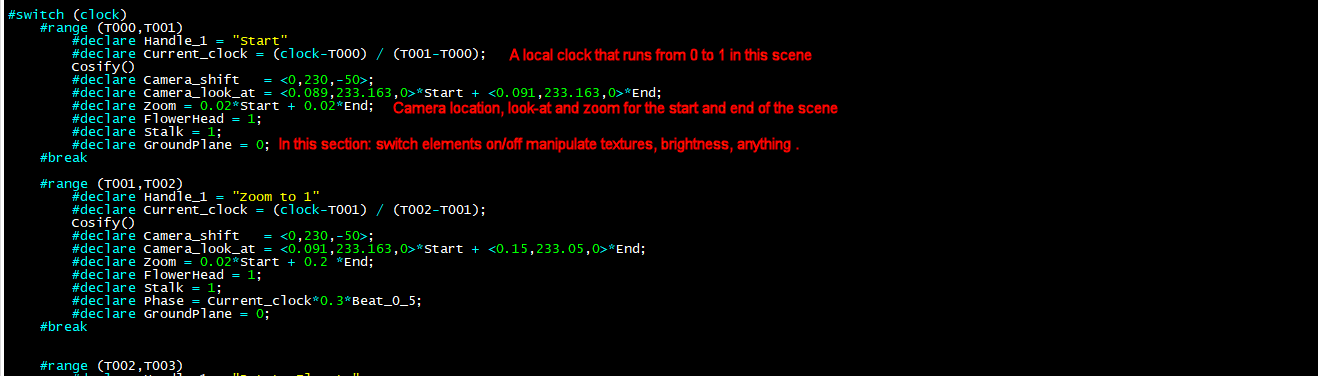
I put the scene all in one file, the timings go in another (.inc) file,
I find it convenient to switch between the two when working.

Here is the layout of the timing file:

SETUP TIMES FROM THE SPREADSHEET

#declare T000 = 0.0000;  // Start
#declare T001 = 0.0667;  // Weird                   Zoom to 1
#declare T002 = 0.0833;  // Dum dum                 Rotate Florets
#declare T003 = 0.1433;  // I'm a little weird      Zoom out 1
#declare T004 = 0.2083;  // I wear a little beard   To Ladybird
#declare T005 = 0.2483;  // Durul ural um dum       Ladybird

INITIALISE ELEMENTS THAT WILL BE ACTIVATED/CHANGED DURING RENDER

#declare FlowerHead  = 0;
#declare Stalk       = 0;
#declare Grass       = 0;
#declare GroundPlane = 1;
#declare Mushroom    = 0;

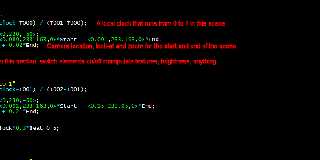
USE SWITCH TO RENDER SCENE BY SCENE
See screen shot

This macro sets up some local clocks. Start runs from 1 to 0, End runs
from 0 to 1, they both start and end slowly like an S-curve, this avoids
jerky camera movements at each scene change. Bumper runs 0-1-0.

#macro Cosify()
	#declare Start =  (cos(1*pi*Current_clock)+1)/2;
	#declare End = (1-(cos(1*pi*Current_clock)+1)/2);
	#declare Bumper = sin(pi*Current_clock); #end

PRINT OUT SOME STATS SO i CAN FOLLOW HOW THE ANIMATION IS PROGRESSING

#debug concat( Handle_1, "   Clock = ", str(clock,0,3), "
Current_clock = ", str(Current_clock,0,4), "    Frame = ",
str(frame_number,0,0),  "\n")
#debug concat("Look at = ", Vstr(Camera_look_at, 0, 0), "    Camera
location = ", Vstr(Camera_shift, 0, 0),  "    Zoom = ", str(Zoom,2,2),
"\n")
Post a reply to this message
Attachments:
Download 'povshot1.gif' (28 KB)
Preview of image 'povshot1.gif'
|
|
| |
| |
|
|
|
|
| |
| |
|
|
On 11/04/2021 9:59 pm, Kenneth wrote:
> "m@b" <sai### [at] googlemailcom> wrote:
>
>> I use Audacity to find the start time of each phrase in the song, I then
>> put these times in a spreadsheet to get the clock values and frame
>> numbers for POV-Ray .
>
> I use Audacity too, a great free app. And your spreadsheet for creating
> animation timings is a great idea. If I understand your spreadsheet-use
> correctly, how do you ultimately output the values there into a form that
> POV-ray can #read during its animation render?

I just copy and paste manually. I am sure it would be possible to output
the spreadsheet as a CSV file and have POV-Ray read it but I haven't yet.

>> If there is a constant beat throughout the song you can set up a
>> variable direct from clock which can be used to animate all sorts of things.
>>
>
> The 'constant beat' is sometimes not so constant, ha. Especially during long
> songs. (Unless the beat is generated by a drum machine or click track, for
> example.)

Good point
Post a reply to this message
|
|
| |
| |
|
|
|
|
| |
| |
|
|
"m@b" <sai### [at] googlemailcom> wrote:
> I put the scene all in one file, the timings go in another (.inc) file,
> I find it convenient to switch between the two when working.
>
> Here is the layout of the timing file:
>
> SETUP TIMES FROM THE SPREADSHEET
>
> #declare T000 = 0.0000;  // Start
> #declare T001 = 0.0667;  // Weird                   Zoom to 1
> #declare T002 = 0.0833;  // Dum dum                 Rotate Florets
> #declare T003 = 0.1433;  // I'm a little weird      Zoom out 1
> #declare T004 = 0.2083;  // I wear a little beard   To Ladybird
> #declare T005 = 0.2483;  // Durul ural um dum       Ladybird
>
> INITIALISE ELEMENTS THAT WILL BE ACTIVATED/CHANGED DURING RENDER
>
> #declare FlowerHead  = 0;
> #declare Stalk       = 0;
> #declare Grass       = 0;
> #declare GroundPlane = 1;
> #declare Mushroom    = 0;
>
> USE SWITCH TO RENDER SCENE BY SCENE
> See screen shot
>
> This macro sets up some local clocks. Start runs from 1 to 0, End runs
> from 0 to 1, they both start and end slowly like an S-curve, this avoids
> jerky camera movements at each scene change. Bumper runs 0-1-0.
>
> #macro Cosify()
>  #declare Start =  (cos(1*pi*Current_clock)+1)/2;
>  #declare End = (1-(cos(1*pi*Current_clock)+1)/2);
>  #declare Bumper = sin(pi*Current_clock); #end
>
> PRINT OUT SOME STATS SO i CAN FOLLOW HOW THE ANIMATION IS PROGRESSING
>
> #debug concat( Handle_1, "   Clock = ", str(clock,0,3), "
> Current_clock = ", str(Current_clock,0,4), "    Frame = ",
> str(frame_number,0,0),  "\n")
> #debug concat("Look at = ", Vstr(Camera_look_at, 0, 0), "    Camera
> location = ", Vstr(Camera_shift, 0, 0),  "    Zoom = ", str(Zoom,2,2),
> "\n")

Hey this is super interesting! We are doing some very similar things - I am also
using local "Event clocks" that go from 0 to 1 at pre-determined intervals, and
look how similar our "smoothing" functions are:

#local ClockFactor = (sin (radians (EventClock [I] * 180 - 90)) + 1) / 2; //0 ..
1
#local ClockFactor = pow (ClockFactor, 1); //Adjust for a faster or slower start

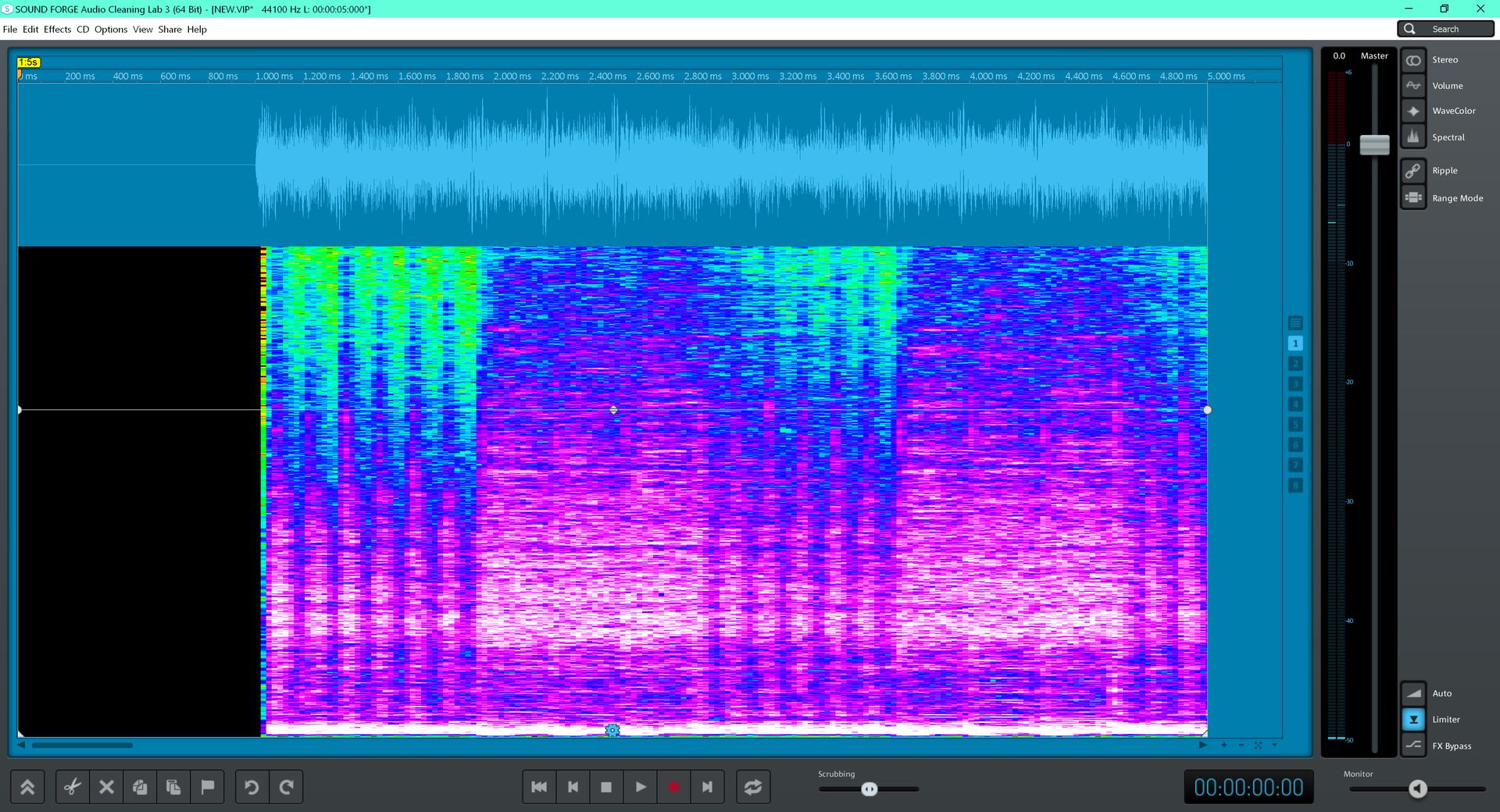
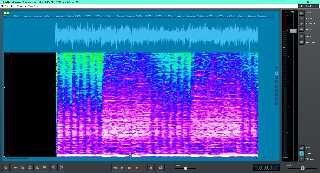
I am in luck regarding my hope of being able to see changes in the music better
than just looking at the waveform. I got the spectral display up and running and
it makes it pretty easy to spot acoustic "events." The screen shot of the first
five seconds of music that I'm using clearly shows six quick bass notes then
three slower ones then five quick ones etc. The time display is in milliseconds
which is plenty accurate. Unfortunately there are many hundreds of musical
events that I will have to log by hand. But the final product should be nearly
perfect.

Thanks for sharing your technique!
Post a reply to this message
Attachments:
Download 'screen.jpg' (397 KB)
Preview of image 'screen.jpg'
|
|
| |
| |
|
|
|
|
| |
| |
|
|
"Dave Blandston" <nomail@nomail> wrote:

> I am in luck regarding my hope of being able to see changes in the music better
> than just looking at the waveform. I got the spectral display up and running and
> it makes it pretty easy to spot acoustic "events." The screen shot of the first
> five seconds of music that I'm using clearly shows six quick bass notes then
> three slower ones then five quick ones etc. The time display is in milliseconds
> which is plenty accurate. Unfortunately there are many hundreds of musical
> events that I will have to log by hand. But the final product should be nearly
> perfect.
>
> Thanks for sharing your technique!

Silly cro-magnon idea here -
what about using sheet music and a ruler?
Post a reply to this message
|
|
| |
| |
|
|
|
|
| |
| |
|
|
"Bald Eagle" <cre### [at] netscapenet> wrote:
> Silly cro-magnon idea here -
> what about using sheet music and a ruler?

Ha ha I wish!!!

Correction: 6 - 3 - 6 etc. bass notes...
Post a reply to this message
|
|
| |
| |
|
|
|
|
| |
| |
|
|
hi,

"Dave Blandston" <nomail@nomail> wrote:
> ... The time display is in milliseconds
> which is plenty accurate. Unfortunately there are many hundreds of musical
> events that I will have to log by hand.

don't you own a computer?  :-)

anyway, reading this I (may have) got carried away and wrote a few lines of
script[*] over lunch (can't tell what OS you're running from the screenshot,
however, if you haven't Tcl/Tk installed, it is freely available on all
platforms).  run it, right-click to start, left-click or 'b' key each beat, then
right-click again to stop; 'q' at any time to abandon.  the only thing left to
do, as exercise for the interested reader ;-), is subtracting the initial mark
from all subsequent ones, and writing them to file.  hope you'll enjoy it, I
certainly did.

[*] hack. :-)


regards, jr.

# ------------------------------------------------------------------------

#!/usr/bin/env wish

proc doStuff {} {
  global T
    set a [lsort -integer [array names T]]
    set from [lindex $a 0]
    set to [lindex $a end]
    set n [llength $a]
    set s [format {recorded %d beats, total ms: %d} $n [expr {$to - $from}]]
    tk_dialog .dlg foobar $s info 0 ok
  return
}

proc rightClick {} {
  global rt T
  if {!$rt(run)} {
    set rt(run) true
    set rt(begin) [clock milliseconds]
  } \
  else {
    unset rt(run)
    if {![array exists T]} {exit 99}
    doStuff
    destroy .
  }
  return
}

proc leftClick {} {
  global rt T
  if {$rt(run)} {
    set T([clock milliseconds]) {}
  }
  return
}

set rt(run) false

label .lbl -padx 2cm -pady 2cm

pack .lbl

bind . <KeyPress-q>  [list destroy .]
bind . <KeyPress-b> leftClick
bind . <ButtonRelease-1> leftClick
bind . <ButtonRelease-3> rightClick

# ------------------------------------------------------------------------
Post a reply to this message
|
|
| |
| |
|
|
|
|
| |
| |
|
|
"jr" <cre### [at] gmailcom> wrote:

ouch, complete with bug even.  forgot to use 'rt(begin)' hence subtracting from
wrong value.  </hang-head-in-shame>


regards, jr.
Post a reply to this message
|
|
| |
| |
|
|
|
|
| |
| |
|
|
"Dave Blandston" <nomail@nomail> wrote:
>
> Hey this is super interesting! We are doing some very similar things - I am also
> using local "Event clocks" that go from 0 to 1 at pre-determined intervals, and
> look how similar our "smoothing" functions are:
>
> #local ClockFactor = (sin (radians (EventClock [I] * 180 - 90)) + 1) / 2; //0 ..
> 1
> #local ClockFactor = pow (ClockFactor, 1); //Adjust for a faster or slower start
>

Just a suggestion:
Although clock, clock_delta and Final_Clock are great tools for creating
animations, and for causing 'events' to happen at certain times, I use
frame_number (or some fraction thereof) more often now. It's probably a personal
choice, of course; but frame_number seems more intuitive to me-- and I don't
have to think in 'clock division' terms for the timing of animation events.

I'm currently reworking an old and complex animation scene, which has various
#include files, where I used clock etc. exclusively throughout the scene. It
worked beautifully at the time-- but I'm thinking now of extending the length of
the entire animation with some new action at the end, maybe by 25%, but
without messing up all of the clock-specified events and timings that are
already there. I *could* simply change Final_clock to be 1.25, but I'm not yet
sure what that will do to some of the events which actually depend on the
(previous) clock-end of 1.0.  As a simple example,

#if(clock <= 0.3) --do this-- #else -- do that-- #end

.....but now I don't want the #else action to extend past a clock of,say, 1.15. I
could easily change the #if clause of course, but changing all such constructs
to use frame_number instead tells me exactly and visually when to expect the
action, or to easily change it.

I also like frame-number because, after a test animation, I can immediately see
where any animation glitches need correcting-- at which frame, in other words,
without having to make a clock-division computation to figure it out.

However, I haven't yet worked out how to 'start and end events slowly like an
S-curve' as was mentioned previously, when using frame_number instead of clock.
I'll have to explore that!

But your music video project uses a song length that is 'set in stone', so using
clock is a perfectly natural way to achieve the results.

----
[Btw, I just discovered that the Audacity app can show 'spectral timings' for a
song too, like the image you posted; I had never used that feature before.
Thanks for the suggestion!]
Post a reply to this message
|
|
| |
| |
|
|
|
|
| |
| |
|
|
"jr" <cre### [at] gmailcom> wrote:
> hi,
>
> run it, right-click to start, left-click or 'b' key each beat, then
> right-click again to stop; 'q' at any time to abandon.

This sounds intriguing - I've never heard of Tcl/Tk so I'm not sure what you
mean - should I run this script then play the song and press the "b" key every
time I hear a beat, and the script will record the timing of the keypresses? If
so then I must admit that I have no musical talent whatsoever of my own and my
ability to keep a beat is nearly non-existent. If you saw me TRY to dance you
would immediately agree that I would fail terribly at this!

Have a great day!

Kind regards,
Dave Blandston
Post a reply to this message
|
|
| |
| |
|
|
|
|
| |
| |
|
|
"Kenneth" <kdw### [at] gmailcom> wrote:
>
> Just a suggestion:
> Although clock, clock_delta and Final_Clock are great tools for creating
> animations, and for causing 'events' to happen at certain times, I use
> frame_number (or some fraction thereof) more often now. It's probably a personal
> choice, of course; but frame_number seems more intuitive to me-- and I don't
> have to think in 'clock division' terms for the timing of animation events.

That's interesting - I had forgotten that frame_number even existed because I
got used to using clock years ago, but I can see that frame_number would be more
appropriate under some circumstances, possibly including this one. I did in fact
have to include some code to convert number of frames generated to time elapsed
so using frame_number would be exact instead of within 1 / framerate / 2. The
beat markers will be in milliseconds which would have to be converted to
frame_numbers though so it's a trade-off either way. Thank you for the excellent
suggestion!

Have an awesome day Kenneth!

Kind regards,
Dave Blandston
Post a reply to this message
|
|
| |
| |
|
|
|
|
| |
| |
|
|
Here's a short test to show the use of the "spectral" display to locate beat
times. It appears to be right on. (Note that not all beats are used, but when a
visual transition does occur it coincides with a beat.) It's great that Audacity
includes this functionality!

https://www.youtube.com/watch?v=RifdL-c0QMM

Kind regards,
Dave Blandston
Post a reply to this message
|
|
| |
| |
|
|
|
|
| |
| |
|
|
"Kenneth" <kdw### [at] gmailcom> wrote:

> I'm currently reworking an old and complex animation scene, which has various
> #include files, where I used clock etc. exclusively throughout the scene. It
> worked beautifully at the time-- but I'm thinking now of extending the length of
> the entire animation with some new action at the end, maybe by 25%, but
> without messing up all of the clock-specified events and timings that are
> already there.

Those ought to stay exactly the same.
If you're just increasing the number of frames, then everything should stay the
same as well.

If you are _appending_ more things to the animation, then maybe just declare a
Clock2 variable that is
#declare Clock2 = max (1, 2-clock);
Then when the 0-1 clock "runs out", you get a second 0-1 clock variable to use.
You can also just search-replace all of your "clock" instances with "Clock"
#declare Clock = min (1, clock);
so that it stops at 1.


> However, I haven't yet worked out how to 'start and end events slowly like an
> S-curve' as was mentioned previously, when using frame_number instead of clock.
> I'll have to explore that!

"Smoothstep" in glsl, shadertoy, etc.
https://en.wikipedia.org/wiki/Smoothstep
https://www.youtube.com/watch?v=60VoL-F-jIQ
https://iquilezles.org/www/articles/ismoothstep/ismoothstep.htm
https://thebookofshaders.com/glossary/?search=smoothstep
Post a reply to this message
|
|
| |
| |
|
|
|
|
| |
| |
|
|
On 13/04/2021 2:38 am, Kenneth wrote:
> "Dave Blandston" <nomail@nomail> wrote:
>>
>> Hey this is super interesting! We are doing some very similar things - I am also
>> using local "Event clocks" that go from 0 to 1 at pre-determined intervals, and
>> look how similar our "smoothing" functions are:
>>
>> #local ClockFactor = (sin (radians (EventClock [I] * 180 - 90)) + 1) / 2; //0 ..
>> 1
>> #local ClockFactor = pow (ClockFactor, 1); //Adjust for a faster or slower start
>>
>
> Just a suggestion:
> Although clock, clock_delta and Final_Clock are great tools for creating
> animations, and for causing 'events' to happen at certain times, I use
> frame_number (or some fraction thereof) more often now. It's probably a personal
> choice, of course; but frame_number seems more intuitive to me-- and I don't
> have to think in 'clock division' terms for the timing of animation events.
>
> I'm currently reworking an old and complex animation scene, which has various
> #include files, where I used clock etc. exclusively throughout the scene. It
> worked beautifully at the time-- but I'm thinking now of extending the length of
> the entire animation with some new action at the end, maybe by 25%, but
> without messing up all of the clock-specified events and timings that are
> already there. I *could* simply change Final_clock to be 1.25, but I'm not yet
> sure what that will do to some of the events which actually depend on the
> (previous) clock-end of 1.0.  As a simple example,
>
> #if(clock <= 0.3) --do this-- #else -- do that-- #end
>
> .....but now I don't want the #else action to extend past a clock of,say, 1.15. I
> could easily change the #if clause of course, but changing all such constructs
> to use frame_number instead tells me exactly and visually when to expect the
> action, or to easily change it.
>
> I also like frame-number because, after a test animation, I can immediately see
> where any animation glitches need correcting-- at which frame, in other words,
> without having to make a clock-division computation to figure it out.


Good points.
Further - frame numbers are better if you are including video frames in
an animation. Using clock derived functions results in dropped or
doubled frames from time to time.


>
> However, I haven't yet worked out how to 'start and end events slowly like an
> S-curve' as was mentioned previously, when using frame_number instead of clock.
> I'll have to explore that!
>

You can't do it with frame numbers directly as each frame has a fixed time.

Presumably you could use the formulas as mentioned above and just
substitute Frame_A, Frame_B instead if Time_A, Time_B to make a local
clock? the start and end points would still be tied to frame numbers.


> But your music video project uses a song length that is 'set in stone', so using
> clock is a perfectly natural way to achieve the results.
>
> ----
> [Btw, I just discovered that the Audacity app can show 'spectral timings' for a
> song too, like the image you posted; I had never used that feature before.
> Thanks for the suggestion!]
>
>
>
Post a reply to this message
|
|
| |
| |
|
|
|
|
| |
| |
|
|
On 13/04/2021 6:32 am, Dave Blandston wrote:
> Here's a short test to show the use of the "spectral" display to locate beat
> times. It appears to be right on. (Note that not all beats are used, but when a
> visual transition does occur it coincides with a beat.) It's great that Audacity
> includes this functionality!
>
> https://www.youtube.com/watch?v=RifdL-c0QMM
>
> Kind regards,
> Dave Blandston
>

Looking good :-)
Post a reply to this message
|
|
| |
| |
|
|
|
|
| |
| |
|
|
"m@b" <sai### [at] googlemailcom> wrote:
> Further - frame numbers are better if you are including video frames in
> an animation. Using clock derived functions results in dropped or
> doubled frames from time to time.

Precision errors can be an issue in situations like this and they're more common
than some folks might realize. You would never know the difference if some
object is positioned at 43.9999999 instead of 44 POV units and the difference is
one billionth the width of a pixel and has zero effect on the final image
values, but you will certainly notice if FRAME #43 is displayed instead of FRAME
#44!

#local FrameNumber = int (EventClock * (NumberOfFrames - 1) + .1); //Correct for
precision errors
#local Padding = strlen (str (NumberOfFrames - 1, 0, 0));
#local SourceImageFileName = concat ("VideoFrame_", str (FrameNumber, -Padding,
0), ".png")

Just something to keep in mind...

Kind regards,
Dave Blandston
Post a reply to this message
|
|
| |
| |
|
|
|
|
| |
| |
|
|
hi,

"Dave Blandston" <nomail@nomail> wrote:
> "jr" <cre### [at] gmailcom> wrote:
> > hi,
> >
> > run it, right-click to start, left-click or 'b' key each beat, then
> > right-click again to stop; 'q' at any time to abandon.
>
> This sounds intriguing - I've never heard of Tcl/Tk so I'm not sure what you
> mean - should I run this script then play the song and press the "b" key every
> time I hear a beat, and the script will record the timing of the keypresses?

yes.

> If
> so then I must admit that I have no musical talent whatsoever of my own and my
> ability to keep a beat is nearly non-existent. If you saw me TRY to dance you
> would immediately agree that I would fail terribly at this!

no worries, the "white men can't jump" syndrome.  :-)

<https://www.youtube.com/watch?v=-FvsgGp8rSE>


regards, jr.
Post a reply to this message
|
|
| |
| |
|
|
|
|
| |
| |
|
|
"jr" <cre### [at] gmailcom> wrote:
> hi,
> no worries, the "white men can't jump" syndrome.  :-)
>
> <https://www.youtube.com/watch?v=-FvsgGp8rSE>
>
>
> regards, jr.

Yep, that's me!
Post a reply to this message
|
|
| |
| |
|
|
|
|
| |
| |
|
|
hi,

(this has been nagging me since I posted, sorry)

"jr" <cre### [at] gmailcom> wrote:
> "Dave Blandston" <nomail@nomail> wrote:
> > "jr" <cre### [at] gmailcom> wrote:
> > > run it, right-click to start, left-click or 'b' key each beat, then
> > > right-click again to stop; 'q' at any time to abandon.
> >
> > This sounds intriguing - I've never heard of Tcl/Tk so I'm not sure what you
> > mean - should I run this script then play the song and press the "b" key every
> > time I hear a beat, and the script will record the timing of the keypresses?
>
> yes.

the presumption was/is that you are comfortable with the idea of "programming"
since you use (at least) the POV-Ray SDL.  there's nothing special about the
language, almost any scripting/compiled language will do.  I wrote the code to
illustrate that you can make a simple tool to take some of the drudge out of the
job and take (human) fallibility out of the equation, with little effort -- make
your computer earn its electricity.  (besides, it also delivered a pleasure
"kick" similar to solving a good crossword. :-))


regards, jr.
Post a reply to this message
|
|
| |
| |
|
|
|
|
| |
| |
|
|
"jr" <cre### [at] gmailcom> wrote:
> the presumption was/is that you are comfortable with the idea of "programming"
> since you use (at least) the POV-Ray SDL.  there's nothing special about the
> language, almost any scripting/compiled language will do.  I wrote the code to
> illustrate that you can make a simple tool to take some of the drudge out of the
> job and take (human) fallibility out of the equation, with little effort -- make
> your computer earn its electricity.  (besides, it also delivered a pleasure
> "kick" similar to solving a good crossword. :-))
>
>
> regards, jr.

I have begun the arduous task of logging the beat marks by hand. I ended up
using a program called RX 8 by Izotope to display the "spectral" music view
since it shows a little more clarity than Audacity and it displays the exact
time where the cursor is so it's easy to get the info. In many instances there
are several beats per second, for example:

23.116
23.242
23.393
23.549
23.675
23.829
23.961

Also this particular song does not have a regular, constant beat - it changes
continually. It took well over an hour, probably closer to two hours just to get
to the 44 second mark but it is possible. I wish I could use your script but I
think it would be impossible to get accurate results, at least for this song. If
you haven't heard it check it out and you'll see what I mean...

https://www.youtube.com/watch?v=6rNELTZO0QQ

Plus listening to it will make your day better!
Post a reply to this message
|
|
| |
| |
|
|
|
|
| |
| |
|
|
"Bald Eagle" <cre### [at] netscapenet> wrote:
> "Kenneth" <kdw### [at] gmailcom> wrote:
>
> > ...but I'm thinking now of extending the length of
> > the entire animation with some new action at the end, maybe by 25%, but
> > without messing up all of the clock-specified events and timings that are
> > already there.
>
> Those ought to stay exactly the same.
> If you're just increasing the number of frames, then everything should
> stay the same as well.
>
> If you are _appending_ more things to the animation, then maybe just declare a
> Clock2 variable that is
> #declare Clock2 = max (1, 2-clock);
> Then when the 0-1 clock "runs out", you get a second 0-1 clock variable
> to use.
> You can also just search-replace all of your "clock" instances with "Clock"
> #declare Clock = min (1, clock);
> so that it stops at 1.
>

Yes, I've used constructs similar to those as well (although the use of min/max
is a new twist that I didn't think of; thanks.)

For me though, it really boils down to 'clarity of code'. In other words, if I
use frame_number to start an event, I'll 'know' immediately what I intended, and
where the event happens in the animation. With something like max(1,2-clock), I
have to actually think about it-- ouch! :-P Especially if I come across this
piece of code years from now, not remembering why I did it this way. Unless I'm
smart and add a nice little comment to *tell* me why, ha.

But there ARE other instances where I'll 'mix and match' clock and frame_number.
Dave B's waving flag is a good example: something like sin(19*pi*clock) is
perfectly fine for such 'continuous' animation, regardless of if I change the
running length of my animation later (where clock would go past 1.0). Using
frame_number there instead would be an unnecessary complication.
Post a reply to this message
|
|
| |
| |
|
|
|
|
| |
| |
|
|
hi,

"Dave Blandston" <nomail@nomail> wrote:
> "jr" <cre### [at] gmailcom> wrote:
> ...
> 23.116
> 23.242
> 23.393
> 23.549
> 23.675
> 23.829
> 23.961

:-)


> Also this particular song does not have a regular, constant beat - it changes
> continually. It took well over an hour, probably closer to two hours just to get
> to the 44 second mark but it is possible. I wish I could use your script but I
> think it would be impossible to get accurate results, at least for this song.

would need .. nimble fingers.


> If you haven't heard it check it out and you'll see what I mean...
> {...}
> Plus listening to it will make your day better!

it did.  :-)

I often find cover versions the equal of, or better than, the originals, eg:
<https://www.youtube.com/watch?v=BoZx9TGdWEA>


regards, jr.
Post a reply to this message
|
|
| |
| |
|
|
|
|
| |
| |
|
|
"jr" <cre### [at] gmailcom> wrote:
> I often find cover versions the equal of, or better than, the originals, eg:
> <https://www.youtube.com/watch?v=BoZx9TGdWEA>
>
>
> regards, jr.

If you like Metallica remakes then here are two of my favorites, both unique in
their own way:

https://www.youtube.com/watch?v=INouvLl1JiQ (Enter Sandman performed by
extremely talented youngsters)

https://odysee.com/@mediabear:5/safetyland:a (Enter Sandman parody)

Cheers!
Post a reply to this message
|
|
| |
| |
|
|
|
|
| |
| |
|
|
hi,

(I know I _always_ get into .. deep water when I make "forthright" comments,
nevertheless..)

"Dave Blandston" <nomail@nomail> wrote:
> "jr" <cre### [at] gmailcom> wrote:
> > I often find cover versions the equal of, or better than, the originals, eg:
> > <https://www.youtube.com/watch?v=BoZx9TGdWEA>
> >
> >
> > regards, jr.
>
> If you like Metallica remakes then here are two of my favorites, both unique in
> their own way:
> INouvLl1JiQ (Enter Sandman performed by extremely talented youngsters)

but where's the "kick"?  they _could_[*] have been miming to a backing track,
there's so little difference.
[*] but didn't.

google 'Hayseed Dixie Enter Sandman' for one I like as well as the original.
:-)


> odysee.com/@mediabear:5/safetyland:a (Enter Sandman parody)

didn't check this, the url looks like something I'd never click on.  (sorry, old
fool being (somewhat) paranoid)


regards, jr.
Post a reply to this message
|
|
| |
| |
|
|
|
|
| |
| |
|
|
"jr" <cre### [at] gmailcom> wrote:
>
> (I know I _always_ get into .. deep water when I make "forthright" comments,
> nevertheless..)
>
> "Dave Blandston" <nomail@nomail> wrote:
> > "jr" <cre### [at] gmailcom> wrote:
> > > ...
> google 'Hayseed Dixie Enter Sandman' for one I like as well as the original.
> :-)

uh, belay that.  misremembered.  was thinking of Lemmy's version (which is ..
ok) and Hayseed Dixie did an 'Ace of Spades' cover, not Sandman.  hence (?)
mix-up.


regards, jr.
Post a reply to this message
|
|
| |
| |
|
|
|
|
| |
| |
|
|
"Dave Blandston" <nomail@nomail> writes:

> That's interesting - I had forgotten that
> frame_number even existed because I
> got used to using clock years ago, but I can see
> that frame_number would be more
> appropriate under some circumstances, possibly
> including this one. I did in fact
> have to include some code to convert number of
> frames generated to time elapsed
> so using frame_number would be exact instead of
> within 1 / framerate / 2. The
> beat markers will be in milliseconds which would
> have to be converted to
> frame_numbers though so it's a trade-off either
> way. Thank you for the excellent
> suggestion!

In case someone doesn’t know, the /POV-Ray Reference/ has something to
say about this
(<http://www.povray.org/documentation/3.7.0/r3_2.html#r3_2_1_2>):

> Unlike some animation packages, the action in POV-Ray animated scenes
> does not depend upon the integer frame numbers. Rather you should
> design your scenes based upon the float identifier clock. By default,
> the clock value is 0.0 for the initial frame and 1.0 for the final
> frame. All other frames are interpolated between these values. For
> example if your object is supposed to rotate one full turn over the
> course of the animation, you could specify rotate 360*clock*y. Then as
> clock runs from 0.0 to 1.0, the object rotates about the y-axis from 0
> to 360 degrees.
>
> The major advantage of this system is that you can render a 10 frame
> animation or a 100 frame or 500 frame or 329 frame animation yet you
> still get one full 360 degree rotation. Test renders of a few frames
> work exactly like final renders of many frames.
>
> In effect you define the motion over a continuous float valued
> parameter (the clock) and you take discrete samples at some fixed
> intervals (the frames). If you take a movie or video tape of a real
> scene it works the same way. An object's actual motion depends only on
> time. It does not depend on the frame rate of your camera.

[...]

> For new scenes, we recommend you do not change the Initial_Clock or
> Final_Clock from their default 0.0 to 1.0 values. If you want the
> clock to vary over a different range than the default 0.0 to 1.0, we
> recommend you handle this inside your scene file as follows...
>
>
> #declare Start    = 25.0;
> #declare End      = 75.0;
> #declare My_Clock = Start+(End-Start)*clock;
>
> Then use My_Clock in the scene description. This keeps the critical
> values 25.0 and 75.0 in your .pov file.
Post a reply to this message
|
|
| |
| |
|
|
|
|
| |
| |
|
|
Subclick <no### [at] spam> wrote:
> In case someone doesn’t know, the /POV-Ray Reference/ has something to
> say about this
> (<http://www.povray.org/documentation/3.7.0/r3_2.html#r3_2_1_2>):
>
> > Unlike some animation packages, the action in POV-Ray animated scenes
> > does not depend upon the integer frame numbers. Rather you should
> > design your scenes based upon the float identifier clock. By default,
> > the clock value is 0.0 for the initial frame and 1.0 for the final
> > frame. All other frames are interpolated between these values. For
> > example if your object is supposed to rotate one full turn over the
> > course of the animation, you could specify rotate 360*clock*y. Then as
> > clock runs from 0.0 to 1.0, the object rotates about the y-axis from 0
> > to 360 degrees.
> >
> > The major advantage of this system is that you can render a 10 frame
> > animation or a 100 frame or 500 frame or 329 frame animation yet you
> > still get one full 360 degree rotation. Test renders of a few frames
> > work exactly like final renders of many frames.
> >
> > In effect you define the motion over a continuous float valued
> > parameter (the clock) and you take discrete samples at some fixed
> > intervals (the frames). If you take a movie or video tape of a real
> > scene it works the same way. An object's actual motion depends only on
> > time. It does not depend on the frame rate of your camera.
>
> [...]
>
> > For new scenes, we recommend you do not change the Initial_Clock or
> > Final_Clock from their default 0.0 to 1.0 values. If you want the
> > clock to vary over a different range than the default 0.0 to 1.0, we
> > recommend you handle this inside your scene file as follows...
> >
> >
> > #declare Start    = 25.0;
> > #declare End      = 75.0;
> > #declare My_Clock = Start+(End-Start)*clock;
> >
> > Then use My_Clock in the scene description. This keeps the critical
> > values 25.0 and 75.0 in your .pov file.

Good point. I got a little carried away with the idea that since the song is a
fixed length and certain key frames have to match certain musical events that a
deviation from the norm might be in order. As the project is progressing though
I see that clock is still the best option. Since the music is time-based,
converting between time and frame numbers just adds another element of
complexity and possibility of error. Also, the worst case scenario of being one
frame off is totally imperceptible. (Especially at 60 FPS!)

On another note, using the spectral view of Izotope RX 8 to locate the beat
marks is working out extremely well. The software allows one to place visual
markers at any point so beats can be marked, which makes it easy to see what's
been done and what's still left. The list of markers can be exported as a text
file (including comments). Editing with the POV-Ray editor into an include file
is trivial, especially with the block selection feature.

Have an awesome day!

Kind regards,
Dave Blandston
Post a reply to this message
|
|
| |
| |
|
|
|
|
| |
| |
|
|
Interesting update:

Some parts of the song I'm working on are difficult to tell exactly where the
beats are or even how many there are, even with the "spectral view" because
there's so much happening so quickly all at once. As luck would have it, there's
a free program available called "Spleeter" that analyzes songs and splits them
into drums, bass, and vocals. This makes the drum beats MUCH easier to identify
and will save a few hours of tedious work. Here's where Spleeter comes from:
https://makenweb.com/SpleeterGUI

Kind regards,
Dave Blandston
Post a reply to this message
|
|
| |
| |
|
|
|
|
| |
| |
|
|
"Dave Blandston" <nomail@nomail> wrote:
> Greetings Friends,
>
> More than ten years ago I made a scene that I didn't think turned out quite
> right so I set it aside until recently. I re-worked some of the textures and
> made some improvements. One of the improvements was to change the flag from a
> flat box with fake shadows to simulate ripples (not very convincing) to a mesh2
> object. Since the mesh2 is easily animatable with a simple sine function that
> led to this animation:
>
> https://www.youtube.com/watch?v=gYJac3vCHu8
>
> The message of the image is anti-war and it's based on the Metallica song
> Disposable Heroes, so I've decided to add the music to the animation and try
> animating the inside (currently green) portion of the Metallica logo. My goal is
> to animate the logo in such a manner that the animation is synchronized with the
> music, similar to the visualizations in Windows Media Player and other music
> players. It will be a big job to do by hand. One thing that would help would be
> a software application that would analyze the music and generate a list of exact
> times when a change occurs in the music and save the list as a text file that
> POV-Ray could read, but creating a program that does that is beyond my ability
> so I will try doing it by hand. There are endless possibilities so this will be
> a fun project! One thing that I have working at this point is using video frames
> as the pigment for one or more letters of the logo at a time, which can be
> combined with procedural textures.
>
> Kind regards,
> Dave Blandston

I made a windows program a few years ago call LR_Voice that takes a wave and
lets you place Phonemes that are saved in a file that POV can read.
Its at
http://leroyw.byethost15.com/WinZips/LR_Voice.zip
Although it was written for lip syncing you could use it to mark locations.
Have Fun!
Post a reply to this message
|
|
| |
| |
|
|
|
|
| |
| |
|
|
"Leroy" <whe### [at] gmailcom> wrote:
> I made a windows program a few years ago call LR_Voice that takes a wave and
> lets you place Phonemes that are saved in a file that POV can read.
> Its at
> http://leroyw.byethost15.com/WinZips/LR_Voice.zip
> Although it was written for lip syncing you could use it to mark locations.
> Have Fun!

Thanks but I'm almost done with that part of the project. The combination of
software that I settled on is working out extremely well for what I need.
IZotope RX 8 supports tabbed documents so I can have the original song open in
one tab and a modified version containing just the drums (made with SpleeterGUI)
open in another tab so I can make quick comparisons when necessary. I can place
a marker at a beat by putting the curser where I want on the waveform and
pressing the "m" key. RX 8 can export the marker times as a tab-delimited text
file that POV-Ray can read after I do about 30 seconds worth of formatting. It
still takes quite a while due to the length of the song and the number beats but
it's going well.

Have a great day and thanks for sharing your idea!

Kind regards,
Dave Blandston
Post a reply to this message
|
|
| |
| |
|
|
|
|
| |
|
|