 |
|
|
|
|
|
| |
| |
|
|
|
|
| |
| |
|
|
Hi jr - I really thought I'd get to this sooner, but this ought to get you on
the right path.

#version 3.8;
// Code by William Pokorny, modified by Bill Walker (Bald Eagle) for jr
2018-06-26
// Animation settings - 50 frames, clock from -1 to 1
global_settings {assumed_gamma 1}


#include "colors.inc"
#include "functions.inc"
background {Black}


#declare Camera00 = camera {
     perspective
     location <3,3,-3.001>
     sky y
     angle 35
     right x*(image_width/image_height)
     look_at <0,0,0>
}


#declare White = srgb <1,1,1>;
#declare Light00 = light_source { <50,150,-250>, White }
#declare Red = srgb <1,0,0>;
#declare CylinderX = cylinder { -1*x, 1*x, 0.01 pigment { Red } }
#declare Green = srgb <0,1,0>;
#declare CylinderY = cylinder { -1*y, 1*y, 0.01 pigment { Green } }
#declare Blue = srgb <0,0,1>;
#declare CylinderZ = cylinder { -1*z, 1*z, 0.01 pigment { Blue } }

#declare Base = box {<-1, -0.51, -1>, <1, -0.5, 1> pigment {Gray10}}


#declare InvisibleObject = sphere {<0,0,0>, 0.5}
#declare InvisibleObjectMediaContainer = sphere {<0,0,0>, 0.6}


#declare S = 0.4;
#declare FnZero = function (x,y,z) {0}
//#declare Scanner = box {-S*<1, 1, 1>, S*<1, 1, 1>}
#declare Scanner = cylinder {-1*x, 1*x, 0.1 translate y*0.5 translate
-y*pow(clock,2)}
#declare FnScanner = function {pattern {object {Scanner}}}

#declare FnInvisibleObject = function {pattern {object {InvisibleObject}}}

// user_defined {FnRed, FnGreen, FnBlue, FnFilter, FnTransmit}
#declare ShowOverlap = density {
     user_defined {
         function { FnZero (x,y,z) },
         function { FnInvisibleObject (x,y,z)*FnScanner(x,y,z) },
         function { FnZero(x,y,z) },,
     }
}

#declare Media00 = media {
     method       3
     samples      300
     emission     rgb <1,1,1>
     density {ShowOverlap}
}
#declare Clear100 = srgbt <1,1,1,1>;
#declare Texture00 = texture {pigment {color Clear100}}
#declare Interior00 = interior {ior 1 media {Media00}}
#declare Material00 =
material {
     texture {Texture00}
     interior {Interior00}
}
#declare ObjectMediaContainer =
object {
     InvisibleObjectMediaContainer
     material {Material00}
     hollow
}

//--- scene ---
    camera {Camera00}
    light_source {Light00}
    //object {CylinderX}
    //object {CylinderY}
    //object {CylinderZ}
    object {Base}
    object {ObjectMediaContainer}

//------------------------------------------
Post a reply to this message
Attachments:
Download 'scanner.mpg' (147 KB)
|
|
| |
| |
|
|
|
|
| |
| |
|
|
hi,
"Bald Eagle" <cre### [at] netscape net> wrote:
> Hi jr - I really thought I'd get to this sooner, but this ought to get you on
> the right path.
<code snipped>
wow, thank you very much. that presentation video is .. natty. :-)
looking at it all with an extra day's reflection, I now see that I ought to
learn walking before running. </sighs> so, the next steps will be using your
and WF Pokorny's code as starting points for "re-construction" to "fit" my aims.
and this time it'll have to be systematic. :-)
regards, jr.
Post a reply to this message
|
|
| |
| |
|
|
|
|
| |
| |
|
|
"jr" <cre### [at] gmailcom> wrote:

> wow, thank you very much.  that presentation video is .. natty.  :-)

Well, yes.  We all develop an individual style, and like they say - you should
stick with what you're good at   ;)

I figured I needed to hammer something functional out that would illustrate the
proof of concept, and I had like 20 minutes to do it...

> looking at it all with an extra day's reflection, I now see that I ought to
> learn walking before running.  </sighs>

Never any harm trying to hit the ground running, but sometimes if that doesn't
work, a slow, methodical working up from first-principles seems to be the best
way to achieve success.
Slow is smooth, smooth is fast.
You can't miss fast enough to win.

> so, the next steps will be using your
> and WF Pokorny's code as starting points for "re-construction" to "fit" my aims.
>  and this time it'll have to be systematic.  :-)

Sometimes the best thing to do is write a pseudocode / explanatory outline to
lay out the flow of things.   It also helps identify sticky spots, clarify the
order of operations, how things need to be defined, hierarchies, data
structures, how layers should be constructed, etc.

I can't tell you how many times I've answered my own question in the middle of
typing up a post trying to explain what I'm failing at doing.  :D


I'm hoping to get some free time to play with this some more and make something
a bit more refined   ;)
Post a reply to this message
|
|
| |
| |
|
|
|
|
| |
| |
|
|
On 06/27/2018 06:47 PM, Bald Eagle wrote:

>
> I can't tell you how many times I've answered my own question in the middle of
> typing up a post trying to explain what I'm failing at doing.  :D

Ditto.

--
dik
Rendered 328976 of 330000 (99%)
Post a reply to this message
|
|
| |
| |
|
|
|
|
| |
| |
|
|
Am 28.06.2018 um 00:47 schrieb Bald Eagle:

> I can't tell you how many times I've answered my own question in the middle of
> typing up a post trying to explain what I'm failing at doing.  :D

Word.
Post a reply to this message
|
|
| |
| |
|
|
|
|
| |
| |
|
|
On 28/06/2018 14:29, clipka wrote:
> Am 28.06.2018 um 00:47 schrieb Bald Eagle:
>
>> I can't tell you how many times I've answered my own question in the middle of
>> typing up a post trying to explain what I'm failing at doing.  :D
>
> Word.
>

Agreement?

(Is there a prize?)

--

Regards
     Stephen
Post a reply to this message
|
|
| |
| |
|
|
|
|
| |
| |
|
|
hi,

"Bald Eagle" <cre### [at] netscapenet> wrote:
> > wow, thank you very much.  that presentation video is .. natty.  :-)
> Well, yes.  We all develop an individual style, and like they say - you should
> stick with what you're good at   ;)
> I figured I needed to hammer something functional out that would illustrate the
> proof of concept, and I had like 20 minutes to do it...

visually v accomplished for a 20 minute "job".

there is one drawback, from my perspective, the lack of a second media which
interacts, otoh I now know that the animation related stuff can be taken care of
early, earlier than I thought.

> > looking at it all with an extra day's reflection, I now see that I ought to
> > learn walking before running.  </sighs>
>
> Never any harm trying to hit the ground running, but sometimes if that doesn't
> work, a slow, methodical working up from first-principles seems to be the best
> way to achieve success.
> Slow is smooth, smooth is fast.
> You can't miss fast enough to win.

not familiar with that phrase.  like: you can't win a race in the opening lap?

> > so, the next steps will be using your
> > and WF Pokorny's code as starting points for "re-construction" to "fit" my aims.
> >  and this time it'll have to be systematic.  :-)
>
> Sometimes the best thing to do is write a pseudocode / explanatory outline to
> lay out the flow of things.

I'm too old to work on-screen exclusively.  :-)  but an outline, no matter how
detailed, cannot compensate for lacking .. in the basics.

> It also helps identify sticky spots, clarify the
> order of operations, how things need to be defined, hierarchies, data
> structures, how layers should be constructed, etc.
>
> I can't tell you how many times I've answered my own question in the middle of
> typing up a post trying to explain what I'm failing at doing.  :D

yes, as the follow-ups attest, not an uncommon occurrence.  :-)

> I'm hoping to get some free time to play with this some more and make something
> a bit more refined   ;)

like, two media?!  ;-)

cheers.


regards, jr.
Post a reply to this message
|
|
| |
| |
|
|
|
|
| |
| |
|
|
"jr" <cre### [at] gmailcom> wrote:

> there is one drawback, from my perspective, the lack of a second media which
> interacts, otoh I now know that the animation related stuff can be taken care of
> early, earlier than I thought.

I'd say it would have to be integrated from the start, due to the translations,
etc that are clock dependent.

What would the second media do?  Just produce a different color, and a third
color when all 3 overlap?  I'll give it a go - or you could just change my code
to make one media cylinder 100% red, and 50% green, and another media cylinder
50% green and 100% blue.  Then have them move in opposite directions, or easier
- just rotate one y*90.


> > Slow is smooth, smooth is fast.
> > You can't miss fast enough to win.
>
> not familiar with that phrase.  like: you can't win a race in the opening lap?

It's more of a sporting activity referring to hitting the intended area.
Don't rush - take your time.  That makes things smooth.  The smoother it is, the
faster it will be when you speed it up.

You can be the _fastest_ person to miss the target 1000 times.... no score.


> I'm too old to work on-screen exclusively.  :-)  but an outline, no matter how
> detailed, cannot compensate for lacking .. in the basics.

I have mountains of scribble paper, and sometimes use the 3 sides of a cardboard
box (x, y, z)


> like, two media?!  ;-)

Unless you beat me to it.  :P
Post a reply to this message
|
|
| |
| |
|
|
|
|
| |
| |
|
|
On 28/06/2018 20:13, Bald Eagle wrote:
> It's more of a sporting activity referring to hitting the intended area.
> Don't rush - take your time.  That makes things smooth.  The smoother it is, the
> faster it will be when you speed it up.
>
> You can be the_fastest_  person to miss the target 1000 times.... no score.

That reminds me of an article that I read years (decades?) ago. It was
about the difference between young and older ball player’s reaction
times. The younger less experienced players with fast reaction times
would run and jump to catch the ball straight away. Whilst older players
would look and think before they did anything. More often than not the
older player would (statistically) be the better.

When I used to work for a living. I was part of a “first responder”
team. I think that is what it is called nowadays. We were certainly
taught to look before we leapt.


--

Regards
     Stephen
Post a reply to this message
|
|
| |
| |
|
|
|
|
| |
| |
|
|
"jr" <cre### [at] gmailcom> wrote:

> like, two media?!  ;-)

So, hopefully this works (completely untested) and it what you're looking for.

#version 3.8;
// Code by William Pokorny, modified by Bill Walker (Bald Eagle) for jr
2018-06-26
// Animation settings - 50 frames, clock from -1 to 1

global_settings {assumed_gamma 1}


#include "colors.inc"
#include "functions.inc"
background {Black}


#declare Camera00 = camera {
     perspective
     location <3,3,-3.001>
     sky y
     angle 35
     right x*(image_width/image_height)
     look_at <0,0,0>
}


#declare White = srgb <1,1,1>;
#declare Light00 = light_source { <50,150,-250>, White }
#declare Red = srgb <1,0,0>;
#declare CylinderX = cylinder { -1*x, 1*x, 0.01 pigment { Red } }
#declare Green = srgb <0,1,0>;
#declare CylinderY = cylinder { -1*y, 1*y, 0.01 pigment { Green } }
#declare Blue = srgb <0,0,1>;
#declare CylinderZ = cylinder { -1*z, 1*z, 0.01 pigment { Blue } }

#declare Base = box {<-1, -0.51, -1>, <1, -0.5, 1> pigment {Gray10}}


#declare InvisibleObject = sphere {<0,0,0>, 0.5}
#declare InvisibleObjectMediaContainer = sphere {<0,0,0>, 0.6}


#declare S = 0.4;
#declare FnZero = function (x,y,z) {0}
//#declare Scanner = box {-S*<1, 1, 1>, S*<1, 1, 1>}

#declare Scanner = cylinder {-1*x, 1*x, 0.1 translate y*0.5 translate
-y*pow(clock,2)}
#declare FnScanner = function {pattern {object {Scanner}}}

#declare Scanner2 = cylinder {-1*x, 1*x, 0.1 rotate y*90 translate y*0.5
translate -y*pow(clock,2)}
#declare FnScanner2 = function {pattern {object {Scanner}}}

#declare FnInvisibleObject = function {pattern {object {InvisibleObject}}}

// user_defined {FnRed, FnGreen, FnBlue, FnFilter, FnTransmit}

#declare ShowOverlap = density {
     user_defined {
         function { FnInvisibleObject (x,y,z)*FnScanner(x,y,z) },
         function { (0.5*FnInvisibleObject (x,y,z)*FnScanner(x,y,z)) +
(0.5*FnInvisibleObject (x,y,z)*FnScanner2(x,y,z))},
         function { FnInvisibleObject (x,y,z)*FnScanner2(x,y,z) },,
     }
}

#declare Media00 = media {
     method       3
     samples      300
     emission     rgb <1,1,1>
     density {ShowOverlap}
}
#declare Clear100 = srgbt <1,1,1,1>;
#declare Texture00 = texture {pigment {color Clear100}}
#declare Interior00 = interior {ior 1 media {Media00}}
#declare Material00 =
material {
     texture {Texture00}
     interior {Interior00}
}
#declare ObjectMediaContainer =
object {
     InvisibleObjectMediaContainer
     material {Material00}
     hollow
}

//--- scene ---
    camera {Camera00}
    light_source {Light00}
    //object {CylinderX}
    //object {CylinderY}
    //object {CylinderZ}
    object {Base}
    object {ObjectMediaContainer}

//------------------------------------------
Post a reply to this message
|
|
| |
| |
|
|
|
|
| |
| |
|
|
hi,

sorry Bill, slipped my mind.

"Bald Eagle" <cre### [at] netscapenet> wrote:
> "jr" <cre### [at] gmailcom> wrote:
> > like, two media?!  ;-)
> So, hopefully this works (completely untested) and it what you're looking for.

<code snipped>

thank you.  I was/am .. bowled over..  will render + examine hopefully this
weekend.
cheers.


regards, jr.
Post a reply to this message
|
|
| |
| |
|
|
|
|
| |
| |
|
|
"jr" <cre### [at] gmailcom> wrote:
> hi,
>
> sorry Bill, slipped my mind.
>
> "Bald Eagle" <cre### [at] netscapenet> wrote:
> > "jr" <cre### [at] gmailcom> wrote:
> > > like, two media?!  ;-)
> > So, hopefully this works (completely untested) and it what you're looking for.
>
> <code snipped>
>
> thank you.  I was/am .. bowled over..  will render + examine hopefully this
> weekend.
> cheers.

Errata:
#declare FnScanner2 = function {pattern {object {Scanner}}}
make this
#declare FnScanner2 = function {pattern {object {Scanner2}}}

I just did a single frame at clock 0.75, and it seems like it ought to be fine.
  Might get to play with it more in a bit.
Post a reply to this message
|
|
| |
| |
|
|
|
|
| |
| |
|
|
What do you think?
Post a reply to this message
Attachments:
Download 'scanner2.mp4.mpg' (568 KB)
|
|
| |
| |
|
|
|
|
| |
| |
|
|
hi,

again sorry for the (relatively) long interval, RL..

"Bald Eagle" <cre### [at] netscapenet> wrote:
> What do you think?

interesting in that it made me think more about pattern(s).

I'm looking for a more .. colourful media interaction.  something like the
attached, but it really is crude.  my current understanding -- if that's the
word -- is that will take multiple densities combined.  lack of time is
a(nother) big problem right now.  anyway.  comments etc invited.


regards, jr.
Post a reply to this message
|
|
| |
| |
|
|
|
|
| |
| |
|
|
"jr" <cre### [at] gmailcom> wrote:

can't see the mp4, must have forgotten.  :-(
Post a reply to this message
Attachments:
Download 'note-test.mp4.mpg' (51 KB)
|
|
| |
| |
|
|
|
|
| |
| |
|
|
"jr" <cre### [at] gmailcom> wrote:
> hi,
>
> again sorry for the (relatively) long interval, RL..

No worries, my friend.  RL can be a real ass-kicker.

> "Bald Eagle" <cre### [at] netscapenet> wrote:
> > What do you think?
>
> interesting in that it made me think more about pattern(s).
>
> I'm looking for a more .. colourful media interaction.  something like the
> attached, but it really is crude.

Sure - quick, easy, just showing you how fast a change or second color can be
added.

> my current understanding -- if that's the
> word -- is that will take multiple densities combined.  lack of time is
> a(nother) big problem right now.  anyway.  comments etc invited.


Well, I've already thought about that, and I've speculated on what you're trying
to do.

You can define different functions based upon the "space" the notes are
traveling through.
So you could have two spaces for FACE and EGBDF, or different colors for all of
the notes in the octave.  Or varying colors for where in the composition the
notes are, or their duration, or ....

Probably the best thing to do at the moment is describe as exactly what you want
to accomplish (including the parts that may be variable / adjusted) and that
would be the fastest way to puzzle out HOW to most efficiently get there from
here.
Post a reply to this message
|
|
| |
| |
|
|
|
|
| |
| |
|
|
"jr" <cre### [at] gmailcom> wrote:

> I'm looking for a more .. colourful media interaction.


> .... my current understanding -- if that's the
> word -- is that will take multiple densities combined.

So, I finally had a chance to dabble with this a bit.
See what you think, and if this is going in the right direction.

I've got a media "staff" with some moving sphere "notes".
The media is colored according to the x,y,z values of the bozo pattern, and the
hue is detrmined by a set of functions that convert a value between 0-1 into a
set of rgb functions (my set of functions to do the equivalent of the CH2RGB
macro in colors.inc)

Crappy samples value to make the rendering faster...

50 frames, 5 frames per sec so you can actually see the coloration better.
Post a reply to this message
Attachments:
Download 'movingmedia.mp4.mpg' (225 KB)
|
|
| |
| |
|
|
|
|
| |
| |
|
|
On 06/07/2018 20:24, Bald Eagle wrote:
> "jr" <cre### [at] gmailcom> wrote:
>
>> I'm looking for a more .. colourful media interaction.
>
>
>> .... my current understanding -- if that's the
>> word -- is that will take multiple densities combined.
>
> So, I finally had a chance to dabble with this a bit.
> See what you think, and if this is going in the right direction.
>
> I've got a media "staff" with some moving sphere "notes".
> The media is colored according to the x,y,z values of the bozo pattern, and the
> hue is detrmined by a set of functions that convert a value between 0-1 into a
> set of rgb functions (my set of functions to do the equivalent of the CH2RGB
> macro in colors.inc)
>
> Crappy samples value to make the rendering faster...
>
> 50 frames, 5 frames per sec so you can actually see the coloration better.
>

Nice. :)

--

Regards
     Stephen
Post a reply to this message
|
|
| |
| |
|
|
|
|
| |
| |
|
|
Stephen <mca### [at] aolcom> wrote:


> Nice. :)

Thanks  :)
It took me a little while, after a false-start, and a minor debugging or two,
trying to figure out how to get the (sort of) either-or result of select() to
work in a set of functions to divvy up the range into thirds.
After that it was pretty straightforward to copy the formulas in the macro.

Still wondering if this is in any way applicable to what you've done with the
RGB channels of the DF3 files.
Post a reply to this message
|
|
| |
| |
|
|
|
|
| |
| |
|
|
On 07/07/2018 01:54, Bald Eagle wrote:
> Stephen <mca### [at] aolcom> wrote:
>
>
>> Nice. :)
>
> Thanks  :)
> It took me a little while, after a false-start, and a minor debugging or two,
> trying to figure out how to get the (sort of) either-or result of select() to
> work in a set of functions to divvy up the range into thirds.
> After that it was pretty straightforward to copy the formulas in the macro.
>

Colour me green with envy. :)

> Still wondering if this is in any way applicable to what you've done with the
> RGB channels of the DF3 files.
>

I don't think so unless you want to do it the hard way. :)

--

Regards
     Stephen
Post a reply to this message
|
|
| |
| |
|
|
|
|
| |
| |
|
|
Stephen <mca### [at] aolcom> wrote:


> Colour me green with envy. :)


#declare envy = true;
#declare Colour = <0, 1, 0> * envy;
object {Stephen pigment {rgb Colour} }


:P


> I don't think so unless you want to do it the hard way. :)

This "other way" you speak of intrigues me.
Post a reply to this message
|
|
| |
| |
|
|
|
|
| |
| |
|
|
On 07/07/2018 14:56, Bald Eagle wrote:
> Stephen <mca### [at] aolcom> wrote:
>
>
>> Colour me green with envy. :)
>
>
> #declare envy = true;
> #declare Colour = <0, 1, 0> * envy;
> object {Stephen pigment {rgb Colour} }
>
>

  #declare Colour = <0.251,0.992,0.078> * envy;


> :P
>

And here is one I did earlier for a similar occasion. ;)

https://i.imgur.com/JXVnX.jpg


>
>
>> I don't think so unless you want to do it the hard way. :)
>
> This "other way" you speak of intrigues me.
>

There is no other way only MY way. :)

Seriously not really appropriate for what what I think jr wants to do.
Unless you wanted to put an emitting image/uv'd object, like a frame of
a 3D butterfly animation, in the media.


--

Regards
     Stephen
Post a reply to this message
|
|
| |
| |
|
|
|
|
| |
| |
|
|
On 07/07/2018 01:48 PM, Stephen wrote:

>
> And here is one I did earlier for a similar occasion. ;)
>
> https://i.imgur.com/JXVnX.jpg

I think you need to bump up the frame rate on that one.


--
dik
Rendered 328976 of 330000 (99%)
Post a reply to this message
|
|
| |
| |
|
|
|
|
| |
| |
|
|
On 07/07/2018 19:09, dick balaska wrote:
> On 07/07/2018 01:48 PM, Stephen wrote:
>
>>
>> And here is one I did earlier for a similar occasion. ;)
>>
>> https://i.imgur.com/JXVnX.jpg
>
> I think you need to bump up the frame rate on that one.
>
>

f(frame rate) → ∞ as number of frames → 0

I can't do better than that. :)

--

Regards
     Stephen
Post a reply to this message
|
|
| |
| |
|
|
|
|
| |
| |
|
|
hi,

"Bald Eagle" <cre### [at] netscapenet> wrote:
> So, I finally had a chance to dabble with this a bit.
> See what you think, and if this is going in the right direction.

nice.  the colour changes are good, difficult to tell whether change is solely
due to crossing a stave, even having split the mp4 into frames (I think they're
not).

> I've got a media "staff" with some moving sphere "notes".
> The media is colored according to the x,y,z values of the bozo pattern, and the
> hue is detrmined by a set of functions that convert a value between 0-1 into a
> set of rgb functions (my set of functions to do the equivalent of the CH2RGB
> macro in colors.inc)

never used 'bozo'.  have read the docs and still find it difficult to relate to
what we're seeing.  there's also a remark about a default colour_map which only
confused things (for me) further.

in a previous post you write "..define different functions based upon the
"space" the notes are traveling through".

that sounds a good idea.  how would that work?  have an object, which has the
user_defined {} construct and is not visible, travel across various function
"spaces"?  can this be discussed without descending into maths??  :-)


thanks + regards, jr.
Post a reply to this message
|
|
| |
| |
|
|
|
|
| |
| |
|
|
"jr" <cre### [at] gmailcom> wrote:

> nice.  the colour changes are good, difficult to tell whether change is solely
> due to crossing a stave, even having split the mp4 into frames (I think they're
> not).

They're not. The color changes are solely dependent upon the pattern defined in
the media functions.
Bozo is a sort of smoothly changing noise function, AFAIK.
http://www.f-lohmueller.de/pov_tut/tex/tex_755e.htm
I tried playing around with other functions, and I saw that a real problem with
trying to change colors using RGb is that you get a lot of --- washed out
gray/cyan type colors, which is why I wanted full saturation HSV


> never used 'bozo'.  have read the docs and still find it difficult to relate to
> what we're seeing.  there's also a remark about a default colour_map which only
> confused things (for me) further.

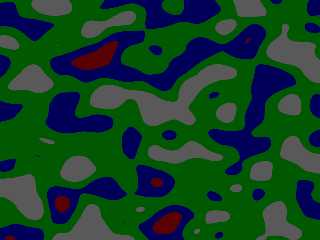
Use POV-Ray's drop-down insert menu, go to Patterns1 and then select bozo
I rendered a test box with the default bozo pigment (attached)

> in a previous post you write "..define different functions based upon the
> "space" the notes are traveling through".
>
> that sounds a good idea.  how would that work?  have an object, which has the
> user_defined {} construct and is not visible, travel across various function
> "spaces"?  can this be discussed without descending into maths??  :-)

Yes, which is exactly what is going on in the animation - though as you point
out, the execution kinda sucks.

I'll render another quick animation to see if I can better illustrate it.
Post a reply to this message
Attachments:
Download 'bozoexample.png' (40 KB)
Preview of image 'bozoexample.png'
|
|
| |
| |
|
|
|
|
| |
| |
|
|
So, it was good that I revisited this, as there were some corrections I needed
to do, and the bozo pattern was pretty bad at showing what I wanted.

Here's an animation of a rolling sphere - the sphere travels through a long box,
and the coloration of the intersection of the sphere and box is determined by
the r, g, and b values calculated from the values of the agate pattern at each
point and converted to a [correct] HSV spectrum.

I hope you like it, and if you provide more of a description of what you're
envisioning, that would make implementing it much more straightforward.  :)

(this is at 15 frames / sec - I can do it at 5 as well, but this looks much
smoother)

Back to work tomorrow   :(   but the heat has broken (for now) and hopefully the
rest of the week goes smoothly.
Hope everything is going well for you IRL.
Post a reply to this message
Attachments:
Download 'agatesphere.mp4.mpg' (465 KB)
|
|
| |
| |
|
|
|
|
| |
| |
|
|
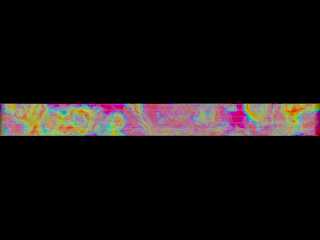
Here's the static box that the sphere travels through to show the full agate
pattern that the sphere translates through.

I hope that visually explains it a lot better.


I need to look back at what I did with crackle and wood to see how to define the
color map for some of the patterns, since I think I need to do the same thing
with bozo since it has a default color map.
Post a reply to this message
Attachments:
Download 'movingmedia.png' (79 KB)
Preview of image 'movingmedia.png'
|
|
| |
| |
|
|
|
|
| |
| |
|
|
On 09/07/2018 00:40, Bald Eagle wrote:
>
> So, it was good that I revisited this, as there were some corrections I needed
> to do, and the bozo pattern was pretty bad at showing what I wanted.
>
> Here's an animation of a rolling sphere - the sphere travels through a long box,
> and the coloration of the intersection of the sphere and box is determined by
> the r, g, and b values calculated from the values of the agate pattern at each
> point and converted to a [correct] HSV spectrum.
>
> I hope you like it, and if you provide more of a description of what you're
> envisioning, that would make implementing it much more straightforward.  :)
>
> (this is at 15 frames / sec - I can do it at 5 as well, but this looks much
> smoother)
>
> Back to work tomorrow   :(   but the heat has broken (for now) and hopefully the
> rest of the week goes smoothly.
> Hope everything is going well for you IRL.
>

Not a criticism but an observation.
What the animation looks like to me. Is that the sphere's media is in
"world space*" as opposed to "object space". There is no indication of
the sphere rolling.

My vision of what is required would be better shown using regular
patterns rather than random-ish ones.
Consider a sphere with a media based on a spiral density pattern rolling
through the box with a horizontal colour gradient. The resultant image
would be additive or subtractive.
My best guess from your description. It looks like you are doing it the
hard way. :)


*
"world space" & "object space" were terms used by Moray. In object space
the material moves with the object.


--

Regards
     Stephen
Post a reply to this message
|
|
| |
| |
|
|
|
|
| |
| |
|
|
hi,

"Bald Eagle" <cre### [at] netscapenet> wrote:
> So, it was good that I revisited this, as there were some corrections I needed
> to do, and the bozo pattern was pretty bad at showing what I wanted.
> Here's an animation of a rolling sphere - the sphere travels through a long box,
> and the coloration of the intersection of the sphere and box is determined by
> the r, g, and b values calculated from the values of the agate pattern at each
> point and converted to a [correct] HSV spectrum.
> I hope you like it,

oh, very much.  it looks very attractive.  it is an entirely different process
than the one I've in mind, the result however .. very nice.

> and if you provide more of a description of what you're
> envisioning, that would make implementing it much more straightforward.  :)

the planned animation (notes travelling along staves, revealing hidden object as
they move "across") has been somewhat on hold these past few days because I'm
working to get 'df3 tools 0.4.0' ready for release.  priorities :-)

I'm hoping to get back to "playing" before this week is out.

> (this is at 15 frames / sec - I can do it at 5 as well, but this looks much
> smoother)
> Back to work tomorrow   :(   but the heat has broken (for now) and hopefully the
> rest of the week goes smoothly.
> Hope everything is going well for you IRL.

snowed under?!  :-)

anyway, thank you also for the image showing the whole path of the sphere --
useful.


regards, jr.
Post a reply to this message
|
|
| |
| |
|
|
|
|
| |
| |
|
|
hi,

Stephen <mca### [at] aolcom> wrote:
> ... an observation.
> Consider a sphere with a media based on a spiral density pattern rolling
> through the box with a horizontal colour gradient. The resultant image
> would be additive or subtractive.

that too sounds v interesting.  I had not thought about patterning functions at
all.  could you post an outline of the objects and the materials, to help me try
this?  thanks.


regards, jr.
Post a reply to this message
|
|
| |
| |
|
|
|
|
| |
| |
|
|
On 09/07/2018 11:07, jr wrote:
> hi,
>
> Stephen <mca### [at] aolcom> wrote:
>> ... an observation.
>> Consider a sphere with a media based on a spiral density pattern rolling
>> through the box with a horizontal colour gradient. The resultant image
>> would be additive or subtractive.
>
> that too sounds v interesting.  I had not thought about patterning functions at
> all.  could you post an outline of the objects and the materials, to help me try
> this?  thanks.
>
>
> regards, jr.
>

Just a thought experiment. Like most things the mind's eye is better
than reality. More thought needed.

--

Regards
     Stephen
Post a reply to this message
|
|
| |
| |
|
|
|
|
| |
| |
|
|
OK, so as far as I understand what you want to do:

There will be static, stationary visible staves.
There will moving, visible notes.
There will be a stationary invisible object.

The visible notes will change color when they intersect the invisible object.

optional:

Portions of the staves will not be visible when a note overlaps them.


I think I can get that work - I scribbled it out during lunch.  :)


Stephen - yes, the ball does not "roll", it translates, but even if the ball
rolled, it would look the same, since as you say, it's traveling through the
pattern, rather than the pattern being attached to it.

The media method is what jr requested, and Bill P. supplied the prototype scene
code and functions for.

Presumably normal primitives could be used with transmit and filter....
Post a reply to this message
|
|
| |
| |
|
|
|
|
| |
| |
|
|
On 09/07/2018 18:00, Bald Eagle wrote:
>
> OK, so as far as I understand what you want to do:
>
> There will be static, stationary visible staves.
> There will moving, visible notes.
> There will be a stationary invisible object.
>
> The visible notes will change color when they intersect the invisible object.
>
> optional:
>
> Portions of the staves will not be visible when a note overlaps them.
>
>
> I think I can get that work - I scribbled it out during lunch.  :)
>
>
> Stephen - yes, the ball does not "roll", it translates, but even if the ball
> rolled, it would look the same, since as you say, it's travelling through the
> pattern, rather than the pattern being attached to it.
>
If you are calling me a pedant. Then I put my hand up with pride. :)


> The media method is what jr requested, and Bill P. supplied the prototype scene
> code and functions for.
>

Memory is the second thing to go. (Jim Henderson's dad.)

So I have this idea in my head and I can't let it go.

> Presumably normal primitives could be used with transmit and filter....
>

Too easy. <cough, cough> ;)

I am still mulling my idea over without consciously think of it.
Too hot here and too many shandies.

--

Regards
     Stephen
Post a reply to this message
|
|
| |
| |
|
|
|
|
| |
| |
|
|
New version with sphere translating across a series of smaller spheres stretched
in the z direction.
Post a reply to this message
Attachments:
Download 'overlappingmedia.mp4.mpg' (441 KB)
|
|
| |
| |
|
|
|
|
| |
| |
|
|
As so:
Post a reply to this message
Attachments:
Download 'movingmedia.png' (26 KB)
Preview of image 'movingmedia.png'

|
|
| |
| |
|
|
|
|
| |
| |
|
|
On 11/07/2018 01:53, Bald Eagle wrote:
> New version with sphere translating across a series of smaller spheres stretched
> in the z direction.
>

Nice one. :D

--

Regards
     Stephen
Post a reply to this message
|
|
| |
| |
|
|
|
|
| |
| |
|
|
Off-topic / highly tangentially related.
:)

http://mnhopkins.blogspot.com/2017/12/your-brain-on-music-how-your-favorite.html
Post a reply to this message
|
|
| |
| |
|
|
|
|
| |
| |
|
|
hi,

"Bald Eagle" <cre### [at] netscapenet> wrote:
> Off-topic / highly tangentially related.
> :)

+1 for the tangents.  :-)

> http://mnhopkins.blogspot.com/2017/12/your-brain-on-music-how-your-favorite.html

"They found that when subjects listened to songs from their preferred musical
genres, they exhibited enhanced levels of brain connectivity."

one could quibble and say that, surely, this is about "activity" rather than
"connectivity", however, reading it did stimulate.  :-)

little progress so far with the 'notes' project, though begins to irritate, so
"something must be done".  ;-)  will post when I have (a little) better than the
jury-rigged present.  still not sure where/whether patterns such as the agate
you showed can be incorporated usefully, another puzzle to solve.


regards, jr.
Post a reply to this message
|
|
| |
| |
|
|
|
|
| |
| |
|
|
Hi(gh)!

On 27.06.18 04:04, Bald Eagle wrote:
> Hi jr - I really thought I'd get to this sooner, but this ought to get you on
> the right path.

Neat and simple... may I AtariSTize and C64ify and re-publish it on my
YouTube channel? What about your other animation works?

No commercial intentions - I'm just fanatically obsessed with
retrocomputing and thus also retro video!

See you in Khyberspace!

Yadgar
Post a reply to this message
|
|
| |
| |
|
|
|
|
| |
| |
|
|
Hi(gh)!

On 03.07.18 01:48, jr wrote:
> "jr" <cre### [at] gmailcom> wrote:
>
> can't see the mp4, must have forgotten.  :-(
>

On my computer, it's clearly visible!

May I convert this to Atari ST and Commodore 64 graphic modes and
re-publish it on my YouTube channel? Also your other animations?

See you in Khyberspace!

Yadgar
Post a reply to this message
|
|
| |
| |
|
|
|
|
| |
| |
|
|
Hi(gh)!

On 14.07.18 15:31, Bald Eagle wrote:

> http://mnhopkins.blogspot.com/2017/12/your-brain-on-music-how-your-favorite.html

Pre-human civilizations? Held together by music?

Also several anti-vaccination postings... and then my "standard crackpot
test entry" yielded this: https://mnhopkins.blogspot.com/search?q=chemtrails

Sorry, this seems to be just another conspiracy nutcase site...
"alternative facts" for feeding feel-good paranoia - just to be clicked
away!

And so stupidly predictable... poor little Internet!

See you in Khyberspace!

Yadgar
Post a reply to this message
|
|
| |
| |
|
|
|
|
| |
| |
|
|
hi,

<yaz### [at] gmxde> wrote:
> On 03.07.18 01:48, jr wrote:
> > can't see the mp4, must have forgotten.  :-(
>
> On my computer, it's clearly visible!

:-)

> May I convert this to Atari ST and Commodore 64 graphic modes and
> re-publish it on my YouTube channel? Also your other animations?

of course.  thank you.


regards, jr.

there's also
https://drive.google.com/file/d/15R_6mKPKMsI80EeiQ7edIbP9YuyWw25m/view?usp=sharing
 ;-)
Post a reply to this message
|
|
| |
| |
|
|
|
|
| |
|
|








