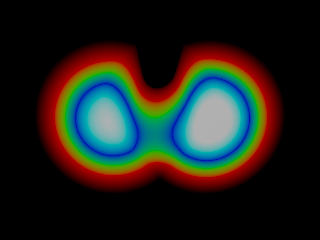
|
|
|
|
|
|
| |
| |
|
|
|
|
| |
| |
|
|
I'm trying to make a human model with muscle-flexing.  The results so
far aren't really exciting, but I thought it might be interesting to
share them :)

Two problems though: I only found a detailed muscle-by-muscle
description of the arms and torso, none for the hands or legs, so
that'll probably be just a guess once I get to it.  Second problem: I
can't do it with 1 blob, because limbs would blob together if they get
too close to each other.  But if I do it in different blob-objects, the
seams are visible :-/ Anyone has an idea how to solve this? :-/

anyway, please let me know what you think.  Good so far?  Or am I just
wasting my time? :)

cu!
--
#macro G(b,e)b+(e-b)*C/50#end#macro _(b,e,k,l)#local C=0;#while(C<50)
sphere{G(b,e)+3*z.1pigment{rgb G(k,l)}finish{ambient 1}}#local C=C+1;
#end#end _(y-x,y,x,x+y)_(y,-x-y,x+y,y)_(-x-y,-y,y,y+z)_(-y,y,y+z,x+y)
_(0x+y.5+y/2x)_(0x-y.5+y/2x)            // ZK http://www.povplace.com
Post a reply to this message
Attachments:
Download 'muscles.m1v.mpg' (703 KB)
|
|
| |
| |
|
|
|
|
| |
| |
|
|
> "Zeger Knaepen" <zeg### [at] povplace com> wrote in message
> news:43b86f66@news.povray.org...
> I'm trying to make a human model with muscle-flexing. The results so far
> aren't really exciting, but I thought it might be interesting to share
> them :)
> Two problems though: I only found a detailed muscle-by-muscle description
> of the arms and torso, none for the hands or legs, so that'll probably be
> just a
> guess once I get to it. Second problem: I can't do it with 1 blob,
> because limbs
> would blob together if they get too close to each other. But if I do it
> in different
> blob-objects, the seams are visible :-/ Anyone has an idea how to solve
> this? :-/
>
> anyway, please let me know what you think. Good so far?
> Or am I just wasting my time? :)
Hi Zeger,
I think that looks very good. I'm impressed.
I have a much less sophisticated human model made of blobs and have a few
rambling thoughts on how to get rid of the seams.
1. When working on the clothing, I developed a set of macros to scan a
blob-based limb, generating an array of points and ultimately a smooth mesh.
This generates seam-free clothing and it occurred to me that I could
probably use the same principle to go back and do a seam free body.
2. An alternative idea is to model the muscles at either end of each body
part, then trim the unwanted bits off again before assembling all the body
parts.
So the palm of the hand could be modelled with the muscles reaching out into
the base of each finger, and the base of each finger could be modelled with
the muscles reaching back into the palm. Then use CSG to slice the finger
pieces off the palm, so that any bits of finger interfering with each other
would be trimmed away. If you use the same plane to cut a piece of finger
away from the palm that you use to cut the palm away from the finger
segment, then most of the joins should be a pretty good fit.
(time-wasting is such a subjective concept. :o)
Regards,
Chris B. com> wrote in message
> news:43b86f66@news.povray.org...
> I'm trying to make a human model with muscle-flexing. The results so far
> aren't really exciting, but I thought it might be interesting to share
> them :)
> Two problems though: I only found a detailed muscle-by-muscle description
> of the arms and torso, none for the hands or legs, so that'll probably be
> just a
> guess once I get to it. Second problem: I can't do it with 1 blob,
> because limbs
> would blob together if they get too close to each other. But if I do it
> in different
> blob-objects, the seams are visible :-/ Anyone has an idea how to solve
> this? :-/
>
> anyway, please let me know what you think. Good so far?
> Or am I just wasting my time? :)
Hi Zeger,
I think that looks very good. I'm impressed.
I have a much less sophisticated human model made of blobs and have a few
rambling thoughts on how to get rid of the seams.
1. When working on the clothing, I developed a set of macros to scan a
blob-based limb, generating an array of points and ultimately a smooth mesh.
This generates seam-free clothing and it occurred to me that I could
probably use the same principle to go back and do a seam free body.
2. An alternative idea is to model the muscles at either end of each body
part, then trim the unwanted bits off again before assembling all the body
parts.
So the palm of the hand could be modelled with the muscles reaching out into
the base of each finger, and the base of each finger could be modelled with
the muscles reaching back into the palm. Then use CSG to slice the finger
pieces off the palm, so that any bits of finger interfering with each other
would be trimmed away. If you use the same plane to cut a piece of finger
away from the palm that you use to cut the palm away from the finger
segment, then most of the joins should be a pretty good fit.
(time-wasting is such a subjective concept. :o)
Regards,
Chris B.
Post a reply to this message
|
|
| |
| |
|
|
|
|
| |
| |
|
|
"Chris B" <c_b### [at] btconnectcomnospam> wrote in message
news:43b88e39$1@news.povray.org...
> Hi Zeger,
>
> I think that looks very good. I'm impressed.

thank you! :)

> I have a much less sophisticated human model made of blobs and have a few
> rambling thoughts on how to get rid of the seams.

oh, can I see your model? :)

> 1. When working on the clothing, I developed a set of macros to scan a
> blob-based limb, generating an array of points and ultimately a smooth mesh.
> This generates seam-free clothing and it occurred to me that I could
> probably use the same principle to go back and do a seam free body.

not a bad idea !  the "bones" of the arm are spline-based, I might be able to a
radial scan along the spline !

> 2. An alternative idea is to model the muscles at either end of each body
> part, then trim the unwanted bits off again before assembling all the body
> parts.
> So the palm of the hand could be modelled with the muscles reaching out into
> the base of each finger, and the base of each finger could be modelled with
> the muscles reaching back into the palm. Then use CSG to slice the finger
> pieces off the palm, so that any bits of finger interfering with each other
> would be trimmed away. If you use the same plane to cut a piece of finger
> away from the palm that you use to cut the palm away from the finger
> segment, then most of the joins should be a pretty good fit.

problem is that I can't even make the arm in one piece.  In this animation
there's already to much blobbing near the elbow (well, the other side of the
elbow... what's the name for that? :)), so I would have to recreate only the
lower part of the upperarm for the lowerarm (if that's what's it called), but
the muscles run all the way from the top to the elbow.  Difficult! :)

> (time-wasting is such a subjective concept. :o)

true :)  But if someone already made something similar, it would be kind of
pointless to do it all over again, unless I would do it better, which is not
very likely :)

cu!
--
#macro G(b,e)b+(e-b)*C/50#end#macro _(b,e,k,l)#local C=0;#while(C<50)
sphere{G(b,e)+3*z.1pigment{rgb G(k,l)}finish{ambient 1}}#local C=C+1;
#end#end _(y-x,y,x,x+y)_(y,-x-y,x+y,y)_(-x-y,-y,y,y+z)_(-y,y,y+z,x+y)
_(0x+y.5+y/2x)_(0x-y.5+y/2x)            // ZK http://www.povplace.com
Post a reply to this message
|
|
| |
| |
|
|
|
|
| |
| |
|
|
"Zeger Knaepen" <zeg### [at] povplacecom> wrote in message
news:43b985fa$1@news.povray.org...
> oh, can I see your model? :)

There's an animation at
http://news.povray.org/povray.binaries.animations/thread/%3C43415866%40news.povray.org%3E/
As I said, nowhere near as sophisticated as what you are attempting.
If you want any of the source just let me know. (but there's a lot of it).

> ... if someone already made something similar, it would be kind of
> pointless to do it all over again, unless I would do it better, which is
> not
> very likely :)
>

I don't recall seeing anyone trying to accurately simulate muscles the way
you're doing it (using blobs).
There is a blob man out there (Blobman 4.2), but it doesn't simulate moving
muscles and I've see various non-POV based attempts at modelling muscles.

Regards,
Chris B.
Post a reply to this message
|
|
| |
| |
|
|
|
|
| |
| |
|
|
"Chris B" <c_b### [at] btconnectcomnospam> wrote in message
news:43b9a06f@news.povray.org...
>
> "Zeger Knaepen" <zeg### [at] povplacecom> wrote in message
> news:43b985fa$1@news.povray.org...
> > oh, can I see your model? :)
>
> There's an animation at
>
http://news.povray.org/povray.binaries.animations/thread/%3C43415866%40news.povr
ay.org%3E/
> As I said, nowhere near as sophisticated as what you are attempting.
> If you want any of the source just let me know. (but there's a lot of it).

weird, I replied to that message, back then, saying that I couldn't see it :)
No problem now, and really, I'm impressed !  Very natural motion, and nice job
on the clothes !
I'm interested in the source, but if it's too much work, then it's ok :)

> > ... if someone already made something similar, it would be kind of
> > pointless to do it all over again, unless I would do it better, which is
> > not
> > very likely :)
> >
>
> I don't recall seeing anyone trying to accurately simulate muscles the way
> you're doing it (using blobs).

Neither have I, but well, google doesn't find everything :)

> There is a blob man out there (Blobman 4.2), but it doesn't simulate moving
> muscles

My main problem with blobman is that it has wrong proportions: the head is way
to big :(  I'm trying to make my blobman fully customizable: you can choose the
size of the head, the proportions of the body, and I would even like to make it
so that you can make other creatures with it, don't know if that'll work though
:)

> and I've see various non-POV based attempts at modelling muscles.

yes, but I'm a terrible modeller, everything I do is pure SDL :)

Don't know why, I just don't like GUI's with a big G I'm afraid :(

cu!
--
#macro G(b,e)b+(e-b)*C/50#end#macro _(b,e,k,l)#local C=0;#while(C<50)
sphere{G(b,e)+3*z.1pigment{rgb G(k,l)}finish{ambient 1}}#local C=C+1;
#end#end _(y-x,y,x,x+y)_(y,-x-y,x+y,y)_(-x-y,-y,y,y+z)_(-y,y,y+z,x+y)
_(0x+y.5+y/2x)_(0x-y.5+y/2x)            // ZK http://www.povplace.com


cu!
Post a reply to this message
|
|
| |
| |
|
|
|
|
| |
| |
|
|
Zeger Knaepen wrote:
> I'm trying to make a human model with muscle-flexing.  The results so far aren't
really exciting, but I thought it might be interesting to share them :)
>
> Two problems though: I only found a detailed muscle-by-muscle description of the
arms and torso, none for the hands or legs, so that'll probably be just a guess once I
get to it.  Second problem: I can't do it with 1 blob, because limbs would blob
together if they get too close to each other.  But if I do it in different
blob-objects, the seams are visible :-/ Anyone has an idea how to solve this? :-/
>
> anyway, please let me know what you think.  Good so far?  Or am I just wasting my
time? :)
>
> cu!

looks impressive; good work !

I had something similar in mind for quite some time and was stumbling
over the same problem.
Making the diffrent muscles out of blobs, but how to "skin" them.
One possible solution came in to my mind (but I didn`t tried it because
I'm afraid it's terrible slow) is to define the muscles as
blob-functions and then in the "skinning" step use another blob-function
to seamlessly join this functions togehter.
Could be worth trying ....

.. dave ..
Post a reply to this message
|
|
| |
| |
|
|
|
|
| |
| |
|
|
"David El Tom" <dav### [at] t-onlinede> wrote in message
news:43ba46f6@news.povray.org...
> looks impressive; good work !

Thankyou !

> I had something similar in mind for quite some time and was stumbling
> over the same problem.
> Making the diffrent muscles out of blobs, but how to "skin" them.
> One possible solution came in to my mind (but I didn`t tried it
because
> I'm afraid it's terrible slow) is to define the muscles as
> blob-functions and then in the "skinning" step use another
blob-function
> to seamlessly join this functions togehter.
> Could be worth trying ....

I'm not really sure I understand it completely :-/

cu!
--
#macro G(b,e)b+(e-b)*C/50#end#macro _(b,e,k,l)#local C=0;#while(C<50)
sphere{G(b,e)+3*z.1pigment{rgb G(k,l)}finish{ambient 1}}#local C=C+1;
#end#end _(y-x,y,x,x+y)_(y,-x-y,x+y,y)_(-x-y,-y,y,y+z)_(-y,y,y+z,x+y)
_(0x+y.5+y/2x)_(0x-y.5+y/2x)            // ZK http://www.povplace.com
Post a reply to this message
|
|
| |
| |
|
|
|
|
| |
| |
|
|
Freaky stuff, Zeger. I'm sure that couldn't be an easy thing to animate.
Reminds me the people Greg Johnson has created over the past few years but I
don't remember how he actually makes those guys.

You didn't mention any use of negative strength component parts so you might
want to give that a try if you haven't already done that. In my somewhat
limited experience with the POV blob I know it can get real tricky placing
blob components with good strength and threshold since, like you said, when
using a single blob for such things as this arm animation, it ultimately
tangles in on itself unless something is done to force spacing where needed.
Even moreso, with negative strength parts I think it would get extremely
complicated to fit the parts together for animation. Just a still image
could be more plausible, but animate that and it means many positions to
account for. However, if you do manage to work it out please post another
animation!

Bob
Post a reply to this message
|
|
| |
| |
|
|
|
|
| |
| |
|
|
"Zeger Knaepen" <zeg### [at] povplacecom> wrote in message
news:43b9b0a7@news.povray.org...
> "Chris B" <c_b### [at] btconnectcomnospam> wrote in message
> news:43b9a06f@news.povray.org...
>
> I'm interested in the source, but if it's too much work, then it's ok :)
>

I've been meaning to publish it for a while, I just got sidetracked adding a
Santa model that I failed to complete by Christmas anyway.
Also the documentation isn't complete yet.
I've put a copy on the povray.binaries.scene-files newsgroup as 'POV-Person
V2 Alpha'.

> I'm trying to make my blobman fully customizable: you can choose the
> size of the head, the proportions of the body, and I would even like to
> make it
> so that you can make other creatures with it, don't know if that'll work
> though
>

My thinking is much the same. I've layered the macros so that the core
functions will work with any anatomical construct (although a human form is
the only one I've included so far).
I've kept the major body parts separate and extensively parameter
controlled, so that they can be shared between different characters (I also
have a separate 'scale' include file to for each character to enable each
body part to be scaled appropriately. For example, for the moment I've used
the same body parts for the male and female characters, but for the chest
I've used different parameters to control the anatomical construction and
for legs and arms I've just scaled the parts (all fairly crude still).

> Don't know why, I just don't like GUI's with a big G I'm afraid :(
>

I know the feeling. I used a modeller for the first few heads, but I'm
gradually replacing that with SDL so that it can be modified dynamically.
On the more recent models I've got mesh eyelids that open and close and lips
that are dynamically generated.

David's suggestion could be good. I think he's suggesting using an
isosurface where you can use functions to define shapes and use the methods
described in Mike Williams' isosurface tutorial to 'blob' them together.
I've used that for the top of the head of my Santa model (see pps2face.inc
in the xip file). It gets quite mathematical quite quickly though and he's
right when he says that isosurfaces increase the render time. On my to-do
list is to scan the isosurface I get for the head shape and build a mesh to
render, for two reasons. Firstly it'll render quicker. Second, the straight
edges of the meshes I plan to use for the eyelids and mouth will join more
easily with a mesh than with the totally smooth isosurface.

Regards,
Chris B.
Post a reply to this message
|
|
| |
| |
|
|
|
|
| |
| |
|
|
"Bob Hughes" <omniverse@charter%net> wrote in message
news:43bb0a76$1@news.povray.org...
> Freaky stuff, Zeger. I'm sure that couldn't be an easy thing to
animate.

It was as easy to animate it as it was to make it, actually :)
You see, I made a muscle() macro that connects 2 points with a blob that
tries to keep the same, given volume.  Not entirely accurate, but it
more or less does the job :)

> Reminds me the people Greg Johnson has created over the past few years
but I
> don't remember how he actually makes those guys.

with a lot of work, I suppose :)

> You didn't mention any use of negative strength component parts so you
might
> want to give that a try if you haven't already done that.

Hmm, I might be able to force something with negative strength, don't
know if I can automate it though :-/

> In my somewhat
> limited experience with the POV blob I know it can get real tricky
placing
> blob components with good strength and threshold since, like you said,
when
> using a single blob for such things as this arm animation, it
ultimately
> tangles in on itself unless something is done to force spacing where
needed.
> Even moreso, with negative strength parts I think it would get
extremely
> complicated to fit the parts together for animation. Just a still
image
> could be more plausible, but animate that and it means many positions
to
> account for. However, if you do manage to work it out please post
another
> animation!

Maybe if I put negative strength blobcomponents on one side of the
muscles, that prevent any other part of the body to "blob" onto that
muscle...  just thinking out loud here, I don't know if that even makes
sense :)

cu!
--
#macro G(b,e)b+(e-b)*C/50#end#macro _(b,e,k,l)#local C=0;#while(C<50)
sphere{G(b,e)+3*z.1pigment{rgb G(k,l)}finish{ambient 1}}#local C=C+1;
#end#end _(y-x,y,x,x+y)_(y,-x-y,x+y,y)_(-x-y,-y,y,y+z)_(-y,y,y+z,x+y)
_(0x+y.5+y/2x)_(0x-y.5+y/2x)            // ZK http://www.povplace.com
Post a reply to this message
|
|
| |
| |
|
|
|
|
| |
| |
|
|
Zeger Knaepen wrote:
> I'm not really sure I understand it completely :-/
>
> cu!

I thought about something like this (never tried, so maybe doesn't work
at all):


1. declare your blobs defining the single muscles

#declare blob_object_1 = blob{....}
#declare blob_object_2 = blob{....}
  .
  .
  .
#declare blob_object_n = blob{....}

2. declare functions based on object-patterns using the formerly
declared blobs like this:

#declare bf_1 = function{pigment{object{blob_object_1 color rgb 0, color
rgb 1}}};

#declare bf_2 = function{pigment{object{blob_object_2 color rgb 0, color
rgb 1}}};

  .
  .
  .
#declare bf_n = function{pigment{object{blob_object_n color rgb 0, color
rgb 1}}};

3. now skin them using somthing to "blob" functions together like in the
docs:

#declare blob_threshold = 0.001;

#declare skin = function {
(1+Blob_threshold)
  -pow(Blob_threshold, bf_1(x,y,z).gray)
  -pow(Blob_threshold, bf_1(x,y,z).gray)
   .
   .
   .
  -pow(Blob_threshold, bf_1(x,y,z).gray)
}

and use this function inside an isosurface-container large enough


... dave
Post a reply to this message
|
|
| |
| |
|
|
|
|
| |
| |
|
|
"David El Tom" <dav### [at] t-onlinede> wrote in message
news:43bbb899@news.povray.org...
> Zeger Knaepen wrote:
> > I'm not really sure I understand it completely :-/
> >
> > cu!
>
> I thought about something like this (never tried, so maybe doesn't
work
> at all):
>
>
> 1. declare your blobs defining the single muscles
>
> #declare blob_object_1 = blob{....}
> #declare blob_object_2 = blob{....}
>   .
>   .
>   .
> #declare blob_object_n = blob{....}
>
> 2. declare functions based on object-patterns using the formerly
> declared blobs like this:

this step is a problem: object-patterns are binary, either a point is
inside the object or it's on the outside, which makes them not suitable
for isosurfaces :-/

cu!
--
#macro G(b,e)b+(e-b)*C/50#end#macro _(b,e,k,l)#local C=0;#while(C<50)
sphere{G(b,e)+3*z.1pigment{rgb G(k,l)}finish{ambient 1}}#local C=C+1;
#end#end _(y-x,y,x,x+y)_(y,-x-y,x+y,y)_(-x-y,-y,y,y+z)_(-y,y,y+z,x+y)
_(0x+y.5+y/2x)_(0x-y.5+y/2x)            // ZK http://www.povplace.com
Post a reply to this message
|
|
| |
| |
|
|
|
|
| |
| |
|
|
Zeger Knaepen wrote:

>>2. declare functions based on object-patterns using the formerly
>>declared blobs like this:
>
> this step is a problem: object-patterns are binary, either a point is inside the
object or it's on the outside, which makes them not suitable for isosurfaces :-/
>
> cu!

ah, ok I'see the point

  ... have to think about if it's possible to transform a blob which
elements have a spherical pattern into a single pigment.
This, I think, could solve the binary problem. Have to go into docs
again ...

... dave ...
Post a reply to this message
|
|
| |
| |
|
|
|
|
| |
| |
|
|
"David El Tom" <dav### [at] t-onlinede> wrote in message
news:43bc13bb$1@news.povray.org...
> Zeger Knaepen wrote:
>
> >>2. declare functions based on object-patterns using the formerly
> >>declared blobs like this:
> >
> > this step is a problem: object-patterns are binary, either a point
is inside the object or it's on the outside, which makes them not
suitable for isosurfaces :-/
> >
> > cu!
>
> ah, ok I'see the point
>
>   ... have to think about if it's possible to transform a blob which
> elements have a spherical pattern into a single pigment.
> This, I think, could solve the binary problem. Have to go into docs
> again ...

MegaPOV used to have a blob-pattern, but for some reason the latest
version doesn't have it anymore :(

cu!
--
#macro G(b,e)b+(e-b)*C/50#end#macro _(b,e,k,l)#local C=0;#while(C<50)
sphere{G(b,e)+3*z.1pigment{rgb G(k,l)}finish{ambient 1}}#local C=C+1;
#end#end _(y-x,y,x,x+y)_(y,-x-y,x+y,y)_(-x-y,-y,y,y+z)_(-y,y,y+z,x+y)
_(0x+y.5+y/2x)_(0x-y.5+y/2x)            // ZK http://www.povplace.com
Post a reply to this message
|
|
| |
| |
|
|
|
|
| |
| |
|
|
Zeger Knaepen wrote:

> Second problem: I can't do it with 1 blob,  because limbs
> would blob together if they get too close to each other.
 > But if I do it in different blob-objects, the seams are
 > visible :-/ Anyone has an idea how to solve this? :-/

To model muscles, you are probably going to have to model bags of goo
that push against each other, and completely abandon blobs altogether.

Regards,
John
Post a reply to this message
|
|
| |
| |
|
|
|
|
| |
| |
|
|
>
> MegaPOV used to have a blob-pattern, but for some reason the latest version doesn't
have it anymore :(
>
> cu!

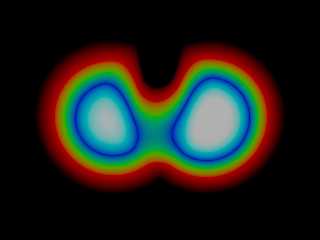
at least I found a way to fake a blob pattern via usage of functions:

<<<<SNIPPET-START>>>>

//"prove of principle" - blob pattern-function

// number of blob components
#declare blob_component_count = 3;

// arrays holding strength, radius and position for each component
#declare blob_strength = array[blob_component_count];
#declare blob_radii = array[blob_component_count];
#declare blob_positions = array[blob_component_count];

// fill these arrays with something
#declare blob_strength[0]=1.0;
#declare blob_strength[1]=1.2;
#declare blob_strength[2]=-.5;
#declare blob_radii[0]   =1.3;
#declare blob_radii[1]   =1.3;
#declare blob_radii[2]   =1.0;
#declare blob_positions[0] = <-.8,0,0>;
#declare blob_positions[1] = <.8,0,0>;
#declare blob_positions[2] = <.0,.3,0>;


#declare counter = 0;
#declare blob_fcn =
function
{
#while (counter < blob_component_count)
   #local x_pos = blob_positions[counter].x;
   #local y_pos = blob_positions[counter].y;
   #local z_pos = blob_positions[counter].z;
   #local radius_squared = pow(blob_radii[counter],2);
   #if (counter > 0)
     +
   #end //if
   (blob_strength[counter] *
pow((1.0-min(1,((pow((x-x_pos),2)+pow((y-y_pos),2)+pow((z-z_pos),2))/radius_squared))),2))
   #declare counter= counter +1;
#end // while
}


plane
{
   z,0
   pigment
   {
     function{min(1,max(0,blob_fcn(x,y,z)))}
     color_map
     {
       [0 rgb 0]
       [0.2 rgb <1,0,0>]
       [0.4 rgb <0,1,0>]
       [0.6 rgb <0,0,1>]
       [0.8 rgb <0,1,1>]
       [1 rgb 1]
     }
     ramp_wave
   }
}

<<<<SNIPPET-END>>>>

... dave
Post a reply to this message
Attachments:
Download 'blob_fcn.png' (26 KB)
Preview of image 'blob_fcn.png'
|
|
| |
| |
|
|
|
|
| |
| |
|
|
"Bob Hughes" <omniverse@charter%net> wrote:

> Freaky stuff, Zeger. I'm sure that couldn't be an easy thing to animate.
> Reminds me the people Greg Johnson has created over the past few years but I
> don't remember how he actually makes those guys.
>

First of all, I have a complicated transform that takes anything associated
with a particular limb from Position(time_zero construction) to
Position(function of various movement parameters, including of course IK,
etc.).


Then as far as construction goes, consider the character shown at:
http://news.povray.org/povray.binaries.animations/thread/%3C437563c5%40news.povray.org%3E/

Except for two eyeball-spheres, twenty individual blob-teeth and a
blob-tongue, and a blob-hairdo,   the entire figure is one blob.  The hands
have blob components of strength like 200 or something-- ugly looking
cylinders.

Then for construction of the arm, take for example say the bicep-bone.
First of all, I have cylinders that do not go all the way to the joints,
and then spheres at the joints.  This prevents the spiking which would
otherwise occur. I believe it also reduces the merging together of
bicep-muscle with fore-arm bone.

Then I represent a muscle with one or more elongated spheres.  Any
muscle-bulging that then occurs with arm-bending is an unintended benefit.
 Also consider super-low and super-high strength components in your
experimentation.

I've also not shied away from obtaining a pliable shape via an overkill
number of blob components.  Most of my faces are made with a stack of
fourty to seventy flattened spheres. If I then rotate only the bottom 1/3
of them, I've thereby created a moving jaw.


But John v.S. ultimately had the answer.  Stay away from blobs.  (I'd say
even stay away from povray.)  As a winner of an IRTC anim contest once
said, using povray for character animation must be a complete waste of
time.

Greg
http://pterandon.blogspot.com/
Post a reply to this message
|
|
| |
| |
|
|
|
|
| |
|
|