|
|
|
|
|
|
| |
| |
|
|
|
|
| |
| |
|
|
Finally!  I spent at least two days editing the macro so the toe will
detect the ground, but I'm pretty happy with the results.  I still think
the hips sway too much and I haven't created the rest of the
star-wars-like robot yet, but I'm satisfied.  What do you think?
Post a reply to this message
|
|
| |
| |
|
|
|
|
| |
| |
|
|
oh yeah, you might want the animation with that.
Post a reply to this message
Attachments:
Download 'ikdemo.mpg.mov' (172 KB)
|
|
| |
| |
|
|
|
|
| |
| |
|
|
Today's just not my day.  I noticed that there's an extra repeat frame at the
end of the animation.  And I just thought it was my computer...
Post a reply to this message
|
|
| |
| |
|
|
|
|
| |
| |
|
|
I couldn't see it.  Was it Mpeg-I?

Reusser wrote:

> oh yeah, you might want the animation with that.
>
>   ------------------------------------------------------------------------
>                     Name: ikdemo.mpg
>    ikdemo.mpg       Type: MPLAYER2 File (video/mpeg)
>                 Encoding: base64
>              Description: Unknown Document
Post a reply to this message
|
|
| |
| |
|
|
|
|
| |
| |
|
|
Well shoot.  Here's one last effort.  I have a mac and I just encoded it in the
mpeg a and b formats with quicktime, so if anyone with a mac knows how to save
these movies in a format that works, PLEASE reply.
Post a reply to this message
Attachments:
Download 'ikwalk.mov' (356 KB)
|
|
| |
| |
|
|
|
|
| |
| |
|
|
Works fine on my PC! Great animation!
-Dave
"Reusser" <reu### [at] chorus net> wrote in message
news:3B146564.B06FAAFA@chorus.net...
> Well shoot. Here's one last effort. I have a mac and I just encoded it
in the
> mpeg a and b formats with quicktime, so if anyone with a mac knows how to
save
> these movies in a format that works, PLEASE reply.
> net> wrote in message
news:3B146564.B06FAAFA@chorus.net...
> Well shoot. Here's one last effort. I have a mac and I just encoded it
in the
> mpeg a and b formats with quicktime, so if anyone with a mac knows how to
save
> these movies in a format that works, PLEASE reply.
>
Post a reply to this message
|
|
| |
| |
|
|
|
|
| |
| |
|
|
i'm cursed... QT4 on my machine is giving me a black
screen.  grrr. :(
--
CG images, *obscure* home-brewed graphics utils, and
animation
http://www.users.qwest.net/~dearmad
Post a reply to this message
|
|
| |
| |
|
|
|
|
| |
| |
|
|
"Dearmad" <dea### [at] qwestnet> wrote in message
news:3B14B9B0.CF5E42FF@qwest.net...
> i'm cursed... QT4 on my machine is giving me a black
> screen.  grrr. :(

Windows Media player says it doesn't have the codec. maybe I should reinstall it
or something.

Nekar
Post a reply to this message
|
|
| |
| |
|
|
|
|
| |
| |
|
|
Nice stuff.  A bit bent-legged maybe.  The motion looks real good to me.
Since you mentioned the toes I'm guessing you inverse-K from those on up
through the legs and hips?  Would it hop okay?

Bob H.
Post a reply to this message
|
|
| |
| |
|
|
|
|
| |
| |
|
|
very impressive - mind sharing your technique?


--
Rick

Kitty5 WebDesign - http://Kitty5.com
Hi-Impact database driven web site design & e-commerce
TEL : +44 (01625) 266358 - FAX : +44 (01625) 611913 - ICQ : 15776037
POV-Ray News & Resources - http://Povray.co.uk

PGP Public Key
http://pgpkeys.mit.edu:11371/pks/lookup?op=get&search=0x231E1CEA
Post a reply to this message
|
|
| |
| |
|
|
|
|
| |
| |
|
|
Impressive walk cycle!

I'm working with IK myself and I'm always looking for inspiration.
I'd appreciate if you could explain how you move the feet around. Do you use
splines for the position of the feet? And how do you control how much the
feet point upwards/downwards - another spline?
And what do you mean when you say that the toe detects the ground? Do you
use trace?

If you're interested, you can see my own experiments on this page:
http://rsj.mobilixnet.dk/3d/anims/anims.html

Rune
--
3D images and anims, include files, tutorials and more:
Rune's World:    http://rsj.mobilixnet.dk (updated May 10)
POV-Ray Users:   http://rsj.mobilixnet.dk/povrayusers/
POV-Ray Webring: http://webring.povray.co.uk
Post a reply to this message
|
|
| |
| |
|
|
|
|
| |
| |
|
|
"Nekar Xenos" <j-p### [at] citywalkcoza> wrote in message
news:3b14c225@news.povray.org...
> "Dearmad" <dea### [at] qwestnet> wrote in message
> news:3B14B9B0.CF5E42FF@qwest.net...
> > i'm cursed... QT4 on my machine is giving me a black
> > screen.  grrr. :(
>
> Windows Media player says it doesn't have the codec. maybe I should
reinstall it
> or something.
>
Same here and I just finished installing every codex I could get my mits on
:( It wants to reconnect for the codex, too (after I'd just disconnected,
damnit)
Post a reply to this message
|
|
| |
| |
|
|
|
|
| |
| |
|
|
Rune wrote:

> Impressive walk cycle!
>
> I'm working with IK myself and I'm always looking for inspiration.
> I'd appreciate if you could explain how you move the feet around. Do you use
> splines for the position of the feet? And how do you control how much the
> feet point upwards/downwards - another spline?
> And what do you mean when you say that the toe detects the ground? Do you
> use trace?

Using the core of your ikleg macro that you posted for me a while ago, I just
added in support for a foot that is always perpendicular to the vector from the
ankle to the hip.  Next, I added in a rotation that rotates the foot before it
is transformed.  I just used the vectors from the matrix transformation to have
it figure out a toe point and basically raise the foot if the y-coord is below
a defined floor level.  As for the motion, I just used my own macro for
motion.  I'll post it in the binaries.scene-files group.

 - Rico
Post a reply to this message
|
|
| |
| |
|
|
|
|
| |
| |
|
|
You gave your first one an ".mpg" extension, it should be ".mov" other than
that they both work fine in QT5 here.

Just to clarify, an MPG or MPEG is a type of file completely different than
QT or MOV; you created a quicktime file which uses a Motion JPEG codec,
which is similar in concept to MPEG, but a completely different type of
file.


"Reusser" <reu### [at] chorusnet> wrote in message
news:3B146564.B06FAAFA@chorus.net...
> Well shoot.  Here's one last effort.  I have a mac and I just encoded it
in the
> mpeg a and b formats with quicktime, so if anyone with a mac knows how to
save
> these movies in a format that works, PLEASE reply.
>
Post a reply to this message
|
|
| |
| |
|
|
|
|
| |
| |
|
|
"Reusser" wrote:
> As for the motion, I just used my own macro for motion.
> I'll post it in the binaries.scene-files group.

Thanks!

Your motion macros remind me of those made by Chris Colefax. Do you know if
there are any major differences?

Rune
--
3D images and anims, include files, tutorials and more:
Rune's World:    http://rsj.mobilixnet.dk (updated May 10)
POV-Ray Users:   http://rsj.mobilixnet.dk/povrayusers/
POV-Ray Webring: http://webring.povray.co.uk
Post a reply to this message
|
|
| |
| |
|
|
|
|
| |
| |
|
|
Rune wrote:

> Your motion macros remind me of those made by Chris Colefax. Do you know if
> there are any major differences.

A while ago, I did download his macro, but I needed it to do a couple of other
things for an animation I was working on, so I just started from the ground up
and wrote a new macro that would do a pretty similar thing, just in a
different way.  I always hate using other people's macros when you don't
really understand exactly what is going on.  Now after downloading his macro
again, I read the copyright notice in the documentation and feel kinda bad.
Is there a way I can have my post removed from the scene-files group to comply
with his copyright?

 -Rico
Post a reply to this message
|
|
| |
| |
|
|
|
|
| |
| |
|
|
"Reusser" wrote:
> I just started from the ground up and wrote a new
> macro that would do a pretty similar thing, just
> in a different way.

That's great! You always learn a lot that way.

> Now after downloading his macro again, I read the
> copyright notice in the documentation and feel
> kinda bad.

You shouldn't! You can't copyright a technique or a concept. You can only
copyright so-called "intellectual property". It means that you may not copy
Chris Colefax's files or parts of them without his permission, but if you've
created your own macros from scratch, then they're your own completely and
you have the copyright.

BTW, you have copyright of your intellectual property no matter if you write
a copyright notice or not. The notice just makes it clear for others.

> Is there a way I can have my post removed from
> the scene-files group to comply with his copyright?

No need to. :)

Rune
--
3D images and anims, include files, tutorials and more:
Rune's World:    http://rsj.mobilixnet.dk (updated May 10)
POV-Ray Users:   http://rsj.mobilixnet.dk/povrayusers/
POV-Ray Webring: http://webring.povray.co.uk
Post a reply to this message
|
|
| |
| |
|
|
|
|
| |
| |
|
|
Rune wrote:

> No need to. :)

Thanks.  I feel much better now.  In addition, I noticed that the hips were
swaying the wrong way, so I just switched the sway to a negative value and
added in a checkered floor (shudder) for reference.  Hope this looks more
realistic.

 - Rico
Post a reply to this message
Attachments:
Download 'ikdemo3.mov' (187 KB)
|
|
| |
| |
|
|
|
|
| |
| |
|
|
"Reusser" wrote:
> I noticed that the hips were swaying the wrong way,
> so I just switched the sway to a negative value and
> added in a checkered floor (shudder) for reference.
> Hope this looks more realistic.

Sure does! :)

I just wish I could get my QuickTime player to loop... :(

Rune
--
3D images and anims, include files, tutorials and more:
Rune's World:    http://rsj.mobilixnet.dk (updated May 10)
POV-Ray Users:   http://rsj.mobilixnet.dk/povrayusers/
POV-Ray Webring: http://webring.povray.co.uk
Post a reply to this message
|
|
| |
| |
|
|
|
|
| |
| |
|
|
Looking back at the old posts, I noticed Al, the walk/running alien.  I
saw your comment about IK not being very forgiving to extended legs and
I know exactly what you're talking about.  In the file I posted, I
altered the knee macro so that it would point the limb in the direction
of the ankle if the points are too far apart.  I also added in a feature
so you can set a certain amount of resistance so the knees don't snap
when they fully extend.  In my code, I set it so the limb would show the
resistance between the fully extended joint +/- the added distance of
the cushion variable.

 -Rico
Post a reply to this message
|
|
| |
| |
|
|
|
|
| |
| |
|
|
"Rune" <run### [at] mobilixnetdk> wrote in message
news:3b16d070@news.povray.org...
> "Reusser" wrote:
> > I noticed that the hips were swaying the wrong way,
> > so I just switched the sway to a negative value and
> > added in a checkered floor (shudder) for reference.
> > Hope this looks more realistic.
>
> Sure does! :)
>
> I just wish I could get my QuickTime player to loop... :(

    I just wish that I didn't have to uninstall my quicktime in a rage when
it usurped all my animation format associations without asking and then
wouldn't play them anyway. "MPG: Unable to recognize format"... then why did
it steal the association?

    Razzerfrattermezzelplatz
Post a reply to this message
|
|
| |
| |
|
|
|
|
| |
| |
|
|
"Reusser" wrote:
> In the file I posted, I altered the knee macro so that
> it would point the limb in the direction of the ankle
> if the points are too far apart.

In my system if one of the hip points are too far away from the ankle I move
the hips closer.

> I also added in a feature so you can set a certain
> amount of resistance so the knees don't snap when they
> fully extend.

Resistance sounds like a good idea. I'll have to look into that.

What I'm thinking about doing is simply to move the hip closer to the ankle
so the distance is, say 95% of the length of the leg. (The actual percentage
would be a variable controlled by the user.) Is that what you're doing too
or is your method more sophisticated? I didn't quite understand your
explanation.

BTW, I'm working on my own IK system in these days, so I might post
something in a few days. :)

Rune
--
3D images and anims, include files, tutorials and more:
Rune's World:    http://rsj.mobilixnet.dk (updated May 10)
POV-Ray Users:   http://rsj.mobilixnet.dk/povrayusers/
POV-Ray Webring: http://webring.povray.co.uk
Post a reply to this message
|
|
| |
| |
|
|
|
|
| |
| |
|
|
Rune wrote:

> Is that what you're doing too
> or is your method more sophisticated? I didn't quite understand your
> explanation.

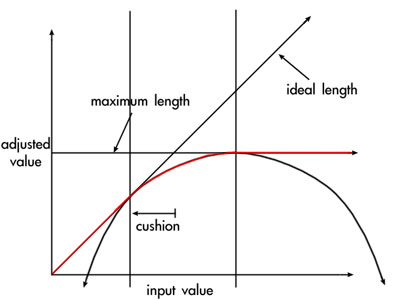
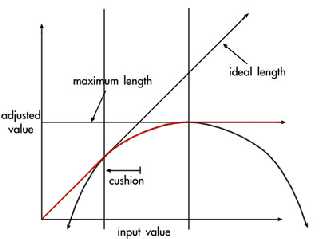
Actually, I spliced three graphs together so the output length follows the red
line simply using #if( ) statements (yes, I know a switch staement would be
much easier).  The graph shows the length between the hip and ankle points on
the x-axis and the adjusted length of the limb on the y-axis.

The equation for the parabola is just:
y =  maximum length  - 1/4  *  1 / cushion  * ( x  -  cushion  -  maximum
length ) ^ 2

This allowed me to set a specific zone where the limb would resist full
extension.  It works pretty well based on my experiments.  In one example I
tried, I just bounced the hip point straight up and down and the legs followed
the jump without snapping at all.

 - Rico
Post a reply to this message
Attachments:
Download 'graph.jpg' (19 KB)
Preview of image 'graph.jpg'
|
|
| |
| |
|
|
|
|
| |