|
|
|
|
|
|
| |
| |
|
|
|
|
| |
| |
|
|
Hi,
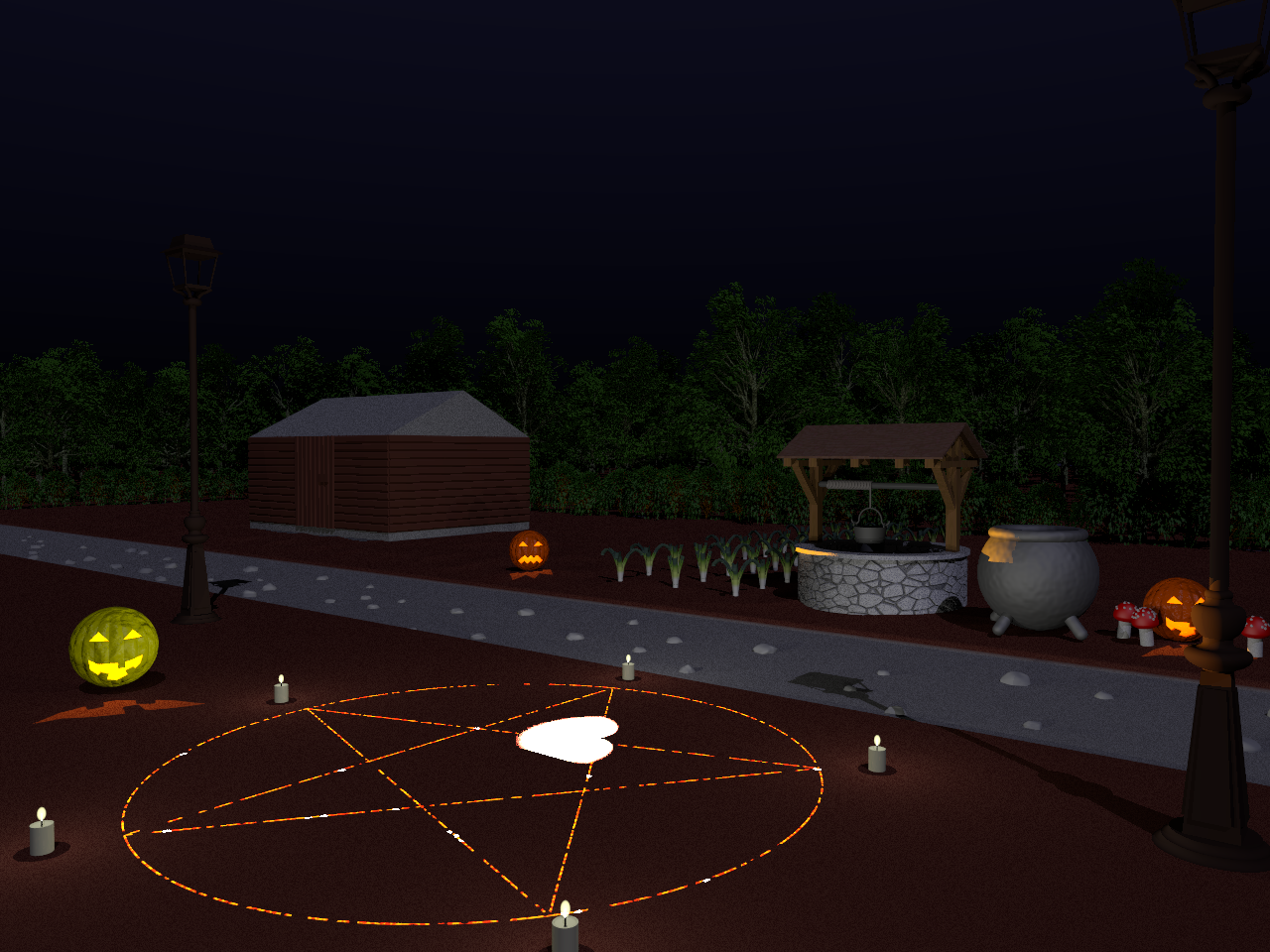
I post a message here, because I get a weird render with povray 3.8.0 beta 1 of
a scene with the following resolution : 1280x960 (see attached image with this
message) , you can see a white stain that has the shape of a heart near the
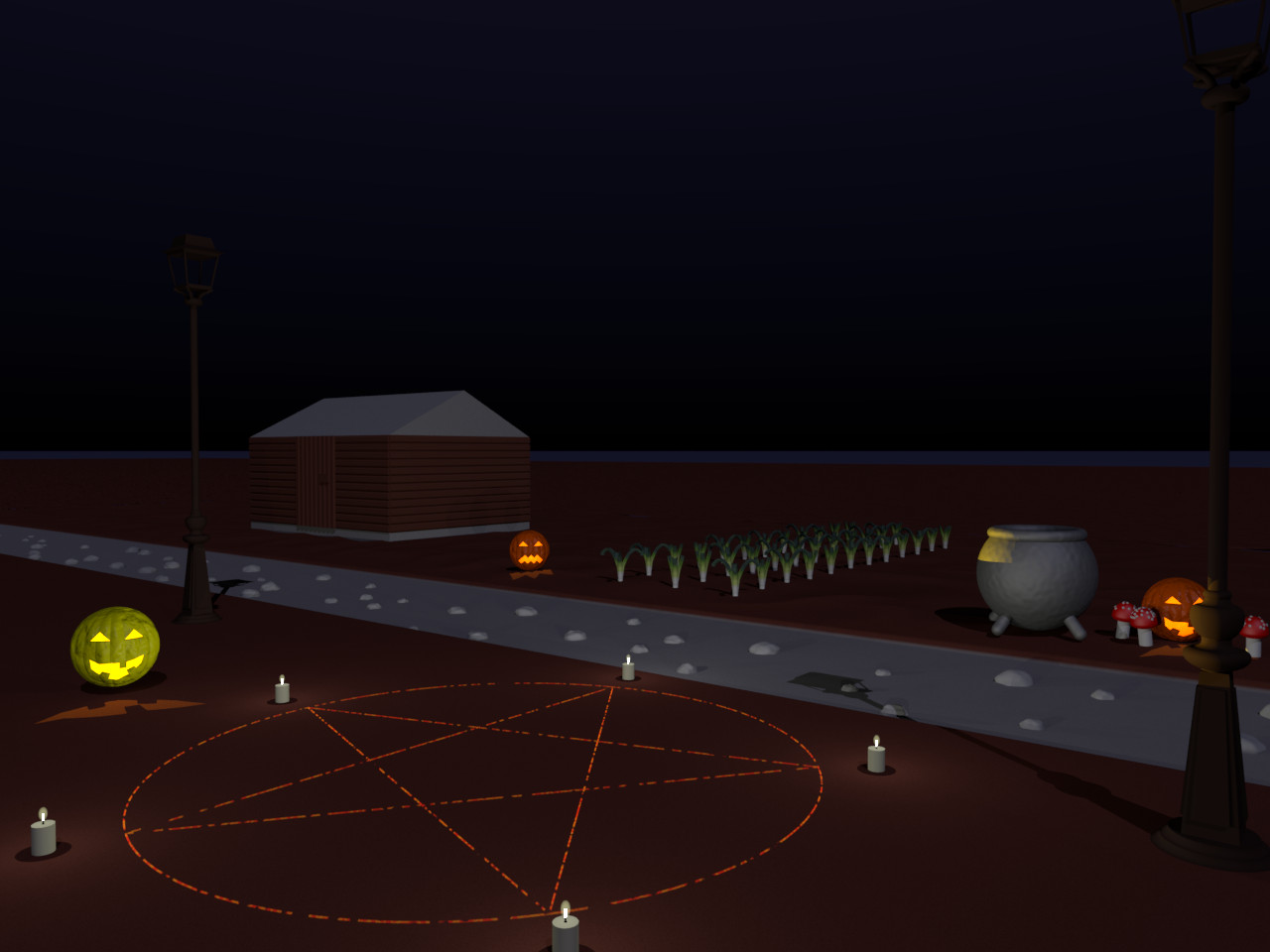
pentagram. When I render this same scene with stable v3.7.0 the white stain
doesn't appear. And even weird, when I render this scene with povray "3.8.0
beta1" but with the resolution of 640x480, I don't get this white stain in the
final image. Usually I'm cautious before I claim this is a bug and that the
error is not between the keyboard and the chair, but there is something wrong
there.
Regards,
Antoine.
Post a reply to this message
Attachments:
Download 'halloweenhousenighttime3.8.png' (1167 KB)
Preview of image 'halloweenhousenighttime3.8.png'
|
|
| |
| |
|
|
From: Alain Martel
Subject: Re: weird white stain with beta povray v3.8.0 (not with povray v3.7.0)
Date: 13 Jan 2022 11:14:26
Message: <61e04fe2$1@news.povray.org>
|
|
|
| |
| |
|
|
Le 2022-01-13 à 09:06, Warren a écrit :
> Hi,
> I post a message here, because I get a weird render with povray 3.8.0 beta 1 of
> a scene with the following resolution : 1280x960 (see attached image with this
> message) , you can see a white stain that has the shape of a heart near the
> pentagram. When I render this same scene with stable v3.7.0 the white stain
> doesn't appear. And even weird, when I render this scene with povray "3.8.0
> beta1" but with the resolution of 640x480, I don't get this white stain in the
> final image. Usually I'm cautious before I claim this is a bug and that the
> error is not between the keyboard and the chair, but there is something wrong
> there.
> Regards,
> Antoine.

Yes, there is something wrong. Now, a few questions :
Is there a resolution where it just start to show up ?
Did you try at 800x600, 1024x768, 1600x1200 ?
Did you try at some different aspect ratio, like 800x800 or 1600x800 ?

You should post the scene file to povray.binaries.scene-files
Be sure to include any custom .inc files and image used. If there are
more than a single file used, zip them together.
That way, we can try to reproduce your issue.
Post a reply to this message
|
|
| |
| |
|
|
From: Cousin Ricky
Subject: Re: weird white stain with beta povray v3.8.0 (not with povray v3.7.0)
Date: 13 Jan 2022 20:37:05
Message: <61e0d3c1@news.povray.org>
|
|
|
| |
| |
|
|
On 2022-01-13 10:06 (-4), Warren wrote:
> Hi,
> I post a message here, because I get a weird render with povray 3.8.0 beta 1 of
> a scene with the following resolution : 1280x960 (see attached image with this
> message) , you can see a white stain that has the shape of a heart near the
> pentagram. When I render this same scene with stable v3.7.0 the white stain
> doesn't appear. And even weird, when I render this scene with povray "3.8.0
> beta1" but with the resolution of 640x480, I don't get this white stain in the
> final image.

What I've found so far:
 - The artifact varies with the image size.  A 960x720 render leaves an
   oblong stain on the upper left vertex.
 - The artifact isn't completely absent with 640x480.  At 640x480, tiny
   white spots appear along the veins of the pentagram, but they are
   absent in a 3.7 render.  I presume that this means you did not put
   them there deliberately, and that they are related to the big heart-
   shaped stain.
 - 3.8 beta 2 does not solve the problem.
Post a reply to this message
|
|
| |
| |
|
|
|
|
| |
| |
|
|
Cousin Ricky <ric### [at] yahoo com> wrote:
> On 2022-01-13 10:06 (-4), Warren wrote:
> > Hi,
> > I post a message here, because I get a weird render with povray 3.8.0 beta 1 of
> > a scene with the following resolution : 1280x960 (see attached image with this
> > message) , you can see a white stain that has the shape of a heart near the
> > pentagram. When I render this same scene with stable v3.7.0 the white stain
> > doesn't appear. And even weird, when I render this scene with povray "3.8.0
> > beta1" but with the resolution of 640x480, I don't get this white stain in the
> > final image.
>
> What I've found so far:
> - The artifact varies with the image size. A 960x720 render leaves an
> oblong stain on the upper left vertex.
> - The artifact isn't completely absent with 640x480. At 640x480, tiny
> white spots appear along the veins of the pentagram, but they are
> absent in a 3.7 render. I presume that this means you did not put
> them there deliberately, and that they are related to the big heart-
> shaped stain.
> - 3.8 beta 2 does not solve the problem.
There are other things to consider:
- First off, set the boolean 'PlaceWell' (line 19 of main pov file) to false, to
get a faster rendering, the heart shape artifact being always there.
- Changing the minimum_reuse value from '0.015' to '0.01' make the 'heart shaped
artifact' to disappear, but the little white stains you talked about are there,
it seems. com> wrote:
> On 2022-01-13 10:06 (-4), Warren wrote:
> > Hi,
> > I post a message here, because I get a weird render with povray 3.8.0 beta 1 of
> > a scene with the following resolution : 1280x960 (see attached image with this
> > message) , you can see a white stain that has the shape of a heart near the
> > pentagram. When I render this same scene with stable v3.7.0 the white stain
> > doesn't appear. And even weird, when I render this scene with povray "3.8.0
> > beta1" but with the resolution of 640x480, I don't get this white stain in the
> > final image.
>
> What I've found so far:
> - The artifact varies with the image size. A 960x720 render leaves an
> oblong stain on the upper left vertex.
> - The artifact isn't completely absent with 640x480. At 640x480, tiny
> white spots appear along the veins of the pentagram, but they are
> absent in a 3.7 render. I presume that this means you did not put
> them there deliberately, and that they are related to the big heart-
> shaped stain.
> - 3.8 beta 2 does not solve the problem.
There are other things to consider:
- First off, set the boolean 'PlaceWell' (line 19 of main pov file) to false, to
get a faster rendering, the heart shape artifact being always there.
- Changing the minimum_reuse value from '0.015' to '0.01' make the 'heart shaped
artifact' to disappear, but the little white stains you talked about are there,
it seems.
Post a reply to this message
|
|
| |
| |
|
|
From: William F Pokorny
Subject: Re: weird white stain with beta povray v3.8.0 (not with povray v3.7.0)
Date: 16 Jan 2022 13:46:53
Message: <61e4681d@news.povray.org>
|
|
|
| |
| |
|
|
On 1/14/22 6:06 AM, Warren wrote:
> Cousin Ricky <ric### [at] yahoocom> wrote:
>> On 2022-01-13 10:06 (-4), Warren wrote:
>>> Hi,
>>> I post a message here, because I get a weird render with povray 3.8.0 beta 1 of
>>> a scene with the following resolution : 1280x960 (see attached image with this
>>> message) , you can see a white stain that has the shape of a heart near the
>>> pentagram. When I render this same scene with stable v3.7.0 the white stain
>>> doesn't appear. And even weird, when I render this scene with povray "3.8.0
>>> beta1" but with the resolution of 640x480, I don't get this white stain in the
>>> final image.
>>
>> What I've found so far:
>>   - The artifact varies with the image size.  A 960x720 render leaves an
>>     oblong stain on the upper left vertex.
>>   - The artifact isn't completely absent with 640x480.  At 640x480, tiny
>>     white spots appear along the veins of the pentagram, but they are
>>     absent in a 3.7 render.  I presume that this means you did not put
>>     them there deliberately, and that they are related to the big heart-
>>     shaped stain.
>>   - 3.8 beta 2 does not solve the problem.
>
> There are other things to consider:
> - First off, set the boolean 'PlaceWell' (line 19 of main pov file) to false, to
> get a faster rendering, the heart shape artifact being always there.
> - Changing the minimum_reuse value from '0.015' to '0.01' make the 'heart shaped
> artifact' to disappear, but the little white stains you talked about are there,
> it seems.
>

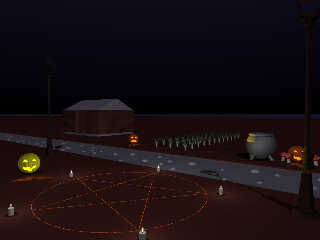
The following might, or might not, be of help to you with official
versions of POV-Ray.

I took a quick look at at this bug with my current povr branch and found
along with some recent bounding code changes it got me to a more stable
fail for a bug I've been chasing for years. Details posted in the v4.0
group.

My povr branch is now considerably different than official POV-Ray
offerings, but after translating the pentagram up by 2x the thread
radius(a) I got away from the 'white regions.' I never saw the heart
shaped one - no idea why not in povr. Image attached.

(a) - Media needs clean start and stop intervals. Near coincident
shape/surfaces can cause confusion and leave intervals open - and with
emission media this results in extremely bright regions.

Where you had media I moved from min, max samples and interval
specifications to just 'samples 10'.

In many places you are using the srgb keyword with channel values
outside the 0-1 range. My povr branch doesn't allow this because any
'srgb calculation' outside the 0-1 range is wacky. See post elsewhere
for details. If you need values outside 0-1, use rgb to exactly specify
what you want for internal linear values.

includes/outdoorsLamp.inc -> debug statement line 218 uses LampZpos and
it should be LampZPos.

Bill P.
Post a reply to this message
Attachments:
Download 'image_povrtracefix.jpg' (105 KB)
Preview of image 'image_povrtracefix.jpg'
|
|
| |
| |
|
|
From: Cousin Ricky
Subject: Re: weird white stain with beta povray v3.8.0 (not with povrayv3.7.0)
Date: 16 Jan 2022 23:46:33
Message: <61e4f4a9$1@news.povray.org>
|
|
|
| |
| |
|
|
On 2022-01-16 14:46 (-4), William F Pokorny wrote:
>
> In many places you are using the srgb keyword with channel values
> outside the 0-1 range. My povr branch doesn't allow this because any
> 'srgb calculation' outside the 0-1 range is wacky. See post elsewhere
> for details. If you need values outside 0-1, use rgb to exactly specify
> what you want for internal linear values.

For what it's worth, these are the out-of-domain sRGB calls, evaluated
under assumed_gamma 1:

customTextures.inc:
  srgb < 1, 0.9, 0.65> * 1.3 = rgb <1.8233, 1.4313, 0.6829>
  srgb < 1, 0.9, 0.65> * 1.15 = rgb <1.3758, 1.0815, 0.5186>
pentagramObject.inc:
  srgb 8 = rgb <131.4473, 131.4473, 131.4473>
  srgb 3 = rgb <12.8298, 12.8298, 12.8298>
pumpkin.inc:
  srgb < 1.5, 1, 0> = rgb <2.5372, 1.0000, 0.0000>

The post elsewhere with details:
https://news.povray.org/povray.general/thread/%3Cweb.60649d9bb9b7dccdd98418916e066e29%40news.povray.org%3E/
Post a reply to this message
|
|
| |
| |
|
|
|
|
| |
| |
|
|
[Running v3.8.0 beta 1 in Windows 10]

This is a very tricky problem to diagnose; I am seeing inconsistent results from
render to render, even at the problematic 1280X960 render size. Sometimes the
heart-shaped stain is there, sometimes not.

[Warren wrote:]
// There are other things to consider:
// First off, set the boolean 'PlaceWell' (line 19 of main pov file) to false,
// to get a faster rendering, the heart shape artifact being always there.

Even with that change, I still get inconsistent results.

Interestingly, I commented-out this code block in your main file to see what
would happen; it's your lamp-placement block, I think...

#for( It, 0, PositionsNum - 1, 1 )
 ...
 #end
#end

..... but I still see the (inconsistent) artifact.

That still leaves your pumpkins and candles in the scene-- with *their* lights.
Maybe those include files would be a place to look? Perhaps you could try
plugging in some crazy values in certain places, to try and *force* the artifact
to always show up and to look even worse.

Strange as it seems, if I simply eliminate your  +bs8  on the command line, I
never see the artifact at 1280X960...well, not in 15 render attempts, anyway. I
have no idea why that would matter.
Post a reply to this message
|
|
| |
| |
|
|
|
|
| |
| |
|
|
"Kenneth" <kdw### [at] gmailcom> wrote:
>
> Strange as it seems, if I simply eliminate your  +bs8  on the command line, I
> never see the artifact at 1280X960...well, not in 15 render attempts,
> anyway. I have no idea why that would matter.

Forget that; it's probably of no real consequence...because I think I've solved
at least part of the problem (the large heart-shaped artifact).
>
> ...I am seeing inconsistent results from
> render to render, even at the problematic 1280X960 render size. Sometimes the
> heart-shaped stain is there, sometimes not.
>

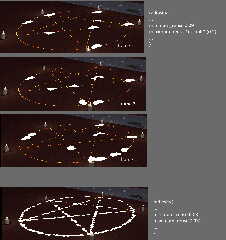
That's because of the scene's radiosity settings. I noticed that there was no
maximum_reuse value given, which means that it defaults to 0.2-- which is quite
large and can result in large splotchy artifacts-- the heart shape, for example.

My image examples are from an animation test. I changed minimum_reuse to 0.09...
and I now see LOTS of such artifacts. The reason why my earlier tests seemed
inconsistent is because of the random nature of such 'splotches' from render to
render, given the values used; and it just happened that the scene's rad
settings were sometimes producing only ONE *major* artifact...or none. The sizes
of such splotches vary according to the 'spread' between the minimum_reuse and
maximum_reuse values.

I also did a test with these rad values:
minimum_reuse 0.03
maximum_reuse 0.031

This produces even more splotches, all of the same (smaller) size.

It's obvious that these super-bright artifacts are showing up along the 'lines'
of the pentagram. The remainder of the problem must be that some of its srgb
colors are 'greater than 1.0' as was mentioned earlier, and are interacting
weirdly with radiosity; or that the scene's lights and fade_powers are somehow
too bright.

Apparently, radiosity is picking up a super-bright color from *somewhere*, and
using it in its calculations.
Post a reply to this message
Attachments:
Download 'halloweenhouse_artifacts_kw.jpg' (246 KB)
Preview of image 'halloweenhouse_artifacts_kw.jpg'
|
|
| |
| |
|
|
|
|
| |
| |
|
|
"Kenneth" <kdw### [at] gmailcom> wrote:

>
> That's because of the scene's radiosity settings...
> My image examples are from an animation test. I changed minimum_reuse to 0.09...
> and I now see LOTS of such artifacts...

Forgot to mention that I changed the scene's rad 'count' from 800 to 80 for
these test renders, just to make quicker tests.
Post a reply to this message
|
|
| |
| |
|
|
|
|
| |
| |
|
|
Good detective work!  :)

Are they "hearts" or --- nephroids?

Is there some sort of "reflection" effect, esp with the circle, that would give
rise to this?

Can the symbol be raised / lowered, scaled, lines widened/narrowed to show an
effect on the artifacts?

Does the same artifact show up with a square or an ellipse...?
Post a reply to this message
|
|
| |
| |
|
|
|
|
| |
| |
|
|
"Bald Eagle" <cre### [at] netscapenet> wrote:
>
> Good detective work!  :)
>
Thanks, Cousin Walker! I've been experimenting a LOT with rad over the past 6
months, kind of 'deconstructing' its many variables and how they interact. Test
after test after...

I have not really taken a deep look at Warren's code; there's a lot of
'busy-ness' in the many include files to chew through.

I think the 'heart' shape is due to just a particular juxtaposition of objects
and lights, as 'processed' by the rad settings. They can take on some pretty
weird shapes sometimes, depending on scene geometry.

BTW, I never did a complete *finished* render of this code. Running it as-is
with no changes, the render almost stalls about 2/3 of the way through-- and
this on my 8 core/16 thread machine! I never did figure out the cause. The
pumpkin lights? The candles? Something is causing my machine to churn through
almost endless calculations. For my tests, I had to turn off at least the
pumpkins.
Post a reply to this message
|
|
| |
| |
|
|
|
|
| |
| |
|
|
> "Bald Eagle" <cre### [at] netscapenet> wrote:
> BTW, I never did a complete *finished* render of this code. Running it as-is
> with no changes, the render almost stalls about 2/3 of the way through-- and
> this on my 8 core/16 thread machine! I never did figure out the cause. The
> pumpkin lights? The candles? Something is causing my machine to churn through
> almost endless calculations. For my tests, I had to turn off at least the
> pumpkins.

Hello / Hi
The scene stalls at 2/3 percent because of the well isosurface (it is a cylinder
parametric function with an add of customized crackle pattern. In addition, I
deleted the heavy-weight tree mesh in the archive posted in 'binaries' forum
section. I you want the complete scene or just take a look at the final image,
you should take a look at my web site:
"https://www.ant01.fr/index.php/graphismes/stills-natures-mortes-avec-povray".
But I didn't update the archive you can download from there.
Since the first posts of Kenneth and William F. Pokorny , I tested the changes
they suggested (replace srgb with rgb in some cases mainly) but the renders were
not exempt of bugs, unfortunately, excepted for some renders with povray
v3.7.0.8.

I think I pointed out a bug, but I've no idea of where it comes from.
Post a reply to this message
|
|
| |
| |
|
|
|
|
| |
| |
|
|
I decided to go through all of the scene's include files-- turning off all of
the light sources, correcting any out-of-gamut srgb colors to 1.0 max, and
eliminating every object except the pentagram and the ground.

And I was still seeing the bright radiosity patches :-(

So I made my own VERY simplified scene-- posted below-- using just the bare
necessities of Warren's code plus a few simplifications... and finally
discovered what I think are the root causes of those bright patches. There are
THREE reasons, as far as I can tell:

1) The sky-sphere object is the primary cause. Comment-out that sphere, and the
problem patches disappear.

2) Radiosity's 'media ON' switch is also a primary problem; turn that OFF and
the patches disappear.

3) The media-pentagram is, I think, halfway embedded in the ground; that seems
to definitely be adding to the problem, for some reason. Move it even slightly
upward (like William P. mentioned), and the number of bright patches greatly
decreases. Not completely, though, as 1) and 2) still produce some patches at
random.

I don't know what is going on with rad's 'media on' switch; but the sky-sphere
problem does not make any sense to me, as its colors are only 0.3 maximum...
certainly not 'super bright'.

Maybe others here have some additional clues?

---------
// 1/19/22-- reduced version of Warren's 'HallowHouseScene' code,
// by Ken Walker

#version 3.7;

#declare RAD_ON = true;
#declare P_start = 64 / image_width;
#declare P_end_final = 4 / image_width;
#declare GroundScale = < 80, 1, 160 >;

global_settings{
assumed_gamma 1.0

#if(RAD_ON)
radiosity{ // mostly Warren's settings
pretrace_start P_start
pretrace_end   P_end_final
error_bound 0.2
minimum_reuse 0.09 // Ken
maximum_reuse 0.091 // Ken
nearest_count 9
count 800
recursion_limit 1
always_sample off
gray_threshold 0.6
brightness 1
adc_bailout 0.01/2
normal on
media on // [If OFF, that ELIMINATES the super-bright radiosity patches.]
         }
#end
}

camera{
 location<-24,6,-24>
 look_at <6, 5, 0>
}


background{color srgb 0.05}

// This light is NOT the cause of the bright radiosity patches.
light_source{<-2,4,-3 >*1000000 color srgb <0.5,0.5,0.6>*0.75 }


#declare SkyPigment =
pigment{
    gradient y
    color_map{
        [0.0 color srgb 0]
        [0.75 color srgb <0.075, 0.075, 0.15>]
             }
}

// ---- THIS SPHERE IS THE MAIN CAUSE OF THE SUPER-WHITE RAD PATCHES (along
// with 'media on' in the rad block) ---

sphere{0, 1
    pigment{ SkyPigment }
    finish{ diffuse 0 emission <1,1,0.95>*0.3}
    scale 4000000
    hollow on
    no_shadow
    no_image
    no_reflection
}

#declare RedCol = color srgb <255,40,0 >/255;
#declare OrangeCol = color srgb <255,155,0 >/255;
#declare Clear = color srgbft <0,0,0,0,1>;
#declare FireMix =
density{
    wrinkles
    density_map{
        [0.4 RedCol ]
        [0.5 OrangeCol]
        [0.6 RedCol]
        }
     }

#declare PointsNumber = 5;
#declare PentagramRadius = 4;
#declare PentagramScaleFactor = 12/PentagramRadius/2;
#declare LineRadius = 0.01;

#declare PentagramCirclePoints = array[PointsNumber]
{<0,0,0>, <0,0,0>, <0,0,0>, <0,0,0>, <0,0,0> }

#for( It, 0, PointsNumber - 1 )
#declare PentagramCirclePoints[It] = <0,0,PentagramRadius>;
#declare PentagramCirclePoints[It] = vrotate(PentagramCirclePoints[It],
< 0,360/PointsNumber*It,0>);
#end

//Link pentagram points
#declare Pentagram =
union{
torus{ PentagramRadius, LineRadius sturm }
cylinder{ PentagramCirclePoints[0], PentagramCirclePoints[2], LineRadius }
cylinder{ PentagramCirclePoints[0], PentagramCirclePoints[3], LineRadius }
cylinder{ PentagramCirclePoints[1], PentagramCirclePoints[3], LineRadius }
cylinder{ PentagramCirclePoints[1], PentagramCirclePoints[4], LineRadius }
cylinder{ PentagramCirclePoints[2], PentagramCirclePoints[4], LineRadius }
     pigment{ color srgbft <0, 0, 0, 0, 1> }
     hollow
     no_shadow
     interior{
         media{
             emission
             color srgb 8 // This is not the major problem; change
                          // to 0.1 to see
             samples 30
             intervals 1
             density{bozo scale 0.1}
  }
 }
    //translate (.03 - .04*clock)*y // moving the pentagram away from the
    // GROUND reduces the number of super-bright radiosity splotches--
    // I think the pentagram is halfway embedded in the ground.
}


#declare brown1_srgb = color srgb <122, 72, 57> / 255;
#declare brown2_srgb = color srgb <126, 76, 62> / 255;
#declare brown3_srgb = color srgb <114, 62, 53> / 255;
#declare brown4_srgb = color srgb <102, 53, 43> / 255;
#declare brown5_srgb = color srgb <93 , 43, 38> / 255;

#macro T_5var_Wrinkles( multiplicateur, Col1, Col2, Col3, Col4, Col5)
texture{
      pigment{
       wrinkles
       color_map{
          [0.0 Col3*multiplicateur]
          [0.125 Col2*multiplicateur]
          [0.25 Col1*multiplicateur]
          [0.375 Col2*multiplicateur]
          [0.5 Col3*multiplicateur]
          [0.675 Col4*multiplicateur]
          [0.75 Col5*multiplicateur]
          [0.875 Col4*multiplicateur]
          [1.0 Col3*multiplicateur]
                     }
          scale 0.005
             }
           }
#end

#macro Pig_5colors_Wrinkles( multiplicateur, Col1, Col2, Col3, Col4, Col5)
      pigment{
           wrinkles
           color_map{
          [0.0 Col3*multiplicateur]
          [0.125 Col2*multiplicateur]
          [0.25 Col1*multiplicateur]
          [0.375 Col2*multiplicateur]
          [0.5 Col3*multiplicateur]
          [0.675 Col4*multiplicateur]
          [0.75 Col5*multiplicateur]
          [0.875 Col4*multiplicateur]
          [1.0 Col3*multiplicateur]
                    }
         scale 0.005
         }
#end

#declare T_brown2 = T_5var_Wrinkles(1.12  ,brown1_srgb, brown2_srgb,
brown3_srgb, brown4_srgb, brown5_srgb)
#declare GrayPig = Pig_5colors_Wrinkles(1.12, color srgb 0.6, color srgb 0.65,
color srgb 0.7, color srgb 0.75, color srgb 0.8)
#declare BrownPig = Pig_5colors_Wrinkles(1.12  ,brown1_srgb, brown2_srgb,
brown3_srgb, brown4_srgb, brown5_srgb)

#declare FinalGroundPig =
pigment{
    gradient y
    pigment_map{
         [0.0 GrayPig ]
         [0.1 BrownPig ]
               }
}

// simpler substitution for Warren's height_field ground
#declare WholeGround =
plane{y,0
texture{pigment{FinalGroundPig}}
}

WholeGround

#local Norm = < 0, 0, 0>;
#local StartPos = < -12, 100, -11>;
#local FinalPos = trace( WholeGround, StartPos, -y, Norm );
#if( Norm.x != 0 | Norm.y != 0 | Norm.z != 0 )
object{ Pentagram scale PentagramScaleFactor translate FinalPos }
#end
Post a reply to this message
|
|
| |
| |
|
|
From: Thomas de Groot
Subject: Re: weird white stain with beta povray v3.8.0 (not with povray v3.7.0)
Date: 20 Jan 2022 11:09:40
Message: <61e98944$1@news.povray.org>
|
|
|
| |
| |
|
|
Op 20-1-2022 om 14:20 schreef Kenneth:
> I decided to go through all of the scene's include files-- turning off all of
> the light sources, correcting any out-of-gamut srgb colors to 1.0 max, and
> eliminating every object except the pentagram and the ground.
>
> And I was still seeing the bright radiosity patches :-(
>
> So I made my own VERY simplified scene-- posted below-- using just the bare
> necessities of Warren's code plus a few simplifications... and finally
> discovered what I think are the root causes of those bright patches. There are
> THREE reasons, as far as I can tell:
>
> 1) The sky-sphere object is the primary cause. Comment-out that sphere, and the
> problem patches disappear.
>
> 2) Radiosity's 'media ON' switch is also a primary problem; turn that OFF and
> the patches disappear.
>
> 3) The media-pentagram is, I think, halfway embedded in the ground; that seems
> to definitely be adding to the problem, for some reason. Move it even slightly
> upward (like William P. mentioned), and the number of bright patches greatly
> decreases. Not completely, though, as 1) and 2) still produce some patches at
> random.
>
> I don't know what is going on with rad's 'media on' switch; but the sky-sphere
> problem does not make any sense to me, as its colors are only 0.3 maximum...
> certainly not 'super bright'.
>
> Maybe others here have some additional clues?
>
[snip]

I have been very silent on this topic until now. A bit short on time.

I also came across your point (2) so thought it might (at least) be a
radiosity/media problem. Then I thought that maybe the very thin value
of the pentagram cylinders might play a role, so I made the cylinder
radii much thicker while also setting intervals and samples to more
default values and playing with sample values, but while renders where
different, the (small) patches remained. I think that (3) might be an
important issue here, but point (1) is really baffling.

Good work, Kenneth!

--
Thomas
Post a reply to this message
|
|
| |
| |
|
|
From: Alain Martel
Subject: Re: weird white stain with beta povray v3.8.0 (not with povray v3.7.0)
Date: 20 Jan 2022 12:41:03
Message: <61e99eaf$1@news.povray.org>
|
|
|
| |
| |
|
|
Le 2022-01-20 à 08:20, Kenneth a écrit :
> // This light is NOT the cause of the bright radiosity patches.
> light_source{<-2,4,-3 >*1000000 color srgb <0.5,0.5,0.6>*0.75 }
>

WHY put that light so far away ? Why not use a much closer one, but with
the parallel attribute ?

When an object or light is situated at a distance in the million units
range, you can get unexpected behaviour.

Alternative light that will get the exact same result :
light_source{<-2,4,-3 >*1000 color srgb <0.5,0.5,0.6>*0.75 parallel}
Post a reply to this message
|
|
| |
| |
|
|
|
|
| |
| |
|
|
Thomas de Groot <tho### [at] degrootorg> wrote:
>
> ...but while renders were
> different, the (small) patches remained. I think that (3) might be an
> important issue here, but point (1) is really baffling.
>
> Good work, Kenneth!
>

Thanks. This has been my most intense 'detective work' in a long time-- and I'm
still thinking about all of it! That sphere problem really bugs me, but I think
I've discovered something interesting about it.

I LIKE a challenge (??) :-O
Post a reply to this message
|
|
| |
| |
|
|
|
|
| |
| |
|
|
Alain Martel <kua### [at] videotronca> wrote:
>
> WHY put that light so far away ? Why not use a much closer one...

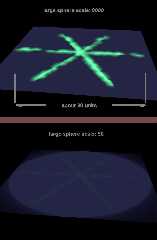
I agree. And from more tests, I see that the sky-sphere's gigantic size has a
great deal to do with those super-bright radiosity patches-- which surprised me.

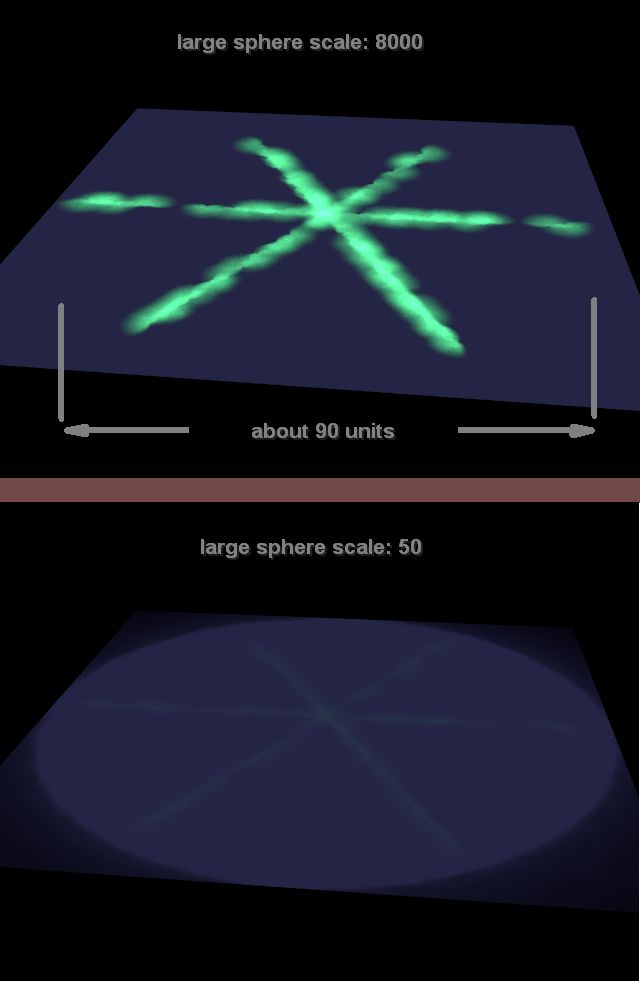
I ran an animation test using my posted 'simplified' code, while changing that
sphere scale from 8000 (which is not *too* large) down to 50. At 8000, the rad
patches are very bright; at 50, they are MUCH less bright. Currently, I don't
know why that should happen-- so I came up with yet another very simple test
scene of my own(!), which I post here. No light_sources in it. It produces the
same weird effect; change the sphere scale to see the difference. (I've also
attached an image example; if you can't see it here, it will nevertheless appear
in the 'image digest'.) Note that all of the scene's color values are purposely
very low.

What this tells me is that any scene with a media object in it, surrounded by
another larger rad-emitting object like that sphere, may show some unexpected
rad/media interactions somewhere, depending on the *scale* of the larger object
and the proximity of the media object to others. It's 'as if' the sphere is
causing brighter radiosity lighting from its colors, the larger it gets. I have
no other guess or explanation at this point. It makes me wonder if certain
radiosity values need tweaking, depending on how large a typical rad-emitting
'sky' sphere is (for example.)

Of course, one of the major reasons for the bright rad patches in all of the
posted scenes here is that the media objects are halfway-embedded in the
'ground'... so there's a proximity effect at work. But I wonder if subtle flaws
might also be occurring in 'typical' media/radiosity scenes that would be
similar to Warren's.

----
#version 3.8;
#declare RAD_ON = 1;
#declare P_start = 64 / image_width;
#declare P_end_final = 4 / image_width;

global_settings{
assumed_gamma 1.0

#if(RAD_ON)
radiosity{ // mostly Warren's settings
pretrace_start P_start
pretrace_end   P_end_final
error_bound 0.2
minimum_reuse 0.15 // Ken
maximum_reuse 0.151 // Ken
nearest_count 9
count 50
recursion_limit 1
always_sample off
//gray_threshold 0.6
brightness 1
adc_bailout 0.01/2
normal on
media on // [If OFF, it ELIMINATES the super-bright radiosity patches.]
         }
#end
}

camera {
  perspective
  location  <15, 70, -140>
  look_at   <0, 0,  -10>
  right     x*image_width/image_height
  angle 40
}

// the large sky-sphere
sphere{0, 1
pigment{rgb .1}
    finish{ambient 0 diffuse 0 emission 1}
    scale 8000 // change to 50
   // hollow on // does not seem to be necessary-- the media objects and
                // rad patches show up anyway
    no_image
}

box{0,1 translate -.5 scale <100,.01,100>
pigment{rgb <.3,.3,1>}
}

merge{ // or union
cylinder{-45*x,45*x,.3}
cylinder{-45*x,45*x,.3 rotate 120*y}
cylinder{-45*x,45*x,.3 rotate 240*y}
hollow
pigment{rgbt 1}
interior{
 media{
  emission .003*<.1,1,.1>
  method 3
  intervals 1
  samples 30
  }
 }
 //translate ... *y
}
Post a reply to this message
Attachments:
Download 'rad_sphere_scale_test_comp.jpg' (28 KB)
Preview of image 'rad_sphere_scale_test_comp.jpg'
|
|
| |
| |
|
|
From: Thomas de Groot
Subject: Re: weird white stain with beta povray v3.8.0 (not with povray v3.7.0)
Date: 21 Jan 2022 11:10:04
Message: <61eadadc$1@news.povray.org>
|
|
|
| |
| |
|
|
Op 21-1-2022 om 15:52 schreef Kenneth:
> Alain Martel <kua### [at] videotronca> wrote:
>>
>> WHY put that light so far away ? Why not use a much closer one...
>
> I agree. And from more tests, I see that the sky-sphere's gigantic size has a
> great deal to do with those super-bright radiosity patches-- which surprised me.
>
> I ran an animation test using my posted 'simplified' code, while changing that
> sphere scale from 8000 (which is not *too* large) down to 50. At 8000, the rad
> patches are very bright; at 50, they are MUCH less bright. Currently, I don't
> know why that should happen-- so I came up with yet another very simple test
> scene of my own(!), which I post here. No light_sources in it. It produces the
> same weird effect; change the sphere scale to see the difference. (I've also
> attached an image example; if you can't see it here, it will nevertheless appear
> in the 'image digest'.) Note that all of the scene's color values are purposely
> very low.
>
> What this tells me is that any scene with a media object in it, surrounded by
> another larger rad-emitting object like that sphere, may show some unexpected
> rad/media interactions somewhere, depending on the *scale* of the larger object
> and the proximity of the media object to others. It's 'as if' the sphere is
> causing brighter radiosity lighting from its colors, the larger it gets. I have
> no other guess or explanation at this point. It makes me wonder if certain
> radiosity values need tweaking, depending on how large a typical rad-emitting
> 'sky' sphere is (for example.)
>
> Of course, one of the major reasons for the bright rad patches in all of the
> posted scenes here is that the media objects are halfway-embedded in the
> 'ground'... so there's a proximity effect at work. But I wonder if subtle flaws
> might also be occurring in 'typical' media/radiosity scenes that would be
> similar to Warren's.
>
> ----
> #version 3.8;
> #declare RAD_ON = 1;
> #declare P_start = 64 / image_width;
> #declare P_end_final = 4 / image_width;
>
> global_settings{
> assumed_gamma 1.0
>
> #if(RAD_ON)
> radiosity{ // mostly Warren's settings
> pretrace_start P_start
> pretrace_end   P_end_final
> error_bound 0.2
> minimum_reuse 0.15 // Ken
> maximum_reuse 0.151 // Ken
> nearest_count 9
> count 50
> recursion_limit 1
> always_sample off
> //gray_threshold 0.6
> brightness 1
> adc_bailout 0.01/2
> normal on
> media on // [If OFF, it ELIMINATES the super-bright radiosity patches.]
>           }
> #end
> }
>
> camera {
>    perspective
>    location  <15, 70, -140>
>    look_at   <0, 0,  -10>
>    right     x*image_width/image_height
>    angle 40
> }
>
> // the large sky-sphere
> sphere{0, 1
> pigment{rgb .1}
>      finish{ambient 0 diffuse 0 emission 1}
>      scale 8000 // change to 50
>     // hollow on // does not seem to be necessary-- the media objects and
>                  // rad patches show up anyway
>      no_image
> }
>
> box{0,1 translate -.5 scale <100,.01,100>
> pigment{rgb <.3,.3,1>}
> }
>
> merge{ // or union
> cylinder{-45*x,45*x,.3}
> cylinder{-45*x,45*x,.3 rotate 120*y}
> cylinder{-45*x,45*x,.3 rotate 240*y}
> hollow
> pigment{rgbt 1}
> interior{
>   media{
>    emission .003*<.1,1,.1>
>    method 3
>    intervals 1
>    samples 30
>    }
>   }
>   //translate ... *y
> }
>

Is there a reason why the sky sphere has emission 1 ? It is a night
scene, so I would use emission 0 or emission0.01......

--
Thomas
Post a reply to this message
|
|
| |
| |
|
|
From: Alain Martel
Subject: Re: weird white stain with beta povray v3.8.0 (not with povrayv3.7.0)
Date: 21 Jan 2022 12:47:57
Message: <61eaf1cd$1@news.povray.org>
|
|
|
| |
| |
|
|
Le 2022-01-21 à 11:10, Thomas de Groot a écrit :

> Is there a reason why the sky sphere has emission 1 ? It is a night
> scene, so I would use emission 0 or emission0.01......
>

Emission 1 and rgb value of 0.1.
If it was rgb 1, then, a small emission value would be required.
Post a reply to this message
|
|
| |
| |
|
|
From: Alain Martel
Subject: Re: weird white stain with beta povray v3.8.0 (not with povray v3.7.0)
Date: 21 Jan 2022 12:54:13
Message: <61eaf345$1@news.povray.org>
|
|
|
| |
| |
|
|
Le 2022-01-21 à 09:52, Kenneth a écrit :
> // the large sky-sphere
> sphere{0, 1
> pigment{rgb .1}
>      finish{ambient 0 diffuse 0 emission 1}
>      scale 8000 // change to 50
>     // hollow on // does not seem to be necessary-- the media objects and
>                  // rad patches show up anyway
>      no_image
> }

Have you tried to replace that large sphere with a sky_sphere ? Or even
a simple background statement if the pigment is solid ?
Some options :

background{ rgb 0.1 }

sky_sphere{
	pigment{ rgb 0.1 }
   }

sky_sphere{
  pigment{plnar{
	[0 rgb 0.1]
	[1 rgb 0]
	}
    }
Post a reply to this message
|
|
| |
| |
|
|
|
|
| |
| |
|
|
Alain Martel <kua### [at] videotronca> wrote:
> Le 2022-01-21 à 09:52, Kenneth a écrit :
> > // the large sky-sphere
> > sphere{0, 1
> > pigment{rgb .1}
> >      finish{ambient 0 diffuse 0 emission 1}
> >      scale 8000 // change to 50
> >     // hollow on // does not seem to be necessary-- the media objects and
> >                  // rad patches show up anyway
> >      no_image
> > }
>
> Have you tried to replace that large sphere with a sky_sphere ? Or even
> a simple background statement if the pigment is solid ?
> Some options :
>
> background{ rgb 0.1 }
>
> sky_sphere{
>  pigment{ rgb 0.1 }
>    }
>

Good suggestions. I tried both of those as a substitute for the large sphere--
and now there are NO bright rad-patch artifacts, in either case! So that sphere
(and its scale) seems to be causing a real/mysterious problem.

I tried one more simple test of that sphere: *creating* it with a radius of 8000
vs. *scaling* it to be so. But that didn't solve the problem.

Thanks Alain; this result *might* indicate a bug, regarding use of such an
actual sphere along with radiosity's 'media ON' switch.
Post a reply to this message
|
|
| |
| |
|
|
|
|
| |
| |
|
|
> Alain Martel <kua### [at] videotronca> wrote:
> >
> > Have you tried to replace that large sphere with a sky_sphere ? Or even
> > a simple background statement if the pigment is solid ?
>
> Good suggestions. I tried both of those as a substitute for the large sphere--
> and now there are NO bright rad-patch artifacts, in either case!

Well, I spoke too soon. The reason I didn't see any patches-- or any rad/media
interaction at all-- was because my sky_sphere color and emission color were
just too dim to produce them. In my most recent test code posted earlier, use
the sky_sphere at rgb 0.1, and try emission 1*<0.1,1.0,0.1> to see the media
cylinders, then emission 250*<0.1,1.0,0.1> to see the bright patches again.

So that media object being half-embedded seems to be the real problem... along
with rad's 'media ON' switch.

But I find it strange that the sky_sphere produces its own particular radiosity
brightness, versus the enclosing-sphere object imparting its *variable* rad
brightness depending on its size.

A mystery for now.
Post a reply to this message
|
|
| |
| |
|
|
From: Alain Martel
Subject: Re: weird white stain with beta povray v3.8.0 (not with povray v3.7.0)
Date: 24 Jan 2022 08:01:33
Message: <61eea32d$1@news.povray.org>
|
|
|
| |
| |
|
|
Le 2022-01-24 à 03:05, Kenneth a écrit :
>> Alain Martel <kua### [at] videotronca> wrote:
>>>
>>> Have you tried to replace that large sphere with a sky_sphere ? Or even
>>> a simple background statement if the pigment is solid ?
>>
>> Good suggestions. I tried both of those as a substitute for the large sphere--
>> and now there are NO bright rad-patch artifacts, in either case!
>
> Well, I spoke too soon. The reason I didn't see any patches-- or any rad/media
> interaction at all-- was because my sky_sphere color and emission color were
> just too dim to produce them. In my most recent test code posted earlier, use
> the sky_sphere at rgb 0.1, and try emission 1*<0.1,1.0,0.1> to see the media
> cylinders, then emission 250*<0.1,1.0,0.1> to see the bright patches again.
>
> So that media object being half-embedded seems to be the real problem... along
> with rad's 'media ON' switch.
>
> But I find it strange that the sky_sphere produces its own particular radiosity
> brightness, versus the enclosing-sphere object imparting its *variable* rad
> brightness depending on its size.
>
> A mystery for now.
>
>
>
>

New suggestion :
Scale your media container by <0.5, 1, 1> and move them up so that it is
entirely above the surface. Even leave a tiny gap between it and the
surface.
Post a reply to this message
|
|
| |
| |
|
|
|
|
| |
|
|