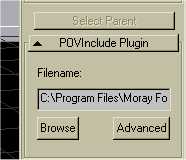
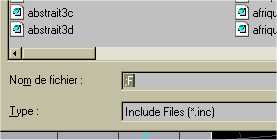
|
|
|
|
|
|
| |
| |
|
|
|
|
| |
| |
|
|
Folks,
With a whole day devoted to cleanup, I have now released V1.1.  I expect
this to be the last release except for bug fixes or feature request
enhancements.  I have added true OpenGL shading to the view box and a host
of other cleanup functions.  The plugin and documentation have been
refreshed.

http://www.kolban.com/3d/POVInclude.htm

Comments very welcome, especially since one of our number tried it and
couldn't get it working.  It is obviously important to know where it works
and where it doesn't.

Neil
Post a reply to this message
|
|
| |
| |
|
|
From: Thomas de Groot
Subject: Re: [Announce]: POVInclude Version 1.1
Date: 27 Dec 2004 03:34:58
Message: <41cfc932@news.povray.org>
|
|
|
| |
| |
|
|
"Neil Kolban" <kol### [at] kolban com> schreef in bericht
news:41cfa6d4$1@news.povray.org...
> Comments very welcome, especially since one of our number tried it and
> couldn't get it working. It is obviously important to know where it works
> and where it doesn't.
>
Just downloaded the zip (1.1) and shall start testing. As I am also running
Windows ME, like Sylvain, I am curious to see how it works here....
Stay tuned!
By the way, your pdf looks good!
Thomas
Post a reply to this message
|
|
| |
| |
|
|
From: Thomas de Groot
Subject: Re: [Announce]: POVInclude Version 1.1
Date: 27 Dec 2004 05:00:46
Message: <41cfdd4e@news.povray.org>
|
|
|
| |
| |
|
|
Hello Neil,

First, please, note that I use the latest official build of Moray, and
export to POV-Ray 3.5 (as version 3.6 is less compatible with Moray). All
that under Windows ME.

I have noted a number of things:

Bugs:
The Browse button does not work here. Everything else works fine J

Comments (in no particular order):
1. I think it worthwhile to mention in the docs that the included object(s)
should be Moray-oriented. This may sound obvious, but I started
unconsciously to build an object in POV-Ray, with POV-Ray orientation,
before I realised that I had to transform it. J .or:
2. Could there be such an option built into the plugin? Selecting that
button would automatically transform the object to Moray space (scale
<1,1,-1> rotate <90,0,0>). This would be useful for already existing objects
normally used in POV-Ray.
3. In order to adjust correctly the corners of the wireframe box, one has to
determine the object's bounding limits. For complex objects, I have been
wondering if this was possible to do automatically? Not in Moray I guess; I
rapidly browsed the POV docs, but could not find anything addressing this.
But I may have missed it.
4. Question: How do you group multiple objects inside the union (page 7,
last line, of the docs)?
5. The plugin is very useful indeed. It is now possible to place or adjust
an external object with far better precision into a Moray scene, and see the
results in the camera window.

That's it for now, I think.

Thomas
Post a reply to this message
|
|
| |
| |
|
|
From: leseur sylvain
Subject: Re: [Announce]: POVInclude Version 1.1
Date: 27 Dec 2004 05:17:10
Message: <41cfe126@news.povray.org>
|
|
|
| |
| |
|
|
I think i found the troubles
When i take off FullMoon plugin.
PovInclude work There is an
 incompatibility between this plug
and your's

Friendly
Sylvain
Post a reply to this message
Attachments:
Download 'FullMoon.dll.dat' (197 KB)
|
|
| |
| |
|
|
From: leseur sylvain
Subject: Re: [Announce]: POVInclude Version 1.1
Date: 27 Dec 2004 06:21:46
Message: <41cff04a@news.povray.org>
|
|
|
| |
| |
|
|
If the Browse button does not work here,
it is because incompatibility between  your's
plug and  MikesBSpline210.dll
Here:
http://members.cox.net/weber.mike/BSplineDLL/


Friendly
Sylvain
Post a reply to this message
|
|
| |
| |
|
|
From: Marc Jacquier
Subject: Re: [Announce]: POVInclude Version 1.1
Date: 27 Dec 2004 06:36:29
Message: <41cff3bd@news.povray.org>
|
|
|
| |
| |
|
|
"Thomas de Groot" <t.d### [at] internlnet> a écrit dans le message de
news:41cfdd4e@news.povray.org...
> 3. In order to adjust correctly the corners of the wireframe box, one has
to
> determine the object's bounding limits. For complex objects, I have been
> wondering if this was possible to do automatically? Not in Moray I guess;
I
> rapidly browsed the POV docs, but could not find anything addressing this.
> But I may have missed it.
See min_extent and max_extent

Marc
Post a reply to this message
|
|
| |
| |
|
|
From: Thomas de Groot
Subject: Re: [Announce]: POVInclude Version 1.1
Date: 27 Dec 2004 08:45:50
Message: <41d0120e@news.povray.org>
|
|
|
| |
| |
|
|
"leseur sylvain" <syl### [at] potar-hurlantcom> schreef in bericht
news:41cff04a@news.povray.org...
> If the Browse button does not work here,
> it is because incompatibility between  your's
> plug and  MikesBSpline210.dll
> Here:
> http://members.cox.net/weber.mike/BSplineDLL/
>
Currently, I do not have the Bspline plugin loaded, and still the browse
button not responding, so that would mean interference with FullMoon, or yet
another plugin maybe?

Thomas
Post a reply to this message
|
|
| |
| |
|
|
From: Thomas de Groot
Subject: Re: [Announce]: POVInclude Version 1.1
Date: 27 Dec 2004 08:54:24
Message: <41d01410@news.povray.org>
|
|
|
| |
| |
|
|
"Marc Jacquier" <jac### [at] wanadoofr> schreef in bericht
news:41cff3bd@news.povray.org...
>
> See min_extent and max_extent
>
Right! Now I remember! Thanks Marc!
This brings me to the following suggestion to Neil: If the min_ and
max_extent were provided in the include file, would that be directly
translatable to the wireframe in Moray? I am afraid I ask to much (because I
am lazy ;-))

Thomas
Post a reply to this message
|
|
| |
| |
|
|
|
|
| |
| |
|
|
"Neil Kolban" <kol### [at] kolbancom> wrote in message
news:41cfa6d4$1@news.povray.org...
> Folks,
> With a whole day devoted to cleanup, I have now released V1.1.  I expect
> this to be the last release except for bug fixes or feature request
> enhancements.  I have added true OpenGL shading to the view box and a host
> of other cleanup functions.  The plugin and documentation have been
> refreshed.
>
> http://www.kolban.com/3d/POVInclude.htm
>
> Comments very welcome, especially since one of our number tried it and
> couldn't get it working.  It is obviously important to know where it works
> and where it doesn't.
>
> Neil
>
>
Neil,
Please see my post in the previous thread. I just downloaded version 1.1 and
all the things I said in my previous post still apply except for the
following: when I make duplicates, they now are represented, and now the
"Browse" button does not work at all.
Steve Shelby
Post a reply to this message
|
|
| |
| |
|
|
|
|
| |
| |
|
|
...
> 4. Question: How do you group multiple objects inside the union (page 7,
> last line, of the docs)?
...
I think this refers to your include file. The include file can have multiple
objects. Another method of using an include file is the UDO/inc method, this
however is grouped in an object{} statement.

Stephen
Post a reply to this message
|
|
| |
| |
|
|
|
|
| |
| |
|
|
> Folks,
> With a whole day devoted to cleanup, I have now released V1.1.  I expect
> this to be the last release except for bug fixes or feature request
> enhancements.  I have added true OpenGL shading to the view box and a host
> of other cleanup functions.  The plugin and documentation have been
> refreshed.
>
> http://www.kolban.com/3d/POVInclude.htm
>
> Comments very welcome, especially since one of our number tried it and
> couldn't get it working.  It is obviously important to know where it works
> and where it doesn't.
>
> Neil
The Browse button doesn't work: Win98se, Moray 9330. Worked in version 1.0.
When I make changes to the box size, Moray doesn't know I've made changes
and can exit without asking to save.

When developing a scene I like to not export some objects, would it be
possible to add the export selection button similar to the Insertcode
plugin? I second the idea of having the browse window being able to display
only the '.inc' extension.

Very nice documentation provided with the plugin. The Opengl shaded box is a
nice touch.

Stephen
Post a reply to this message
|
|
| |
| |
|
|
From: leseur sylvain
Subject: Re: [Announce]: POVInclude Version 1.1
Date: 27 Dec 2004 10:54:26
Message: <41d03032@news.povray.org>
|
|
|
| |
| |
|
|
Yes you're right.
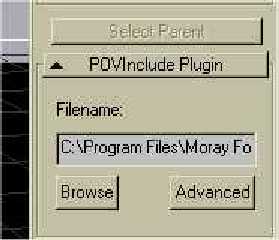
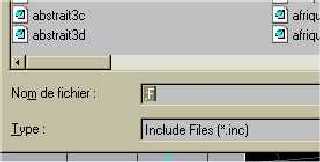
That's working but strangely. When i click on the button
(Browser) i got fig3  with  "    ;F     "  in TextEdit ????
Sometime "Browse" button does not work at all....
The render is correct
Friendly
Sylvain

Help Neil!


"Thomas de Groot" <t.d### [at] internlnet> a écrit dans le message de
news:41d0120e@news.povray.org...
>
> "leseur sylvain" <syl### [at] potar-hurlantcom> schreef in bericht
> news:41cff04a@news.povray.org...
> > If the Browse button does not work here,
> > it is because incompatibility between  your's
> > plug and  MikesBSpline210.dll
> > Here:
> > http://members.cox.net/weber.mike/BSplineDLL/
> >
> Currently, I do not have the Bspline plugin loaded, and still the browse
> button not responding, so that would mean interference with FullMoon, or
yet
> another plugin maybe?
>
> Thomas
>
>
Post a reply to this message
Attachments:
Download 'fig2.jpg' (6 KB)
Download 'fig3.jpg' (6 KB)
Preview of image 'fig2.jpg'
Preview of image 'fig3.jpg'
|
|
| |
| |
|
|
From: leseur sylvain
Subject: Re: [Announce]: POVInclude Version 1.1
Date: 27 Dec 2004 10:58:07
Message: <41d0310f@news.povray.org>
|
|
|
| |
| |
|
|
Oups!
Under Windows ME. Millennium
Post a reply to this message
|
|
| |
| |
|
|
|
|
| |
| |
|
|
Sylvain,
Thanks for the diagnosis.  This is most disturbing.   I will test with the
FullMoon plugin and see what happens at my end.  I will also try and contact
the author of FullMoon and see if we can collaborate on diagnosing the
problem.

From a technical perspective, when ever a new plugin for Moray is created, a
new unique identifier for the plugin has to be generated to ensure that it
is different from all the other plugins.  I did that for POVInclude using
the Moray supplied identifier generator.  Other than that, I can't (yet)
imagine the reason.  I WILL hunt it down and fix it.

Neil

"leseur sylvain" <syl### [at] potar-hurlantcom> wrote in message
news:41cfe126@news.povray.org...
> I think i found the troubles
> When i take off FullMoon plugin.
> PovInclude work There is an
>  incompatibility between this plug
> and your's
>
> Friendly
> Sylvain
>
>
>
Post a reply to this message
|
|
| |
| |
|
|
|
|
| |
| |
|
|
...
> Thanks for the diagnosis.  This is most disturbing.   I will test with the
> FullMoon plugin and see what happens at my end.
...
I have many plugins made with Fullmoon, but when I remove this plugin, the
browse button still does not work. If I remove all plugins (except yours)
still no go.

Win98se, Moray 9330
I'm wondering if anyone with an NT version of Windows is having any
problems?

Stephen
Post a reply to this message
|
|
| |
| |
|
|
|
|
| |
| |
|
|
Thomas,
GREAT comments .. am working through all the replies.

I have posted V1.1.1 of the plugin that should give us options for the
Browse button.  See the announce post for V1.1.1.

To address the other points.

1. I agree.  I have made that an entry in my to-do list.  I must admit that
I am a newbie to Moray and POV-Ray ... on a 1-10 scale of Ray tracing
skills, I am about a 3 (10 being good).  As such, I am relying on y'all to
tell me WHAT should be said and done.  Let me know and I will attempt to
include in the Plugin.

2. I like this and can include very quickly.  My question for you and the
rest of the gang ... is this all that is needed?  If I include a check box
(called what?  "Orient" perhaps?) then if I add:

union
{
   #include <filename>
   scale <1,1,-1>
   rotate <90,0,0>
}

When selected ... is this what you want?

3. I'd love to be able to determine the bounding box but don't know how yet
(if at all possible).

4. Grouping is still a bit of work in progress.  Moray Groups work but not
yet CSGs.  If you add a "POVInclude" to a Moray Group, all should be good.

When added to a group, the following code is generated:

#declare POVInclude1 = union {
  #include ""
}

union { // Group001
  object { POVInclude1 }
}

5. Thanks my friend!!

Neil

"Thomas de Groot" <t.d### [at] internlnet> wrote in message
news:41cfdd4e@news.povray.org...
> Hello Neil,
>
> First, please, note that I use the latest official build of Moray, and
> export to POV-Ray 3.5 (as version 3.6 is less compatible with Moray). All
> that under Windows ME.
>
> I have noted a number of things:
>
> Bugs:
> The Browse button does not work here. Everything else works fine J
>
> Comments (in no particular order):
> 1. I think it worthwhile to mention in the docs that the included
object(s)
> should be Moray-oriented. This may sound obvious, but I started
> unconsciously to build an object in POV-Ray, with POV-Ray orientation,
> before I realised that I had to transform it. J .or:
> 2. Could there be such an option built into the plugin? Selecting that
> button would automatically transform the object to Moray space (scale
> <1,1,-1> rotate <90,0,0>). This would be useful for already existing
objects
> normally used in POV-Ray.
> 3. In order to adjust correctly the corners of the wireframe box, one has
to
> determine the object's bounding limits. For complex objects, I have been
> wondering if this was possible to do automatically? Not in Moray I guess;
I
> rapidly browsed the POV docs, but could not find anything addressing this.
> But I may have missed it.
> 4. Question: How do you group multiple objects inside the union (page 7,
> last line, of the docs)?
> 5. The plugin is very useful indeed. It is now possible to place or adjust
> an external object with far better precision into a Moray scene, and see
the
> results in the camera window.
>
> That's it for now, I think.
>
> Thomas
>
>
>
Post a reply to this message
|
|
| |
| |
|
|
|
|
| |
| |
|
|
Guys,
Let me study this concept.  I have no knowledge on min/max extent.

Neil

"Thomas de Groot" <t.d### [at] internlnet> wrote in message
news:41d01410@news.povray.org...
>
> "Marc Jacquier" <jac### [at] wanadoofr> schreef in bericht
> news:41cff3bd@news.povray.org...
> >
> > See min_extent and max_extent
> >
> Right! Now I remember! Thanks Marc!
> This brings me to the following suggestion to Neil: If the min_ and
> max_extent were provided in the include file, would that be directly
> translatable to the wireframe in Moray? I am afraid I ask to much (because
I
> am lazy ;-))
>
> Thomas
>
>
Post a reply to this message
|
|
| |
| |
|
|
|
|
| |
| |
|
|
Stephen,
See the V1.1.1 announce.  Browse button work around now in place.  Thanks
again for testing/comments.

Neil

"StephenS" <sshonfield(at)ottawa(dot)net> wrote in message
news:41d03e65@news.povray.org...
> ...
> > Thanks for the diagnosis.  This is most disturbing.   I will test with
the
> > FullMoon plugin and see what happens at my end.
> ...
> I have many plugins made with Fullmoon, but when I remove this plugin, the
> browse button still does not work. If I remove all plugins (except yours)
> still no go.
>
> Win98se, Moray 9330
> I'm wondering if anyone with an NT version of Windows is having any
> problems?
>
> Stephen
>
>
Post a reply to this message
|
|
| |
| |
|
|
|
|
| |
| |
|
|
Sylvain,
Temporary workaround now in place for V1.1.1 now in place ... help is coming
my friends :-)

Neil

"leseur sylvain" <syl### [at] potar-hurlantcom> wrote in message
news:41d0310f@news.povray.org...
> Oups!
> Under Windows ME. Millennium
>
>
Post a reply to this message
|
|
| |
| |
|
|
|
|
| |
| |
|
|
Stephen,

I have a temporary fix for the browse button now in V1.1.1.

Wow!!!  Nice catch on the no prompt for save when the bounding box is
changed.  Yikes!!  This will be interesting, I need to research on how to
flag the object as "dirty" and hence inform Moray that it should be changed.
I am looking into it.

Hmmmmm

Neil

"StephenS" <sshonfield(at)ottawa(dot)net> wrote in message
news:41d02f00@news.povray.org...
> > Folks,
> > With a whole day devoted to cleanup, I have now released V1.1.  I expect
> > this to be the last release except for bug fixes or feature request
> > enhancements.  I have added true OpenGL shading to the view box and a
host
> > of other cleanup functions.  The plugin and documentation have been
> > refreshed.
> >
> > http://www.kolban.com/3d/POVInclude.htm
> >
> > Comments very welcome, especially since one of our number tried it and
> > couldn't get it working.  It is obviously important to know where it
works
> > and where it doesn't.
> >
> > Neil
> The Browse button doesn't work: Win98se, Moray 9330. Worked in version
1.0.
> When I make changes to the box size, Moray doesn't know I've made changes
> and can exit without asking to save.
>
> When developing a scene I like to not export some objects, would it be
> possible to add the export selection button similar to the Insertcode
> plugin? I second the idea of having the browse window being able to
display
> only the '.inc' extension.
>
> Very nice documentation provided with the plugin. The Opengl shaded box is
a
> nice touch.
>
> Stephen
>
>
Post a reply to this message
|
|
| |
| |
|
|
|
|
| |