|
 |
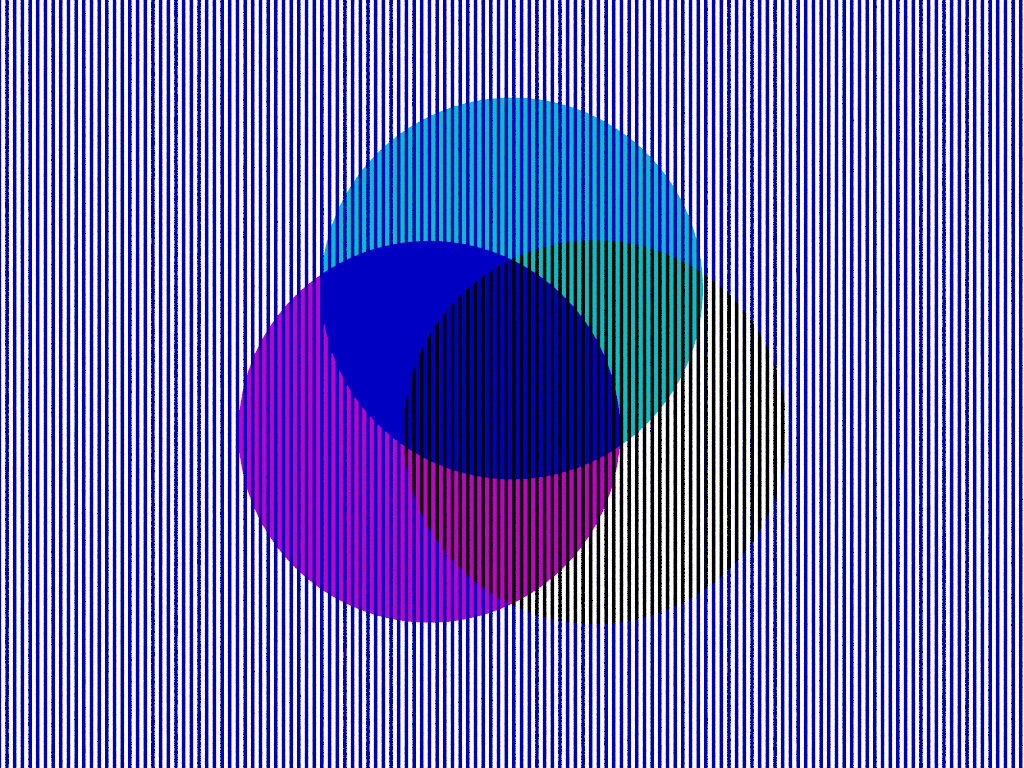
(I'm sure many of you have seen this before)
We have rgb, rgbf, rgbt, rgbft,
..... and then we have colors that just aren't there at all.
There is:
a cyan disc
a magenta disc
and a blue vesica piscis
on a plane of blue lines
Imaginary colors:
there is no "dark blue", "green", "red",
and there is absolutely no yellow.
Interestingly, the illusion is instantiated by the addition of BLACK.
Something to think about the next time you ponder why your render "looks weird".
- BE
Try it!
// Color Illusion
// Bill "Bald Eagle" Walker
// 2026-03-29
#version version;
global_settings {assumed_gamma 1.0}
light_source {<10, 20, -50> rgb 1 shadowless}
sky_sphere {pigment {rgb 1}}
camera {
location <0, 0, -2>
right x*image_width/image_height
up y
look_at <0, 0, 0>
}
#declare ShowIllusion = yes;
#declare BlueLines =
pigment {
gradient x
pigment_map {
[0.0 rgb z]
[0.5 rgb z]
[0.5 rgbt 1]
[1.0 rgbt 1]
}
}
#declare BlackLines =
pigment {
gradient x
pigment_map {
[0.0 rgb 0]
[0.5 rgb 0]
[0.5 rgbt 1]
[1.0 rgbt 1]
}
}
#declare LineScale = 0.02;
plane {z, 0 pigment {BlueLines scale LineScale}}
#declare Imaginary =
intersection {
plane {z, 0 pigment {BlackLines scale LineScale} translate -z*0.001}
sphere {x*0.25, 0.5 pigment {rgbt 1} rotate z*330 translate z*0.01}
}
#if (ShowIllusion) object {Imaginary} #end
difference {
disc {x*0.25, -z, 0.5 pigment {rgb y+z} rotate z*90 translate z*0.01}
sphere {x*0.25, 0.5 pigment {rgbt 1} rotate z*210 translate z*0.01}
}
difference {
disc {x*0.25, -z, 0.5 pigment {rgb x+z} rotate z*210 translate z*0.01}
sphere {x*0.25, 0.5 pigment {rgbt 1} rotate z*90 translate z*0.01}
}
intersection {
disc {x*0.25, -z, 0.5 pigment {rgb z} rotate z*90 translate z*0.01}
sphere {x*0.25, 0.5 pigment {rgbt 1} rotate z*210 translate z*0.01}
sphere {x*0.25, 0.5 pigment {rgbt 1} rotate z*90 translate z*0.01}
}
Post a reply to this message
|
|
|
|
"Bald Eagle" <cre### [at] netscape net> wrote:
>
> Imaginary colors:
> there is absolutely no yellow.
>
> Interestingly, the illusion is instantiated by the addition of BLACK.
>
That is uncanny! And it is truly an illusion, not some kind of computer/monitor
technical aberration.
At first, I thought the yellow 'color' might be an odd result of my computer
monitor (and everyone else's!), duo to the lines in the image interacting with
the position or orientation of a monitor's tiny red-green-blue LED's. Or that
your use of a perspective camera might be slightly throwing off the spatial
alignment of lines vs. discs, creating a false color somehow. But nope!
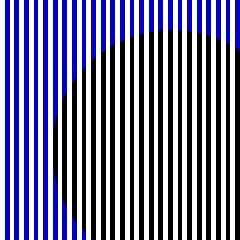
For the attached image, I used only your 'imaginary' disc, and changed your line
spacing to 0.06; then used an orthographic camera a bit closer in.
In the smaller thumbnail preview image that will appear here, the disc will
probably look mostly yellow. But seen at full size (600X600), the 'color'
illusion starts to fade out toward the lower right corner-- i.e., farther from
the blue lines!
Interestingly, changing the blue lines to red or green does not produce such a
false-color illusion-- at least to my eyes. But I wonder if others here see such
a change differently. net> wrote:
>
> Imaginary colors:
> there is absolutely no yellow.
>
> Interestingly, the illusion is instantiated by the addition of BLACK.
>
That is uncanny! And it is truly an illusion, not some kind of computer/monitor
technical aberration.
At first, I thought the yellow 'color' might be an odd result of my computer
monitor (and everyone else's!), duo to the lines in the image interacting with
the position or orientation of a monitor's tiny red-green-blue LED's. Or that
your use of a perspective camera might be slightly throwing off the spatial
alignment of lines vs. discs, creating a false color somehow. But nope!
For the attached image, I used only your 'imaginary' disc, and changed your line
spacing to 0.06; then used an orthographic camera a bit closer in.
In the smaller thumbnail preview image that will appear here, the disc will
probably look mostly yellow. But seen at full size (600X600), the 'color'
illusion starts to fade out toward the lower right corner-- i.e., farther from
the blue lines!
Interestingly, changing the blue lines to red or green does not produce such a
false-color illusion-- at least to my eyes. But I wonder if others here see such
a change differently.
Post a reply to this message
Attachments:
Download 'test_of_disc_color_kw_3_29_26.jpg' (45 KB)
Preview of image 'test_of_disc_color_kw_3_29_26.jpg'
|
|