"LanuHum" <Lan### [at] yandex ru> wrote:
> Hello! I created a picture with a gradient. I want to use it as a
> height map for a sphere. However, only gray stripes are visible on the sphere.
>
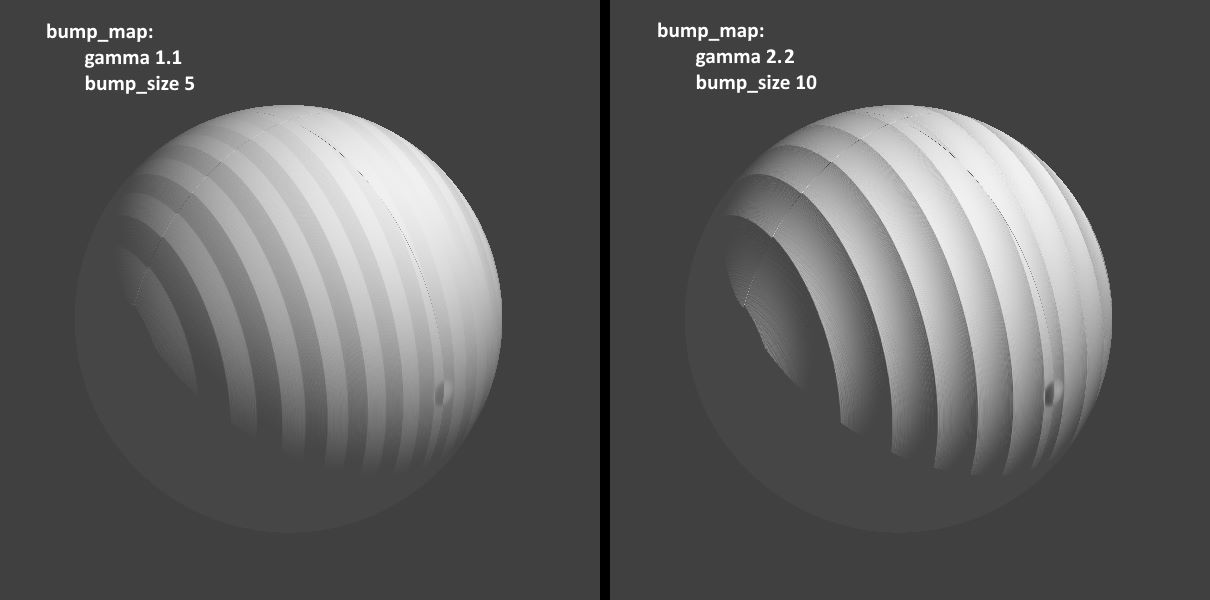
The 'flat' look of those gray stripes seems odd to me; there *should* be some
(fake) 'depth' to them due to your bump_map, based on the normal-pattern image
that you posted:
normal{ bump_map{"/home/lanuhum/src/Thread_90.jpg"
gamma 1.1000 map_type 0
interpolate 2 bump_size 5}
I ran your code--using the same 'normal' image that I copied here-- and it seems
that a gamma of 1.1 that you used is not a good value for a bump_map. I changed
that value to 2.2 (and boosted the bump_size to 10) and it looks much better.
If I leave out the gamma keyword altogether, the 'flat' result looks nearly
identical to your 1.1 value. The POV-ray default is 1.0 (i.e., it treats the
image as 'linear' data.)
Since we are both using jpeg's for the bump_map, they have a standard 'embedded
gamma' of around 2.2 (or maybe 'srgb'), which is not linear. So using a value of
1.1 (or 1.0) changes that; a somewhat simple explanation is that it reduces the
contrast of the image-as-bump_map.
From the documentation:
"While POV-Ray will normally interpret the bump map input file as a container of
linear data [gamma of 1.0] irregardless of file type, this can be overridden for
any individual bump map input file by specifying gamma immediately after the
file name." ru> wrote:
> Hello! I created a picture with a gradient. I want to use it as a
> height map for a sphere. However, only gray stripes are visible on the sphere.
>
The 'flat' look of those gray stripes seems odd to me; there *should* be some
(fake) 'depth' to them due to your bump_map, based on the normal-pattern image
that you posted:
normal{ bump_map{"/home/lanuhum/src/Thread_90.jpg"
gamma 1.1000 map_type 0
interpolate 2 bump_size 5}
I ran your code--using the same 'normal' image that I copied here-- and it seems
that a gamma of 1.1 that you used is not a good value for a bump_map. I changed
that value to 2.2 (and boosted the bump_size to 10) and it looks much better.
If I leave out the gamma keyword altogether, the 'flat' result looks nearly
identical to your 1.1 value. The POV-ray default is 1.0 (i.e., it treats the
image as 'linear' data.)
Since we are both using jpeg's for the bump_map, they have a standard 'embedded
gamma' of around 2.2 (or maybe 'srgb'), which is not linear. So using a value of
1.1 (or 1.0) changes that; a somewhat simple explanation is that it reduces the
contrast of the image-as-bump_map.
From the documentation:
"While POV-Ray will normally interpret the bump map input file as a container of
linear data [gamma of 1.0] irregardless of file type, this can be overridden for
any individual bump map input file by specifying gamma immediately after the
file name."
Post a reply to this message
Attachments:
Download 'bump_map_gamma_comparison_kw.jpg' (41 KB)
Preview of image 'bump_map_gamma_comparison_kw.jpg'
|