|
 |
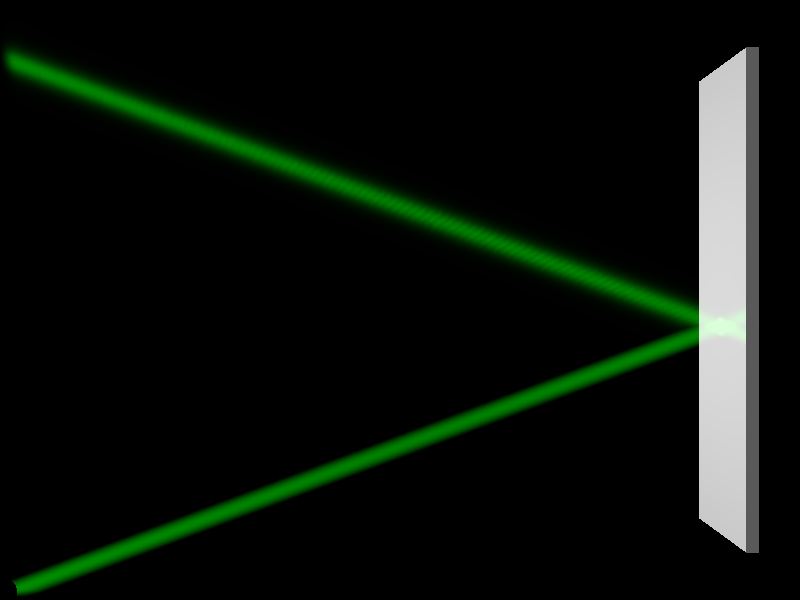
How does one create perfect mirror to reflect beam of light in scattering media?
In attached scene, the reflected beam is clearly different from the incident
one. It is (a) wider, (b) weaker [maybe due to (a)] and (c) contains some
fringes. So if I want reflected beam to look identical to incident one (just
like if the second source is placed at the position of the mirror), what should
I do?
Also, it is possible that the mirror reflect only the light directly from the
source and not the scattered one (so we do not see the scattered beam on the
mirror)?
#declare BOX_X = 10*(4/3);
#declare BOX_Y = 10;
#declare BOX_Z = 0.5;
#declare MIR_S = 1;
#declare MIR_W = 0.2;
global_settings {
assumed_gamma 1
photons { count 100000 media 100, 2 }
}
camera {
location <BOX_X/2, BOX_Y/2, -10>
look_at <BOX_X/2, BOX_Y/2, +10>
}
light_source { // ambient light
<BOX_X/2, BOX_Y/2, BOX_Z/2>
color rgb 1
photons { reflection off }
media_interaction off
}
box { // scattering media
<0, 0, 0>, <BOX_X, BOX_Y, BOX_Z>
pigment { rgbt 1 }
hollow
interior {
media {
scattering { 1, 1 extinction 0 }
samples 100
}
}
photons { pass_through }
}
light_source { // laser beam
<0, 0, BOX_Z/2>
color rgb <0, 1, 0>
cylinder
radius 0.01
falloff 0.2
point_at <BOX_X, BOX_Y/2, BOX_Z/2>
photons { reflection on }
}
box { // mirror
<BOX_X-MIR_W-MIR_S, MIR_S, MIR_S>, <BOX_X-MIR_S, BOX_Y-MIR_S, BOX_Z-MIR_S>
pigment { rgb 1 }
finish { reflection 1 }
photons { target reflection on }
}
Post a reply to this message
Attachments:
Download 'reflection_on_mirror__v01.png' (37 KB)
Preview of image 'reflection_on_mirror__v01.png'
|
|