|
 |
"Bald Eagle" <cre### [at] netscape net> wrote:
> "Kenneth" <kdw### [at] gmailcom> wrote:
> >
> > I ran your code--using the same 'normal' image that I copied here-- and it
> > seems that a gamma of 1.1 that you used is not a good value for a bump_map.
> > I changed that value to 2.2 (and boosted the bump_size to 10) and it
> > looks much better.
>
>
> If you share your thoughts about how the image gets converted to gamma 2.2 or
> srgb-modified rgb values...
[Sorry for the long delay in responding here; I had to deal with repairs on my
car, one after the other.]
I have been trying to reproduce Lanahum's flat-looking result with my *own*
image(s) for the bump_map, made in POV-ray at typical assumed_gamma 1.0-- and
see 'normals' results that sometimes do not agree with my previous comments
about the bump_map's gamma setting requiring a 2.2 value. (I'm running the
tests in v3.7, same as he did.) The surface normals in at least one of my tests
look OK even with the bump_map's gamma at 1.0 (or just leaving out 'gamma'
altogether). That seems strange, based on my earlier remarks. But I finally
'chased the rabbit down its hole' and discovered the reason for the disparity.
Simply put: The final appearance of the 'normal' effect is very sensitive to the
gamma used to encode its image_map (and sensitive to the chosen pattern itself,
apparently.)
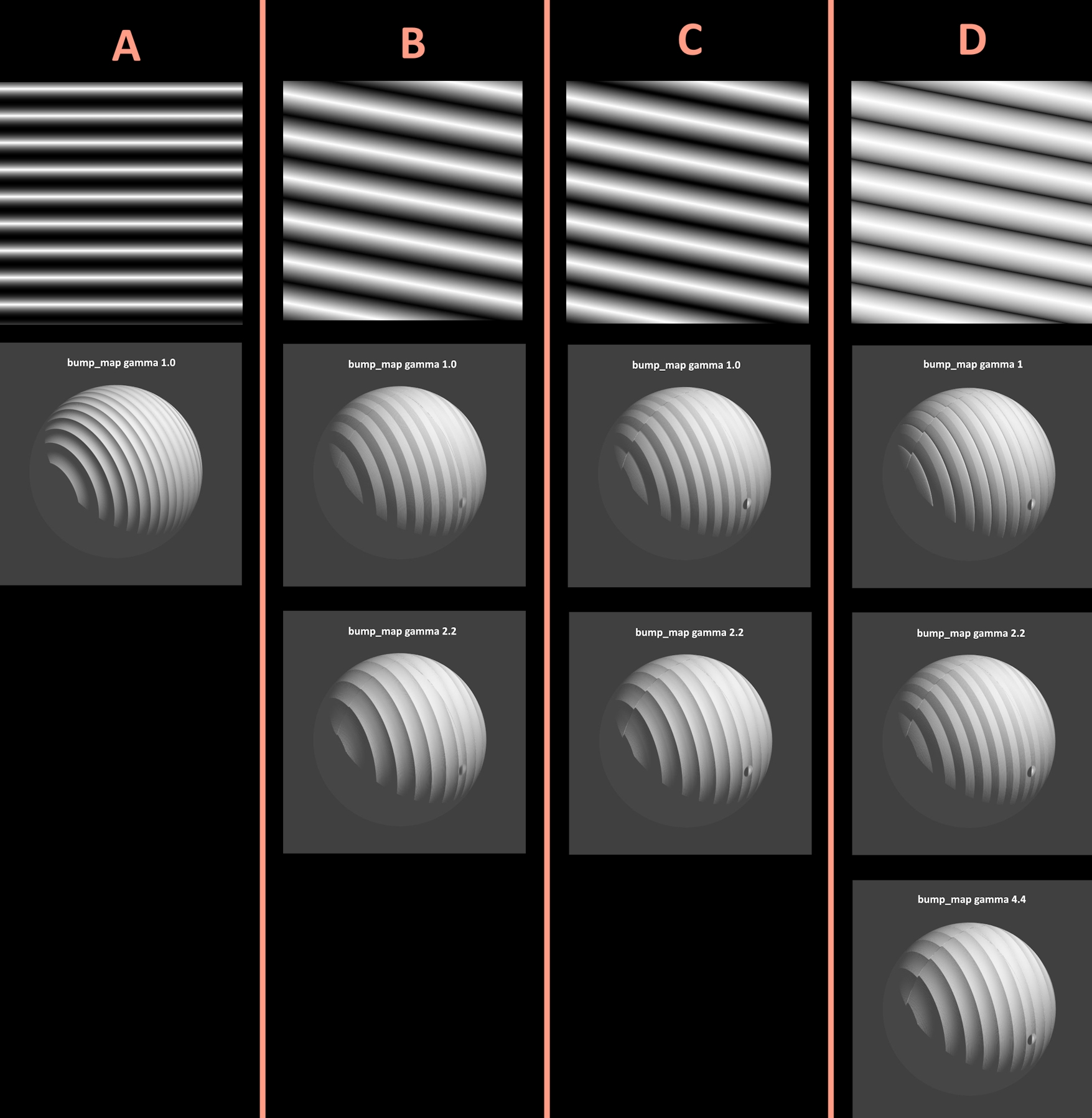
NOTE: In the attached image, all of the bump_maps use bump_size 10 for the
normal.
[A] While the default 'gamma' setting in a bump_map does indeed seem to be 1.0,
my new tests indicate that POV-ray automatically compensates for an image having
an intrinsic or 'encoded' gamma of 2.2-- like typical jpeg's or png's-- and
*without* having to specify a gamma-value change in the bump_map. (I used an
inverted sine_wave pattern for this one; I took the original sine_wave .jpeg
render into my paint.net app and inverted it there.) It's 'normals' look as
expected!
[B] This is just Lanahum's posted pattern again and his original bump_map
result, then with my gamma 2.2 'correction' as before. (To use his pattern, I
simply snipped it out of his .jpeg image post-- using paint.net--and re-saved it
as a .jpeg again.) The final 'normals' result looks like a 'scallop wave'-- but
that's misleading...
[C] To create a pattern that looks like his, I had to use a triangle_wave
pattern instead-- with the image_map **rendered at assumed_gamma 2.2** in
POV-ray, rather than at my usual 1.0. It looks nearly identical to Lanahum's
pattern. Using that image in the bump_map-- with a gamma 1.0 setting there--
produces the flat gray-stripes look again, same as Lanahum's. A setting of 2.2
gives the surface normals some 'depth'...although the result looks like a
'scallop wave' instead of a triangle. That's to be expected: The gamma is
changing the 'slope' of the black-to-white gradations.
[There is another way to produce the same effect, which I didn't post here:
making a triangle-wave image_map *as* a gamma 1.0 image. I made one in POV-ray
using assumed_gamma 1.0 and changing both Display_Gamma and File_Gamma to 1.0,
rather than their usual 2.2 (or 'srgb'). Then it likewise required a gamma 2.2
value in the bump_map. BTW, this image_map had to be in the .png format--
apparently a .jpeg cannot(?) be rendered at gamma 1.]
I think that Lanahum's original image_map was made using one those two schemes--
which is why it required a 2.2 gamma change.
[D] I used POV-ray's triangle_wave pattern again for the image_map, but rendered
at typical assumed_gamma 1.0. With the bump_map's gamma set to 1.0, there
appears to be *some* 'depth' to the normal-- but changing the gamma to 2.2 makes
flat stripes instead(!), which is a mystery. To get any further depth from it
requires a bump_map gamma of between 4 and 5 (4.4??)-- but then it looks like a
'scallop wave' again.
--------------------
[off topic]
Lanahum's code uses a 'brilliance' setting in his finish{...}. That seems to
work (or look) better in v3.7 than in v3.8 beta 1, to my eyes. There must have
been a 'change' of some kind for the current betas. net> wrote:
> "Kenneth" <kdw### [at] gmailcom> wrote:
> >
> > I ran your code--using the same 'normal' image that I copied here-- and it
> > seems that a gamma of 1.1 that you used is not a good value for a bump_map.
> > I changed that value to 2.2 (and boosted the bump_size to 10) and it
> > looks much better.
>
>
> If you share your thoughts about how the image gets converted to gamma 2.2 or
> srgb-modified rgb values...
[Sorry for the long delay in responding here; I had to deal with repairs on my
car, one after the other.]
I have been trying to reproduce Lanahum's flat-looking result with my *own*
image(s) for the bump_map, made in POV-ray at typical assumed_gamma 1.0-- and
see 'normals' results that sometimes do not agree with my previous comments
about the bump_map's gamma setting requiring a 2.2 value. (I'm running the
tests in v3.7, same as he did.) The surface normals in at least one of my tests
look OK even with the bump_map's gamma at 1.0 (or just leaving out 'gamma'
altogether). That seems strange, based on my earlier remarks. But I finally
'chased the rabbit down its hole' and discovered the reason for the disparity.
Simply put: The final appearance of the 'normal' effect is very sensitive to the
gamma used to encode its image_map (and sensitive to the chosen pattern itself,
apparently.)
NOTE: In the attached image, all of the bump_maps use bump_size 10 for the
normal.
[A] While the default 'gamma' setting in a bump_map does indeed seem to be 1.0,
my new tests indicate that POV-ray automatically compensates for an image having
an intrinsic or 'encoded' gamma of 2.2-- like typical jpeg's or png's-- and
*without* having to specify a gamma-value change in the bump_map. (I used an
inverted sine_wave pattern for this one; I took the original sine_wave .jpeg
render into my paint.net app and inverted it there.) It's 'normals' look as
expected!
[B] This is just Lanahum's posted pattern again and his original bump_map
result, then with my gamma 2.2 'correction' as before. (To use his pattern, I
simply snipped it out of his .jpeg image post-- using paint.net--and re-saved it
as a .jpeg again.) The final 'normals' result looks like a 'scallop wave'-- but
that's misleading...
[C] To create a pattern that looks like his, I had to use a triangle_wave
pattern instead-- with the image_map **rendered at assumed_gamma 2.2** in
POV-ray, rather than at my usual 1.0. It looks nearly identical to Lanahum's
pattern. Using that image in the bump_map-- with a gamma 1.0 setting there--
produces the flat gray-stripes look again, same as Lanahum's. A setting of 2.2
gives the surface normals some 'depth'...although the result looks like a
'scallop wave' instead of a triangle. That's to be expected: The gamma is
changing the 'slope' of the black-to-white gradations.
[There is another way to produce the same effect, which I didn't post here:
making a triangle-wave image_map *as* a gamma 1.0 image. I made one in POV-ray
using assumed_gamma 1.0 and changing both Display_Gamma and File_Gamma to 1.0,
rather than their usual 2.2 (or 'srgb'). Then it likewise required a gamma 2.2
value in the bump_map. BTW, this image_map had to be in the .png format--
apparently a .jpeg cannot(?) be rendered at gamma 1.]
I think that Lanahum's original image_map was made using one those two schemes--
which is why it required a 2.2 gamma change.
[D] I used POV-ray's triangle_wave pattern again for the image_map, but rendered
at typical assumed_gamma 1.0. With the bump_map's gamma set to 1.0, there
appears to be *some* 'depth' to the normal-- but changing the gamma to 2.2 makes
flat stripes instead(!), which is a mystery. To get any further depth from it
requires a bump_map gamma of between 4 and 5 (4.4??)-- but then it looks like a
'scallop wave' again.
--------------------
[off topic]
Lanahum's code uses a 'brilliance' setting in his finish{...}. That seems to
work (or look) better in v3.7 than in v3.8 beta 1, to my eyes. There must have
been a 'change' of some kind for the current betas.
Post a reply to this message
Attachments:
Download 'bump_map_tests_3_23_2026_kw.jpg' (561 KB)
Preview of image 'bump_map_tests_3_23_2026_kw.jpg'
|
|