|
|
|
|
|
|
| |
| |
|
|
|
|
| |
| |
|
|
"Kenneth" <kdw### [at] gmail com> wrote:
> "Bald Eagle" <cre### [at] netscapenet> wrote:
> >
> > In some of your renders you get a mis-match / seam in your normal/texture.
> > Also, there is that small half-black/half-white circular "blemish" at the
> > forefront of some of the spheres.
> >
>
> The mis-match seam comes from my attempt to give my own image_map the same
> 'tilt' of the pattern as Lanahum's...although I didn't get it quite right. Then
> the pattern repeats on the sphere, causing the visible 'seam'.
Ok, well - it doesn't seem to be there in column B,
and
looking back at the OP, he's got another weird seam that's perpendicular to that
and seems to line up with where the black/white circle divides.
I would not ignore either of these things, as this is usually where we
discover/learn something important.
Just curious if you can use spherical bump-mapping or spherical warp
> That small circle on my sphere renders is also visible in Lanahum's original
> post, although not as pronounced. I don't quite know what the cause is, as I
> have not really examined his code in detail, and just used it as-is. (Although,
> I did comment-out his various matrices to simplify the code, since they were
> having no effect as far as I could tell.) The circle might be because the
> bump_map's image_map does not exactly fit the sphere(?) or is not exactly
> aligned to it. (We are both using map_type 0 for applying the bump_map, which is
> just planar mapping, not 'spherical')
That doesn't really make any sense to me.
I'd experiment with other bump maps - maybe a grid, and see what happens, and
where on the bump map that artefact appears.
- BE com> wrote:
> "Bald Eagle" <cre### [at] netscapenet> wrote:
> >
> > In some of your renders you get a mis-match / seam in your normal/texture.
> > Also, there is that small half-black/half-white circular "blemish" at the
> > forefront of some of the spheres.
> >
>
> The mis-match seam comes from my attempt to give my own image_map the same
> 'tilt' of the pattern as Lanahum's...although I didn't get it quite right. Then
> the pattern repeats on the sphere, causing the visible 'seam'.
Ok, well - it doesn't seem to be there in column B,
and
looking back at the OP, he's got another weird seam that's perpendicular to that
and seems to line up with where the black/white circle divides.
I would not ignore either of these things, as this is usually where we
discover/learn something important.
Just curious if you can use spherical bump-mapping or spherical warp
> That small circle on my sphere renders is also visible in Lanahum's original
> post, although not as pronounced. I don't quite know what the cause is, as I
> have not really examined his code in detail, and just used it as-is. (Although,
> I did comment-out his various matrices to simplify the code, since they were
> having no effect as far as I could tell.) The circle might be because the
> bump_map's image_map does not exactly fit the sphere(?) or is not exactly
> aligned to it. (We are both using map_type 0 for applying the bump_map, which is
> just planar mapping, not 'spherical')
That doesn't really make any sense to me.
I'd experiment with other bump maps - maybe a grid, and see what happens, and
where on the bump map that artefact appears.
- BE
Post a reply to this message
|
|
| |
| |
|
|
|
|
| |
| |
|
|
"Bald Eagle" <cre### [at] netscapenet> wrote:
> "Kenneth" <kdw### [at] gmailcom> wrote:
> >
> > The mis-match seam comes from my attempt to give my own image_map the same
> > 'tilt' of the pattern as Lanahum's...although I didn't get it quite right.
> > Then the pattern repeats on the sphere, causing the visible 'seam'.
>
> Ok, well - it doesn't seem to be there in column B.
Column B is just a copy of Lanahum's initial post, along with my gamma 2.2
'correction' for the bump_map. His own posted pattern is 'tilted' just enough to
show no seam when it repeats.
>
> Just curious if you can use spherical bump-mapping or spherical warp
I never got around to that. "So little time, so much other neat stuff to work
on." ;-)
>
> > That small circle on [the] sphere renders...
>
> That doesn't really make any sense to me.
> I'd experiment with other bump maps - maybe a grid, and see what happens, and
> where on the bump map that artefact appears.
>
You're right, it *is* kind of odd. I took a look at Lanahum's code again, and
there is nothing there to cause that little circle.
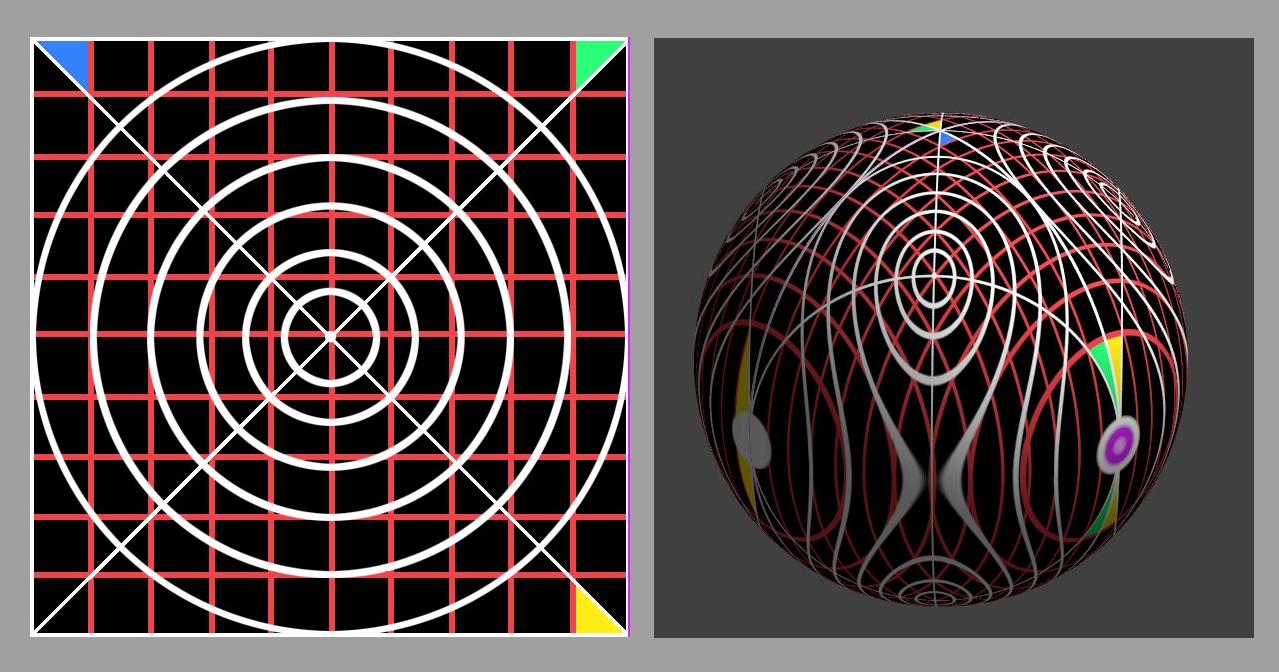
Herewith, a grid example. Same Lanahum code, but I substituted an image_map
PIGMENT using the same map_type 0; no bump_map. My grid image_map has a
2-pixel-wide vertical purple stripe on the right edge from top to bottom, as a
tester. A purple circle shows up on the sphere where the bump_map's 'circle'
was-- along with a white dot in the center, which is probably a 1-pixel 'repeat'
from the left side of the image_map(?). So the anomaly does not seem to be
bump_map specific.
Perhaps it's a result (or a glitch?) of using map_type 0 when applying an
image_map of any kind to a *sphere*.
Post a reply to this message
Attachments:
Download 'grid_test_kw.jpg' (491 KB)
Preview of image 'grid_test_kw.jpg'
|
|
| |
| |
|
|
|
|
| |
| |
|
|
"Kenneth" <kdw### [at] gmailcom> wrote:
>
> I did comment-out his various matrices to simplify the code, since they were
> having no effect as far as I could tell.
My mistake: His sphere does use a matrix-- but is has no effect on that small
'circle' except to move it (and the pattern itself) around the sphere. I tested
it. (His code had another matrix that I did comment out, which was just a
default one producing no change.)
Post a reply to this message
|
|
| |
| |
|
|
|
|
| |
| |
|
|
"Kenneth" <kdw### [at] gmailcom> wrote:
> You're right, it *is* kind of odd. I took a look at Lanahum's code again, and
> there is nothing there to cause that little circle.
I think I see why - the image_map is getting wrapped around that point as a
pole.
That's why you get that purple/white circle - it's the right edge of your image
map.
> A purple circle shows up on the sphere where the bump_map's 'circle'
> was-- along with a white dot in the center, which is probably a 1-pixel 'repeat'
> from the left side of the image_map(?). So the anomaly does not seem to be
> bump_map specific.
>
> Perhaps it's a result (or a glitch?) of using map_type 0 when applying an
> image_map of any kind to a *sphere*.
Could be.
No way to know without comparing it to spherical map_type.
In the meantime, put a (different) colored stripe along the left side of that
image_map and see if the color of the central dot changes.
If it's a persistent "repeat", then that's a problem.
I should already have a fix for that, if such is the case, but that will require
another dive into the depths of the source code.
y'all know how I love that.
- BE
Post a reply to this message
|
|
| |
| |
|
|
|
|
| |
| |
|
|
This also reminded me that hand-rolled a uv_mapping mechanism in SDL.
https://news.povray.org/povray.binaries.images/thread/%3Cweb.5d5757a84c72a7284eec112d0%40news.povray.org%3E/
So you could try that and see what happens.
- BE
Post a reply to this message
|
|
| |
| |
|
|
|
|
| |
| |
|
|
I found the cause(s) of that small circle in the bump_map appearance. It is a
combination of two different things:
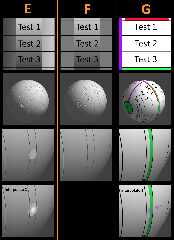
1) a gray value *difference* between the left and right edges of the applied
image (see column E). The circle seems to be a natural consequence of this
difference. My guess is that the 'normals' mechanism under-the-hood needs(?) to
use the gray values from BOTH left and right to figure out what the normal
should be at that circle 'point'. Or possibly it's a precision issue.
2) using 'interpolate 2' in the bump_map, which makes the circle even worse. In
this case, the resulting normal definitely appears to be using the
left-and-right edges of the image for the interpolation.
Column F shows the normals result when the applied image has the SAME gray
values on the left and right-- NO circle is produced, whether or not interpolate
2 is also used. But such an applied image is not a realistic test; it will
usually have natural grayscale differences on the left and right, like LanuHum's
original pattern of a tilted wave.
Column G shows that NO 'circle' is produced when a typical pigment{image_map...}
is applied instead of a bump_map-- unless 'interpolate 2' is used, which then
'blends' the left and right edge colors of the image_map.
Post a reply to this message
Attachments:
Download 'bump_map_circle_vs_pigment_image_map_kw_3_28_26.jpg' (510 KB)
Preview of image 'bump_map_circle_vs_pigment_image_map_kw_3_28_26.jpg'
|
|
| |
| |
|
|
|
|
| |